
Instructions:
- Uncompress the lab (pass: cyberdefenders.org)
Scenario:
An employee reported that his machine started to act strangely after receiving a suspicious email for a security update. The incident response team captured a couple of memory dumps from the suspected machines for further inspection. Analyze the dumps and help the SOC analysts team figure out what happened!
Tools:
1
2
3
- [Volatility2](https://github.com/volatilityfoundation/volatility)
- [Volatility3](https://github.com/volatilityfoundation/volatility3)
- [Rstudio](https://www.r-studio.com/)
There are two files presented to you:
1
2
- .vmss : use this with volatility
- .vmsd
Techniques Listed:
1
2
3
4
5
6
7
8
9
1) Initial Access
2) Execution
3) Privilege Escalation
4) Defense Evasion
5) Credential Access
6) Discovery
7) Lateral Movement
8) Collection
9) Exfiltration
Questions
Q1- Machine:Target1 What email address tricked the front desk employee into installing a security update?
Getting the general information of the infected image:
Command 1:
1
vol.py -f Target1-1dd8701f.vmss imageinfo
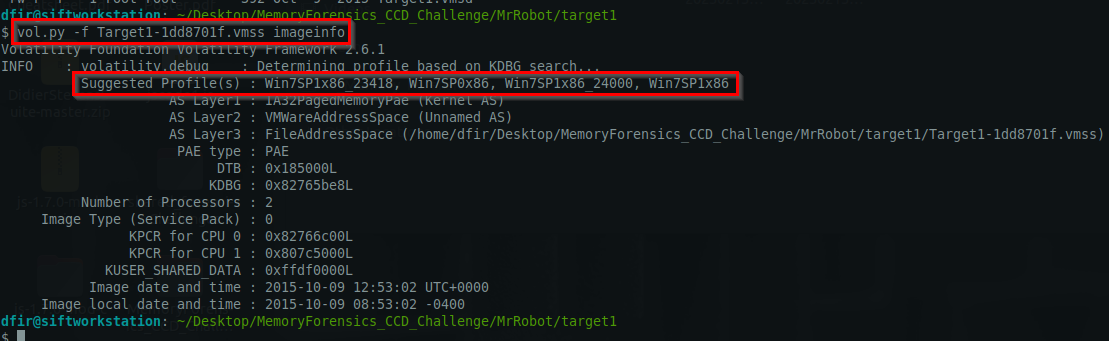
Command 2:
1
vol.py -f Target1-1dd8701f.vmss --profile=Win7SP1x86_23418 kdbgscan
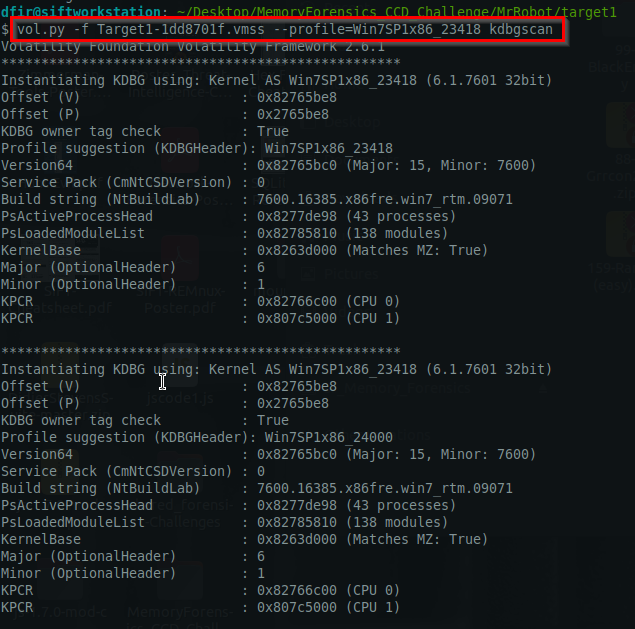
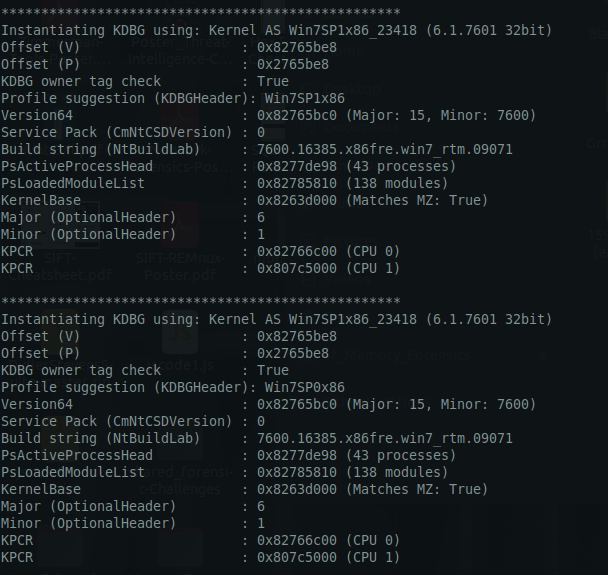
Important stuff:
1
2
3
4
5
- Profile suggestion: Win7SP1x86_23418
- Version64 : 0x82765bc0 (Major: 15, Minor: 7600)
- Build string (NtBuildLab) : 7600.16385.x86fre.win7_rtm.09071
- PsActiveProcessHead : 0x8277de98 (43 processes)
- PsLoadedModuleList : 0x82785810 (138 modules)
Process List:
1
vol.py -f Target1-1dd8701f.vmss --profile=Win7SP1x86_23418 pslist
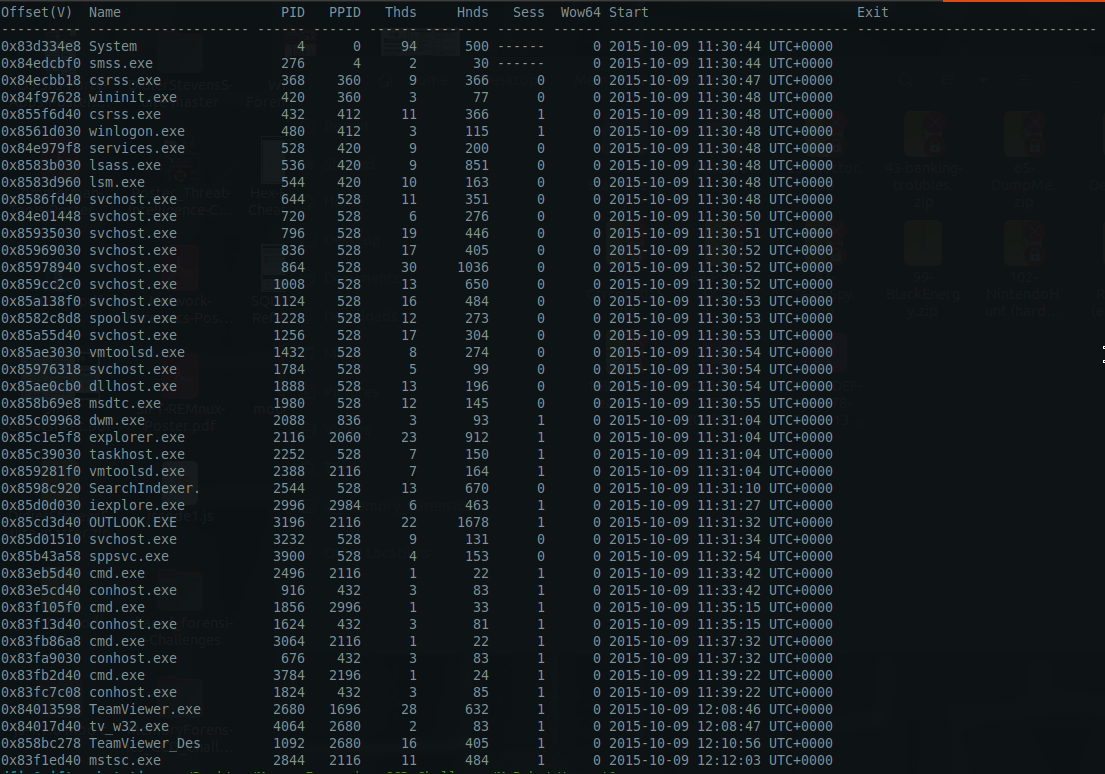
Since this is a phishing incident, we check the OUTLOOK.exe process:
1
vol.py -f Target1-1dd8701f.vmss --profile=Win7SP1x86_23418 handles -p 3196 -t file
Check all DLLs linked on the process:
1
vol.py -f Target1-1dd8701f.vmss --profile=Win7SP1x86_23418 -p 880 ldrmodules
Other commands useful for digging into a process:
1
2
3
4
5
6
7
- 'malfind': Detect injected code/malware in memory regions
- 'memdump': Dump the entire memory space of a process for offline analysis
- 'moddump': Dump kernel modules (drivers) from memory
- 'vaddump': Dump the virtual address space of a process
- 'volshell': Interactive shell for deep memory analysis
- 'vadinfo': Detailed information about process memory regions
- 'dlllist': List loaded DLLs and their memory addresses
Checking the contents of OUTLOOK.exe process:
1
sudo vol.py -f Target1-1dd8701f.vmss --profile=Win7SP1x86_23418 memdump -p 3196 --dump-dir=./memdump/
1
sudo vol.py -f Target1-1dd8701f.vmss --profile=Win7SP1x86_23418 memdump -p 3196 --dump-dir=./memdump/
1
- Dumping the memory
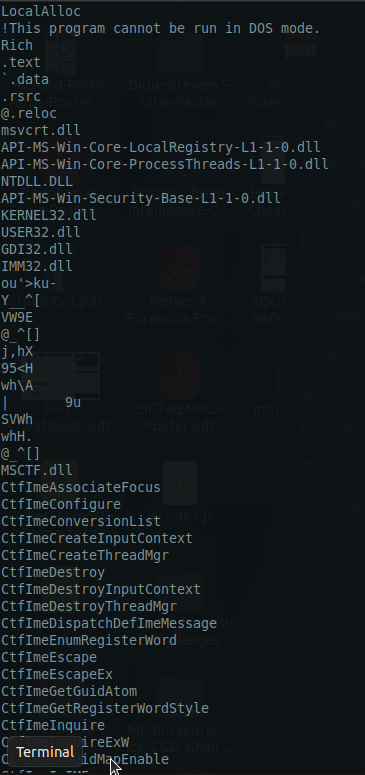
Sifting through the text contents using strings utility:
1
sudo strings 3196.dmp > email-content.txt

Important strings found:
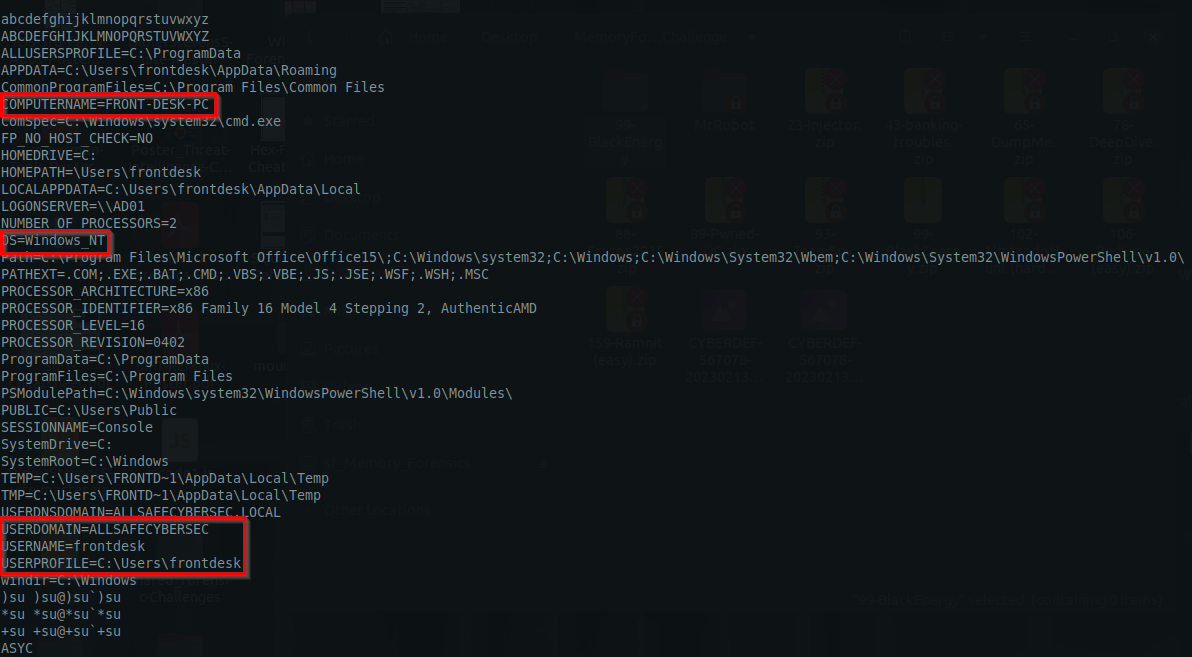
Email format found:

1
4b05e584-8dc6-4554-84cf-53ec8e59b175@allsafecybersec.com
1
- With this, we can easily sift through which email address to hunt for
Start of Email Content:
Another email found:

Found the phishing email!:

1
2
3
4
5
6
7
8
9
10
11
12
13
14
15
16
17
18
19
20
21
22
23
24
25
26
<meta http-equiv="Content-Type" content="text/html; charset=utf-8">
<div dir="ltr">Hello Mr. Wellick,<div>
<br>
</div>

<div>In order to provide the best service, in the most secure manner, AllSafe has recently updated our remote VPN software. Please download the update from the link below.
</div>

<div>
<br>
</div>

<div><a href="http://180.76.254.120/AnyConnectInstaller.exe">http://180.76.254.120/AnyConnectInstaller.exe</a></div><div><br></div><div>If you have any questions please don't hesitate to contact IT support.</div><div><br></div><div>Thanks and have a great day!</div><div>AllSafe IT Support Desk
</div></div>
SMTP:TH3WH1T3R0S3@GMAIL.COM

/O=ALLSAFECYBERSEC/OU=EXCHANGE ADMINISTRATIVE GROUP (FYDIBOHF23SPDLT)/CN=RECIPIENTS/CN=81A8142E6B5A40A4881F3161C21D3C33-FRONT DE
/O=ALLSAFECYBERSEC/OU=EXCHANGE ADMINISTRATIVE GROUP (FYDIBOHF23SPDLT)/CN=RECIPIENTS/CN=81A8142E6B5A40A4881F3161C21D3C33-FRONT DE
EX:/O=ALLSAFECYBERSEC/OU=EXCHANGE ADMINISTRATIVE GROUP (FYDIBOHF23SPDLT)/CN=RECIPIENTS/CN=81A8142E6B5A40A4881F3161C21D3C33-FRONT DE
EX:/O=ALLSAFECYBERSEC/OU=EXCHANGE ADMINISTRATIVE GROUP (FYDIBOHF23SPDLT)/CN=RECIPIENTS/CN=81A8142E6B5A40A4881F3161C21D3C33-FRONT DE
SMTP:TH3WH1T3R0S3@GMAIL.COM
/o=allsafecybersec/ou=Exchange Administrative Group (FYDIBOHF23SPDLT)/cn=Recipients/cn=81a8142e6b5a40a4881f3161c21d3c33-front de
/o=allsafecybersec/ou=Exchange Administrative Group (FYDIBOHF23SPDLT)/cn=Recipients/cn=81a8142e6b5a40a4881f3161c21d3c33-front de
EX:/O=ALLSAFECYBERSEC/OU=EXCHANGE ADMINISTRATIVE GROUP (FYDIBOHF23SPDLT)/CN=RECIPIENTS/CN=81A8142E6B5A40A4881F3161C21D3C33-FRONT DE
/o=allsafecybersec/ou=Exchange Administrative Group (FYDIBOHF23SPDLT)/cn=Recipients/cn=81a8142e6b5a40a4881f3161c21d3c33-front de
/O=ALLSAFECYBERSEC/OU=EXCHANGE ADMINISTRATIVE GROUP (FYDIBOHF23SPDLT)/CN=RECIPIENTS/CN=81A8142E6B5A40A4881F3161C21D3C33-FRONT DE
Answer:
1
TH3WH1T3R0S3@GMAIL.COM
Q2- Machine:Target1 What is the filename that was delivered in the email?
-> Look above
Answer:
1
2
3
http://180.76.254.120/AnyConnectInstaller.exe

==> AnyConnectInstaller.exe
Email trail from the attacker sent to frontdesk@allsafecybersec:
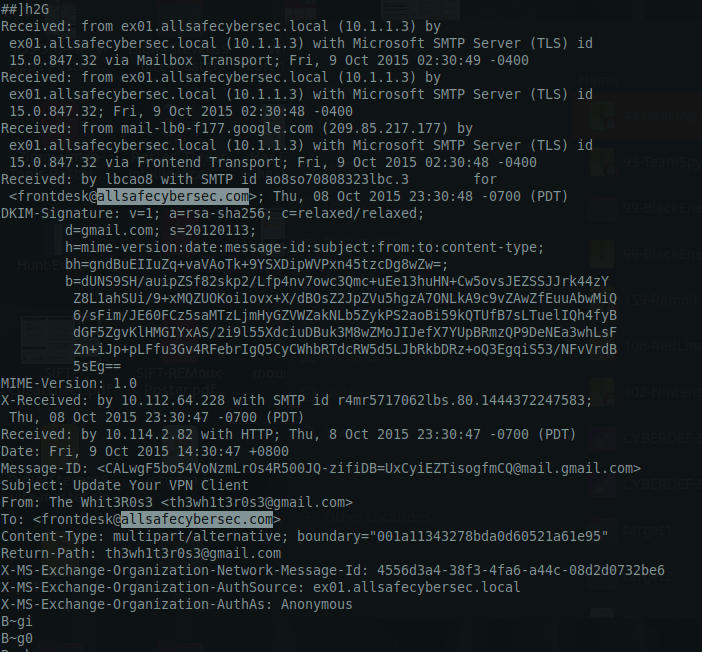
Q3- Machine:Target1 What is the name of the rat’s family used by the attacker?
Process Tree view:
1
vol.py -f Target1-1dd8701f.vmss --profile=Win7SP1x86_23418 pstree
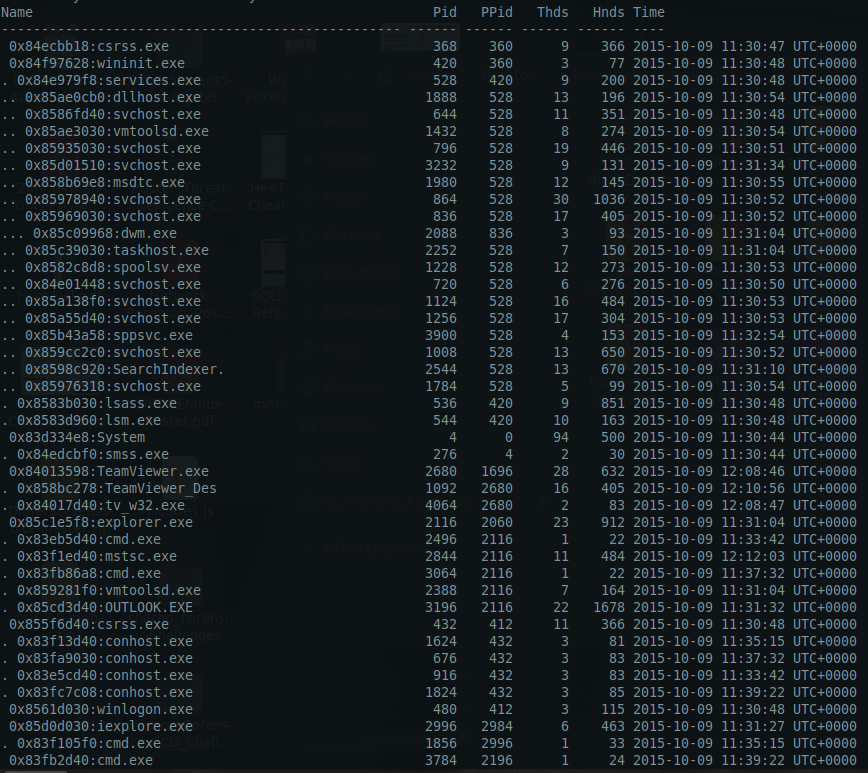
- For this one,
OUTLOOK.exespawned the malicious process but its not available in here. Let’s try to look for hidden process(es):
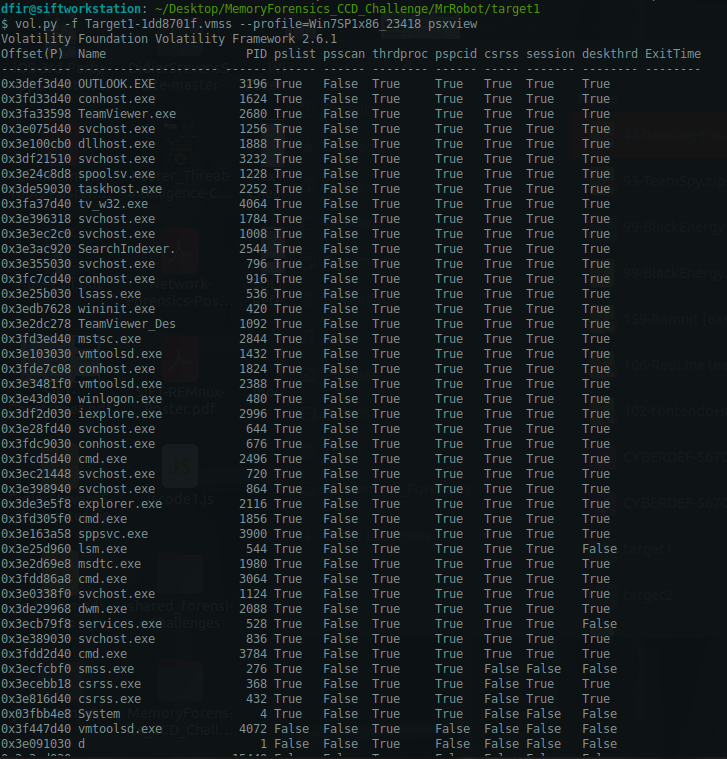

1
- There are TWO unnamed process.
Checking malware in outlook.exe process with malfind module:
1
vol.py -f Target1-1dd8701f.vmss --profile=Win7SP1x86_23418 malfind -p 3196
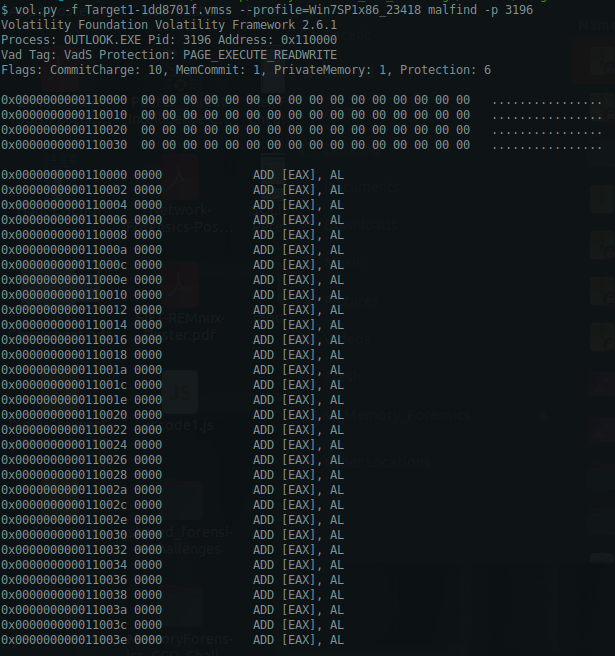
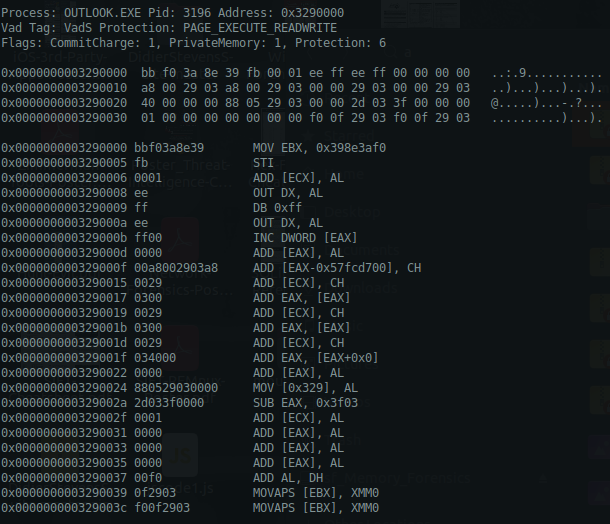
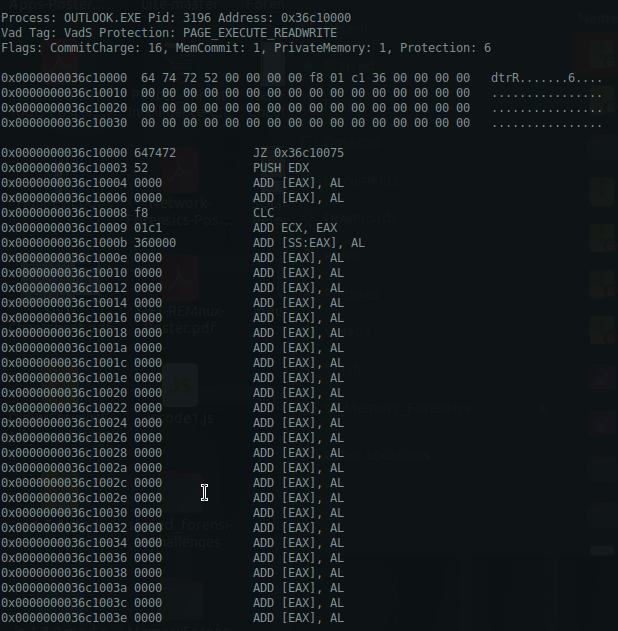
Dumping the possible .exe file from this: (base address = 0x0000000003290000)
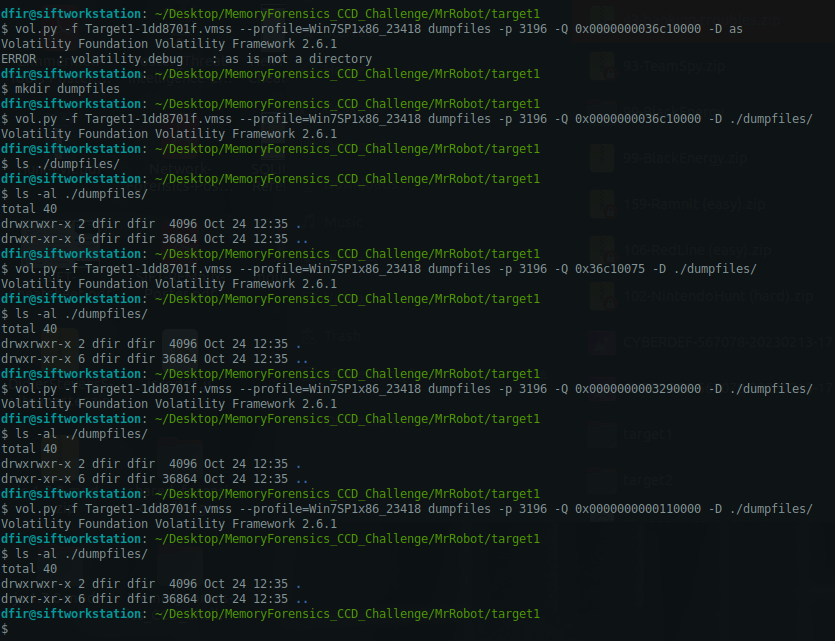
1
- Dumping all the files from the base addresses found above
Check the iexplorer.exe since the user has made connection to http://180.76.254.120/AnyConnectInstaller.exe.
1
2
3
4
- csrss.exe
	- conhost.exe(4x)
- iexplorer.exe
- cmd.exe(2x)
1
- In case we can recover the .exe file and reverse it to see which RAT family it belongs to.
Using netscan module to check the network connections made with this process:
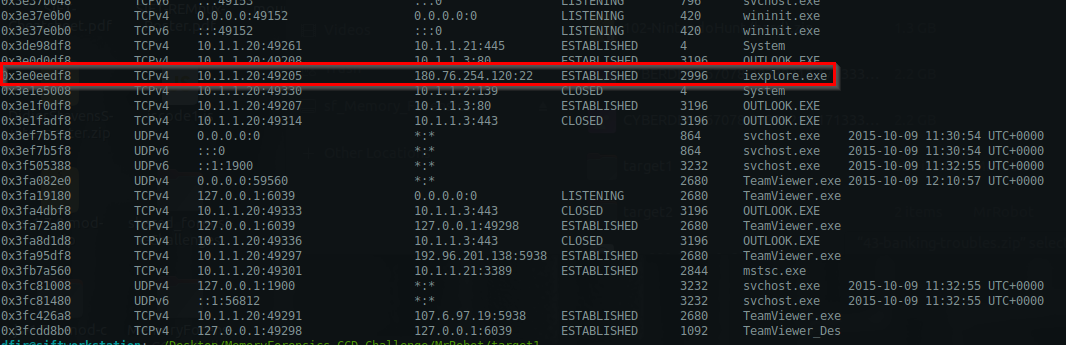
1
- PID: 2996 for iexplore.exe that was spawned to download this .exe file
What we are mostly interested in is any connection related to this
1
http://180.76.254.120/AnyConnectInstaller.exe
Checking all handles of iexplore.exe (PID=2996):
1
vol.py -f Target1-1dd8701f.vmss --profile=Win7SP1x86_23418 handles -p 2996
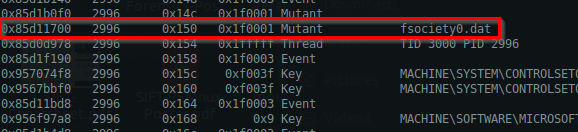
1
2
- Notice this .dat file Mutex from the process
- Since this is MrRobot theme related box, this should be relevant
Digging into process 2996 by checking all files related to this process:
1
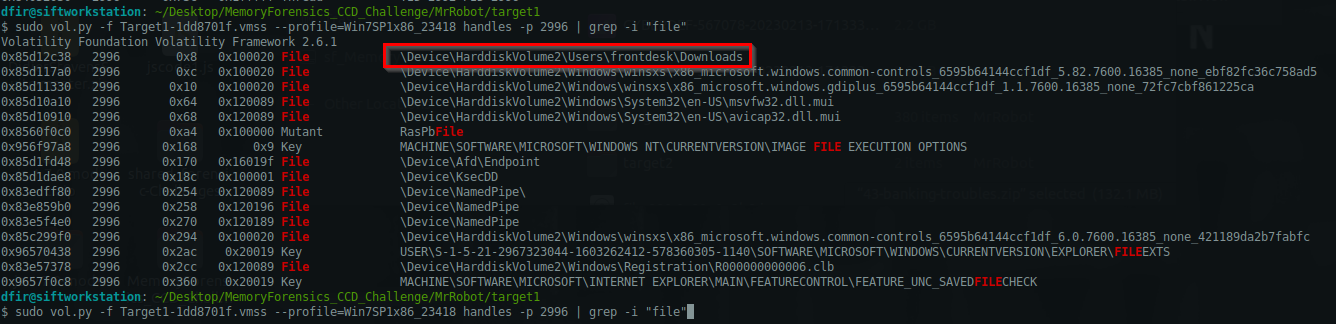
vol.py -f Target1-1dd8701f.vmss --profile=Win7SP1x86_23418 handles -p 2996 | grep -i "file"
1
2
- This process is pointing to Downloads folder. Its probably the landing directory.
- No sign of AnyConnectInstaller.exe at this moment
Dumping the virtual address space AND memory: (vaddump and memdump)
1
vol.py -f Target1-1dd8701f.vmss --profile=Win7SP1x86_23418 vaddump -p 2996 --dump-dir=./vaddump/
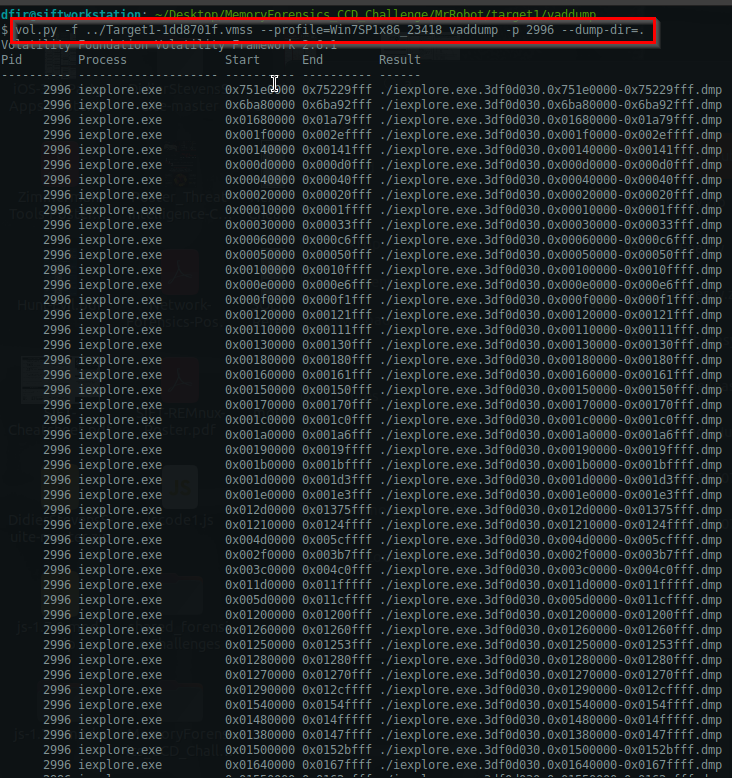
Checking all the strings of these VAD dump: -> This takes up so much time. Try to use memdump instead. -> Only use this if you know the exact offset where the malware file starts.
1
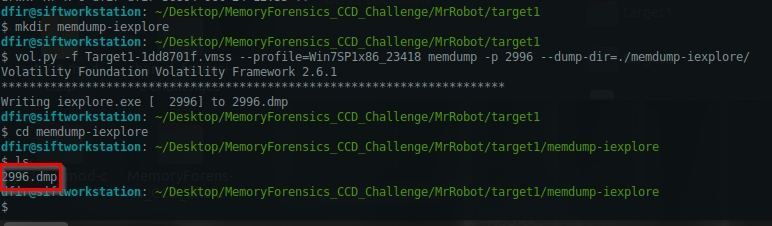
vol.py -f Target1-1dd8701f.vmss --profile=Win7SP1x86_23418 memdump -p 2996 --dump-dir=./memdump-iexplore/
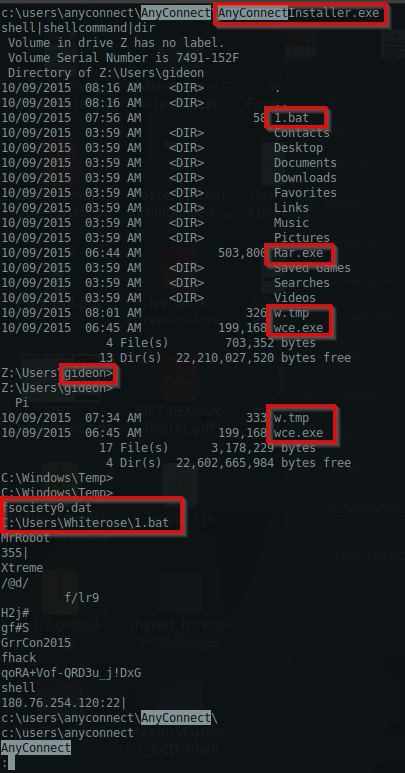
Gathering more information about AnyConnectInstaller.exe that was sent from phishing:
1
- From here we can see the files that was used for further compromise, and the user that was pawned (which is the boss of this company).
Other .bat files in the Downloads directory:
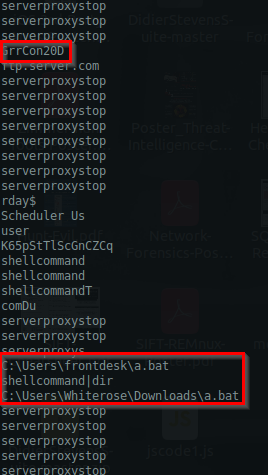
Now, we can see the RAT name:
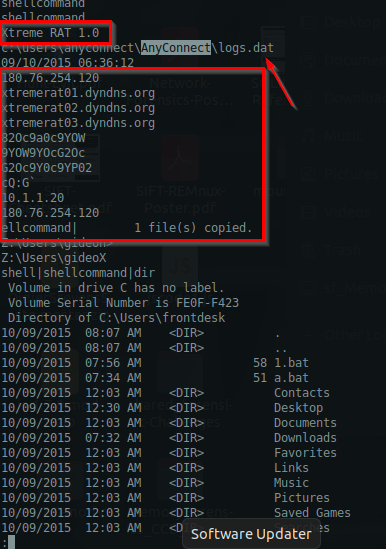
1
2
3
4
5
6
7
- Along with the logs of the RAT containing the malware's IP source, and DNS domains:
	- 180.76.254.120
	- xtremerat01.dyndns.org
	- xtremerat02.dyndns.org
	- xtremerat03.dyndns.org
- 'a.bat' was downloaded into user Gideon's machine
- Gideon's machine's IP address : 10.1.1.20
Answer:
1
XtremeRAT
Q4- Machine:Target1 The malware appears to be leveraging process injection. What is the PID of the process that is injected?
Checking other activities the attacker have done on the machine:
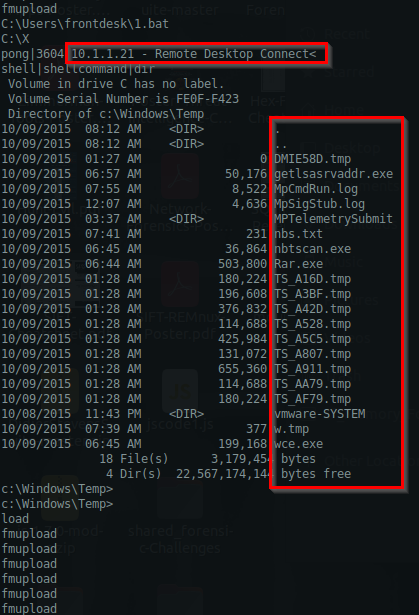
1
- Lateral movement from 10.1.1.20 (Gideon) to 10.1.1.21
Attacker copied rar.exe from 10.1.1.20 to Gideon’s machine:
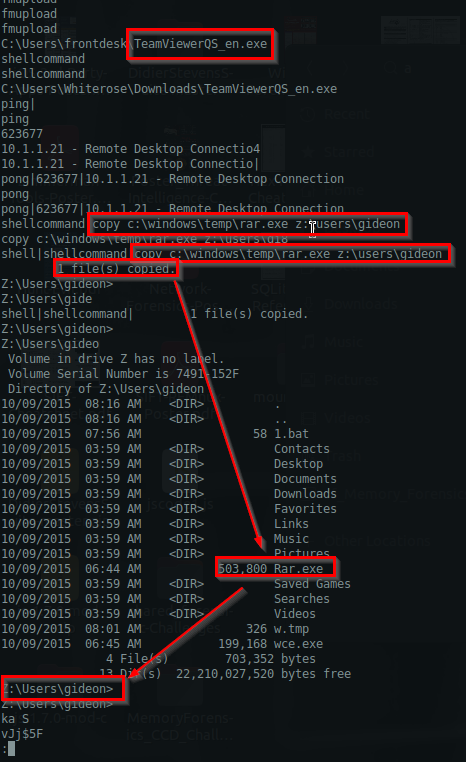
Files in C:\Windows\Temp:
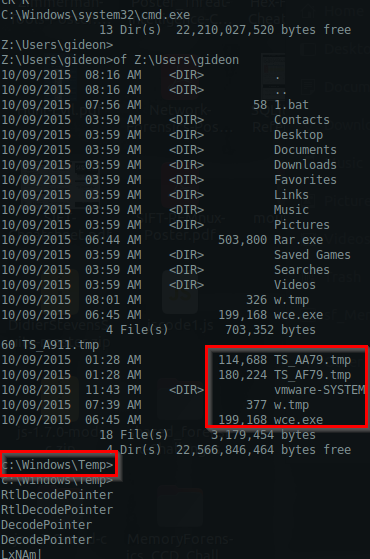
Attacker extract system information on the system:
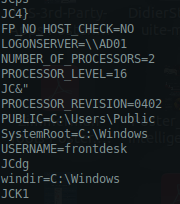
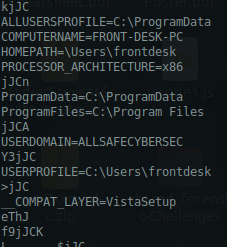
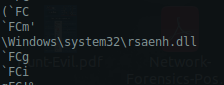
Another .dll file shown from the process:
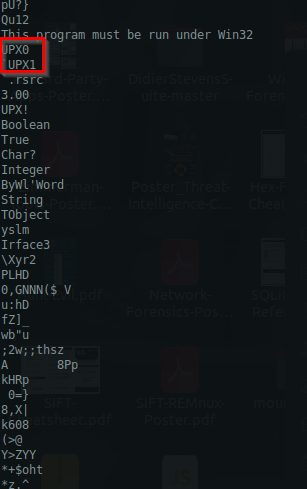
Now, here’s the malware packed in UPX0 and UPX1:
1
2
3
- These are the starting strings for the malware.
- If you can find the offset for this strings, you can extract the malware!
- From there, you can do Malware Analysis
Hidden process’ info:
1
2
3
4
5
6
7
Offset(P)  Name                    PID pslist psscan thrdproc pspcid csrss session deskthrd ExitTime
---------- -------------------- ------ ------ ------ -------- ------ ----- ------- -------- --------
0x3e091030 d                         1 False  False  True     False  False False   False
0x3e3ed030                       15440 False  False  True     False  False False   False
0x3f035450 u?                     108 False  False  True     False  False False   False
0x3f443ab0 explorer.exe           3932 False  False  True     False  False False   False
0x3ed4e030                          4 False  False  True     False  False False   False
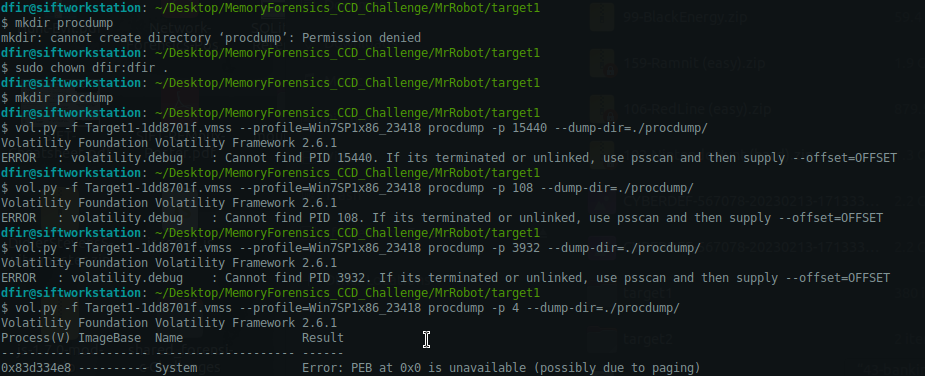
Trying to dump all these hidden processes:
1
 - All of them failed as these processes were stopped
Answer:
1
2996
1
- This is the process of iexplore.exe when downloaded the malware and injected it into this process
Q5- Machine:Target1 What is the unique value the malware is using to maintain persistence after reboot?
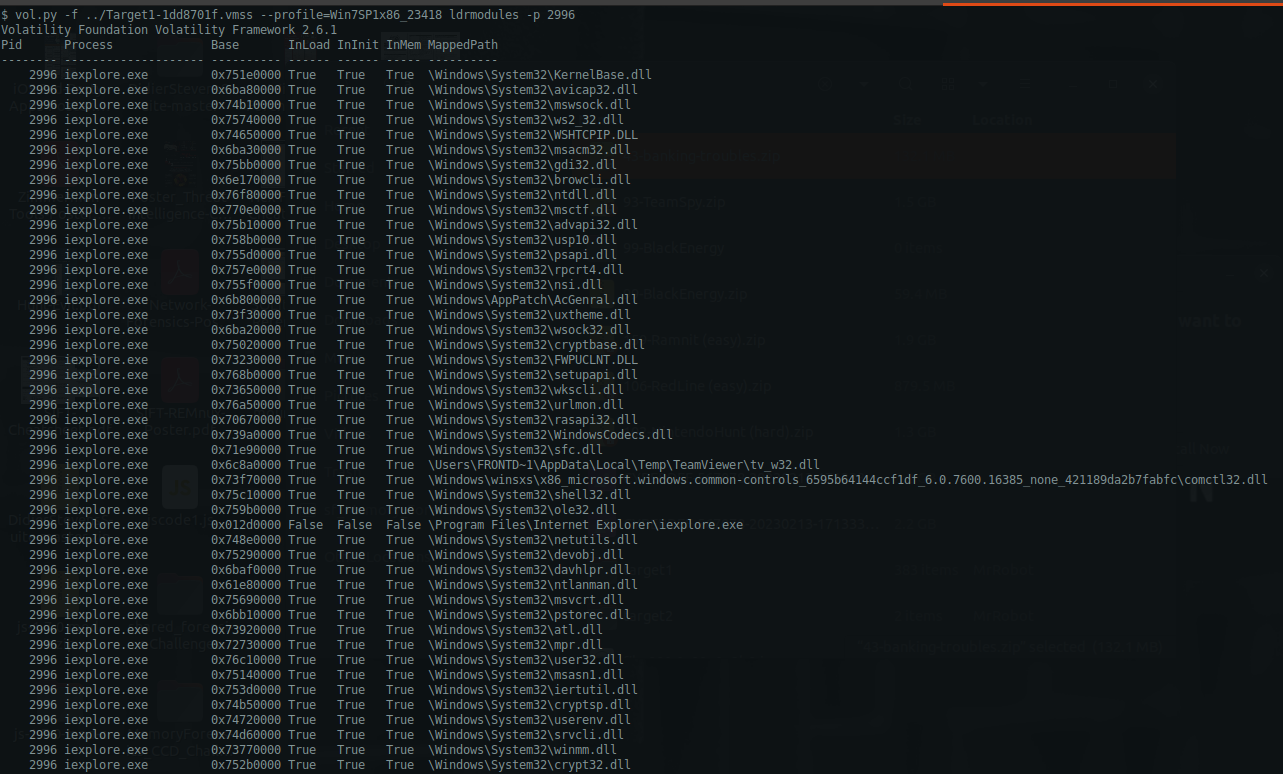
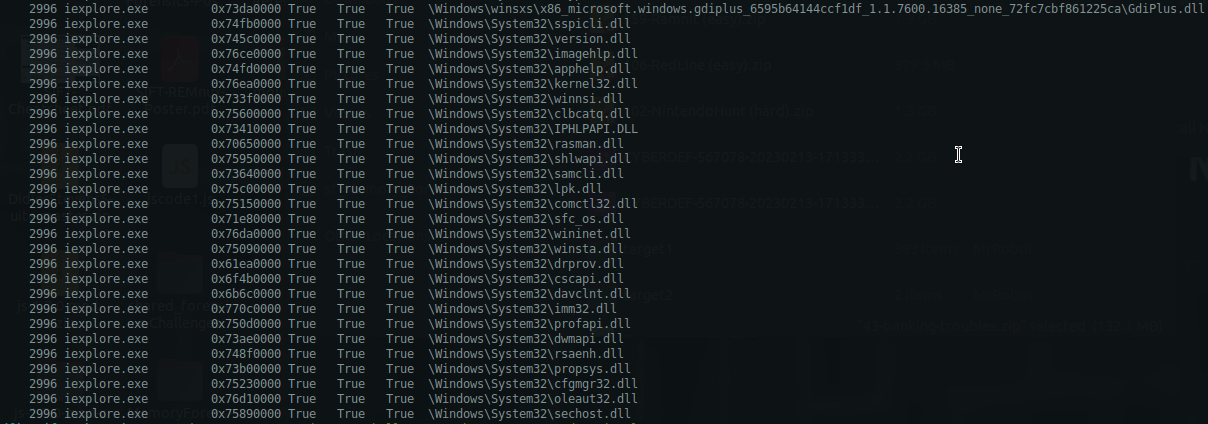
List of volatility modules that could be of help to us for determining persistence after reboot:
1
vol.py -f ../Target1-1dd8701f.vmss --profile=Win7SP1x86_23418 ldrmodules -p 2996
autoruns command:
-> Doesn’t work…
printkey command:
1
vol.py -f ../Target1-1dd8701f.vmss --profile=Win7SP1x86_23418 printkey
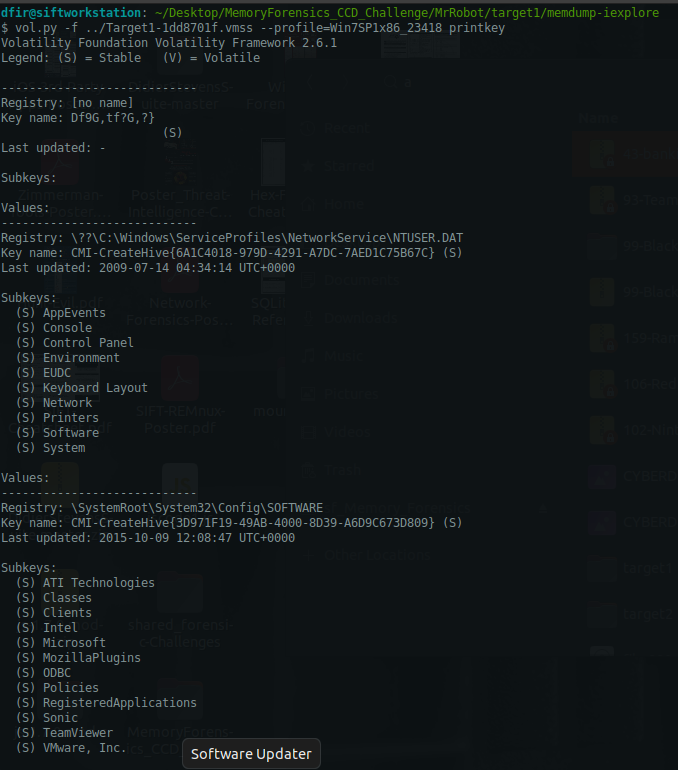
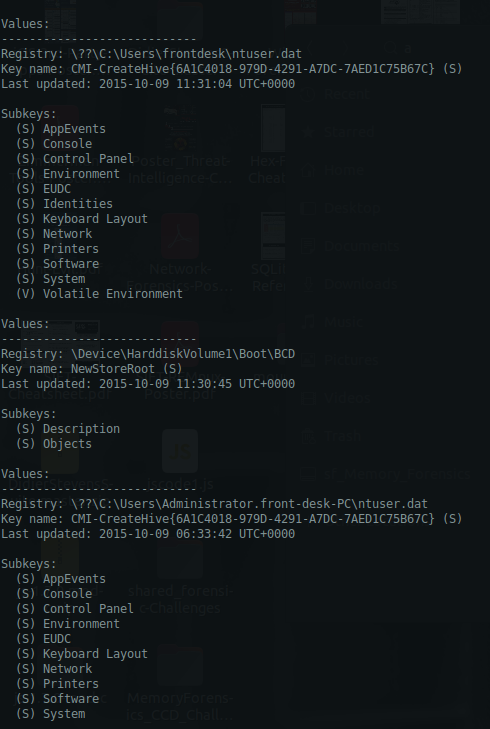
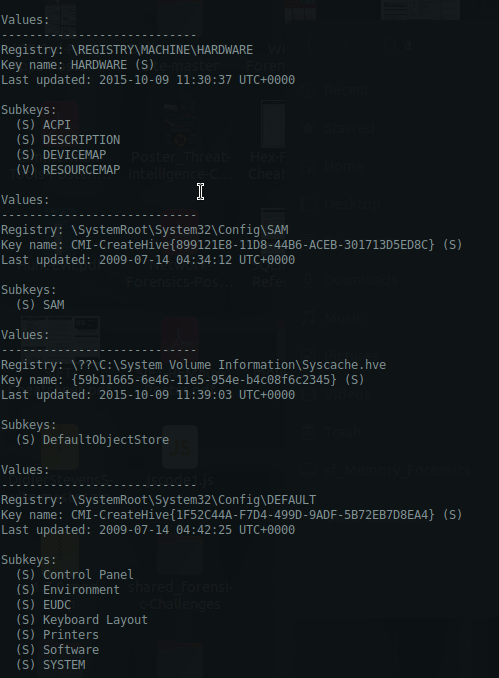
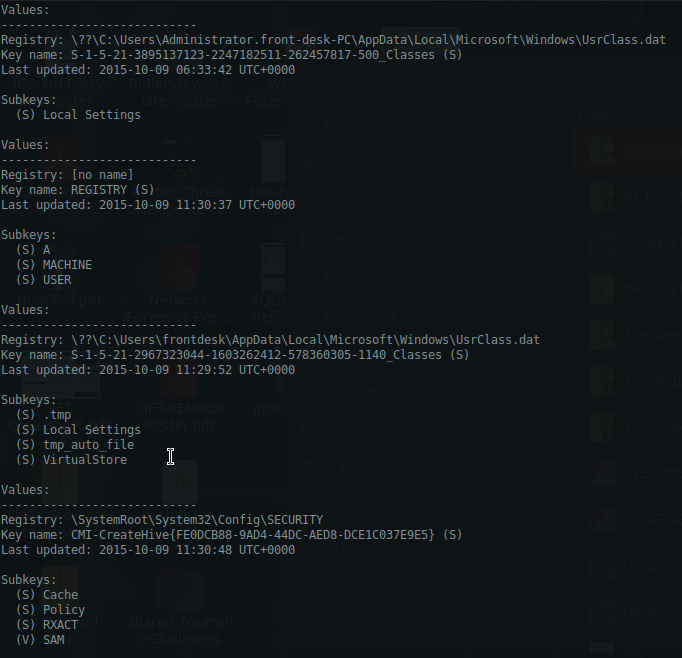
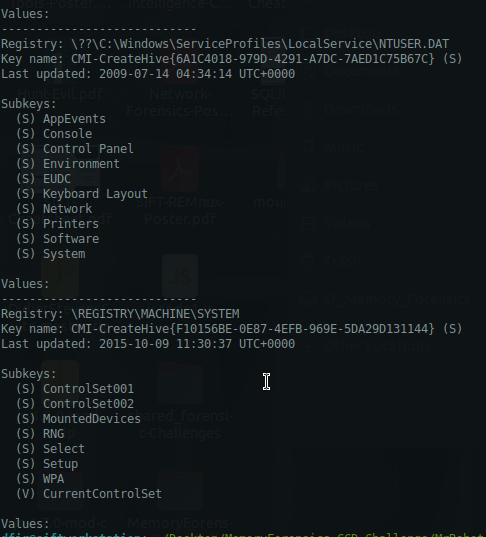
Listing all of the hives:
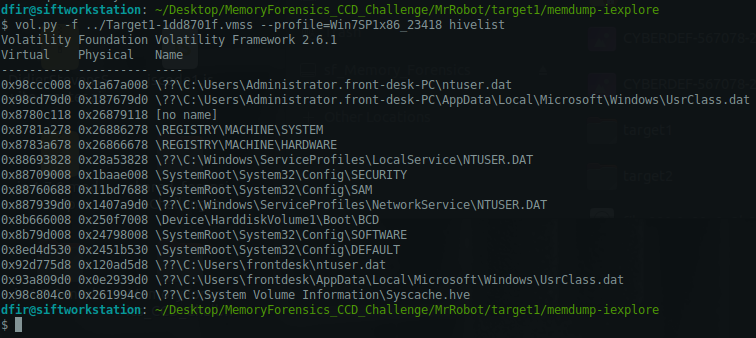
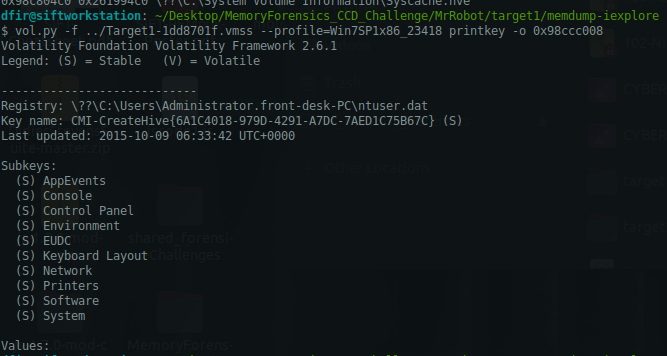
Specifying an offset:
1
vol.py -f ../Target1-1dd8701f.vmss --profile=Win7SP1x86_23418 printkey -o 0x98ccc008
1
- For offset, use virtual address space!
Note, you will need double backslash for this to work. Otherwise, it will tell you “The requested key could not be found in the hive(s) searched”
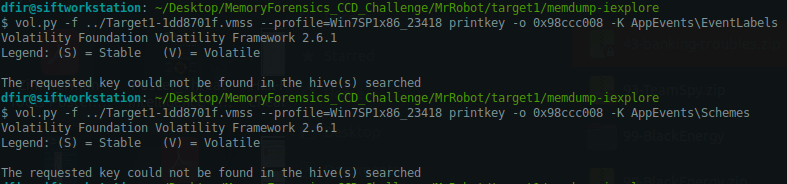
Checking registry keys and subkeys that might contain leads to persistence mechanisms
List of volatility modules that are useful to us:
1
2
3
- autoruns [X] -> Doesn''t work for some reason
- svcscan [/]
- netscan [/]
Get the offset for each hive:
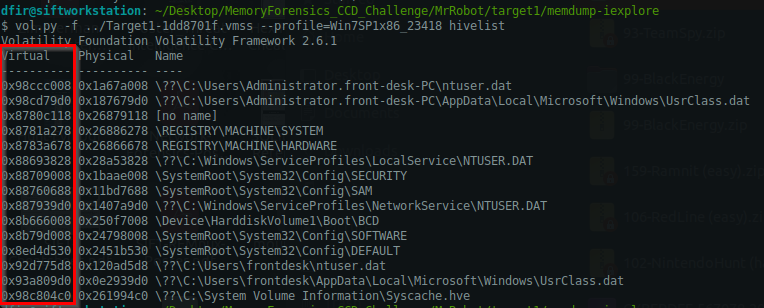
Offsets:
1
2
3
4
5
6
7
8
9
10
11
12
13
14
15
16
17
Virtual    Physical   Name
---------- ---------- ----
0x98ccc008 0x1a67a008 \??\C:\Users\Administrator.front-desk-PC\ntuser.dat
0x98cd79d0 0x187679d0 \??\C:\Users\Administrator.front-desk-PC\AppData\Local\Microsoft\Windows\UsrClass.dat
0x8780c118 0x26879118 [no name]
0x8781a278 0x26886278 \REGISTRY\MACHINE\SYSTEM
0x8783a678 0x26866678 \REGISTRY\MACHINE\HARDWARE
0x88693828 0x28a53828 \??\C:\Windows\ServiceProfiles\LocalService\NTUSER.DAT
0x88709008 0x1baae008 \SystemRoot\System32\Config\SECURITY
0x88760688 0x11bd7688 \SystemRoot\System32\Config\SAM
0x887939d0 0x1407a9d0 \??\C:\Windows\ServiceProfiles\NetworkService\NTUSER.DAT
0x8b666008 0x250f7008 \Device\HarddiskVolume1\Boot\BCD
0x8b79d008 0x24798008 \SystemRoot\System32\Config\SOFTWARE
0x8ed4d530 0x2451b530 \SystemRoot\System32\Config\DEFAULT
0x92d775d8 0x120ad5d8 \??\C:\Users\frontdesk\ntuser.dat
0x93a809d0 0x0e2939d0 \??\C:\Users\frontdesk\AppData\Local\Microsoft\Windows\UsrClass.dat
0x98c804c0 0x261994c0 \??\C:\System Volume Information\Syscache.hve
Registry keys and subkeys that we can target on:
User and System Auto-Start Keys:
1
2
3
4
5
6
(a) HKCU (NTUSER.DAT)\Software\Microsoft\Windows\CurrentVersion\Run [/]
(b) HKCU\Software\Microsoft\Windows\CurrentVersion\RunOnce [/]
(c) HKCU\Software\Microsoft\Windows\CurrentVersion\Policies\Explorer\Run [/]
(d) HKLM\Software\Microsoft\Windows\CurrentVersion\Run [/]
(e) HKLM\Software\Microsoft\Windows\CurrentVersion\RunOnce [/]
(f) HKLM\Software\Microsoft\Windows\CurrentVersion\RunOnceEx [/]
1
- HKCU == Current User
(a) \??\C:\Users\Administrator.front-desk-PC\ntuser.dat -> 0x98ccc008
1
vol.py -f ../Target1-1dd8701f.vmss --profile=Win7SP1x86_23418 printkey -o 0x98ccc008 -K Software\\Microsoft\\Windows\\CurrentVersion\\RunOnce
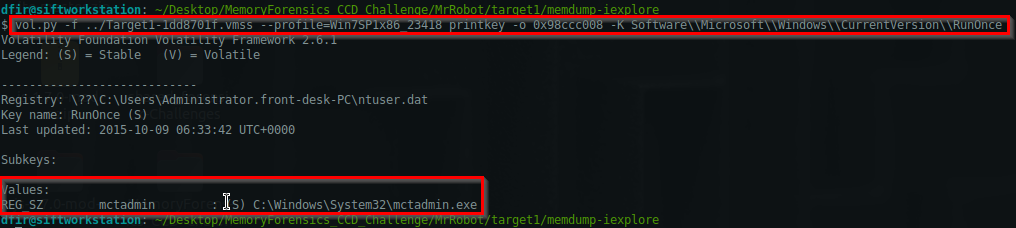
1
- Whats 'mctadmin.exe' does? => Microsoft Content Advisor - a parental control feature used for restricting access to web content
(b) \??\C:\Users\Administrator.front-desk-PC\ntuser.dat -> 0x98ccc008
1
vol.py -f ../Target1-1dd8701f.vmss --profile=Win7SP1x86_23418 printkey -o 0x98ccc008 -K Software\Microsoft\Windows\CurrentVersion\Run
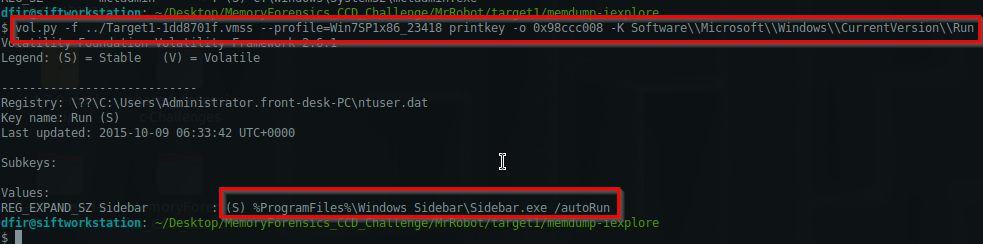
(c) \??\C:\Users\Administrator.front-desk-PC\AppData\Local\Microsoft\Windows\UsrClass.dat -> 0x98cd79d0
1
vol.py -f ../Target1-1dd8701f.vmss --profile=Win7SP1x86_23418 printkey -o 0x98cd79d0 -K Software\\Microsoft\\Windows\\CurrentVersion\\Policies\\Explorer\\Run
There’s no registry subkey under Policies:
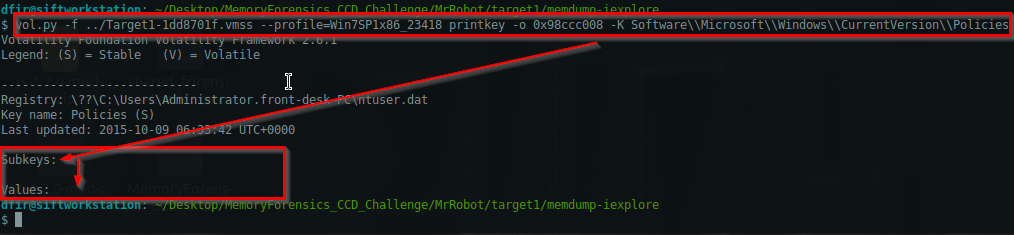
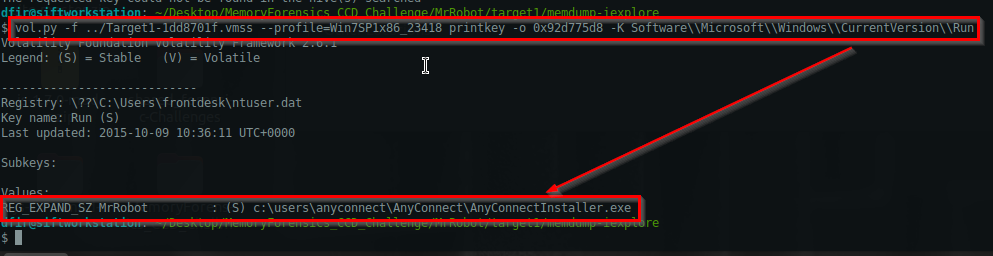
(d) \??\C:\Users\frontdesk\ntuser.dat -> 0x92d775d8
1
vol.py -f ../Target1-1dd8701f.vmss --profile=Win7SP1x86_23418 printkey -o 0x92d775d8 -K Software\\Microsoft\\Windows\\CurrentVersion\\Run
Executes the trojan on reboot:
1
- This is HKLM : HKLM\Software\Microsoft\Windows\CurrentVersion\Run
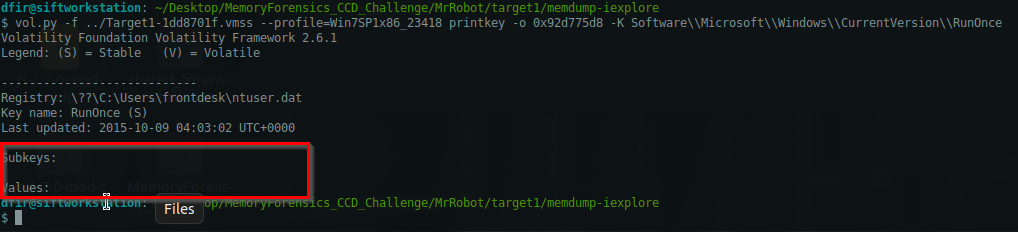
(e) \??\C:\Users\frontdesk\ntuser.dat -> 0x92d775d8
1
vol.py -f ../Target1-1dd8701f.vmss --profile=Win7SP1x86_23418 printkey -o 0x92d775d8 -K Software\\Microsoft\\Windows\\CurrentVersion\\RunOnce
There’s no value for this one:
Other registry keys you can explore on for different persistence techniques:
Services and Drivers Persistence Keys:
1
2
3
(f) HKLM\System\CurrentControlSet\Services [/]
(g) HKLM\System\CurrentControlSet\Services<ServiceName>\ImagePath [/]
(h) HKLM\Software\Microsoft\Windows NT\CurrentVersion\Svchost [X]
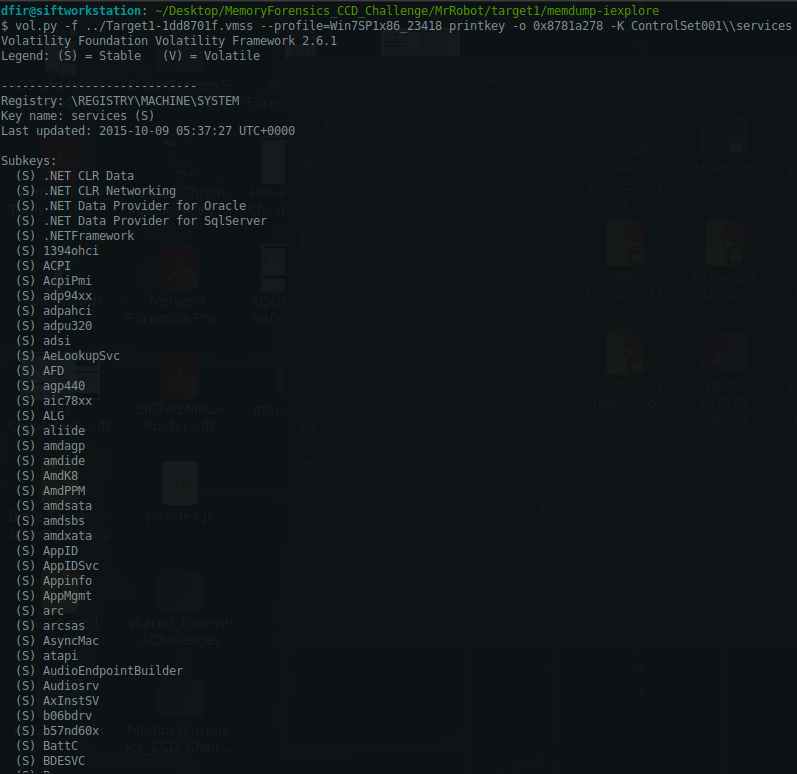
(f) \REGISTRY\MACHINE\SYSTEM -> 0x8781a278
1
vol.py -f ../Target1-1dd8701f.vmss --profile=Win7SP1x86_23418 printkey -o 0x8781a278 -K ControlSet001\\services\\wuauserv
1
- List of services available during the time of capture
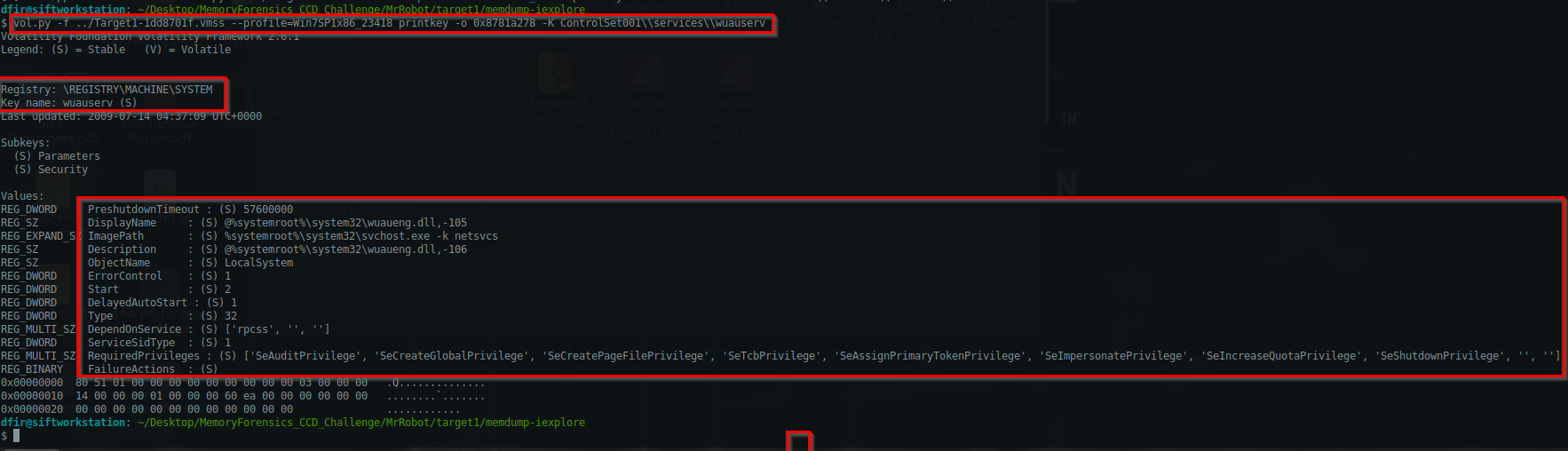
(g) \REGISTRY\MACHINE\SYSTEM -> 0x8781a278
1
vol.py -f ../Target1-1dd8701f.vmss --profile=Win7SP1x86_23418 printkey -o 0x8781a278 -K ControlSet002\\services\\wuauserv
1
- You can see the ImagePath: "%systemroot%\system32\svchost.exe -k netsvcs"
(h) \??\C:\Users\frontdesk\ntuser.dat -> 0x92d775d8
1
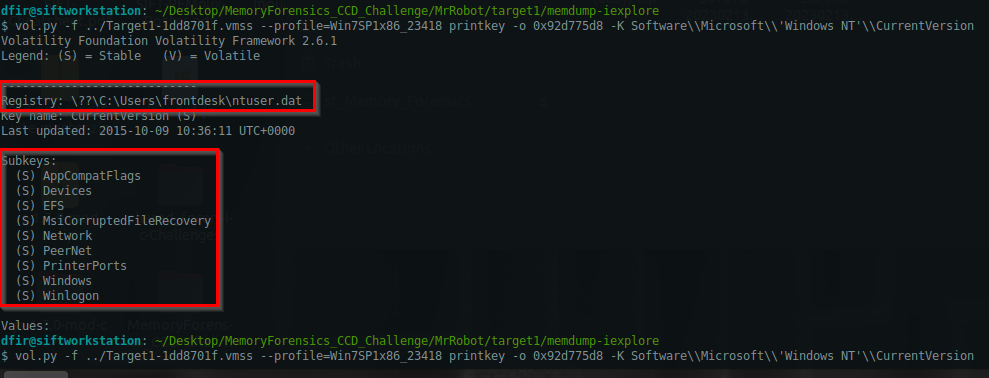
vol.py -f ../Target1-1dd8701f.vmss --profile=Win7SP1x86_23418 printkey -o 0x92d775d8 -K Software\\Microsoft\\Windows NT\\CurrentVersion\\Svchost
Found at Software\\Microsoft\\'Windows NT'\\CurrentVersion:
1
- There's no 'SvcHost'
Scheduled Tasks and Job Persistence:
1
2
(i) HKLM\Software\Microsoft\Windows NT\CurrentVersion\Schedule\TaskCache\Tasks
(j) HKLM\Software\Microsoft\Windows NT\CurrentVersion\Schedule\TaskCache\Tree
(i) \SystemRoot\System32\Config\SOFTWARE -> 0x8b79d008
1
vol.py -f ../Target1-1dd8701f.vmss --profile=Win7SP1x86_23418 printkey -o 0x8b79d008 -K Software\\Microsoft\\Windows NT\\CurrentVersion\\Schedule\\TaskCache\\Tasks

(j) \SystemRoot\System32\Config\SOFTWARE -> 0x8b79d008
1
HKLM\Software\Microsoft\Windows NT\CurrentVersion\Schedule\TaskCache\Tree
Browser Helper Objects and Shell Extensions:
1
2
3
- HKLM\Software\Microsoft\Windows NT\CurrentVersion\Explorer\Browser Helper Objects
- HKCU\Software\Microsoft\Internet Explorer\Main\FeatureControl\FEATURE_BROWSER_EMULATION
- HKCU\Software\Microsoft\Windows\CurrentVersion\Shell Extensions\Approved
Offsets:
1
2
3
4
5
6
7
8
9
10
11
12
13
14
15
16
17
Virtual    Physical   Name
---------- ---------- ----
0x98ccc008 0x1a67a008 \??\C:\Users\Administrator.front-desk-PC\ntuser.dat
0x98cd79d0 0x187679d0 \??\C:\Users\Administrator.front-desk-PC\AppData\Local\Microsoft\Windows\UsrClass.dat
0x8780c118 0x26879118 [no name]
0x8781a278 0x26886278 \REGISTRY\MACHINE\SYSTEM
0x8783a678 0x26866678 \REGISTRY\MACHINE\HARDWARE
0x88693828 0x28a53828 \??\C:\Windows\ServiceProfiles\LocalService\NTUSER.DAT
0x88709008 0x1baae008 \SystemRoot\System32\Config\SECURITY
0x88760688 0x11bd7688 \SystemRoot\System32\Config\SAM
0x887939d0 0x1407a9d0 \??\C:\Windows\ServiceProfiles\NetworkService\NTUSER.DAT
0x8b666008 0x250f7008 \Device\HarddiskVolume1\Boot\BCD
0x8b79d008 0x24798008 \SystemRoot\System32\Config\SOFTWARE
0x8ed4d530 0x2451b530 \SystemRoot\System32\Config\DEFAULT
0x92d775d8 0x120ad5d8 \??\C:\Users\frontdesk\ntuser.dat
0x93a809d0 0x0e2939d0 \??\C:\Users\frontdesk\AppData\Local\Microsoft\Windows\UsrClass.dat
0x98c804c0 0x261994c0 \??\C:\System Volume Information\Syscache.hve
TBC on these registry keys (for this CTF, there seems to be a single persistence)
Image File Execution Options (IFEO):
1
2
- HKLM\Software\Microsoft\Windows NT\CurrentVersion\Image File Execution Options
- HKLM\Software\Microsoft\Windows NT\CurrentVersion\Image File Execution Options<targetExe>\Debugger
Winlogon Persistence:
1
2
- HKLM\Software\Microsoft\Windows NT\CurrentVersion\Winlogon\Userinit
- HKLM\Software\Microsoft\Windows NT\CurrentVersion\Winlogon\Shell
Startup Folder Keys:
1
2
3
4
- HKCU\Software\Microsoft\Windows\CurrentVersion\Explorer\StartupApproved\Run
- HKLM\Software\Microsoft\Windows\CurrentVersion\Explorer\StartupApproved\Run
- C:\Users<username>\AppData\Roaming\Microsoft\Windows\Start Menu\Programs\Startup
- C:\ProgramData\Microsoft\Windows\Start Menu\Programs\Startup
WMI Persistence:
1
2
- HKCU\Software\Microsoft\WBEM\CIMOM
- HKLM\Software\Microsoft\WBEM\CIMOM
AppInit_DLLs Persistence:
1
- HKLM\Software\Microsoft\Windows NT\CurrentVersion\Windows\AppInit_DLLs
Office Add-ins (Persistence through MS Office):
1
2
- HKCU\Software\Microsoft\Office<Version>\Word\Addins
- HKCU\Software\Microsoft\Office<version>\Excel\Addins
Active Setup:
1
- HKCU\Software\Microsoft\Active Setup\Installed Components
COM Hijacking:
1
2
- HKCU\Software\Classes\CLSID
- HKCU\Software\Classes\Interface
Task Scheduler:
1
- HKLM\Software\Microsoft\Windows NT\CurrentVersion\Schedule\TaskCache\Tasks
Answer:
1
MrRobot
Q6- Machine:Target1 Malware often uses a unique value or name to ensure that only one copy runs on the system. What is the unique name the malware is using?
What we are mostly interested in is any connection related to this
1
http://180.76.254.120/AnyConnectInstaller.exe
Checking all handles of iexplore.exe (PID=2996):
1
vol.py -f Target1-1dd8701f.vmss --profile=Win7SP1x86_23418 handles -p 2996
1
2
3
- Notice this .dat file Mutex from the process
- Since this is MrRobot theme related box, this should be relevant
- Mutex prevents other file from having a handle like this file do if its identical.
Answer:
1
fsociety0.dat
Q7- Machine:Target1 It appears that a notorious hacker compromised this box BEFORE our current attackers. Name the movie he or she is from.
Finding a possibly malicious service with svcscan:
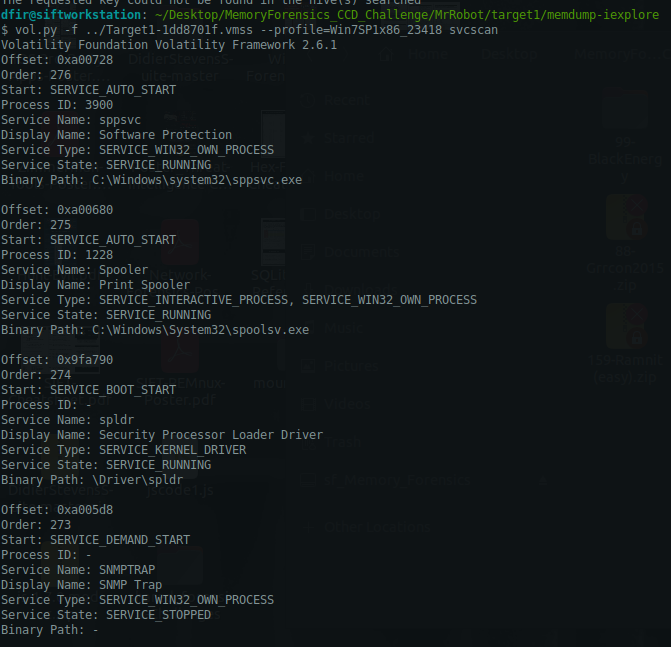
List of volatility modules that might be of help:
1
2
3
4
5
6
7
8
9
10
11
12
- shimcache [/]
- envars [/]
- getsids [/]
- dlllist [/]
- shellbags [/]
- userassist [/]
- mftparser [/]
- modscan [/]
- hivelist [/]
- printkey [/]
- evtlogs [/]
- screenshot [/]
shimcachecommand which helps us track which commands were executed on the machine:
1
vol.py -f ../Target1-1dd8701f.vmss --profile=Win7SP1x86_23418 shimcache
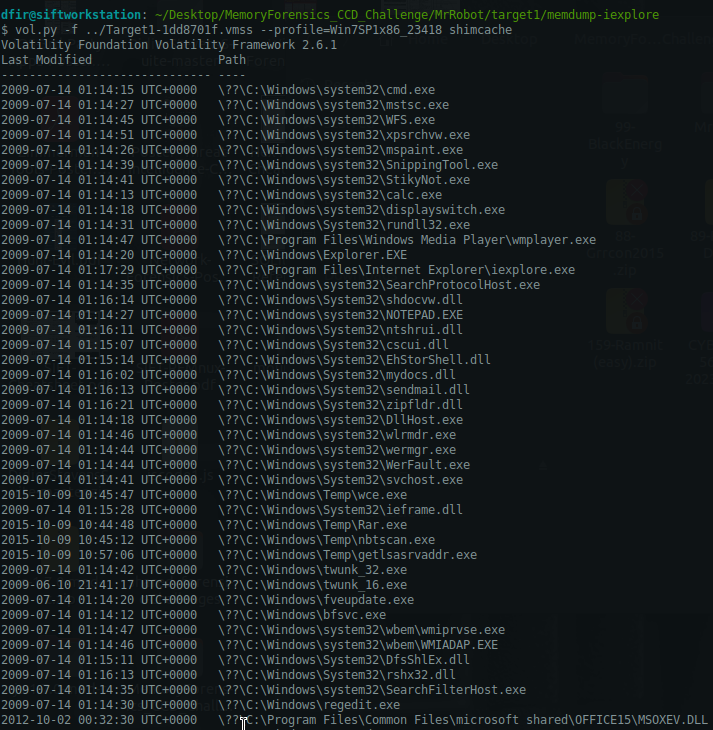
Commands we have to look out for: (anything found in C:\Windows\Temp should be suspicious and NOT in C:\ drive, along with the processes that was spawned from absolute paths that they shouldn’t have been like C:\Windows\notepad.exe coming up)
1
2
3
4
5
6
7
- C:\Windows\Temp\cmd.exe
- C:\Windows\Temp\calc.exe
- C:\Windows\Temp\Rar.exe
- C:\Windows\Temp\nbtscan.exe
- C:\Windows\Temp\getlsasrvaddr.exe
- C:\Windows\Temp\wce.exe
- C:\Program Files\Common Files\microsoft shared\OFFICE15\MSOXEV.DLL -> (Suspicious)
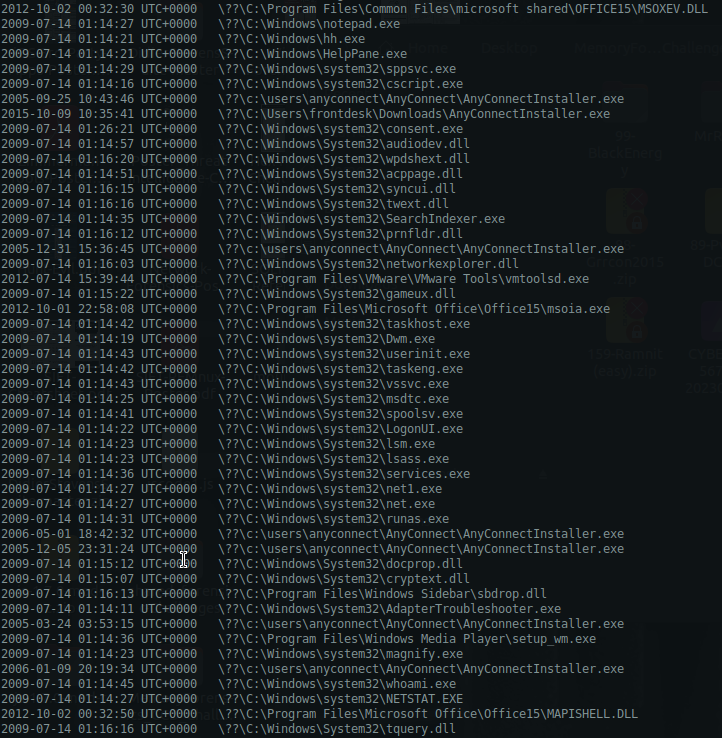
Commands we have to look out for: (anything found in C:\Windows\Temp should be suspicious and NOT in C:\ drive, along with the processes that was spawned from absolute paths that they shouldn’t have been like C:\Windows\notepad.exe coming up)
1
2
3
4
5
6
7
8
9
10
11
12
13
14
- \??\c:\users\anyconnect\AnyConnect\AnyConnectInstaller.exe
- \??\C:\Users\frontdesk\Downloads\AnyConnectInstaller.exe

This sequence is suspicious:
- 2009-07-14 01:14:22 UTC+0000   \??\C:\Windows\system32\LogonUI.exe
- 2009-07-14 01:14:23 UTC+0000   \??\C:\Windows\System32\lsm.exe
- 2009-07-14 01:14:23 UTC+0000   \??\C:\Windows\System32\lsass.exe
- 2009-07-14 01:14:36 UTC+0000   \??\C:\Windows\System32\services.exe
- 2009-07-14 01:14:27 UTC+0000   \??\C:\Windows\system32\net1.exe
- 2009-07-14 01:14:27 UTC+0000   \??\C:\Windows\system32\net.exe
- 2009-07-14 01:14:31 UTC+0000   \??\C:\Windows\system32\runas.exe
- 2006-05-01 18:42:32 UTC+0000   \??\c:\users\anyconnect\AnyConnect\AnyConnectInstaller.exe
- 2005-12-05 23:31:24 UTC+0000   \??\c:\users\anyconnect\AnyConnect\AnyConnectInstaller.exe
-
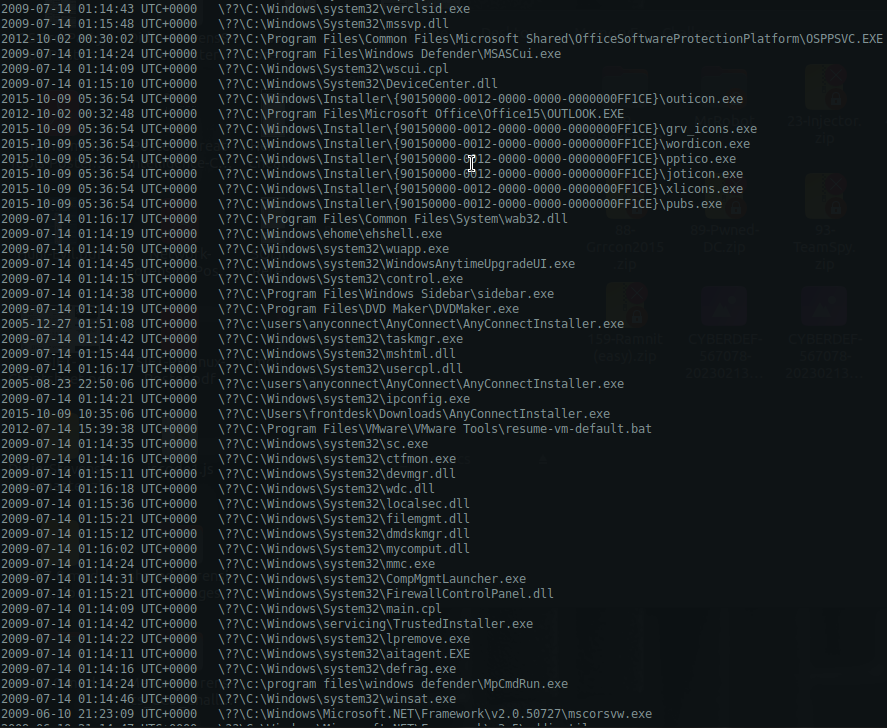
Commands we have to look out for: (anything found in C:\Windows\Temp should be suspicious and NOT in C:\ drive, along with the processes that was spawned from absolute paths that they shouldn’t have been like C:\Windows\notepad.exe coming up)
1
2
- C:\Program Files\Microsoft Office\Office15\OUTLOOK.EXE
- \??\c:\users\anyconnect\AnyConnect\AnyConnectInstaller.exe
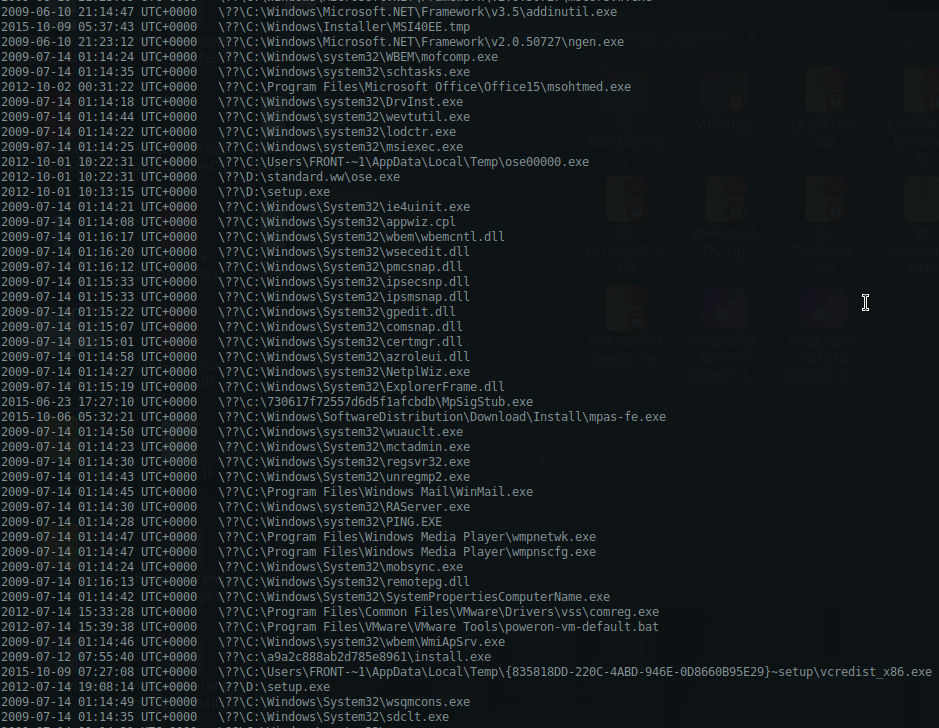
Commands we have to look out for: (anything found in C:\Windows\Temp should be suspicious and NOT in C:\ drive, along with the processes that was spawned from absolute paths that they shouldn’t have been like C:\Windows\notepad.exe coming up)
1
2
3
4
5
6
- 2009-07-14 01:14:44 UTC+0000   \??\C:\Windows\system32\wevtutil.exe
- 2009-07-14 01:14:22 UTC+0000   \??\C:\Windows\system32\lodctr.exe
- 2009-07-14 01:14:25 UTC+0000   \??\C:\Windows\system32\msiexec.exe
- 2012-10-01 10:22:31 UTC+0000   \??\C:\Users\FRONT-~1\AppData\Local\Temp\ose00000.exe
- 2012-10-01 10:22:31 UTC+0000   \??\D:\standard.ww\ose.exe
- 2012-10-01 10:13:15 UTC+0000   \??\D:\setup.exe
1
- Remember that 'msiexec.exe' is used for installation of programs in Windows

Commands we have to look out for: (anything found in C:\Windows\Temp should be suspicious and NOT in C:\ drive, along with the processes that was spawned from absolute paths that they shouldn’t have been like C:\Windows\notepad.exe coming up)
1
- For this list, im not sure if execution of any of these process is considered suspicious or malicious.
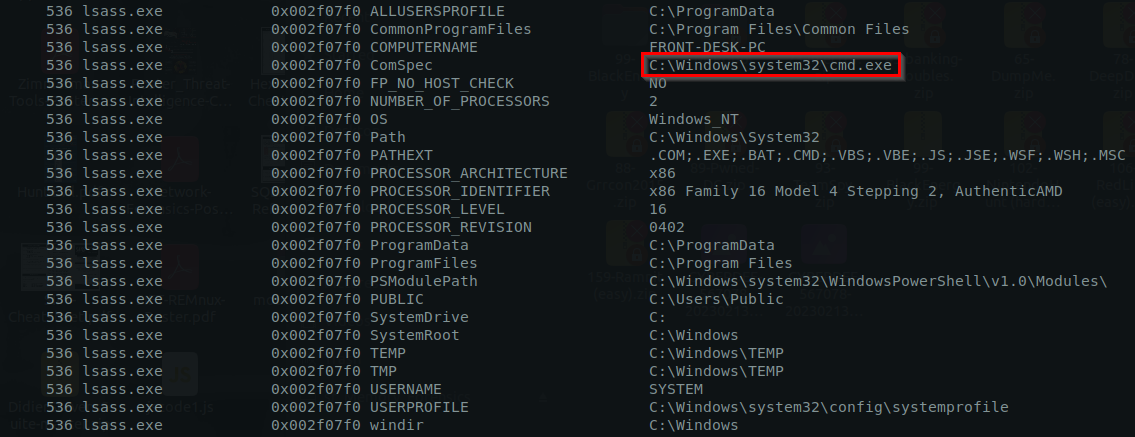
envars: command to execute
1
vol.py -f ../Target1-1dd8701f.vmss --profile=Win7SP1x86_23418 envars
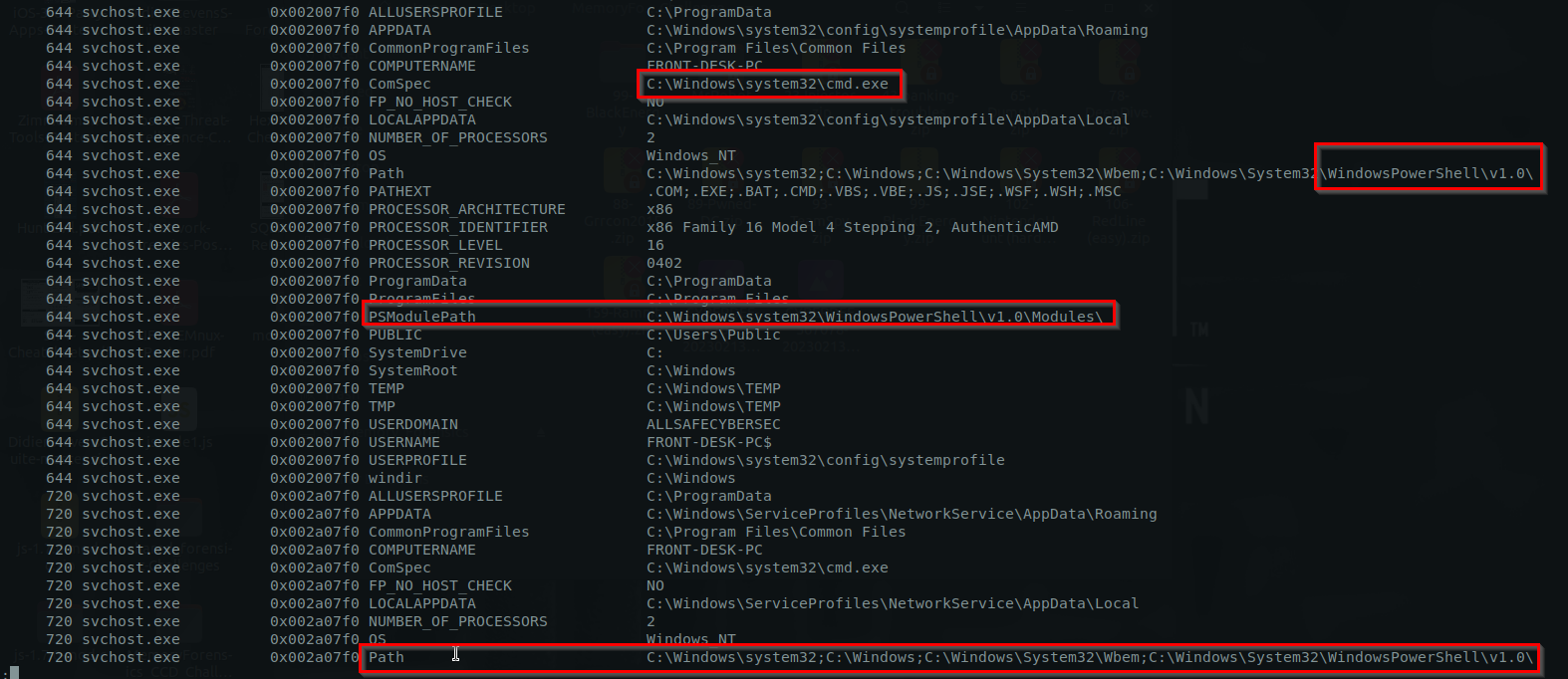
List of environment variables that might be important/suspicious enough:
-> lsass.exe:
-> svchost.exe:
1
- I dont think its normal for svchost.exe to be invoked from PowerShell session
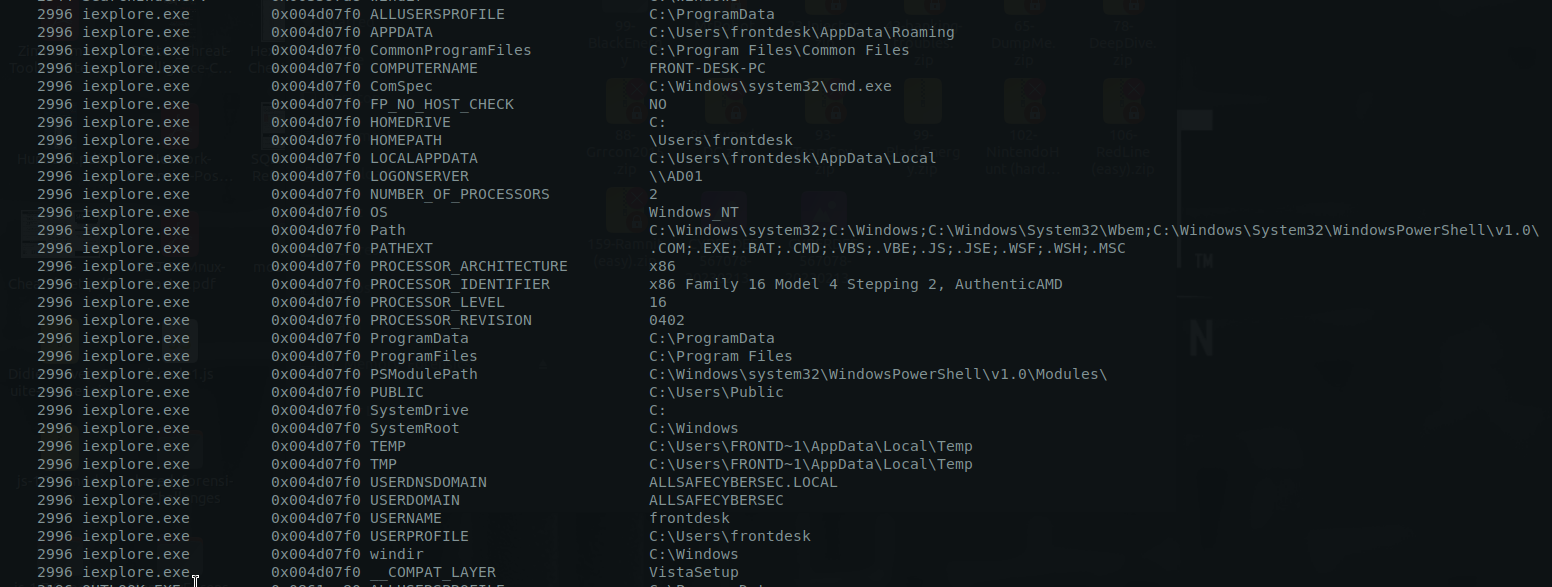
-> iexplore.exe spawned by OUTLOOK.exe:
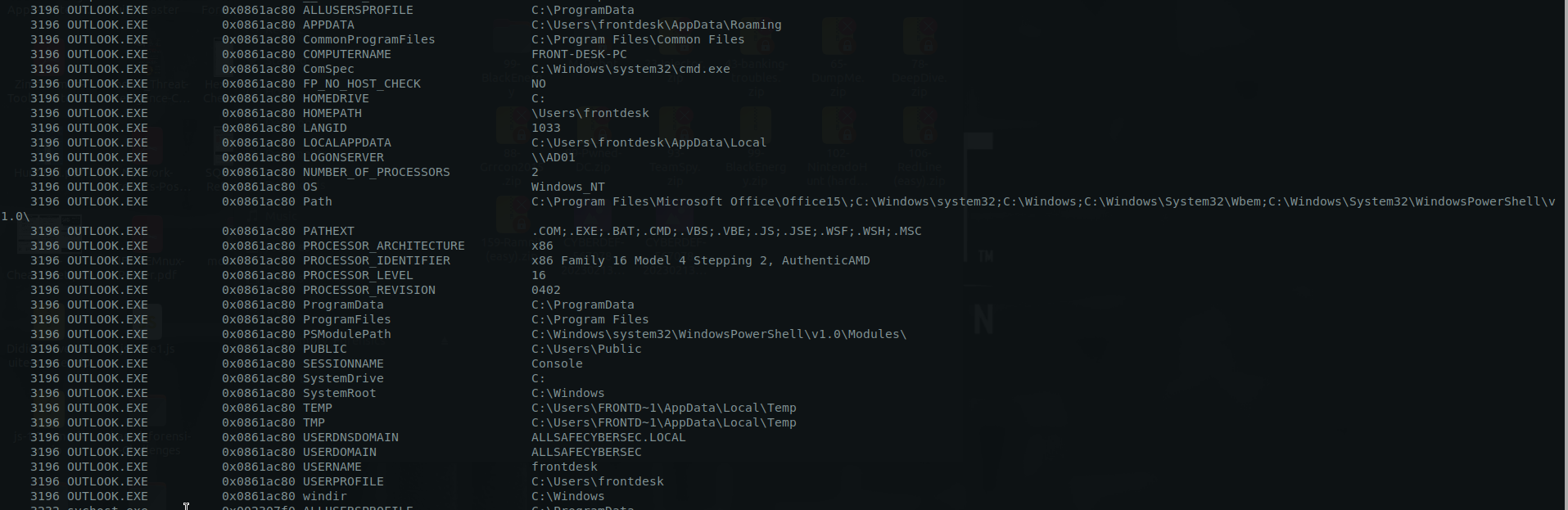
-> OUTLOOK.exe:
1
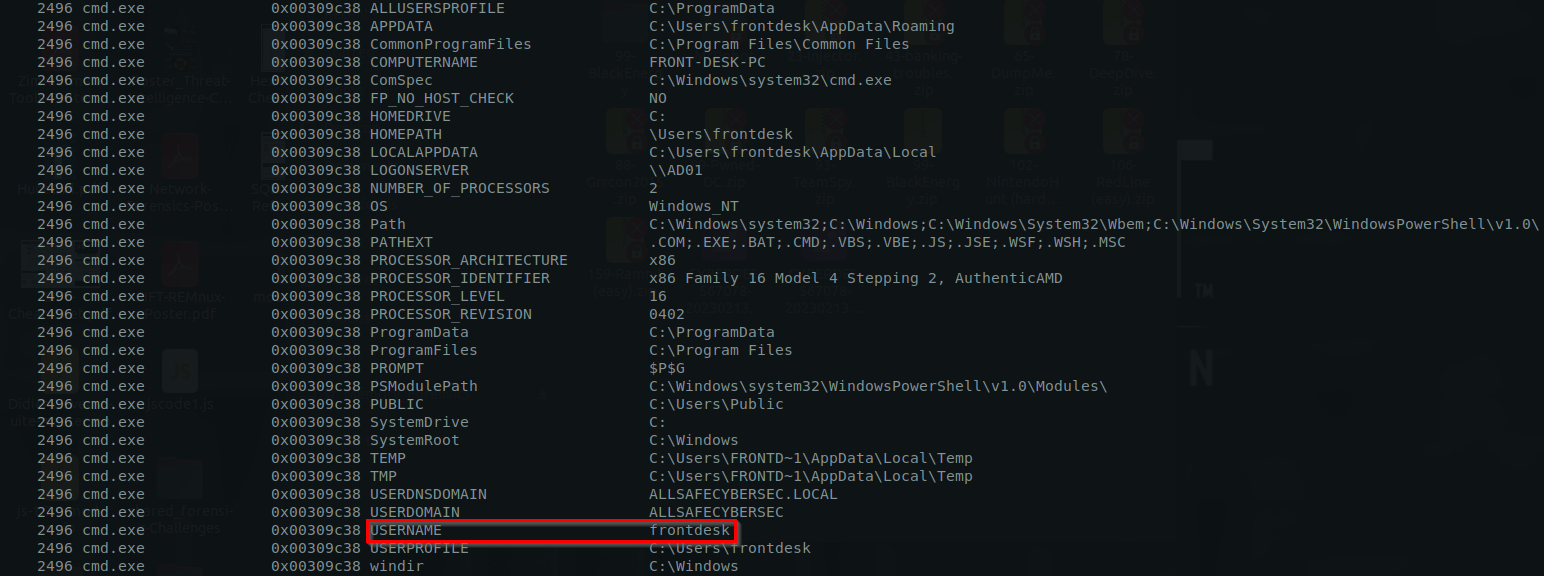
- This process is executed from console under the user 'frontdesk'
cmd.exe process:
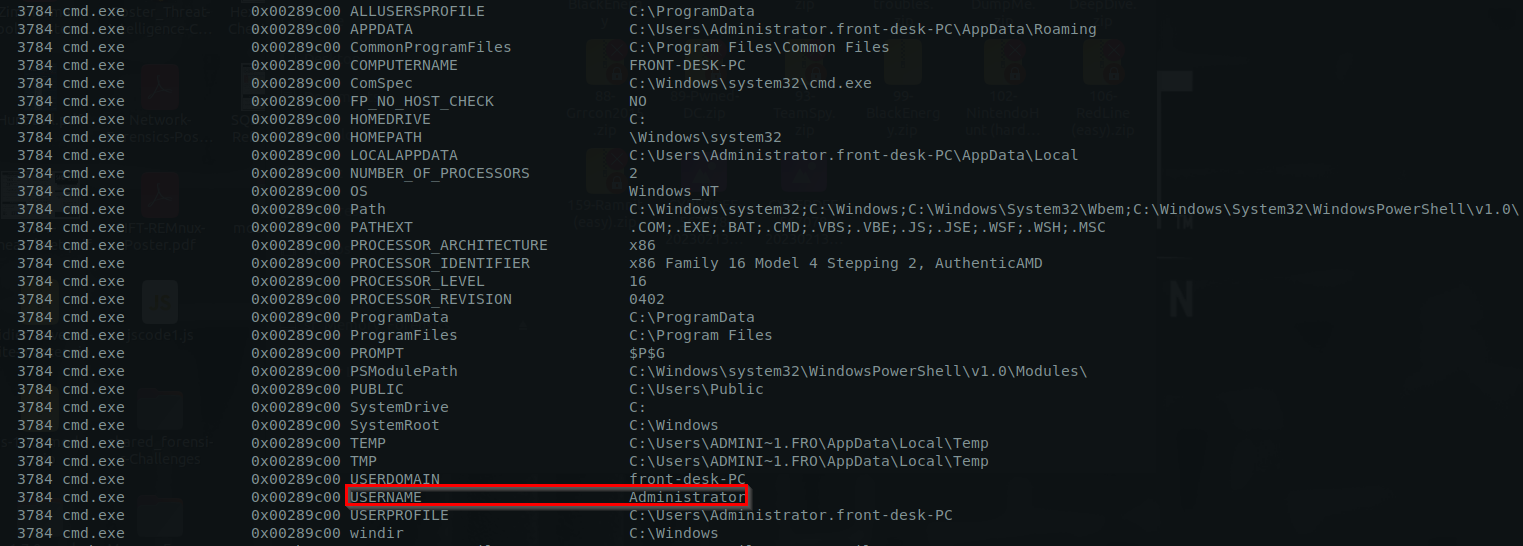
Elevated privilege on this cmd.exe process:
This conhost.exe process originating in C:\Windows\Temp has a SYSTEM privilege which is definitely malicious:
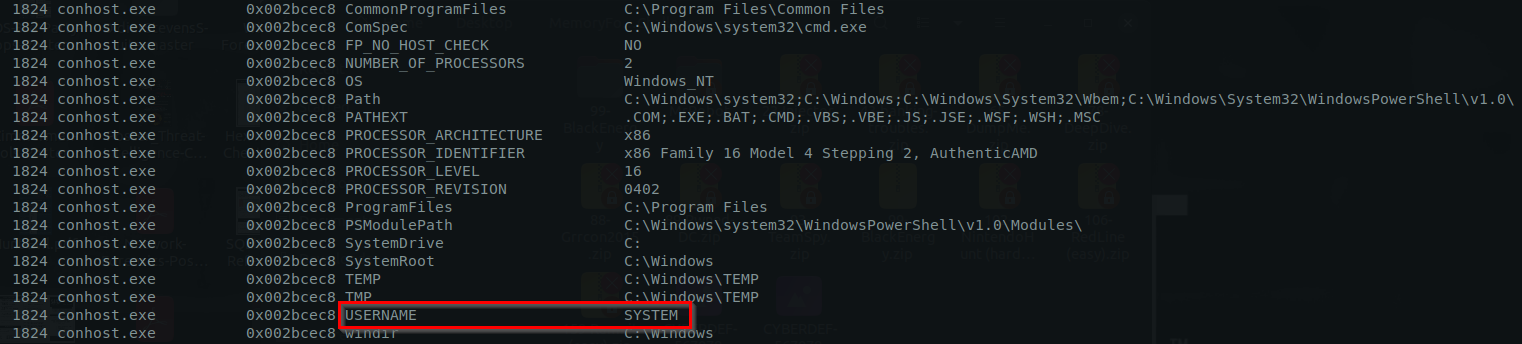
Checking the TeamViewer.exe process that was used by attacker for lateral movement:
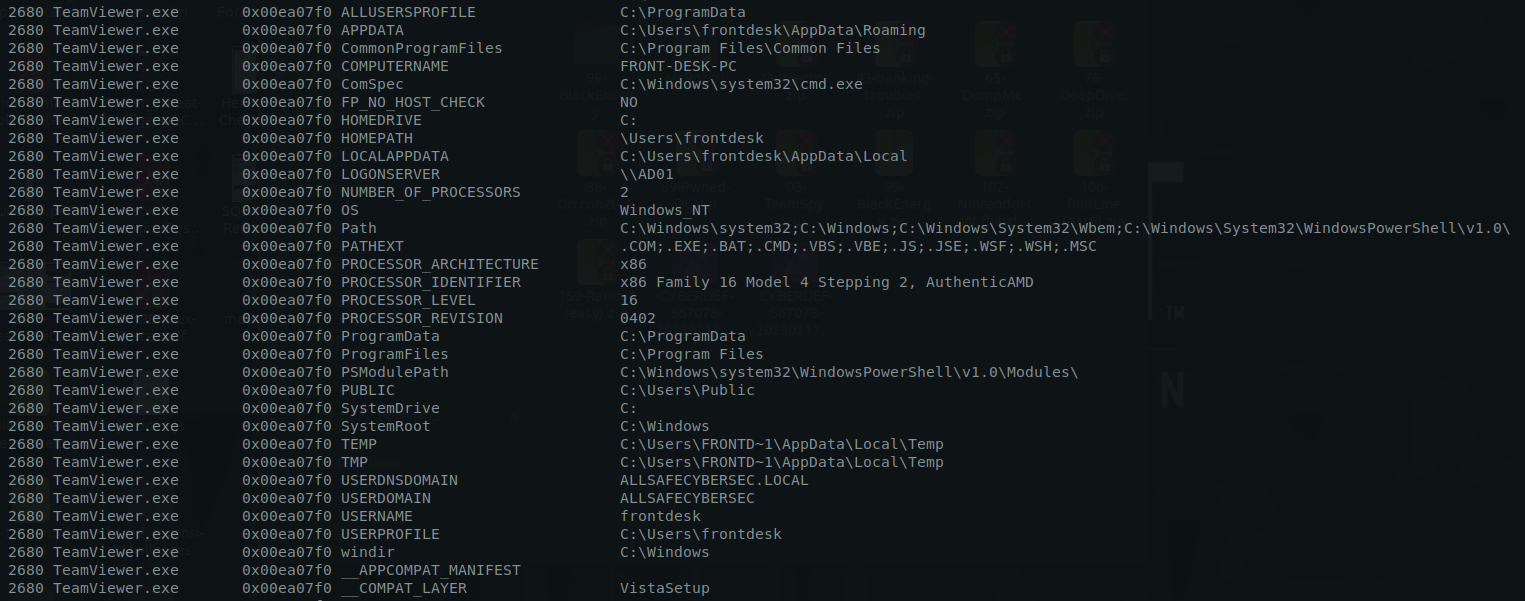
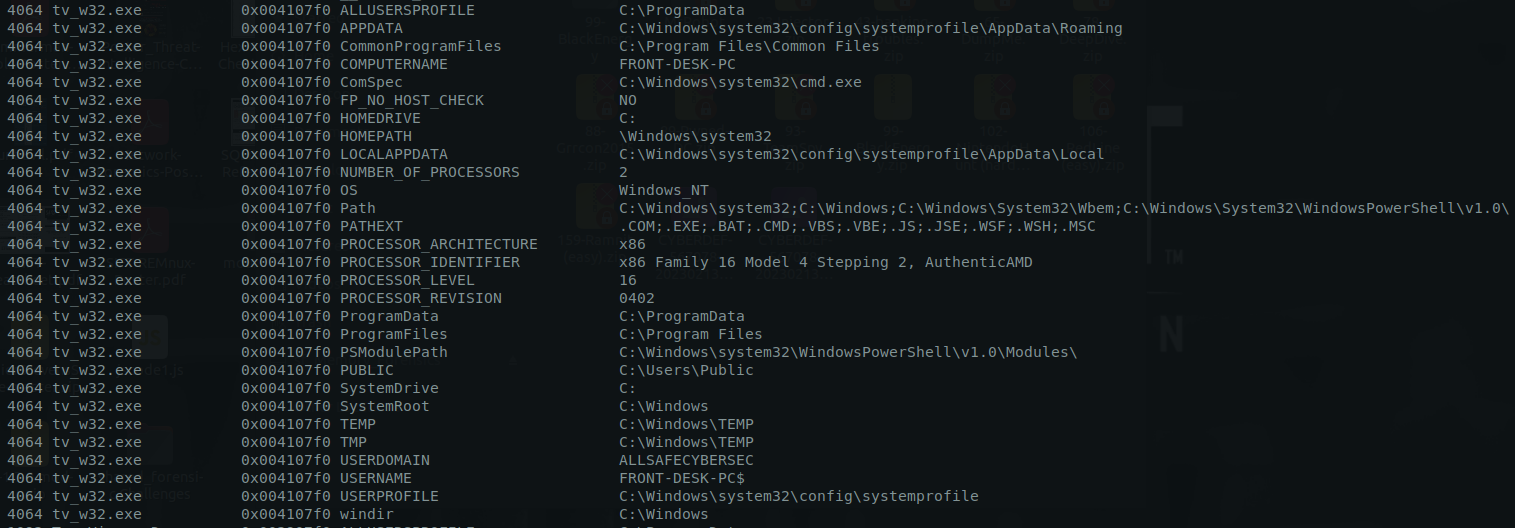
Checking the tv_w32.exe process as this is not a native process:
getsidscommand (getting the privilege for each process):
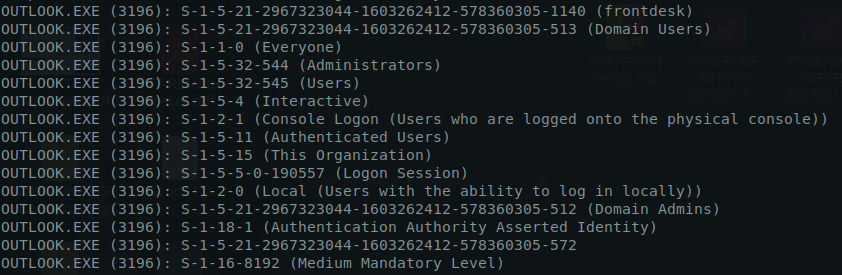
1
- This has Medium Mandatory level privs
For iexplore.exe that was spawned after clicking the phishing link:
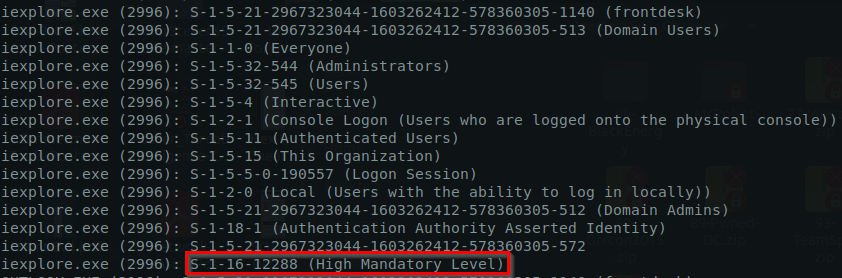
1
2
- Notice that the iexplore.exe process has ADMIN privileges. This means that the malware has achieved privilege escalation during download and execution!
- Is it possible to deduce the vulnerabilities the 'click' took advantage of?
Processes utilized for lateral movement:
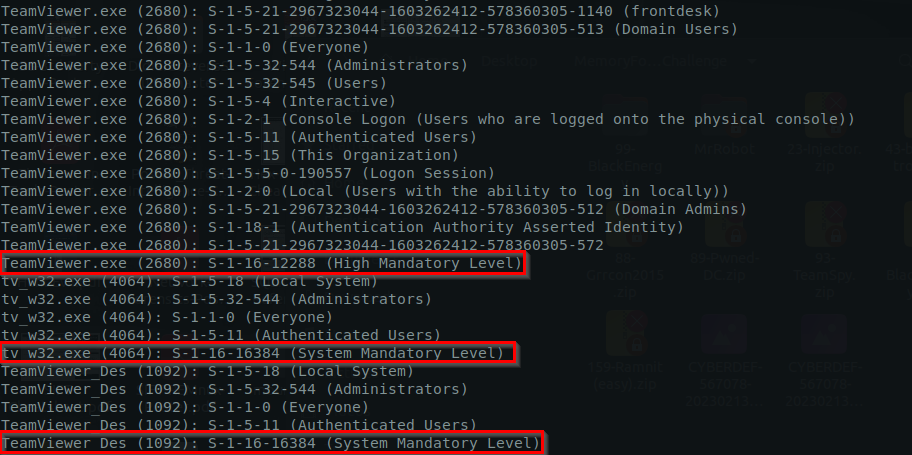
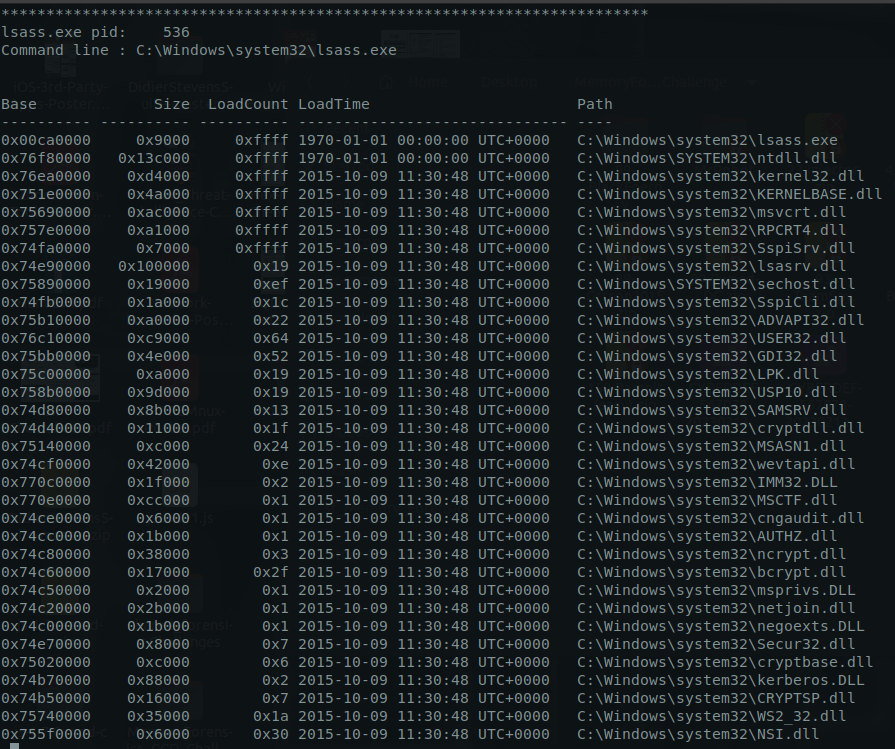
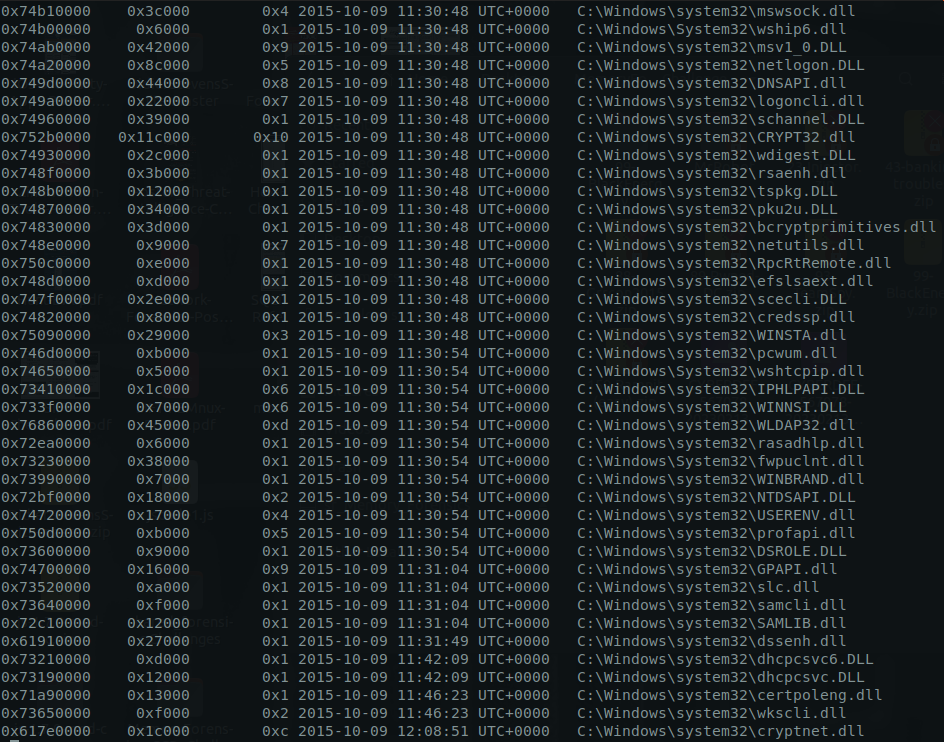
Getting DLLs for malicious processes: (or atleast the processes related to the badness)

shellbagscommand: These are the files/registries that was viewed fromFile Explorer
1
vol.py -f ../Target1-1dd8701f.vmss --profile=Win7SP1x86_23418 shellbags
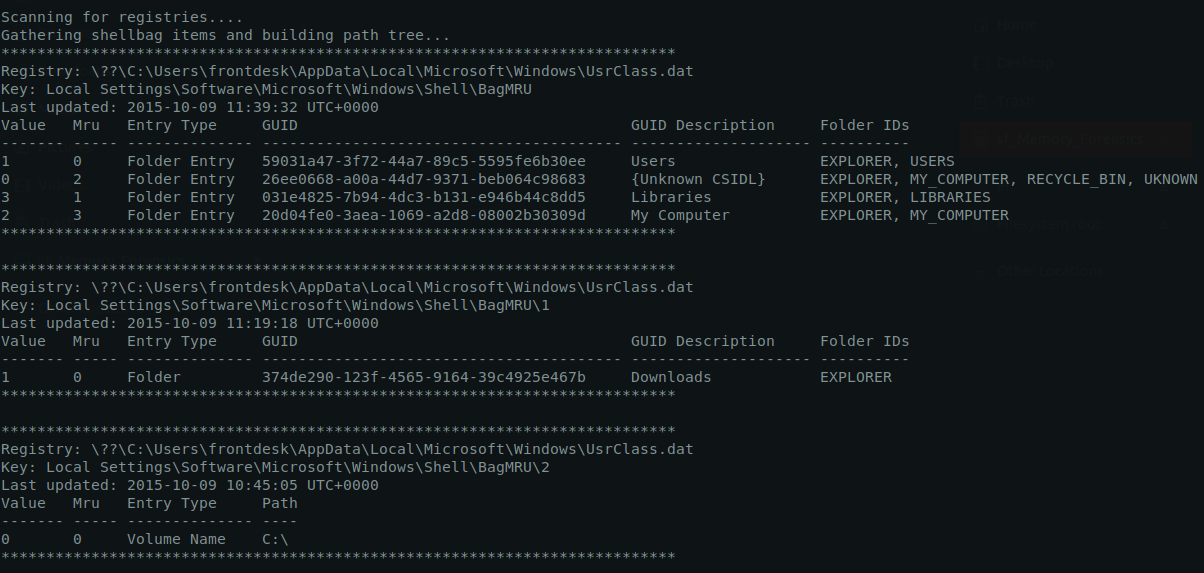
Recently accessed C:\Windows and C:\Users:
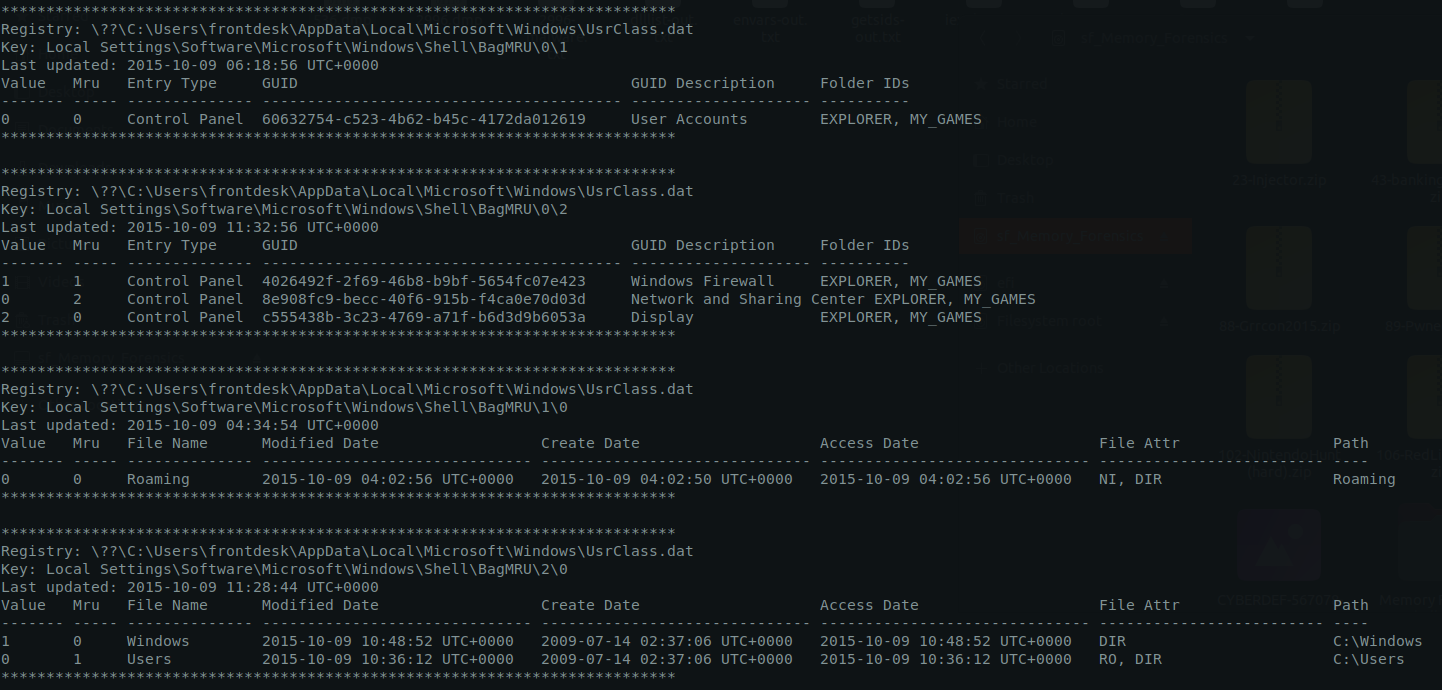
Attacker accessed C:\Windows\System32 and C:\Windows\Temp:
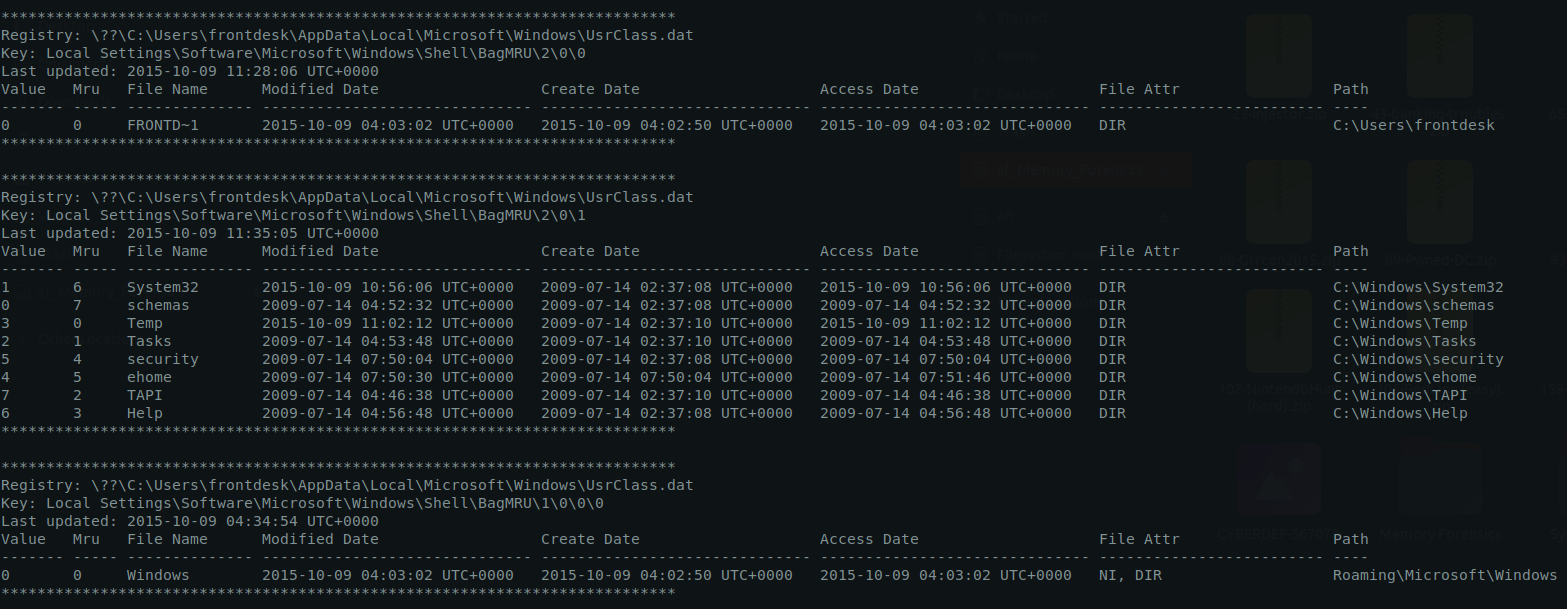
Recently accessed Start Menu\Programs\Administrative Tools:
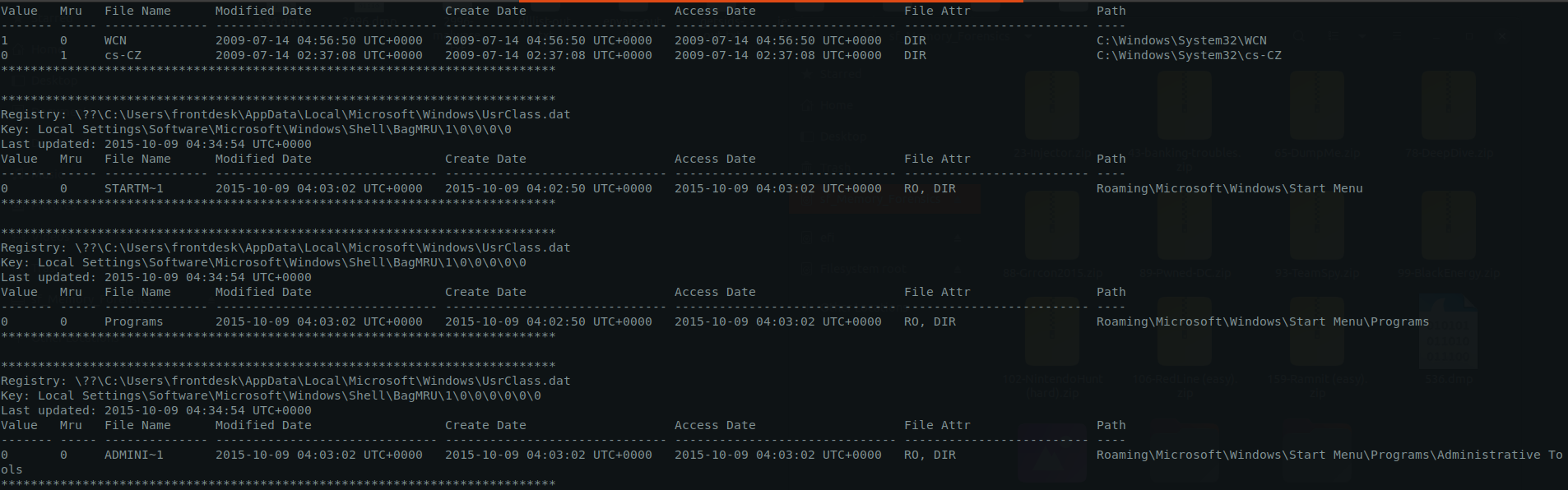
List of directories the attacker visited when viewing with Windows Explorer at machine Target 1:
1
2
3
4
5
a) C:\Windows
b) C:\Users
c) C:\Windows\System32
d) C:\Windows\Temp
e) Start Menu\Programs\Administrative Tools
modscanmodule:
1
vol.py -f ../Target1-1dd8701f.vmss --profile=Win7SP1x86_23418 modscan
1
- This list the drivers installed. Going here would be overkill for this box.
evtlogsmodule:
1
vol.py -f ../Target1-1dd8701f.vmss --profile=Win7SP1x86_23418 evtlogs

screenshotmodule: (important screenshots probably?)
1
vol.py -f ../Target1-1dd8701f.vmss --profile=Win7SP1x86_23418 screenshot
User zerocool found using filescan: (instances)


1
- Searched up the user `zerocool` in Wikipedia
Answer:
1
Hackers (movie)
Q8- Machine:Target1 What is the NTLM password hash for the administrator account?
-> Use the lsass.exe service available. There’s lsass.exe:
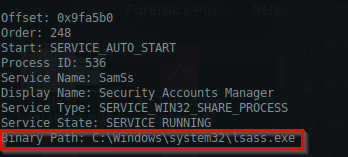
1
- Tried it with `mimikatz.exe`, doesn't work. It says mimikatz.exe can't open the process' file.
-> Using hashdump module:
1
vol.py -f ../Target1-1dd8701f.vmss --profile=Win7SP1x86_23418 hashdump

Answer:
1
79402b7671c317877b8b954b3311fa82
Q9- Machine:Target1 The attackers appear to have moved over some tools to the compromised front desk host. How many tools did the attacker move?
Dumping the memory for iexplore.exe:
1
vol.py -f Target1-1dd8701f.vmss --profile=Win7SP1x86_23418 memdump -p 2996 --dump-dir=./memdump-iexplore/
Gathering more information about AnyConnectInstaller.exe that was sent from phishing:
1
- From here we can see the files that was used for further compromise, and the user that was pawned (which is the boss of this company).
. Answer:
1
3 : 'wce.exe','Rar.exe', and '1.bat'
Q10- Machine:Target1 What is the password for the front desk localadministratoraccount?
Command:
1
hashcat -m 1000 -a 0 hashes.txt /usr/share/wordlists/rockyou.txt
1
2
- hashes.txt contains the NTLM hash
- Couldn't find a better dictionary for this.
1
NTLM hash for administrator: 79402b7671c317877b8b954b3311fa82
1
- Doesn't work
-> Checking the commands executed during login sessions on cmd.exe:
1
vol.py -f ../Target1-1dd8701f.vmss --profile=Win7SP1x86_23418 cmdscan
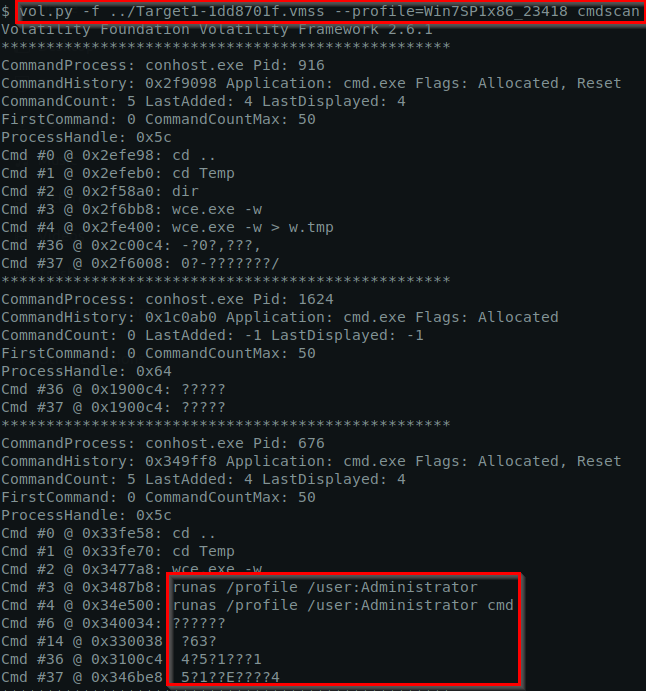
1
- How can I determine the login sessions?
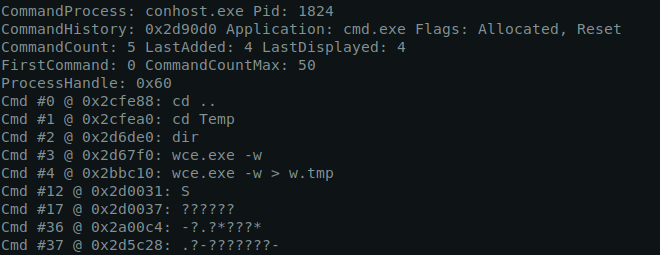
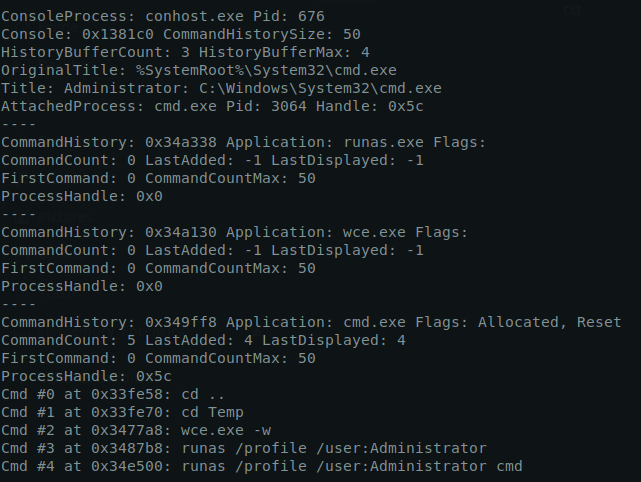
-> Checking with consoles to get the actions the attacker took with the terminal (cmd.exe):
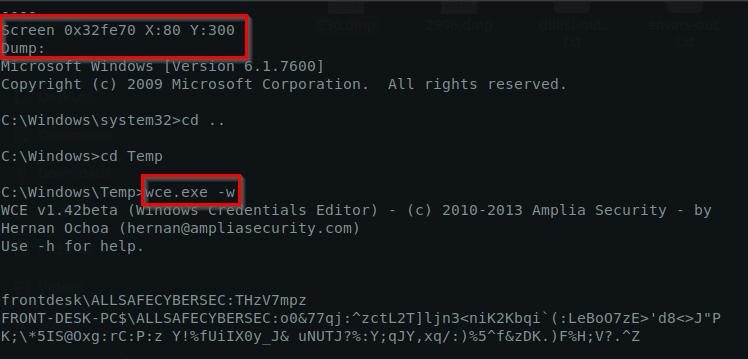
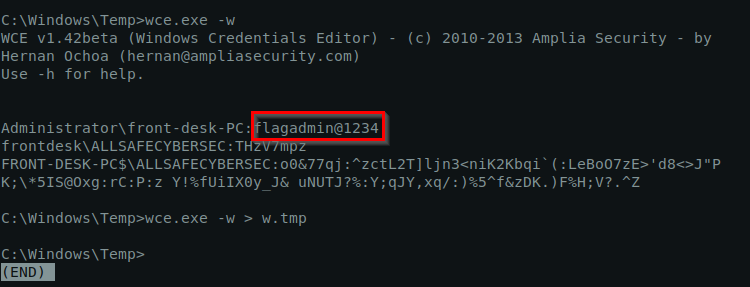
The login session seems to be initiated with the wce.exe process which is Windows Credentials Editor:
1
wce.exe -w
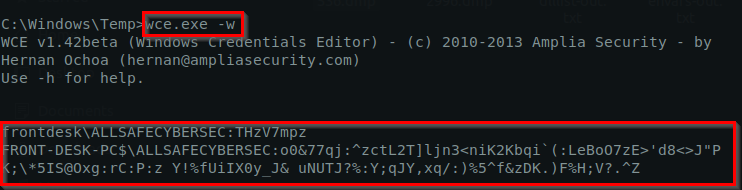
Showing the screen:
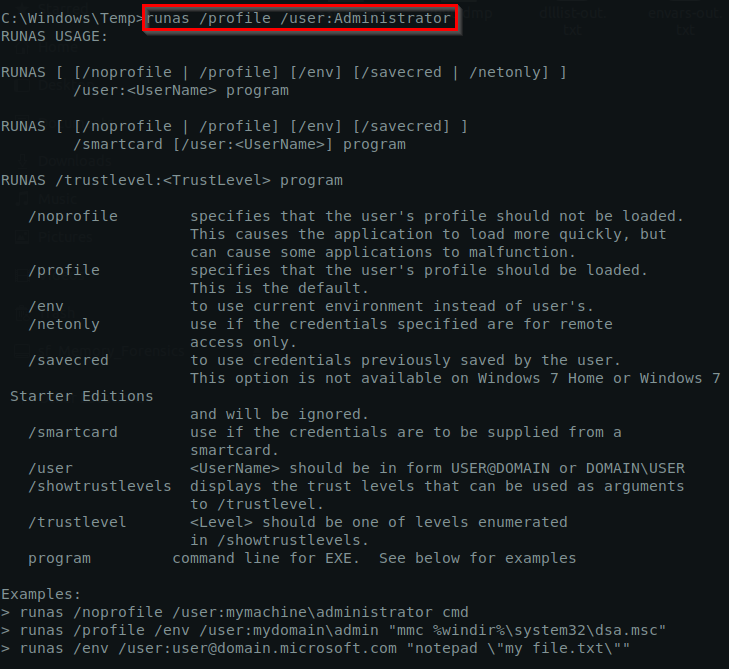
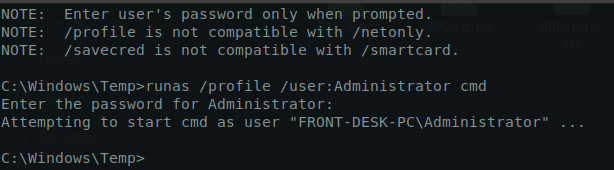
The password is being entered in here but it doesn’t show (which shouldn’t be):
Going to more important parts of the login process with wce.exe:
1
wce.exe -w
1
2
3
4
5
- This command dumps the plaintext credentials found in LSASS.exe process
- You need Admin level access on terminal(cmd)/PowerShell for this
- To extract data on LSASS.exe, you will need SYSTEM-level privileges
- What 'wce.exe -w' does is find the password inside the LSASS.exe process
- Note that in LSASS.exe, passwords are stored in plaintext in memory which can be taken advantage of programs like 'wce.exe'
Answer:
1
flagadmin@1234
Q11- Machine:Target1 What is thestd createdata timestamp for thenbtscan.exetool?1
- Basically, when was the nbtscan.exe tool copied by the attacker to C:\Windows\Temp directory in the victim machine?
What is nbtscan tool and its capabilities?
1
2
3
4
5
- 'Network Service Discovery' : for scanning IP networks
- "Network Sniffing" : can dump and print the whole packet in the network
- 'Remote System Discovery' : can list NetBIOS computer names
- 'System Network Configuration Discovery' : used to collect MAC addresses
- 'System Owner/User Discovery' : list active users on the system
First off, what is std create data timestamp? -> Its a metadata timestamp in NTFS that records the creation date and time of a file or directory on disk.
Four main timestamps in NTFS which is contained in STD data timestamp:
1
2
3
4
1) 'Creation time'
2) 'Modification time'
3) 'MFT Change time': When the metadata of the file or directory was last modified
4) 'Access Time'
Getting file timestamp with volatility:
1
vol.py -f ../Target1-1dd8701f.vmss --profile=Win7SP1x86_23418 timeliner | grep -i "nbtscan"

1
2
3
- Found one!
- Possible answer: 2015-10-09 10:45:12 => Does NOT work!
- This only shows the last time the nbtscan.exe tool was last executed but not the time it was created. We need "std CREATE" after all.
Trying mftparser:
1
vol.py -f ../Target1-1dd8701f.vmss --profile=Win7SP1x86_23418 mftparser
1
- We use mftparser when we're trying to get information from Memory that is possibly related to Disk
Example output:

1
- We need nbtscan.exe tool though
nbtscan tool file creation timestamp:

Answer:
1
2015-10-09 10:45:12 UTC
Q12- Machine:Target1 The attackers appear to have stored the output from thenbtscan.exetool in a text file on a disk callednbs.txt. What is the IP address of the first machine in that file?
1
vol.py -f ../Target1-1dd8701f.vmss --profile=Win7SP1x86_23418 mftparser > mftparse-out.txt
Method 1: For this one, we can use the same method which is getting the std create but for nbs.txt. Also, we can check the effects of network connection:
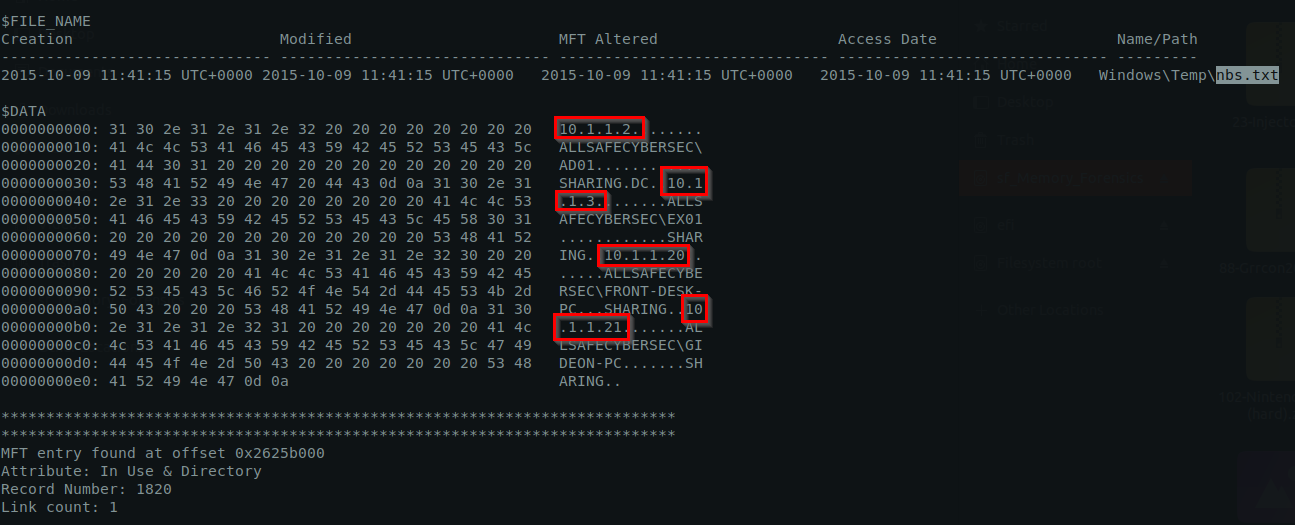
IP addresses shown:
1
2
3
4
- 10.1.1.2: AD01 (Active Directory)
- 10.1.1.3: Shared PC
- 10.1.1.20: Frontdesk''s PC
- 10.1.1.21: Gideon''s PC
Method 2: Checking the effects of the network connection
Answer:
1
10.1.1.2
Q13Machine:Target1 What is the full IP address and the port was the attacker’s malware using?
Answer:
1
180.76.254.120:22
Q14Machine:Target1 It appears the attacker also installed legit remote administration software. What is the name of the running process?
-> Look above.
1
TeamViewer.exe
Q15Machine:Target1 It appears the attackers also used a built-in remote access method. What IP address did they connect to?
Answer:
1
10.1.1.21
Extracting the malware injected from iexplore.exe: (To Be Added later after Dragos CTF)
-> Directory in PMAT lab containing the capa tool for measuring the malware’s capabilities:
1
C:\ProgramData\Microsoft\Windows\Start Menu\Programs\FLARE\Utilities
Command used for dumping the malware injected into iexplore.exe with PE-Sieve:
1
List of tools used by attackers at target1
Description as to how attackers used these tools:
1
2
3
4
5
6
7
8
9
10
11
12
13
14
15
16
17
18
19
20
21
22
23
24
25
26
27
28
29
30
31
32
33
34
35
36
37
38
39
40
41
42
43
- Rar.exe:

- wce.exe:

- TeamViewer.exe:

- nbtstat: used to troubleshoot NetBIOS name resolution
	-> 'System Network Configuration Discovery'(T1016) : can be used to discover local NetBIOS domain names
	-> 'System Network Connections Discovery'(T1049) : can be used to discover currenet NetBIOS sessions

- nbtscan:
	Possible use case:
	-> 'Network Service Discovery' : for scanning IP networks
	-> "Network Sniffing" : can dump and print the whole packet in the network
	-> 'Remote System Discovery' : can list NetBIOS computer names
	-> 'System Network Configuration Discovery' : used to collect MAC addresses
	-> 'System Owner/User Discovery' : list active users on the system

- runas:
	Possible usage from MITRE ATT&CK:
	-> 'Access Token Manipulation'
	-> 'Token Impersonation/Theft' => used by attacker in our case
	-> 'Create Process with Token'
	-> 'Make and Impersonate Token'

- AnyConnectInstaller.exe:

- Outlook.exe:

- msiexec.exe: (not sure yet what was being downloaded)

- cmd.exe/powershell.exe:

- iexplore.exe: (to download the malware + process injection)

- fsociety0.dat: used to create a single instance of the malware deployed

- 1.bat:

- a.bat:

- RDP (Remote Desktop Connect) : used for lateral movement
1
2
- Check which is a Native Windows binary and which is migrated by the attacker
- Is it possible to recover the contents of '1.bat' and fsociety0.dat?
Users that was utilized by the attacker:
1
2
3
4
5
6
- 'Frontdesk' : for initial access
- 'Administrator'
- 'SYSTEM'
- 'Gideon'
- 'Whiterose' : not sure if created by the attacker or not (it probably is)
- 'zerocool' : I think this was created by the attacker
List of Network information that might be useful
1
2
3
4
5
6
7
- 10.1.1.20 : frontdesk''s machine
- 180.76.254.120 : this is the IP address where the 1st stage malware was downloaded and executed
- xtremerat01.dydns.org : first DNS (tunneling probably/C2)
- xtremerat02.dydns.org : second DNS (tunneling probably/C2)
- xtremerat03.dydns.org : third DNS (tunneling probably/C2)
- 10.1.1.21 : Gideon''s machine (after lateral movement with RDP/Teamviewer?)
- 10.1.1.2 : this is the IP address inside the 'nbs.txt' created from the nbtscan.exe
Accounts
1
2
3
- frontdesk@allsafecybersec.com
- TH3WHIT3R0S3@gmail.com
-
TTP used by attacker (so far) [MITRE ATT&CK Navigator]
Goal: Identify the TTP (and other information inferred) used by attacker ONLY through the use of Volatility
1
- What else can we see by using volatility?
Reconnaissance:
1
- Phishing for information => Spearphishing link (T1598.003)
Resource Development:
1
2
3
- Compromise Accounts => Email Accounts (T1586.002)
- Develop Capabilities => Malware (T1587.001)
- Stage Capabilities => Upload Malware (T1608.001) => not so sure about this one
Initial Access:
1
2
3
4
5
- Phishing => Spearphishing link (T1566.002)
- Valid Accounts
					=> Default Accounts (T1078.001),
					=> Domain Accounts (T1078.002),
					=> Local Accounts (T1078.003)
Execution:
1
- User Execution => Malicious link (T1204.001)
Persistence:
1
2
3
4
5
6
- Boot or Logon Autostart Execution => Registry Run Keys / Startup Folder (T1547.001) => 'Not sure on this one'
- Hijack Execution Flow => DLL Side-Loading (T1574.002)
- Valid Accounts =>
					=> Default Accounts (T1078.001),
					=> Domain Accounts (T1078.002),
					=> Local Accounts (T1078.003)
Privilege Escalation:
1
2
3
4
5
6
7
- Access Token Manipulation => Token Impersonation/Theft (T1134.001)
- Boot or Logon Autostart Execution => Registry Run Keys / Startup Folder (T1547.001)
- Hijack Execution Flow => DLL Side-Loading (T1574.002) => 'Not sure on this one'
- Valid Accounts =>
					=> Default Accounts (T1078.001),
					=> Domain Accounts (T1078.002),
					=> Local Accounts (T1078.003)
Part 2: Gideon’s machine
Extracting general details about Gideon’s machine with the memory image using imageinfo:
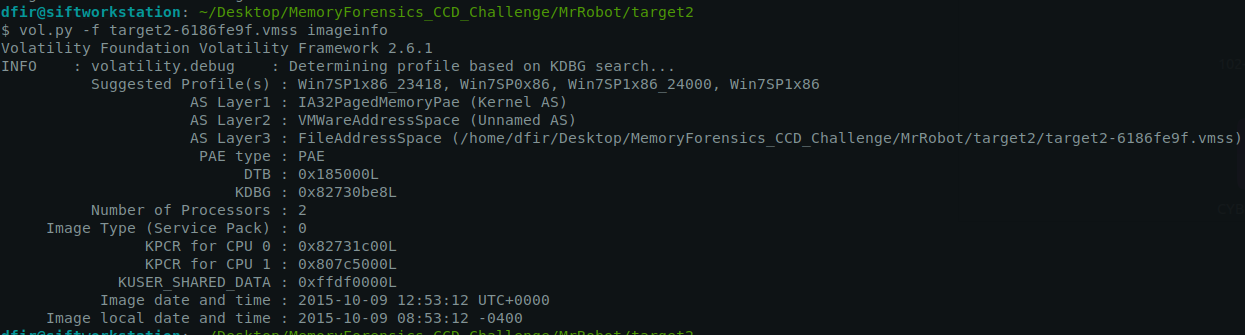
Profiles:
1
2
3
4
1) Win7SP1x86_23418
2) Win7SP0x86
3) Win7SP1x86_24000
4) Win7SP1x86
Kdbgscan:
1
vol.py -f target2-6186fe9f.vmss --profile=Win7SP1x86_23418 kdbgscan
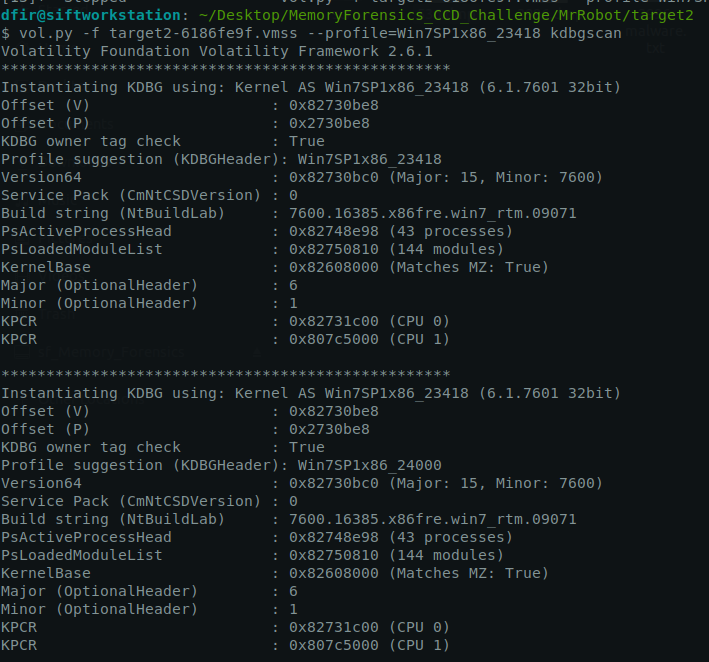
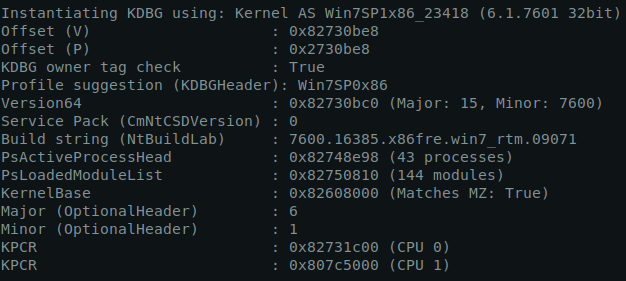
Important stuff:
1
2
3
- PsActiveProcessHead : 0x82748e98 (43 processes)
- Version64 : 0x82730bc0 (Major: 15, Minor: 7600)
- Build string (NtBuildLab) : 7600.16385.x86fre.win7_rtm.09071
Q16Machine:Target2 It appears the attacker moved latterly from the front desk machine to the security admins (Gideon) machine and dumped the passwords. What is Gideon’s password?
Listing all available processes in Gideon’s machine:
1
vol.py -f target2-6186fe9f.vmss --profile=Win7SP1x86_23418 pstree
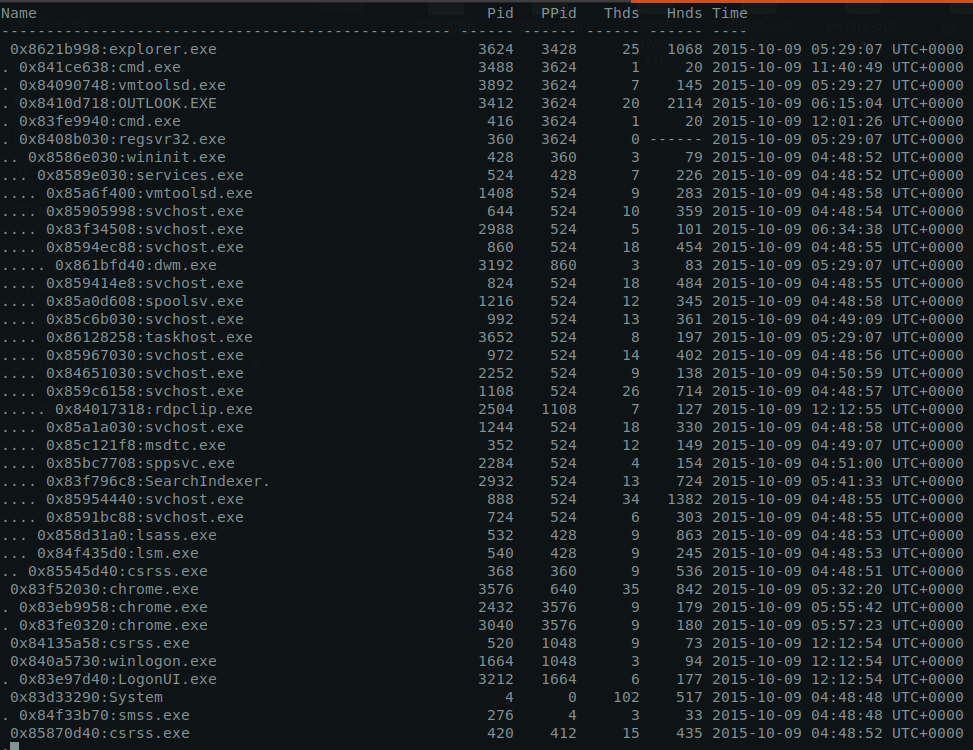

Process(es) to pay attention to:
1
2
3
4
- svchost.exe : specifically the one with PID=1108
- explorer.exe :
- winlogon.exe : spawns when a new login session including RDP is initiated
- rdpclip.exe (PID=2504) : notice that this is spawned by one of the svchost.exe. This facilitates clipboard sharing for RDP session and client.
Dumping the suspicious/malicious processes:
1
$ vol.py -f target2-6186fe9f.vmss --profile=Win7SP1x86_23418 memdump --dump-dir=./memdump/
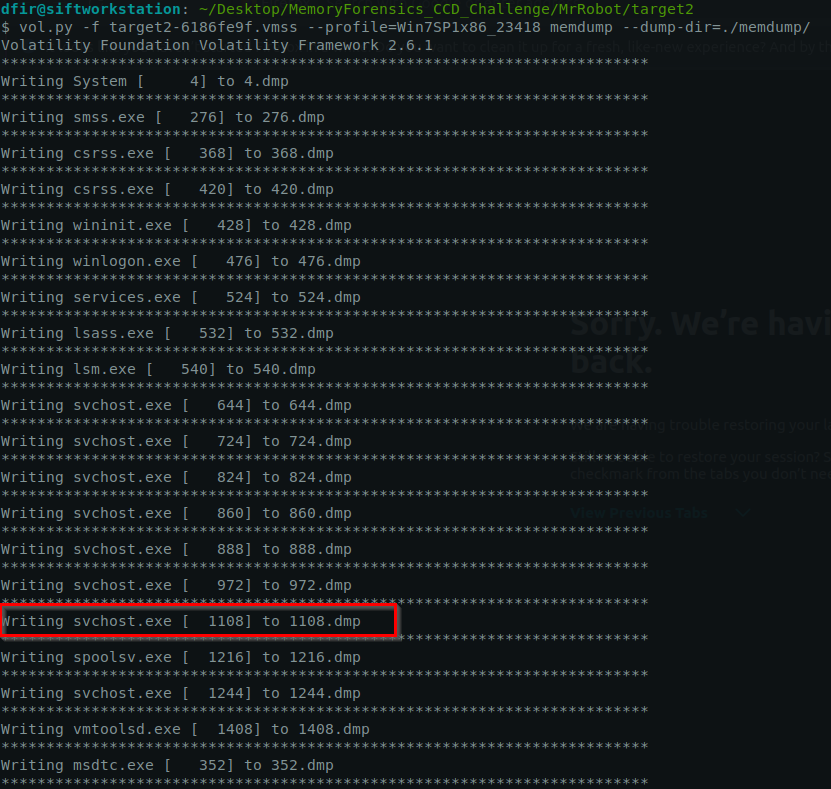
Here are the .dmp files ready for analysis:

1
2
3
- 1108.dmp (svchost.exe) that hosted the RDP process
- 2504.dmp (rdpclip.exe) that was used for copy and pasting on the host machine and the RDP session
- 1664.dmp (winlogon.exe) :  this is the process responsible to handling the authentication
Checking all commands executed in the console:
1
2
3
4
5
6
7
8
9
10
11
12
13
14
15
16
17
18
19
20
21
22
23
24
25
26
27
28
29
30
31
32
33
34
35
36
37
38
39
40
41
42
43
44
Volatility Foundation Volatility Framework 2.6.1
**************************************************
ConsoleProcess: conhost.exe Pid: 2888
Console: 0x4a81c0 CommandHistorySize: 50
HistoryBufferCount: 2 HistoryBufferMax: 4
OriginalTitle: %SystemRoot%\system32\cmd.exe
Title: C:\Windows\system32\cmd.exe
AttachedProcess: cmd.exe Pid: 3488 Handle: 0x60
----
CommandHistory: 0x2da180 Application: ipconfig.exe Flags:
CommandCount: 0 LastAdded: -1 LastDisplayed: -1
FirstCommand: 0 CommandCountMax: 50
ProcessHandle: 0x0
----
CommandHistory: 0x2d9ff0 Application: cmd.exe Flags: Allocated, Reset
CommandCount: 1 LastAdded: 0 LastDisplayed: 0
FirstCommand: 0 CommandCountMax: 50
ProcessHandle: 0x60
Cmd #0 at 0x2d77a0: ipconfig
----
Screen 0x2bfe68 X:80 Y:300
Dump:
Microsoft Windows [Version 6.1.7600]
Copyright (c) 2009 Microsoft Corporation.  All rights reserved.

C:\Users\gideon.ALLSAFECYBERSEC>ipconfig

Windows IP Configuration


Ethernet adapter Local Area Connection:

   Connection-specific DNS Suffix  . :
   IPv4 Address. . . . . . . . . . . : 10.1.1.21
   Subnet Mask . . . . . . . . . . . : 255.255.255.0
   Default Gateway . . . . . . . . . : 10.1.1.1

Tunnel adapter isatap.{AB3D4E7F-B62F-4398-A77C-057C31081A47}:

   Media State . . . . . . . . . . . : Media disconnected
   Connection-specific DNS Suffix  . :

C:\Users\gideon.ALLSAFECYBERSEC>
**************************************************
1
2
- The attacker checked the IP address of Gideon's machine (10.1.1.21)
- This was executed under the 'cmd.exe'
1
2
3
4
5
strings 1664.dmp > winlogon-strs.txt

Then sift through the lines that relates to user 'gideon'...

cat winlogon-strs.txt | grep -i "gideon"
Output:
1
2
3
4
5
6
7
8
9
10
11
12
13
14
15
16
17
18
19
20
21
22
23
24
25
26
27
28
29
30
31
32
33
34
35
36
37
38
39
40
41
42
43
44
45
46
47
48
49
50
51
52
53
54
55
56
57
58
59
60
61
62
63
64
65
66
67
68
69
70
71
72
73
74
75
76
77
78
79
80
81
82
83
84
85
86
87
88
89
90
91
92
93
94
95
96
97
98
99
100
101
102
103
104
105
106
107
108
109
110
111
112
113
114
115
116
117
118
119
120
121
122
123
124
125
126
127
128
129
130
131
132
133
134
135
136
137
138
139
140
141
142
143
144
145
146
147
148
149
150
151
152
<c:ContactIDCollection><c:ContactID c:ElementID="d8ee13ca-fc02-4ee8-bc47-11217c4f3443"><c:Value>6b5eb22e-572c-4c1b-a407-e0526d2cbcb1</c:Value></c:ContactID></c:ContactIDCollection><c:NameCollection><c:Name c:ElementID="6bca8bea-72af-4d14-8a6e-e60c6d86e887"><c:FormattedName>gideon</c:FormattedName></c:Name></c:NameCollection></c:contact>
! gideon-PC
GIDEON-PC
GIDEON-PC.allsafecybersec.local
GIDEON-PC
GIDEON-PC.allsafecybersec.local
GIDEON-PC.allsafecybersec.local
GIDEON~1.ALL
GIDEON-PC
<DisplayName>gideon</DisplayName>
safecybersec/ou=Exchange Administrative Group (FYDIBOHF23SPDLT)/cn=Recipients/cn=eb332b0fe51f4cc5a46e19ca46ff5d1c-gideon</LegacyDN>
<AutoDiscoverSMTPAddress>gideon@allsafecybersec.com</AutoDi
GIDEON-PC
GIDEON-PC
gideon-PC0
gideon-PC0
gideon
8ALLSAFECYBERSEC.LOCALhostgideon-pc.allsafecybersec.local0
GIDEON-PC
8ALLSAFECYBERSEC.LOCALhostgideon-pc.allsafecybersec.local
GIDEON-PC$
GIDEON-PC$
gideon-pc$
GIDEON-PC$
gideon-pc$@ALLSAFECYBERSEC.LOCAL
gideon-pc$@ALLSAFECYBERSEC.LOCAL
GIDEON-PC
gideon
gideon
GIDEON-PC
gideon
gideon
GIDEON-PC
GIDEON-PC
GIDEON-PC
GIDEON-PC
GIDEON-PC
GIDEON-PC
GIDEON-PC
GIDEON-PC
GIDEON-PC [
GIDEON-PC
gideon-PC.allsafecybersec.local
GIDEON-PC
GIDEON-PC
/o=allsafecybersec/ou=Exchange Administrative Group (FYDIBOHF23SPDLT)/cn=Recipients/cn=eb332b0fe51f4cc5a46e19ca46ff5d1c-gideon
GIDEON~1.ALL
GIDEON-PC
gideon-PC.allsafecybersec.local0
gideon-PC.allsafecybersec.local0
gideon-PC.allsafecybersec.local0
gideon-PC.allsafecybersec.local0
GIDEON-PC
1_gideon@allsafecybersec.local_AD
1_gideon@allsafecybersec.local_AD_state
1_gideon@allsafecybersec.local_AD_roamed
1_gideon@allsafecybersec.local_AD_external
\\GIDEON-PC\root\cimv2:Win32_NetworkAdapter.DeviceID="0"
\\GIDEON-PC\root\cimv2:Win32_NetworkAdapterConfiguration.Index=0
gideon-PC.allsafecybersec.local0
gideon-PC.allsafecybersec.local0
/o=allsafecybersec/ou=Exchange Administrative Group (FYDIBOHF23SPDLT)/cn=Recipients/cn=eb332b0fe51f4cc5a46e19ca46ff5d1c-gideon
\\GIDEON-PC\root\cimv2:Win32_NetworkAdapter.DeviceID="0"
\\GIDEON-PC\root\cimv2:Win32_NetworkAdapterConfiguration.Index=0
GIDEON-PC
GIDEON-PC
/o=allsafecybersec/ou=Exchange Administrative Group (FYDIBOHF23SPDLT)/cn=Recipients/cn=eb332b0fe51f4cc5a46e19ca46ff5d1c-gideon
gideon-PC.allsafecybersec.local0
gideon-PC.allsafecybersec.local0
C:\Users\gideon.ALLSAFECYBERSEC\AppData\Roaming\Microsoft\Windows\Start Menu\Programs\Microsoft Office 2013\Office 2013 Tools\Telemetry Dashboard for Office 2013.lnkl
C:\Users\gideon.ALLSAFECYBERSEC\AppData\Roaming\Microsoft\Windows\Start Menu\Programs\Microsoft Office 2013\Office 2013 Tools\Telemetry Log for Office 2013.lnk
/o=allsafecybersec/ou=Exchange Administrative Group (FYDIBOHF23SPDLT)/cn=Recipients/cn=eb332b0fe51f4cc5a46e19ca46ff5d1c-gideon
2_gideon@allsafecybersec.local_AD
2_gideon@allsafecybersec.local_AD_state
2_gideon@allsafecybersec.local_AD_roamed
2_gideon@allsafecybersec.local_AD_external
gideon@allsafecybersec.local_AD
GIDEON@ALLSAFECYBERSEC.LOCAL_AD
C:\Users\gideon.ALLSAFECYBERSEC\AppData\Roaming\Microsoft\Windows\Start Menu\Programs\Microsoft Office 2013\SkyDrive Pro 2013.lnkgideon.
ogC:\Users\gideon.ALLSAFECYBERSEC\AppData\Roaming\Microsoft\Windows\Start Menu\Programs\Microsoft Office 2013\Send to OneNote 2013.lnk p
C:\Users\gideon.ALLSAFECYBERSEC\AppData\Roaming\Microsoft\Windows\Start Menu\Programs\Microsoft Office 2013\Word 2013.lnkools\Of@
C:\Users\gideon.ALLSAFECYBERSEC\AppData\Roaming\Microsoft\Windows\Start Menu\Programs\Microsoft Office 2013\Office 2013 Tools\Office 2013 Language Preferences.lnkces.ln
/o=allsafecybersec/ou=Exchange Administrative Group (FYDIBOHF23SPDLT)/cn=Recipients/cn=eb332b0fe51f4cc5a46e19ca46ff5d1c-gideon
\\GIDEON-PC\root\cimv2:Win32_NetworkAdapter.DeviceID="0"
\\GIDEON-PC\root\cimv2:Win32_NetworkAdapterConfiguration.Index=0
gideon
a\C:\Users\gideon.ALLSAFECYBERSEC\AppD
gideon-PC.allsafecybersec.local0
gideon-PC.allsafecybersec.local0
C:\Users\gideon.ALLSAFECYBERSEC\AppD
ormation about how to contact PSS, see C:\Users\GIDEON~1.ALL\AppData\Local\Temp\Setup00000f58\PSS10R.CHM.
</o:shapelayout></xml><![endif]--></head><body lang=EN-US link="#0563C1" vlink="#954F72"><div class=WordSection1><p class=MsoNormal>PoS Team:<o:p></o:p></p><p class=MsoNormal><o:p> </o:p></p><p class=MsoNormal>Please install this update ASAP, it is critical in order to keep our business operations running!<o:p></o:p></p><p class=MsoNormal><o:p> </o:p></p><p class=MsoNormal>http://54.84.237.92/allsafe_update.exe<o:p></o:p></p><p class=MsoNormal><o:p> </o:p></p><p class=MsoNormal>Thanks,<o:p></o:p></p><p class=MsoNormal>Gideon<o:p></o:p></p></div></body></html>
C:\Users\gideon.ALLSAFECYBERSEC\Favorites\Links for United States\USA.gov.url
gideon@allsafecybersec.local_AD
<DisplayName>gideon</DisplayName>
<LegacyDN>/o=allsafecybersec/ou=Exchange Administrative Group (FYDIBOHF23SPDLT)/cn=Recipients/cn=eb332b0fe51f4cc5a46e19ca46ff5d1c-gideon</LegacyDN>
<AutoDiscoverSMTPAddress>gideon@allsafecybersec.com</AutoDi
gideon
t C:\Users\gideon.ALLSAFECYBERSEC\AppData\Roaming\Microsoft\Windows\Start Menu\Programs\Microsoft Office 2013\Excel 2013.lnk
C:\Users\gideon.ALLSAFECYBERSEC\AppData\Roaming\Microsoft\Windows\Start Menu\Programs\Microsoft Office 2013\OneNote 2013.lnkD
C:\Users\gideon.ALLSAFECYBERSEC\AppData\Roaming\Microsoft\Windows\Start Menu\Programs\Microsoft Office 2013\PowerPoint 2013.lnks
C:\Users\gideon.ALLSAFECYBERSEC\AppData\Roaming\Microsoft\Windows\Start Menu\Programs\Microsoft Office 2013\Publisher 2013.lnkrs
C:\Users\gideon.ALLSAFECYBERSEC\AppData\Local\Microsoft\Outlook\gideon@allsafecybersec.com.ost
C:\Users\gideon.ALLSAFECYBERSEC\AppData\Roaming\Microsoft\Windows\Start Menu\Programs\Microsoft Office 2013\SkyDrive Pro 2013.lnkgideon.
ogC:\Users\gideon.ALLSAFECYBERSEC\AppData\Roaming\Microsoft\Windows\Start Menu\Programs\Microsoft Office 2013\Send to OneNote 2013.lnk p
C:\Users\gideon.ALLSAFECYBERSEC\AppData\Roaming\Microsoft\Windows\Start Menu\Programs\Microsoft Office 2013\Word 2013.lnkools\Of@
C:\Users\gideon.ALLSAFECYBERSEC\AppData\Roaming\Microsoft\Windows\Start Menu\Programs\Microsoft Office 2013\Office 2013 Tools\Office 2013 Language Preferences.lnkces.ln
gideon@allsafecybersec.local_AD
vSC:\Users\gideon.ALLSAFECYBERSEC\AppData\Roaming\Microsoft\Internet Explorer\Quick Launch\User Pinned\TaskBar\Google Chrome.lnk
C:\Users\gideon.ALLSAFECYBERSEC\Favorites\Links for United States\GobiernoUSA.gov.url
/O=ALLSAFECYBERSEC/OU=EXCHANGE ADMINISTRATIVE GROUP (FYDIBOHF23SPDLT)/CN=RECIPIENTS/CN=EB332B0FE51F4CC5A46E19CA46FF5D1C-GIDEON
/o=allsafecybersec/ou=Exchange Administrative Group (FYDIBOHF23SPDLT)/cn=Recipients/cn=eb332b0fe51f4cc5a46e19ca46ff5d1c-gideon
gideon@allsafecybersec.com
/o=allsafecybersec/ou=Exchange Administrative Group (FYDIBOHF23SPDLT)/cn=Recipients/cn=eb332b0fe51f4cc5a46e19ca46ff5d1c-gideon
/O=ALLSAFECYBERSEC/OU=EXCHANGE ADMINISTRATIVE GROUP (FYDIBOHF23SPDLT)/CN=RECIPIENTS/CN=EB332B0FE51F4CC5A46E19CA46FF5D1C-GIDEON
/o=allsafecybersec/ou=Exchange Administrative Group (FYDIBOHF23SPDLT)/cn=Recipients/cn=eb332b0fe51f4cc5a46e19ca46ff5d1c-gideon
C:\Users\gideon.ALLSAFECYBERSEC\AppData\Local\Microsoft\Outlook\gideon@allsafecybersec.com.ost
2015/10/09-02:35:23.669 812 Reusing MANIFEST C:\Users\gideon.ALLSAFECYBERSEC\AppData\Local\Google\Chrome\User Data\Default\IndexedDB\https_www.google.com_0.indexeddb.leveldb/MANIFEST-000001
2015/10/09-02:35:23.670 812 Reusing old log C:\Users\gideon.ALLSAFECYBERSEC\AppData\Local\Google\Chrome\User Data\Default\IndexedDB\https_www.google.com_0.indexeddb.leveldb/000003.log
N~1.ALL\AppData\Local\Temp\CR_16642.tmp\setup.exe" --install-archive="C:\Users\GIDEON~1.ALL\AppData\Local\Temp\CR_16642.tmp\CHROME.PACKED.7Z" --multi-install --chrome --verbose-logging --do-not-launch-chrome --system-level /installerdata="C:\Windows\TEMP\gui4CD8.tmp"
C:\Users\gideon.ALLSAFECYBERSEC\AppData\Roaming\Microsoft\Windows\Start Menu\Programs\Microsoft Office 2013\Office 2013 Tools\Office 2013 Upload Center.lnke 201
GIDEON-PC
C:\Users\gideon.ALLSAFECYBERSEC\AppData\Local\Microsoft\Outlook\gideon@allsafecybersec.com.ost
/o=allsafecybersec/ou=Exchange Administrative Group (FYDIBOHF23SPDLT)/cn=Recipients/cn=eb332b0fe51f4cc5a46e19ca46ff5d1c-gideon
Cookie: mstshash=gideon
C:\Users\gideon.ALLSAFECYBERSEC\AppData\Roaming\Microsoft\Windows\Start Menu\Programs\Microsoft Office 2013\Publisher 2013.lnkrs
C:\Users\gideon.ALLSAFECYBERSEC\AppData\Roaming\Microsoft\Internet Explorer\Quick Launch\User Pinned\TaskBar\Internet Explorer.lnk
gideon-pc
C:\Users\gideon.ALLSAFECYBERSEC\AppData\Roaming\Microsoft\Internet Explorer\Quick Launch\User Pinned\TaskBar\Windows Explorer.lnk
gideon-pc
C:\Users\gideon.ALLSAFECYBERSEC\AppData\Roaming\Microsoft\Internet Explorer\Quick Launch\User Pinned\TaskBar\Windows Media Player.lnk
gideon-pc
C:\Users\gideon.ALLSAFECYBERSEC\AppData\Roaming\Microsoft\Internet Explorer\Quick Launch\User Pinned\TaskBar\Google Chrome.lnk
gideon-pc
C:\Users\gideon\Desktop
gideon-pc
<c:ContactIDCollection><c:ContactID c:ElementID="7d7818d0-1305-4a6a-ac1b-c895cea92660"><c:Value>f3686722-9ad5-4b01-91ac-b27837417915</c:Value></c:ContactID></c:ContactIDCollection><c:NameCollection><c:Name c:ElementID="fbc84359-df72-446c-9266-541f1d874bb1"><c:FormattedName>gideon</c:FormattedName></c:Name></c:NameCollection></c:contact>
t C:\Users\gideon.ALLSAFECYBERSEC\AppData\Roaming\Microsoft\Windows\Start Menu\Programs\Microsoft Office 2013\Excel 2013.lnk
C:\Users\gideon.ALLSAFECYBERSEC\AppData\Roaming\Microsoft\Windows\Start Menu\Programs\Microsoft Office 2013\OneNote 2013.lnkD
C:\Users\gideon.ALLSAFECYBERSEC\AppData\Roaming\Microsoft\Windows\Start Menu\Programs\Microsoft Office 2013\PowerPoint 2013.lnks
C:\Users\gideon.ALLSAFECYBERSEC\AppData\Roaming\Microsoft\Windows\Start Menu\Programs\Microsoft Office 2013\Publisher 2013.lnkrs
gideon
10/09/2015 00:45:16:654 NetpValidateName: checking to see if 'GIDEON-PC' is valid as type 1 name
10/09/2015 00:45:16:701 NetpCheckNetBiosNameNotInUse for 'GIDEON-PC' [MACHINE] returned 0x0
10/09/2015 00:45:16:701 NetpValidateName: name 'GIDEON-PC' is valid for type 1
10/09/2015 00:45:16:748 NetpValidateName: checking to see if 'gideon-PC' is valid as type 5 name
10/09/2015 00:45:16:748 NetpValidateName: name 'gideon-PC' is valid for type 5
gideon\ALLSAFECYBERSEC:t76fRJhS
GIDEON-PC$\ALLSAFECYBERSEC:s9O3t%sd1q>:u5Za8Xrx_3Eg;(\qapu<"Rn$#QQJlsD m#;z2hbJkr*tLe>0)F[S)'USh3BKJILn3-?vt]q=s-Cp.ws9wVik[]5?#F\*l/J19+`PYco:au;T
cmd.exe /c wce.exe -w > c:\Users\gideon\w.tmp
2015/10/09-01:57:12.699 812 Reusing MANIFEST C:\Users\gideon.ALLSAFECYBERSEC\AppData\Local\Google\Chrome\User Data\Default\IndexedDB\https_www.google.com_0.indexeddb.leveldb/MANIFEST-000001
2015/10/09-01:57:12.700 812 Reusing old log C:\Users\gideon.ALLSAFECYBERSEC\AppData\Local\Google\Chrome\User Data\Default\IndexedDB\https_www.google.com_0.indexeddb.leveldb/000003.log
Important stuff to take note of:
1
2
3
4
5
6
7
8
9
10
11
12
- gideon\ALLSAFECYBERSEC:t76fRJhS => Gideon''s credentials
- GIDEON-PC$\ALLSAFECYBERSEC:s9O3t%sd1q>:u5Za8Xrx_3Eg;(\qapu<"Rn$#QQJlsD m#;z2hbJkr*tLe>0)F[S)'USh3BKJILn3-?vt]q=s-Cp.ws9wVik[]5?#F\*l/J19+`PYco:au;T => Gideon's hash?
- Update Message:
Information about how to contact PSS, see C:\Users\GIDEON~1.ALL\AppData\Local\Temp\Setup00000f58\PSS10R.CHM.
</o:shapelayout></xml><![endif]--></head><body lang=EN-US link="#0563C1" vlink="#954F72"><div class=WordSection1><p class=MsoNormal>PoS Team:<o:p></o:p></p><p class=MsoNormal><o:p> </o:p></p><p class=MsoNormal>Please install this update ASAP, it is critical in order to keep our business operations running!<o:p></o:p></p><p class=MsoNormal><o:p> </o:p></p><p class=MsoNormal>http://54.84.237.92/allsafe_update.exe<o:p></o:p></p><p class=MsoNormal><o:p> </o:p></p><p class=MsoNormal>Thanks,<o:p></o:p></p><p class=MsoNormal>Gideon<o:p></o:p></p></div></body></html>
=> IP address and file that could be used as IOC: http://54.84.237.92/allsafe_update.exe
- Gideon's email address: gideon@allsafecybersec.com
Answer:
1
t76fRJhS
Q17Machine:Target2 Once the attacker gained access to “Gideon,” they pivoted to the AllSafeCyberSec domain controller to steal files. It appears they were successful. What password did they use?
1
2
3
4
5
6
7
8
9
10
11
12
13
14
15
16
17
18
19
20
21
22
23
24
25
26
27
28
29
30
31
32
33
34
35
36
37
38
39
40
41
42
43
44
45
46
47
ConsoleProcess: conhost.exe Pid: 3048
Console: 0x4a81c0 CommandHistorySize: 50
HistoryBufferCount: 4 HistoryBufferMax: 4
OriginalTitle: Command Prompt
Title: Administrator: Command Prompt
AttachedProcess: cmd.exe Pid: 416 Handle: 0x60
----
CommandHistory: 0xea408 Application: Rar.exe Flags:
CommandCount: 0 LastAdded: -1 LastDisplayed: -1
FirstCommand: 0 CommandCountMax: 50
ProcessHandle: 0x0
----
CommandHistory: 0xea5f8 Application: net.exe Flags:
CommandCount: 0 LastAdded: -1 LastDisplayed: -1
FirstCommand: 0 CommandCountMax: 50
ProcessHandle: 0x0
----
CommandHistory: 0xea500 Application: whoami.exe Flags:
CommandCount: 0 LastAdded: -1 LastDisplayed: -1
FirstCommand: 0 CommandCountMax: 50
ProcessHandle: 0x0
----
CommandHistory: 0xe9198 Application: cmd.exe Flags: Allocated, Reset
CommandCount: 18 LastAdded: 17 LastDisplayed: 17
FirstCommand: 0 CommandCountMax: 50
ProcessHandle: 0x60
Cmd #0 at 0xe6030: cd C:\Users
Cmd #1 at 0xe6ea8: dir
Cmd #2 at 0xee3d0: wce.exe -w > gideon/w.tmp
Cmd #3 at 0xe0170: who ami
Cmd #4 at 0xe0188: whoami
Cmd #5 at 0xea3c8: net use z: \\10.1.1.2\c$
Cmd #6 at 0xe01b8: cd z:
Cmd #7 at 0xe6ed8: dir
Cmd #8 at 0xe6070: cd gideon
Cmd #9 at 0xe6ef8: dir
Cmd #10 at 0xe6f08: z:
Cmd #11 at 0xe6f18: dir
Cmd #12 at 0xf2418: copy c:\users\gideon\rar.exe z:\crownjewels
Cmd #13 at 0xe0cb8: cd crownjewels
Cmd #14 at 0xe6f28: dir
Cmd #15 at 0xe6f38: rar
Cmd #16 at 0xf2478: rar crownjewlez.rar *.txt -hp123qwe!@#
Cmd #17 at 0xf24d0: rar a -hp123!@#qwe crownjewlez.rar *.txt
----
Screen 0xd0038 X:80 Y:300
Dump:
1
- The attacker added a shared drive 'Z:\' mapped from '10.1.1.2\c$' to copy the 'rar.exe' from Gideon's machine and copy it to 'crownjewels' directory on the shared drive. We can say that this is the intellectual property of the company to be compressed/encrypted with RAR
Commands breakdown:
1
2
3
4
5
6
7
8
9
10
11
12
13
14
15
16
17
18
19
20
21
rar crownjewlez.rar *.txt -hp123qwe!@#

-> Uses the 'rar' tool to create a RAR archive with a password.
	- 'rar' : the command utility used for creating and managing RAR archives
	- 'crownjewlez.rar' : This is the name of the output RAR file that will be created. Replace the '<file>' with your desired archie name
	- '*.txt' : this specifies that all '.txt' files in the current directory will be added to the RAR archive.
	- 'hp123qwe!@#' : this option specifies that the RAR fil should be 'password-protected' with '123qwe!@#'. The '-hp' flag stands for 'hide password', which encrypts both the file contents and the file names inside the archive.

Summary:
This command creates a RAR archive called 'crownjewlez.rar' containing all '.txt' files in the directory. The archive is password-protected with the password '123qwe!@#', and both the contents and names of the files inside the archive are encrypted.


rar a -hp123!@#qwe crownjewlez.rar *.txt

-> Uses 'rar' utility, but with a slightly different syntax
	- 'rar' : the command utility used for creating and managing RAR archives
	- 'a' : This stands for 'add', indicating the files will be added to the RAR archive
	- '-hp123!@#qwe' : This flag indicates that the archive shold be 'password-protected' with the password '123!@#qwe'. As with the previous command, the '-hp' option hides the password and encrypts both the files and their names.
	- 'crownjewlez.rar' : This is the name of the RAR file to which the '..txt' files will be added. If this file does NOT exist, it will be created. This is the name of the file to be exfiltrated
	- '*.txt' : This specifies that all '.txt' files in the current directory will be added to the RAR archive.
Answer:
1
hp123qwe!@#
Q18Machine:Target2 What was the name of the RAR file created by the attackers?
Look above.
Answer:
1
crownjewlez.rar
Q19Machine:Target2 How many files did the attacker add to the RAR archive?
Modules to use:
cmdscancmdlineshellbags: used this to see the binary used to do the task forcopycommand (Robocopy.exe)
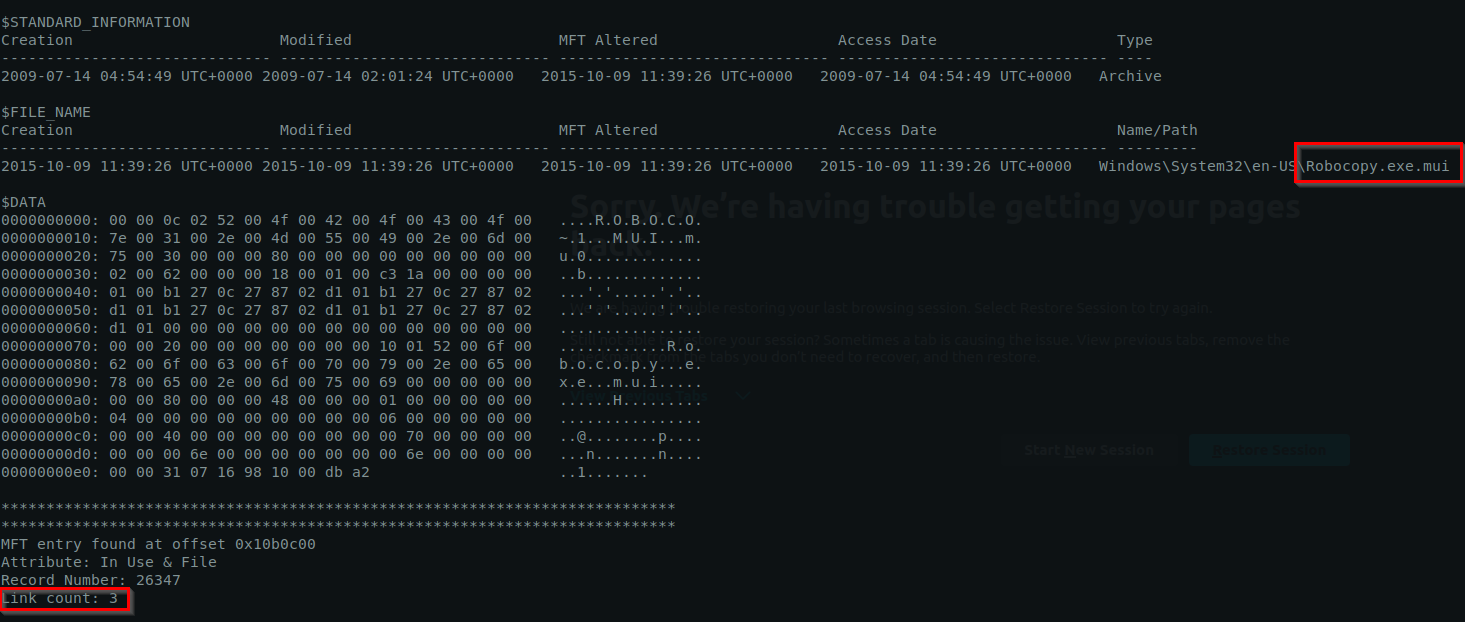
Answer:
1
3
Q20Machine:Target2 The attacker appears to have created a scheduled task on Gideon’s machine. What is the name of the file associated with the scheduled task?
How would I know if a file is being used for schedule task?

1
- There's a .bat file but not sure if this is scheduled.
Check the hives for Gideon’s machine:
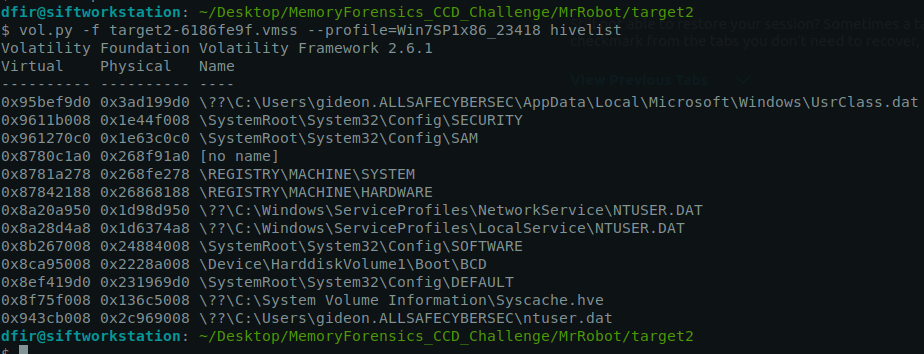
1
vol.py -f target2-6186fe9f.vmss --profile=Win7SP1x86_23418 printkey -o 0x8b267008 -K SOFTWARE\\Microsoft\\Windows NT\\CurrentVersion\\Schedule\\TaskCache
1
- No output for this one.
- I tried
filescan, but it doesnt have any way to tell if its a scheduled task. The directoryC:\Windows\System32\Taskscontains all of the scheduled tasks:
1
2
3
4
5
6
7
8
9
10
11
12
13
14
15
16
17
18
19
20
21
22
23
24
25
26
27
28
29
30
31
32
33
34
35
36
37
38
39
40
41
42
43
44
45
46
47
48
49
50
51
52
53
54
55
56
57
58
59
60
61
62
63
64
65
66
67
68
69
70
71
72
73
74
75
76
77
78
79
80
81
82
83
84
85
86
87
88
89
90
91
92
93
94
95
cat filescan-out.txt | grep -i "Tasks"

0x000000003d86af80      2      0 R--r-d \Device\HarddiskVolume2\Windows\System32\Tasks\Microsoft\Windows\WindowsColorSystem\Calibration Loader
0x000000003d8a5d58      2      0 R--r-d \Device\HarddiskVolume2\Windows\System32\Tasks\Microsoft\Windows\Task Manager\Interactive
0x000000003db79318      2      0 R--r-d \Device\HarddiskVolume2\Windows\System32\Tasks\Microsoft\Windows\Media Center\PBDADiscoveryW2
0x000000003dddb160      2      0 R--r-d \Device\HarddiskVolume2\Windows\System32\Tasks\Microsoft\Windows\Media Center\mcupdate
0x000000003dddb6a0      8      0 R--r-d \Device\HarddiskVolume2\Windows\System32\Tasks\GoogleUpdateTaskMachineUA
0x000000003decdda0      2      0 R--r-d \Device\HarddiskVolume2\Windows\System32\Tasks\Microsoft\Windows\SideShow\SessionAgent
0x000000003e00d270      1      1 RW-r-- \Device\HarddiskVolume2\Windows\System32\winevt\Logs\Microsoft-Windows-TaskScheduler%4Operational.evtx
0x000000003e022998      2      0 R--r-d \Device\HarddiskVolume2\Windows\System32\Tasks\Microsoft\Windows\Media Center\ReindexSearchRoot
0x000000003e037340      2      0 R--r-d \Device\HarddiskVolume2\Windows\System32\Tasks\Microsoft\Windows\Media Center\PvrScheduleTask
0x000000003e077c20      8      0 R--r-d \Device\HarddiskVolume2\Windows\System32\Tasks\Microsoft\Windows\CertificateServicesClient\UserTask-Roam
0x000000003e08d820      2      0 R--r-d \Device\HarddiskVolume2\Windows\System32\Tasks\Microsoft\Windows\Multimedia\SystemSoundsService
0x000000003e0ae7a8      2      0 R--r-d \Device\HarddiskVolume2\Windows\System32\Tasks\Microsoft\Windows\PerfTrack\BackgroundConfigSurveyor
0x000000003e15ebb0      2      0 R--r-d \Device\HarddiskVolume2\Windows\System32\Tasks\Microsoft\Windows\MemoryDiagnostic\DecompressionFailureDetector
0x000000003e165f80      2      0 R--r-d \Device\HarddiskVolume2\Windows\System32\Tasks\Microsoft\Windows\Autochk\Proxy
0x000000003e16b428      2      0 R--r-d \Device\HarddiskVolume2\Windows\System32\Tasks\Microsoft\Windows\Time Synchronization\SynchronizeTime
0x000000003e193320      2      0 R--r-d \Device\HarddiskVolume2\Windows\System32\Tasks\Microsoft\Windows\Active Directory Rights Management Services Client\AD RMS Rights Policy Template Management (Manual)
0x000000003e347488      2      0 R--r-d \Device\HarddiskVolume2\Windows\System32\Tasks\Microsoft\Windows\Windows Filtering Platform\BfeOnServiceStartTypeChange
0x000000003e367bf0      2      0 R--r-d \Device\HarddiskVolume2\Windows\System32\Tasks\Microsoft\Windows\Windows Error Reporting\QueueReporting
0x000000003e3b5b40      8      0 R--r-d \Device\HarddiskVolume2\Windows\System32\taskschd.dll
0x000000003e3fd798      9      1 RW-r-- \Device\HarddiskVolume2\Windows\Tasks\SCHEDLGU.TXT
0x000000003e3fe420      2      0 R--r-d \Device\HarddiskVolume2\Windows\System32\Tasks\Microsoft\Windows Defender\MP Scheduled Scan
0x000000003e3ffe20      2      1 R--rw- \Device\HarddiskVolume2\Windows\Tasks
0x000000003ec30448      2      0 R--r-d \Device\HarddiskVolume2\Windows\System32\Tasks\Microsoft\Windows\Application Experience\ProgramDataUpdater
0x000000003edad5c0      2      0 R--r-d \Device\HarddiskVolume2\Windows\System32\Tasks\Microsoft\Windows\Media Center\PBDADiscoveryW1
0x000000003f06ce28      2      0 R--r-d \Device\HarddiskVolume2\Windows\System32\Tasks\Microsoft\Windows\NetTrace\GatherNetworkInfo
0x000000003f4029e0      8      0 R--rwd \Device\HarddiskVolume2\Windows\System32\Tasks\Microsoft\Windows\RAC\RacTask
0x000000003f42c498      2      0 R--r-d \Device\HarddiskVolume2\Windows\System32\Tasks\Microsoft\Office\Office 15 Subscription Heartbeat
0x000000003f4506a8      2      0 R--r-d \Device\HarddiskVolume2\Windows\System32\Tasks\Microsoft\Windows\AppID\PolicyConverter
0x000000003fa00278      2      0 R--r-d \Device\HarddiskVolume2\Windows\System32\Tasks\Microsoft\Windows\SideShow\SystemDataProviders
0x000000003fa0c658      2      0 R--r-d \Device\HarddiskVolume2\Windows\System32\Tasks\Microsoft\Windows\Customer Experience Improvement Program\Consolidator
0x000000003fa43d60      2      0 R--r-d \Device\HarddiskVolume2\Windows\System32\Tasks\Microsoft\Windows\Shell\WindowsParentalControls
0x000000003fa45af8      8      0 R--r-d \Device\HarddiskVolume2\Windows\System32\Tasks\Microsoft\Windows\Offline Files\Background Synchronization
0x000000003fa7f2c0      2      0 R--r-d \Device\HarddiskVolume2\Windows\System32\Tasks\Microsoft\Windows\WDI\ResolutionHost
0x000000003fa803a0      2      0 R--r-d \Device\HarddiskVolume2\Windows\System32\Tasks\Microsoft\Windows\Media Center\RegisterSearch
0x000000003fa98510      2      0 R--r-d \Device\HarddiskVolume2\Windows\System32\Tasks\Microsoft\Windows\Media Center\DispatchRecoveryTasks
0x000000003faa4398      2      0 R--r-d \Device\HarddiskVolume2\Windows\System32\Tasks\Microsoft\Windows\DiskDiagnostic\Microsoft-Windows-DiskDiagnosticResolver
0x000000003faa6758      2      0 R--r-d \Device\HarddiskVolume2\Windows\System32\Tasks\Microsoft\Windows\MobilePC\HotStart
0x000000003fac7f80      2      0 R--r-d \Device\HarddiskVolume2\Windows\System32\Tasks\Microsoft\Windows\Shell\WindowsParentalControlsMigration
0x000000003fae5ef0      2      0 R--r-d \Device\HarddiskVolume2\Windows\System32\Tasks\Microsoft\Windows\SystemRestore\SR
0x000000003fae6480      2      0 R--r-d \Device\HarddiskVolume2\Windows\System32\Tasks\Microsoft\Windows\Application Experience\AitAgent
0x000000003faeaeb8      2      0 R--r-d \Device\HarddiskVolume2\Windows\System32\Tasks\Microsoft\Windows\Windows Media Sharing\UpdateLibrary
0x000000003faf0ba0      2      0 R--r-d \Device\HarddiskVolume2\Windows\System32\Tasks\Microsoft\Windows\Maintenance\WinSAT
0x000000003fafbc40      2      0 R--r-d \Device\HarddiskVolume2\Windows\System32\Tasks\Microsoft\Windows\Tcpip\IpAddressConflict2
0x000000003fb007e8      8      0 R--r-d \Device\HarddiskVolume2\Windows\System32\Tasks\Microsoft\Windows\Active Directory Rights Management Services Client\AD RMS Rights Policy Template Management (Automated)
0x000000003fb10408      2      0 R--r-d \Device\HarddiskVolume2\Windows\System32\Tasks\Microsoft\Windows\CertificateServicesClient\UserTask
0x000000003fb166e8      8      0 R--rwd \Device\HarddiskVolume2\Windows\System32\taskschd.dll
0x000000003fb21e88      2      0 R--r-d \Device\HarddiskVolume2\Windows\System32\Tasks\Microsoft\Windows\TextServicesFramework\MsCtfMonitor
0x000000003fb37bc0      2      0 R--r-d \Device\HarddiskVolume2\Windows\System32\Tasks\Microsoft\Windows\User Profile Service\HiveUploadTask
0x000000003fb395d8      2      0 R--r-d \Device\HarddiskVolume2\Windows\System32\Tasks\Microsoft\Windows\Media Center\SqlLiteRecoveryTask
0x000000003fb587c0      2      0 R--r-d \Device\HarddiskVolume2\Windows\System32\Tasks\Microsoft\Windows\Power Efficiency Diagnostics\AnalyzeSystem
0x000000003fb58ec8      8      0 R--r-d \Device\HarddiskVolume2\Windows\System32\Tasks\Microsoft\Windows\RemoteAssistance\RemoteAssistanceTask
0x000000003fb5b470      2      0 R--r-d \Device\HarddiskVolume2\Windows\System32\Tasks\Microsoft\Windows\Media Center\RecordingRestart
0x000000003fb743e8      8      0 R--r-- \Device\HarddiskVolume2\Program Files\Microsoft Office\Office15\FORMS\1033\TASKS.ICO
0x000000003fb92038      2      0 R--r-d \Device\HarddiskVolume2\Windows\System32\Tasks\Microsoft\Office\OfficeTelemetryAgentLogOn
0x000000003fb92708      8      0 R--r-d \Device\HarddiskVolume2\Windows\System32\Tasks\Microsoft\Windows\CertificateServicesClient\SystemTask
0x000000003fbaef80      2      0 R--r-d \Device\HarddiskVolume2\Windows\System32\Tasks\Microsoft\Windows\Tcpip\IpAddressConflict1
0x000000003fbb7e00      8      0 R--r-d \Device\HarddiskVolume2\Windows\System32\Tasks\GoogleUpdateTaskMachineCore
0x000000003fbb7f80      2      0 R--r-d \Device\HarddiskVolume2\Windows\System32\Tasks\Microsoft\Windows\MUI\LPRemove
0x000000003fc399b8      8      0 R--r-d \Device\HarddiskVolume2\Windows\System32\Tasks\At1
0x000000003fc436a8      2      0 R--r-d \Device\HarddiskVolume2\Windows\System32\Tasks\Microsoft\Windows\Media Center\MediaCenterRecoveryTask
0x000000003fc447b0      2      0 R--r-d \Device\HarddiskVolume2\Windows\System32\Tasks\Microsoft\Windows\Customer Experience Improvement Program\KernelCeipTask
0x000000003fc4af80      2      0 R--r-d \Device\HarddiskVolume2\Windows\System32\Tasks\Microsoft\Windows\Media Center\UpdateRecordPath
0x000000003fc64f40      2      0 R--r-d \Device\HarddiskVolume2\Windows\System32\Tasks\Microsoft\Windows\SideShow\GadgetManager
0x000000003fc6a498      2      0 R--r-d \Device\HarddiskVolume2\Windows\System32\Tasks\Microsoft\Windows\Media Center\InstallPlayReady
0x000000003fc6c2e8      2      0 R--r-d \Device\HarddiskVolume2\Windows\System32\Tasks\Microsoft\Windows\UPnP\UPnPHostConfig
0x000000003fc7a360      2      0 R--r-d \Device\HarddiskVolume2\Windows\System32\Tasks\Microsoft\Windows\SoftwareProtectionPlatform\SvcRestartTask
0x000000003fc81f38      2      0 R--r-d \Device\HarddiskVolume2\Windows\System32\Tasks\Microsoft\Windows\AppID\VerifiedPublisherCertStoreCheck
0x000000003fc8f518      2      0 R--r-d \Device\HarddiskVolume2\Windows\System32\Tasks\Microsoft\Windows\Media Center\PBDADiscovery
0x000000003fc91ca8      2      0 R--r-d \Device\HarddiskVolume2\Windows\System32\Tasks\Microsoft\Office\OfficeTelemetryAgentFallBack
0x000000003fc9b468      2      0 R--r-d \Device\HarddiskVolume2\Windows\System32\Tasks\Microsoft\Windows\Offline Files\Logon Synchronization
0x000000003fcafc48      2      0 R--r-d \Device\HarddiskVolume2\Windows\System32\Tasks\Microsoft\Windows\Media Center\PvrRecoveryTask
0x000000003fcb7bf0      2      0 R--r-d \Device\HarddiskVolume2\Windows\System32\Tasks\Microsoft\Windows\MemoryDiagnostic\CorruptionDetector
0x000000003fccab08      2      0 R--r-d \Device\HarddiskVolume2\Windows\System32\Tasks\Microsoft\Windows\SideShow\AutoWake
0x000000003fccb520      8      0 R--r-d \Device\HarddiskVolume2\Windows\System32\Tasks\Microsoft\Windows\WindowsBackup\ConfigNotification
0x000000003fcdb038      2      0 R--r-d \Device\HarddiskVolume2\Windows\System32\Tasks\Microsoft\Windows\Registry\RegIdleBackup
0x000000003fcf0640      8      0 R--r-- \Device\HarddiskVolume2\Windows\Tasks\GoogleUpdateTaskMachineUA.job
0x000000003fd05bd8      8      0 -W-r-d \Device\HarddiskVolume2\Windows\Tasks\At1.job
0x000000003fd1ba10      2      0 R--r-d \Device\HarddiskVolume2\Windows\System32\Tasks\Microsoft\Windows\Media Center\ConfigureInternetTimeService
0x000000003fd44960      2      0 R--r-d \Device\HarddiskVolume2\Windows\System32\Tasks\Microsoft\Windows\Media Center\PeriodicScanRetry
0x000000003fd69730      2      0 R--r-d \Device\HarddiskVolume2\Windows\System32\Tasks\Microsoft\Windows\DiskDiagnostic\Microsoft-Windows-DiskDiagnosticDataCollector
0x000000003fd77af0      2      0 R--r-d \Device\HarddiskVolume2\Windows\System32\Tasks\Microsoft\Windows\Media Center\OCURDiscovery
0x000000003fd863d0      8      0 R--r-d \Device\HarddiskVolume2\Windows\assembly\NativeImages_v2.0.50727_32\TaskScheduler\b2f5acd3061ea8f4e43272508954f2e1\TaskScheduler.ni.dll
0x000000003fd88748      2      0 R--r-d \Device\HarddiskVolume2\Windows\System32\Tasks\Microsoft\Windows\Location\Notifications
0x000000003fd89c38      8      0 -W-r-- \Device\HarddiskVolume2\Windows\System32\Tasks\OfficeSoftwareProtectionPlatform\SvcRestartTask
0x000000003fd97990      2      0 R--r-d \Device\HarddiskVolume2\Windows\System32\Tasks\Microsoft\Windows\Customer Experience Improvement Program\UsbCeip
0x000000003fdaa2f0      2      0 R--r-d \Device\HarddiskVolume2\Windows\System32\Tasks\Microsoft\Windows\Ras\MobilityManager
0x000000003fdb4990      2      0 R--r-d \Device\HarddiskVolume2\Windows\System32\Tasks\Microsoft\Windows\Media Center\ehDRMInit
0x000000003fdb7ab8      2      0 R--r-d \Device\HarddiskVolume2\Windows\System32\Tasks\Microsoft\Windows\Media Center\ObjectStoreRecoveryTask
0x000000003fdba358      2      0 R--r-d \Device\HarddiskVolume2\Windows\System32\Tasks\Microsoft\Windows\Media Center\OCURActivate
0x000000003fdbca40      2      0 R--r-d \Device\HarddiskVolume2\Windows\System32\Tasks\Microsoft\Windows\Defrag\ScheduledDefrag
0x000000003fdc6ab8      2      0 R--r-d \Device\HarddiskVolume2\Windows\System32\Tasks\Microsoft\Windows\Diagnosis\Scheduled
0x000000003fdfdde0      2      0 R--r-d \Device\HarddiskVolume2\Windows\System32\Tasks\Microsoft\Windows\Media Center\ActivateWindowsSearch
0x000000003ffde470      2      0 R--r-d \Device\HarddiskVolume2\Windows\System32\Tasks\Microsoft\Windows\Bluetooth\UninstallDeviceTask
At1.job is unusual name for a task:

Now, how do we extract he contents of this file? Let’s go check the mftparser module output:
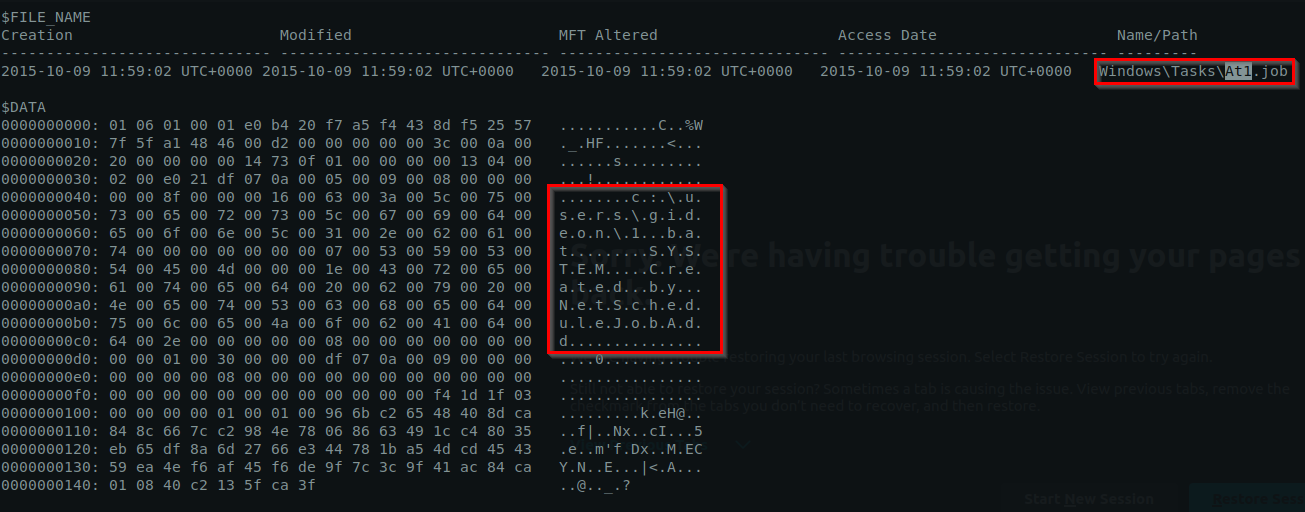
1
2
- We can see that the job is directly related to '1.bat' file. How do we know when this file executes?
- It says that there should be a process called "NetScheduleJobAdd" (tf is this)
Answer:
1
1.bat
These questions asks us what happens after the lateral movement:
Credential AccessCollection
Part 3
Getting general information about the third image:
1
$ vol.py -f POS-01-c4e8f786.vmss --profile=Win7SP1x86_23418 imageinfo
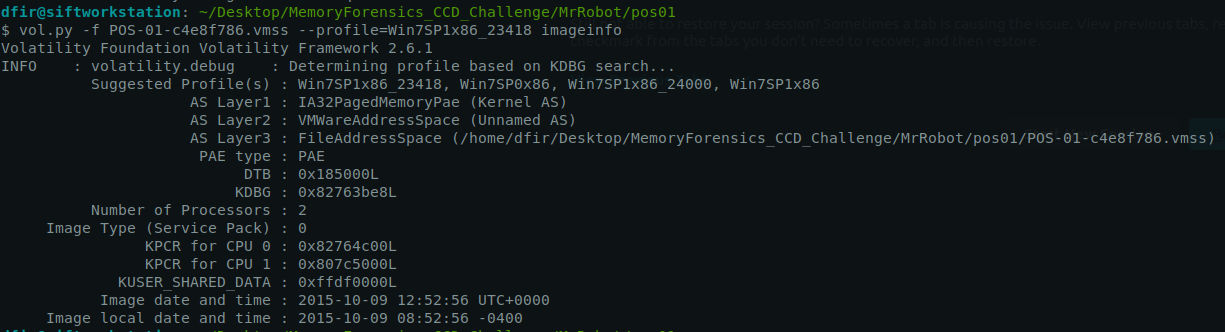
Important stuff to take note of:
1
- Suggested Profile(s) : Win7SP1x86_23418, Win7SP0x86, Win7SP1x86_24000, Win7SP1x86
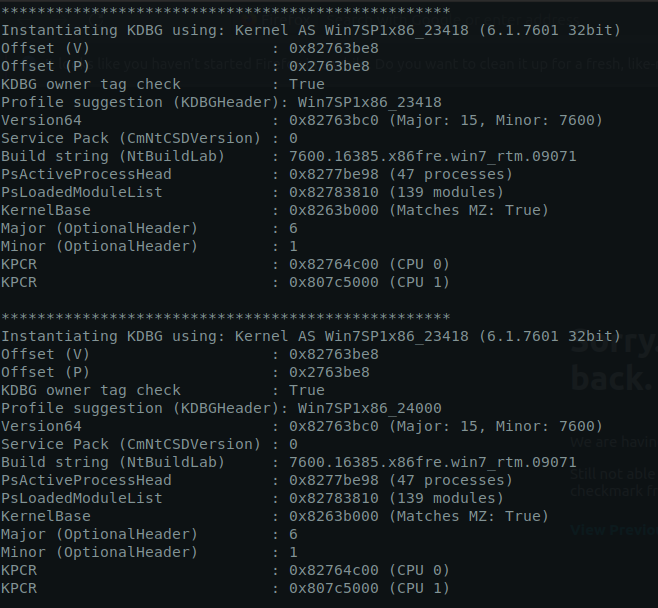
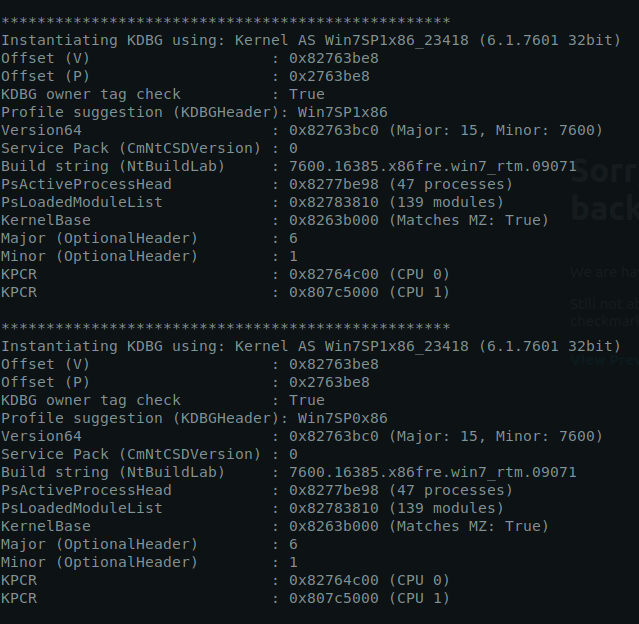 \
\
Q21Machine:POS What is the malware CNC’s server?
POS systems: used by business for financial transactions
Use command like netscan:
1
vol.py -f POS-01-c4e8f786.vmss --profile=Win7SP1x86_23418 netscan
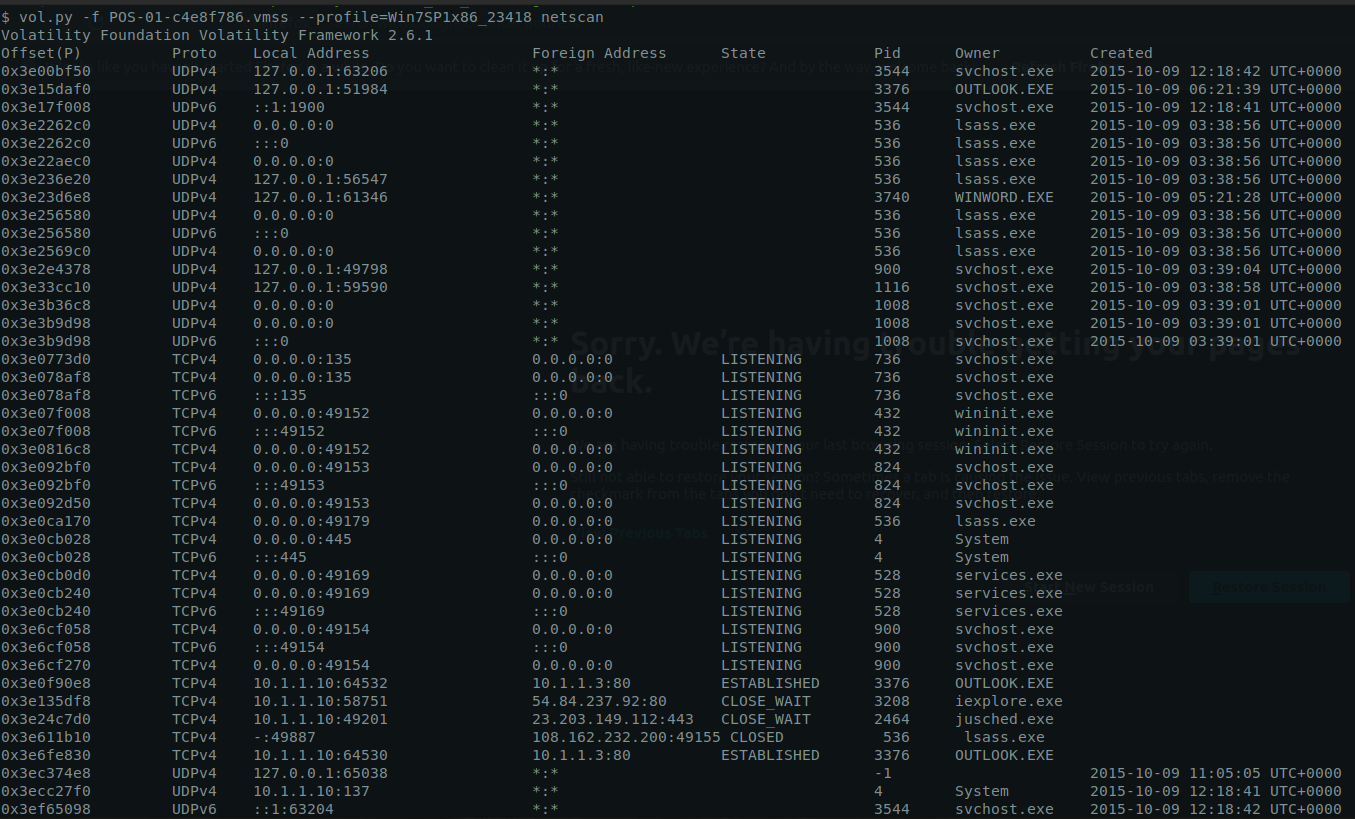
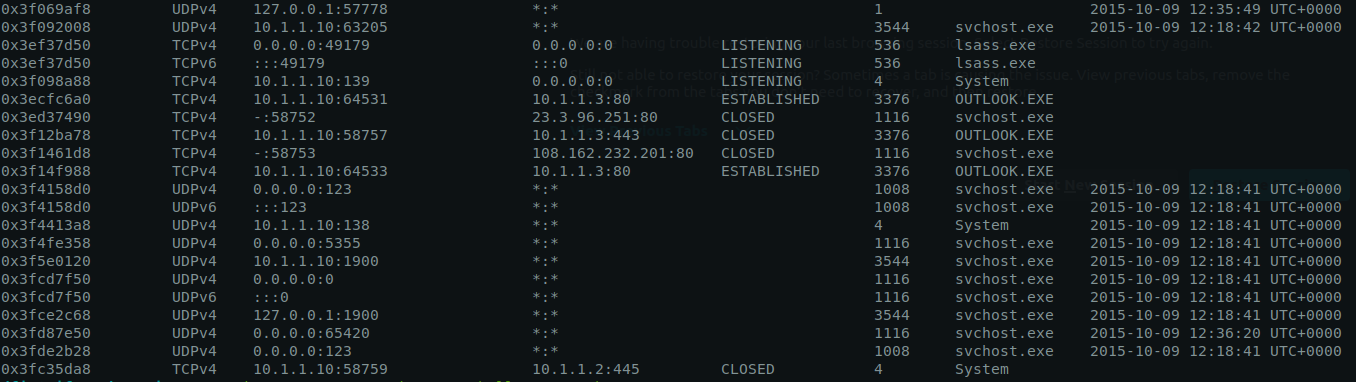
Suspicious process:
1
2
3
4
5
6
7
8
9
10
- 0x3e24c7d0  TCPv4  10.1.1.10:49201   23.203.149.112:443   CLOSE_WAIT  2464  jusched.exe
- 0x3e135df8  TCPv4  10.1.1.10:58751   54.84.237.92:80      CLOSE_WAIT  3208  iexplore.exe
- 0x3e0ca170  TCPv4  0.0.0.0:49179     0.0.0.0:0            LISTENING    536  lsass.exe
- 0x3e611b10  TCPv4    -:49887         108.162.232.200:49155 CLOSED      536  lsass.exe
- 0x3ed37490  TCPv4    -:58752         23.3.96.251:80        CLOSED     1116  svchost.exe
- 0x3f1461d8  TCPv4    -:58753         108.162.232.201:80    CLOSED     1116  svchost.exe
- 0x3ecfc6a0  TCPv4  10.1.1.10:64531   10.1.1.3:80        ESTABLISHED   3376  OUTLOOK.EXE
- 0x3f12ba78  TCPv4  10.1.1.10:58757   10.1.1.3:443         CLOSED      3376  OUTLOOK.EXE
- 0x3f14f988  TCPv4  10.1.1.10:64533   10.1.1.3:80        ESTABLISHED   3376  OUTLOOK.EXE
- 0x3e6fe830  TCPv4  10.1.1.10:64530   10.1.1.3:80        ESTABLISHED   3376  OUTLOOK.EXE
1
- The malware was downloaded from 54.84.237.92:80 using iexplore.exe
Answer:
1
54.84.237.92:80
Q22Machine:POS What is thecommon nameof the malware used to infect the POS system?
Dumping the memory of the iexplore.exe process:
1
vol.py -f POS-01-c4e8f786.vmss --profile=Win7SP1x86_23418 memdump -p 3208 --dump-dir=.

1
- This is way too broad. I can't find anything useful with just strings
Using malfind:
1
vol.py -f POS-01-c4e8f786.vmss --profile=Win7SP1x86_23418 malfind -p 3208 -D .
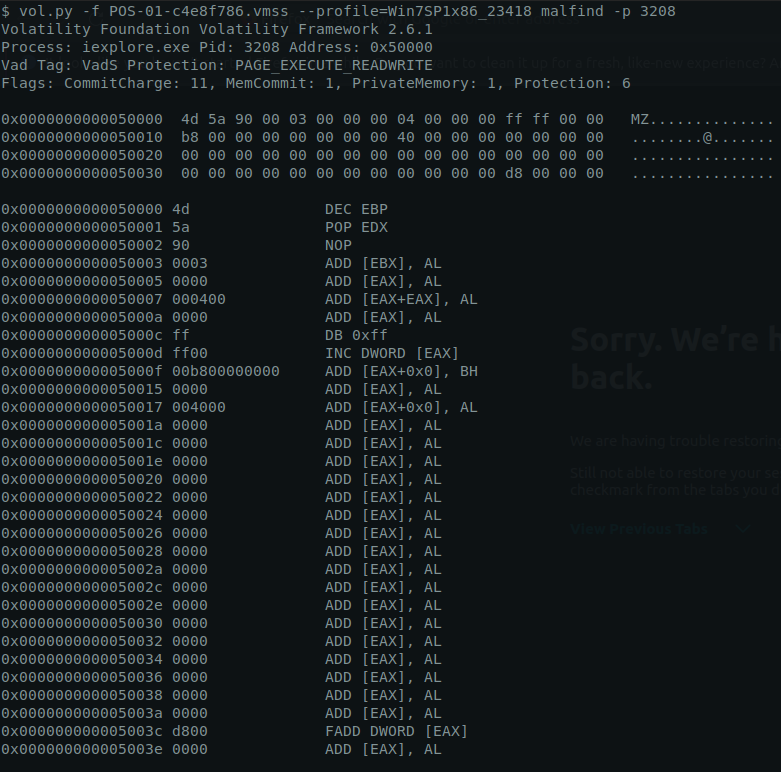
1
- "-D" flag is dump starting the offset of this injected malware into the iexplore.exe process
- Upload the HASH of the dumped
iexplore.exefile onto Virustotal (3608.dmp)

md5sum:
1
md5sum process.0x83f324d8.0x50000.dmp
VT link:
1
https://virustotal.com/gui/file/bf0677fc68f3f1c23bc3402e4494d83e738cc6e158c4f57176b4f5def412e056/detection
1
- Or search "process.0x83f324d8.0x50000.dmp
Answer:
1
Dexter
Q23Machine:POS In the POS malware whitelist. What application was specific to Allsafecybersec?
Open the dumped injected malware and extract useful strings:
1
strings process.0x83f324d8.0x50000.dmp > mal.txt
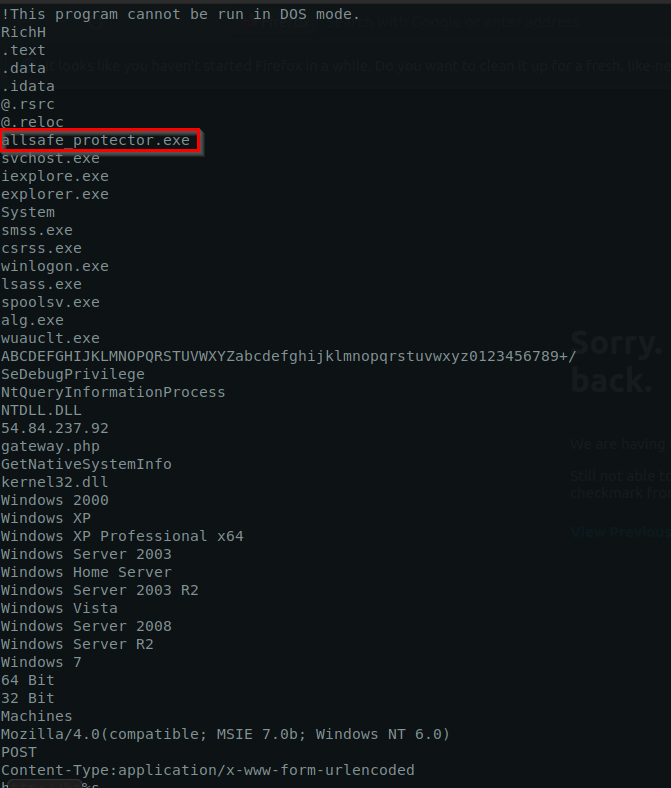
Answer:
1
allsafe_protector.exe
Q24Machine:POS What is the name of the file the malware was initially launched from?
Remember that the entire incident happened because a user got phished and install a wrong update on Target1 machine:
1
cat mftparser-out.txt | grep -i "Download"
1
- Shows all the files in the system and I parse it to check downloaded files
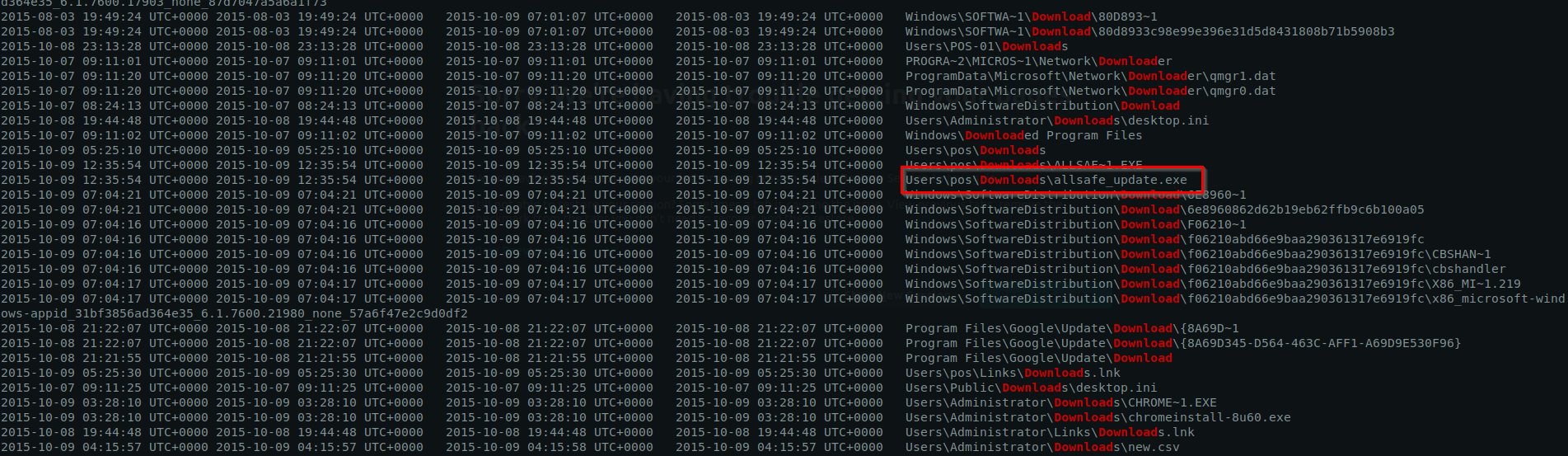
Answer:
1
allsafe_update.exe