
Intro to Phishing Attacks
- Before you learn what phishing is, you’ll need to understand the term Social Engineering.
Social Engineering: psychological manipulation of people into performing or divulging information by exploiting weaknesses in human nature.These ‘weaknesses’ can be:
1
2
3
4
5
6
  - Curiosity
  - Jealousy
  - Greed
  - Kindness
  - Willingness to help someone (see Angela from Mr. robot clip 0:00 - 0:25 => https[:][/][/]www[.]youtube[.]com[/]watch?v=nYvm0pQxNFc)
  - etc.
Phishing is a source of social engineering delivered through email to trick someone into either revealing personal information credentials or even executing malicious code on their computer.
- These emails will usually appear to come from a trusted source, whether that’s a person or a business. (
spearphishingsince in this context, it will most likely targeted) Tricks people into:
1
2
3
  - Downloading software
  - Opening attachments
  - Following malicious links
Spear-phishing: a targeted phishing technique in which the target can either be an individual, business or organization rather than just doing a
mass-phishing.1 2
- This kind of phishing attack looks legitimate and mostly come from legitimate/compromised sources so spam filters,AV and firewalls usually won't work on these. - Say, you are visiting a website you always visit like a Security blog of a hacker you follow. If that hacker gets compromised and its website becomes a watering hole, everytime you visit the website, you'll get infected. It preys on the fact that you trust the website and visit it regularly. I guess the attacker has to know you first before doing this. (OSINT)
Other forms of phishing:
1
2
  - SMS-ing
  - Vishing : performed through phone calls
Examples:
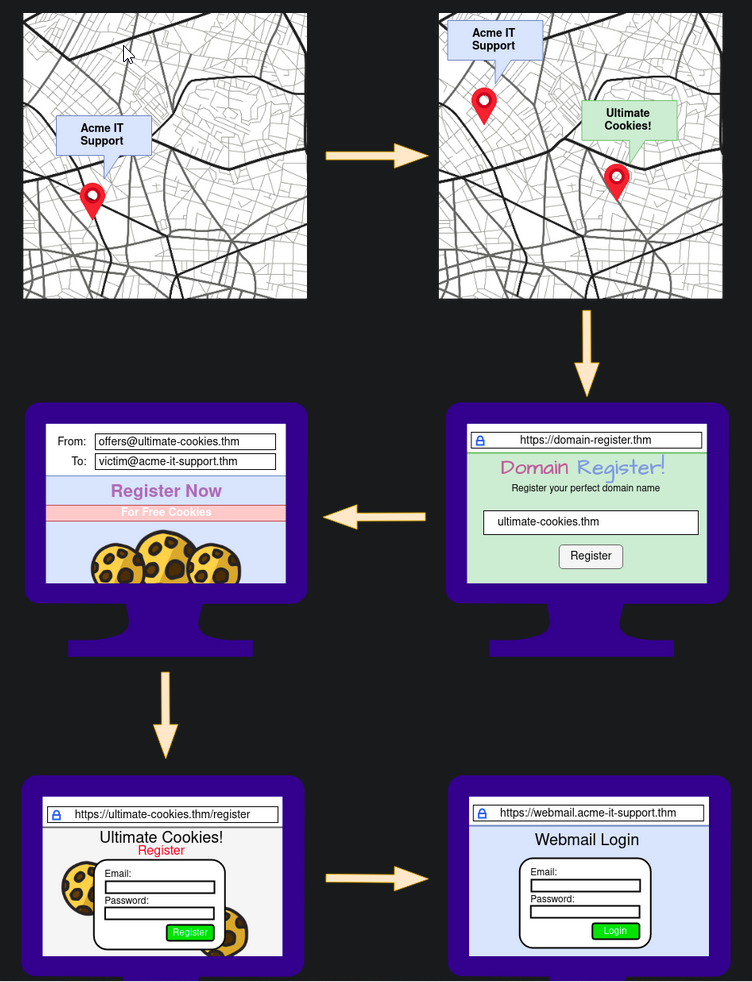
1. The attacker locates the physical location of the target business.
2. The attacker then looks for nearby food suppliers and discovers a company called Ultimate Cookies!
3. The attacker registers the domain name ultimate-cookies.thm
4. The attacker then crafts and email to their target, tempting them with an offer of receiving some free cookies if they sign up to the website. Because the victim has heard of this local company, they are more likely to trust it.
5. The victim then follows the link in the email to the fake website created by the attacker and registers online. To keep things simple, the victim reuses the same password for ALL their online accounts.
6. The attacker now has the victim’s email address and password and can log onto the victim’s company email account. The attacker could now have acess to private company info and also have somewhere to launch another phishing attack against other employees.
Writing Convincing Phishing Emails
Three things to work on:
1. Sender’s email address
2. Subject
3. Content
Sender’s Address: from a domain name that spoofs a significant brand, a known contact, or a coworker.
1
2
3
4
5
  - How to do this exactly with OSINT:
  - Observe their social media account for any brands or friends they talk to.
  - Searching Google for the victim's name and rough location for any reviews the victim may have left about local businesses or brands.
  - Looking at the victim's business website to find suppliers.
  - Looking at LinkedIn to find coworkers of the victim.
Subject : it should be
urgent, worrying or piquesthe victim’s curiosity, so they do NOT ignore it and act on itquickly.
Examples:
- Your account has been compromised.
- Your package has been dispatched/shipped.
- Staff payroll info (do not forward!)
Your photos have been published.
- Content : When impersonating say, a legitimate email address, research their domain name so the victim will think it is legitimate.
Thought process of crafting a legitimate content:
1. Contacting the person of interest to impersonate, say by emailing them.
2. Copy the template in which they send email messages. Say, they may use an email signature or even something nuanced to how they refer to themselves. (e.g., a worker named “Dorothy” and her email is dorothy@company.thm)
3. Example of an email signature:
1
	- "Best Regards, Dot"
4. Imitiating these nuanced way of interaction that the individual to impersonate creates a psychological effect such that the victim will think it is from a legitimate source in which they are more likely to open and act on the email provided.
Data Harvesting/Malware Distribution
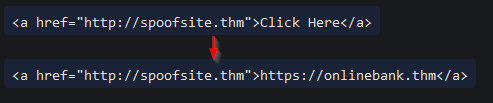
- disguise the link using
anchor textso it would be clickable. - Changing it to a correct looking link that reflects the business you are spoofing say:
1
2
- The real website is on "http://spoofsite.thm" but it will show "https://onlinebank.thm" when you hover on it.
- The previous anchor text is "Click here" which is changed into "https://onlinebnak.thm".
Phishing Infrastructure
Parts of a Phishing Infrastructure:
1
2
3
4
5
6
7
8
9
  - Domain Name : you'll need to register either an authentic-looking domain name or one that mimics the identity of another domain. (task 5)
  - SSL/TSL Certificates : Creating SSL/TSL certs for your chosen domain name will add an extra layer of authenticity to the attack.
  - Email Server/Account : You'll need to either set up an email server or register with an SMTP email provider.
  - DNS Records : Setting up DNS Records such as SPF, DKIM, DMARC will improve the deliverability of your emails and make sure they're getting into the inbox rather than the spam folder.
  - Web Server : You'll need to set up webservers or purchase web hosting from a company to host your phishing websites. Adding SSL/TLS to the websites will give them and extra layer of authenticity.
  - Analytics : When a phishing campaign is part of a red team engagement, keeping analytics info is more inportant as it keeps track of the email being 'sent', 'opened', or 'clicked'. You'll also need to combine it with info from your phishing websites for which users have supplied personal info or downloaded software.
  - Automation and Useful software :
  - GoPhish (Open-Source Phishing Framework) - [getgophish[.]com](https[:][/][/]getgophish[.]com/) :
  - SET (Social Engineering Toolkit) : The Social Engineering Toolkit contains a multitude of tools, but some of the important ones for phishing are the ability to create spear-phishing attacks and deploy fake versions of common websites to trick victims into entering their credentials. Trustedsec link: https[:][/][/]www[.]trustedsec[.]com[/]tools[/]the-social-engineer-toolkit-set[/]
Sample Infrastructure Diagram:
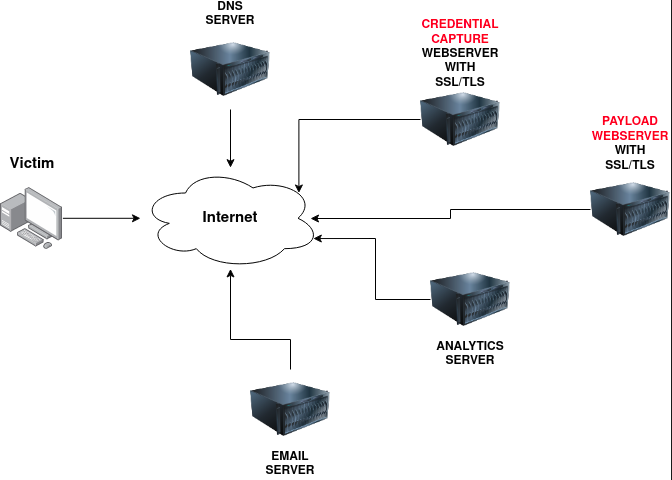
- Let’s see on the next task how these nodes is integrated to create a Phishing Infrastructure…
GoPhish
- This task will take you through setting up
GoPhish, sending a phishing campaign and capturing user credentials from aspoofwebsite.
Thought Process:
1. Launch the VM
2. Go to the provided link.
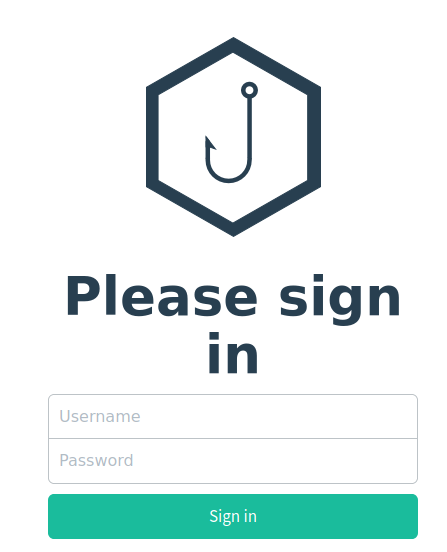
3. Login page:
1
- Creds = admin:tryhackme
Sending Profiles:
connectiondetails required to actually send your Phishing emails.- This is just simply an
SMTP serverthat you have access to.
4. Click the Sending Profiles on the left-hand menu > click “New Profile”. Then, you’ll get prompted with this:
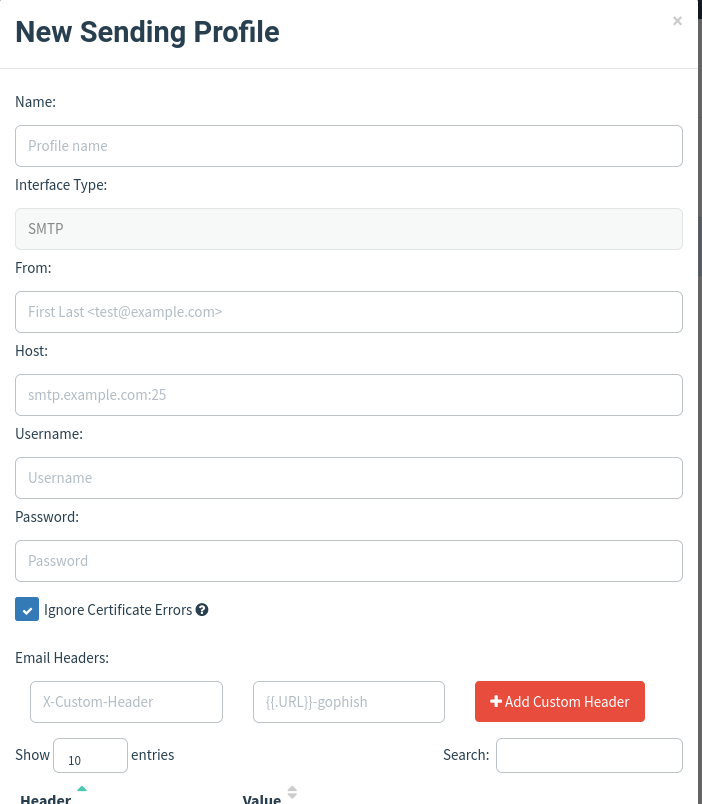
5. Add the following information:
1
2
3
	- Name: Local Server
	- From: noreply@redteam.thm
	- Host: 127.0.0.1:25
Landing Pages
- Landing pages is where the website that the phishing email is going to direct the victim to. This page is usually a spoof of a website the victim is familiar with.
6. Setting up the landing page:
1
2
3
4
	- Go to "Landing Pages" on the left hand side.
	- Click "New Page"
	- Name it "ACME Login"
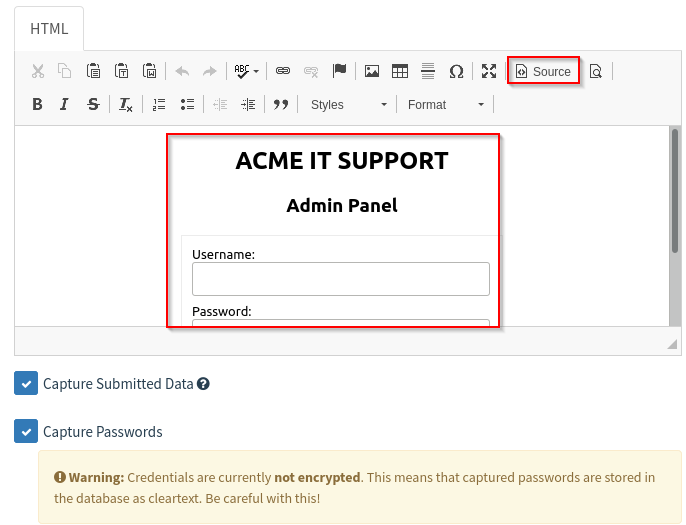
	- Save the following HTML code in the box:
1
2
3
4
5
6
7
8
9
10
11
12
13
14
15
16
17
18
19
20
21
22
23
24
25
<!DOCTYPE html>
<html lang="en">
<head>
    <meta charset="UTF-8">
    <title>ACME IT SUPPORT - Admin Panel</title>
    <style>        body { font-family: "Ubuntu", monospace; text-align: center }
        div.login-form { margin:auto; width:300px; border:1px solid #ececec; padding:10px;text-align: left;font-size:13px;}
        div.login-form div input { margin-bottom:7px;}
        div.login-form input { width:280px;}
        div.login-form div:last-child { text-align: center; }
        div.login-form div:last-child input { width:100px;}
    </style>
</head>
<body>
    <h2>ACME IT SUPPORT</h2>
    <h3>Admin Panel</h3>
    <form method="post">
        <div class="login-form">
            <div>Username:</div>
            <div><input name="username"></div>
            <div>Password:</div>
            <div><input type="password" name="password"></div>
            <div><input type="submit" value="Login"></div>
        </div>    </form></body>
</html>
1
2
3
- Click "Capture submitted data"
- Click "Capture passwords"
- Click "Source" to show the visual version of the html code:
1
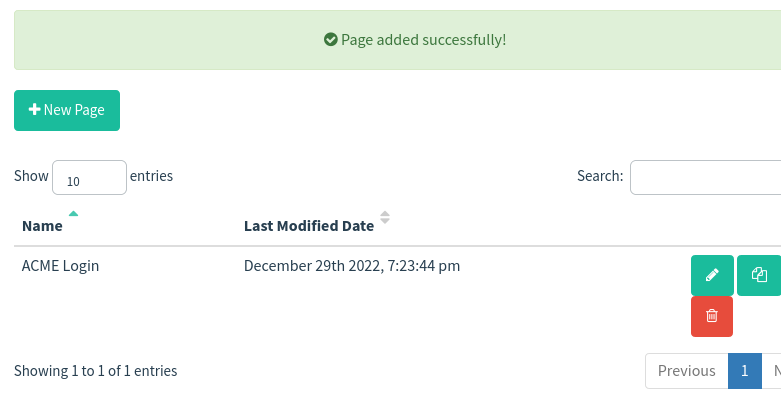
- Now, Save the page:
7. Now, let’s go to Email Templates:
1
2
	- This is the design(format of the email probably from a reputable source in which you're going to imitate) and content of the email you're going actually send to the victim.
	- It will need to be persuasive and contain link to your landing page to enable us to capture the victim's username and password.
How to:
- Click the
Email Templateson the left hand side > New Template - Set the name: “
Email 1” - Set the subject: “
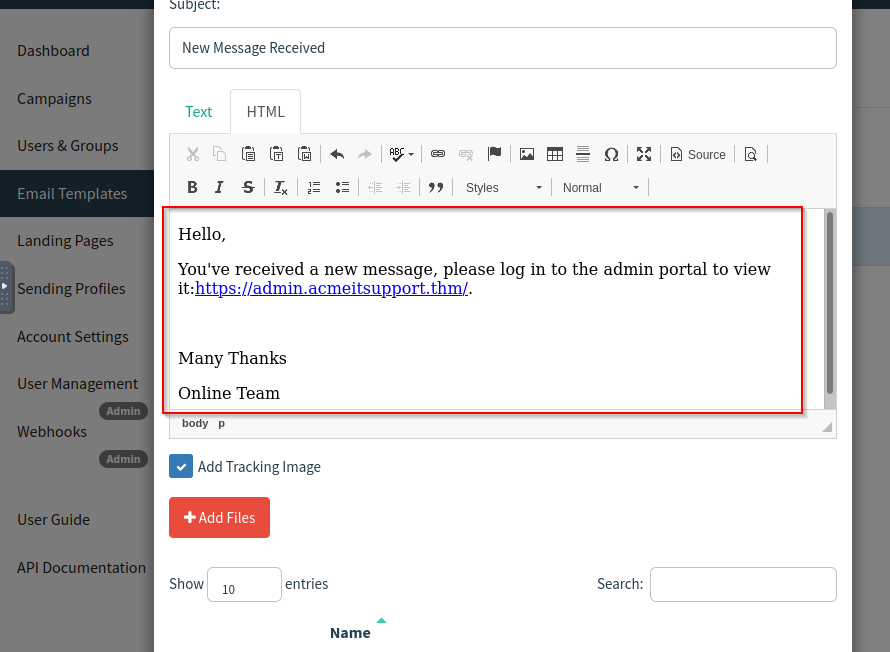
New Message Received” - Click on the
HTMLtab . Click on “Source” button to enable HTML editor mode.
1
  - Email Contents: it should be persuasive enough that the victim will click the link.
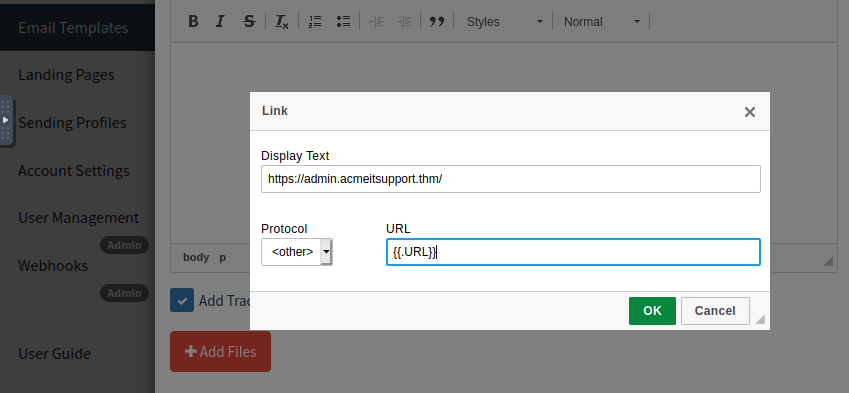
- In the
link text, will need to be set tohttps://admin.acmeitsupport.thm/but the actual link will need to be set to `` which will get changed to our spoofed landing page when the email gets sent and set the protocol to<other>:
Example phishing email:
1
- Then, Save the template.
8. Now, we modify the Users & Groups:
1
2
3
4
5
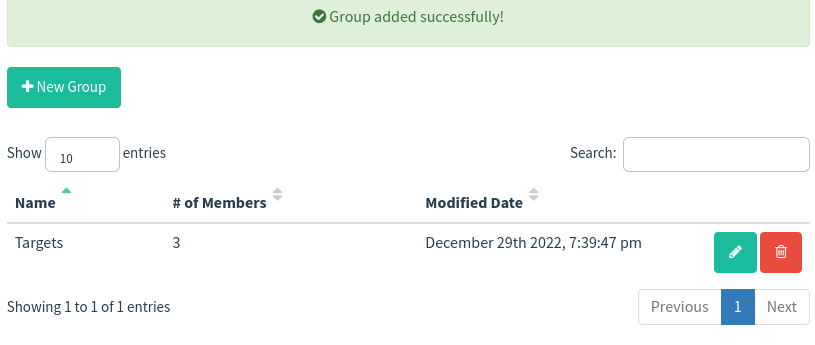
	- Click on Users & Group > New Group > Name == "Targets"
	- Set these emails:
			- martin@acmeitsupport.thm
			- brian@acmeitsupport.thm
			- accounts@acmeitsupport.thm
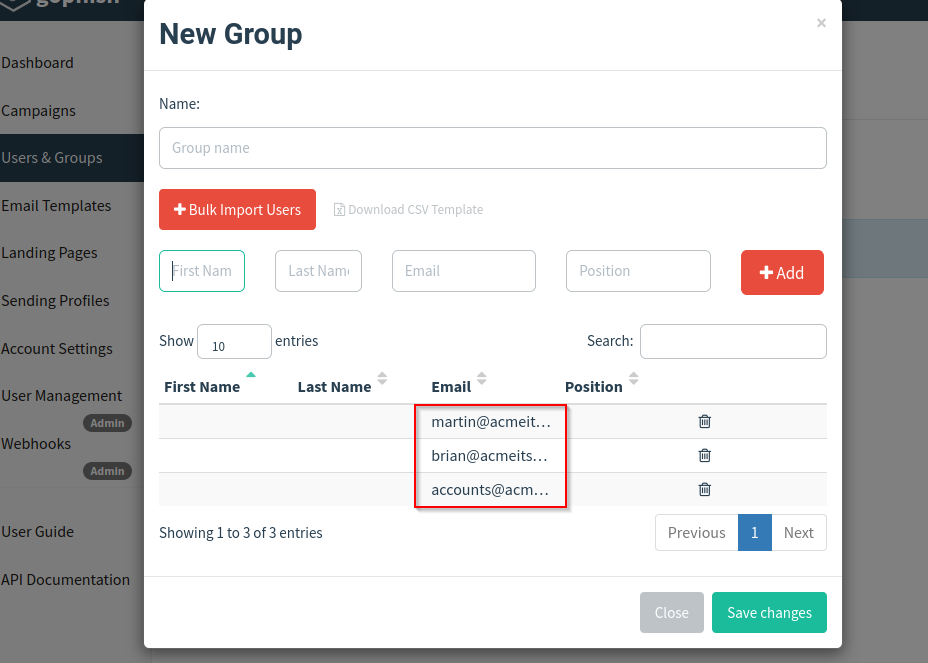
1
- Then, click "Save Changes"
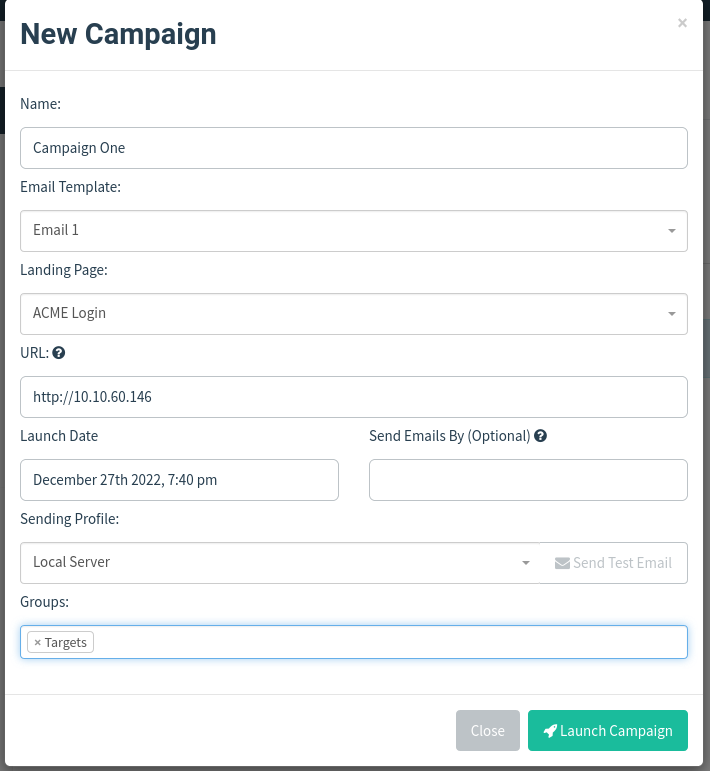
9. Lastly, let’s modify the Campaign > New Campaigns:
1
2
3
4
5
6
7
8
	- Name: Campaign One
	- Email Template: Email 1
	- Landing Page: ACME Login
	- URL: [http://10.10.60.146](http://10.10.60.146/)
	- Launch Date: Set to 2 days ago. This avoids timezone complication.
	- Sending Profile: Local Server
	- Groups : Targets
	- Click "Launch Campaign".
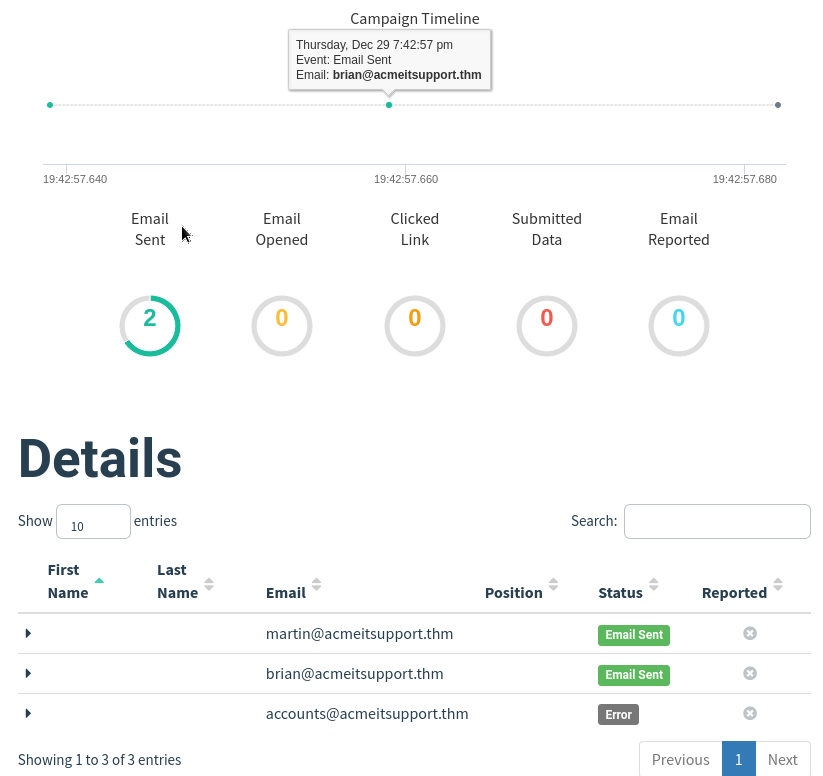
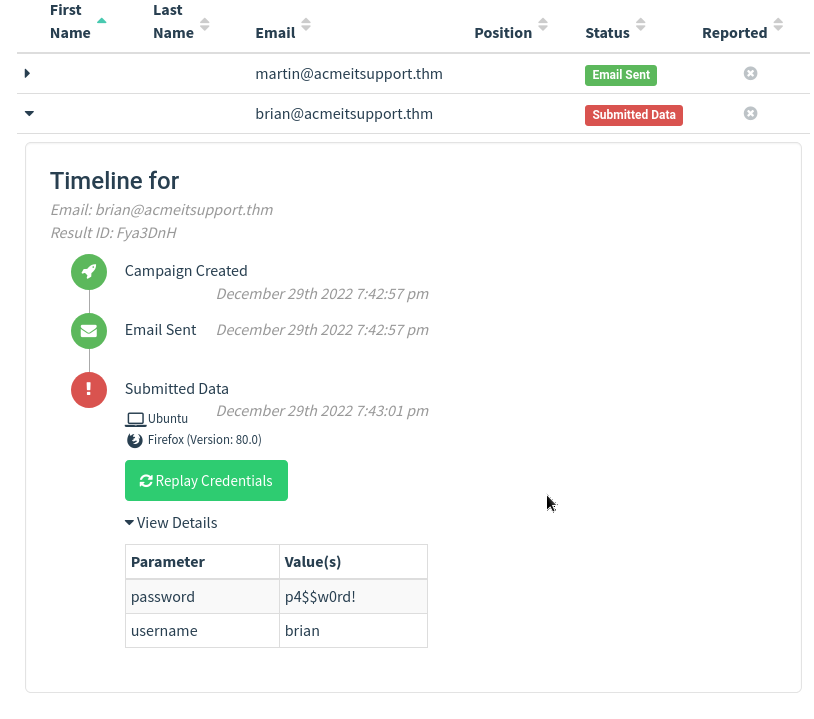
10. Results of the phishing campaign:
Someone got compromised:
Choosing a Phishing Domain
- Choosing the right domain to launch your attack from is essential to ensure you have the psychological edge over your target.
- A red team engagement can use some of the below methods for choosing the perfect domain name.
Expired Domains:
Although not essential, buying a domain name with some history may lead to better scoring of your domain when to comes to spam filters.
Spam filtershave a tendency to not trust brand new domain names compared to ones with some history.1 2
- People that implements spam filters anticipated that new domain names could be bought and be used to be a Phishing domain. - However, websites with history that doesn't relate to anything malicious will get a pass from spam filters I guess.
Typosquatting:
Typosquatting is when a registered domain looks very similar to the target domain you’re trying to impersonate.
1
2
  - Remember the story from Darknet Diaries in which they phished some guy buy impersonating the whole LinkedIn website to trick the victim into thinking that those people whom we saw was connected are legitimate. However in the story, it was as high level attack that exploits the router's vulnerability so the spoofed LinkedIn Website looks exactly as the ACTUAL LinkedIn website.
  - Basically in the story, the common methods below are not used at all and they don't have to but most likely used a Timing Attack at the router level.
Common Methods:
Misspelling: goggle.com Vs google.comAdditional Period: go.ogle.com Vs. google.comSwitching numbers for letters: g00gle.com Vs google.comPhrasing: googles.com Vs google.comAdditional Word: googleresults.com Vs. google.com1
- These changes might look unrealistic, but at a glance, the human brain tries to make sense as much as possible to it just processes these strings quickly making it look like the actual domain name.
TLD Alternatives:
A TLD(
Top Level Domain) is the:1 2 3 4 5 6 7
- .com - .net - .co - .uk - .org - .gov - etc.
- part of the domain name, there are 100’s of variants of TLD’s now.
- A common tryick for choosing a domain would be to use the same name but with a different TLD.
- For example, register
tryhackme.co.ukto impersonatetryhackme.com
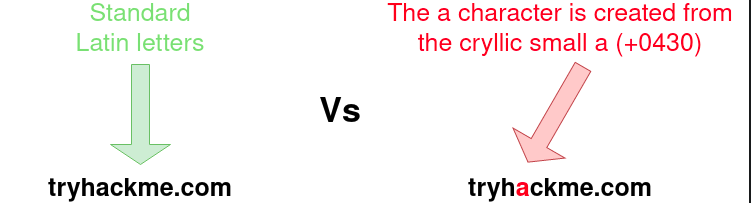
IDK Homograph Attack/Script Spoofing:
- Originally, domain names were made up of Latin characters
a-zand0-9but in 1998, IDN (Internationalized domain name) implemented to support language specific script or alphabet from other languages such as Arabic, Chinese, Cyrillic, Hebrew and more. An issue that arises from the IDN implementation is that different letters from different languages can actually appear identical.
1
2
  - This could be used for Phishing attacks and will trick the user that there's nothing wrong with the domain name.
  - Note: Just type in the domain name when forced to enter one instead of copy-pasting.
Using MS Office in Phishing
- Often during phishing campaigns, an MS document (typically Word, Excel, or PowerPoint) will be included as an attachment.
- Office documents can contain macros;
Macrosdo have a legitiamte use but can also be used to run computer commands that can cause malware to be installed into the victim’s system or connect back to an attacker’s network and allow the attacker to take control of the victim’s computer.
Example Scenario:
1
	- A staff member working for Acme IT Support receives an email from HR with an excel spreadsheet called "Staff_Salaries.xlsx" intended to go to the boss but somehow ended up in the staff members inbox instead.
- What really happened was that an attacker spoofed the HR email address and crafted a psychologically tempting email - everyone wants to know everyone’s salary, aimed to tempt the staff members into opening the attachment.
- Once the staff member opened the attachment and enabled the macros, their computer was compromised.
Using Browser Exploits
- Another method is exploiting the vulnerability of the browser the user is using.
- This allows an attacker to an RCE.
- Assumption: red teamers has to know prior whether there are victims that uses outdated browser software. OR if an attacker uses a 0-day exploit on browser, GG.
- Another case to consider is that, upgrading browsers may not be compatible with the commercial software/hardware currently being used by an entity like
academia,governmentand especiallyhealth care. These are the organizations that cannot have hijinx in terms of their performance otherwise, like in health care, lives could be the cost of denial of service.
How it works:
- Usually, the victim would receive an email, convincing them to visit a particular website set up by the attacker.
Once the victim is on the site, the exploit works against the browser and the attacker can now perform ANY commands they wish on the victim’s computer.
1
  - So basically, it can be combined with normal phishing/spearphishing attacks?
Example:
CVE-2021-40444from Sept. 2021 allows attacker to execute code from victim’s machine after they visited the attacker’s website. This is a vulnerability found in Microsoft Systems.
Phishing Practical
- See THM website.