
Scenario
In this challenge room, you will act as John, who has recently cleared his third screening interview for the SOC-L2 position at MSSP Cybertees Ltd, and a final challenge is ready to test your knowledge, where you will be required to apply the knowledge to FIX the problems in Splunk.
You are presented with a Splunk Instance and the network logs being ingested from an unknown device.
Note: Splunk is installed in the /opt/splunk directory, and you will be working in the App called Fixit.
Challenge: FIXIT
This challenge is divided into three levels:
Level 1: Fix Event Boundaries
Fix the Event Boundaries in Splunk. As the image below shows, Splunk cannot determine the Event boundaries, as the events are coming from an unknown device. 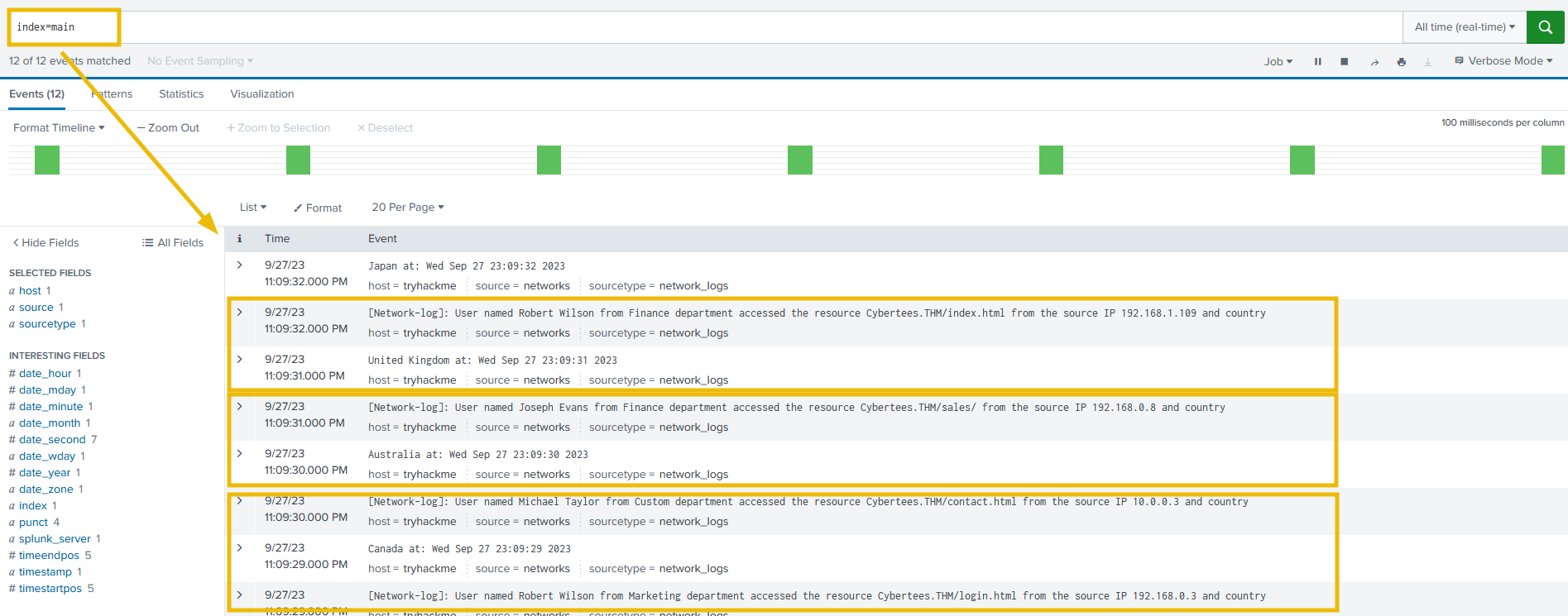
Level 2: Extract Custom Fields
Once the event boundaries are defined, it is time to extract the custom fields to make the events searchable.
1
2
3
4
5
- Username
- Country
- Source_IP
- Department
- Domain
Sample Logs: To create regex patterns, sample Network logs are shown below:
1
2
3
4
5
6
[Network-log]: User named Johny Bil from Development department accessed the resource Cybertees.THM/about.html from the source IP 192.168.0.1 and country
Japan at: Thu Sep 28 00:13:46 2023
[Network-log]: User named Johny Bil from Marketing department accessed the resource Cybertees.THM/about.html from the source IP 192.168.2.2 and country
Japan at: Thu Sep 28 00:13:46 2023
[Network-log]: User named Johny Bil from HR department accessed the resource Cybertees.THM/about.html from the source IP 10.0.0.3 and country
Japan at: Thu Sep 28 00:13:46 2023
Level 3: Perform Analysis on the FIXED Events
- Once the custom fields are parsed, we can use those fields to analyze the Event logs. Examine the events and answer the questions.
Question and Answers section:
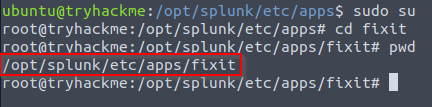
- What is the full path of the
FIXITapp directory?![]()
1
/opt/splunk/etc/apps/fixit
- What
Stanzawill we use to define Event Boundary in this multi-line Event case?1
BREAK_ONLY_BEFORE- Look at the original event structure from Level 1 section above
- In the
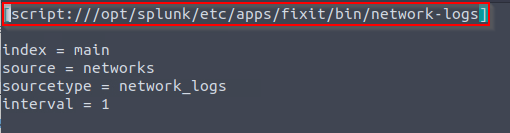
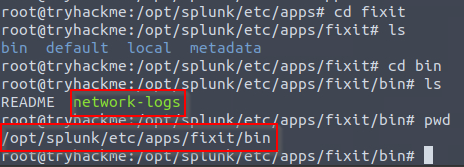
inputs.conf, what is the full path of thenetwork-logsscript?![]()
1
/opt/splunk/etc/apps/fixit/bin
- What regex pattern will help us define the Event’s start?
![]()

1
2
[Network-log]: User named Daniel Martin from Marketing department accessed the resource Cybertees.THM/signup.html from the source IP 192.168.1.103 and country
Germany at: Thu Apr 18 21:24:43 2024
Answer:
1
\[Network-log\]
After fixing it: 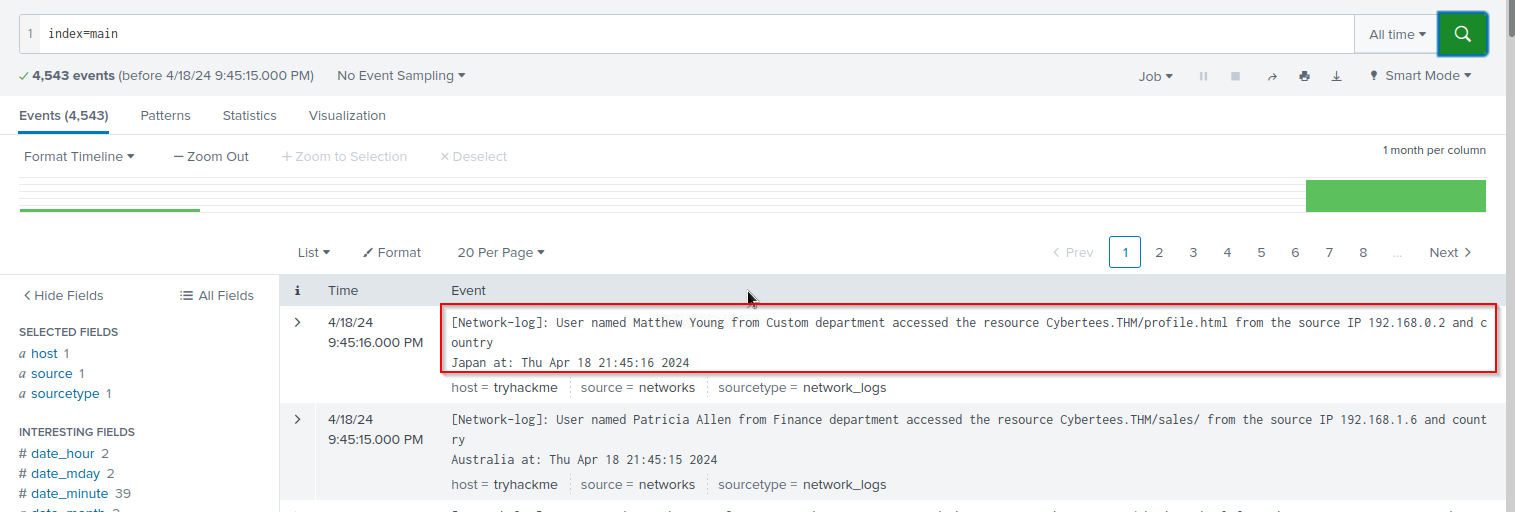
- What is the captured domain?
1
cybertees.thm
- How many countries are captured in the logs?
Setup in the default directory:
1
2
3
4
5
6
7
8
9
10
11
12
13
14
15
<transforms.conf>
[network-logs_custom_fields]
REGEX = country\s+(\w+)
FORMAT = Country::$1
WRITE_META = true

<props.conf>
[network_logs]
SHOULD_LINEMERGE = true
BREAK_ONLY_BEFORE = \[Network-log\]
TRANSFORM-network_logs = network-logs_custom_fields

<fields.conf>
[Country]
INDEXED = true
Regex: 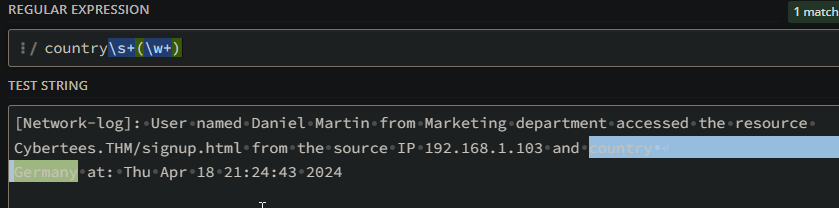
Output: 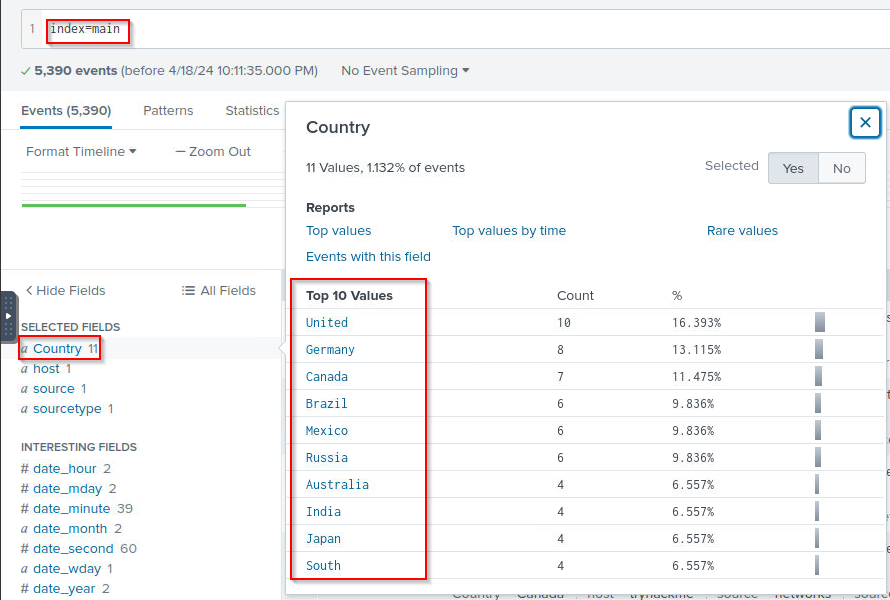
Answer:
1
12 -> not sure how TBC
- How many departments are captured in the logs? Possible regex to use:
1
from\s+(\w+)\s+department
Updated configuration files:
1
2
3
4
5
6
7
8
9
10
11
12
13
14
15
16
17
18
19
20
21
22
23
<transforms.conf>
[network-logs_custom_fields]
REGEX = country\s+(\w+)
FORMAT = Country::$1
WRITE_META = true

REGEX = from\s+(\w+)\s+department
FORMAT = Department::$1
WRITE_META = true


<props.conf>
[network_logs]
SHOULD_LINEMERGE = true
BREAK_ONLY_BEFORE = \[Network-log\]
TRANSFORM-network_logs = network-logs_custom_fields

<fields.conf>
[Country]
INDEXED = true

[Department]
INDEXED = true
Answer: 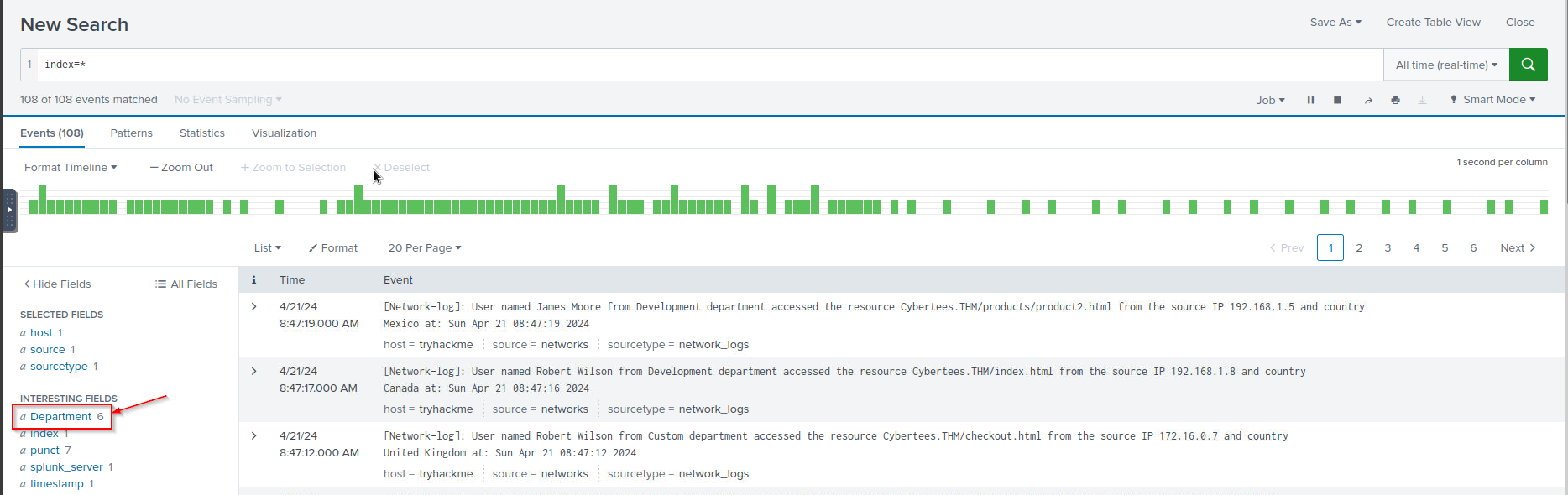
Update again:
1
/opt/splunk/bin/splunk restart
Answer:
1
6
- How many usernames are captured in the logs? Possible regex to use:
1
User named\s+(\w+\s+\w+)\s+from
Updated configuration files:
1
2
3
4
5
6
7
8
9
10
11
12
13
14
15
16
17
18
19
20
21
22
23
24
25
26
27
28
29
30
<transforms.conf>
[network-logs_custom_fields]
REGEX = country\s+(\w+)
FORMAT = Country::$1
WRITE_META = true

REGEX = from\s+(\w+)\s+department
FORMAT = Department::$1
WRITE_META = true

REGEX = User named\s+(\w+\s+\w+)\s+from
FORMAT = Username::$1
WRITE_META = true


<props.conf>
[network_logs]
SHOULD_LINEMERGE = true
BREAK_ONLY_BEFORE = \[Network-log\]
TRANSFORM-network_logs = network-logs_custom_fields

<fields.conf>
[Country]
INDEXED = true

[Department]
INDEXED = true

[Username]
INDEXED = true
Update again:
1
/opt/splunk/bin/splunk restart
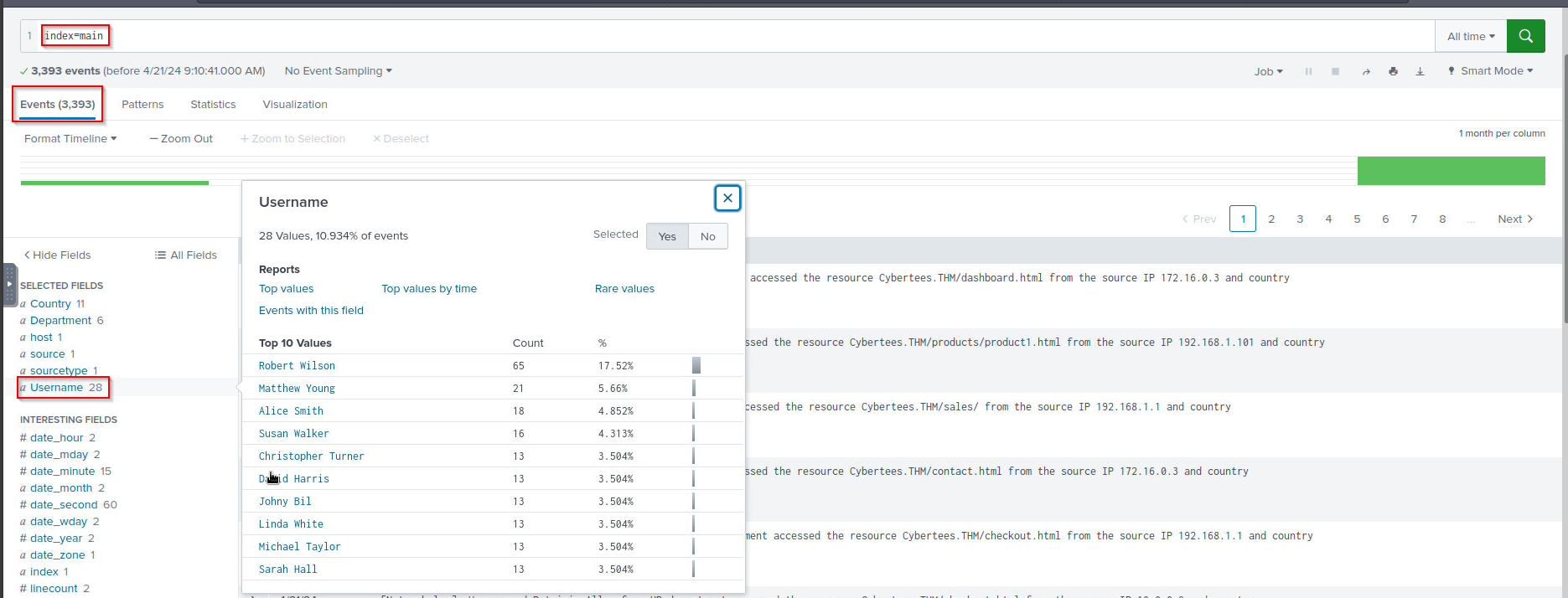
Answer:
1
28
- How many source IPs are captured in the logs? Possible regex to use:
1
source IP (\d{1,3}\.\d{1,3}\.\d{1,3}\.\d{1,3}) and
Updated configuration files:
1
2
3
4
5
6
7
8
9
10
11
12
13
14
15
16
17
18
19
20
21
22
23
24
25
26
27
28
29
30
31
32
33
34
35
36
<transforms.conf>
[network-logs_custom_fields]
REGEX = country\s+(\w+)
FORMAT = Country::$1
WRITE_META = true

REGEX = from\s+(\w+)\s+department
FORMAT = Department::$1
WRITE_META = true

REGEX = User named\s+(\w+\s+\w+)\s+from
FORMAT = Username::$1
WRITE_META = true

REGEX = source IP (\d{1,3}\.\d{1,3}\.\d{1,3}\.\d{1,3}) and
FORMAT = SrcIP::$1
WRITE_META = true

<props.conf>
[network_logs]
SHOULD_LINEMERGE = true
BREAK_ONLY_BEFORE = \[Network-log\]
TRANSFORM-network_logs = network-logs_custom_fields

<fields.conf>
[Country]
INDEXED = true

[Department]
INDEXED = true

[Username]
INDEXED = true

[SourceIP]
INDEXED = true
Update again:
1
/opt/splunk/bin/splunk restart
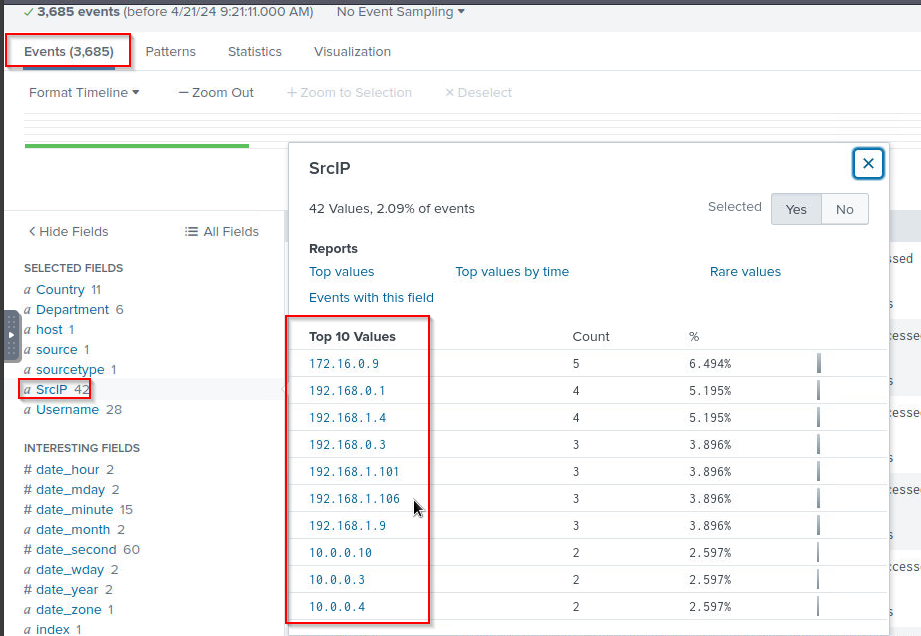
1
- Since the event is increasing, the answer is changing. Make sure to enter it after refreshing the page.
- Which configuration files were used to fix our problem?
[Alphabetic order: File1, file2, file3]1
fields.conf, transforms.conf, props.conf
- What are the TOP two countries the user Robert tried to access the domain from?
[Answer in comma-separated and in Alphabetic Order][Format: Country1, Country2]![]()
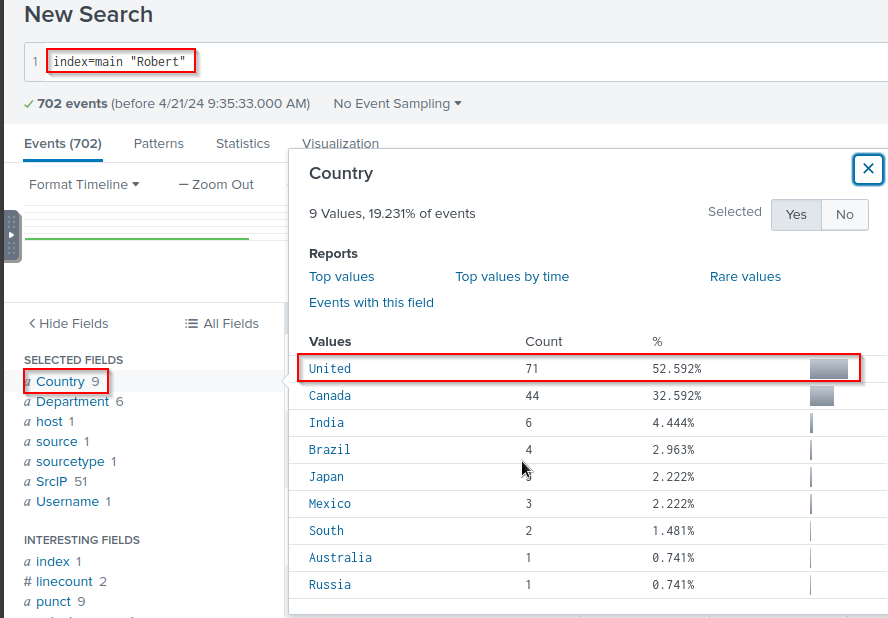
1
71
- Which user accessed the
secret-document.pdfon the website?![]()
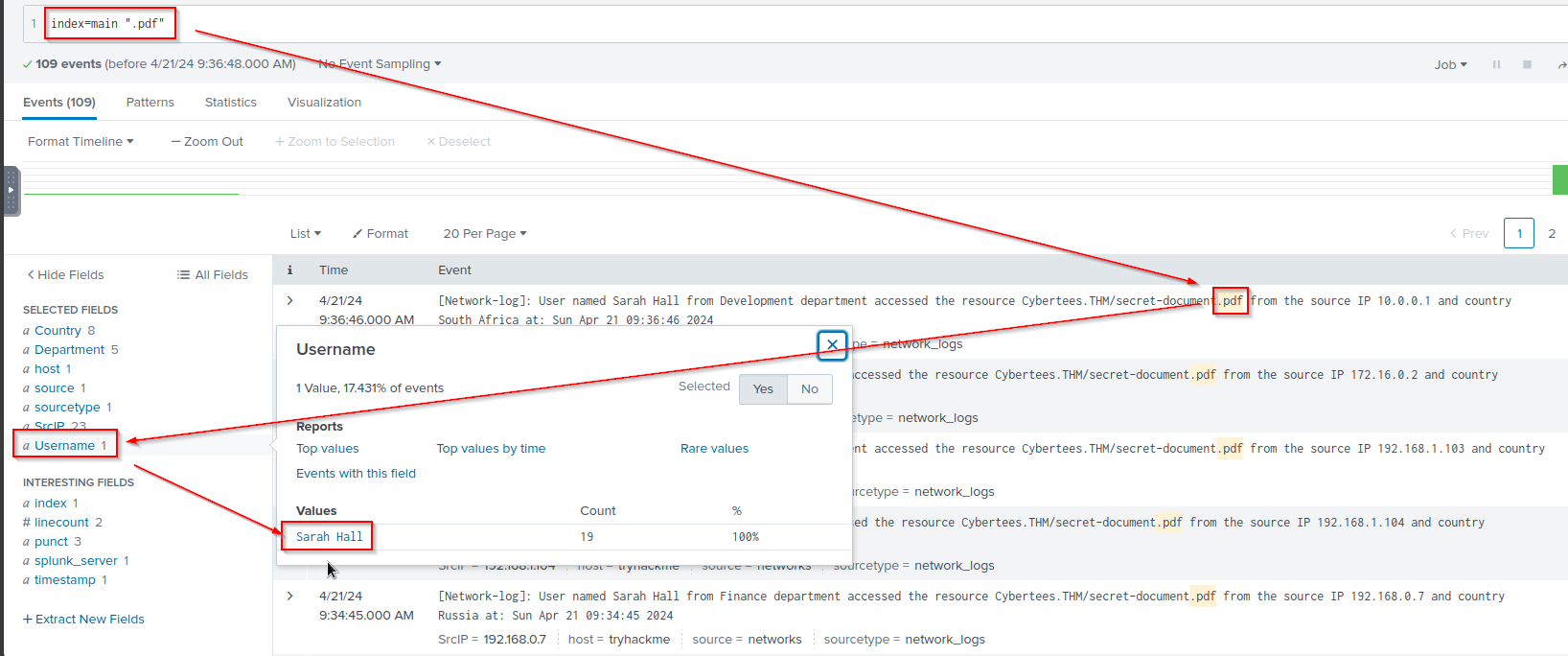
Answer:
1
Sarah Hall