Scenario
You work as a Tier 1 Security Analyst L1 for a Managed Security Service Provider (MSSP). Today you’re tasked with monitoring network alerts.
A few minutes into your shift, you get your first network case: Potentially Bad Traffic and Malware Command and Control Activity detected. Your race against the clock starts. Inspect the PCAP and retrieve the artifacts to confirm this alert is a true positive.
Your tools:
Questions and Answers section:
With Brim (Log Analysis)
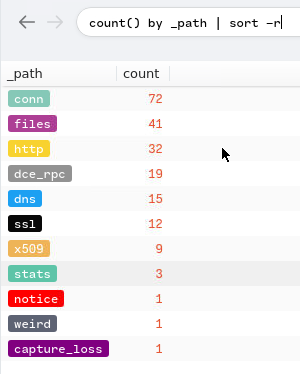
Checking the traffic type from the pcap:
1
count() by _path | sort -r
Output:
- What was the
alert signaturefor Malware Command and Control Activity Detected?
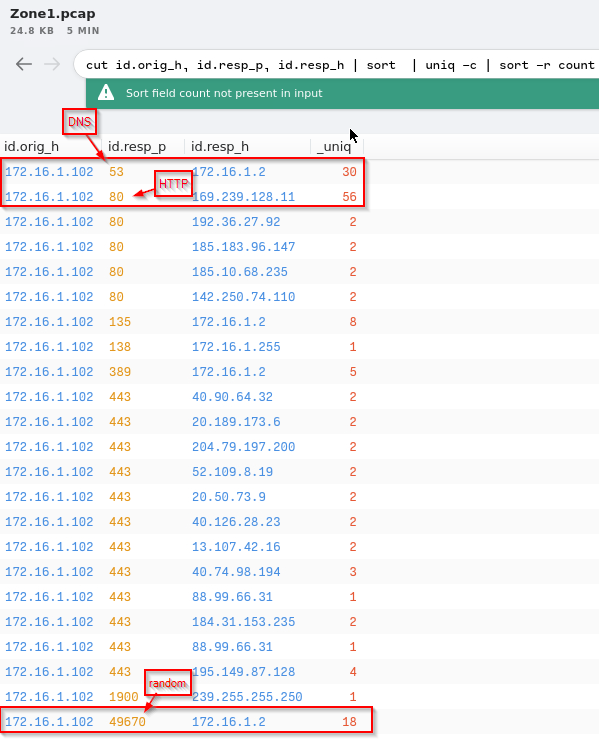
Checking the outbound connections from the victim’s machine:
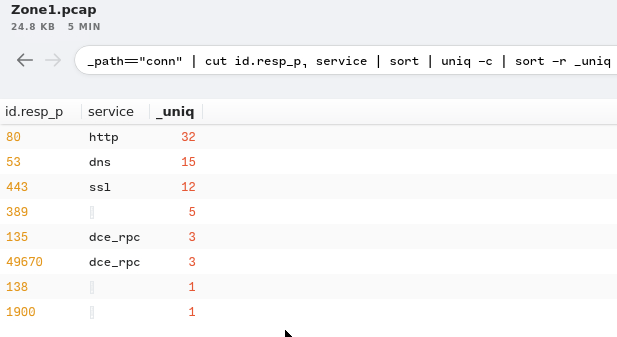
Amount of unique connections/queries per protocol:
Checking the domains for the outbound connection:
1
_path=="dns" | count() by query | sort -r
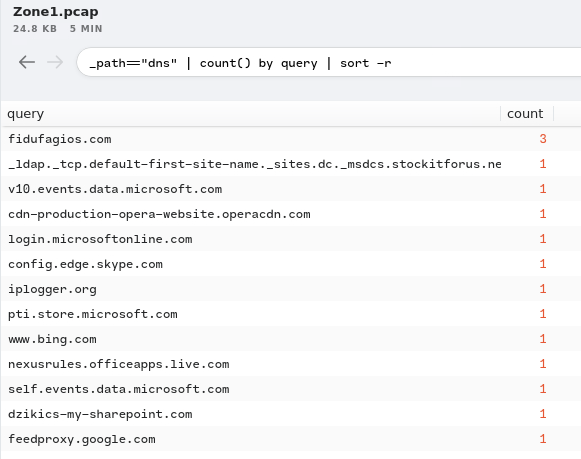
DNS
Virustotal Queries for suspected domains:
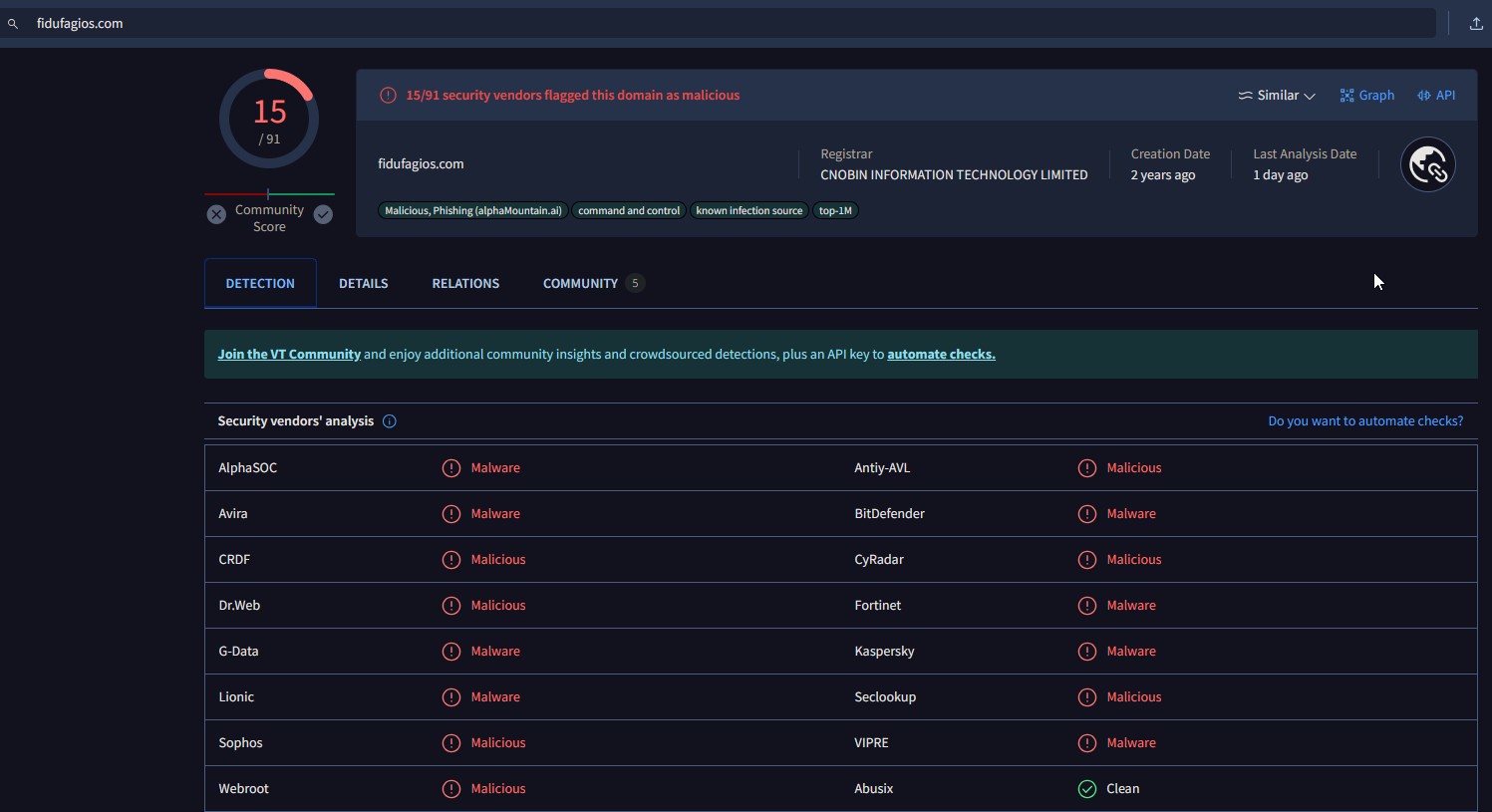
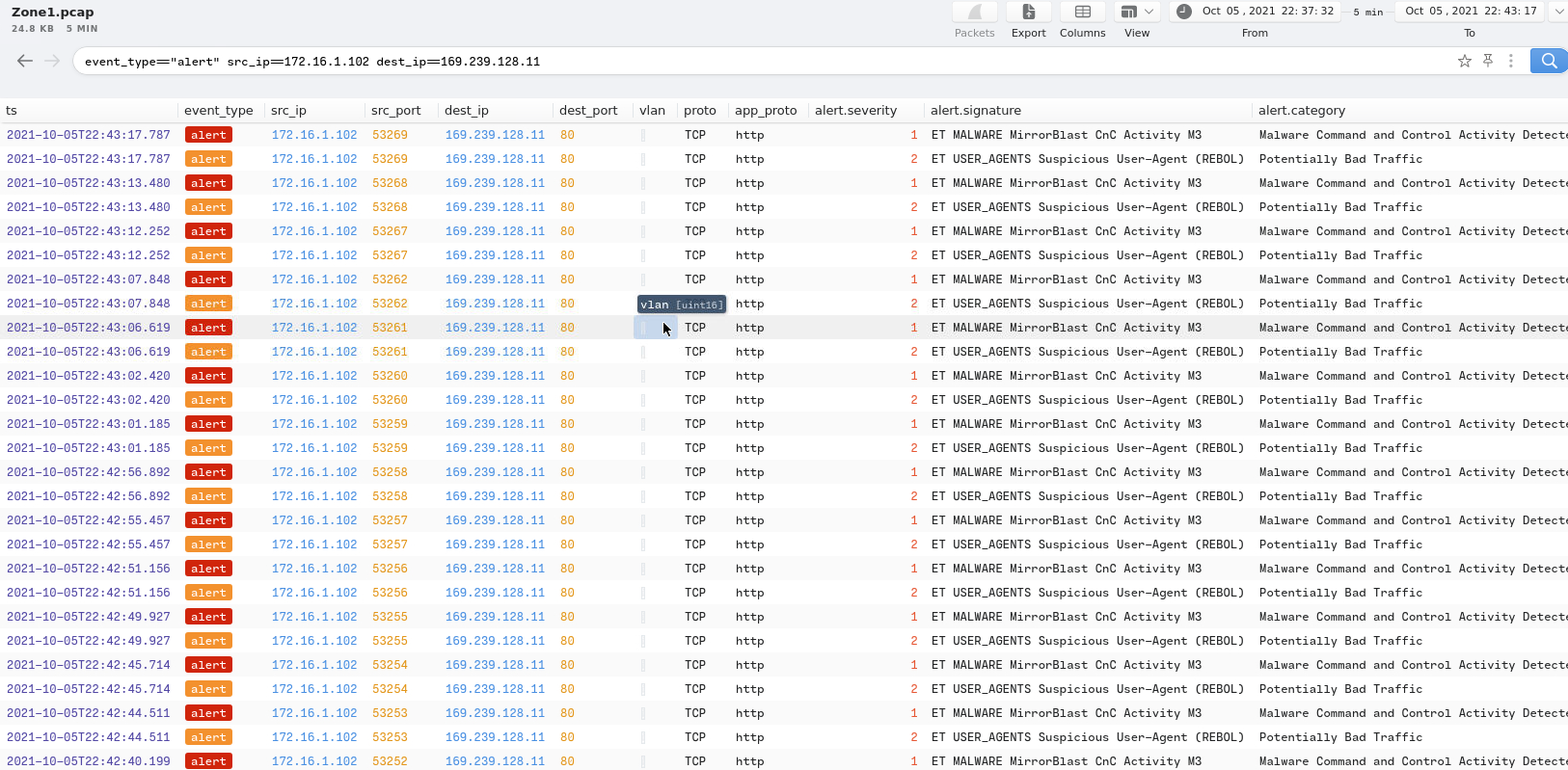
Using Suricata filter:
1
event_type="alert" | alerts := union(alert.category) by src_ip, dest_ip
Output:
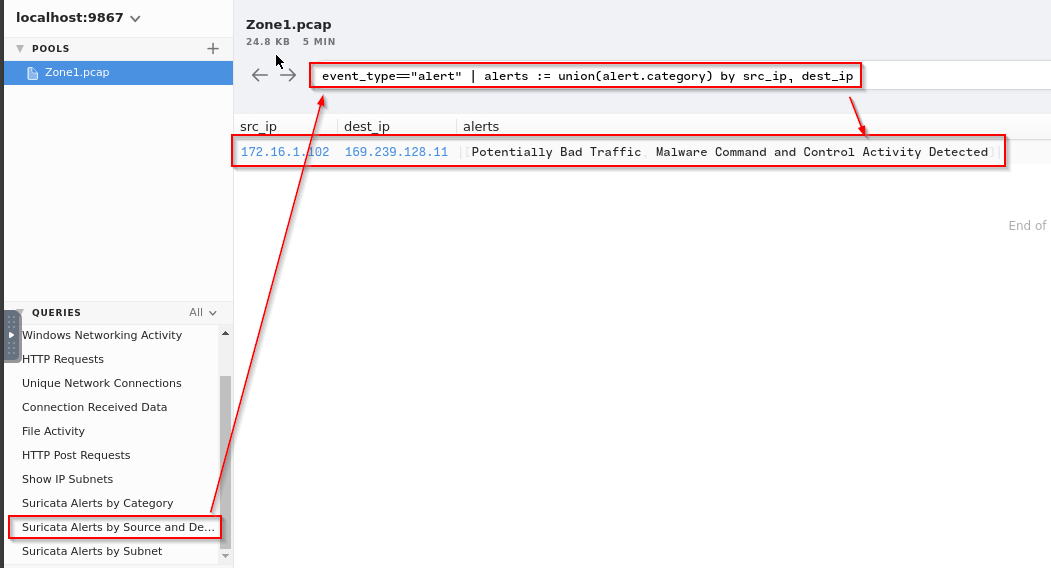
Going to logs:
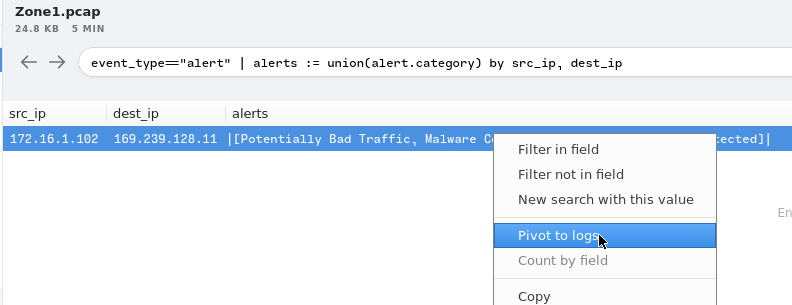

Answer:
1
ET MALWARE MirrorBlast CnC Activity M3
- What is the source IP address of the logs? Enter your answer in a defanged format.
1
172[.]16[.]1[.]102
- What IP address was the destination IP in the alert? Enter your answer in a defanged format.
1
169[.]239[.]128[.]11
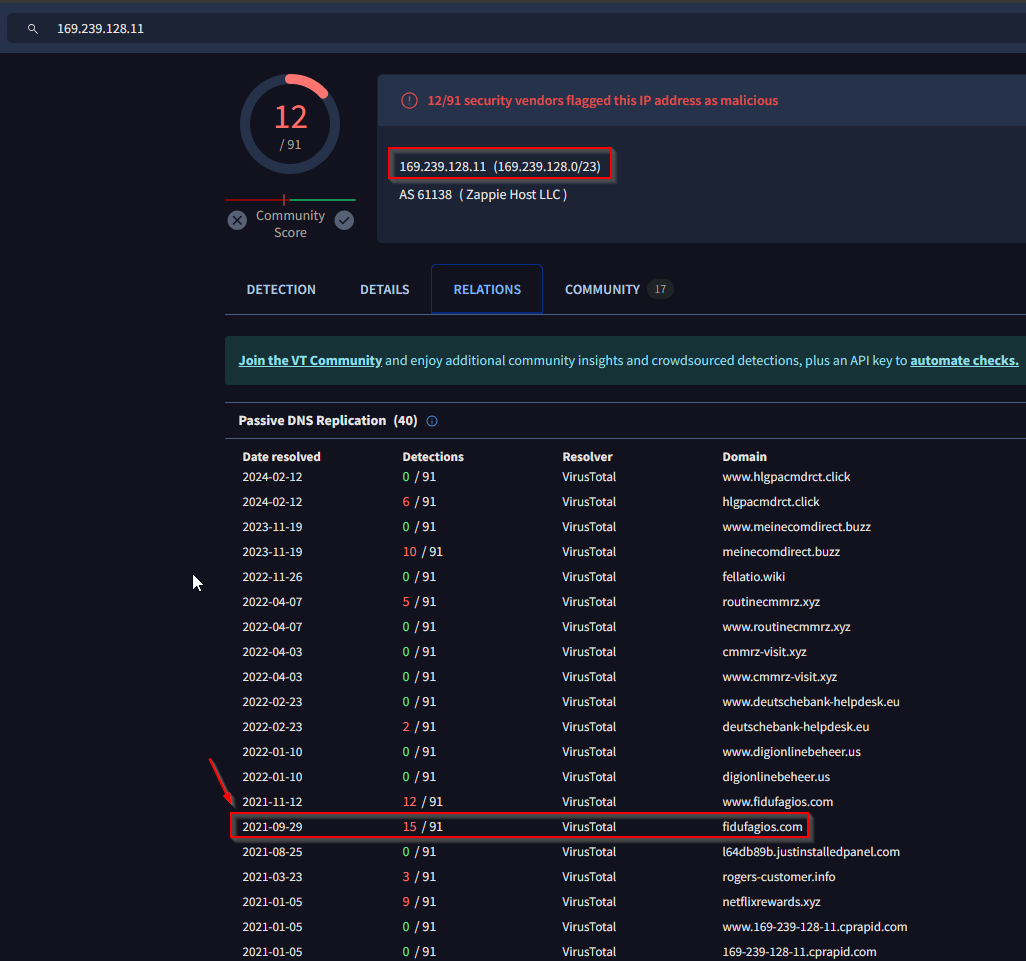
- Inspect the IP address in VirusTotal. Under
Relations > Passive DNS Replication, which domain has the most detections? Enter your answer in a defanged format.
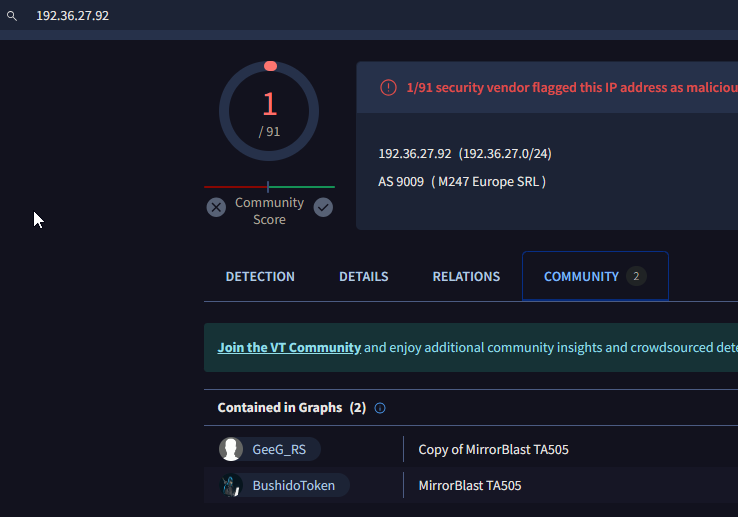
Still in VirusTotal, under Community, what threat group is attributed to this IP address?
TA505What is the malware family?

- Do a search in VirusTotal for the domain from question 4. What was the majority file type listed under Communicating Files?
1
Windows Installer
- Inspect the web traffic for the flagged IP address; what is the user-agent in the traffic?
Brim Filter:
1
_path="http" | id.orig_h==172.16.1.102 and dest_ip==169.239.128.11

1
- Answer: REBOL View 2.7.8.3.1
Using NetworkMiner : (Network Forensics)
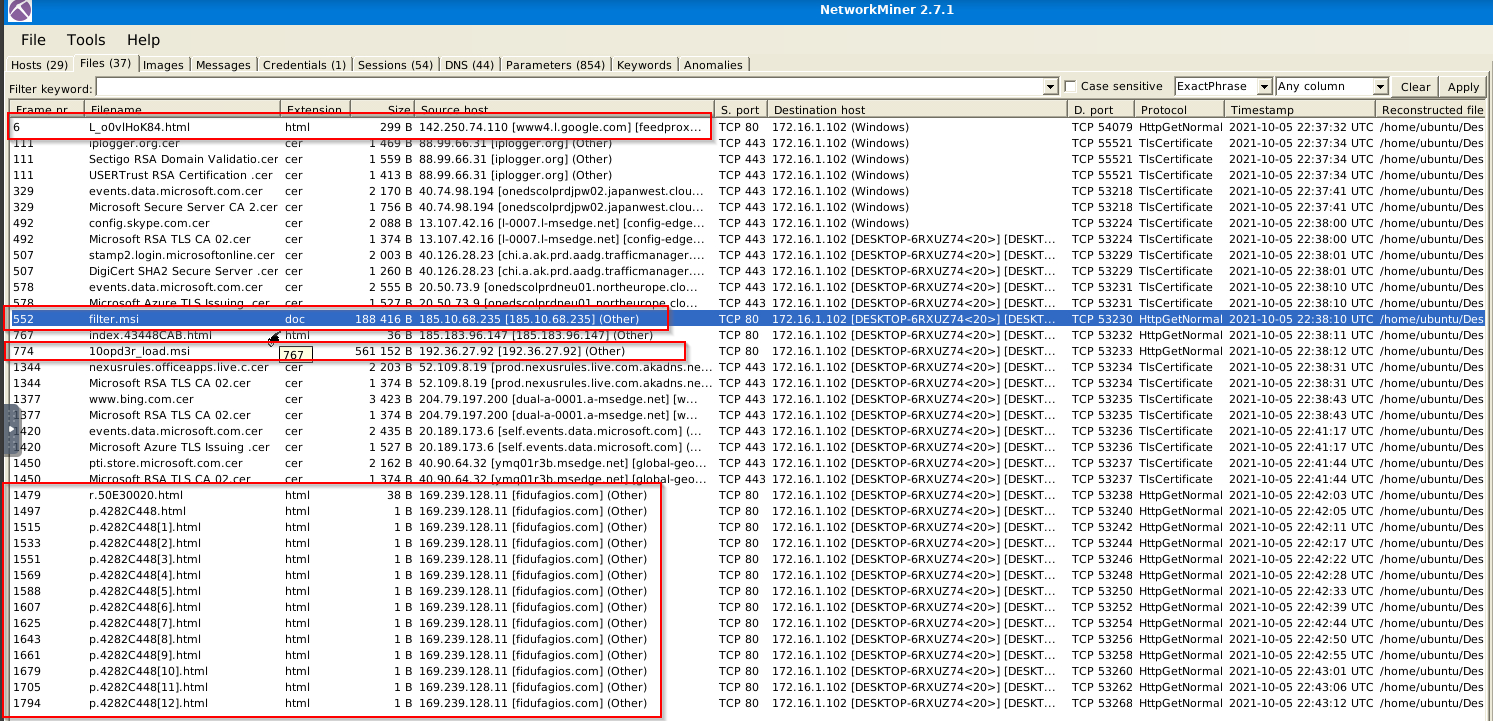
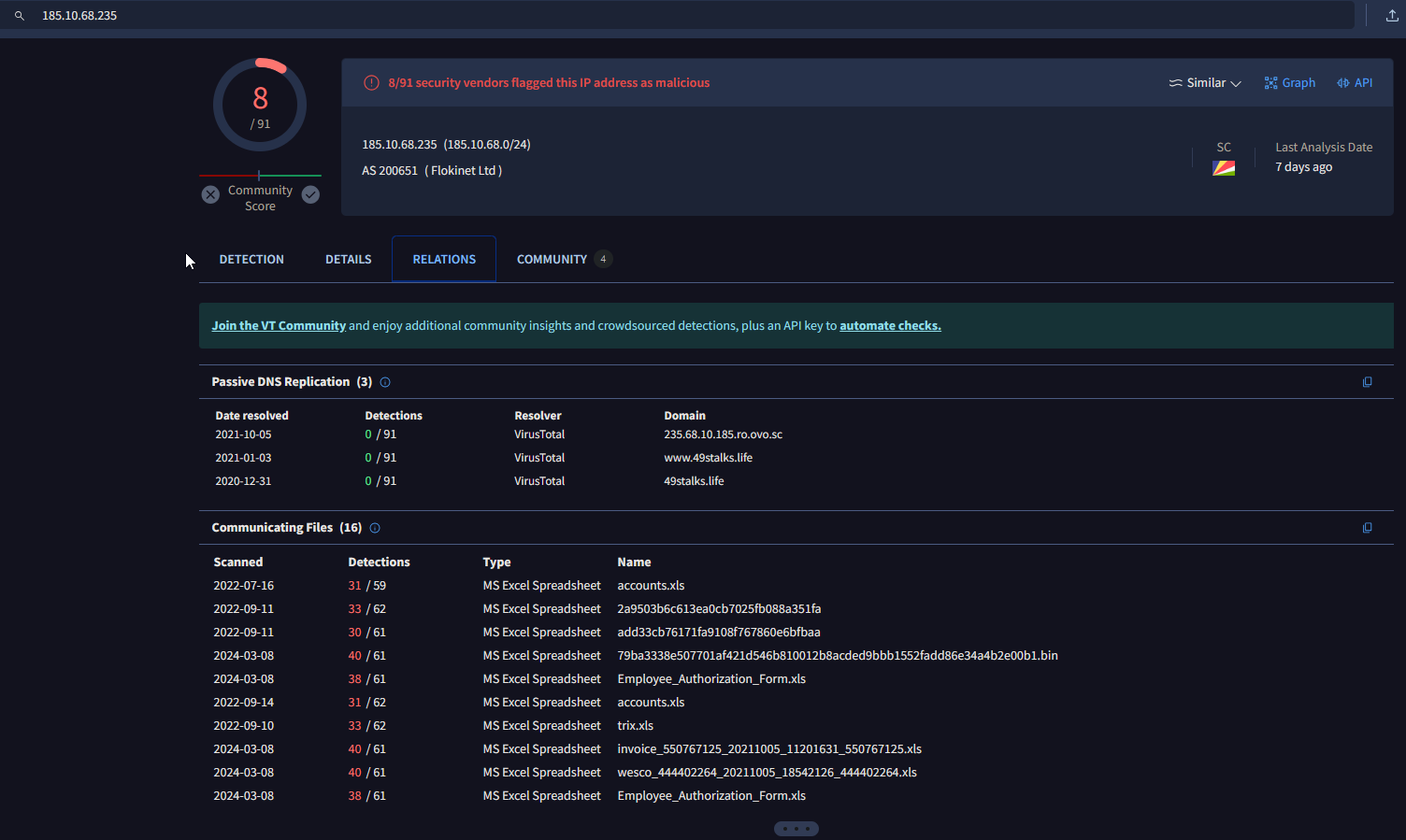
Retrace the attack; there were multiple IP addresses associated with this attack. What were two other IP addresses? Enter the IP addressed defanged and in numerical order. (format: IPADDR,IPADDR)
1
2
3
  - How will those IP address be associated with this attack? Note that the `fidufagious[.]com` is a host domain used for C2 comms
      - Phishing payload?
      - Downloader?
Filenames highlighted are suspicious:
Checking a suspicious IP address: 185[.]10[.]68[.]235
Correlating data with Brim:
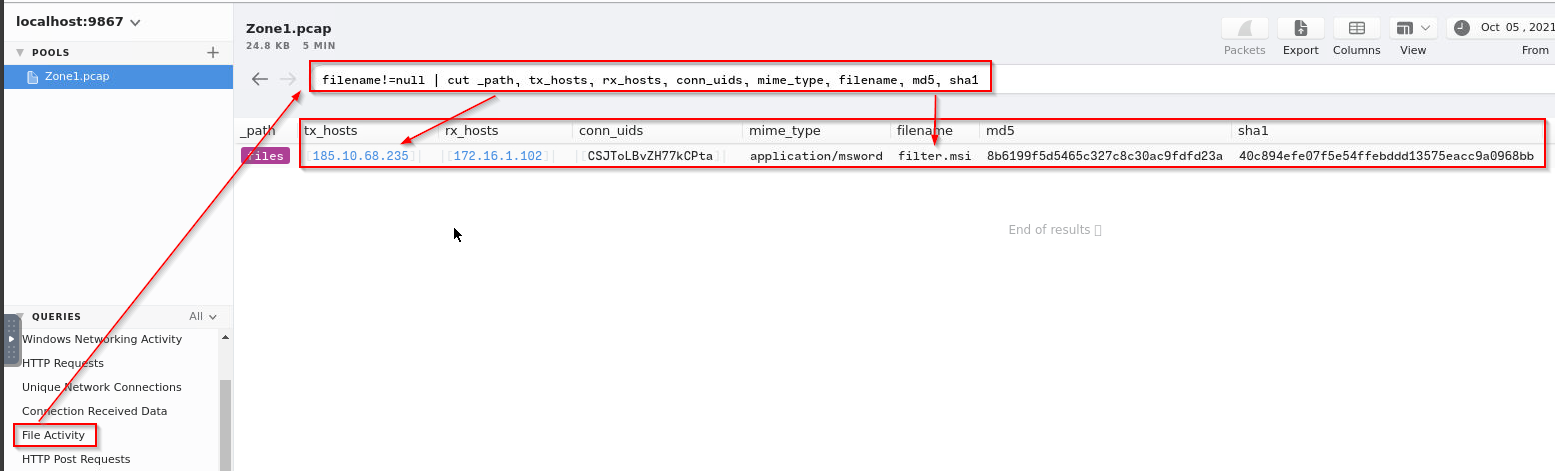
1
- This file activity is also seen in Brim although we get more visibility using NetworkMiner at the host level.
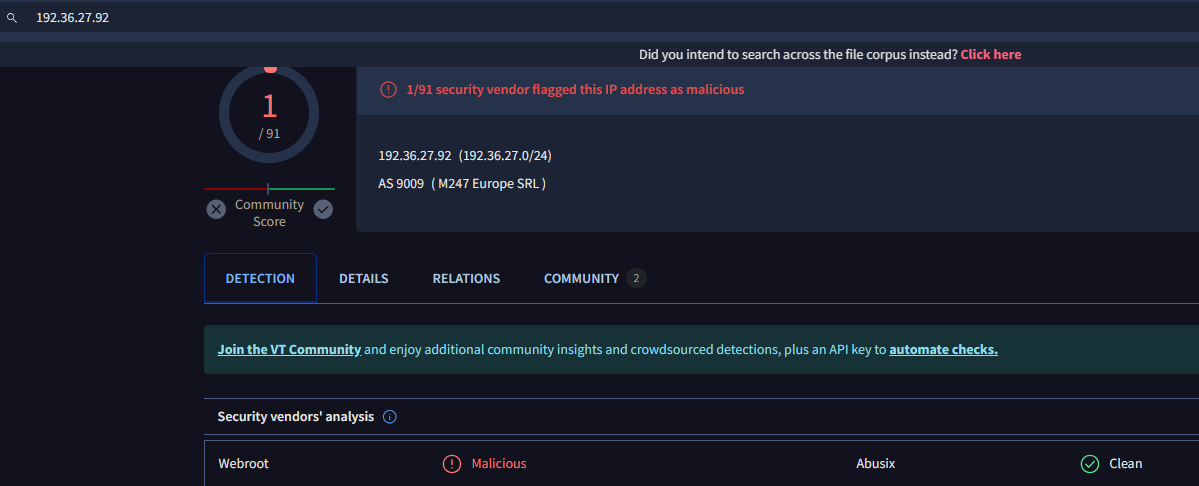
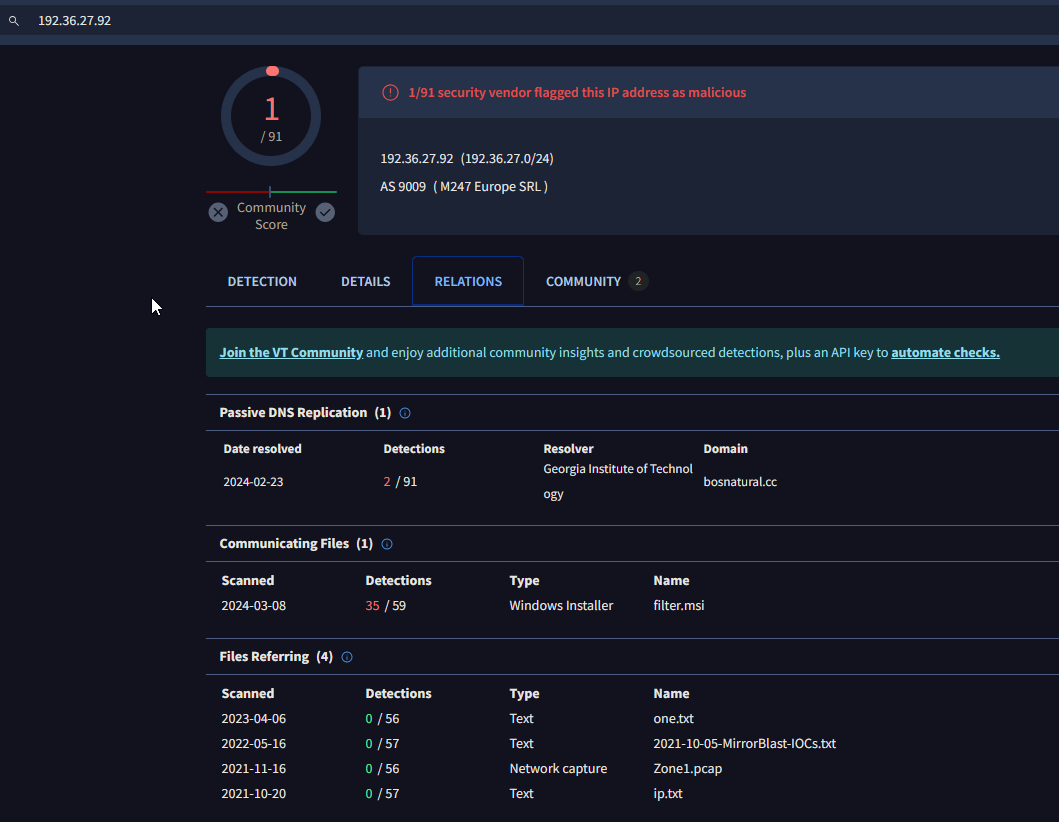
Checking the SECOND suspicious IP address in VirusTotal: 192[.]36[.]27[.]92

- What were the file names of the downloaded files? Enter the answer in the order to the IP addresses from the previous question. (format: file.xyz,file.xyz)
Extracted from NetworkMiner:
1
2
- filter.msi
- l0opd3r_load.msi
Using Wireshark: (Deep Packet Inspection)
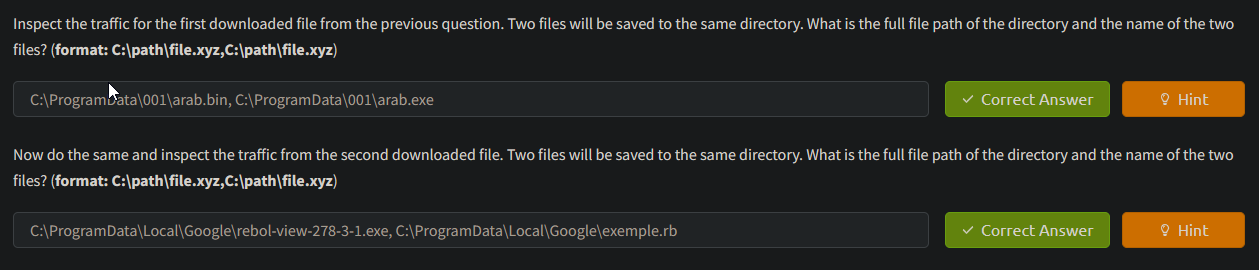
- Inspect the traffic for the first downloaded file from the previous question. Two files will be saved to the same directory. What is the full file path of the directory and the name of the two files? (format:
C:\path\file.xyz,C:\path\file.xyz)
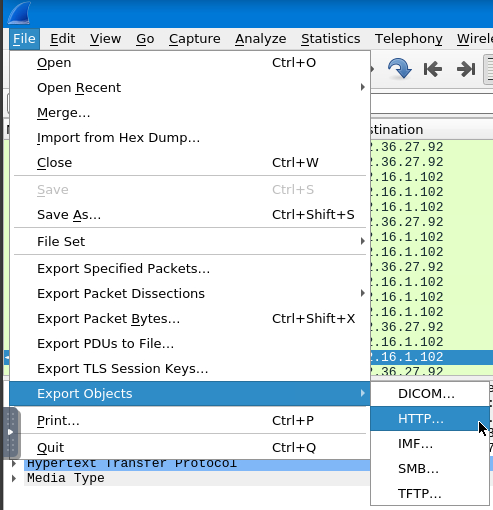
Go to File > Export Objects > HTTP:
1
- This will show the files related to HTTP protocol
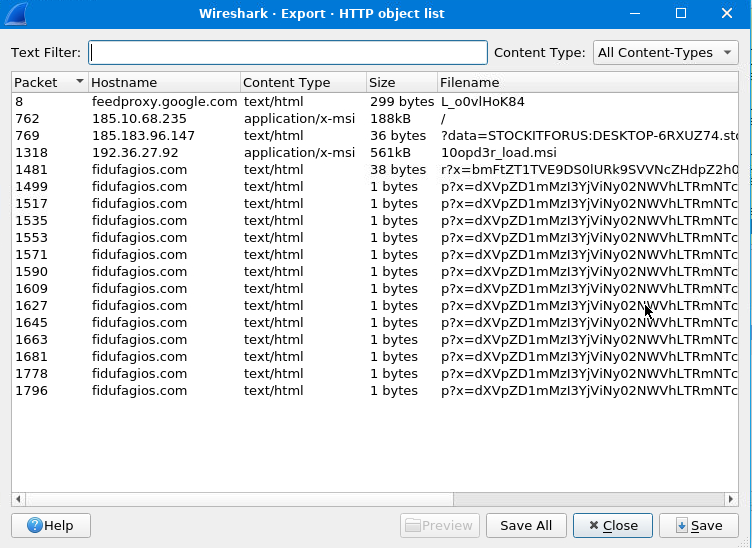
Now, if you double-click the file of interest, Wireshark will then take you to the packet when looking at the front page: (Note that when doing this, make sure that the filter was cleared out)
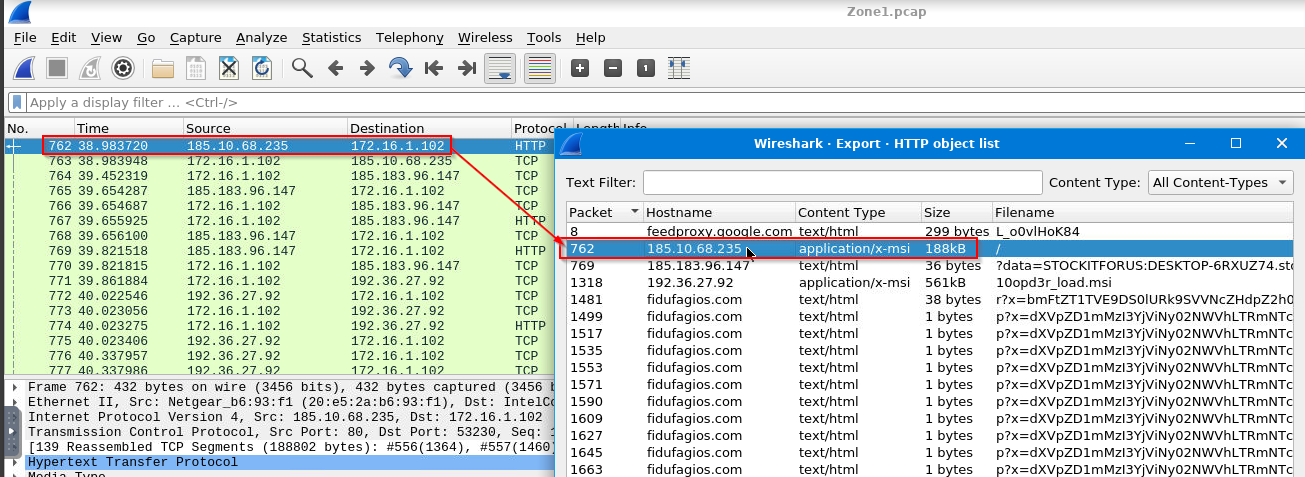
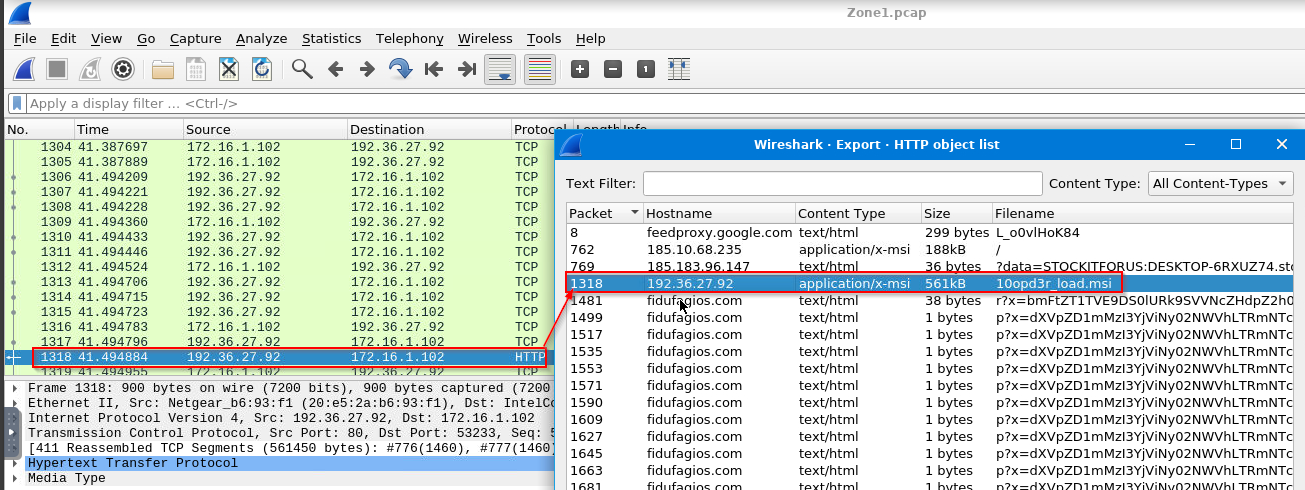
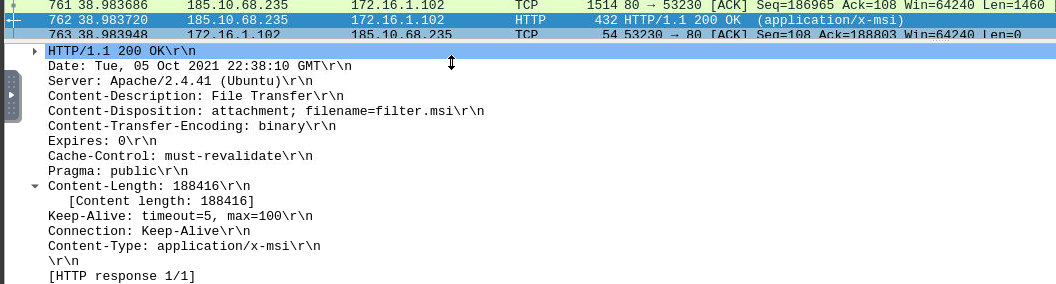
Checking the TCP and HTTP stream of the first file, there isn’t a destination file path when downloaded that was available:
1
2
3
4
5
6
7
8
9
10
11
12
13
14
15
16
17
18
19
20
21
22
23
24
25
26
27
28
29
30
31
rminate, returning iesBadActionData.

SequenceNumber that determines the sort order in which the actions are to be executed. Leave blank to suppress action.

'AdminUISequenceAdvtExecuteSequenceComponentPrimary' key used to identify a particular component record.

'ComponentIdGuidA' string GUID unique to this component, version, and language.

'Directory_DirectoryRequired' key of a Directory table record. This is actually a property name whose value contains the actual path, set either by the AppSearch action or with the default setting obtained from the Directory table.

'AttributesRemote' execution option, one of irsEnumA conditional statement that will disable this component if the specified condition evaluates to the 'True' state. If a component is disabled, it will not be installed, regardless of the 'Action' state associated with the component.

'KeyPathFile;Registry;ODBCDataSourceEither' the primary key into the File table, Registry table, or ODBCDataSource table. This extract path is stored when the component is installed, and is used to detect the presence of the component and to return the path to it.

'CreateFolderPrimary' key, could be foreign key into the Directory table.

'Component_Foreign' key into the Component table.

'CustomActionPrimary' key, name of action, normally appears in sequence table unless private use.The numeric custom action type, consisting of source location, code type, entry, option flags.

'SourceCustomSourceThe' table reference of the source of the code.

'TargetFormattedExcecution' parameter, depends on the type of custom actionExtendedTypeA numeric custom action type that extends code type or option flags of the Type column.Unique identifier for directory entry, primary key. If a property by this name is defined, it contains the full path to the directory.Directory_ParentReference to the entry in this table specifying the default parent directory. A record parented to itself or with a Null parent represents a root of the install tree.DefaultDirThe default sub-path under parent''s path.FeaturePrimary key used to identify a particular feature record.

'Feature_ParentOptional' key of a parent record in the same table. If the parent is not selected, then the record will not................................................................................................................................................................................................................................................................................................................................................................................................................................................................NameTableTypeColumnIdentifier_ValidationValueNPropertyId_SummaryInformationDescriptionSetCategoryKeyTableMaxValueNullableKeyColumnMinValueName of tableName of columnY;NWhether the column is nullableYMinimum value allowedMaximum value allowedFor foreign key, Name of table to which data must linkColumn to which foreign key connectsText;Formatted;Template;Condition;Guid;Path;Version;Language;Identifier;Binary;UpperCase;LowerCase;Filename;Paths;AnyPath;WildCardFilename;RegPath;CustomSource;Property;Cabinet;Shortcut;FormattedSDDLText;Integer;DoubleInteger;TimeDate;DefaultDirString categoryTextSet of values that are permittedDescription of columnAdminExecuteSequenceActionName of action to invoke, either in the engine or the handler DLL.ConditionOptional expression which skips the action if evaluates to expFalse.If the expression syntax is invalid, the engine will terminate, returning iesBadActionData.SequenceNumber that determines the sort order in which the actions are to be executed.  Leave blank to suppress action.AdminUISequenceAdvtExecuteSequenceComponentPrimary key used to identify a particular component record.ComponentIdGuidA string GUID unique to this component, version, and language.Directory_DirectoryRequired key of a Directory table record. This is actually a property name whose value contains the actual path, set either by the AppSearch action or with the default setting obtained from the Directory table.AttributesRemote execution option, one of irsEnumA conditional statement that will disable this component if the specified condition evaluates to the 'True' state. If a component is disabled, it will not be installed, regardless of the 'Action' state associated with the component.KeyPathFile;Registry;ODBCDataSourceEither the primary key into the File table, Registry table, or ODBCDataSource table. This extract path is stored when the component is installed, and is used to detect the presence of the component and to return the path to it.CreateFolderPrimary key, could be foreign key into the Directory table.Component_Foreign key into the Component table.CustomActionPrimary key, name of action, normally appears in sequence table unless private use.The numeric custom action type, consisting of source location, code type, entry, option flags.SourceCustomSourceThe table reference of the source of the code.TargetFormattedExcecution parameter, depends on the type of custom actionExtendedTypeA numeric custom action type that extends code type or option flags of the Type column.Unique identifier for directory entry, primary key. If a property by this name is defined, it contains the full path to the directory.Directory_ParentReference to the entry in this table specifying the default parent directory. A record parented to itself or with a Null parent represents a root of the install tree.DefaultDirThe default sub-path under parent''s path.FeaturePrimary key used to identify a particular feature record.Feature_ParentOptional key of a parent record in the same table. If the parent is not selected, then the record will not be installed. Null indicates a root item.TitleShort text identifying a visible feature item.Longer descriptive text describing a visible feature item.DisplayNumeric sort order, used to force a specific display ordering.LevelThe install level at which record will be initially selected. An install level of 0 will disable an item and prevent its display.UpperCaseThe name of the Directory that can be configured by the UI. A non-null value will enable the browse button.0;1;2;4;5;6;8;9;10;16;17;18;20;21;22;24;25;26;32;33;34;36;37;38;48;49;50;52;53;54Feature attributesFeatureComponentsFeature_Foreign key into Feature table.Foreign key into Component table.FilePrimary key, non-localized token, must match identifier in cabinet.  For uncompressed files, this field is ignored.Foreign key referencing Component that controls the file.FileNameFilenameFile name used for installation, may be localized.  This may contain a "short name|long name" pair.FileSizeSize of file in bytes (long integer).VersionVersion string for versioned files;  Blank for unversioned files.LanguageList of decimal language Ids, comma-separated if more than one.Integer containing bit flags representing file attributes (with the decimal value of each bit position in parentheses)Sequence with respect to the media images; order must track cabinet order.InstallExecuteSequenceInstallUISequenceMediaDiskIdPrimary key, integer to determine sort order for table.LastSequenceFile sequence number for the last file for this media.DiskPromptDisk name: the visible text actually printed on the disk.  This will be used to prompt the user when this disk needs to be inserted.CabinetIf some or all of the files stored on the media are compressed in a cabinet, the name of that cabinet.VolumeLabelThe label attributed to the volume.PropertyThe property defining the location of the cabinet file.MsiFileHashFile_Primary key, foreign key into File table referencing file with this hashOptionsVarious options and attributes for this hash.HashPart1HashPart2HashPart3HashPart4Name of property, uppercase if settable by launcher or loader.String value for property.  Never null or empty.RegistryPrimary key, non-localized token.RootThe predefined root key for the registry value, one of rrkEnum.KeyRegPathThe key for the registry value.The registry value name.The registry value.Foreign key into the Component table referencing component that controls the installing of the registry value.

'RemoveFileFileKeyPrimary' key used to identify a particular file entryForeign key referencing Component that controls the file to be removed.

'WildCardFilenameName' of the file to be removed.DirPropertyName of a property whose value is assumed to resolve to the full pathname to the folder of the file to be removed.InstallMode1;2;3Installation option, one of iimEnum.CostInitializeFileCostCostFinalizeInstallValidateInstallInitializeInstallAdminPackageInstallFilesInstallFinalizeExecuteActionPublishFeaturesPublishProductComponent.

'CommonAppDataFolder'{DEA88988-9EB8-4997-B469-14BBA2A13D95}CommonAppDataFolderComponent.INSTALLDIR{DEA88988-9EB8-4997-B469-14BB177F6F37}INSTALLDIRComponent.arab.bin{DEA88988-9EB8-4997-B469-14BB85EDB3C2}arab.binComponent.arab.exe{DEA88988-9EB8-4997-B469-14BBE3B5B3B3}arab.exeTempFolder.EmptyDirectory{DEA88988-9EB8-4997-B469-14BBAA73C431}TempFolderreg579EC8DF028069C30646A4022E297FB6TARGETDIR{DEA88988-9EB8-4997-B469-14BB57246387}Action1_arab.exeC:\ProgramData\001\arab.bin001yhcj5x6n|CommonAppDataFoldert19mu-pt|TempFolderSourceDirWKIX32_WKIX324.60.0.01033ValidateProductIDProcessComponentsUnpublishFeaturesRemoveRegistryValuesRemoveFilesRemoveFoldersCreateFoldersWriteRegistryValues(NOT Installed)#_645645_.cabManufacturerProductCode{DEA88988-9EB8-4997-B469-14BBF4540314}ProductLanguageProductName645645ProductVersion1.0.0UpgradeCode{6E17A28F-8D23-4F70-8404-1A5CA4EB63F7}Software\WixSharp\Used0
Things that are useful:
1
2
- C:\ProgramData\001\arab.bin
- C:\ProgramData\001\arab.exe
- Now do the same and inspect the traffic from the second downloaded file. Two files will be saved to the same directory. What is the full file path of the directory and the name of the two files? (format:
C:\path\file.xyz,C:\path\file.xyz)
Checking the TCP and HTTP stream of the second file:
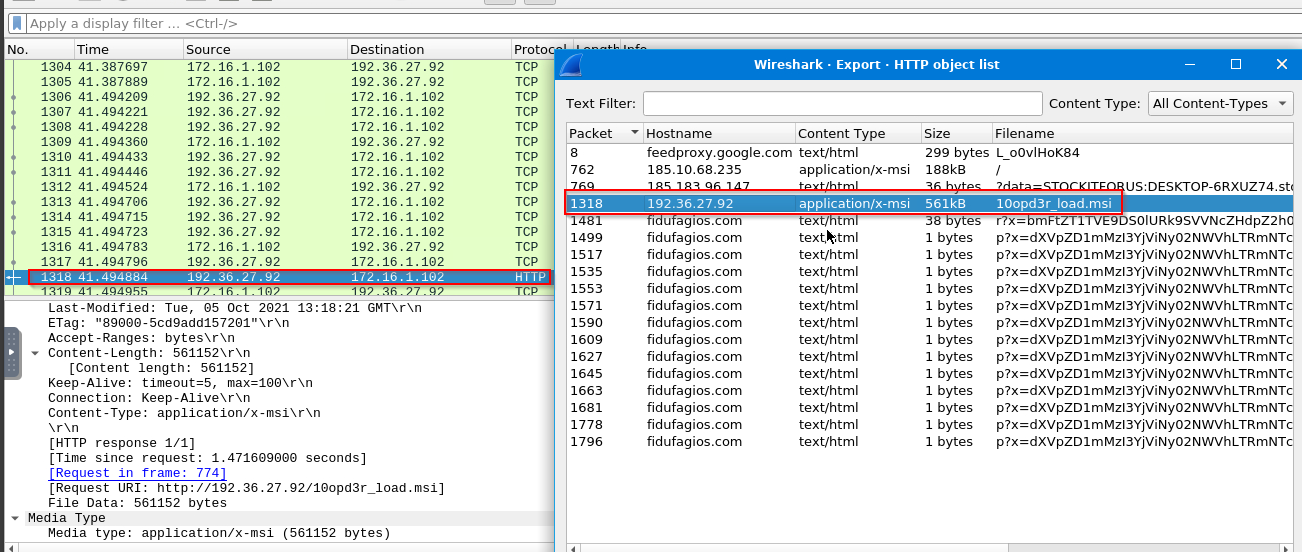
There are file paths at the end of the file:
1
2
3
- C:/ProgramData/Local/Google/exemple.rbGoogleLocalyhcj5x6n|CommonAppDataFoldert19mu-pt|TempFolderSourceDirPackage38yhbxk2.exe|rebol-view-278-3-1.exe2.7.8.31033ValidateProductIDProcessComponentsUnpublishFeaturesRemoveRegistryValuesRemoveFilesRemoveFoldersCreateFoldersWriteRegistryValues(NOT Installed)#Google_Chrome.cabManufacturerProductCode{7DAD0B07-2406-4203-AE21-B31650B1B6AE}ProductLanguageProductNameGoogle ChromeProductVersion92.0.4515UpgradeCode{A2F91B1E-5C5B-4BBC-85F0-16F8CCAD5E7E}RegValueSoftware\Microsoft\Windows\CurrentVersion\RunGoogle  Chrome
- C:\ProgramData\Local\Google\rebol-view-278-3-1.exe -w -i -s
- C:\ProgramData\Local\Google\exemple.rbSoftware\WixSharp\Used0