
Learning Objective
In this introductory room, the following learning objectives are covered:
- What is Osquery, and what problem it solves?
- Osquery in Interactive Mode
- How to use the interactive mode of Osquery to interact with the operating system
- How to join two tables to get a single answer
OSQuery: Interactive Mode
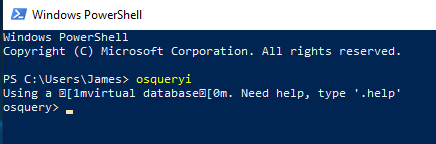
0. Launching on powershell terminal:
1
ps> osqueryi
1. Open the terminal and run:
1
osqueryi
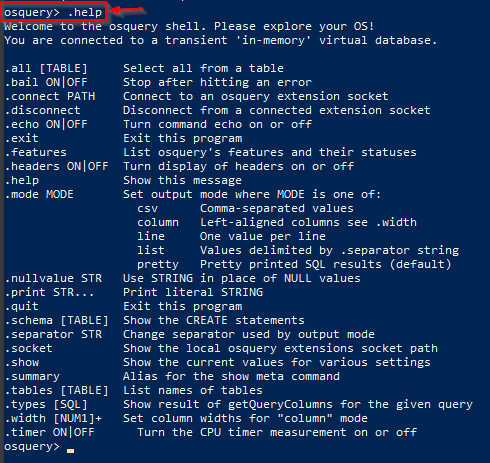
2. To understand the tool, run the .help command in the interactive terminal, as shown below:
1
2
3
4
5
6
7
8
9
10
11
12
13
14
15
16
17
18
19
20
21
22
23
24
25
26
27
28
29
30
31
32
33
34
root@analyst$ osqueryi
Using a virtual database. Need help, type '.help'

osquery> .help
Welcome to the osquery shell. Please explore your OS!
You are connected to a transient 'in-memory' virtual database.

.all [TABLE]     Select all from a table
.bail ON|OFF     Stop after hitting an error
.connect PATH    Connect to an osquery extension socket
.disconnect      Disconnect from a connected extension socket
.echo ON|OFF     Turn command echo on or off
.exit            Exit this program
.features        List osquery's features and their statuses
.headers ON|OFF  Turn display of headers on or off
.help            Show this message
.mode MODE       Set output mode where MODE is one of:
                   csv      Comma-separated values
                   column   Left-aligned columns see .width
                   line     One value per line
                   list     Values delimited by .separator string
                   pretty   Pretty printed SQL results (default)
.nullvalue STR   Use STRING in place of NULL values
.print STR...    Print literal STRING
.quit            Exit this program
.schema [TABLE]  Show the CREATE statements
.separator STR   Change separator used by output mode
.socket          Show the local osquery extensions socket path
.show            Show the current values for various settings
.summary         Alias for the show meta command
.tables [TABLE]  List names of tables
.types [SQL]     Show result of getQueryColumns for the given query
.width [NUM1]+   Set column widths for "column" mode
.timer ON|OFF      Turn the CPU timer measurement on or off
Note: As per the documentation, meta-commands are prefixed with a ..
List the tables
3. To list all the available tables that can be queried, use the .tables meta-command.
For example, if you wish to check what tables are associated with processes, you can use:
1
.tables process
1
2
3
4
5
6
7
8
9
10
11
12
13
14
15
16
17
18
root@analyst$ osqueryi
Using a virtual database. Need help, type '.help'

osquery> .table
=> appcompat_shims
	=> arp_cache
	=> atom_packages
	=> authenticode
	=> autoexec
	=> azure_instance_metadata
	=> azure_instance_tags
	=> background_activities_moderator
	=> bitlocker_info
	=> carbon_black_info
	=> carves
	=> certificates
	=> chassis_info
	=> chocolatey_packages
4. To list all the tables with the term user in them, we will use .tables user as shown below:
1
2
3
4
5
6
7
8
root@analyst$ osqueryi
Using a virtual database. Need help, type '.help'

osquery> .table user
	=> user_groups
	=> user_ssh_keys
	=> userassist
	=> users
In the above example, four tables are returned that contain the word user.
Understanding the table Schema
5. Table names are not enough to know what information it contains without actually querying it. Knowledge of columns and types (known as a schema ) for each table is also helpful.
We can list a table’s schema with the following meta-command: .schema table_name
Here, we are interested in understanding the columns in the user’s table.
1
2
3
4
5
6
root@analyst$ osqueryi
Using a virtual database. Need help, type '.help'

osquery> .schema users
CREATE TABLE users(`uid` BIGINT, `gid` BIGINT, `uid_signed` BIGINT, `gid_signed` BIGINT, `username` TEXT, `description` TEXT, `directory` TEXT, `shell` TEXT, `uuid` TEXT, `type` TEXT, `is_hidden` INTEGER HIDDEN, `pid_with_namespace` INTEGER HIDDEN, PRIMARY KEY (`uid`, `username`, `uuid`, `pid_with_namespace`))
WITHOUT ROWID;
List of user parameters:
1
2
3
4
5
6
7
8
9
10
11
12
- uid
- gid
- uid_signed
- gid_signed
- username
- description
- directory
- shell
- uuid
- type
- is_hidden
- pid_with_namespace
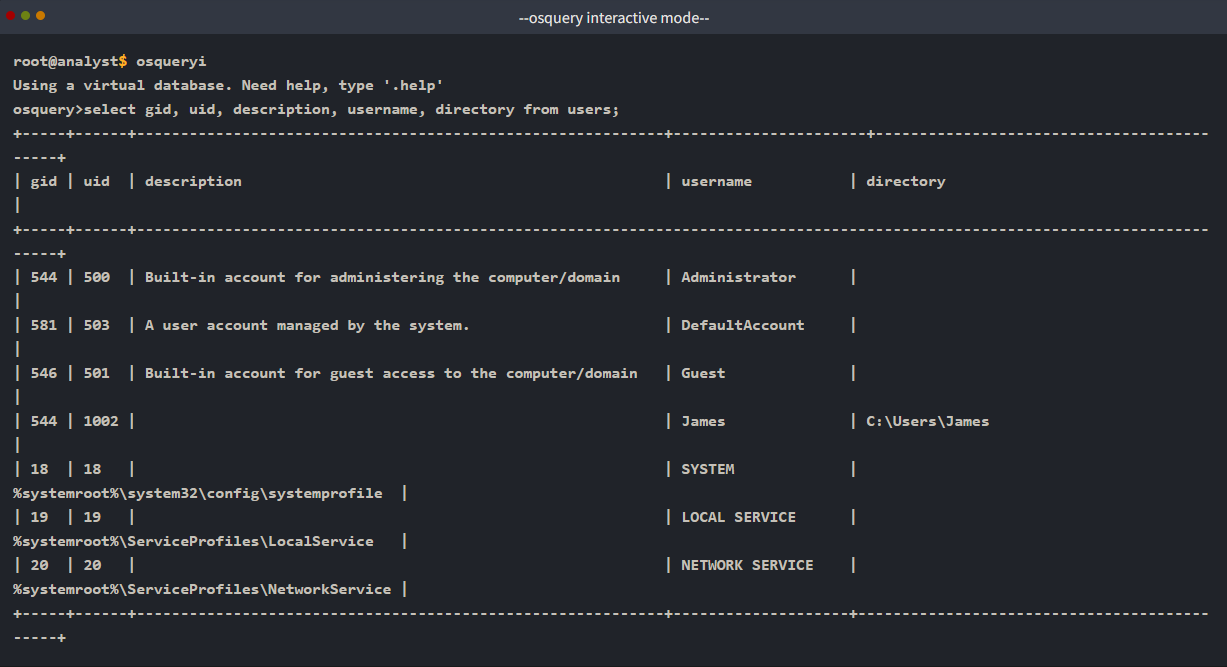
The above result provides the column names like username, description, PID followed by respective datatypes like BIGINT, TEXT, INTEGER, etc. Let us pick a few columns from this schema and use SQL query to ask osquery to display the columns from the user table using the following syntax:
SQL QUERY SYNTAX:
1
select <column1>, <column2>, <column3> from table;
From PowerShell:

Display Mode
Osquery comes with multiple display modes to select from. Use the .help option to list the available modes or choose 1 of them as shown below:
1
2
3
4
5
6
7
8
9
10
11
12
13
14
15
16
root@analyst$ osqueryi
Using a virtual database. Need help, type '.help'

osquery> .help

Welcome to the osquery shell. Please explore your OS!
You are connected to a transient 'in-memory' virtual database.
.
.
.
.mode MODE Set output mode where MODE is one of:
			csv Comma-separated values
			column Left-aligned columns see .width
			line One value per line
			list Values delimited by .separator string
			pretty Pretty printed SQL results (default) . . .
Question and Answers section:
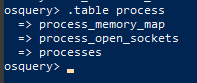
- How many tables are returned when we query “
table process” in the interactive mode of Osquery?
1
osquery> .table process
1
3
Objects you can query in Windows:
1
2
3
4
5
6
7
8
9
10
11
12
13
14
15
16
17
18
19
20
21
22
23
24
25
26
27
28
29
30
31
32
33
34
35
36
37
38
39
40
41
42
43
44
45
46
47
48
49
50
51
52
53
54
55
56
57
58
59
60
61
62
63
64
65
66
67
68
69
70
71
72
73
74
75
76
77
78
79
80
81
82
83
84
85
86
87
88
89
90
91
92
93
94
95
96
97
98
99
100
101
102
103
104
105
106
107
108
109
osquery> .tables
  => appcompat_shims
  => arp_cache
  => atom_packages
  => authenticode
  => autoexec
  => azure_instance_metadata
  => azure_instance_tags
  => background_activities_moderator
  => bitlocker_info
  => carbon_black_info
  => carves
  => certificates
  => chassis_info
  => chocolatey_packages
  => chrome_extension_content_scripts
  => chrome_extensions
  => connectivity
  => cpu_info
  => cpuid
  => curl
  => curl_certificate
  => default_environment
  => device_file
  => device_hash
  => device_partitions
  => disk_info
  => dns_cache
  => drivers
  => ec2_instance_metadata
  => ec2_instance_tags
  => etc_hosts
  => etc_protocols
  => etc_services
  => file
  => firefox_addons
  => groups
  => hash
  => hvci_status
  => ie_extensions
  => intel_me_info
  => interface_addresses
  => interface_details
  => kernel_info
  => kva_speculative_info
  => listening_ports
  => logged_in_users
  => logical_drives
  => logon_sessions
  => memory_devices
  => npm_packages
  => ntdomains
  => ntfs_acl_permissions
  => ntfs_journal_events
  => office_mru
  => os_version
  => osquery_events
  => osquery_extensions
  => osquery_flags
  => osquery_info
  => osquery_packs
  => osquery_registry
  => osquery_schedule
  => patches
  => physical_disk_performance
  => pipes
  => platform_info
  => powershell_events
  => prefetch
  => process_memory_map
  => process_open_sockets
  => processes
  => programs
  => python_packages
  => registry
  => routes
  => scheduled_tasks
  => secureboot
  => services
  => shared_resources
  => shellbags
  => shimcache
  => ssh_configs
  => startup_items
  => system_info
  => time
  => tpm_info
  => uptime
  => user_groups
  => user_ssh_keys
  => userassist
  => users
  => video_info
  => winbaseobj
  => windows_crashes
  => windows_eventlog
  => windows_events
  => windows_firewall_rules
  => windows_optional_features
  => windows_security_center
  => windows_security_products
  => windows_update_history
  => wmi_bios_info
  => wmi_cli_event_consumers
  => wmi_event_filters
  => wmi_filter_consumer_binding
  => wmi_script_event_consumers
  => yara
  => ycloud_instance_metadata
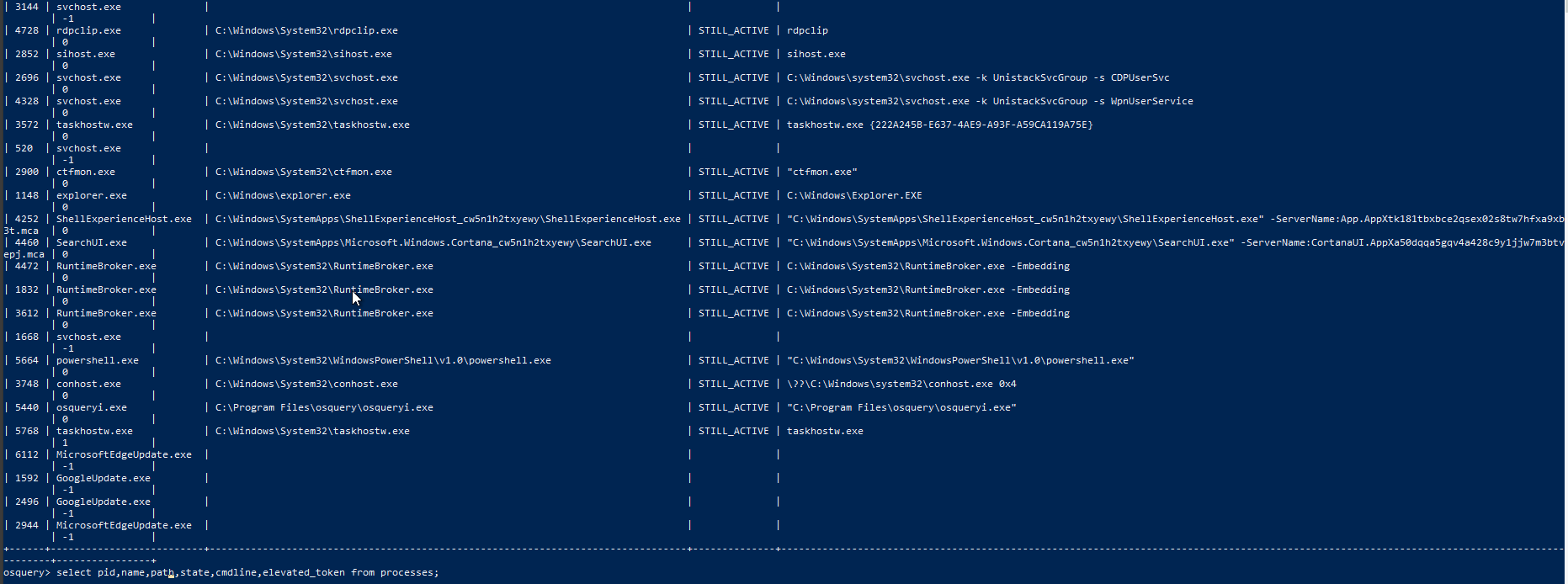
- Looking at the schema of the processes table, which column displays the process id for the particular process?
1
pid

1
...
- Examine the
.helpcommand, how many output display modes are available for the.modecommand?
Schema Documentation
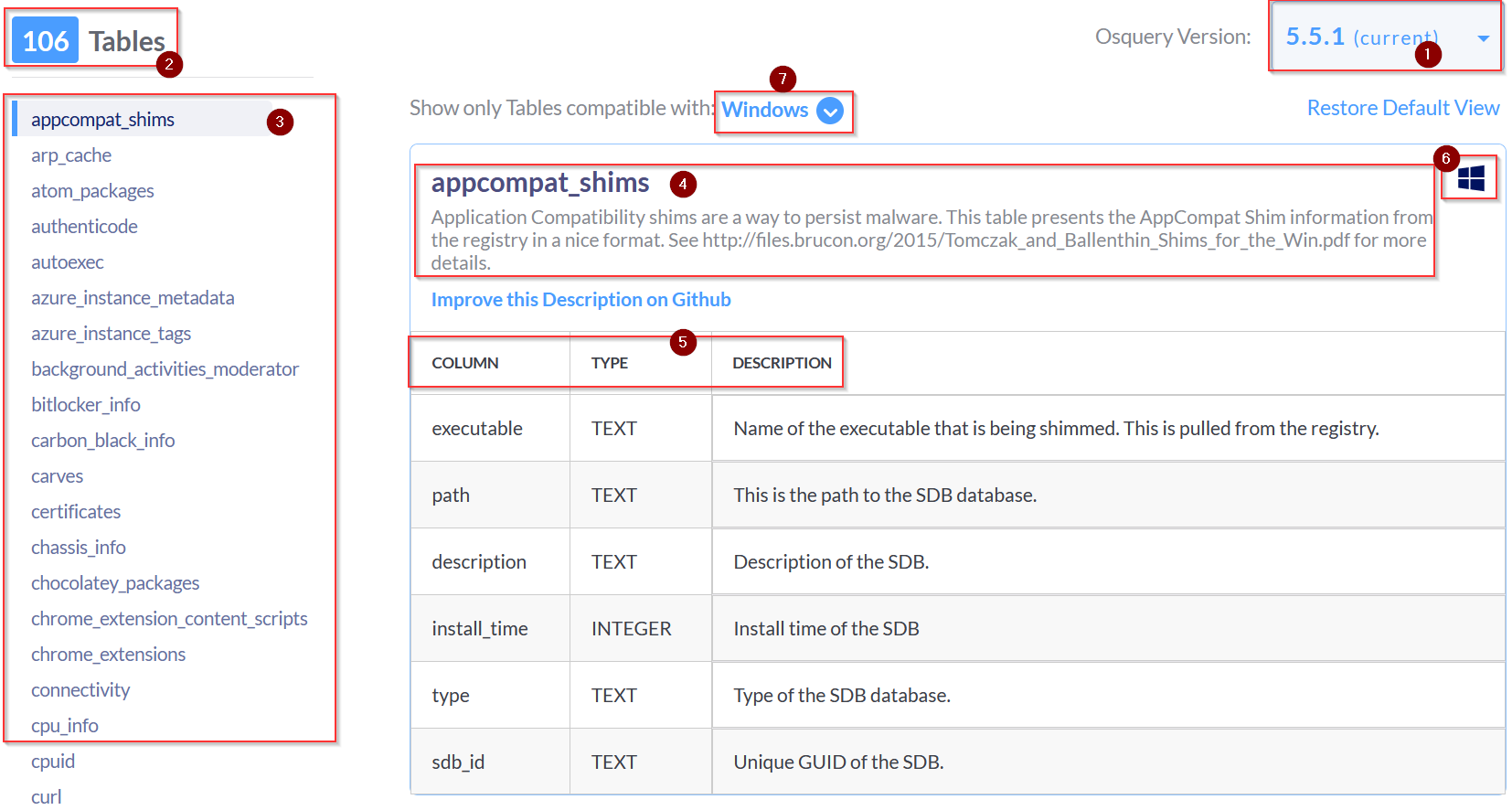
For this task, go to the schema documentation of Osquery version 5.5.1, the latest version. The schema documentation looks like the image shown below:
Breakdown
Let’s break down the important information we could find in this schema documentation:
1. A dropdown lists various versions of Osquery. Choose the version of Osquery you wish to see schema tables for.
2. The number of tables within the selected version of Osquery. (In the above image, 106 tables are available).
3. The list of tables is listed in alphabetical order for the selected version of Osquery. This is the same result we get when we use the .table command in the interactive mode.
4. The name of the table and a brief description.
5. A detailed chart showing each table’s column, type, and description.
6. Information to which Operating System the table applies. (In the above image, the account_policy_data table is available only for macOS)
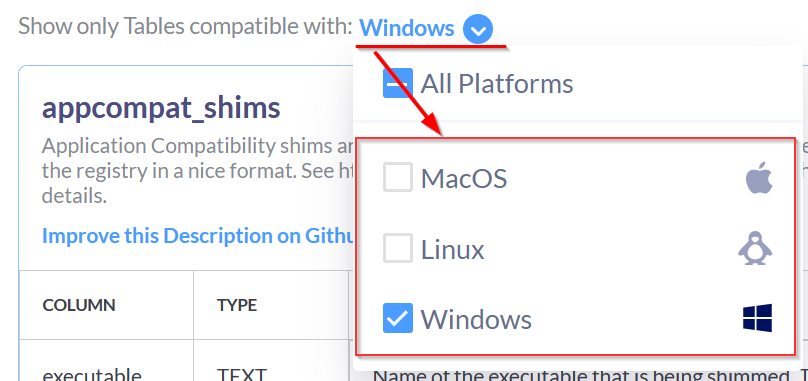
7. A dropdown menu to select the Operating System of choice. We can choose multiple Operating Systems, which will display the tables available for those Operating systems.
Question and Answer section:
- In
Osquery version 5.5.1, how many common tables are returned, when we select both Linux and Window Operating system?
1
56
- In
Osquery version 5.5.1, how many tables for MAC OS are available?
1
180
- In the Windows Operating system, which table is used to display the installed programs?
1
programs
- In Windows Operating system, which column contains the registry value within the registry table?
1
data
Creating SQL Queries
The SQL language implemented in Osquery is not an entire SQL language that you might be accustomed to, but rather it’s a superset of SQLite.
Realistically all your queries will start with a SELECT statement. This makes sense because, with Osquery, you are only querying information on an endpoint. You won’t be updating or deleting any information/data on the endpoint.
1
**The exception to the rule**: Using other SQL statements, such as **UPDATE** and **DELETE,** is possible, but only if you''re creating run-time tables (views) or using an extension if the extension supports them.
Your queries will also include a FROM clause and end with a semicolon.
Exploring Installed Programs
1. If you wish to retrieve all the information about the installed programs on the endpoint, first understand the table schema either using the .schema programs command in the interactive mode or use the documentation here.

List of the columns in 'programs':
1
2
3
4
5
6
7
8
9
- name
- version
- install_location
- install_source
- language
- publisher
- uninstall_string
- install_date
- identifying_number
Query:
1
SELECT * FROM programs LIMIT 1;
1
- This shows the first entry in the 'programs' table.
Output:
1
2
3
4
5
6
7
8
9
10
11
12
root@analyst$ osqueryi
Using a virtual database. Need help, type '.help'
osquery>select * from programs limit 1;
	name = 7-Zip 21.07 (x64)
	version = 21.07
	install_location = C:\Program Files\7-Zip\
	install_source =
	language =
	publisher = Igor Pavlov
	uninstall_string = "C:\Program Files\7-Zip\Uninstall.exe"
	install_date =
	identifying_number =
In PowerShell:

In the above example LIMIT was used followed by the number to limit the results to display.
Note: Your results will be different if you run this query in the attached VM or your local machine (if Osquery is installed). Here line mode is used to display the result.
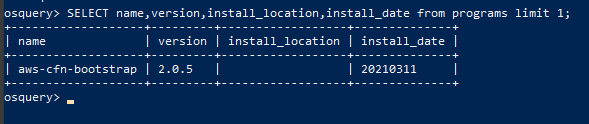
2. Selecting specific columns to display for an entry:
The number of columns returned might be more than what you need. You can select specific columns rather than retrieve every column in the table.
Query:
1
SELECT name, version, install_location, install_date from programs limit 1;
1
2
3
4
5
6
7
root@analyst$ osqueryi
Using a virtual database. Need help, type '.help'
osquery>select name, version, install_location, install_date from programs limit 1;
	name = 7-Zip 21.07 (x64)
	version = 21.07
	install_location = C:\Program Files\7-Zip\
	install_date =
1
- The above query will list the name, version, install location, and installed date of the programs on the endpoint. This will still return many results, depending on how busy the endpoint is.
In PowerShell:
1
2
3
4
5
- Columns that weren't displayed:
	- language
	- publisher
	- uninstall_string
	- identifying_number
Count
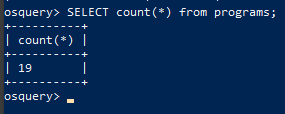
3. To see how many programs or entries in any table are returned, we can use the count() function, as shown below:
Query:
1
SELECT count(*) from programs;
Terminal Output:
1
2
3
4
root@analyst$ osqueryi
Using a virtual database. Need help, type '.help'
osquery>select count(*) from programs;
count(*) = 160
In PowerShell:
WHERE Clause
4. Optionally, you can use a WHERE clause to narrow down the list of results returned based on specified criteria. The following query will first get the user table and only display the result for the user James, as shown below:
Query:
1
SELECT * FROM users WHERE username='James';
Terminal Output:
1
2
3
4
5
6
7
8
9
10
11
12
13
root@analyst$ osqueryi
Using a virtual database. Need help, type '.help'
osquery>SELECT * FROM users WHERE username='James';
        uid = 1002
        gid = 544
 uid_signed = 1002
 gid_signed = 544
   username = James
description =
  directory = C:\Users\James
      shell = C:\Windows\system32\cmd.exe
       uuid = S-1-5-21-605937711-2036809076-574958819-1002
       type = local
In PowerShell: Getting the user entry for ‘James’

The equal sign is not the only filtering option in a WHERE clause. Below are filtering operators that can be used in a WHERE clause:
1
2
3
4
5
6
7
8
- `=` [equal]
- `<>`  [not equal]
- `>`, `>=` [greater than, greater than, or equal to]
- `<`, `<=` [less than or less than or equal to]
- `BETWEEN` [between a range]
- `LIKE` [pattern wildcard searches]
- `%` [wildcard, multiple characters]
- `_` [wildcard, one character]
Matching Wildcard Rules
Below is a screenshot from the Osquery documentation showing examples of using wildcards when used in folder structures: (This is regex but replace “*” with “%”)
%: Match all files and folders for one level.%%: Match all files and folders recursively.%abc: Match all within-level ending in “abc”.abc%: Match all within-level starting with “abc”.
Matching Examples:
/Users/%/Library: Monitor for changes to every user’s Library folder, but not the contents within.1
- Probably in terms of content size and permissions + ownerships?
/Users/%/Library/: Monitor for changes to files within each Library folder, but not the contents of their subdirectories./Users/%/Library/%: Same, changes to files within each Library folder for every user./Users/%/Library/%%: Monitor changes recursively within each Library. (including ALL subdirectories)/bin/%sh: Monitor thebindirectory for changes ending insh.
5. Some tables require a WHERE clause, such as the file table, to return a value. If the required WHERE clause is not included in the query, then you will get an error.
1
2
3
4
5
6
root@analyst$ osqueryi
Using a virtual database. Need help, type '.help'
osquery>select * from file;
W1017 12:38:29.730041 45744 virtual_table.cpp:965] Table file was queried without a required column in the WHERE clause
W1017 12:38:29.730041 45744 virtual_table.cpp:976] Please see the table documentation: https://osquery.io/schema/#file
Error: constraint failed
In PowerShell:

1
- Basically, OSQuery wants the user to be specific about the entry to be queried in the table.
Joining Tables using JOIN Function
6. Table Union: OSquery can also be used to join two tables based on a column that is shared by both tables. Let’s look at two tables to demonstrate this further. Below is the schema for the user’s table and the processes table.
1
2
3
4
root@analyst$ osqueryi
Using a virtual database. Need help, type '.help'
osquery>.schema users
CREATE TABLE users(`uid` BIGINT, `gid` BIGINT, `uid_signed` BIGINT, `gid_signed` BIGINT, `username` TEXT, `description` TEXT, `directory` TEXT, `shell` TEXT, `uuid` TEXT, `type` TEXT, `is_hidden` INTEGER HIDDEN, `pid_with_namespace` INTEGER HIDDEN, PRIMARY KEY (`uid`, `username`, `uuid`, `pid_with_namespace`)) WITHOUT ROWID;
In PowerShell:

1
2
osquery>.schema processes
CREATE TABLE processes(`pid` BIGINT, `name` TEXT, `path` TEXT, `cmdline` TEXT, `state` TEXT, `cwd` TEXT, `root` TEXT, `uid` BIGINT, `gid` BIGINT, `euid` BIGINT, `egid` BIGINT, `suid` BIGINT, `sgid` BIGINT, `on_disk` INTEGER, `wired_size` BIGINT, `resident_size` BIGINT, `total_size` BIGINT, `user_time` BIGINT, `system_time` BIGINT, `disk_bytes_read` BIGINT, `disk_bytes_written` BIGINT, `start_time` BIGINT, `parent` BIGINT, `pgroup` BIGINT, `threads` INTEGER, `nice` INTEGER, `elevated_token` INTEGER, `secure_process` INTEGER, `protection_type` TEXT, `virtual_process` INTEGER, `elapsed_time` BIGINT, `handle_count` BIGINT, `percent_processor_time` BIGINT, `upid` BIGINT HIDDEN, `uppid` BIGINT HIDDEN, `cpu_type` INTEGER HIDDEN, `cpu_subtype` INTEGER HIDDEN, `translated` INTEGER HIDDEN, `cgroup_path` TEXT HIDDEN, `phys_footprint` BIGINT HIDDEN, PRIMARY KEY (`pid`)) WITHOUT ROWID;
In PowerShell:

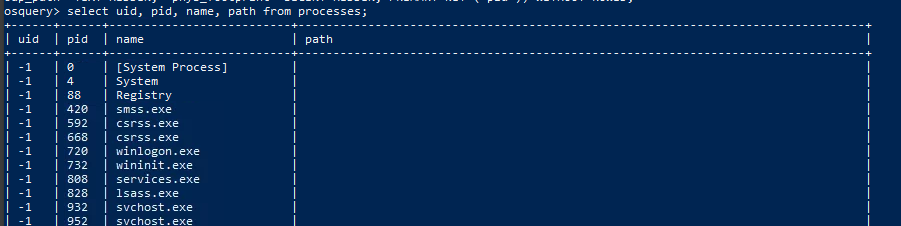
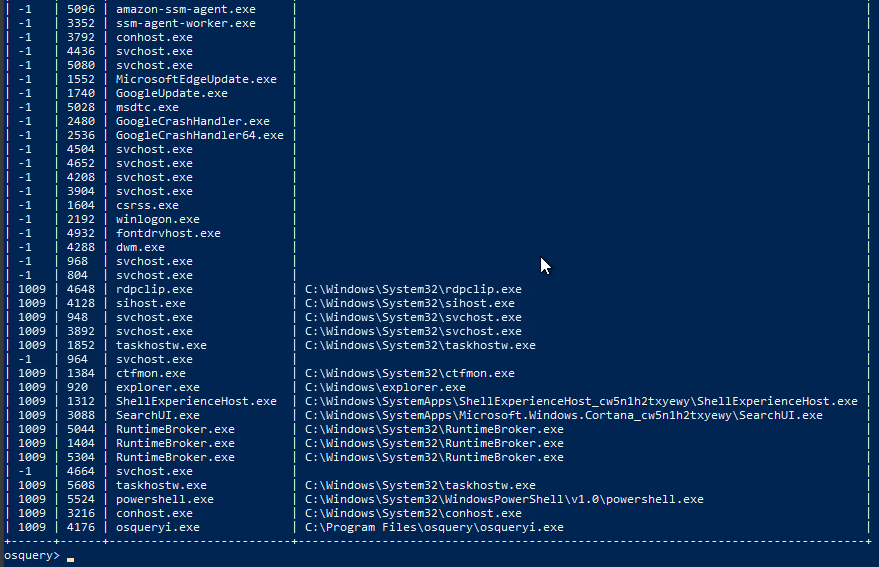
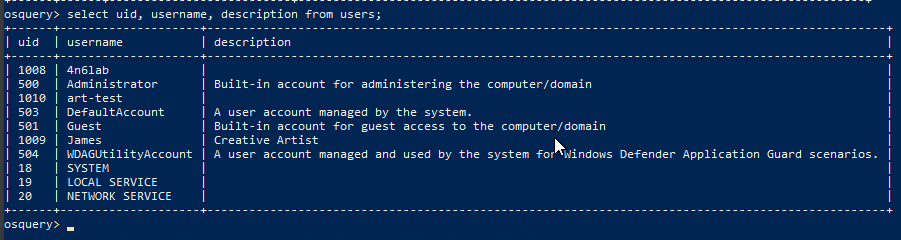
Looking at both schemas, uid in users table is meant to identify the user record, and in the processes table, the column uid represents the user responsible for executing the particular process. We can join both tables using this uid field as shown below:
Query1:
1
select uid, pid, name, path from processes;
PS Output:
...
Query2:
1
select uid, username, description from users;
PS Output:
1
- Enumerate all the users in the endpoint
Joined Query:
1
select p.pid, p.name, p.path, u.username from processes p JOIN users u on u.uid=p.uid LIMIT 10;
PS Output:
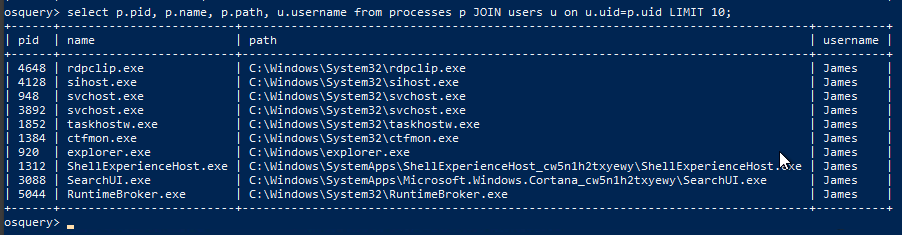
1
- Enumerate all the processes running under the user "James" along with their PIDs.
Terminal Output:
1
2
3
4
5
6
7
8
9
10
11
12
13
14
15
16
17
root@analyst$ osqueryi
Using a virtual database. Need help, type '.help'
osquery>select p.pid, p.name, p.path, u.username from processes p JOIN users u on u.uid=p.uid LIMIT 10;
+-------+-------------------+---------------------------------------+----------+
| pid   | name              | path                                  | username |
+-------+-------------------+---------------------------------------+----------+
| 7560  | sihost.exe        | C:\Windows\System32\sihost.exe        | James    |
| 6984  | svchost.exe       | C:\Windows\System32\svchost.exe       | James    |
| 7100  | svchost.exe       | C:\Windows\System32\svchost.exe       | James    |
| 7144  | svchost.exe       | C:\Windows\System32\svchost.exe       | James    |
| 8636  | ctfmon.exe        | C:\Windows\System32\ctfmon.exe        | James    |
| 8712  | taskhostw.exe     | C:\Windows\System32\taskhostw.exe     | James    |
| 9260  | svchost.exe       | C:\Windows\System32\svchost.exe       | James    |
| 10168 | RuntimeBroker.exe | C:\Windows\System32\RuntimeBroker.exe | James    |
| 10232 | RuntimeBroker.exe | C:\Windows\System32\RuntimeBroker.exe | James    |
| 8924  | svchost.exe       | C:\Windows\System32\svchost.exe       | James    |
+-------+-------------------+---------------------------------------+----------+
Note: Please refer to the Osquery documentation for more information regarding SQL and creating queries specific to Osquery.
Question and Answers section:
- Using Osquery, how many programs are installed on this host?
1
19
- Using Osquery, what is the description for the user
James?
1
"Creative Artist"
- When we run the following search query, what is the full SID of the user with RID ‘
1009’?
Query:
1
select path, key, name from registry where key = 'HKEY_USERS';
Output:

- When we run the following search query, what is the Internet Explorer browser extension installed on this machine?
Query:
1
select * from ie_extensions;
Output:

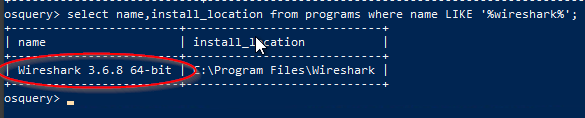
- After running the following query, what is the full name of the program returned?
Query:
1
select name,install_location from programs where name LIKE '%wireshark%';
1
- You can use "LIKE" like 'grep'
Output:
Challenge and Conclusion
- Which table stores the evidence of process execution in Windows OS?
1
userassist
Check userassist table:
1
osquery>.schema userassist

Query all entries in userassist table:
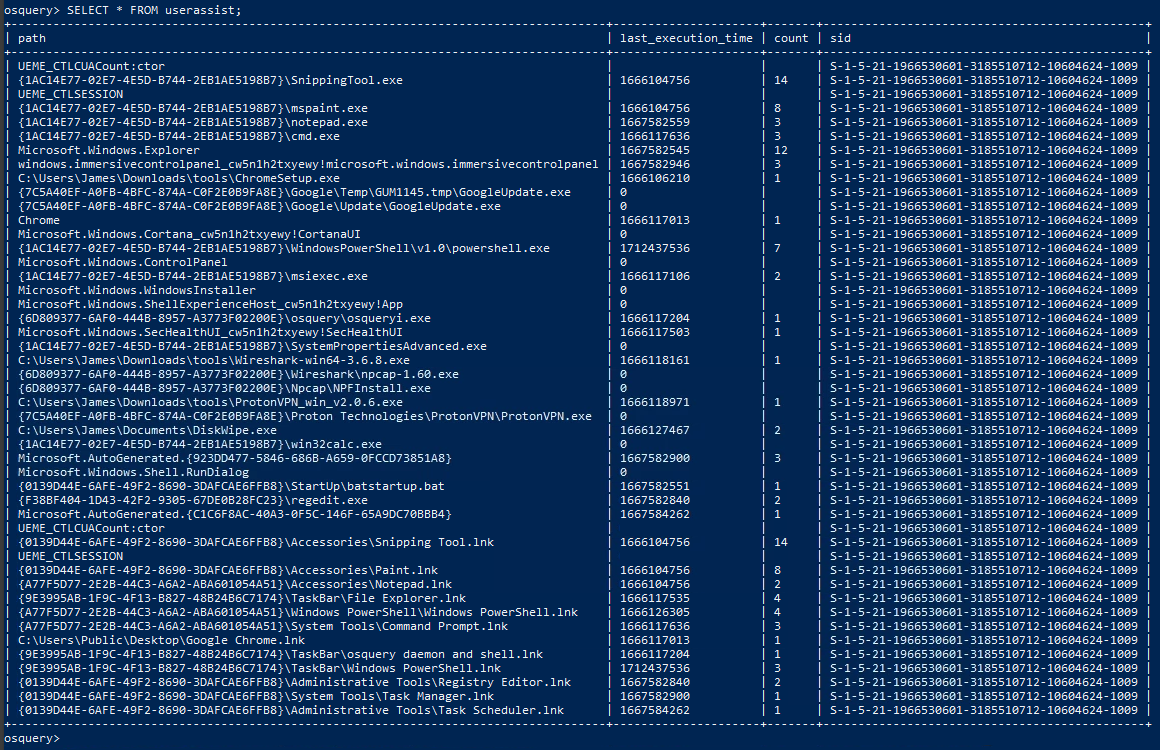
- One of the users seems to have executed a program to
remove traces from the disk; what is the name of that program?

1
diskwipe.exe
- Create a search query to identify the VPN installed on this host. What is name of the software?
1
SELECT * FROM userassist where path ILIKE "%vpn%"
PS Output:

1
- Seems like OSQuery is already case insensitive
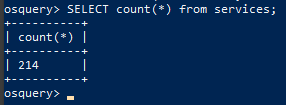
- How many services are running on this host?
Command:
1
osquery>.schema services

1
SELECT count(*) from services;
Output:
One of the services running:
1
osquery> SELECT name,service_type,display_name,status,pid,path,module_path,description from services LIMIT 1;

- A table
autoexeccontains the list of executables that are automatically executed on the target machine. There seems to be a batch file that runs automatically. What is the name of that batch file (with the extension.bat)?
Command:
1
osquery>.schema autoexec

1
osquery> SELECT * from autoexec where path LIKE "%.bat%";
PS Output:

- What is the full path of the batch file found in the above question? (Last in the List)
1
2
- C:\ProgramData\Microsoft\Windows\Start Menu\Programs\Startup\batstartup.bat
- C:\Users\James\AppData\Roaming\Microsoft\Windows\Start Menu\Programs\Startup\batstartup.bat
Reference:
[osquery Schema](https://osquery.io/schema/5.5.1#registry) - TryHackMe! Finding Computer Artifacts with osquery (youtube.com)